Microsoft Dynamics 365 for financial services: a complete guide

Jul 14, 2026 25 min read
Summarize article with AI

Key takeaways

  • Dynamics 365 helps financial companies connect customer data, service cases, finance work, compliance tasks, reporting, and integrations in one Microsoft-based setup.
  • The best module mix depends on the business problem: Sales for relationship work, Customer Service for cases, Finance for financial operations, Customer Insights for customer data, and Power Platform for custom workflows.
  • Integrations matter as much as the apps themselves, especially when Dynamics 365 needs to work with core banking, KYC, AML, payments, document, and reporting systems.
  • Implementation success depends on clean data, clear ownership, strong security roles, user adoption, and post-launch support. Yes, the boring stuff again.
  • ROI usually comes from faster onboarding, shorter case resolution, less manual work, better reporting, and fewer disconnected tools.

Financial services run on trust, speed, and paperwork. A weird combo, but here we are. Dynamics 365 can help banks, credit unions, insurers, wealth firms, and fintech companies connect customer data, service cases, finance processes, compliance tasks, and reporting without making every team live in its own little system cave.

I’ve seen this enough times: the problem usually isn’t one bad tool. It’s several systems that don’t work together. In this article, we’ll look at how Dynamics 365 is used in financial services, its main features, common use cases, implementation challenges, and what to consider before rolling it out.

See what related services we offer

What is Microsoft Dynamics 365 for financial services?

Microsoft Dynamics 365 for financial services is a set of business apps that helps financial companies manage customer onboarding, loan servicing, claims, advisor workflows, compliance reporting, service cases, and financial operations in one Microsoft environment. In plain words, it gives banks, insurers, wealth firms, credit unions, and fintech teams a shared operational platform instead of forcing everyone to chase data across CRM, ERP, email, spreadsheets, and old internal systems. The “for financial services” part is not one single product you buy and magically everything works. Nice thought, though. It usually means choosing the right Dynamics 365 apps, connecting them with Microsoft 365, Power Platform, Azure, and financial systems, then shaping the setup around real processes like onboarding, KYC, claims, loan workflows, client service, approvals, and compliance checks.

Who can use Dynamics 365 in financial services?

Dynamics 365 can be used by almost any financial company that deals with customers, products, service requests, approvals, documents, and reporting. The fit is especially good when teams need one trusted customer record rather than five versions of the truth living in five systems.

Common users include:

  • Retail and commercial banks: customer profiles, loan workflows, branch service, relationship management, cross-selling, and case handling.
  • Credit unions: member onboarding, service requests, loan applications, retention work, and local relationship management.
  • Insurance companies: policyholder service, claims support, renewals, agent workflows, and document-heavy processes.
  • Wealth and asset management firms: advisor tasks, client history, portfolio-related notes, life-event tracking, and follow-ups.
  • Fintech companies and lenders: customer lifecycle management, support operations, partner workflows, onboarding, and integrations with payment, KYC, analytics, and credit systems.

Main Dynamics 365 modules for financial services

The main Dynamics 365 modules for financial services depend on what the company needs to fix first: sales, service, finance, reporting, field operations, or internal processes. I wouldn’t start with the full Microsoft menu. That sounds nice in a sales deck, but in real projects it usually creates a very expensive maze.

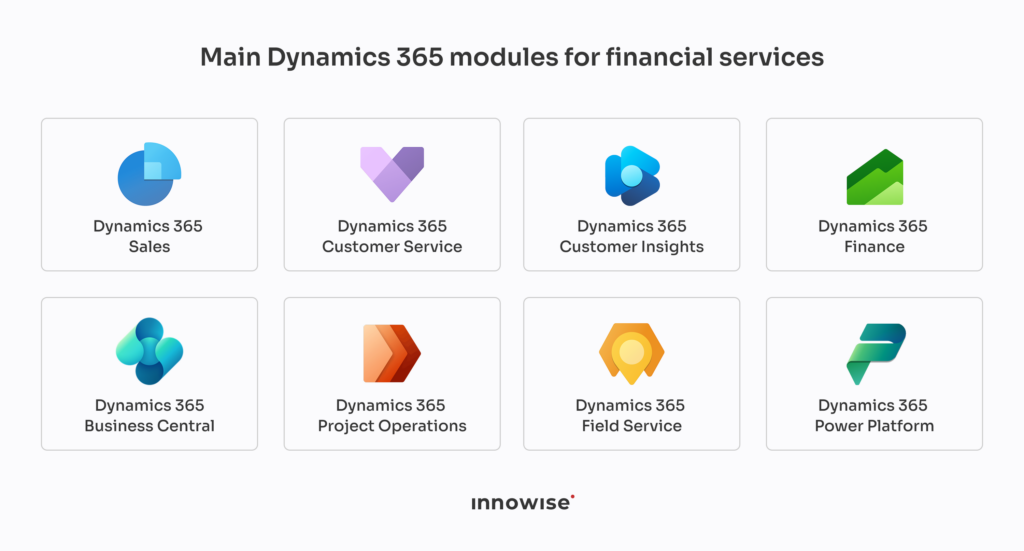
Main Dynamics 365 modules for financial services.

Common module choices include:

  • Dynamics 365 Sales: for relationship management, lead tracking, referrals, cross-selling, opportunity management, and advisor pipelines. Good choice when the sales process is half CRM, half inbox archaeology.
  • Dynamics 365 Customer Service: for support tickets, complaints, card issues, fraud claims, loan servicing, and customer support across channels. This is often the first place I’d look if customers keep repeating the same story to different agents.
  • Dynamics 365 Customer Insights: for customer profiles, segmentation, churn signals, behavioral analysis, and targeted campaigns. Useful, but only if the source data is clean enough. Otherwise, it just gives you polished confusion.
  • Dynamics 365 Finance: for financial management, reporting, budgeting, multi-entity operations, accounts payable, accounts receivable, and compliance reporting. This one matters when finance teams need control, not another spreadsheet circus.

For smaller financial firms, Dynamics 365 Business Central can be a lighter option: it covers core finance and operations needs without the heavier setup of Dynamics 365 Finance.

  • Dynamics 365 Project Operations: for project-based finance work, internal initiatives, professional services, cost tracking, and resource planning. Not every financial firm needs it, but consulting-heavy or project-heavy teams should consider it.
  • Dynamics 365 Field Service: for scheduled visits, inspections, branch-related tasks, on-site consultations, and field operations. More niche, but useful when work happens outside the office and still needs proper tracking.
  • Power Platform: for low-code apps, workflows, dashboards, approval paths, and internal tools when standard Dynamics 365 functions are not enough. My take: use it to close practical gaps, not to rebuild the whole company in low-code because someone got excited after a demo.

Dynamics 365 use cases in financial services

Dynamics 365 use cases in financial services usually come down to one thing: getting work out of disconnected tools and into processes people can actually follow. Not glamorous, very useful.

Common use cases include:

  • Customer 360: gives relationship managers, advisors, service agents, branch teams, and compliance users one customer view with profile data, interactions, service history, documents, and product information. Public example: Backbase partnered with Microsoft so its banking engagement platform could work as an engagement layer in Microsoft Cloud for Financial Services.
  • Digital onboarding and KYC: supports digital forms, identity checks, document collection, approval routing, compliance review, and status updates. Basically, fewer “can you resend this PDF?” moments.
  • Loan and credit application management: helps teams handle application intake, document checklists, scoring rules, approval steps, task routing, and customer communication.
  • Wealth management workflows: gives advisors access to client history, meeting notes, portfolio-related updates, life events, follow-up tasks, and product fit signals.
  • Customer service and case resolution: helps manage complaints, fraud disputes, lost card cases, loan servicing questions, SLA tracking, knowledge base content, and escalation paths.
  • Cross-selling and referral management: supports customer segmentation, eligibility checks, product suggestions, referral tracking, and pipeline visibility. Useful when done properly. Annoying when it turns into “sell everyone everything.”
  • Compliance task management: tracks KYC reviews, AML alerts, audit trails, access controls, data retention steps, and regulatory workflows.
  • Financial reporting and analytics: connects finance, service, sales, and operational data into dashboards for profitability, cost analysis, risk tracking, and performance reporting.

Need Dynamics 365 built around real financial workflows?

Integrations for the financial services ecosystem

Integrations are not a side task in a Dynamics 365 project for financial services. They are the project.

A bank, insurer, lender, or wealth firm already has systems that run the business: core banking, payment processing, card systems, KYC tools, AML checks, policy platforms, loan origination, document storage, accounting, call center software, and reporting tools. Dynamics 365 should not replace all of that. It should give teams one place to work while the heavy systems keep doing what they were built to do.

Microsoft stack integrations

The easiest place to start is usually the Microsoft stack. Outlook and Teams connect emails, meetings, and internal discussions to customer records and service cases. SharePoint handles document storage. Excel still appears because finance people and spreadsheets have a bond no vendor can break.

Power BI is often the most useful piece here. It can turn CRM, service, finance, and operational data into dashboards for managers, compliance teams, branch leads, and executives. Power Apps and Power Automate can cover smaller internal workflows when the standard Dynamics 365 setup does not fit.

Financial system integrations

This is where planning gets serious. Dynamics 365 may need data from core banking, loan origination, payment processors, card platforms, credit bureaus, policy systems, claims tools, portfolio management systems, accounting platforms, e-signature tools, KYC providers, and AML systems.

Each connection needs clear rules: what data moves, which system owns the record, how often updates happen, what happens when something fails, and who is allowed to see what. Boring? Yes. Also the difference between a working platform and a reporting dumpster fire.

Data ownership and process flow

Before connecting anything, map the process from end to end: customer action, internal review, system update, approval, notification, document storage, and reporting. Then decide what Dynamics 365 should do and what should stay in the source system.

This matters because bad integrations do real damage. They create duplicate customer records, broken approval chains, missing audit history, slow reports, and teams that quietly go back to Excel. The goal is not to connect every system just because it exists. The goal is to make the right data available at the right step of the process.

Compliance, security, and risk management

Compliance, security, and risk management in Dynamics 365 should be built into the process, not patched on later when someone from legal asks an uncomfortable question.

For financial services, this usually means role-based access, audit trails, approval history, data retention rules, consent tracking, and clear records of who changed what and when. Dynamics 365 can also support KYC and AML work through workflows, alerts, document tracking, and integrations with external screening tools.

The system should make compliance work easier to prove. If access rules are vague, audit logs are incomplete, or customer data sits in random places, the platform is not doing its job.

AI and automation in Dynamics 365 for financial services

AI in Dynamics 365 for financial services is useful when it removes manual work from real processes, not when it gets added because someone wants a shinier demo. The best areas are customer service, onboarding, case routing, reporting, document handling, and sales support.

Area
How AI can help
Watch out for
Customer service
Summarizes cases, emails, chats, and past interactions so agents do not start from zero every time
Bad source data means bad summaries. Simple rule.
Onboarding and KYC
Helps extract data from forms, IDs, statements, and uploaded documents
Human review still matters, especially for regulated checks
Case routing
Sends complaints, fraud claims, loan questions, and service requests to the right team based on type, risk, or priority
Routing rules need regular review, or old logic keeps sending work to the wrong place
Sales and relationship management
Gives advisors and relationship managers context before calls: recent activity, product history, open cases, follow-up tasks, suggested next steps, and possible contacts to involve
Suggestions should support judgment, not replace it
Finance workflows
Helps spot unusual entries, missing fields, approval delays, and reporting gaps
Finance teams need clear exception rules, not a mystery box
Customer insights
Groups customers by behavior, needs, product usage, and churn signals
If teams use this badly, it turns into spammy outreach. Nobody wants that
Internal knowledge
Helps employees find policy details, process steps, and case guidance faster by giving concise summaries for the exact enquiry instead of making people read a long article end to end
The knowledge base must be maintained. Otherwise, it becomes a very confident liar
Reporting
Helps managers read trends across sales, service, finance, and operations without digging through ten dashboards
Reports still need clear definitions, owners, and trusted source systems
Show more

The practical point is this: AI should sit inside the workflow, a service agent gets a case summary, a compliance user gets a flagged review item, a finance manager sees exceptions, an advisor gets client context before a meeting. That is useful.

What I would avoid is building a big AI story before fixing the basics. If customer records are duplicated, access roles are messy, and nobody agrees which system owns the data, AI will not save the project.

Plan your Dynamics 365 rollout before the budget starts leaking

Implementation roadmap

A Dynamics 365 implementation roadmap should start with processes. Buying the tools first and “figuring it out later” is how companies end up with an expensive system nobody likes.

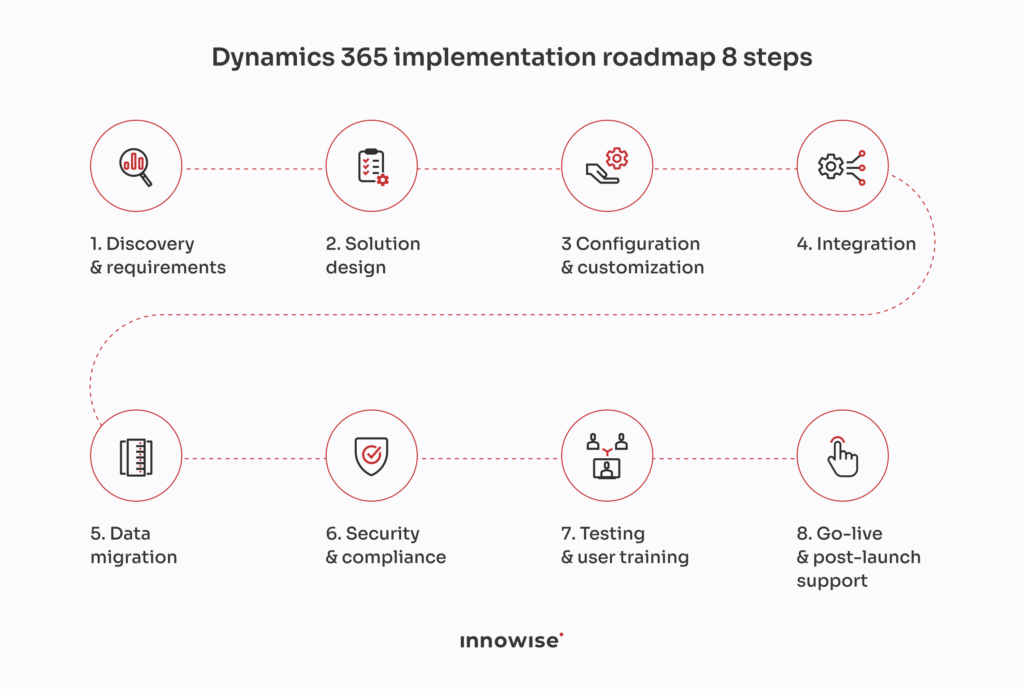
Eight-step Dynamics 365 implementation roadmap diagram.

1. Assess current processes

Map how work happens now: onboarding, service cases, approvals, reporting, KYC, AML reviews, loan workflows, claims, or finance operations. Note where data gets copied manually, where approvals slow down, and where teams use side spreadsheets to survive.

2. Choose the right Dynamics 365 apps

Pick modules based on real needs: Sales for relationship work, Customer Service for cases, Finance for accounting and reporting, Customer Insights for segmentation, and so on. No need to buy half the catalog just to look ambitious.

3. Design the architecture

Decide how Dynamics 365 will connect with Microsoft 365, Power Platform, Azure, core banking, payments, KYC, AML, document storage, and reporting tools. Define which system owns each type of data.

4. Plan data migration

Clean customer records, financial data, documents, interaction history, product data, and legacy CRM or ERP data before moving it. Bad data does not become good data because it changed the address.

5. Configure workflows and security

Build approval flows, case routing, access roles, audit logs, alerts, retention rules, and compliance steps. This is where the system starts to match how the business actually works.

6. Run a pilot

Test the setup with one department, branch, region, or product line. Check performance, user feedback, reporting accuracy, integration behavior, and whether people can do their jobs without inventing workarounds.

7. Train users and roll out in stages

Train relationship managers, service agents, advisors, finance teams, and compliance users around their real tasks. Then roll out by team or region, fix issues early, and expand only when the basics are stable.

8. Keep improving after launch

Review adoption, process gaps, reports, support tickets, and new business needs. Dynamics 365 is not “done” on go-live day. That is just the day everyone starts finding the truth.

Pricing and cost factors

Dynamics 365 pricing for financial services has two main parts: licenses and implementation. Licenses are easier to estimate. Implementation is where the number changes fast, because financial companies usually need integrations, migration, security setup, compliance workflows, and reporting. Fun little detail: those are rarely “small extras.”

As a rough example, Dynamics 365 licenses can start from about $50-$65 per user/month for service or sales users and go above $200 per user/month for finance users. A small financial firm with 30 users might spend a few thousand dollars per month on licenses. A larger bank, insurer, or lender with 200+ users and several modules can move into tens of thousands per month before implementation work is counted.

Implementation costs vary by scope:

  • Basic CRM or service setup: around $30,000-$70,000
  • Mid-size rollout with integrations, migration, workflows, dashboards, and training: around $100,000-$300,000
  • Large financial services implementation with core banking, AML/KYC tools, complex security roles, multi-entity finance, and heavy reporting: $300,000+ and sometimes much more

Licensing cost factors include:

  • Selected Dynamics 365 apps: Sales, Customer Service, Finance, Customer Insights, Field Service, Project Operations, Business Central, and other apps have different pricing and setup needs. If a company buys more than one module, discounts may apply to the following licenses.
  • Number and type of users: full users, light users, admins, finance users, service agents, advisors, and external users may need different license types.
  • Microsoft Cloud for Financial Services components: industry-specific capabilities can change both subscription and setup scope.
  • Power Platform usage: Power Apps, Power Automate, Power BI, and Copilot Studio can add license and configuration costs.
  • Azure services: data storage, identity, security, analytics, document processing, and custom application logic may add monthly cloud spend.

Implementation cost factors include:

  • Data migration: customer records, financial data, documents, interaction history, product data, and legacy CRM or ERP data need cleanup and mapping.
  • Integrations: core banking, payments, KYC, AML, credit bureaus, policy systems, accounting tools, document management, and reporting platforms can be major cost drivers.
  • Custom workflows: onboarding, approvals, case routing, compliance checks, alerts, and reporting rules need design, build, and testing.
  • Security and compliance setup: access roles, audit trails, retention rules, consent tracking, and regulatory workflows need careful configuration.
  • Training and support: users need role-based training, and the system needs post-launch support so it does not become another “official tool” everyone avoids.

ROI of Dynamics 365 for financial services

Let’s do the math together. Not the fake “ROI can be huge” kind of math, but the simple version a finance team can actually challenge without rolling their eyes.

Dynamics 365 ROI in financial services usually comes from five areas: faster onboarding, shorter case resolution, less manual work, better cross-selling, and quicker reporting. Here’s a basic example.

Say a financial company has:

  • 80 employees using Dynamics 365
  • average loaded cost of $55 per hour
  • 5 hours saved per employee each month through fewer manual updates, faster search, cleaner workflows, and better case visibility
  • $180,000 spent on implementation
  • $96,000 spent yearly on licenses and support

The annual time-saving value would be:

80 users × 5 hours/month × 12 months × $55/hour = $264,000 per year

Now subtract the yearly running cost:

$264,000 – $96,000 = $168,000 net yearly value

If the implementation cost was $180,000, the payback period would be close to:

$180,000 / $168,000 = about 13 months

That is only one side of the story. The bigger gains often come from things that are harder to calculate but still very real: fewer lost leads, faster loan decisions, better retention, shorter audit preparation, fewer duplicate records, fewer service escalations, and less time spent making reports nobody trusts.

A few notes before anyone gets too excited:

  • ROI depends on adoption. If teams keep working in spreadsheets and only update Dynamics 365 “for reporting,” the numbers fall apart.
  • Data quality matters. Bad data slows onboarding, reporting, service, sales, and compliance work.
  • Integrations change the result. If Dynamics 365 is connected to core systems, KYC tools, document storage, and reporting platforms, the value is much easier to prove.
  • The best ROI usually comes from boring workflow fixes, not fancy features. A clean approval flow can save more money than a shiny dashboard nobody uses.

So yes, Dynamics 365 can pay for itself. But only when the company treats it as a business process project, not just a software rollout with nicer screens.

How to choose a Dynamics 365 implementation partner

Choosing a Dynamics 365 implementation partner is not about finding someone who “knows Microsoft.” A lot of teams know Microsoft. The real question is whether they can turn messy financial processes, old systems, strict access rules, and anxious stakeholders into a working setup people can use without sending daily apology emails.

Look for a partner with: financial services experience, Dynamics 365 skills, integration experience, data migration skills, security and compliance knowledge, change management, post-launch support.

At Innowise, we cover the full Dynamics 365 path: consulting, implementation, configuration, application management, administration, migration, cloud and on-premise development, and also maintenance and support. We also offer Microsoft Dynamics 365 service packs, so clients do not have to buy a vague “we’ll see” package. Basic, Standard, and Advanced packs help match the scope to the actual work needed, from environment setup and account configuration to dashboards, data migration, process alerts, security roles, training, and project management.

We keep the delivery model clear from the start. We start with project scoping, prepare cost estimates, document the work, keep reporting clear, manage change requests, and provide post-launch warranty. Clients can also choose the delivery model that fits them: staff augmentation, a dedicated team, or full project outsourcing.

“What makes our approach different is that we don’t push one huge Dynamics 365 package on every client. We break the work into clear service packs, check what the business really needs, and build from there. That keeps the scope under control, gives the client a clearer budget, and helps us deliver a system that supports real daily work, not just a nice demo.”

Dmitry Nazarevich

Chief Technology Officer

Future trends in Dynamics 365 for financial services

I don’t really like to talk about future trends as it’s always partly speculation. Nobody can honestly say, “This is exactly how banks and insurers will use Microsoft tools in five years.” If they do, check whether they also sell conference tickets. 

But we can see where the market is moving: more connected systems, more AI inside daily work, more API-based financial products, and stricter reporting demands.

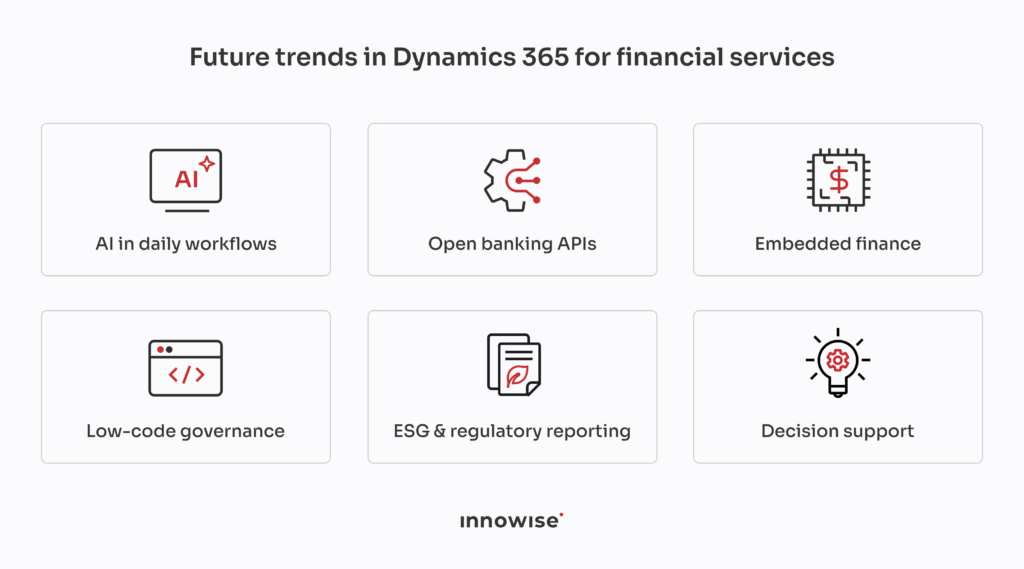
Future trends in Dynamics 365 for financial services.

Deeper AI inside daily workflows

The first likely shift is deeper AI support inside regular workflows. Not “AI writes your whole banking strategy while you drink coffee.” More like: a service agent gets a clean case summary, a relationship manager gets client context before a call, a compliance user sees unusual activity grouped for review, and a finance team gets help finding reporting gaps before month-end panic starts.

Open banking as part of the front office

Open banking will also matter more. As banks, fintech platforms, payment providers, and third-party apps share more account and transaction data through APIs, Dynamics 365 may become a stronger front-office layer for managing the customer side of those connections. The system would not just store client records. It could help teams act on account signals, onboarding updates, credit checks, and partner activity.

Embedded finance behind the curtain

Embedded finance is another area to watch. More companies outside traditional banking will offer payments, lending, insurance, or wallet-like services inside their own products. That creates a mess behind the curtain: customer service, partner management, risk checks, reporting, and issue resolution. Dynamics 365 could help manage that business layer while financial infrastructure runs in the background.

Low-code with more control

I also expect more low-code work, but with tighter governance. Power Platform can help financial teams build forms, approval paths, internal tools, and reporting views faster. The risk is obvious: if every department starts building its own mini-system, congratulations, you’ve reinvented the same chaos with nicer buttons.

ESG and regulatory reporting

Regulatory and ESG reporting will probably become a bigger part of the conversation too. Financial companies will need clearer records, better audit trails, cleaner ownership of data, and reporting processes that do not depend on three people manually fixing spreadsheets every quarter.

From record keeping to decision support

The broader direction is simple: Dynamics 365 will likely move from “system where people enter updates” to “system that helps people decide what to do next.” That future only works if the basics are in place: clean data, clear roles, solid integrations, and business processes that make sense outside a meeting room.

Too many systems, not enough control?

Conclusion

Dynamics 365 can give financial companies a cleaner way to connect customer data, service work, finance processes, compliance tasks, reporting, and integrations. But the value does not come from the Microsoft logo alone. It comes from choosing the right modules, cleaning the data, planning integrations properly, setting access rules carefully, and getting users to actually work in the system. Boring foundation, good results. That’s usually how enterprise software wins.

FAQs

Microsoft Dynamics 365 for financial services is a set of Microsoft business apps used by banks, insurers, credit unions, wealth firms, lenders, and fintech companies to manage customer data, service cases, finance work, workflows, reporting, and compliance tasks in one connected setup.


It can be both. Microsoft Dynamics CRM for financial services includes apps, such as Sales and Customer Service, and ERP apps, such as Finance and Supply Chain Management and Business Central. Financial companies usually pick the apps they need instead of using the whole stack just because it exists.

The most common modules are Dynamics 365 Sales, Customer Service, Customer Insights, Finance, Field Service, and Project Operations. Power Platform is also often used for dashboards, approval flows, internal apps, and custom business tools.

Dynamics 365 can support KYC and AML workflows through customer profiles, document tracking, approval routing, alerts, review tasks, audit history, and integrations with identity checks, sanctions screening, and risk scoring tools. It does not replace compliance teams. It gives them a better system to work in.

Yes, Dynamics 365 can integrate with core banking systems through APIs, middleware, Azure services, and custom connectors. The important part is deciding which system owns each record, how often data moves, and what happens when something fails. This is not the place for “we’ll figure it out later” energy.

Dynamics 365 is the set of business apps where teams manage sales, service, finance, operations, and customer work. Microsoft Cloud for Financial Services adds industry-specific data models, templates, connectors, and capabilities for financial services. In simple terms: Dynamics 365 is where the work happens; Microsoft Cloud for Financial Services helps shape that work around finance-specific needs.

Licenses can start from about $50-$65 per user/month for service or sales users and go above $200 per user/month for finance users. Implementation can range from about $30,000-$70,000 for a basic setup to $100,000-$300,000 for a mid-size rollout. Large financial services projects with core banking, AML/KYC tools, complex security, and heavy reporting can cost more.

A simple setup can take a few months. A mid-size implementation often takes 4-9 months. Large projects with data migration, core system integrations, custom workflows, finance setup, and compliance requirements can take 12 months or longer. The timeline depends less on the software and more on scope, data quality, integrations, and decision-making speed.

Yes, if the firm needs better customer management, case handling, reporting, or workflow control. A small lender, insurance agency, advisory firm, or fintech company does not need to start with a massive setup. It can begin with CRM, service, or reporting basics and expand later.

They should prepare process maps, data sources, user roles, compliance requirements, reporting needs, integration lists, security rules, and migration plans. Also, someone needs to decide who owns what. Without that, every meeting becomes a group therapy session with spreadsheets.

Show more Show less

Table of contents

    Contact us

    Book a call or fill out the form below and we’ll get back to you once we’ve processed your request.

    Send us a voice message
    Attach documents
    Upload file

    You can attach 1 file up to 2MB. Valid file formats: pdf, jpg, jpeg, png.

    By clicking Send, you consent to Innowise processing your personal data per our Privacy Policy to provide you with relevant information. By submitting your phone number, you agree that we may contact you via voice calls, SMS, and messaging apps. Calling, message, and data rates may apply.

    You can also send us your request
    to contact@innowise.com
    What happens next?
    1

    Once we’ve received and processed your request, we’ll get back to you to detail your project needs and sign an NDA to ensure confidentiality.

    2

    After examining your wants, needs, and expectations, our team will devise a project proposal with the scope of work, team size, time, and cost estimates.

    3

    We’ll arrange a meeting with you to discuss the offer and nail down the details.

    4

    Finally, we’ll sign a contract and start working on your project right away.

    More services we cover

    arrow