The power of data mapping in healthcare: benefits, use cases & future trends. As the healthcare industry and its supporting technologies rapidly expand, an immense amount of data and information is generated. Statistics show that about 30% of the world's data volume is attributed to the healthcare industry, with a projected growth rate of nearly 36% by 2025. This indicates that the growth rate is far beyond that of other industries such as manufacturing, financial services, and media and entertainment.

Best ERP software for e-commerce businesses: features, benefits, and top options

Jul 30, 2026 14 mins read
Summarize article with AI

Key takeaways

  • ERP integrates inventory management, order processing, financial data, and customer databases across different sales and warehouse locations, creating a single source of truth. 
  • When deciding on an ERP solution, companies should pay special attention to how well inventory and order management features meet their needs.
  • Choosing an appropriate ERP system depends on factors such as company size, budget, the number of sales locations, and the level of customization required.
  • The choice between cloud and on-premises ERP, as well as between ready-made and custom-built software, has significant long-term implications for costs and IT.

According to Linnworks, 45% of UK e-commerce retailers and 47% of their US counterparts use spreadsheets for inventory forecasting. The option works until… You grow beyond small and medium businesses, and your order volumes, sales channels, and warehouse locations grow. 

Perhaps you have already reached this point, or it’s coming very soon: a standalone shipping calculator, QuickBooks, or another accounting software solution that still requires manual work, a few plugins for Shopify or WooCommerce plugins for loyalty points, subscription management, or multi-warehouse logistics, cease to make sense. 

These tools may have worked at a low order volume. But when you introduce a second sales channel, another warehouse, or even a wholesale business alongside your regular store, the current approach falls apart. Stock levels no longer match across applications. An item is out of stock at Amazon but is still available on the website. The month gets closed after it’s due because revenue needs to be consolidated manually from three different sources. Customer support is unable to access order history information without switching applications during a customer call.

I’m not saying this is because any one tool is inadequate. It’s the inevitable result of rapid growth combined with the fragmented systems in place to manage it. ERP software for e-commerce consolidates inventory, orders, financial, and customer information into a single source of truth. Sounds much more convenient, doesn’t it? 

In this post, I’ll explain how to evaluate ERP solutions and share a list of the best ERP for e-commerce businesses​

Key benefits of ERP for e-commerce businesses

ERP removes friction that can slow down processes involved in selling, order fulfillment, and accounting. Let’s look in more detail at what benefits you can expect from adopting an ERP system.

You know what's in stock

Salespeople, warehouse workers, and finance teams all have access to the exact stock numbers at any given point in time. This helps reduce two frequent inventory mistakes: selling out of stock items and tying up too much capital in unsold inventory.

Fewer order errors and delays

For an ERP, it doesn’t matter which channel an order comes from. An ERP pulls each order into a single processing queue, validates it, and routes it to fulfillment automatically. Fewer manual touchpoints mean fewer misshipped items, fewer pricing errors, and shorter time between “order placed” and “order shipped.”

Financial data is business insight

Data from revenue, cost of goods sold, refunds, and channel fees flows in as transactions happen, so the month-end close no longer depends on chasing down numbers from multiple systems. You can check margins by product, channel, or region with just a few clicks.

The customers get first-contact resolution

Your support and sales teams can see order status, shipping history, and stock availability on a single ERP screen. This helps them answer questions during the first contact instead of escalating them or researching offline.

Every sales channel is managed via one tool

If you sell through a website, marketplaces, and physical stores, you have to manage different pricing, tax, and fulfillment requirements. An ERP centralizes those rules and pushes consistent product, price, and stock data out to every channel, so promotions or inventory updates only have to be made once.

Your system is ready for the next stage of growth

ERP platforms are built to handle growing order volumes, more users, and new business units without a full retooling of how the business operates. Your business is well-supported during a demand spike, a new market launch, or the addition of a second warehouse.

Must-have ERP features for e-commerce

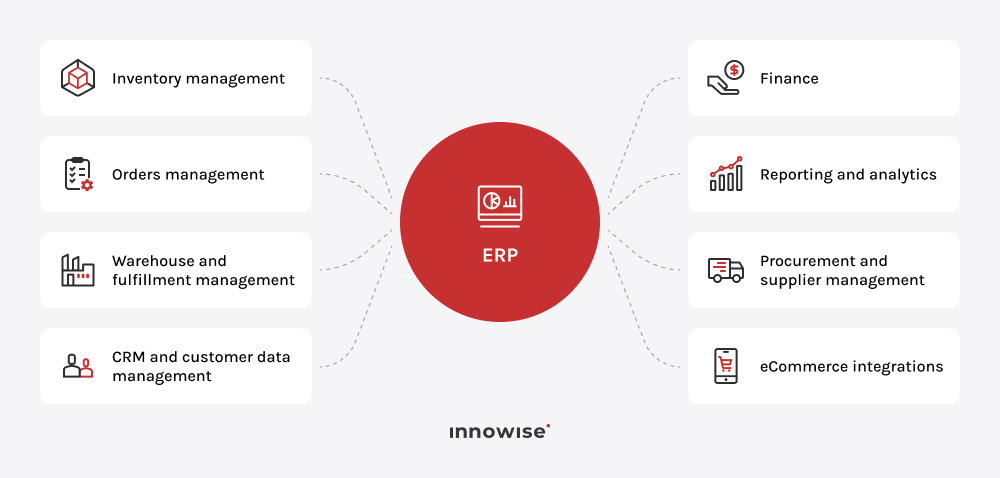
You can’t just pick any ERP solution and expect it to work for you. Its features need to meet your business needs so that you can achieve the benefits you expect. I’ve prepared the list of core features to look for when you’re choosing the best ERP for an e-commerce business.

Inventory management

When nobody flags a stockout during a busy sales period or a build-up of dead stock in time, your e-commerce business is missing an important inventory management capability. Look for live stock counts across every warehouse and sales channel, automatic reorder points, and demand forecasting based on historical sales data.

Order management

You have one system to keep track of each order from the moment it goes into the cart until it reaches the customer. It brings together orders from multiple sales channels and supports order validation, split shipping, backorder management, and even returns handling.

Warehouse and fulfillment management

For businesses running their own warehouse, this capability helps prevent picking and packing errors as order volume grows. Make sure your ERP system supports barcode- or RFID-based picking and packing, bin-level location tracking, and integration with third-party logistics providers or in-house fulfillment teams.

Financial management and accounting

This feature takes over general ledger, accounts payable and receivable, multi-currency transactions, and automated reconciliation of sales, payments, and refunds. For an e-commerce business, I would also recommend looking for capabilities such as marketplace deduction and per-channel margin calculation.

CRM and customer data management

An ERP keeps a single customer record that connects order history, customer service interactions, and marketing engagements, regardless of how they originated. This supports more personalized offers, reward programs, and informed service discussions.

Procurement and supplier management

Purchase order creation is linked directly to inventory levels, supplier performance, and vendor communications history within your ERP. If you deal with several suppliers or manufacturers, this connection makes it easier to manage the information in one system instead of relying on a separate Excel file.

Reporting and analytics

You get dashboards for real-time monitoring of sales, inventory efficiency, channel analysis, and customer behavior, as well as the capacity to create customized reports. It helps you stay proactive and respond to the current inventory or marketing situation.

E-commerce integrations

Your ERP can be integrated with e-commerce platforms, marketplaces, payment solutions, shipping services, and marketing platforms. These integration capabilities create a more connected working environment, so they’re worth paying particular attention to when choosing an ERP solution.

Explore how ERP can support your order volume and channel mix

Best ERP software for e-commerce businesses

The right ERP choice depends on a number of factors: business size, budget, number of sales channels used, the depth of the integration required, the level of custom development needed internally, and overall complexity of operations. A small ten-person direct-to-consumer business selling through Shopify has very different requirements from a single marketplace with a larger wholesale distribution company that relies on EDI and B2B portals. Below is a comparison of the five best ERP systems for e-commerce.

ERPBest forKey e-commerce featuresDeployment and integrations
Microsoft Dynamics 365Mid-market and enterprise businesses already invested in the Microsoft ecosystemNative Commerce module; unified order management across web, marketplaces, POS, and EDI; real-time inventory data shared with the ERPCloud SaaS, modular by application; native Dynamics 365 Commerce and connectors for Amazon and eBay
OdooSmall and medium-sized enterprises seeking an ERP-native storefront without combining multiple systemsBuilt-in website and e-commerce application with a drag-and-drop interface, automatic stock updates, B2B pricing, and customer portalsCloud or self-hosted; native Odoo e-commerce application and integrations with Shopify, Amazon, and WooCommerce
SAP Business OneSmall and medium-sized companies that need strong financial and inventory management without a full enterprise suiteInventory, purchasing, and financial management functionality; no native storefrontCloud or on-premises; requires integration with Shopify, WooCommerce, or SAP-certified add-ons
SAP S/4HANALarge enterprises with multi-entity, multinational, or highly regulated operationsOmnichannel order management through integration with SAP Commerce Cloud, built-in analytics, and in-memory processing for real-time reportingPublic cloud, private cloud, or on-premises; integrates with SAP Commerce Cloud and third-party platforms but isn’t a native storefront
ServiceNowEnterprises that already use an ERP and want to coordinate order management, customer service, and fulfillment workflowsOmnichannel order management and process automation across order capture, fulfillment, and after-sales activities; not a system of record for finance or inventoryCloud SaaS; integrates with existing ERP, CRM, and e-commerce platforms

Microsoft Dynamics 365

Microsoft Dynamics 365 is an ERP and CRM ecosystem that includes several modules. Small and medium-sized businesses typically use Business Central, whereas enterprises may use the Finance and Supply Chain Management apps. Its Commerce module integrates the e-commerce functional layer and reduces the need for third-party middleware to synchronize the required data.

Mid-market and enterprise e-commerce companies will find Microsoft Dynamics 365 particularly useful if they’re looking to consolidate their operations within the Microsoft ecosystem, including Microsoft 365, Teams, and Power BI.

Strengths:

  • Orders from the website, marketplaces, phone, EDI, and in-store POS all land in one fulfillment queue.
  • Offers a modular pricing structure, so you can start with core finance and inventory and add Commerce, CRM, or supply chain apps later without re-platforming.

Possible limitations: 

  • Per-user, per-app pricing can become expensive when you need several different modules.
  • Enterprise-wide implementations are very costly and may run into millions of dollars.
  • The Commerce module doesn’t offer the same rich out-of-the-box storefront functionality as dedicated e-commerce platforms.

Innowise holds multiple Dynamics 365 certifications. This allows us to guide clients through complex implementations, tailor the platform to specific business processes and needs, and consult and support the clients.

Odoo

Odoo is an open-source, modular ERP. Its e-commerce app is one of the many modules available in Odoo. When an order is placed through the Odoo e-commerce storefront, the relevant inventory, accounting, and fulfillment records are updated within the Odoo system.

It’s a good choice for small and medium-sized e-commerce businesses that want to integrate their e-commerce solution with ERP but don’t wish to invest in a full enterprise-level system.

Strengths: 

  • The Community edition is free and open-source, so it gives an accessible entry point.
  • Enterprise pricing is generally lower than that of many major ERP competitors.
  • Native support for B2B pricing rules, customer-specific catalogs, and multi-currency storefronts.
  • The system operates on a single shared database, so data remains consistent.

Possible limitations: 

  • Odoo is primarily an ERP system with an e-commerce module, so storefront functionality may require more configuration than it would on a dedicated e-commerce platform.
  • User-based costs increase with the number of backend users, while frontend users remain free.

Innowise is an official Odoo partner, which provides our specialists with exclusive access to the latest Odoo resources and best practices. Thanks to it, our team delivers effective, personalized, and expert-driven Odoo implementations and Odoo consulting to help businesses reach multifaceted goals.

SAP Business One

SAP Business One is SAP’s ERP for small and mid-sized businesses. Its capabilities cover finance, inventory, purchasing, and basic CRM. It doesn’t include a native storefront, so e-commerce is handled through integration with a third-party platform or an SAP-certified add-on.

If you run an SME with 10–250 employees, need SAP-level financial and inventory control, and plan to keep or add a separate e-commerce front end such as Shopify or WooCommerce, you may find this solution a worthwhile investment.

Strengths: 

  • Strong financial management and inventory tracking.
  • Support for multi-currency and audit-ready reporting.
  • Faster and less expensive implementation than SAP enterprise-tier products.
  • SAP’s established brand credibility. 

Possible limitations: 

  • No native e-commerce storefront, so additional integration work and separate platform licensing and maintenance are required.
  • Basic CRM capabilities.
  • May be less suitable for businesses whose scale and operational complexity require an enterprise ERP such as SAP S/4HANA. 

SAP S/4HANA

S/4HANA is SAP’s enterprise-level ERP system and runs on the SAP HANA in-memory database. Unlike the previous solution, it’s designed for multi-entity, multi-country operations with heavy regulatory requirements or business processes. The ERP doesn’t include omnichannel storefront management but integrates with SAP Commerce Cloud.

It’s best suited to large enterprises and fast-growing mid-to-large e-commerce businesses, such as retail chains with hundreds of stores or brands operating across D2C, wholesale, and marketplace channels.

Strengths: 

  • Real-time, in-memory data processing that supports embedded analytics and predictive tools across finance, supply chain, and customer experience.
  • Public cloud, private cloud, or on-premises deployment options and deep industry-specific configurations.

Possible limitations: 

  • Substantial investment often reaches millions of dollars.
  • Highly complex projects with a steep learning curve for internal teams.
  • Best suited for businesses with significant internal capacity and budget for multi-year transformations.

As a certified SAP partner, Innowise delivers expert SAP consulting and SAP implementation. We help our clients use SAP with compliant rollouts, streamlined financial and logistics operations, and clear analytics.

ServiceNow

In contrast to a traditional ERP system, ServiceNow doesn’t serve as the system of record for finance or inventory the way the other four systems do. It’s a workflow automation platform used for order management. Order capture, fulfillment, and post-sale support become part of one workflow layer on top of an existing ERP, CRM, and e-commerce stack.

It’s an option for enterprises that already run a full ERP such as SAP, Dynamics, or NetSuite r but still find that orders, service requests, and fulfillment status are scattered across different systems.

Strengths:

  • Strong at breaking down silos between departments.
  • Workflow automation and a more modern, role-specific interface make it easier for non-technical staff to track and act on orders.

Possible limitations: 

  • Not a replacement for core ERP functions like general ledger, inventory valuation, or procurement.
  • Quote-based, enterprise-oriented pricing.

Innowise holds multiple ServiceNow certifications. So, if you’re considering ServiceNow implementation, our team has the expertise to implement it in high-quality and optimized ways that effectively improve your workflows.

Get an unbiased read on which ERP is the best fit for your business

How to choose the best ERP for an e-commerce business

Every vendor comparison eventually comes down to the same question: which of these solutions best fits the way your business operates? Here are the main steps you can take to shortlist the options:

01
Check sales channels

Check which sales channels the ERP supports and make sure it covers all the ones you need, including your website, marketplace, wholesale store, and retail POS.

02
Estimate total costs

Estimate the costs beyond licensing fees, including implementation, migration, integration, training, and support. I recommend having this discussion before narrowing down the list of prospective vendors.

03
Audit tech stack

Audit your current tech stack and assess which ERP systems can integrate with your current platforms and which would require a full rebuild.

04
List operational problems

List the operational problems causing pain right now, then check which systems solve those specifically. After that, consider the nice-to-have you may want to add in the long run.

05
Determine customization needs

Determine the necessity for customization: sometimes it's really required, and sometimes people just assume they’ll need it. Get a clear-eyed read, ideally from someone who has implemented the shortlisted systems before.

06
Plan ahead for scale

Plan ahead and look at how the system would handle your order volume doubling or the addition of another entity.

arrow-iconarrow-icon
01 Check sales channels

Check which sales channels the ERP supports and make sure it covers all the ones you need, including your website, marketplace, wholesale store, and retail POS.

arrow-iconarrow-icon
02 Estimate total costs

Estimate the costs beyond licensing fees, including implementation, migration, integration, training, and support. I recommend having this discussion before narrowing down the list of prospective vendors.

arrow-iconarrow-icon
03 Audit tech stack

Audit your current tech stack and assess which ERP systems can integrate with your current platforms and which would require a full rebuild.

arrow-iconarrow-icon
04 List operational problems

List the operational problems causing pain right now, then check which systems solve those specifically. After that, consider the nice-to-have you may want to add in the long run.

arrow-iconarrow-icon
05 Determine customization needs

Determine the necessity for customization: sometimes it's really required, and sometimes people just assume they’ll need it. Get a clear-eyed read, ideally from someone who has implemented the shortlisted systems before.

arrow-iconarrow-icon
06 Plan ahead for scale

Plan ahead and look at how the system would handle your order volume doubling or the addition of another entity.

Cloud ERP vs. on-premises ERP for e-commerce

When you choose an ERP system that suits your business, you’ll need to decide between cloud or on-premises deployment. Since the choice affects the cost structure, IT overhead, and how easily a business can adapt the system later, I want to talk about it separately from the vendor decision itself.

If you choose a cloud ERP

  • It runs on the vendor’s infrastructure and is accessed through a web browser or app.
  • It’s typically offered as a subscription service (SaaS).
  • Automatic updates, security patches, and maintenance reduce IT workload.
  • It scales automatically to handle seasonal demand spikes, such as Black Friday or holiday sales.
  • It enables remote and distributed teams to access the same system without on-site infrastructure and, in many cases, without a VPN.

If you choose an on-premises ERP

  • It runs on servers owned and maintained by the business.
  • It’s usually purchased with a perpetual software license.
  • It’s best suited for businesses with strict data residency or regulatory compliance requirements.
  • It can be a good option for organizations with heavily customized legacy infrastructure that isn’t ready for cloud migration.
  • It gives businesses greater control over their servers, data, and IT environment.

Cloud infrastructure absorbs e-commerce traffic, and order volume swings better. It’s also where many ERP vendors are focusing their investment.SAP Business One and SAP S/4HANA still support on-premises deployment, but new features and AI capabilities ship to the cloud first.

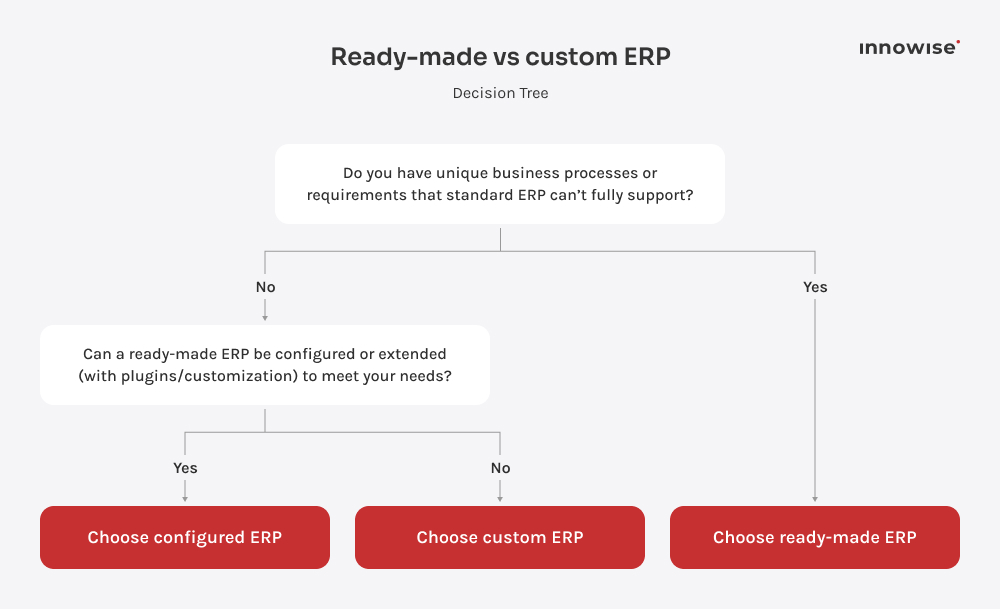
Ready-made ERP vs. custom ERP for e-commerce

We’ve discussed ready-made platforms. However, if none of them fit your operations, you may want to consider developing a custom solution. This choice affects not only implementation and development costs, but also deployment speed, total ownership costs, and how closely the software matches your business logic.

If you choose a ready-made ERP

  • It comes with pre-built modules for inventory, finance, order management, and often e-commerce.
  • It’s designed around common business processes, allowing for faster implementation.
  • It has lower upfront cost than developing a custom solution.
  • It includes ongoing vendor updates, security patches, and technical support.
  • It’s best suited to businesses that want proven functionality with minimal development.

If you choose a custom-built ERP

  • It’s developed specifically around your business processes and requirements.
  • It provides complete flexibility over features, workflows, and data structures.
  • It’s well suited for businesses with highly specialized operations or unique competitive advantages.
  • It can become more cost-effective than licensing commercial ERP software at a very large scale.
  • It gives full ownership and control over the system and its future development.

The economics rarely favor building from scratch until a business has outgrown what configuration and integration can achieve with a commercial platform. Even then, a hybrid approach that combines a ready-made core ERP with selected custom modules for the unique parts of the business is usually more practical.

An ERP doesn’t clean up a chaotic business, but it makes the chaos visible sooner. It’s not rare for an e-commerce business to think it needs more features. It can be so indeed, but adding them can also create a different kind of chaos. Sometimes, all the business really needs is one place where inventory, orders, and accounting data stay in sync.

Head of E-Commerce and Retail

Final thoughts

Spreadsheets and disconnected apps get an e-commerce business to its first real growth milestone. But once order volumes, sales channels, and team size exceed a certain threshold, operating without an ERP can become more expensive than implementing one.

The market now offers a range of solutions, including Microsoft Dynamics 365, Odoo, SAP Business One, SAP S/4HANA, and ServiceNow. I can’t pick one of the mentioned solutions and tell you it’s the right choice without first understanding your business. The right choice for a ten-person DTC brand on Shopify looks nothing like the right choice for a multi-entity wholesale operation running EDI across three countries. 

You should work through the decision deliberately. Compare your business needs against the ERP offerings. If you want expert guidance on choosing the right system, reach out to Innowise’s ERP experts for a consultation.

FAQ

There's no universal solution that works for all e-commerce businesses out there. It really comes down to the individual needs of the business in terms of its size, budget, number of sales channels, and level of customization required. The important question to ask should be "What fits us?" Shortlist options based on that.

No. Shopify is an e-commerce platform that is used to set up and manage an online store. It’s meant to handle back-office processes such as general ledger accounting, warehouse management, procurement, and manufacturing, which are all ERP components.

Yes. Most ERP vendors offer native connectors, certified partner apps, or API-based integrations for the major e-commerce platforms. These integrations sync inventory, orders, pricing, and customer data between the storefront and the ERP's back office. The depth of integration varies by vendor: some support near-real-time, bidirectional synchronization, while others rely on periodic batch updates.

Inventory management and order management are the top priorities because they’re the two areas where disconnected tools cause visible damage: overselling, stockouts, and mis-shipped orders. Beyond that, financial management for accurate margin and channel reporting, CRM for a unified customer view, and e-commerce integrations round out the core requirements.

Costs vary depending on the system and size of the project. For instance, smaller projects using systems like Odoo could cost anywhere between $5,000 and $75,000 for an initial deployment, while mid-level implementations involving Microsoft Dynamics 365 Business Central or SAP Business One will likely be in the range of $30,000 to $300,000. Enterprise implementations of Dynamics 365 Finance and Supply Chain Management or SAP S/4HANA could cost anywhere from several hundred thousand to several million dollars. Beyond licensing, implementation, customization, integrations, data migration, training, infrastructure, and ongoing support all contribute to the total cost.

The timeline depends on how much configuration and customization you need. A straightforward, single-app rollout in a system like Odoo or Business Central can go live in a few weeks to several months. More complex solutions and integrations will take longer.

Not always, and not immediately. A small business operating through one or two channels and having relatively small order load may do fine by relying on a good accounting system, good inventory software, and the capabilities built into the store itself. The need to consider ERP usually comes from operational challenges, such as inventory discrepancies across channels, a month-end process that takes longer because data from different systems must be reconciled manually, or the launch of another warehouse or sales channel that requires additional coordination effort.

Shopify, WooCommerce, Magento, BigCommerce, and other e-commerce platforms are built to run the customer-facing storefront: product listings, checkout, and payment processing. An ERP manages back-office functions such as inventory, financial accounting, procurement, and order management. Growing e-commerce businesses often use both together.

Show more Show less

Lead of ERP Consultants

Kiryl knows SAP inside and out. He’s the go-to when a client needs not just implementation, but smart configuration that fits their unique processes — with a clear path from complexity to clarity.

Table of contents

    Contact us

    Book a call or fill out the form below and we’ll get back to you once we’ve processed your request.

    Send us a voice message
    Attach documents
    Upload file

    You can attach 1 file up to 2MB. Valid file formats: pdf, jpg, jpeg, png.

    By clicking Send, you consent to Innowise processing your personal data per our Privacy Policy to provide you with relevant information. By submitting your phone number, you agree that we may contact you via voice calls, SMS, and messaging apps. Calling, message, and data rates may apply.

    You can also send us your request
    to contact@innowise.com
    What happens next?
    1

    Once we’ve received and processed your request, we’ll get back to you to detail your project needs and sign an NDA to ensure confidentiality.

    2

    After examining your wants, needs, and expectations, our team will devise a project proposal with the scope of work, team size, time, and cost estimates.

    3

    We’ll arrange a meeting with you to discuss the offer and nail down the details.

    4

    Finally, we’ll sign a contract and start working on your project right away.

    More services we cover

    arrow