







Logо for review

Cross-platform mobile app development for EmKap

Innowise developed a cross-platform mobile app that gives users access to portfolio data, trading orders, market information, in-app chat support, and account settings via EmKap’s existing platform.

Secure trading actions with 2FA and biometrics

Positive feedback from active traders

Cross-platform investment mobile app for EmKap
Industry Fintech
Employees up to 50
Region UK, Cyprus
Services Mobile development, UI/UX design, QA, Integration
Client since 2024

Client overview

Summarize article with AI

EmKap Ltd, formerly MeritKapital Ltd, is an investment firm with offices in Cyprus and the UK. The company focuses on fixed-income securities, asset management, proprietary trading, brokerage, and custody services. EmKap works primarily with institutional clients and market participants in fixed-income and emerging markets.

Challenge

EmKap needed a mobile app for clients who manage trading and portfolio activity while travelling. The existing web platform was not convenient enough for mobile use, making it harder for users to access information and complete transactions when they were away from a desktop.

  • Trading on the go. Many users needed access to trading and portfolio functions while traveling, often with unstable internet connections and time zone changes. EmKap needed a mobile experience that would let users stay connected to their portfolios wherever they were.
  • Faster access to transactions. The web version was not optimized for mobile devices, which created friction for clients who needed to act quickly. The mobile app had to make portfolio checks, order-related actions, and account access easier to complete with fewer steps.
  • Secure mobile use. Traders often work from public or higher-risk environments. EmKap needed stronger protection for mobile access, especially for actions connected to trading, portfolio data, and account activity.
  • Cross-platform delivery. The app had to provide a consistent experience across mobile devices while supporting core flows such as sign-in, order flow, market data, support, and account settings.
  • Existing backend integration. The mobile app had to connect to the client’s existing backend to store and sync user and order data with the web platform.
  • Security. The app required two-factor authentication and automatic locking when sent to the background. The team also had to support secure re-authentication through PIN or biometrics.
  • Market & order updates.The app had to support timely updates for market-related information and order statuses, including push notifications for important events.

Solution we delivered

DISCOVERY & PLANNING

Innowise started by reviewing the project context, gathering requirements, agreeing on the design direction, and setting up the project. The team defined the app scope, outlined the main user journeys, and planned how the mobile app would work with the client’s existing platform.

SOLUTION DESIGN

Innowise designed the cross-platform mobile app as an extension of EmKap’s web platform. The app connects to the client’s backend, allowing users to sign in with their existing credentials and access portfolio data, order functions, in-app chat, and account settings.

The first release covered the core flows: sign-in, order management, third-party market integration, in-app chat, and account settings. The team also added mobile security features, push notifications, and REST API integration, then supported stabilization, app store release, and ongoing version updates.

KEY FUNCTIONALITY DELIVERED

Portfolio & order management

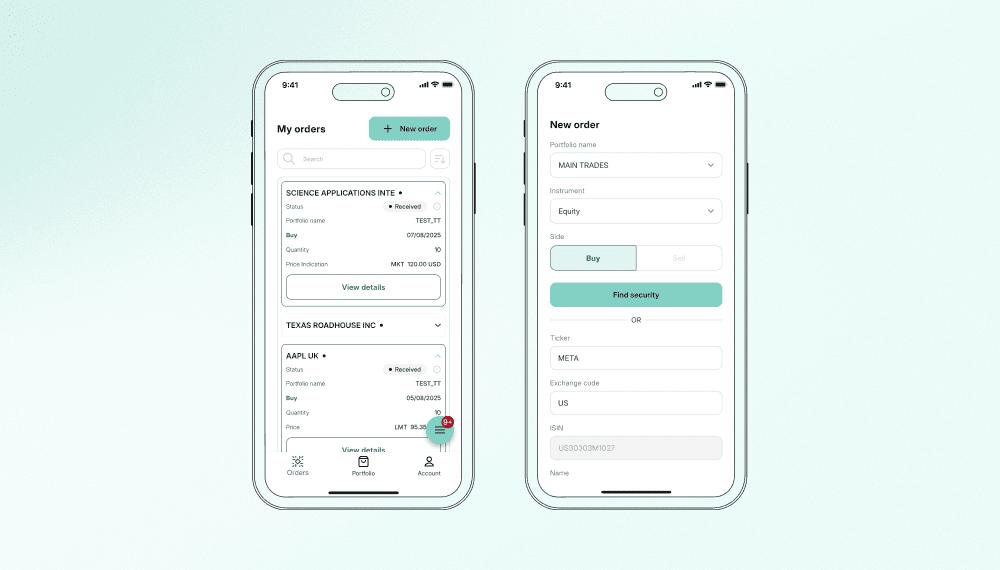
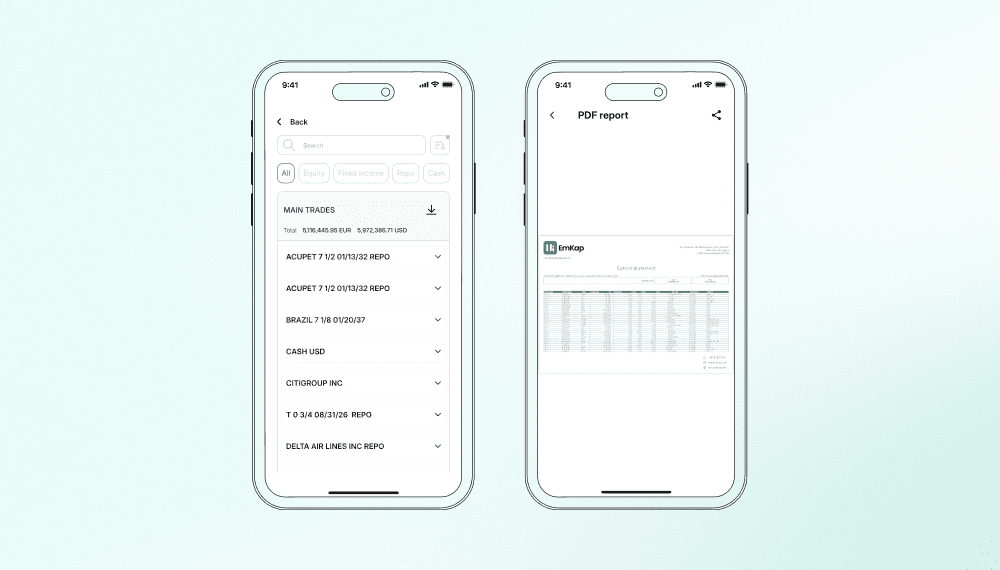
The team built the main mobile workflows around portfolios and orders. Users can open a portfolio overview, view asset distribution, check current and past orders, and see where each order stands in the app.

Users can also create and submit new trading order requests from mobile devices. Since the app connects to the client’s existing backend, user and order data stays synced with the web platform. Multi-level filters and search help users work faster on portfolio, order, and market data.

Secure access

Innowise built the sign-in flow so users could access the mobile app using their existing credentials. The app also supports two-factor authentication, automatic locking when sent to the background, and PIN or biometric re-authentication after an extended period of inactivity.

Market data & filtering

The app includes third-party market integration to display selected market data in the mobile interface. Innowise also built a multi-level filter system with different filter types and search options, helping users narrow down results faster.

In-app chat & account flows

The team added support and account sections for the first release. The app includes built-in chat with a bot for FAQ-style questions, while the account area lets users manage app settings and perform account-related actions from a single mobile entry point.

Push notifications

The app sends push notifications about important events, including order status changes and portfolio-related updates. The team used Firebase Cloud Messaging and local notifications to keep users informed even when they were not using the web platform.

Cross-platform UI/UX

Innowise adapted the app for iOS and Android devices, following Material Design 3 and Apple’s Human Interface Guidelines. The team worked through screen size differences, platform-specific behavior, navigation patterns, and accessibility basics to keep the app familiar on both platforms.

Modular app structure

The Flutter app was divided into separate feature modules. This made the codebase easier to organize, kept app areas separated by function, and simplified development and testing as the product grew.

REST API integration

The mobile app was connected to the client’s backend through a centralized REST API layer. The team covered authentication, logging, error handling, and data model generation, allowing the app to exchange user and order data with the existing platform.

Navigation architecture

Innowise built the app navigation with structured routing, making user flows easier to manage across the sign-in, portfolio, order, support, and account sections. This helped keep transitions between app areas clear and predictable.

DELIVERY APPROACH

Innowise managed the project using Agile/Scrum, with the work split into clear milestones. The team stayed in regular contact with EmKap throughout the project: Innowise held daily internal stand-ups, PM-business calls with the client took place two or three times a week, and both teams joined a weekly core stand-up during active development.

Day-to-day communication ran through the client’s Slack. Status updates, sprint reports, and meeting notes were shared in Confluence so both sides could track progress, decisions, and next steps.

Quote icon

What I liked about this project is that it started from real user behavior. People check investments while travelling, between meetings, or when they have only a minute to understand what is happening. The app had to work in that reality, with a flow that felt clear and careful from the first screen.

logo
Siarhei Dashkouski Project Manager

Technologies

technology icon Flutter
technology icon Dart
technology icon Java
technology icon Figma
technology icon Firebase
technology icon BLoC
technology icon DevPilot
technology icon Mocktail
technology icon REST API

Team

Icon 1
Project Manager
Icon 1
Business Analyst
Icon 1
UI/UX designer
Icon 1
Flutter Developer
Icon 1
QA Engineer
Innowise team

Result

Project duration

December 2024 — Ongoing

EmKap received a cross-platform mobile app connected to its existing web platform and backend. Users can access portfolio data, create and track order requests, view selected market data, manage account settings, and use the built-in FAQ chat from their mobile devices.

The app made trading-related tasks more convenient for users who are often away from a desktop. Secure access flows, push notifications, and PIN or biometric re-authentication support mobile use in travel scenarios, where users may need quick access from public places or across time zones.

After the initial release, the team continued supporting version updates. The solution has reached over 60% unit test coverage and received positive feedback from active traders.

Table of contents

Build your investment app

    Contact us

    Book a call or fill out the form below and we’ll get back to you once we’ve processed your request.

    Send us a voice message
    Attach documents
    Upload file

    You can attach 1 file up to 2MB. Valid file formats: pdf, jpg, jpeg, png.

    By clicking Send, you consent to Innowise processing your personal data per our Privacy Policy to provide you with relevant information. By submitting your phone number, you agree that we may contact you via voice calls, SMS, and messaging apps. Calling, message, and data rates may apply.

    You can also send us your request
    to contact@innowise.com
    What happens next?
    1

    Once we’ve received and processed your request, we’ll get back to you to detail your project needs and sign an NDA to ensure confidentiality.

    2

    After examining your wants, needs, and expectations, our team will devise a project proposal with the scope of work, team size, time, and cost estimates.

    3

    We’ll arrange a meeting with you to discuss the offer and nail down the details.

    4

    Finally, we’ll sign a contract and start working on your project right away.

    arrow