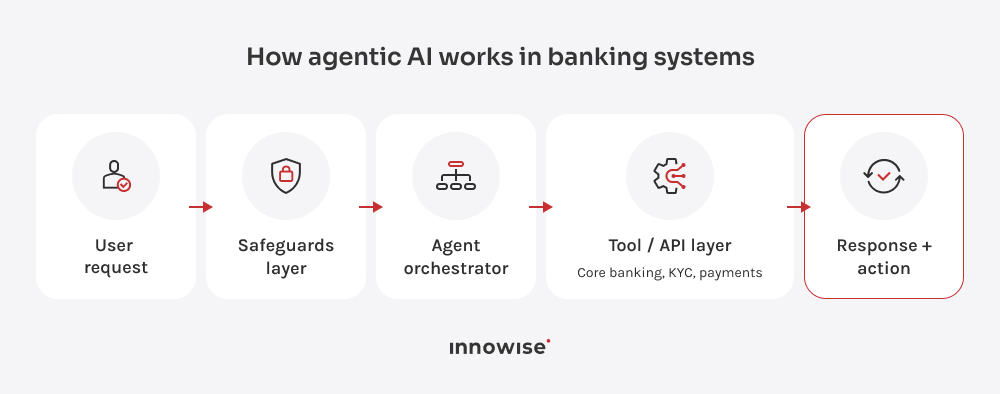
The KYC example shows the main point: agentic AI in banking needs checks, stop points, and human review when risk or bank rules call for it. Without those capabilities, you get a chatbot with a fancier label.
Persistent state
Banking work rarely happens in one neat exchange. Take a mortgage application. A customer uploads salary documents, pauses the process, then returns a few days later with a bank statement and the missing form. An AI agent picks up from the last completed step. It knows which documents have passed review and what is still missing. Your team sees the same case history in one place instead of pulling it from emails, CRM notes, and document uploads.
Tool orchestration
A banking agent needs to use systems in the right order. For a cross-border payment, the agent may need to check the recipient’s details, account balance, payment limit, exchange rate, and fees before moving the payment. Sanctions screening is always done separately as a required compliance step.
If any payment details are missing, the process stops. If the payment is over the limit, it’s sent for review. If sanctions screening finds a possible match, the agent doesn’t decide whether the payment can continue. Instead, the process stops, and the case is sent to a compliance specialist. A chatbot might tell the customer, “Your payment is being processed.” The agent checks the necessary systems and moves the case forward once it’s approved.
Multi-step reasoning
Some banking decisions require several smaller checks along the way. Loan approval is a good example. The agent looks at things like income, credit history, existing debt, uploaded documents, product rules, and any missing information. If everything is in order, the process moves quickly. If there are gaps, the agent needs to be more careful. When information is missing or the debt profile seems unusual, the agent summarizes the issue and sends the case to an underwriter. The underwriter still makes the final decision, but now has a clearer case file to review.
Constrained tool use
Agentic AI for customer service in banking can’t act on the model’s suggestion alone. The agent prepares the next step, but every action still passes through external controls before it reaches a banking system. The gateway checks permissions, limits, AML flags, and human approval rules.
Customer data works the same way. For a declined card payment, the agent may need the case ID, transaction status, and the last four digits of the card. It doesn’t need the full card number, passport scan, income file, or the whole history. If the case is risky, the control layer stops the flow and routes it to the right team with a record of what the agent checked and why it stopped.

 Hire us
 About us






 Client review