How to build an AI app: a complete guide for 2026

May 13, 2026 12 min read
Summarize article with AI

Key takeaways

  • Start with the problem. The best AI apps solve a clear user or business need instead of chasing AI for its own sake.
  • Data quality affects the result. Weak, messy, or scattered data usually causes bigger problems than the model itself.
  • MVP thinking matters. A smaller first version helps you test the use case, build trust, and avoid wasting budget on the wrong setup.
  • Integration is often a make-or-break for projects. The model still has to fit the product, connect to real systems, and hold up under live conditions.
  • AI apps need ongoing work after launch. Monitoring, feedback, retraining, and cost control are part of the product, rather than cleanup work for later.

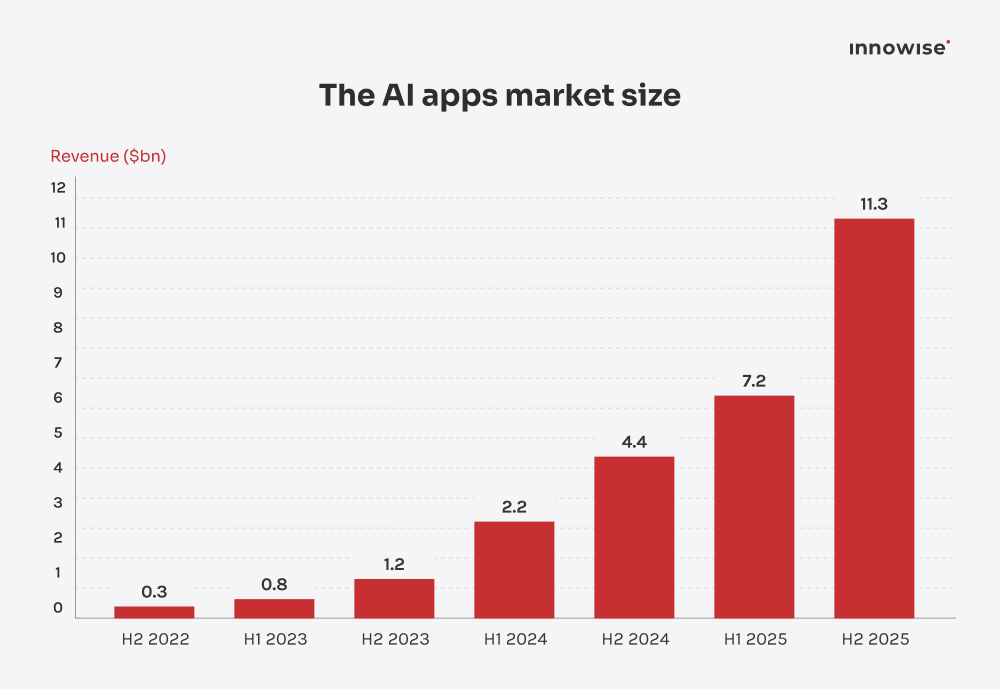
The AI app market is on an absolute tear. Last year alone, it generated $18.5 billion in revenue, up 180% from the year before, and projections put it at $88 billion by the end of the decade. By late 2025, more than 1.1 billion people were using AI apps, with ChatGPT alone occupying 40% of that market. Sounds like a pretty good moment to ask how to build an AI app, right?

There’s a catch, of course. Companies are pouring billions into AI, yet only 5% of integrated AI pilots are generating millions in value. The rest are still sitting there with no measurable P&L impact. Grim? A little. A reason to panic? Nope. It just means you need to come in better prepared and make sharper decisions from the start.

In this guide, I’ll walk you through the full AI app development lifecycle. We’ll cover the core components, the right tech stack, the realities of data preparation, and the cost side of the process, too. By the end, you’ll have a much clearer picture of how to make an AI app that stands out.

What is an AI app?

AI app definition

Before we get into the development process, let’s clear up one basic question: What is an AI app? If you already know the AI app definition, you can skip ahead.

An AI app, or artificial intelligence application, is software that uses machine learning, natural language processing, computer vision, or other AI technologies to manage tasks typically handled by humans. Traditional software sticks to pre-programmed rules and follows the same logic every time. AI apps work differently. They can learn from data, adjust to new inputs, and generate fresh insights or content.

Let’s say a marketing manager wants a quick read on which campaigns are bringing in the best leads this week. In a regular app, that kicks off the usual routine. Open a few dashboards, add filters, compare the numbers, and pull the answer together manually. With an AI app, they can ask the question outright and get the summary back on the spot, based on live data.

How AI apps work

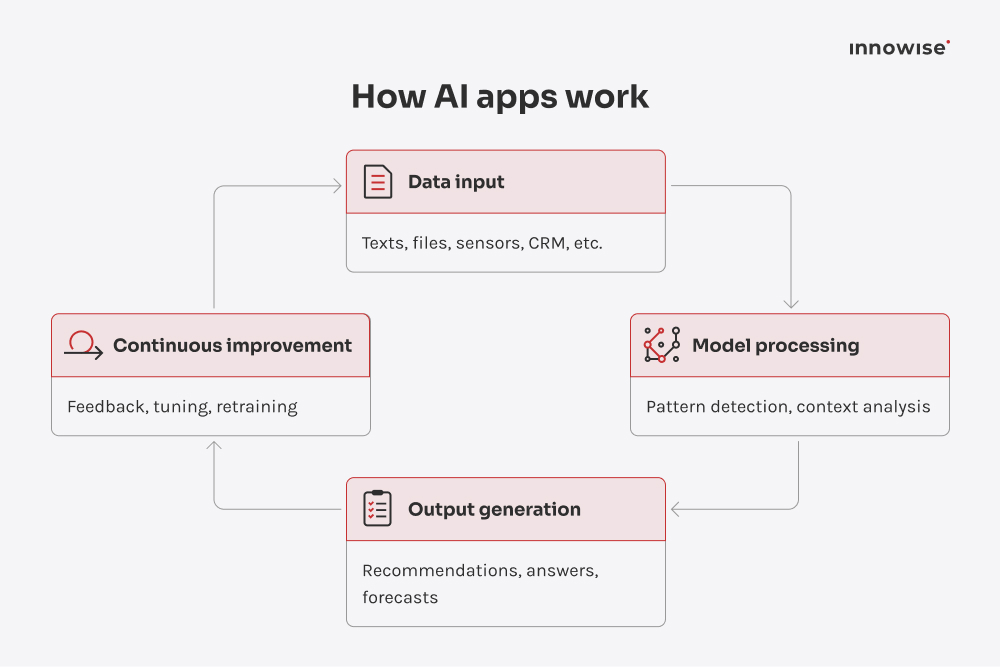
If you want to understand how to create an AI app, it helps to look under the hood. A lot of people picture AI as some kind of black box: data goes in, magic comes out. In real projects, it’s much more structured than that. Most AI apps run on a loop with four main stages, and once you understand that loop, the whole system starts to make a lot more sense.

  • Data input. Everything starts with data. The app pulls in raw information from user actions, uploaded files, sensors, business systems, APIs, CRMs, ERPs, or third-party platforms. In my experience, this stage causes more problems than teams expect. Poor data quality, missing fields, outdated records, or inconsistent formats slowly hinder the app before the model even gets going.
  • Model processing. Next, the AI model processes that data. It identifies patterns, interprets context, scores probabilities, classifies inputs, or generates a response. The exact behavior depends on the use case. A fraud detection model looks for suspicious patterns. A recommendation engine looks for preferences and intent. A generative AI app tries to produce useful text, images, or answers based on the input it receives.
  • Output generation. After that, the app turns the model’s output into something you can use. That could be a product recommendation, a generated summary, a chatbot response, a fraud alert, a pricing suggestion, or an anomaly detection signal.
  • Continuous improvement. Once the app is live, the loop keeps going. User feedback, new data, edge cases, and real-world behavior all feed back into the system, allowing the model to be refined over time. That may mean retraining the model, adjusting prompts, improving data pipelines, or adding rules around the output.

AI apps vs traditional apps

The next logical question is usually this: how different are AI apps from regular software? Honestly, pretty different.

With traditional apps, the logic is fixed. You define the rules, the system follows them, and the output stays predictable. AI apps work differently. They learn from data, handle uncertainty, and produce results that can vary with context, input quality, and model behavior.

Because of that, the whole development approach changes. You still build the application logic, but you don’t define every AI output through fixed rules. Part of the system’s behavior stems from the model, the data behind it, and the way you guide and evaluate it. That’s why testing, monitoring, and iteration carry much more weight.

Key differences

To make this life easier, I’ve compared the differences in the table below. In real-world projects, the gap becomes evident, especially when a team moves from prototype to production.

Feature
Traditional apps
AI apps
Core logic
Operate based on predefined rules, workflows, and business logic
Operate based on trained models, probabilistic outputs, and pattern recognition
Adaptability
Require manual code or rule updates to change behavior
Can be improved through retraining, fine-tuning, prompt updates, or feedback loops
Automation
Best suited for structured, rule-based tasks
Better suited for tasks involving prediction, interpretation, generation, or classification
Personalization
Usually limited to user-defined settings or fixed logic
Can adapt outputs based on user behavior, context, and historical data
Data processing
Primarily work with structured data and predefined inputs
Can process both structured and unstructured data, including text, images, audio, and behavioral signals
Output
Deterministic and predictable
Context-aware and probabilistic
Decision-making
Executes decisions within explicitly programmed conditions
Supports decision-making through predictions, rankings, recommendations, or generated responses
Improvement cycle
Improved through code changes, feature releases, and bug fixes
Improved through model evaluation, data updates, retraining, and output monitoring
User interaction
Typically form-based, command-based, or workflow-driven
Often conversational, assistive, or dynamically adaptive
Typical use cases
ERP systems, booking platforms, accounting tools, admin portals
Chatbots, recommendation engines, fraud detection systems, vision-based apps, AI copilots
Show more

Development approach

Traditional software development starts with logic. You write the rules, define the flows, and make sure the system behaves as planned. AI app development shifts the focus pretty quickly. Now you’re thinking about data quality, model training, evaluation, and tuning alongside the code. The app still needs solid engineering, but the behavior users see depends just as much on the model and how well the whole setup supports it.

Performance & scalability

Traditional apps usually scale familiarly. Traffic goes up, you add more backend capacity, and the system keeps up. AI apps are heavier by design. Every generated answer, prediction, or image takes real compute, especially when users expect near-instant responses. That’s why AI products often need GPUs, faster inference pipelines, and tighter infrastructure planning to stay responsive when demand jumps.

User experience

Traditional apps usually make people follow the interface. You move from screen to screen, pick from menus, fill in fields, and work through the flow step by step. AI apps feel different right away. People can say what they want, adjust as they go, and get help without digging around for the right button or page. The experience becomes more natural, more flexible, and often more personal.

Take a travel app. In a traditional setup, you choose dates, destination, budget, flight length, and hotel preferences one step at a time. In an AI app, a user can simply say, “I want a warm weekend trip in April for under $800 with a short flight from Berlin,” and start from there. That’s why the experience feels different. The app helps shape the path with the user rather than having the user figure out on their own.

People often assume that it all starts with choosing a model. In reality, you first need to understand the problem, make sure the data is usable, and build an early working prototype that you can see in action. Once you get that right, the next steps become much easier.

Chief Technology Officer

Key components of an AI app

If you pull an AI app apart and look at what is actually inside, the setup is usually less mysterious than people expect. The tools and frameworks can change from project to project, sure, but the core pieces tend to stay pretty similar. So before we get any further, let’s quickly walk through the main ones. If you already know this part, skip ahead.

Data collection & processing

Everything starts here. An AI app needs data to work with, and this layer is the one that pulls it in, cleans it up, labels it, normalizes it, and gets it into shape for the model. That could be text, images, audio, logs, or user behavior data, depending on the product. And yes, if the data pipeline is fragile, the model usually feels fragile too.

Machine learning models

Here’s where the AI logic sits. You might use a custom model built for one task, or take a pre-trained model and adapt it for something practical like classification, forecasting, summarization, or generation. In most cases, the choice comes down to accuracy, speed, cost, and the level of control you want over the output.

Model training & fine-tuning

Once you have the model, it needs to be shaped around your use case. Sometimes that means training from scratch. More often, it means fine-tuning, prompt work, retrieval setup, or task-level tuning on your own data. The point is to get answers that fit your business.

AI infrastructure

This is the part users never see, but they definitely feel it. We’re talking GPUs or TPUs for training and inference, cloud services to handle traffic, vector databases for retrieval, and the tools needed to serve models in production. It all affects how fast the app feels, how stable it stays, and how expensive it gets once real users start piling in.

Backend & APIs

The backend ties the model to the rest of the product. It handles business logic, authentication, database access, session storage, prompt routing, and API calls to external services or models (like OpenAI or Anthropic). It’s also where teams usually place guardrails, rate limits, and fallback logic, so when the model slips, stalls, or gives a weak answer, the app doesn’t fall apart.

User interface

And of course, every app needs a user interface, whether it’s for the web, mobile, chat, voice assistants, or AI features built into other software. When AI is involved, the frontend has even more to manage. Replies might stream in real time, users might ask follow-up questions, upload files, or give instant feedback. If this experience feels awkward, the whole app will feel awkward, no matter how good the underlying model is.

Monitoring & continuous learning

Launching the app is one step. Keeping it useful is another. AI systems need ongoing monitoring because output quality can shift over time. Teams usually track latency, failed responses, hallucinations, drift, and user feedback. In stronger products, that feedback feeds into retraining, prompt updates, evaluation flows, or human review, so the app keeps improving after launch.

AI technologies used in app development

Many people hear terms like machine learning, deep learning, or generative AI and lump them together as if they all do the same job. They don’t. Each one is built for a different kind of task, needs a different level of data and infrastructure, and shapes the product differently. That’s why picking the right one matters just as much as picking the right vendor or development plan.

Machine learning

Machine learning is often the first choice when an app needs to learn from data rather than following preset rules. It works well for recommendations, fraud detection, demand forecasting, and personalization, where the system needs to spot patterns and make better decisions over time.

Deep learning

Deep learning takes things further. It is part of machine learning, but it is better suited to more complex input like images, speech, video, or messy behavioral data. Teams use this technology when simpler models stop being enough. The upside is obvious. The setup is heavier, too. More data, more compute, more tuning, more work to keep it in shape.

Natural language processing

If the app needs to work with text or speech, natural language processing is usually part of the picture. It powers chatbots, search, translation, summarization, sentiment analysis, and text classification. What makes it useful is also what makes it tricky. People rarely say the same thing the same way twice, so the system has to deal with wording, context, tone, and intent all at once.

Computer vision

Computer vision is what gives an app eyes, more or less. It lets software work with images, video, and camera input, which is why it shows up in things like facial recognition, document scanning, object detection, medical image analysis, and visual search. For users, this usually feels pretty natural. They point the camera, scan something, upload a file, and expect the app to understand what is in front of it.

Generative AI

Generative AI is getting a lot of attention right now, and honestly, fair enough. It lets apps generate text, images, code, audio, and other content on demand. More importantly, it changes how people interact with software. Instead of clicking through a fixed set of steps, users can describe what they need and get something useful back.

Bring your AI app to market faster.

How to make an AI app: step-by-step process

Define the problem & goals

You should not start with the model, but with the problem itself. I’d even say this is one of those points that the entire logic of the project depends on. If it’s not clear from the very beginning exactly what the app should do for the user, what business outcome you want to achieve, and what the real role of AI is, it’s very easy to go off track later. And once that happens, the discussion around tools, models, and the tech stack starts too early.

I’d also define success criteria right from the start, and on two levels at once. On one hand, there are product metrics: does the solution save time, improve conversion, or help users complete tasks faster? On the other hand, there are model metrics like accuracy, precision, recall, F1 score, and fairness. You need both. A good model in isolation doesn’t guarantee anything.

Validate the idea

Once the problem is clear, test the idea before spending months on it. At this stage, many brilliant AI ideas become something much simpler, but actually useful. And that’s fine. Sometimes AI really is the right solution. Sometimes the same problem is better solved with a good search function, a more intuitive interface, or just a better-organized workflow.

That is why I’d always recommend running an early PoC around a narrow scenario. Take one specific use case, run realistic data through it, and see what the system actually produces. It is also the point where you find out whether users will trust it at all.

Prepare data

On paper, every company has data. Sure. In real projects, that data is often messy, duplicated, poorly labeled, scattered across different systems, or simply missing the fields the model needs to do its job well. So this stage usually comes down to collecting the right data, cleaning it up, organizing formats, adding relevant labels, and splitting everything into training, validation, and test sets.

If you’re building a generative AI app, the job can stretch further. You may also need to prepare internal documents, support content, or knowledge bases so the system can retrieve the right information when it generates a response. For retrieval-augmented generation systems, the chunking strategy matters a lot. The way data is split directly affects how well the LLM retrieves relevant context, preserves meaning, and stays within token limits.

Choose tools & technologies

This is the stage where I’d keep things practical. A lot of teams lose time chasing the “perfect” stack, when what really matters is choosing one they can build with now, ship without extra hassle, and still manage six months from now.

For many teams, Python is still the most sensible place to start. PyTorch or TensorFlow usually cover the model side, while FastAPI or Flask are common choices for serving. If you’re building a generative AI product, you may also need embeddings, vector storage, and a retrieval layer. Cloud platforms like AWS, Azure, or Google Cloud usually come into the picture early, along with Docker, CI/CD, and monitoring tools.

Tech stack for classic AI and generative AI apps

Layer
Classic AI / ML app
Generative AI app
Primary use case
Classification, regression, forecasting, anomaly detection, recommendation
Chat, search, summarization, copilots, content generation, document Q&A
Programming language
Python, R
Python, JavaScript / TypeScript
Core model stack
Scikit-learn, XGBoost, PyTorch, TensorFlow
PyTorch, TensorFlow, Hugging Face Transformers
Data layer
Pandas, NumPy, feature pipelines
Pandas, NumPy, document parsing, chunking, embeddings
Serving/API layer
FastAPI, Flask
FastAPI, Flask, vLLM, Ollama
App UI/prototyping
Jupyter Notebook, Streamlit, web app
Gradio, Streamlit, web app
Storage
PostgreSQL, MongoDB, object storage
PostgreSQL, MongoDB, Pinecone, Qdrant, Milvus, pgvector
Retrieval layer
Usually not needed
Vector store/vector index, embeddings, reranking
Model orchestration
Batch jobs, model endpoints, and scheduled pipelines
LangChain, LangGraph, LlamaIndex, Semantic Kernel
Experiment tracking/evaluation
MLflow, offline metrics, A/B testing
MLflow, prompt evaluation, response quality checks, tracing
Containerization
Docker
Docker
Orchestration/scaling
Kubernetes
Kubernetes
Cloud platform
AWS, Azure, Google Cloud
Monitoring
Logs, latency, accuracy, drift, infra metrics
Logs, latency, token usage, response quality, infra metrics
CI/CD
GitHub Actions, GitLab CI, Jenkins
Testing
Unit tests, integration tests, load tests
Unit tests, integration tests, load tests, prompt / output evaluation
Show more

Train or fine-tune the model

Depending on the use case, you might train a model from scratch, fine-tune a pre-trained one, or use retrieval to ground responses in your own data. In most product scenarios, I wouldn’t jump straight to training from scratch. Fine-tuning or retrieval usually gets you to a useful result faster, with less cost and a lot less guesswork.

The harder part is being realistic about what the model actually needs to do. If the task is narrow, keep it narrow. If the output depends on domain knowledge, a general model will not magically understand your business on its own.

Build an MVP

Once the model direction looks promising, build the smallest version that can prove the idea. One use case, one workflow, one clear outcome. That is enough to show whether the product is worth a bigger investment.

I’m a big believer in this step because users reveal weak spots very quickly. They ask things you did not expect, use the feature in the wrong place, ignore the part you thought they would love, or depend on it for something riskier than you planned. You want to learn that early, while the product is still small and changes are still easy to make.

Integrate AI into the app

A model on its own is not yet a product. It still has to work inside the app, connect to the backend, use the right data, and support the flow the user is already in.

You need to expose the model through an API, decide whether inference runs in the cloud or on-device, connect it to internal systems, and shape the UX around how the model actually behaves. What do users see while it is thinking? What happens when the answer is slow, weak, or simply misses? How can a user retry, correct it, or leave feedback? This is the stage where you see whether the AI feels like a natural part of the product or just an added extra.

Test & improve

AI apps need a different kind of testing from standard software. Yes, unit tests, integration tests, and user acceptance testing still matter. But they only cover part of the job. You’ll also look at output quality, response time, edge cases, drift, and bias.

I usually think of this as a live feedback loop. You put the product in front of users, watch where it fails, collect feedback, and improve the prompts, training data, retrieval logic, or model settings.

Deploy & monitor

At this stage, you need to put the app on the right platform, get the environment set up, connect the databases and outside services, and make releases in a way that does not create chaos. In practice, that usually involves CI/CD pipelines, rolling updates, and container-based deployment so the production setup stays close to what the team tested.

After deployment, you need to track response times, error rates, uptime, and resource usage, but that is only part of it. For an AI app, I’d also watch user flows, drop-off points, feedback, and the points where people start losing trust in the output.
And once the app is live, you still need updates, performance fixes, user feedback loops, and security patches.

Scale & optimize

Once the app is live, real usage starts showing you things no test set could. People behave differently, data shifts, weak spots appear, and the model that looked good at launch can deteriorate over time. At the same time, the product has to handle more users, more requests, and higher model costs without slowing down or becoming too expensive to run.

At this stage, you need to keep the system efficient as demand grows and the AI useful as conditions change. That includes monitoring performance, controlling model and infrastructure costs, collecting fresh data from real use, and updating the model or retrieval logic when needed. User feedback matters here too, because it helps you see where the product is still falling short.

AI app tech stack

Frameworks & libraries

The choice of tools depends on what you want the app to do. For example, PyTorch, TensorFlow, and scikit-learn are common picks for predictive models. LangChain and Hugging Face often come up in language-based features. OpenCV is a familiar choice for image-related tasks. So there’s no single stack that fits every case. The setup changes with the product.

Cloud platforms

Most AI apps run in the cloud because training, inference, storage, and scaling add up fast. AWS, Azure, and Google Cloud are the usual go-tos here. They give teams the infrastructure to deploy models, run GPU workloads, monitor performance, and handle security without sinking time and budget into building everything from scratch.

APIs & pre-trained models

Most companies don’t start from zero. They use APIs or pre-trained models to get things moving faster. That might mean OpenAI, Anthropic, Google, AWS, or an open-source model adapted to the job. It saves time, which is a big plus early on. Still, those shortcuts come with trade-offs. Cost, response speed, control, and compliance all need a closer look.

Data infrastructure

An AI app needs a data layer that can pull data, clean it up, store it, and distinguish the right pieces when the model needs them. In practice, teams rely on ETL/ELT pipelines, data lakes or warehouses, PostgreSQL or NoSQL databases, vector stores like Pinecone or Weaviate for semantic search, and orchestration tools such as Airflow. Add streaming with Kafka, along with monitoring and lineage, and the model gets stable inputs, it can work with.

AI app development cost

It’s easy to focus on features, models, and use cases right up until the budget comes up. That’s usually when teams realize AI app development works a bit differently from regular software. Some costs are familiar, sure. But AI also brings unforeseen layers, especially around data preparation, model usage, evaluation, and ongoing improvement. That’s why costs can climb quickly. The best way to plan for that is to understand what adds the most.

What affects the cost

  • Solution complexity. The bigger and more custom the app, the higher the cost. A basic chatbot built on top of an existing API is one thing. A custom predictive system with its own logic, workflows, and backend is a very different level of work.
  • Data volume & quality. If the data is fragile, spread across different systems, or missing key pieces, a lot of time and budget will go into cleaning, organizing, and preparing it before the AI part can even start.
  • Chosen technologies. The tech stack directly impacts cost. Commercial APIs like OpenAI can launch quickly, but they come with ongoing usage fees. Open-source models can give you more control, though training and hosting them usually mean higher upfront cloud and engineering costs.
  • Team composition. AI projects often need a broader team than regular app development. Once data scientists, ML engineers, and MLOps experts are involved, costs go up quickly.

MVP vs full AI product

That’s why I usually push teams to start with an MVP. It’s the simplest way to test the idea without sinking too much time, money, or effort into the wrong version of the product.

You learn fast whether the AI is helpful, whether people trust it enough to use it, and whether the idea still makes sense once it hits real data, real workflows, and all the usual business constraints. If it holds up, you move forward with much more confidence. If it doesn’t, you’ve learned something important early, before the budget starts running away from you.

Estimated cost ranges

So, how much does AI app development cost? There’s no single number, because the budget depends on product scope, the complexity of the AI setup, the quality of your data, and how much needs to be built from scratch. Still, these 2026 ranges will give you a good starting point.

  • AI integration / basic MVP using existing APIs: $15,000 to $40,000
  • Custom AI app with fine-tuned models and a more complex backend: $50,000 to $150,000
  • Enterprise AI platform with custom models and large-scale deployment: $150,000 to $500,000+

AI app examples

We can talk about AI apps and how to build them all day, sure. But that doesn’t tell you much until you see how wildly different they can be in practice. AI in healthcare and pharma looks nothing like AI in retail, fintech, or logistics, even when some of the building blocks overlap. So if you want to figure out whether your business actually needs one, and what that could look like, the best place to start is with real AI cases.

In healthcare, AI apps power medical imaging analysis, symptom triage, clinical documentation, and patient risk scoring. Behind the scenes, they combine EHR integrations, NLP, computer vision, and HIPAA-grade security controls to process sensitive health data with precision and care.

Take Microsoft’s Dragon Copilot, for example. This AI clinical assistant combines ambient listening, voice dictation, and generative AI so clinicians can capture patient conversations, generate notes on the spot, and access medical data directly inside EHRs. This app steps into the daily workflow and takes a chunk of admin work off clinicians’ shoulders. Which, let’s be honest, is clearly needed.

Fintech

AI apps help fintech companies catch fraud faster, make better credit calls, take some of the load off support teams, and give users financial insights they can actually do something with. They can flag suspicious transactions in real time, make banking feel more relevant to the person on the other side of the screen, and help shape everyday decisions across lending, payments, and investing.

A good example is Mastercard Decision Intelligence. Mastercard describes it as a real-time transaction risk monitoring solution that helps prevent fraud while approving genuine transactions. In its announcement, Mastercard said the system already helps banks score and safely approve 143 billion transactions a year, and that the next-generation technology improves transaction scoring in less than 50 milliseconds.

Retail & e-commerce

In retail, AI apps help brands make shopping feel less generic and a lot more relevant. They can shape product discovery, predict demand, speed up support, and adjust pricing with better timing. In real life, that shows up as smarter recommendations, more useful search results, tighter inventory planning, and fewer abandoned carts because the whole journey feels smoother and better matched to the customer.

Walmart is a good example. The company has brought AI directly into product discovery and shopping journeys by letting Google’s Gemini work with Walmart’s systems. The result is a more conversational and personalized shopping experience, with AI playing an active role in how customers search, browse, and buy.

Logistics

In logistics, AI helps teams plan better routes, forecast deliveries more accurately, automate warehouse work, and catch maintenance issues before they disrupt operations. These apps usually combine telematics, IoT data, geospatial analytics, and machine learning models that work with real-time data across fleets, hubs, and supply chains.

For example, DHL company uses AI-powered DHLBots in hubs and gateways for sorting and warehouse operations. DHL says these sorting robots can raise capacity by around 40%.

Marketing

Marketing teams use AI apps because there’s always too much to do and never much time to do it. These tools help with audience segmentation, customer behavior prediction, content generation, ad spend decisions, and repetitive outreach. That means teams can react faster, run campaigns with less manual work, and make calls based on live data instead of guesswork.

Adobe GenStudio for Performance Marketing is a good example. It’s made for marketers who need to turn around campaign assets quickly, keep everything on-brand, and avoid the usual approval bottlenecks. It pulls in performance data from platforms like LinkedIn and TikTok, so teams can create content, see what’s working, and make changes without hopping between different tools.

Challenges in AI app development

If you wonder how to develop an AI app at a high level, it can sound pretty clean. Pick a model, connect some data, ship the product. That is the nice version. The real work usually gets stuck in five places, and they are a lot less glamorous than the demo.

Data quality

Everything starts with data. If the inputs are messy, incomplete, outdated, or inconsistent, the app picks up the wrong signals fast. And once that happens, the output starts slipping too. You might have a polished interface and smooth user flows, sure, but people notice very quickly when the answers feel off, or the recommendations miss the mark.

Model accuracy & bias

A model can look strong in testing and still struggle once it hits real conditions. New users, different regions, and day-to-day workflow quirks tend to expose the gaps pretty quickly. Accuracy can drop, bias can surface, and edge cases can pile up before teams realize what is happening. That is why ongoing validation, monitoring, and retraining need to be part of the plan from the start.

Integration complexity

The model might work fine on its own. That does not mean it will fit neatly into your business. It still has to connect to the systems your teams already use, from apps and databases to APIs, workflows, and reports. When those systems are outdated, disconnected, or hard to work with, integration becomes one of the biggest headaches in the whole project.

Costs & scalability

AI can seem fairly affordable in the early stage, especially when it is still just a prototype. Then real usage kicks in. More users come in, more data needs processing, the model needs updates, and the cost starts climbing. Without the right technical setup behind it, a company can end up with a solution that works nicely at first, but gets expensive fast and becomes tough to scale

Security & compliance

AI apps often use regulated data, so you need to think about security early. For example, in the EU, GDPR sets rules for how data is collected, used, and stored, and the EU AI Act adds extra requirements for some AI systems. And when the stakes are higher, and your in-house team is not fully sure how to handle it, I’d recommend bringing in AI security consulting experts to spot problems before the app goes live.

Regulatory compliance & AI safety

By 2026, with the EU AI Act and other global rules in force, teams need to put bias checks, model transparency, and safety guardrails into the product early. If they miss things like the right to explanation or data lineage, the risks are real: legal exposure, project delays, or even a full stop on deployment.

Best practices for AI app development

Let’s be honest, a good AI app rarely comes down to one brilliant technical decision. It usually comes from getting the basics right over and over again. That may sound less exciting than chasing the latest model release, but in real projects, these habits are what turn a promising prototype into something people can actually use and trust

  • Start with an MVP. Don’t start by building the full AI app with every feature you have in mind. One strong use case is enough. For example, if you’re building an AI support app, start by answering common customer questions, not ticket routing, sentiment analysis, voice support, and analytics all at once. It helps you test whether the app is actually useful, spot problems early, and avoid spending time on features people may never use.
  • Reuse existing models where it makes sense. You don’t need a custom model for every AI app. A lot of teams go there too early and waste time for no real payoff. In many cases, pre-trained models and APIs are the fastest, most practical way to get something useful in front of users.
  • Focus on data quality. This part isn’t fancy, sure, but it matters far more than you can expect. If the data going in is messy or incomplete, the results coming out will be shaky too. That is why strong AI apps usually depend less on clever modeling and more on having clean, relevant, well-structured data from the start.
  • Improve the model over time. Launch isn’t the finish line. Models need monitoring, feedback, and retraining if you want them to stay useful once real users and real data start pushing on them.
  • Keep people in the loop. When the output can affect money, health, safety, or someone’s rights, AI should not act on its own. A person should review the result, decide whether it makes sense, and approve the next step. For example, an AI app can flag suspicious payments or score loan risk, but a human should still check high-impact cases before a card is blocked or a loan is denied.

How Innowise can help

If, after reading this, you feel your team may not handle the whole thing in-house, that doesn’t mean the idea has to stall. Many companies hit that same point. The good news is you can bring in a partner and keep moving. My team at Innowise has worked on a wide range of AI projects, so we’ve seen where companies usually get stuck and what support makes a real difference. Below, I’ve gathered the most common reasons clients come to us and how we usually help.

End-to-end AI app development

Some clients know exactly what product they want to build. Others have only a rough idea, a business challenge, and a feeling that AI could help. In both cases, we start the same way: by figuring out what’s worth building first and what will work in a real product.

Our AI experts help you define the first version, decide what belongs in a POC or MVP, and sort out the data and product foundations. Then we build, test, and launch the app. Our AI development services cover that entire process, which works well for companies that want one team to carry the product through without the usual back-and-forth.

AI consulting & strategy

It is easy to get swept up in the AI hype and build something nobody uses. With our AI consulting services, we help you to prevent exactly that. Our team sits down with you, looks at the data you really have, tests whether the idea holds up, and maps out a plan that makes sense before the heavy engineering starts.

Whether you need a lean POC to secure stakeholder buy-in or a strategic plan to modernize your legacy architecture, we make sure your investment is tied directly to a business outcome. Our experts also frequently step in to rescue stalled projects or perform AI technical debt cleanup for teams that moved a little too fast during the hype cycle and need to stabilize their infrastructure.

Custom AI model development

Off-the-shelf APIs are great for simple tasks, but they don’t work for everything. When your application requires strict data privacy, highly specialized domain knowledge, or complex predictive capabilities that generic models can’t handle, we build it from the ground up. From early MVP work to full enterprise AI deployment, we create custom models that fit your business logic, connect with the rest of your system, and keep working as your user base grows.

Integration & scaling

When we talk about integration, we mean embedding the model into the working environment in which the business already operates. That includes databases, internal APIs, current processes, access rights, and security requirements. On top of that, it is almost always necessary to build additional logic around the model itself, so the product works stably and predictably, even when the AI does not respond immediately or has to pull data from multiple sources at once. 

From there, everything depends on the product itself. In one case, the goal is to connect generative AI to the company’s internal data so it can produce genuinely useful results tied to the real business context. In another, the task is to give AI agents access to the right systems and the right level of permissions. If we are talking about a customer-facing product or an internal tool, this often means placing an AI chatbot or copilot where people already work, so the help appears not somewhere separately, but right at the moment it is needed.

Scaling is essentially a continuation of the same work, just under a heavier load. As the number of users and requests grows, the system has to handle that growth without slowing down and without a sharp increase in costs. And this is where it becomes very clear how well things were thought through in advance. Routing, caching, infrastructure, usage patterns, the cost of model calls, all of this is better calculated before growth starts, not after. Otherwise, bottlenecks and extra costs show up very quickly.

Future trends in AI app development

And one thing I’d definitely keep in mind. If you’re building an AI app in 2026, you need to look a bit ahead. I’ve seen teams build around what users want right now, then realize a few months later that expectations have already changed. Things move fast. The telephone took decades to spread. ChatGPT reached 100 million monthly users in about two months, then climbed to roughly 800 million weekly users by early 2026. Once products scale that fast, user expectations do the same.

Generative AI

Generative AI is already past the early hype stage and is settling into how modern apps are expected to work. People are getting used to software that can write, summarize, explain, generate content, and respond in natural language without asking much from them.

The numbers back that up. Statista estimated the global generative AI market at roughly US$63 billion last year, while Deloitte found that 51% of surveyed gen AI users say they use it every day, and 38% say they use it at least once a week. That shows AI is already becoming part of everyday behavior.

And once that shift happens, expectations tend to stay there. So if your app cannot support more natural interaction or take repetitive work off the user’s plate, it can start to feel dated pretty quickly.

Native multimodality

Another shift is changing how AI apps handle input and output. The line between text bots, voice tools, image generators, and video models is getting thinner. Stronger AI apps are starting to work across several formats at once, so they can understand and generate text, audio, images, and video within the same flow. For developers, this means moving from simple text APIs to sophisticated multimodal pipelines.

Generative UI (GenUI)

The interface is starting to change, too. Instead of forcing users through the same fixed screens every time, AI apps are beginning to shape the interface around the request itself. That is the idea behind generative UI.

So if a user asks for a financial report, the app may not answer with a block of text alone. It can generate the view around that task on the spot, with the right charts, filters, summaries, and action buttons for that exact request. For product teams, this opens up a very different direction. The interface stops being a fixed layer and starts reacting much more directly to what the user is trying to do.

AI agents

If generative AI changed how people talk to software, AI agents push that much further. They can figure out the steps, use tools, pull data from other systems, and handle part of the task for you. In products built around workflows, that changes the whole setup. With advanced cool calling (function calling) mechanisms and multi-agent frameworks, these agents can coordinate multi-step flows on their own. One agent writes code, another tests it, and another handles deployment, etc.

And yes, this is already happening. In PwC’s AI Agent Survey, 79% of companies said AI agents were already being adopted, and 66% of adopters said they were seeing measurable productivity gains. Sounds great. There is a catch, though. Deloitte also found that only 21% of companies currently have mature governance for autonomous agents. So the apps that win here will be the ones that get security, auditability, and user trust right.

Edge AI

The next trend is about where AI runs. With edge AI, the model works closer to where the data is created, on a phone, camera, sensor, vehicle, or local device, instead of sending everything to the cloud first. That matters because these products often need to react in real time. They can’t always afford to send data away, wait for it to be processed, and then get a response back.

That’s a big reason edge AI is gaining ground. Grand View Research valued the global edge AI market at $24.91 billion in 2025 and expects it to reach $118.69 billion by 2033. So for anyone building an AI app in 2026, the takeaway is pretty straightforward: if your product depends on fast decisions, local data, or unstable connectivity, edge AI becomes part of the product strategy, not just the technical setup. And with smaller language models (SLMs) getting much stronger, that shift feels a lot more real. You can now run fairly advanced reasoning right on the device without massive cloud computing.

Low-code & no-code AI

The last trend is low-code and no-code AI. Instead of writing everything from the ground up, teams can use visual builders, drag-and-drop tools, and ready-made components to put together apps, workflows, and AI features much faster. Tools like Bubble, Akkio, and Glide already make it easier to launch chatbots, predictive features, and internal AI tools without starting from scratch.

If you’re building an AI app in 2026, this changes a lot at the early stage. You can test the idea sooner, shape the workflow faster, and get something useful in front of users before the project turns into a long, expensive build. Custom engineering still matters once the product gets more complex, but these tools are already changing how version one gets built.

Conclusion

If you’ve read this far, you’re probably genuinely interested in how to create an artificial intelligence app. You’ve also likely realized that this has very little to do with choosing a model at the initial stage. The real work lies in defining the problem correctly, preparing the data, choosing a setup your team can actually handle, and turning the model into something people truly trust.

AI apps are never really done, either. They get better through feedback, monitoring, updates, and smarter decisions over time. Sometimes that also means admitting your team may not be able to carry the whole thing alone and bringing in a partner who can help. That’s completely normal.

And my honest advice is simple. Start smaller than you’d like. Focus on practicality. If the use case is real and the foundation is solid, you have a much better chance of creating something that lasts.

FAQs

This rule says people keep 30% of the work that calls for judgment, oversight, and creative thinking, while AI takes on the other 70% of routine, repetitive, and data-heavy tasks. That split helps teams get more done without giving up control or accountability.

A simple MVP might cost a few thousand dollars, while a production-ready product can easily go past $100,000. It all depends on what you’re building, how much data it needs, what model you choose, how many systems it has to connect with, how tight the security has to be, and whether you’re using existing AI APIs or building custom models.

Yes, you can build an AI on your own, especially if you start with existing tools, APIs, or no-code and low-code platforms. For one person, a basic chatbot, classifier, or recommendation app is very doable. Once you move into more advanced systems, the bar gets higher: stronger technical skills, better data, solid testing, and ongoing support all start to matter a lot more.

author avatar

Head of AI Technical Expertise

An AI strategist focused on MLOps and deep learning, Artsiom builds scalable models that move beyond hype. He engineers data-driven solutions that provide a genuine competitive edge, from predictive analytics to complex automation.

Table of contents

    Contact us

    Book a call or fill out the form below and we’ll get back to you once we’ve processed your request.

    Send us a voice message
    Attach documents
    Upload file

    You can attach 1 file up to 2MB. Valid file formats: pdf, jpg, jpeg, png.

    By clicking Send, you consent to Innowise processing your personal data per our Privacy Policy to provide you with relevant information. By submitting your phone number, you agree that we may contact you via voice calls, SMS, and messaging apps. Calling, message, and data rates may apply.

    You can also send us your request
    to contact@innowise.com
    What happens next?
    1

    Once we’ve received and processed your request, we’ll get back to you to detail your project needs and sign an NDA to ensure confidentiality.

    2

    After examining your wants, needs, and expectations, our team will devise a project proposal with the scope of work, team size, time, and cost estimates.

    3

    We’ll arrange a meeting with you to discuss the offer and nail down the details.

    4

    Finally, we’ll sign a contract and start working on your project right away.

    More services we cover

    arrow