

ERP warehouse management system: how it works, ERP vs WMS, and how to choose

Nov 26, 2026 16 min read
Head of ERP Consultants
Verified expert
Every article at Innowise is created by authors with real-world experience. They understand the topic beyond theory and bring insight from real projects.
19+ years of experience
Verified expert
19+ years of experience
Kiryl is a specialist in SAP ecosystem optimization. He cuts through the complexity of enterprise resource planning, tailoring SAP modules to specific workflows to ensure clients extract maximum efficiency from their digital core.
Expertise
ERP Project management Process optimization
Let's talk

Key takeaways

  • ERP warehouse management connects inventory records with purchasing, sales, and finance. The warehouse operations it supports depend on your ERP’s capabilities and available modules.
  • Businesses have three main options. They can use basic ERP warehouse functions, an ERP-native WMS, or a standalone WMS connected to their ERP. Each provides a different level of control over warehouse operations.
  • Choose your warehouse management system based on your day-to-day operations. Test how each option supports stock reservations, picking, returns, and urgent orders.
  • License fees are only part of the budget. Configuration, data migration, integrations, warehouse devices, and employee training can add significantly to the total implementation cost.
  • A pilot warehouse helps reduce rollout risks. Testing real transactions and reconciling stock records at one location can expose problems before the system is rolled out to other sites.
Summarize article with AI

Your sales team confirms an order. The warehouse prepares to pick it, but then finds out another customer has already reserved the stock. The items are physically in stock, but your team can’t ship them. Now sales has to explain the delay. It’s a frustrating way to start the day. 

ERP warehouse management helps businesses avoid situations like this by linking inventory data with sales and warehouse operations. The best setup depends on how your warehouse runs. A basic ERP module might be enough for simple processes, while more complex operations could require a dedicated WMS.

In this guide, I’ll explain how an ERP warehouse management system works, where ERP and WMS differ, and what to consider when choosing a solution for your business.

Check if your ERP needs a WMS

What is an ERP warehouse management system?

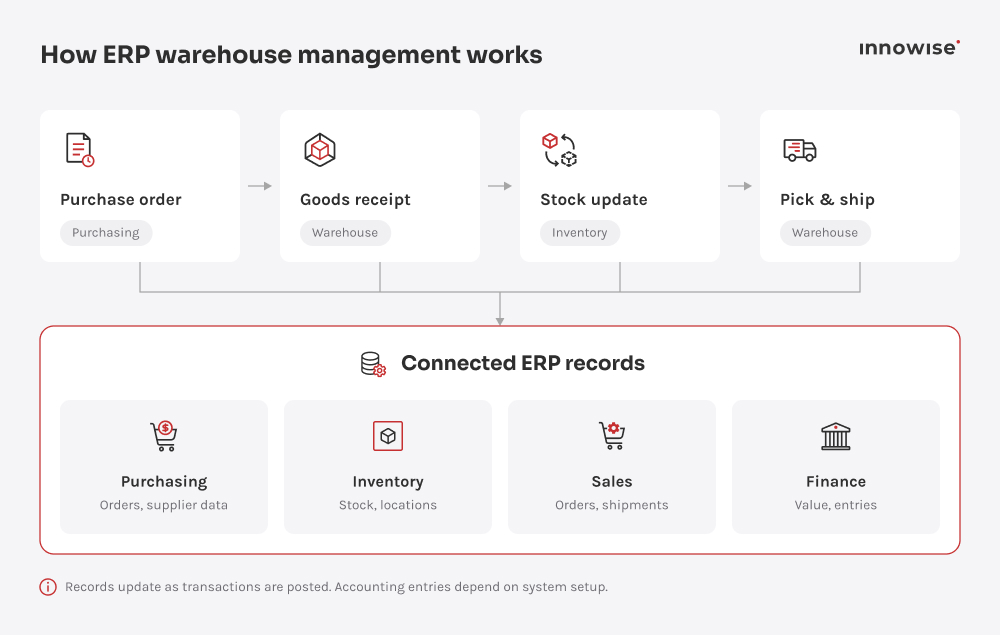
An ERP warehouse management system is the warehouse functionality within an ERP platform. It helps businesses track inventory and, depending on the software, manage receiving, put-away, picking, and shipping. Warehouse transactions also update relevant records across purchasing, sales, and finance.

ERP warehouse management workflow with connected business records.

Here’s a simple example. A supplier delivers 100 units against a purchase order, and warehouse staff record the receipt in the ERP system. The system updates stock levels and may also create an accounting entry, depending on the transaction and setup. That’s where ERP differs from accounting software. Accounting focuses on financial records, while ERP connects them to purchasing and warehouse operations.

Recording deliveries is only one part of warehouse work, though. Some ERP systems track stock quantities by location. Others support barcode scanning and direct employees to the right storage bins or picking locations. For more complex operations, an ERP-native or standalone WMS may be a better fit.

Not sure whether your ERP supports your warehouse processes?

ERP vs WMS: three ways to run the warehouse

ERP and warehouse management systems (WMS) focus on different aspects of warehouse operations. ERP links inventory with orders and financial records, while a WMS manages daily warehouse tasks, such as deciding where to store incoming goods and how to organize picking. Some ERP products also offer advanced warehouse features, so the choice isn’t always obvious.

Below, I compare three options to help you see which one makes the most sense for your warehouse.

A core ERP warehouse module

For smaller warehouses with straightforward operations, the ERP’s built-in inventory functions may be enough. Staff can record deliveries, transfer stock between locations, and carry out inventory counts. Some products also support scanning and basic picking, though more demanding workflows may call for additional software.

An ERP-native WMS

An ERP-native WMS adds more detailed control over warehouse activities. It can direct put-away, organize picking waves, and give employees instructions on mobile devices. NetSuite WMS, for example, extends the platform’s inventory capabilities with guided warehouse workflows. Advanced features may require additional licensing or configuration.

ERP connected to a separate WMS

A standalone WMS may suit warehouses with specialized workflows or complex automation. It directs warehouse activities while ERP manages business orders and financial records. Integration becomes particularly important here. Both systems need to exchange accurate inventory updates and shipping confirmations, especially when an order changes or a warehouse transaction fails.

CriteriaCore ERP warehouse moduleERP-native WMSERP connected to a separate WMS
Main scopeStock transactions connected to purchasing, sales and accountingWarehouse execution within the ERP platformWarehouse execution in a separate application connected to the ERP
Stock detailLocations, quantities and supported tracking attributesBin-level stock, tracking attributes and warehouse task statusBin-level stock and execution records maintained in the WMS
Work allocationPick lists or basic mobile tasks, depending on the moduleDirected put-away, picking strategies and mobile instructions, where supportedDirected work and picking strategies provided by the selected WMS
Financial recordsInventory valuation and related postings in the ERPInventory valuation and related postings in the ERPWarehouse confirmations sent to the ERP for financial processing
System connectionsERP module connections plus external interfaces as neededIntegration within the ERP platform, with device and external-system setup still requiredInterfaces for exchanging master data, orders and warehouse confirmations
Changes and supportWarehouse changes follow ERP release and support arrangementsERP and warehouse-module updates require coordinated testingERP and WMS releases require interface compatibility checks and coordination between support teams

When I discuss these options with clients, a few questions come up regularly, especially about SAP and whether a separate WMS is necessary.

  • What is the difference between ERP and WMS?

The main difference lies in how much control each system provides over warehouse tasks. ERP records what needs to move, while a WMS can direct how that work gets done. For example, ERP records an order for 20 units, and the WMS tells a picker which bins to collect them from.

  • Is SAP a WMS or ERP?

SAP offers both. SAP S/4HANA is an ERP platform, while SAP Extended Warehouse Management (EWM) supports advanced warehouse operations. Depending on the edition and deployment, EWM can run within S/4HANA or as a separate system connected to the ERP.

  • Can ERP replace a WMS?

Yes, if its warehouse features meet your operational needs. Basic receiving, stock tracking, and picking may work well within ERP alone. For warehouses with complex picking strategies or automation requirements, an ERP-native or standalone WMS may offer better control.

Our success stories

All case studies
Odoo ERP implementation
Innowise implemented Odoo 17 Enterprise as a single connected system for sales, purchasing, production, finance, service, HR, and reporting.
100% unified operations under one ERP
100% operations traceability
View case study
Client review

View case study
Client review logo. Client review

Odoo ERP implementation.
Automated testing for top ERP solutions
Innowise executed automated ERP testing to ensure that integrating new functionality did not compromise the integrity of the existing system.
2x faster feature release compared to manual QA
Upgrade of data management software for extractive, oil, and gas industry
Innowise has upgraded a set of customized oil and gas platforms to optimize resource exploration and extraction processes.
1-3 seconds to generate reports
Royalty streams calculator development
Innowise developed a convenient system for storing, calculating, and editing royalty streams from biopharmaceutical products on a quarterly basis.
Enterprise resources management system development
We built cloud-based mobile and web applications for tracking and managing equipment and machines’ states, location, and work schedule in real-time.
Time and task tracking application upgrade
Innowise enhanced a custom web and mobile solution allowing users to easily track document management tasks, working time, and safety.
01 / 01
Close popup icon

Key features of ERP warehouse management software

Below, I’ll look at the main features of the ERP warehouse management software and how they help your teams track stock, process orders, and replenish inventory before shortages disrupt operations.

  • Real-time inventory tracking

    Real-time inventory tracking shows how much stock you have and where it's stored. When warehouse staff receive goods, ship orders, or move items between locations, the system updates stock quantities as each transaction is recorded. Sales teams can check what's available, while the purchasing team can see when supplies are running low.

  • Automated order management

    Order management features reserve stock, assign orders to warehouses, and release picking tasks according to your rules. More advanced systems can prioritize urgent orders, manage backorders, and support partial shipments. When an order changes, warehouse staff receive updated picking instructions.

  • Barcode and RFID integration

    Barcode and RFID integration lets warehouse staff record goods movements without typing item details manually. For example, scanning a product and storage bin helps the system track where the item goes. RFID readers identify multiple tagged items at once, speeding up stock counts and pallet tracking.

  • Multi-warehouse management

    With multi-warehouse features, you can check stock availability at each site, manage transfers, and track goods in transit. The software can also apply different fulfillment rules across locations. Some platforms support third-party warehouses and consignment stock, including separate ownership records.

  • Procurement and replenishment planning

    Replenishment planning features compare available stock and incoming deliveries with expected demand. When stock is likely to fall below a set minimum, they calculate how much to reorder based on supplier lead times. The system can then suggest a purchase order or a transfer from another warehouse.

  • Batch, lot, and serial number tracking

    This feature helps you trace products throughout the warehouse. Batch and lot numbers identify groups of goods, while serial numbers track individual items. You can also monitor expiry dates, prioritize products that expire sooner, and identify affected stock if a supplier announces a recall.

  • Warehouse reporting and analytics

    Warehouse reports track inventory accuracy, picking errors, and order processing times. Managers can compare results across warehouses or shifts to find recurring delays, investigate their causes, and check whether process changes improve performance.

  • Integration with other business systems

    ERP exchanges data with online stores, supplier platforms, delivery services, and separate WMS solutions. For example, your online store sends a customer order to the ERP system, which passes the details to the WMS for picking and shipping. Once the warehouse dispatches s the goods, the WMS sends a confirmation to the ERP system, and the delivery service provides tracking information.

Platforms with warehouse management capabilities

ERP platforms offer different levels of warehouse control. I’ve picked five options worth comparing, highlighting their main capabilities and limitations.

  • SAP S/4HANA
  • D365 SCM
  • NetSuite WMS
  • Odoo
  • Acumatica

SAP S/4HANA

SAP S/4HANA connects warehouse operations with purchasing, production, and finance. SAP Extended Warehouse Management (EWM) supports advanced warehouse tasks and can run as an embedded solution or a separate system for on-premises and private-cloud deployments. Available features depend on the SAP S/4HANA edition and EWM scope.

Pros

  • Integration with SAP purchasing and production
  • Advanced warehouse execution with SAP EWM

Cons

  • Warehouse features vary by edition and license
  • EWM deployment requires additional planning and configuration

Microsoft Dynamics 365 Supply Chain Management

Microsoft Dynamics 365 Supply Chain Management includes a Warehouse management module with mobile scanning, picking strategies, and replenishment. It also offers a warehouse management only mode that allows companies to use its warehouse capabilities alongside an external ERP or order management system.

Pros

  • Advanced picking and mobile warehouse workflows
  • Option to connect warehouse management to another ERP

Cons

  • WMS-only mode has restrictions on production-related processes
  • Mobile devices and warehouse rules require configuration

Oracle NetSuite with NetSuite WMS

NetSuite WMS adds mobile warehouse workflows to NetSuite's inventory management capabilities. Staff can record receiving, put-away, picking, and shipping activities, with completed transactions updating inventory records. Wave processing also helps organize picking across multiple orders.

Pros

  • Warehouse transactions update NetSuite inventory records
  • Mobile workflows with wave picking support

Cons

  • Requires the Advanced Inventory Management feature
  • WMS SuiteApps and warehouse rules need setup

Odoo

Odoo combines its Inventory app with purchasing, sales, and manufacturing functions. Warehouse teams can manage storage locations, configure stock movement routes, and use barcode scanning to record operations. The platform also supports replenishment planning and expiry-date tracking.

Pros

  • Warehouse operations connected to other Odoo apps
  • Configurable routes and barcode workflows

Cons

  • Specialized warehouse processes may need custom development
  • Custom code requires Odoo.sh or on-premises hosting

Acumatica

Acumatica's native WMS supports receiving, put-away, picking, packing, and shipping within its ERP environment. Warehouse employees can use mobile scanners to confirm transactions, while single-order, batch, and wave picking options give teams flexibility in organizing fulfillment.

Pros

  • Native connection between warehouse operations and ERP inventory records
  • Mobile scanning and multiple picking methods

Cons

  • Specialized warehouse tools may require marketplace integrations
  • Warehouse layouts and picking rules need configuration

ERP warehouse management use cases by industry

Warehouse requirements vary depending on what a business stores and how it fulfills orders. Here are five examples of how ERP warehouse management supports different industries.

  • Wholesale distribution
  • E-com & retail
  • Manufacturing
  • Food & beverage
  • Pharma & med devices

Wholesale distribution

A distributor might receive goods by the carton but sell them individually. ERP warehouse management tracks stock using the correct unit conversions and shows which orders can be fulfilled with available inventory. When supplies run short, allocation rules help prioritize orders. Purchasing can also check incoming deliveries to plan replenishment.

Automation transforming warehouse operations and product distribution.

E-commerce and retail

Online stores and physical shops often sell the same stock. ERP warehouse management software monitors reserved quantities, updates inventory as orders ship, and helps teams manage cancellations. Staff can also inspect returned products before making them available for sale again.

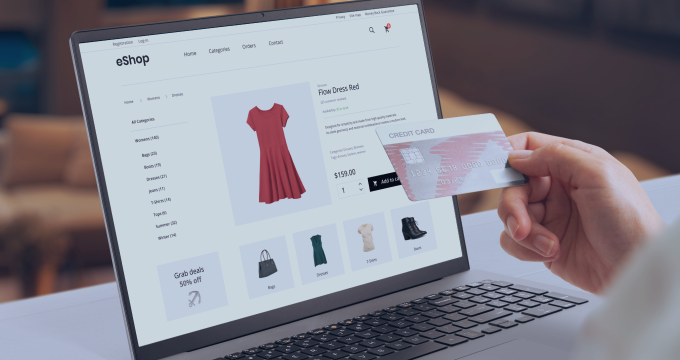
Online clothing store with secure payment input via laptop interface.

Manufacturing

One missing component can hold up an entire production run. In manufacturing, ERP warehouse management logs materials issued to production and records finished goods entering inventory. Depending on the setup, it can also support kitting for production orders. Planners see which components remain available, while warehouse teams track unused materials returned to storage.

Smart manufacturing powered by automation and robotics for higher efficiency.

Food and beverage

Having products in stock doesn't help much if they're about to expire. Lot tracking identifies products by batch, while first-expired-first-out (FEFO) rules prioritize those with earlier expiry dates. Shelf-life checks help meet customer requirements, and batch records make it easier to identify affected goods when quality issues or recalls arise.

Smart food service uses digital ordering and IoT-enabled quality control for safer, personalized dining.

Pharma and medical devices

Pharma warehouses must keep track of which products are ready to ship and which still need quality approval. ERP warehouse management helps by blocking unreleased stock and tracking batches or serial numbers as goods move through the warehouse. For some US prescription drugs, the Drug Supply Chain Security Act (DSCSA) also requires electronic package-level tracing, which may require integration with specialized systems.

Digital transformation in pharma supports e-prescriptions, inventory monitoring, and personalized medicine.

Get your warehouse ready for higher order volumes

ERP implementation roadmap

Rolling out an ERP warehouse management system takes careful planning, especially since daily receiving and shipping need to keep running. At Innowise, we help your team prepare the first site for launch and address potential issues before expanding to other locations.

01 arrow-icon.
Define scope and goals

We start by choosing which warehouse goes first and what the initial rollout should cover. Together with your operations and finance teams, we agree on success metrics, such as on-time dispatch rates and inventory accuracy. Current performance gives us a baseline for measuring results after launch.

02 arrow-icon.
Design the warehouse processes

Our ERP experts work with you to define how goods are received, stored, picked, and shipped, including how to deal with shortages and stock discrepancies. If you're using a separate WMS, we also decide which system records each transaction and how to resolve mismatches between them.

03 arrow-icon.
Prepare data and system connections

Before migration, the team checks item records, storage locations, and units of measure. We map data flows between systems and prepare a plan for reconciling opening stock balances. Your data owners review the trial migration results and flag discrepancies before the final transfer.

04 arrow-icon.
Configure and test

Our specialists configure the agreed workflows, then test them with your warehouse team using representative orders and equipment. Testing covers everyday transactions, exceptions, system integrations, and the impact on inventory and financial records. Employees also receive training before go-live.

05
Pilot and extend

The cutover plan defines when each system stops and starts recording transactions, including any planned pause in warehouse work. After go-live, our support team monitors operations and resolves issues. We extend the rollout to other sites once your team approves the pilot results and critical problems are addressed.

arrow-icon.arrow-icon.
01 Define scope and goals

We start by choosing which warehouse goes first and what the initial rollout should cover. Together with your operations and finance teams, we agree on success metrics, such as on-time dispatch rates and inventory accuracy. Current performance gives us a baseline for measuring results after launch.

arrow-icon.arrow-icon.
02 Design the warehouse processes

Our ERP experts work with you to define how goods are received, stored, picked, and shipped, including how to deal with shortages and stock discrepancies. If you're using a separate WMS, we also decide which system records each transaction and how to resolve mismatches between them.

arrow-icon.arrow-icon.
03 Prepare data and system connections

Before migration, the team checks item records, storage locations, and units of measure. We map data flows between systems and prepare a plan for reconciling opening stock balances. Your data owners review the trial migration results and flag discrepancies before the final transfer.

arrow-icon.arrow-icon.
04 Configure and test

Our specialists configure the agreed workflows, then test them with your warehouse team using representative orders and equipment. Testing covers everyday transactions, exceptions, system integrations, and the impact on inventory and financial records. Employees also receive training before go-live.

arrow-icon.arrow-icon.
05 Pilot and extend

The cutover plan defines when each system stops and starts recording transactions, including any planned pause in warehouse work. After go-live, our support team monitors operations and resolves issues. We extend the rollout to other sites once your team approves the pilot results and critical problems are addressed.

A 2026 survey found that 55% of warehouse and distribution professionals reported using paper-based picking methods. I'd look at what happens when an urgent order changes in the middle of a shift. If a supervisor has to walk around replacing pick lists, that adds a real labor cost worth considering when deciding between ERP and WMS.
Michael Labutin, Head of Delivery.
Michael Labutin
Head of Delivery Office

How much does ERP warehouse management software cost?

First-year costs for ERP warehouse management software can start at tens of thousands of dollars for a small setup and reach several hundred thousand dollars or more for a complex enterprise rollout. If you add warehouse features to an ERP you already use, the cost may be lower. The final price depends on how many warehouses you have, which processes the system needs to support, and how much work is involved in the implementation.

Vendors have different ways of charging. Some charge per user, while others base pricing on application or resource usage. However, licensing is only part of the total cost. When reviewing a project estimate, I focus on the following expenses.

  • Software and subscriptions. Check which warehouse features your license includes and how many employees need access. Additional modules or connected applications may come with separate fees.
  • Implementation work. You’ll need to budget for configuring warehouse processes, transferring existing data, connecting other systems, and testing. Custom development and employee training can add to the cost.
  • Warehouse equipment. Handheld scanners, label printers, and mobile devices may require additional investment. Some warehouses also need better Wi-Fi coverage to support daily operations.
  • Operating costs. After launch, you’ll pay for ongoing support, software renewals, and hosting where applicable. Include the internal resources needed to maintain the system.

When comparing vendor proposals, I’d look closely at what’s included in the quoted price. Two offers may look similar on paper but cover different warehouses, integrations, or implementation tasks. Those differences can significantly change the final bill.

How to choose an ERP for warehouse management?

When choosing an ERP for warehouse management, I’d start with the processes causing the most trouble and see how shortlisted systems handle them. Here are the main factors worth checking.

  • Process complexity. Basic stock tracking may be enough for simple operations. Directed put-away, wave picking, and cross-docking call for more advanced warehouse capabilities.
  • Order volumes. Check how the system performs during peak periods, when hundreds of orders may need to be picked and shipped at once.
  • Existing ERP. Your current platform may already support some warehouse functions. It’s worth checking those before investing in a separate WMS or replacing the ERP.
  • Multiple warehouses. Managing several sites or working with third-party logistics (3PL) partners calls for stock visibility across locations and reliable transfer tracking.
  • Warehouse automation. If you use conveyors, automated storage systems, or robots, check how the software connects with their control systems.
  • Integrations. Orders, stock updates, and shipping confirmations need to move reliably between ERP, e-commerce platforms, carriers, and other systems.
  • Traceability. Food, pharma, and medical device businesses may need lot or serial tracking, expiry-date controls, and audit trails, depending on regulatory requirements.
  • Total cost. Compare licensing, implementation, integrations, equipment, training, and ongoing support costs over the same period.
  • Pilot testing. Test real warehouse scenarios, including shortages, returns, and urgent orders, before rolling the system out across multiple sites.

Why choose Innowise for ERP

With 300+ in-house ERP experts and over 200+ completed ERP projects, Innowise has extensive experience with enterprise systems. Our team includes certified SAP S/4HANA, Odoo, and Microsoft Dynamics 365 specialists, and our quality and information security management systems are certified to ISO 9001 and ISO 27001 standards.

Before recommending new warehouse software, we assess what your existing ERP already supports and where improvements are needed. Our team then makes the necessary changes, connects warehouse operations with sales and finance, and tests the workflows before launch.

We can also build AI solutions that help employees find stock and order information faster. For AI agents that update ERP records, we work with your team to define access permissions and approval rules.

Odoo

Odoo Silver Partner.

SAP

SAP Activate Project Manager.
4HANA 1809.
4HANA 1709.
4HANA Sales 1909.
4HANA Sourcing and Procurement.
SAP Certified Development Associate - SAP Fiori Application Developer.
4HANA Cloud Private Edition, Central Finance.
4HANA Cloud Private Edition, Financial Accounting.
SAP Certified Associate - Backend Developer - SAP Cloud Application Programming Model.
SAP Certified Associate - Data Engineer - SAP HANA.
SAP Certified Associate - Back-End Developer - ABAP Cloud.
SAP Certified Associate - Data Analyst - SAP Analytics Cloud.

MS Dynamics 365

MB-500-Microsoft-Dynamics-365-Finance-and-Operations-Apps-Developer 1.
Dynamics-365_-Finance-and-Operations-Apps-Developer-Associate 1.
MB-300-Microsoft-Dynamics-365-Core-Finance-and-Operations 1.

ISO

ISO 27001.

Conclusion

The right warehouse management setup should help your team keep orders moving and inventory records accurate. For straightforward operations, an ERP module may be enough. More complex warehouses may benefit from a dedicated WMS, especially when picking, automation, or stock control requires more advanced capabilities.

If you’re weighing your options, the Innowise ERP team can review your warehouse processes, assess what your current system can support, and help plan an implementation that makes sense for your business.

FAQ

ERP manages business processes such as finance, sales, purchasing, and inventory. A WMS focuses on warehouse operations, including receiving goods, putting them away, picking orders, and shipping. More advanced WMS solutions also help plan warehouse tasks and coordinate automated equipment.

SAP S/4HANA is an ERP system, but SAP also offers warehouse management solutions. Stock Room Management covers basic warehouse operations, while SAP EWM supports more complex processes. EWM can run within SAP S/4HANA or as a separate system connected to it.

Yes, if your ERP already has the warehouse features your business needs. For smaller warehouses, built-in tools for tracking stock, receiving goods, and shipping orders may be enough. Larger warehouses with complex picking processes or automated equipment may need a dedicated WMS for better control.

Not necessarily. If your ERP already supports the warehouse processes you rely on, adding a separate WMS may create unnecessary cost and integration work. Consider one when your team needs more detailed task control, specialized picking strategies, or equipment integration that the existing ERP module cannot support.

The best ERP for warehouse management depends on your warehouse processes, existing software, and order volumes. SAP S/4HANA, Microsoft Dynamics 365 Supply Chain Management, NetSuite, Odoo, and Acumatica offer different warehouse capabilities. Innowise can help compare these options against your requirements and decide whether built-in ERP features or a dedicated WMS make more sense.

A WMS integrates with an ERP by automatically exchanging orders and inventory updates. For example, the ERP sends a customer order to the WMS, which helps warehouse staff pick and ship the goods. Once the order ships, the WMS sends a shipment confirmation to the ERP, which can then update stock levels and order status. The systems can connect through APIs, integration platforms, or ready-made connectors.

A focused warehouse management ERP rollout may take a few months, while complex, multi-site projects can take considerably longer. The timeline depends on warehouse processes, data migration, integrations, and testing. Innowise can assess your requirements and provide a project-specific timeline and cost estimate.

Show all

Table of contents

Check if your ERP needs a WMS

    Contact us

    Book a call or fill out the form below and we’ll get back to you once we’ve processed your request.

    Send us a voice message
    Attach documents
    Upload file

    You can attach 1 file up to 2MB. Valid file formats: pdf, jpg, jpeg, png.

    By clicking Send, you consent to Innowise processing your personal data per our Privacy Policy to provide you with relevant information. By submitting your phone number, you agree that we may contact you via voice calls, SMS, and messaging apps. Calling, message, and data rates may apply.

    You can also send us your request
    to contact@innowise.com
    What happens next?
    1

    Once we’ve received and processed your request, we’ll get back to you to detail your project needs and sign an NDA to ensure confidentiality.

    2

    After examining your wants, needs, and expectations, our team will devise a project proposal with the scope of work, team size, time, and cost estimates.

    3

    We’ll arrange a meeting with you to discuss the offer and nail down the details.

    4

    Finally, we’ll sign a contract and start working on your project right away.

    More services we cover

    arrow