












SAP Master Data Governance (MDG): features, benefits, and implementation

Nov 20, 2026 12 min read
innowiseteam icon.
Head of ERP Consultants
Verified expert
Every article at Innowise is created by authors with real-world experience. They understand the topic beyond theory and bring insight from real projects.
19+ years of experience
Verified expert
19+ years of experience
Kiryl is a specialist in SAP ecosystem optimization. He cuts through the complexity of enterprise resource planning, tailoring SAP modules to specific workflows to ensure clients extract maximum efficiency from their digital core.
Expertise
ERP Project management Process optimization
Let's talk

Key takeaways

  • This SAP MDG master data governance overview covers how companies create, approve, and update master data records across business systems.
  • Supported data domains and features vary by SAP MDG edition. Enterprise asset data governance is available through a partner extension.
  • Assigned data owners establish accountability for master data, while approval workflows determine how changes are authorized.
  • Fewer data corrections and shorter processing times indicate improvements, measured against figures collected before rollout.
Summarize article with AI

When procurement and finance maintain supplier records separately, even a routine update can leave the two teams working with different information. Someone then has to figure out which version is correct. SAP Master Data Governance (MDG) provides a shared process for maintaining those records and approving changes.

In this guide, I’ll explain what MDG is in SAP and what SAP MDG is used for. We’ll also look at deployment options and implementation requirements, so you can consider whether MDG is a good fit for your systems.

What is SAP MDG?

What does MDG stand for in SAP? It stands for Master Data Governance. SAP MDG is SAP’s solution for managing master data, such as supplier, customer, and product records. It sets rules for how new records are created, who approves changes, and how that information is maintained across systems.

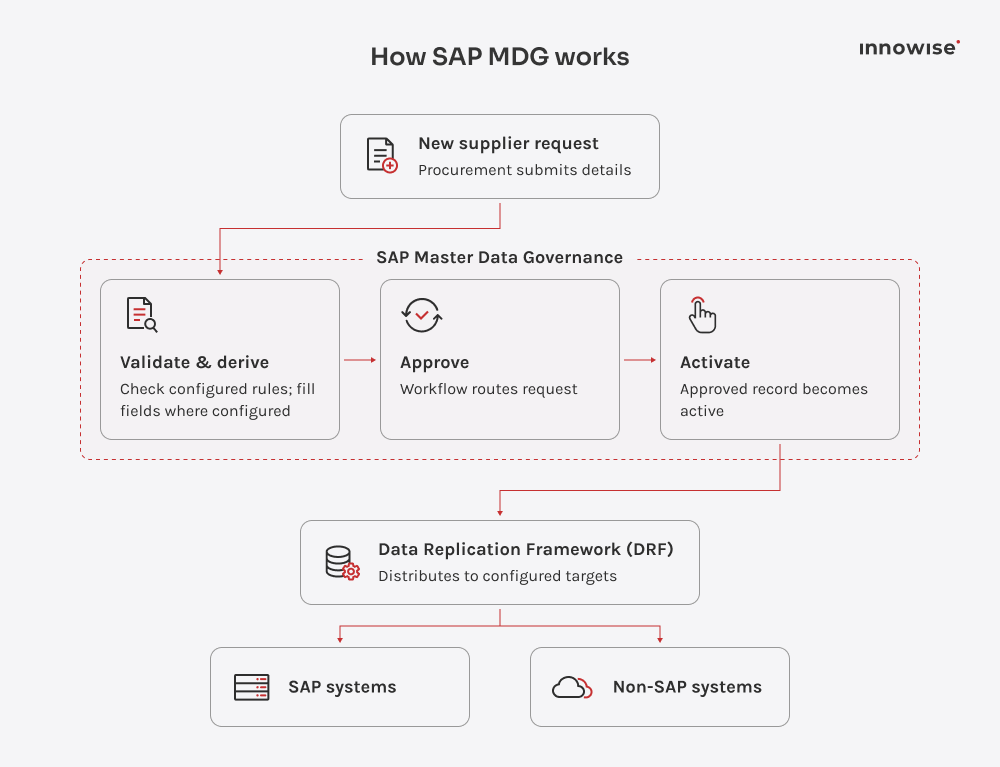
Say your procurement team needs to add a new supplier. A user submits a change request, and MDG checks the details against configured rules. It can also fill in certain fields automatically before routing the request to the right approvers. Once approved, the record becomes active. The Data Replication Framework (DRF) can then distribute the data to configured SAP and non-SAP systems.

On SAP S/4HANA, MDG uses the existing master data models and provides SAP Fiori interfaces, although some classic-mode screens still use Web Dynpro. You’ll also need a separate SAP MDG license to activate it.

SAP MDG modules and data domains

To better understand the meaning of SAP MDG, it helps to look at the data domains it covers. You can govern them separately or together, depending on the edition and extensions in use. I’ll cover the main ones below.

  • Material data

    The same material may need different attributes at different plants. MDG-M covers those plant-specific details alongside purchasing and sales data. In practice, it's important to check which fields are shared across sites and which must vary.

  • Supplier data

    Supplier information often appears in both procurement and finance processes. MDG-S governs supplier details and purchasing data, with checks before changes are approved. In SAP S/4HANA, the supplier record follows the Business Partner model.

  • Customer data

    When a customer record changes, sales and finance may both depend on the result. MDG-C covers sales-area and company-code details, not just basic customer information. On SAP S/4HANA, customer data follows the Business Partner model.

  • Financial data

    If a cost center is wrong, expenses may be assigned to the wrong part of the business. MDG-F governs G/L accounts, cost centers, profit centers, and related hierarchies, with configurable approval workflows for master data changes.

  • Asset data

    Maintenance teams depend on accurate equipment and functional location records. The SAP MDG enterprise asset management extension by Prometheus Group governs updates to these objects. It's a separate partner extension, not a standard MDG domain.

  • Custom data

    Not every important business record fits a standard SAP MDG domain. The framework supports custom data models and fields, with governance rules around them. I'd check whether an existing model can be extended before creating a separate one.

Key SAP Master Data Governance capabilities

The data domains show what SAP MDG covers. Now I’ll look at the capabilities that help teams control changes, handle duplicate records, and maintain data quality.

Central governance

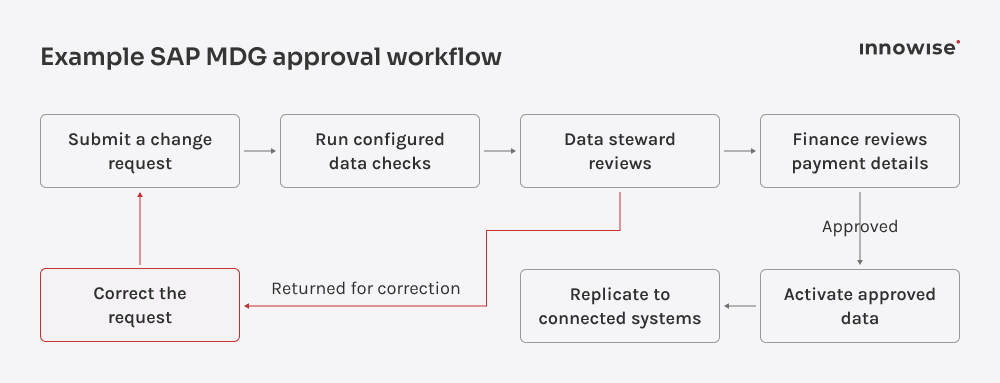
A supplier’s bank details should only be updated in the payment system after proper checks. With SAP MDG, companies can define who reviews and approves these requests. After approval, the new information becomes active and can be shared with other systems. Role-based permissions also control who is allowed to make changes.

Master data consolidation

After an acquisition, the same supplier may appear in two systems with different names, addresses, or contact details. SAP MDG consolidation helps identify duplicate records and combine them. Configured rules determine which details to keep, while data stewards review cases where the system can’t confidently identify a match.

Data quality management

Even approved master data needs regular checks. Master Data Governance in SAP uses validation rules to catch errors and derivation rules to fill in values based on defined logic. Quality scores and dashboards show where problems keep appearing, helping data stewards decide what to correct first. The available functions depend on the edition and data domain.

For a wider introduction to SAP MDG, I’ve included an overview video below.

Business benefits of SAP MDG

Improved data quality

Missing supplier details or incorrect material attributes can cause problems in purchasing and finance. SAP MDG checks records against configured business rules, helping teams catch mistakes before other systems receive the data.

A supplier update shouldn’t require several emails just to find the right approver. SAP MDG routes requests to the responsible people and tracks their status. Employees spend less time following up, while reviewers know which changes need their attention.

Duplicate supplier records can lead to repeated onboarding checks and extra hours spent resolving invoice mismatches. SAP MDG helps identify and consolidate these records, potentially reducing the cost of repeated checks and corrections.

When departments use different records for the same supplier, reports may show incomplete spending figures. SAP MDG helps keep supplier data consistent and financial hierarchies aligned, so you have more reliable information for planning and business decisions.

During an audit, companies may need to prove that changes to supplier or customer records were properly approved. Master Data Governance in SAP keeps a history of change requests and approvals, making it easier to show that internal rules were followed.

When supplier details change, SAP MDG validates the update, routes it for approval, and distributes the approved record to connected systems. Purchasing and finance can then use the same information, reducing the risk of errors caused by outdated or conflicting records.

Struggling with inconsistent master data?

SAP MDG vs. SAP MDM

SAP MDG and SAP MDM may sound alike, but they are different products. MDM also stands for the broader field of master data management, which includes governance, consolidation, and distribution. In SAP’s lineup, SAP MDM means SAP NetWeaver Master Data Management, which is an older tool built around its own master data repository. SAP MDG is the current SAP solution for master data governance and is more closely integrated with SAP business processes.

Both products support data consolidation and approval workflows, so I wouldn’t compare them on those features alone. The bigger differences lie in how they manage records, connect to SAP systems, and fit into your existing setup.

Comparison criteriaSAP MDGSAP MDM
Primary purposeGovern how master data is created and changed, with consolidation capabilities availableConsolidate, harmonize, and distribute master data from different systems
Governance and workflowsChange requests with validation, approval workflows, and controlled activationConfigurable workflows with validation and approval steps
Data qualityValidation rules, quality monitoring, duplicate matching, and best-record calculationData cleansing, duplicate detection, validation, and record merging
ArchitectureOn SAP S/4HANA, can reuse its data models and be deployed within the ERP environment or as a separate hubUses a separate SAP NetWeaver MDM repository
System integrationIntegrates with SAP business processes and distributes data to SAP and non-SAP systemsImports and distributes data through MDM tools and configured integrations
Typical use casesOngoing master data governance, SAP S/4HANA projects, and consolidation after acquisitionsExisting MDM environments, master data harmonization, and migration planning
Product statusCurrent SAP solution with ongoing developmentOlder SAP product, mainly relevant to existing installations
Show more

Common use cases

  • Material data
  • Supplier onboarding
  • Financial data
  • ERP migration
  • M&A

Material and product management

Purchasing, production, and sales often need different details for the same material. Individual plants may have their own requirements, too. SAP MDG manages material creation and updates through a shared approval process, helping teams maintain consistent data across procurement, manufacturing, inventory, and sales.

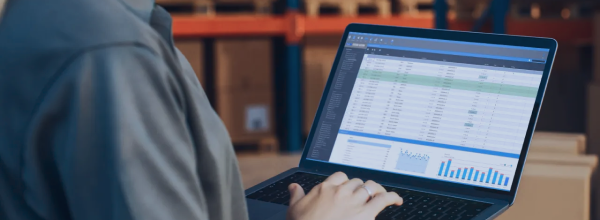
Warehouse worker reviewing a data table and bar chart on a laptop among stacked boxes.

Supplier onboarding

SAP MDG gives procurement and finance a shared process for adding suppliers and maintaining their records. When someone requests a new supplier, the system checks the details against configured rules, flags potential duplicates, and sends the request for approval. The same process covers later changes, such as updated bank details, so teams can review them before they take effect.

Courier holding a tablet while a person signs on the screen to confirm a delivery.

Financial data governance

When a department moves to another business unit, finance may need to update its cost center hierarchy to reflect the new organizational structure. SAP MDG routes the change request to the designated approvers and records who requested and approved it.

Laptop screen showing financial charts on a desk next to a person’s hand.

S/4HANA migration and ERP consolidation

When several ERP systems move to SAP S/4HANA, the same material may have different codes. SAP MDG helps teams find duplicates and determine which data to retain during ERP data migration, including SAP ECC to S/4HANA migrations. After go-live, MDG can apply validation and approval rules to new records and changes.

Hands typing on a laptop keyboard with a glowing ERP hologram and data charts overlaid.

Mergers and acquisitions

After an acquisition, the two companies may have different records for the same suppliers, customers, or materials. SAP MDG identifies duplicates, combines these records, and applies agreed rules to decide which details to keep. The combined company can then manage future changes through a shared approval process and distribute approved updates to the relevant systems.

Business partners shaking hands across a meeting table while colleagues look on.

Material data

Purchasing, production, and sales often need different details for the same material. Individual plants may have their own requirements, too. SAP MDG manages material creation and updates through a shared approval process, helping teams maintain consistent data across procurement, manufacturing, inventory, and sales.

Warehouse worker reviewing a data table and bar chart on a laptop among stacked boxes.

Supplier onboarding

SAP MDG gives procurement and finance a shared process for adding suppliers and maintaining their records. When someone requests a new supplier, the system checks the details against configured rules, flags potential duplicates, and sends the request for approval. The same process covers later changes, such as updated bank details, so teams can review them before they take effect.

Courier holding a tablet while a person signs on the screen to confirm a delivery.

Financial data

When a department moves to another business unit, finance may need to update its cost center hierarchy to reflect the new organizational structure. SAP MDG routes the change request to the designated approvers and records who requested and approved it.

Laptop screen showing financial charts on a desk next to a person’s hand.

ERP migration

When several ERP systems move to SAP S/4HANA, the same material may have different codes. SAP MDG helps teams find duplicates and determine which data to retain during ERP data migration, including SAP ECC to S/4HANA migrations. After go-live, MDG can apply validation and approval rules to new records and changes.

Hands typing on a laptop keyboard with a glowing ERP hologram and data charts overlaid.

M&A

After an acquisition, the two companies may have different records for the same suppliers, customers, or materials. SAP MDG identifies duplicates, combines these records, and applies agreed rules to decide which details to keep. The combined company can then manage future changes through a shared approval process and distribute approved updates to the relevant systems.

Business partners shaking hands across a meeting table while colleagues look on.
A study found that 55% of organizations manage data-related error reports on an ad hoc basis. SAP MDG helps address this by checking master data before approval, so teams can catch errors before other systems use the records.
Michael Labutin, Head of Delivery.
Michael Labutin
Head of Delivery Office

Deployment options

SAP MDG offers different deployment options and editions. The choice depends on your existing SAP environment, the number of connected systems, the data domains in scope, and the governance model.

  • Embedded
  • Central hub
  • Cloud options

Embedded

SAP MDG runs within the same SAP S/4HANA system that handles your business operations. Teams can create and approve master data changes directly in that environment, without maintaining a separate MDG system. However, sharing approved records with other applications still requires integration.

Best suited for:

Organizations that manage most of their master data within one SAP S/4HANA system.

Central hub

SAP MDG runs on a separate SAP S/4HANA system that manages master data for multiple applications. Teams approve changes in the hub, and MDG sends the updated records to connected SAP and non-SAP systems. Companies can manage master data centrally, but they also need to maintain the hub and its integrations.

Best suited for:

Enterprises with multiple SAP and non-SAP systems that need centralized master data governance.

Cloud options

SAP MDG is available with SAP S/4HANA Cloud Private Edition and Public Edition. Private Edition supports more master data domains, while Public Edition focuses on business partner and product data. Release 2608 added central governance for products in Public Edition. SAP is discontinuing the separate SAP BTP-based SAP MDG, cloud edition. Existing customers can use it until their contracts expire, but they cannot renew their subscriptions.

Best suited for:

Organizations using or moving to SAP S/4HANA Cloud that need governance capabilities supported by their chosen edition.

SAP MDG implementation roadmap

SAP MDG implementation varies with your systems and governance requirements. At Innowise, we usually follow the stages below.

01 arrow-icon.

Assessment

Our specialists review existing master data and how teams create and maintain it. We assess data quality and governance requirements to identify the issues and processes the SAP MDG project needs to address.

02 arrow-icon.

Planning

The Innowise team works with you to define the project scope and select the data domains to cover. We define governance roles and choose the deployment architecture, then set an implementation timeline.

03 arrow-icon.

Configuration

Our SAP specialists configure data models and validation rules for the selected domains, including required fields and duplicate checks. We also set up change request workflows that assign reviews and approvals to the right people.

04 arrow-icon.

Integration

Innowise engineers connect SAP MDG to the SAP and non-SAP applications in scope, configuring data mappings and replication rules. Where necessary, we also prepare and migrate existing master data.

05 arrow-icon.

Deployment

We test change requests using real business scenarios, checking approval workflows and data replication to connected systems. Once business users sign off on the test results, our team trains employees and moves SAP MDG into production.

06

Optimization

After go-live, our team monitors data quality and investigates failed replications or stalled approvals. We fix recurring issues and refine validation rules and workflows based on how teams use SAP MDG.

arrow-icon.arrow-icon.
01

Assessment

Our specialists review existing master data and how teams create and maintain it. We assess data quality and governance requirements to identify the issues and processes the SAP MDG project needs to address.

arrow-icon.arrow-icon.
02

Planning

The Innowise team works with you to define the project scope and select the data domains to cover. We define governance roles and choose the deployment architecture, then set an implementation timeline.

arrow-icon.arrow-icon.
03

Configuration

Our SAP specialists configure data models and validation rules for the selected domains, including required fields and duplicate checks. We also set up change request workflows that assign reviews and approvals to the right people.

arrow-icon.arrow-icon.
04

Integration

Innowise engineers connect SAP MDG to the SAP and non-SAP applications in scope, configuring data mappings and replication rules. Where necessary, we also prepare and migrate existing master data.

arrow-icon.arrow-icon.
05

Deployment

We test change requests using real business scenarios, checking approval workflows and data replication to connected systems. Once business users sign off on the test results, our team trains employees and moves SAP MDG into production.

arrow-icon.arrow-icon.
06

Optimization

After go-live, our team monitors data quality and investigates failed replications or stalled approvals. We fix recurring issues and refine validation rules and workflows based on how teams use SAP MDG.

Choose the right MDG deployment option before committing to a rollout

Common implementation challenges

SAP master data governance challenges can delay a rollout if teams discover them too late. I’d address the risks below while there’s still time to correct the data and adjust the setup.

ChallengePractical response
Poor source dataTest cleansing and duplicate-matching rules on sample records. Assign data owners to resolve cases that need manual review
Complex integrationsAgree on field mappings for each target system. Test how applications handle rejected updates and failed replication
Conflicting ownershipDefine who owns each data domain and who has the final say when departments disagree over a record
Excessive customizationStart with SAP's standard data models and workflows. Add custom fields or logic only when business requirements call for them
Low adoptionInvolve employees who will submit and approve requests during testing. Adjust workflows that make everyday tasks unnecessarily difficult
Volume and performanceTest mass processing and replication under expected loads. Check processing times and recovery after failures
Show more

AI and emerging capabilities

workflow automation icon.

SAP Joule and AI-assisted workflows

In SAP S/4HANA Cloud Private Edition, Joule lets users find Business Partner records and make changes using natural language. AI-assisted features also help create and update change requests and summarize updates, so reviewers can see what has changed without checking every field individually. The existing approval process still applies.

Intelligent data quality management icon.

Intelligent data quality management

SAP MDG uses machine learning to look for patterns in existing master data and suggest new validation rules. For example, it might identify a pattern in how certain fields are filled in for particular product types and suggest a rule based on that pattern. Data stewards review these rules before applying them. MDG then flags records that fail the checks, so teams know what needs correcting.

Emerging governance automation icon.

Emerging governance automation

SAP plans to add Joule assistance to more master data workflows in SAP S/4HANA Cloud Public Edition. Planned features include AI-assisted validation rule creation and using Joule to retrieve reference data when creating or updating records. Release 2608 already supports external data providers for Business Partner data, but these new Joule features are still on SAP’s roadmap.

SAP claims that using Joule in SAP MDG on S/4HANA Cloud Private Edition can reduce the effort needed to manage master data by 85%. This figure refers to the effort involved in individual master data management tasks. However, the time it takes to complete a change request still depends on how quickly approvals happen and how fast open data issues are resolved. I’d recommend measuring the actual cycle time in a pilot before expecting the same level of improvement.
Philip Tikhanovich, Head of Big Data, AI/ML/DS Departments
Philip Tikhanovich
Head of Big Data, AI/ML/DS Departments

Our SAP and data governance services

  • Consulting
  • Implementation
  • Integration
  • Data governance
  • Migration
  • Support

SAP consulting

Our SAP consultants start by reviewing your SAP systems, data ownership, and approval processes. Together, we choose the right solution and deployment approach, define the scope, and identify issues to address before implementation.

SAP implementation

Our team implements SAP solutions to support your business processes. For SAP MDG, that includes configuring validation rules and approval workflows. Before launch, we test the setup with the people who will create, review, and update records, then train them to use it.

SAP integration

An approved record still needs to reach the systems that use it. We connect SAP solutions with your other business applications, map the data fields, and test how updates move between systems, including what happens when a transfer fails.

Data governance

We help establish who owns master data and who is responsible for keeping it accurate. Our work also covers rules for maintaining records, quality checks, and procedures for reviewing information that fails validation.

SAP migration

Old ERP records often contain duplicates or conflicting information. Our experts help resolve these issues, map records to the new structure, and validate the results before the new system goes live.

SAP support and maintenance

When an approval request gets stuck or an update fails to reach another system, the Innowise team investigates the cause. We also maintain validation rules and adjust workflows as your processes and responsibilities change.

Consulting

Our SAP consultants start by reviewing your SAP systems, data ownership, and approval processes. Together, we choose the right solution and deployment approach, define the scope, and identify issues to address before implementation.

See our SAP consulting services Three colleagues discussing a project over laptops in an office.

Implementation

Our team implements SAP solutions to support your business processes. For SAP MDG, that includes configuring validation rules and approval workflows. Before launch, we test the setup with the people who will create, review, and update records, then train them to use it.

See our SAP implementation services IT specialist with a badge typing on a laptop in a dark office.

Integration

An approved record still needs to reach the systems that use it. We connect SAP solutions with your other business applications, map the data fields, and test how updates move between systems, including what happens when a transfer fails.

See our SAP integration services Server icons connected by glowing circuit lines.

Data governance

We help establish who owns master data and who is responsible for keeping it accurate. Our work also covers rules for maintaining records, quality checks, and procedures for reviewing information that fails validation.

See our data governance services Smartphone with code lines, a stylus, and a security shield.

Migration

Old ERP records often contain duplicates or conflicting information. Our experts help resolve these issues, map records to the new structure, and validate the results before the new system goes live.

See our SAP migration services Hand touching a virtual interface with documents transferring between two servers.

Support

When an approval request gets stuck or an update fails to reach another system, the Innowise team investigates the cause. We also maintain validation rules and adjust workflows as your processes and responsibilities change.

See our SAP support services Hands on a keyboard with holographic dashboards showing task progress.

Why choose Innowise as your SAP partner

Innowise is an SAP Consulting Service Partner with 200+ SAP-certified experts. Our specialists hold certifications in SAP Activate and S/4HANA, as well as SAP HANA, SAP Analytics Cloud, SAP Fiori, and ABAP Cloud.

We hold ISO certifications for quality management and information security, including ISO 9001 and ISO 27001. For your SAP MDG project, we’ll review the data domains and integrations involved, then agree on the specialists needed and their responsibilities.

SAP activate icon.
SAP 4Hana certificate icon.
4HANA certificate icon.
SAP certificate icon.
SAP fiori development certificate icon.
SAP certificate icon.

Have an SAP MDG project in mind?

Let’s work out the delivery plan.

SAP solutions we've delivered

All case studies
Odoo ERP implementation
Innowise implemented Odoo 17 Enterprise as a single connected system for sales, purchasing, production, finance, service, HR, and reporting.
100% unified operations under one ERP
100% operations traceability
View case study
Client review

View case study
Client review logo. Client review

Odoo ERP implementation.
Automated testing for top ERP solutions
Innowise executed automated ERP testing to ensure that integrating new functionality did not compromise the integrity of the existing system.
2x faster feature release compared to manual QA
Upgrade of data management software for extractive, oil, and gas industry
Innowise has upgraded a set of customized oil and gas platforms to optimize resource exploration and extraction processes.
1-3 seconds to generate reports
Royalty streams calculator development
Innowise developed a convenient system for storing, calculating, and editing royalty streams from biopharmaceutical products on a quarterly basis.
Enterprise resources management system development
We built cloud-based mobile and web applications for tracking and managing equipment and machines’ states, location, and work schedule in real-time.
Time and task tracking application upgrade
Innowise enhanced a custom web and mobile solution allowing users to easily track document management tasks, working time, and safety.
01 / 01
Close popup icon

Conclusion

SAP MDG gives companies a consistent way to manage master data changes. But the software alone won’t keep records accurate. You still need clear data ownership and approval rules that make sense for your business.

I’d recommend starting with one data domain where errors already cause delays or extra work. The first rollout gives you a chance to see how the approval process works in practice, fix what slows people down, and make adjustments before expanding SAP MDG further.

If you’re considering SAP MDG, Innowise can help you define the scope and plan how the solution will work with your existing systems. Our SAP and data governance teams can support both the technical setup and the governance processes involved.

FAQ

SAP MDG is a solution for governing master data, including customer, supplier, material, and financial records. It helps companies maintain consistent information across business systems through defined rules and approval processes.


Yes, SAP MDG is an optional component of SAP S/4HANA that requires a separate license. It can run within S/4HANA or on a separate system.

Yes. SAP MDG can share approved master data with SAP and non-SAP systems through its Data Replication Framework (DRF). Some third-party connections may also need SAP Integration Suite. Innowise can help you figure out the right setup and handle the integration.

SAP MDG implementation usually takes around 3–12 months, depending on the project scope, data quality, and integration complexity. You can share your project details with Innowise, and we'll assess the scope and provide a more specific timeline.

SAP MDG implementation has no fixed price. Costs depend on the data domains involved, the condition of your existing data, and the integrations or custom workflows required. Innowise can review your requirements and estimate the implementation budget, including licensing and deployment costs.

Yes. Our team can integrate SAP MDG into your existing SAP S/4HANA system or set it up as a separate hub connected to your SAP and non-SAP applications. We’ll recommend the right approach based on your current infrastructure.

Businesses can compare duplicate rates, processing times, and data correction costs before and after SAP MDG implementation. They can then calculate ROI by comparing the savings with implementation and ongoing costs.

SAP MDG maintenance requires both technical and data governance expertise. Your team needs to manage data quality, approval workflows, and integrations with other systems. Business data owners oversee data standards and approve changes. If you lack SAP expertise in-house, Innowise can help maintain your workflows and integrations.

Show all

Table of contents

Plan your SAP MDG rollout

    Contact us

    Book a call or fill out the form below and we’ll get back to you once we’ve processed your request.

    Send us a voice message
    Attach documents
    Upload file

    You can attach 1 file up to 2MB. Valid file formats: pdf, jpg, jpeg, png.

    By clicking Send, you consent to Innowise processing your personal data per our Privacy Policy to provide you with relevant information. By submitting your phone number, you agree that we may contact you via voice calls, SMS, and messaging apps. Calling, message, and data rates may apply.

    You can also send us your request
    to contact@innowise.com
    What happens next?
    1

    Once we’ve received and processed your request, we’ll get back to you to detail your project needs and sign an NDA to ensure confidentiality.

    2

    After examining your wants, needs, and expectations, our team will devise a project proposal with the scope of work, team size, time, and cost estimates.

    3

    We’ll arrange a meeting with you to discuss the offer and nail down the details.

    4

    Finally, we’ll sign a contract and start working on your project right away.

    More services we cover

    arrow