



Odoo implementation cost: pricing, cost factors & budgeting guide

Nov 24, 2026 14 min read
Head of ERP Consultants
Verified expert
Every article at Innowise is created by authors with real-world experience. They understand the topic beyond theory and bring insight from real projects.
19+ years of experience
Verified expert
19+ years of experience
Kiryl is a specialist in SAP ecosystem optimization. He cuts through the complexity of enterprise resource planning, tailoring SAP modules to specific workflows to ensure clients extract maximum efficiency from their digital core.
Expertise
ERP Project management Process optimization
Let's talk

Key takeaways

  • Odoo implementation typically costs about $5,000–$30,000 for a small team using standard modules, $30,000–$100,000 for a mid-size company, and $100,000+ for multi-site projects. Licensing is charged separately, and hosting may cost extra.
  • Hosting is included with Odoo Online. Odoo.sh and on-premise setups add their own costs, and custom code requires one of them.
  • Hidden costs such as data cleanup, change requests, add-on licenses, and custom-code upkeep can push projects over budget. 
  • A practical way to budget for Odoo implementation is to divide the project into three stages: discovery and pilot, rollout, and optimization.
Summarize article with AI

There are nearly 28 million Odoo users worldwide. About 80% of them use free plans. For the remaining 20% on paid plans, license costs are only a portion of their total expenses. There’s more to consider when calculating the total: hosting, implementation services, and post-launch support. The implementation process covers stages such as pre-project assessment, configuration, data migration, customization, integrations, testing, and staff training. If you budget only for licenses, you may run out of funds when additional expenses arise.

In this article, I’ll break down each component of Odoo implementation cost, along with the factors that influence the final amount and the things that often come to light only after you receive the initial commercial proposal. You’ll also learn how to plan your budget in phases and set aside a contingency fund for unexpected costs. I’ll cover Innowise’s implementation service packages, ways to optimize costs, how to calculate return on investment (ROI), and a checklist to help you discuss your project with an implementation partner.

Implement Odoo with Innowise

How much does Odoo implementation cost?

One of the main factors affecting Odoo implementation costs is the business size: the more users, the higher the costs. For a small team, costs can start at $5,000, while larger companies may need a budget of $100,000 or more. In the table below, I’ve included cost estimates based on team size, scope of work, and implementation timeline.

Project sizeUsersCost rangeScopeTimeline
Small1–10$5,000–$30,000
  • Core apps such as Accounting, Sales, Inventory, and Invoicing
  • Standard configuration
  • Light data import
  • Odoo Online
  • Basic data import
4–12 weeks
Mid-size11–99$30,000–$100,000
  • Several modules
  • Data migration from a legacy system
  • A few integrations
  • Moderate customization
  • User acceptance testing
  • Odoo.sh or on-premise hosting for custom code
3–6 months
Large or multi-site100+$100,000+
  • Multi-company or multi-site rollout
  • Complex integrations such as EDI and warehouse systems
  • Heavy customization
  • Formal change management
6–18+ months

However, keep in mind that two projects with the same number of users can differ significantly in complexity and cost. A project for a distribution company with 40 users running the standard Sales, Purchase, and Inventory apps isn’t at all the same as one for a manufacturing company with the same number of users but a custom pricing mechanism and EDI integration. Use the table for an initial assessment of a commercial proposal, and refer to the section on additional cost factors to understand why the estimates might differ.

Core components of Odoo TCO

If you ask me, “How much does Odoo implementation cost?” I won’t have a single number ready to reply with. You can check a per-user price, but it isn’t the whole project cost. Six other components make up the budget, and each has its own pricing model. Some are one-time expenses, some recur every year, and a few depend on the plan you pick.

Licensing: Community vs. Enterprise

Odoo Community is the free, open-source edition. You pay for hosting, implementation, and support yourself, and you don’t get access to official Odoo support, Odoo’s managed version upgrades, Odoo Studio, or the official mobile app. Odoo Enterprise is the paid edition, with pricing based on the number of users and billed monthly or annually. Odoo offers two paid subscription plans and a free One App Free plan:

PlanUS list price per user per month (yearly billing)What you getHosting
Community$0Open-source core apps; no official support or managed upgradesSelf-hosted
One App Free$0One app, unlimited usersOdoo Online
Standard$31.10 ($24.90 for the first 12 months)All apps; no custom codeOdoo Online
Custom$61 ($49.00 for the first 12 months)All apps plus Studio, multi-company support and the external APIOdoo Online, Odoo.sh or on-premises

*Standard and Custom prices include a 12-month introductory discount for initial users. Regular pricing applies afterward. Odoo.sh hosting, implementation services, and custom code maintenance cost extra.

I included annual pricing in the table, but monthly billing costs about 20% more. Odoo sets prices by region, so if you’re outside the US, you’ll need to check the prices for your region on Odoo’s official website before you prepare a quote.

A $0 license doesn’t mean a $0 project: hosting, support, upgrades, and any missing features can still come with costs, even without a subscription fee.

Hosting: Odoo Online vs. Odoo.sh vs. on-premise

Odoo offers three hosting options, each with different costs, levels of control, and use cases.

OptionWho runs itCostBest suited for
Odoo OnlineOdooIncluded with Standard and CustomBusinesses using standard Odoo functionality without custom Python modules
Odoo.shOdoo (platform as a service)Additional hosting charges on top of the Enterprise Custom planCustom modules, third-party apps, Git-based development, staging environments, and CI/CD
On-premiseYou or your hosting providerInfrastructure, hosting, backups, security, and administration costsOrganizations requiring full infrastructure control, custom deployments, or Community Edition

Implementation services

Implementation is usually the highest one-time cost of an Odoo project. Pricing is typically based on consulting hours or a fixed project fee.

Odoo offers Success Packs, prepaid consulting packages that include implementation assistance, configuration, training, and project guidance. Depending on the package, they typically work out to roughly $125–$145 per consulting hour. 

These are Odoo’s current US prices for the Success Pack:

PackHoursReturning customer priceNew customers (15% off first pack)Hourly rate (returning customers)
Starter4$580$493$145
Basic25$3,600$3,060$144
Standard50$7,000$5,950$140
Custom100$12,500$10,625$125
Pro200$25,000$21,250$125

Partner rates vary considerably by country, experience, and project complexity. When comparing proposals, look at both the estimated hours and the hourly rate.

Customization and development

When you choose the Enterprise Custom plan, you get Odoo Studio. It’s a low-code tool that lets you create fields, modify forms, automate workflows, and build basic business logic without writing Python code. More advanced requirements, such as custom modules, complex integrations, reports, or advanced business logic, may require software development and are typically billed at hourly or daily consulting rates.

The cost increases as complexity rises. Adding fields and updating PDF layouts can take just a few hours, while new pricing logic, approval workflows, and integrations may take days or even weeks, depending on their complexity. All changes also need testing. Custom code continues to cost money even after launch. Odoo’s Success Pack terms mention additional monthly fees for maintaining custom modules and lines of code, and since Odoo releases a major version every year, custom modules may need to be retested and updated when upgrading to a new version.

Data migration

Four factors influence the cost of data migration: the number of source systems, the volume of records, the depth of historical data being migrated, and the quality of the data itself. The process involves analyzing the sources, mapping fields, developing data transformation scripts, running test imports, reconciling the data, and finally migrating it to the new system.

For a small company with a single well-organized spreadsheet, Odoo’s built-in import tools and a few hours of consulting may be enough. A manufacturing company that needs to migrate product specifications, open orders, and years of accounting data will need a more involved process. For example, Innowise helped one of our clients migrate decades of financial data, with additional checks to verify its accuracy.

Training, support and maintenance

Role-based sessions for sales, purchasing, warehouse, and finance teams cost more than a single demo. However, this one-time investment can save you months of support tickets from employees who haven’t learned to use the platform properly. Success Pack hours often include training and coaching.

Enterprise subscriptions include Odoo’s support for the standard product, hosting (where applicable), maintenance, and upgrades. However, support generally doesn’t extend to custom modules, third-party applications, or bespoke integrations, which remain the responsibility of your implementation partner or internal development team. Maintaining these customizations can bring recurring costs. You’ll need to budget separately for a partner’s support retainer or an hour bank.

Odoo partners may charge $1,000–$10,000 annually for support, maintenance, and small improvements, depending on project size and the amount of custom code. Innowise includes one to two months of hypercare after go-live.

So, let’s sum up the core components of Odoo TCO:

ComponentWhat it coversPricing modelOne-time or recurring
LicensingOdoo Enterprise subscription, Light Users, paid add-onsPer user per month; Community is freeRecurring (Enterprise)
HostingOdoo Online, Odoo.sh or your own serversIncluded with the subscription (Odoo Online); separate hosting fees (Odoo.sh); infrastructure costs (on-premises)Recurring
Implementation servicesDiscovery, configuration, testing, project management, go-liveHourly or daily rates, fixed fee, phased fee, or prepaid packsPrimarily one-time
Customization and developmentStudio changes, custom modules, reports, workflowsHourly rates or fixed bids per featureOne-time build, recurring maintenance
Data migrationAnalysis, mapping, scripts, test loads, cutoverPer source system or per hourPrimarily one-time
TrainingRole-based sessions, materials, key-user coachingPer session or included in Success Pack hoursOne-time, with refreshers
Support and maintenanceHelpdesk, fixes, upgrades, custom-code upkeepRetainer, prepaid support hours, or per ticketRecurring

Get a clearer picture of your Odoo total cost of ownership

Key factors that affect your Odoo budget

I’d point out eight factors that explain most of the gap between a $15,000 quote and a $90,000 one.

  • Number of users icon.

    Number of users

    More internal users increase subscription costs and tend to increase implementation effort because larger teams often need more roles, permissions, testing, and training.

  • Modules needed icon.

    Modules needed

    The Enterprise license includes all applications, so adding modules typically affects the Odoo ERP implementation cost rather than the subscription fee. Complex applications usually require more time for configuration and testing.

  • Customization scope icon.

    Customization scope

    Changes made in Studio are generally less expensive, whereas custom modules and more complex development can lead to higher upfront costs and ongoing maintenance expenses.

  • Integrations icon.

    Integrations

    External API access requires the Custom plan, which comes with a higher recurring subscription cost per user. Connectors and middleware can also affect the initial build cost and long-term maintenance expenses.

  • Data volume and quality icon.

    Data volume and quality

    Clean data from a single system helps reduce migration costs. Duplicate records, poor data quality, and multiple sources increase the costs of data cleansing, mapping, migration testing, and validation.

  • Organizational structure icon.

    Organizational structure

    Multiple companies, currencies, countries, tax rules, or locations increase configuration, testing, and training effort, which raises implementation costs.

  • Hosting type icon.

    Hosting type

    Odoo Online includes hosting in the subscription. Odoo.sh adds infrastructure charges, while on-premises deployments come with server, security, backup, and administration costs.

  • Partner experience and methodology icon.

    Partner experience and methodology

    Higher-cost partners may reduce the total project cost by completing the work in fewer hours and minimizing rework. I recommend comparing the estimated hours, delivery approach, and project controls.

Hidden costs of Odoo implementation

As I mentioned earlier, implementation accounts for the greatest share of the Odoo budget. However, the final quote also depends on what’s included in the project. From what I’ve seen, these ten items can add significantly to the overall cost.

  • Third-party integrations

    Connecting Odoo to an e-commerce platform, CRM, payroll system, warehouse solution, or payment gateway can involve development, testing, and ongoing maintenance. Some integrations can use prebuilt connectors, while others require custom development. Third-party connectors may also have their own subscription or licensing fees.

  • Add-on licenses

    When a required feature isn’t included in standard Odoo modules, businesses can turn to third-party apps from the Odoo Apps Store. Some of these apps come with additional licensing costs. Apps that rely on custom Python modules also require an Odoo.sh or on-premises deployment, potentially increasing both licensing and hosting costs.

  • Data cleanup

    Migration costs depend as much on data quality as on data volume. Duplicate records, missing fields, inconsistent product codes, and outdated customer information all require cleanup before import. Cleaning up the data reduces migration issues later but adds to the implementation budget.

  • Custom reports

    Odoo includes many standard reports, but businesses often need custom invoices, financial statements, dashboards, or operational reports. Depending on its complexity, a custom report may require analysis, development, testing, and future maintenance, adding both one-time and long-term costs.

  • Change requests

    Requirements often evolve once users see the system in action. New features, workflow changes, or additional reports requested after the project scope is agreed upon can increase consulting hours and delay implementation. A well-defined change-request process helps keep these costs under control.

  • Extra testing

    I advise against skipping testing when you deploy any customization, integration, or workflow change. Additional user acceptance testing, regression testing, and bug fixing can increase consulting hours and extend the project timeline.

  • Low adoption and retraining

    If employees are reluctant to use Odoo, your company may need additional training sessions, documentation updates, and post-go-live support. Poor user adoption can increase consulting costs and delay ROI.

  • Maintenance of custom code

    After your custom modules are live, they may need ongoing maintenance, compatibility testing, bug fixes, and adjustments when upgrading to a new major Odoo version. The more custom code a project contains, the higher its long-term ownership cost tends to be.

  • Travel and onsite expenses

    One often-overlooked expense is travel: projects delivered partly onsite may include travel time, transportation, accommodation, and daily expenses for consultants. Businesses sometimes choose onsite workshops for complex implementations or employee training.

  • Performance tuning

    Large databases, complex customizations, or inefficient integrations can increase implementation and ongoing support costs, as they may require additional performance optimization after go-live. Diagnosing bottlenecks, tuning databases, optimizing custom code, and scaling infrastructure may also require specialist consulting.

Review your technical setup and get an implementation plan

How to budget for Odoo implementation

  • Phased approach icon.

    Phased approach

    I recommend breaking down the Odoo implementation process into phases, as this helps control costs and reduce project risks. Start with allocating 15–25% of the budget to the analysis and pilot phase. Set aside the bulk of the investment, around 50–60% of the budget, for the full-scale rollout, which includes system configuration, integrations, data migration, testing, and go-live. Reserve the remaining budget for optimization activities: user training, additional support during the initial post-launch phase, reporting refinement, and adding new functionality.

  • Contingency reserve icon.

    Contingency reserve

    Set aside another 10–20% of the implementation budget as a contingency fund for unforeseen expenses. This gives you some financial breathing room if the project scope changes or unexpected issues arise during data migration, integrations, or testing. Note that projects involving legacy systems or requiring extensive customization may need a larger contingency fund.

  • Partner pricing models icon.

    Partner pricing models

    Implementation partners typically offer fixed-price, hourly, or phased pricing. Fixed-price projects work best when requirements are well defined, hourly pricing suits projects where the scope may change, and phased pricing offers a middle ground, with each implementation stage approved separately. Choose a model based on your project's complexity, uncertainty, and expected custom development.

Innowise Odoo implementation packs

Innowise offers Odoo Success Packs, prepaid packages of consulting hours with a dedicated consultant. You can use these hours for system configuration, data import, training, and guidance on customizing the selected applications. These packages follow a similar structure to Odoo’s official Success Packs.

ServiceBasicStandardProExplanation
Dedicated consultant25 hours50 hours200 hoursA dedicated Odoo consultant supports your project for the number of service hours included in the package.
Project management—Included.Included.Overall project coordination.
Email & phone supportIncluded.Included.Included.Providing expert guidance on request and helping resolve issues as they arise.
Training & coachingIncluded.Included.Included.Dedicated sessions to train employees on the system and its features.
ConfigurationIncluded.Included.Included.System deployment and basic configuration, including user setup and standard modules.
Data import assistance—Included.Included.Importing data and showing users how to work with Odoo’s import/export tools.
On-site consulting *——Included.In-person assistance, training, and coaching at the client’s location.
App customization **
Customizations—Included.Included.Creating custom forms, reports, and workflows.
Custom development——Included.Writing custom code based on specific business needs.
Performance issues——Included.Analyzing custom code and helping resolve performance issues.

* Travel time billed; travel expenses billed separately

** Extra monthly charges may apply for the maintenance of extra modules (custom code) / lines of code.

Tips to reduce Odoo implementation costs

01 arrow-icon.
Start small with core modules

Start by implementing the applications that automate the most time-consuming tasks. With Standard and Custom plans, adding apps later may require additional implementation hours but generally doesn't increase subscription fees.

02 arrow-icon.
Use out-of-the-box features before customizing

Run fit-gap sessions and check whether your requirements can be met through process improvements, standard configuration, or changes made in Odoo Studio.

03 arrow-icon.
Negotiate licenses and annual billing discounts

Check whether annual billing offers a better rate than monthly billing. New customers may qualify for a first-year introductory rate, and Odoo offers a 15% discount on their first Success Pack.

04 arrow-icon.
Buy licenses in phases

Instead of paying upfront for every user from day one, add licenses as each team starts using Odoo.

05 arrow-icon.
Invest in training

Role-based sessions built around each team's daily tasks, along with a few internal champions, can reduce support tickets and the need for additional training.

06 arrow-icon.
Plan support in advance

Decide early who handles user questions, fixes bugs, and manages upgrades. Include the support arrangement, such as a retainer or prepaid hours, in the contract.

07
Compare 2–3 partner proposals

Ask each partner for a breakdown of hours by project phase and provide the same information about users, modules, and migration requirements.

arrow-icon.arrow-icon.
01 Start small with core modules

Start by implementing the applications that automate the most time-consuming tasks. With Standard and Custom plans, adding apps later may require additional implementation hours but generally doesn't increase subscription fees.

arrow-icon.arrow-icon.
02 Use out-of-the-box features before customizing

Run fit-gap sessions and check whether your requirements can be met through process improvements, standard configuration, or changes made in Odoo Studio.

arrow-icon.arrow-icon.
03 Negotiate licenses and annual billing discounts

Check whether annual billing offers a better rate than monthly billing. New customers may qualify for a first-year introductory rate, and Odoo offers a 15% discount on their first Success Pack.

arrow-icon.arrow-icon.
04 Buy licenses in phases

Instead of paying upfront for every user from day one, add licenses as each team starts using Odoo.

arrow-icon.arrow-icon.
05 Invest in training

Role-based sessions built around each team's daily tasks, along with a few internal champions, can reduce support tickets and the need for additional training.

arrow-icon.arrow-icon.
06 Plan support in advance

Decide early who handles user questions, fixes bugs, and manages upgrades. Include the support arrangement, such as a retainer or prepaid hours, in the contract.

arrow-icon.arrow-icon.
07 Compare 2–3 partner proposals

Ask each partner for a breakdown of hours by project phase and provide the same information about users, modules, and migration requirements.

Before building custom functionality, I recommend checking whether standard Odoo features or configuration changes can meet your requirements. Every customization adds development effort and can create ongoing maintenance work. Knowing when customization isn't necessary helps avoid extra costs and unnecessary development.
Raman Karabach, Head of Microsoft Dynamics and CRM.
Raman Karabach
Head of CRM Practice

How to calculate Odoo ROI

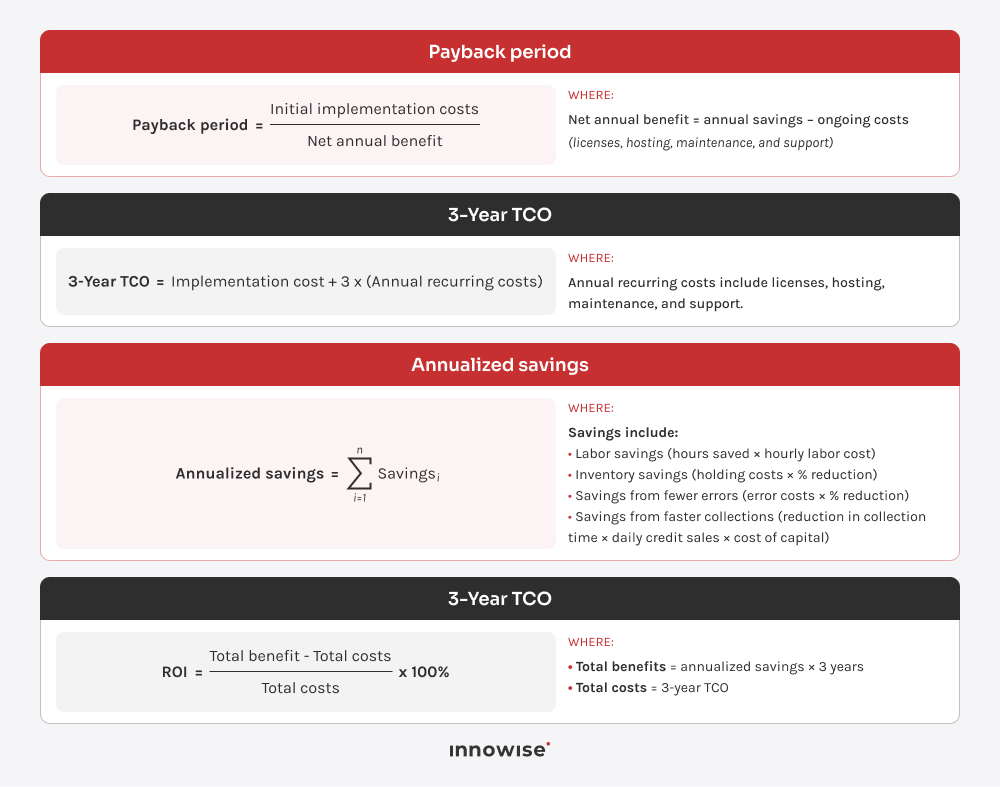
Three numbers carry an ERP business case. Calculate each one before you approve the budget:

  • Payback period: initial implementation costs divided by net annual benefit, where net annual benefit is annual savings minus ongoing costs (licenses, hosting, and support).
  • 3-year TCO: implementation cost plus three years of recurring expenses, including licenses, hosting, and support.
  • Annualized savings: total annual savings from reduced labor and inventory costs, fewer errors, and more efficient order processing.
Alt Text Option 2: ERP ROI infographic explaining how to calculate payback period, total cost of ownership, annual savings, and return on investment.

Measure each source of benefit relative to the baseline period preceding the project.

  • Labor savings are the number of hours saved multiplied by the hourly labor cost.
  • Inventory savings are annual inventory holding costs multiplied by the expected percentage reduction in inventory.
  • Savings from errors are the annual costs of rework, credit memos, and shipping errors multiplied by the expected percentage reduction in these costs.
  • Savings from faster collections are calculated based on the reduction in collection time, average daily credit sales, and the cost of capital.

What to ask an Odoo partner before signing

At Innowise, we make sure our clients understand what to expect from their Odoo implementation. During consultations, we address the questions below to clarify the scope, costs, and project requirements. You can ask your potential implementation partners the same questions to evaluate their approach and know what to expect before signing an agreement.

Question #1: Can you provide an hour breakdown by project phase?

Ask for estimated hours for discovery, configuration, development, migration, testing, training, and go-live.

Question #2: What are your rates by role and seniority?

Check the hourly rates for different roles and seniority levels, along with rules for overtime, travel, and rate changes during the project.

Question #3: What license assumptions are included in the proposal?

Confirm the plan, the number of full users and Light Users, the first-year discount, the hosting option, and whether you or the partner pays Odoo directly.

Question #4: What migration activities are included?

Clarify which source systems are covered, how many records and years of historical data need to be migrated, and who’s responsible for data cleanup.

Question #5: How are change requests estimated and approved?

Ask how a change is requested, estimated, and approved, and which rates apply.

Question #6: Can you provide references from similar Odoo projects?

Ask for examples of projects involving businesses of a similar size, in the same industry, and using comparable modules. If possible, speak directly with at least one of those clients.

Get expert support at every stage of your Odoo implementation

A look at our ERP projects

All case studies
Odoo ERP implementation
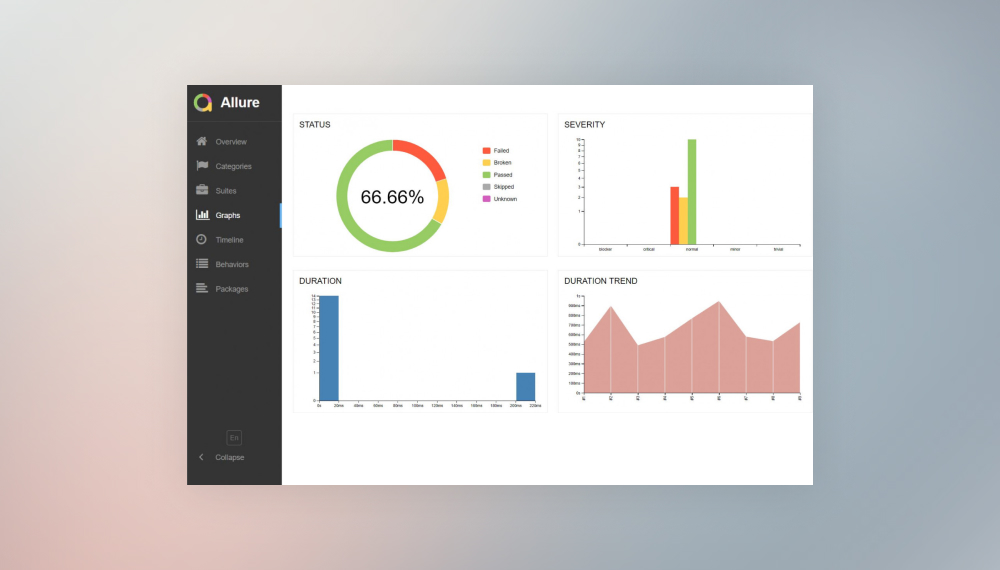
Innowise implemented Odoo 17 Enterprise as a single connected system for sales, purchasing, production, finance, service, HR, and reporting.
100% unified operations under one ERP
100% operations traceability
View case study
Client review

View case study
Client review logo. Client review

Odoo ERP implementation.
Automated testing for top ERP solutions
Innowise executed automated ERP testing to ensure that integrating new functionality did not compromise the integrity of the existing system.
2x faster feature release compared to manual QA
Upgrade of data management software for extractive, oil, and gas industry
Innowise has upgraded a set of customized oil and gas platforms to optimize resource exploration and extraction processes.
1-3 seconds to generate reports
Royalty streams calculator development
Innowise developed a convenient system for storing, calculating, and editing royalty streams from biopharmaceutical products on a quarterly basis.
Enterprise resources management system development
We built cloud-based mobile and web applications for tracking and managing equipment and machines’ states, location, and work schedule in real-time.
Time and task tracking application upgrade
Innowise enhanced a custom web and mobile solution allowing users to easily track document management tasks, working time, and safety.
01 / 01
Close popup icon

How Innowise can help

Innowise is an Odoo Silver Partner with 70+ delivered projects and 50+ in-house experts. After you share your requirements, we’ll prepare a proposal outlining the project scope, team size, timeline, and estimated cost.

Our Odoo services cover every stage of implementation:

Logo.
  • Odoo consulting
  • Odoo implementation
  • Odoo customization
  • Custom Odoo development
  • Odoo integration
  • Odoo migration
  • Odoo support

Odoo consulting

Our Odoo consulting includes scoping, module selection, and a roadmap with cost estimates. This gives you a clearer picture of the work involved and the budget you'll need.

Business consultant discussing software solutions with a client.

Odoo implementation

Innowise's Odoo implementation process covers discovery, configuration, data migration, training, go-live, and hypercare. We also offer the Success Packs described above to support these activities.

Digital code analysis for business software integration.

Odoo customization

When standard Odoo modules or workflows need adjustments, our experts can modify them to fit your requirements. We test all Odoo customizations before deploying them to your live system.

Digital gears representing software migration and system automation.

Custom Odoo development

When your business needs functionality beyond what standard Odoo apps offer, Innowise provides Custom Odoo development. We build modules for specific business processes to get more value from Odoo.

Software consultant managing digital systems.

Odoo integration

We connect Odoo with your CRM, e-commerce platform, and other external systems to keep data consistent across them. With Odoo integration, changes made in one system can be synchronized with the others, reducing manual data entry.

Laptop with digital connections representing software integration.

Odoo migration

During the Odoo migration, Innowise experts transfer data from legacy systems into Odoo. We run validation checks to identify errors and verify that the migrated data is accurate and ready for use.

Digital documents transferring between computers during migration.

Odoo support

Our Odoo support services include implementation support, maintenance, troubleshooting, hosting support, and post-go-live training.

Keyboard key labeled support representing technical assistance.

FAQ

Odoo subscription pricing depends on the plan, billing cycle, and region. The official pricing page lists per-user rates for the Standard and Custom plans. Published prices and promotions may change, so we recommend checking Odoo's current pricing before preparing a budget.

Odoo offers two editions: Odoo Community and Odoo Enterprise. Odoo Community is free and open source. However, infrastructure, administration, implementation, and maintenance can still incur costs. Odoo also offers a One App Free plan with one app and unlimited users.


A focused small-business deployment may take around 4–12 weeks. Mid-sized projects can take 3–6 months. Enterprise implementations may require 6–18 months or longer. The timeline varies depending on the number of processes, integrations, customizations, and business units.

Potential additional expenses include third-party connectors, add-on licenses, data cleanup, custom reports, change requests, extra testing, retraining, custom-code maintenance, travel, and performance tuning. Ask the implementation partner to clarify what's excluded from the proposal.

There is no universal answer. The comparison depends on the specific products and editions selected, number of users, implementation scope, hosting, partner fees, and ongoing support. Compare the three-year TCO for equivalent business requirements rather than comparing subscription prices alone.

A contingency reserve of 10–20% of the estimated implementation budget can help cover approved changes, data issues, and unforeseen technical work. The right amount depends on how well you understand the requirements and source data.

Not necessarily. Odoo support terms distinguish standard support from other maintenance work, and custom modules may require separate attention. Confirm the applicable terms and responsibilities with Odoo or your implementation partner.

Odoo provides a One App Free plan that lets you use one app with unlimited users. The available features and hosting options depend on the plan you choose. Review the official pricing page to check current options.

Show all

Table of contents

Implement Odoo with Innowise

    Contact us

    Book a call or fill out the form below and we’ll get back to you once we’ve processed your request.

    Send us a voice message
    Attach documents
    Upload file

    You can attach 1 file up to 2MB. Valid file formats: pdf, jpg, jpeg, png.

    By clicking Send, you consent to Innowise processing your personal data per our Privacy Policy to provide you with relevant information. By submitting your phone number, you agree that we may contact you via voice calls, SMS, and messaging apps. Calling, message, and data rates may apply.

    You can also send us your request
    to contact@innowise.com
    What happens next?
    1

    Once we’ve received and processed your request, we’ll get back to you to detail your project needs and sign an NDA to ensure confidentiality.

    2

    After examining your wants, needs, and expectations, our team will devise a project proposal with the scope of work, team size, time, and cost estimates.

    3

    We’ll arrange a meeting with you to discuss the offer and nail down the details.

    4

    Finally, we’ll sign a contract and start working on your project right away.

    More services we cover

    arrow