ERP for the manufacturing industry: features, top systems & implementation guide

Lead of ERP Consultants
Verified expert
Every article at Innowise is created by authors with real-world experience. They understand the topic beyond theory and bring insight from real projects.
19+ years of experience
Verified expert
19+ years of experience
Kiryl is a specialist in SAP ecosystem optimization. He cuts through the complexity of enterprise resource planning, tailoring SAP modules to specific workflows to ensure clients extract maximum efficiency from their digital core.
Expertise
ERP Project management Process optimization
Let's talk

Key takeaways

  • ERP systems for manufacturing centralize business operations through the integration of production, inventory, procurement, finance, and quality management into a single system with real-time, accurate data.
  • Key ERP features include production planning, supply chain and inventory management, order processing, financial management, regulatory compliance, and analytics.
  • Choosing the right ERP system depends on your business’s needs. Solutions such as Microsoft Dynamics 365, Odoo, SAP S/4HANA, and NetSuite serve companies of various sizes, budgets, and operational complexity.
  • Off-the-shelf ERP solutions work well when standard functionality meets most of the business’s needs. At the same time, customized ERP systems work better for manufacturing companies with unique workflows, specific regulatory requirements, or complex production cycles.
Summarize article with AI

One system manages procurement, another handles planning, a third oversees the production process, and accounting is a whole other story. Companies spend countless hours piecing together reports from different systems, only to find the data outdated by the time it’s sent. Does this sound familiar?

An ERP system for manufacturing companies helps solve such problems. It integrates procurement, planning, production, and accounting processes into a single information environment. Instead of searching for information across disparate systems, you’ll see your operations in real time in one window. This helps you make faster and more informed decisions.

In this post, I’ll walk you through the must-have features of ERP for manufacturing, share insights on some of the best solutions out there right now, and break down how ERP genuinely adds value in a real-world setting.

What is ERP for the manufacturing industry?

ERP for manufacturing is a single platform that connects production planning, inventory, supply chain, finance, and quality management, so every department works off the same real-time data instead of pulling separate reports and reconciling them by hand. It’s the system of record that ties your shop floor to your back office.

It’s worth untangling ERP from two terms people throw around interchangeably. MRP is a piece of what ERP does — the planning engine that calculates what materials you need, how much, and when, based on your bills of materials and demand. MES lives on the shop floor itself, tracking machines, work orders, and operators in real time. Put simply: MRP plans the materials, MES watches the floor, and ERP connects both to finance, procurement, and the rest of the business.

An ERP market overview

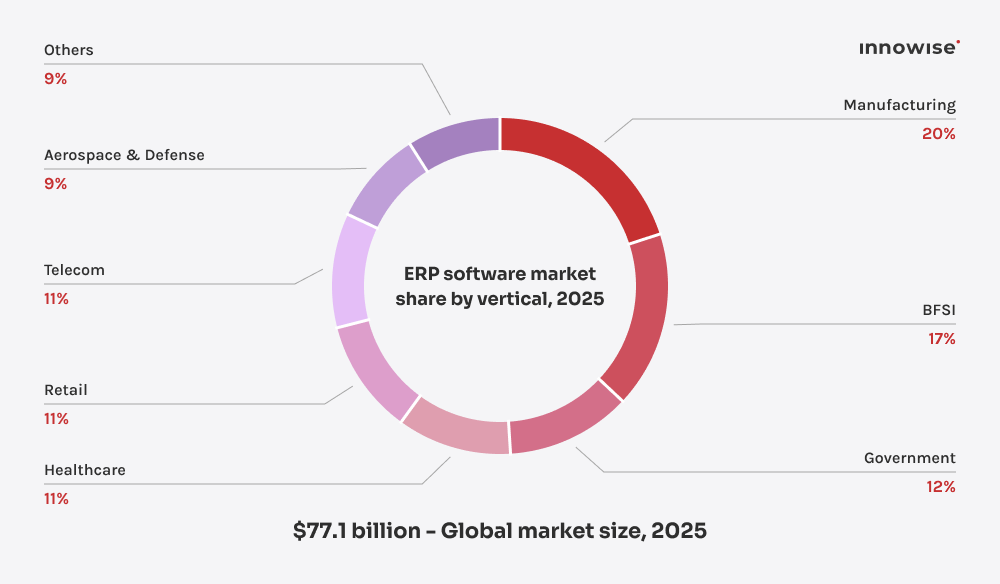
In 2025, the global ERP market hit $77.1 billion, and it’s not slowing down anytime soon. With an expected 9.5% CAGR through 2033, businesses are doubling down on smarter, more integrated systems. Manufacturers hold 19.75% of the ERP market revenue share, driving the push for better automation and efficiency.

Traditional on-prem systems can’t keep up with today’s need for flexibility, remote access, and multi-location management. That’s why cloud ERP is chosen more often, with a 54.4% revenue share. 

erp software market.

Discover how a modern ERP can benefit your operation

Do you need ERP for manufacturing?

Not every manufacturer needs ERP on day one, but a few warning signs usually mean it’s time to stop putting it off:

  • Siloed departments. Purchasing, production, and finance each run their own spreadsheets, and nobody has the same numbers at the same time.
  • Inventory inaccuracy. You’re finding out about shortages or overstock after they’ve already cost you money.
  • Missed delivery dates. Orders slip because nobody has visibility into production capacity before promising the date.
  • Manual BOM and traceability errors. Bills of materials live in spreadsheets that drift out of sync with what’s actually being built, and tracing a defect back to its source takes days instead of minutes.

If you’re running a very small operation with a single product line and none of the above is biting yet, a simpler inventory or production tool might genuinely serve you better for now — ERP is worth the investment once complexity, not ambition, demands it.

Discover manufacturing ERP software key features

If you’ve ever dealt with the chaos of running a manufacturing operation, you know how easy it is to get buried in spreadsheets, disconnected systems, and never-ending manual updates. That’s why having a solid ERP for the manufacturing industry is a must. But here’s the thing: not all ERPs are built the same, and trust me, not all of them are worth your time.

After working with all kinds of setups, I’ve nailed down the must-have features. So, if you’re looking for an ERP that boosts operations instead of slowing you down, here’s my go-to checklist.

  • Production
  • Supply chain
  • Compliance & quality
  • Orders
  • Inventory
  • Finance
  • Analytics

Production planning & scheduling

If your production scheduling is a mess, everything else falls apart. A solid ERP keeps things running like clockwork, so you’re not stuck chasing delays, juggling last-minute changes, or constantly playing catch-up.

  • Monitoring production progress and work orders
  • Managing resource allocation and labor scheduling
  • Organizing production tasks to minimize downtime
  • Tracking equipment and machine efficiency
  • Automating scheduling based on live data inputs
Production planning & scheduling.

Supply chain management

The last thing you need is to suddenly realize you’re short on materials after a shipment is already delayed. A connected supply chain keeps all your data in one place, so you can track inventory, anticipate shortages, and adapt on the fly.

  • Tracking inventory levels in real-time
  • Assessing and monitoring supplier performance
  • Forecasting demand and planning supply chain activities
  • Connecting with logistics systems for shipment tracking
Supply chain management.

Compliance & quality management

No one wants a failed audit or, worse, a product recall. Built-in compliance tools keep things in check without drowning you in paperwork.

  • Monitoring production processes for compliance with standards
  • Managing quality assurance checks and audits
  • Documenting non-conformance issues and corrective actions
Compliance & quality management.

Order management

Customers hate waiting on updates. A strong order management system means you can give instant updates, resolve issues faster, and improve customer satisfaction.

  • Tracking order status and shipment details
  • Automating invoicing and payment processing
  • Managing customer inquiries and returns
Order management.

Inventory management

Nothing kills productivity like running out of key parts mid-production. A good ERP keeps stock levels right where they need to be.

  • Tracking inventory automatically with real-time updates
  • Valuing inventory and analyzing costs
  • Setting reorder alerts based on predefined thresholds
Inventory management.

Financial oversight

If you don’t have a grip on cash flow and costs, nothing else matters. An ERP with strong financial tools keeps you profitable and compliant.

  • Incorporating budgeting and forecasting functionalities
  • Streamlining processes for accounts payable and receivable
  • Automating financial reporting and compliance tasks
  • Monitoring costs and analyzing profitability metrics
Financial oversight.

Analytics & reporting

Making gut-based decisions isn’t a strategy. A strong analytics setup gives you real insights, so you’re making moves based on facts, not feelings.

  • Customizing dashboards for KPIs
  • Automating report generation for different departments
  • Predicting future trends with advanced analytics
  • Visualizing data for easier interpretation
Analytics & reporting.

Manufacturing ERP features and KPI they can influence

Feature areaKPI
Production planning & scheduling
  • Unplanned downtime
  • On-time delivery
Supply chain management
  • Stockout-driven stoppages
  • Lead-time predictability
Compliance & quality management
  • Audit preparation time
  • Time-to-detect on defects
Order management
  • Order accuracy
  • Inquiry resolution time
Inventory management
  • Carrying costs
  • Stock availability
Financial oversight
  • Forecasting accuracy
  • Month-end close time
Analytics & reporting
  • Manual reporting time
  • Decision speed
Manufacturers, especially in the automotive industry, are always under pressure to work smarter, cut down on waste, and keep up with changing regulations. Without a solid ERP system, things can quickly spiral — delays, inventory mix-ups, and missed opportunities to grow. That’s where we come in. At Innowise, we build ERP solutions that connect everything, so you can stay on top of your game and ahead of the competition.
Michael Labutin, Head of Delivery.
Michael Labutin
Head of Delivery Office

ERP software for manufacturing: how we help you get it right

Whether you’re starting from scratch, upgrading an outdated system, or fine-tuning what you’ve got, we make sure your ERP runs smoothly from day one. No headaches, no guesswork — just a system that works the way you need it to. Here’s what we bring to the table.

ERP system implementation

We’ll map out your technical needs and set up the right ERP features — handling everything from customization to deployment. Expect a smooth transition that works with your production flow and keeps you on top of compliance. 

Data migration

Switching from spreadsheets or legacy systems? Our team moves your data into your new ERP smoothly and securely. Your data stays safe, downtime remains low, and you’re all set for your next production cycle without the stress.

Ongoing support

ERP solutions aren’t set-it-and-forget-it. Our T-shaped experts handle maintenance, security updates, and troubleshooting so your operations stay smooth and hassle-free. Need upgrades or tweaks? We’ve got you covered.

User training

The best ERP software for manufacturing is one your team actually uses. Our team provides easy-to-follow training so everyone feels confident from day one. From production managers to admin staff, everyone gets the know-how they need. 

Process optimization icon.

Workflow automation

Take repetitive tasks off your plate. We’ll automate crucial workflows like purchase orders and production updates, so your team can focus on bigger things. Less manual work means fewer mistakes and smoother daily operations.

Report icon.

BI and reporting

We bring in BI tools that turn your data into insights you can actually use. Think custom dashboards, real-time analytics, and automated reporting that keep everyone from line managers to C-level execs on the same page.

Cloud ERP solutions

Not ready to invest in on-prem servers? Innowise implements cloud ERP solutions that let you scale easily, stay up to date, and access everything securely from any device — keeping your operations running smoothly, no matter where you are.

ERP upgrade

Already using ERP software for manufacturing but not getting the ROI you expected? Our expert team will fine-tune it, add new modules, customize integrations, and smooth out workflows to get more value from your system.

Top ERP systems for the manufacturing industry in 2025

If you’re evaluating your options, you’ve likely come across a crowded market of ERP vendors. Navigating all the choices can be overwhelming, so I’ve spotlighted three heavy hitters that consistently stand out. 

PlatformBest forKey featuresDeployment
Microsoft Dynamics 365Microsoft ecosystem users who want AI-powered insights across sales, finance, and supply chainCloud-based modules tying sales, finance, and supply chain; Deep Office and Power BI integrationCloud
OdooSmall and mid-sized manufacturers who want a modular, budget-friendly ERPOpen-source, plug-and-play apps for inventory, scheduling, and productionCloud
SAP S/4HANAMid-sized to large enterprises with complex, global production and supply chain needsIn-memory database for real-time analytics, deep financial and production planning capabilitiesCloud, on-premises, or hybrid
NetSuiteGrowing mid-market manufacturers who want financials, inventory, production, and CRM on one platformMulti-subsidiary and multi-currency consolidation; real-time visibility into work orders and inventoryCloud
  • Microsoft Dynamics 365
  • Odoo
  • SAP S/4HANA
  • NetSuite

Microsoft Dynamics 365 is a solid choice for manufacturers of all sizes, offering a full suite of tools to keep operations running smoothly. It works perfectly with other Microsoft products, provides AI-powered insights, and scales effortlessly in the cloud. From production planning to inventory and customer management, it’s got you covered.

Company logo.
Why it’s great
  • Cloud-based modules that tie together sales, finance, and supply chain
  • Smooth integration with Microsoft tools like Office and Power BI
Potential pitfalls
  • Licensing costs can add up fast if you need multiple modules
  • Frequent updates mean you’ll need a robust IT plan for rollouts

Odoo is a flexible, open-source ERP that’s great for small and mid-sized manufacturers. Its modular design lets you add exactly what you need — whether it’s inventory tracking, production scheduling, or other tools to keep things running smoothly. It’s easy to use, budget-friendly, and a reliable option if you're looking to dive into ERP without a huge upfront cost.

Company logo.
Why it’s great
  • Open-source platform with a large library of plug-and-play apps
  • Wallet-friendly for small to mid-sized manufacturing setups
Potential pitfalls
  • Advanced features often require third-party add-ons
  • Less comprehensive out-of-the-box than some ERP giants

SAP S/4HANA is a powerful ERP designed for mid-sized and large enterprises that need robust tools for managing production, supply chains, finance, and real-time analytics. Built on the in-memory SAP HANA database, it delivers high-speed data processing and scalability for businesses with global operations.

Company logo.
Why it’s great
  • Ideal for mid-sized and large companies aiming for digital transformation
  • Strong financial, supply chain, and production planning capabilities
  • Real-time insights for smarter decision-making
Potential pitfalls
  • Customization can be complex and often requires expert support
  • Higher upfront costs compared to simpler ERP solutions

NetSuite is Oracle's cloud-native ERP. Usually, it's a choice for growing mid-market manufacturers that want financials, inventory, production, and CRM on a single platform. It supports scaling across entities and currencies, so consolidation and reporting don't depend on separate systems stitched together.

Company logo.
Why it’s great
  • Strong multi-subsidiary and multi-currency consolidation
  • Real-time visibility into work orders, inventory, and financials on one cloud-native platform
  • Built-in compliance support for standards like ISO 9001 and OSHA
Potential pitfalls
  • Manufacturing and MRP modules can feel underbuilt for complex, multi-tier BOMs and lot traceability
  • Deep customization relies on SuiteScript, which means budgeting for developer time
  • Costs have climbed since Oracle's acquisition, and licensing can scale quickly with modules and subsidiaries
Boost production workflows and cut out inefficiencies with our ERP services

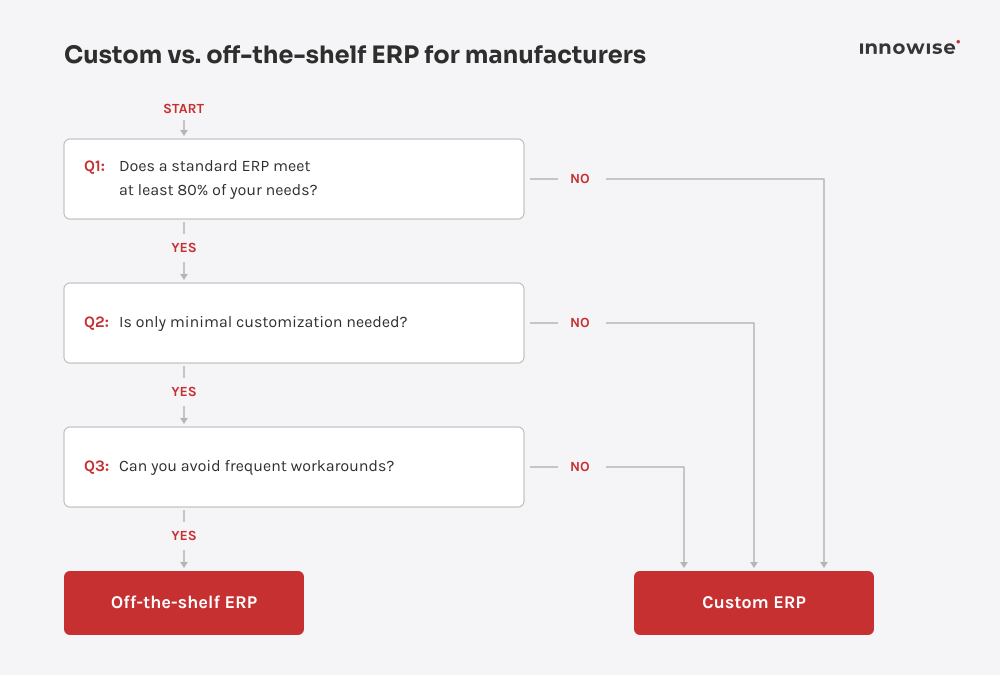
Custom vs. off-the-shelf ERP for manufacturers

The platforms above are ready platforms that can be configured for your needs. However, I’ve worked with manufacturers where the off-the-shelf ERP wasn’t enough. In such cases, we talk about custom solutions. 

Off-the-shelf ERP

Off-the-shelf platforms are faster to roll out and cost less upfront. You’re working within the vendor’s roadmap and standard modules, which is usually plenty if your processes are fairly standard for your industry.

  • Faster time to go-live
  • Lower initial investment
  • Vendor handles updates and security patches
  • Best when your workflows are close to industry standard

Custom ERP

Custom development builds the system around your processes. It costs more and takes longer, but it removes the workarounds that off-the-shelf systems force on manufacturers with unusual BOM structures, regulatory requirements, or legacy equipment to integrate.

  • Built around your specific workflows
  • No paying for modules you’ll never use
  • Full ownership of the codebase and data architecture
Decision flowchart comparing custom ERP and off-the-shelf ERP options for manufacturers based on business needs.

The business value of manufacturing ERP solutions

Thinking about ERP for your manufacturing business but not sure it’s worth it? Here’s the deal — modern ERP systems tie everything together, from production to finance, so you can ditch outdated processes and work smarter. No more guesswork, fewer bottlenecks, and a more proactive approach to growth. Here’s what you’ll gain:

Less manual work, smoother ops Reduced risks icon.
Better data visibility & reporting E-commerce analytics icon.
Smart supply chain management Supply chain icon.
Better inventory & lower costs Inventory icon.
Flexibility for market changes Business intelligence icon.
Compliance & consistent quality Maintenance check icon.
Smart resource/production planning Research icon.
Better teamwork across departments Brand integrity icon.
Happier customers, timely shipping Logistics icon.
Data-driven decisions & insights Data consolidation icon.

Manufacturing ERP implementation roadmap

01
Project setup
  • Identifying stakeholders
  • Forming a project team
  • Establishing communication
02
Discovery & analysis
  • Analyzing challenges
  • Collecting requirements
03
Requirement planning
  • Creating a schedule
  • Finalizing specifications
  • Designing architecture
04
ERP implementation
  • Configuring functionality
  • Developing extensions
  • Performing test cases
05
System testing
  • Carrying out unit testing
  • Conducting integration testing
  • Executing user testing
06
User training
  • Training end users
  • Generating training materials
07
Deployment & support
  • Migrating data
  • Verifying production
  • Post-launch support
arrow-icon.arrow-icon.
01 Project setup
  • Identifying stakeholders
  • Forming a project team
  • Establishing communication
arrow-icon.arrow-icon.
02 Discovery & analysis
  • Analyzing challenges
  • Collecting requirements
arrow-icon.arrow-icon.
03 Requirement planning
  • Creating a schedule
  • Finalizing specifications
  • Designing architecture
arrow-icon.arrow-icon.
04 ERP implementation
  • Configuring functionality
  • Developing extensions
  • Performing test cases
arrow-icon.arrow-icon.
05 System testing
  • Carrying out unit testing
  • Conducting integration testing
  • Executing user testing
arrow-icon.arrow-icon.
06 User training
  • Training end users
  • Generating training materials
arrow-icon.arrow-icon.
07 Deployment & support
  • Migrating data
  • Verifying production
  • Post-launch support

How much does manufacturing ERP cost?

I can’t say a specific number because it doesn’t exist, and the cost range is wide. Any figure quoted without a discovery conversation is a guess. 

What influences the cost:

  • Licensing or subscription fees
  • Implementation that includes configuration, workflow setup, and go-live support
  • Customization 
  • Integrations 
  • Data migration
  • Training
  • Ongoing support 

Company size and the number of facilities you’re rolling out to are usually the biggest swing factors. These are followed by the required modules, how much customization your processes require, and how much data has to migrate from your legacy systems.

How long does implementation take?

Just as with costs, it depends on the project. Smaller manufacturers with fairly standard processes can expect 3 to 6 months. Mid-sized operations with multiple modules and moderate customization tend to take 6 to 12 months. Larger or multi-site manufacturers rolling out complex, highly customized systems can take more than 12 months.

What the timeline depends on:

  • How much of your data needs to be cleaned and migrated
  • The number of modules and integrations in scope
  • How much your workflows deviate from the vendor’s standard configuration
  • How available your internal team is throughout the project

AI in manufacturing ERP

With AI becoming a standard layer on top of manufacturing ERP, I’d not want to skip it in this article. I think it is most useful in demand forecasting and predictive maintenance. 

AI featureWhat it does
Demand forecastingPredicts inventory and material needs from historical and real-time sales data, then recommends purchase or work orders
Predictive maintenanceFlags equipment issues from sensor and historical data
Conversational copilotsLets planners and managers query data, generate summaries, and trigger actions using natural language
Visual quality inspectionUses computer vision to catch product defects on the line faster than manual sampling
Procurement automationExtracts order details from emails or documents and drafts purchase orders and supplier communications automatically

I’d like to note that for proper work, AI requires clean, structured transactional data.

Final thoughts

Though implementing an ERP system helps solve many manufacturing-specific problems, the software itself is only part of the solution. The right choice depends on your specific manufacturing operations, the systems in use, your workflow complexity, and your business development plans. Some companies can use a custom-configured ready-made platform, while others benefit more from extensive customization or a custom-developed ERP system.

To successfully implement ERP for the manufacturing industry, it’s recommended to define the right scope from the start and link the implementation to concrete business goals. If you organize processes, data handling, and integrations effectively and ensure staff adoption, ERP becomes a reliable foundation for improving production predictability and supporting continued business growth.

If you’re currently selecting a suitable ERP system, contact our team. We’ll analyze your current business processes and requirements, and help you develop a practical plan for next steps.

That’s where an ERP steps in. It ties your whole operation together so everything flows smoother, faster, and with way less stress. Production planning gets easier, inventory updates automatically, orders move quicker, and reports practically build themselves. Most importantly, your team finally gets real-time data to make better calls without the guesswork.

Sure, it’s not a magic wand that fixes every single issue. But it gives you a fighting chance to stay in control when everything around you keeps changing. And these days, that’s already a pretty big win.

FAQs

The cost of ERP for the manufacturing industry scales with your company size, the modules you need, and how much customization and data migration your setup requires. These are the factors that influence the cost the most.

There isn't a universal best. Your choice will depend on your size, complexity, and existing tech stack. SAP S/4HANA suits large, complex operations; NetSuite and Dynamics 365 are better for growing mid-market manufacturers; Odoo works well for smaller, budget-conscious teams.

If a standard platform supports most of your workflows without much customization, off-the-shelf ERP gets you live faster and cheaper. If your processes don't fit a standard mold, such as unusual BOM structures, legacy equipment, or specific compliance needs, custom development starts to pay for itself. It’s worth walking through both options with your ERP partner.

Yes, most modern platforms are built to add users, modules, facilities, and subsidiaries as you grow. However, scalability depends on how the system was configured at implementation. A rushed setup with hardcoded workarounds will fight you later, so it's worth planning for growth from the beginning.

You can see ROI as fewer stockouts and rush orders, less time reconciling data across systems, faster month-end close, and better on-time delivery. The exact payback period depends on your starting point and how disciplined the rollout is.

Most enterprise-grade platforms do, though the depth varies. Discrete manufacturing and process manufacturing have different planning and traceability needs, so it's worth confirming a platform's process-manufacturing depth specifically rather than assuming general ERP support covers it.

Show more Show less

Table of contents

Implement your manufacturing ERP with Innowise

    Contact us

    Book a call or fill out the form below and we’ll get back to you once we’ve processed your request.

    Send us a voice message
    Attach documents
    Upload file

    You can attach 1 file up to 2MB. Valid file formats: pdf, jpg, jpeg, png.

    By clicking Send, you consent to Innowise processing your personal data per our Privacy Policy to provide you with relevant information. By submitting your phone number, you agree that we may contact you via voice calls, SMS, and messaging apps. Calling, message, and data rates may apply.

    You can also send us your request
    to contact@innowise.com
    What happens next?
    1

    Once we’ve received and processed your request, we’ll get back to you to detail your project needs and sign an NDA to ensure confidentiality.

    2

    After examining your wants, needs, and expectations, our team will devise a project proposal with the scope of work, team size, time, and cost estimates.

    3

    We’ll arrange a meeting with you to discuss the offer and nail down the details.

    4

    Finally, we’ll sign a contract and start working on your project right away.

    More services we cover

    Industries
    3D product modeling 3D product rendering Adtech Agriculture software ATS software Automotive software Banking software BI BigCommerce Biotech Clinical data management Clinical intelligence Clinical trials software Cloud Migration Consulting Services CMS Construction software CRM Desk booking apps Drupal E-commerce E-commerce apps E-commerce apps QA E-commerce consulting E-commerce migration E-commerce web design e-learning EHR & EMR EHR integration EHS solutions Embedded finance Energy & utilities Enterprise AI Enterprise blockchain Enterprise software ESG consulting Finance apps QA Finance software Fintech consulting Fitness apps GenAI consulting Government apps GRC Headless ecommerce development Healthcare Healthcare AI Healthcare analytics Healthcare data migration Healthcare IT consulting Healthcare mobile apps Healthcare software Hire healthcare app developers HR software Imprint Insurance Investment apps Life-cycle assessment LIMS integration LMS Logistics Magento Magento PWA Manufacturing Marketing Marketplace development Media & entertainment Medtech Microsoft 365 Microsoft Dynamics 365 MS Dynamics 365 migration NopCommerce Odoo consulting Odoo development Odoo implementation Oil & gas software OpenCart Patient engagement Payment gateway API Payment hub Pharma Pharma AI Pharmacy management PIM implementation Pimcore Population health management PoS software Practice management PWA development Quality management RCM software Real estate Retail Retail data analytics Robotics Salesforce CRM SaMD & SiMD SharePoint SharePoint Intranet Shopify Shopify developers Shopify integration Shopify migration Shopware Sitecore Supply chain management Sustainability consulting Telecom Telemedicine Transportation Travel apps Travel portals Value-based care apps Video-on-demand VR/AR in healthcare Wellness apps White-label HRM White-label LMS WooCommerce Wordpress
    See more

    arrow