Retail ERP software: features, systems, costs, and selection guide

Aug 27, 2026 18 min read
Summarize article with AI

Key takeaways

  • The best ERP system for your retail business depends on your size, revenue streams, the products you sell, and your budget.
  • An ERP system is not always necessary from day one. A single-store retailer can often operate efficiently on POS and basic inventory systems until the need for an ERP becomes apparent.
  • Business needs for ERP capabilities differ depending on the business model.
  • The ability to integrate is just as important as which system you choose to implement. 
  • AI helps speed up decision-making through demand forecasting, dynamic pricing, and anomaly detection.

What happens when customer-facing systems and back-office systems run on separate rails? The departments may end up displaying different information. A support rep might tell a customer their order has shipped, while the warehouse system says it’s still sitting on a shelf. Another example is when the storefront and inventory counts are managed in two different tools, so no one flags a product stockout, but marketing may still run a promotion on it.

As IHL Group found, stockouts and overstocks cost retailers worldwide $1.7 trillion every year. That figure is what accumulates when a sale made through a storefront, a POS terminal, or a marketplace listing doesn’t update the same inventory record the purchasing team is working from. So, someone reorders too much, or too little, or too late.

This is why retail ERP adoption keeps climbing. Market researchers pegged the segment at $11.25 billion in 2025, and it’s projected to reach $38.95 billion by 2034. 

In this article, I’ll talk about what retail ERP software actually does, what to check before you commit budget to one, and which platforms are worth putting on your shortlist.

What is retail ERP software?

Customer-facing operations include point of sale, the e-commerce storefront, promotions, loyalty programs, customer service, and returns. The back-office functions make those transactions possible and include inventory, purchasing, fulfillment, accounting, supplier management, analytics, and workforce scheduling. ERP software for the retail industry sits between the two and keeps them working from one shared set of numbers.

That distinction is what separates retail ERP from either a standalone e-commerce platform or a basic accounting package. A storefront tool is built to sell; an accounting tool is built to record what was sold after the fact. Neither one, on its own, tells purchasing how much stock to reorder, tells a support agent whether a return is eligible before they promise a refund, or tells a store manager what to expect for staffing during a flash sale. Retail ERP software carries that information across departments, with each transaction updating every module it touches.

For a business selling through more than one channel, this connection is less a convenience and more a requirement. Retail ERP software gives storefront, sales counter, warehouse, and finance team a single account of what happened.

Retail ERP vs POS, OMS, WMS, CRM, and PIM

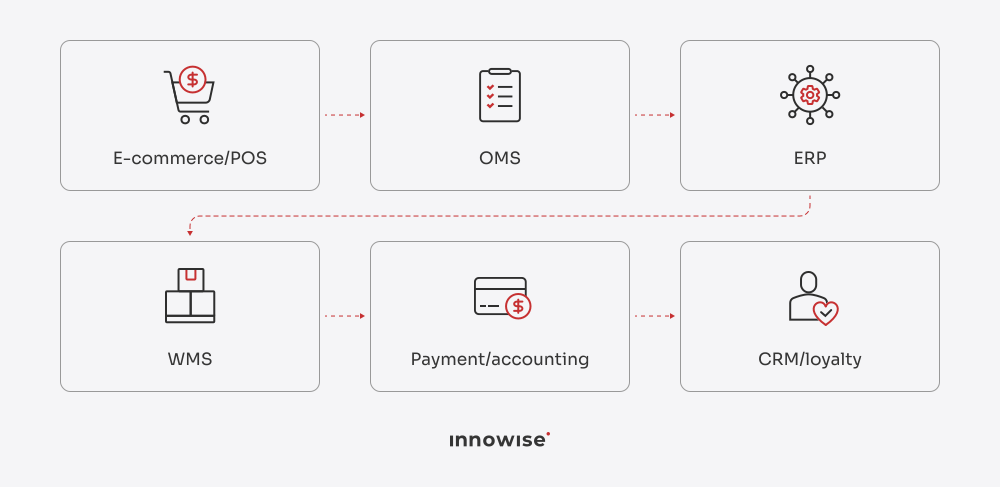
ERP vs POS, OMS, WMS, CRM, and PIM… Or what’s the difference if you already have these systems? A POS processes a transaction, a WMS moves a box, and a CRM logs a conversation, but none of them keeps a full account of what happened across the business. That’s the job of an ERP, using the data these other systems generate. 

So, let’s look at what each system does and compare them side by side.

SystemPrimary roleTypical dataMain users
ERPCentral business and financial managementOrders, inventory, finance, purchasing, suppliers, customersFinance, operations, management
POSIn-store transaction processingSales, payments, receipts, store inventoryCashiers and store managers
OMSCross-channel order orchestrationOrders, availability, fulfillment statusE-commerce and fulfillment teams
WMSWarehouse executionBins, receiving, picking, packing, stock movementsWarehouse teams
CRMCustomer relationship managementProfiles, communications, campaigns, service historySales, marketing, support
PIMProduct information managementProduct descriptions, attributes, media, localizationMerchandising and e-commerce teams

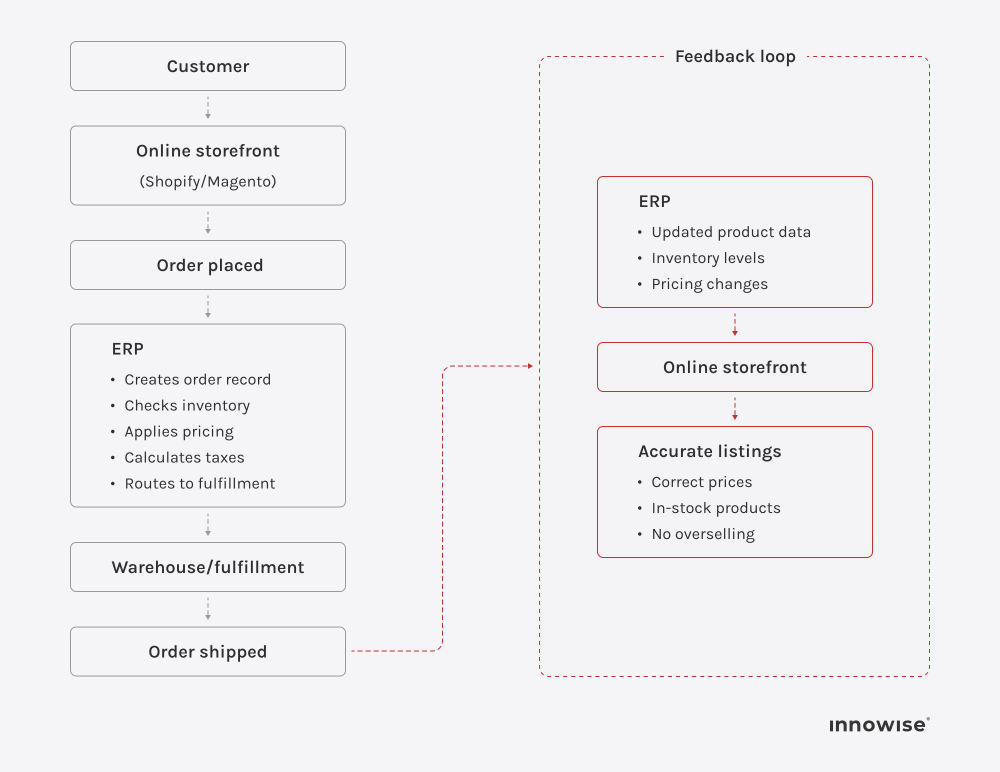
Here’s what that might look like for a single order:

    None of these systems is a substitute for the others. The ERP turns separate events into one coherent record.

When does a retail business need an ERP system?

When a retailer comes to Innowise for ERP implementation, I often find that their decision comes down to a common underlying issue: their existing solutions were designed for a smaller and simpler business.

You may need an ERP system when…

  • You launch a second sales channel. Your storefront, marketplace, wholesale operation, or second store starts generating data in systems that do not communicate with each other.
  • Your warehouse becomes too big to manage by hand because you have too many SKUs or a second warehouse location.
  • Finance spends more time reconciling than reporting because your sales information lives in one program, payments in another, and accounting in yet another.
  • Support is unable to answer simple order questions because responding to those questions requires looking at the storefront, then the fulfillment program, then maybe your warehouse.
  • You are planning for new locations, channels, or markets, but you know you need a solution that will scale with this growth.

All of them come down to the need to connect different parts of business in a single system. Eventually, the cost of staying on disconnected tools, whether in staff time, lost sales from stockouts, or poor customer service, tends to outweigh the cost of switching.

ERP may not be your first priority when...

  • You have a reliable POS that can process payments, print receipts, and keep a running count of what’s on the shelf. Paying for a full ERP module is money spent on capacity the business isn’t using yet.
  • You run a business in a single location with one bank account and a manageable number of transactions, and you don’t need multi-entity financial consolidation or procure-to-pay workflow across departments.
  • Basic inventory management is enough for one storeroom and catalog. It can flag low stock and prevent surprises.
  • You sell through one storefront and a physical counter, and can keep stock counts in sync across both channels with a specialized e-commerce connector.

The tipping point is usually reached as the business grows and starts dealing with multiple sales channels, too large a warehouse to manage in Excel, hours spent by the finance team reconciling numbers between different systems, or a customer support team unable to answer “Where’s my order?”

Core features of retail ERP systems

ERP features connect customer-facing and back-office operations. A catalog update, a return, a markdown can all start on one side of the business and need to be completed successfully on the other. These are the modules that make it happen and the problems they solve.

Product, SKU, and catalog management

Every downstream process depends on product data being right at the source. A retail ERP holds one catalog record per SKU, including variants, attributes, cost, supplier, and the channels it’s listed on. When a product’s dimensions change, or a new variant launches, that update reaches the storefront, the POS, and the purchasing module at the same time.

Point-of-sale integration

POS integration connects the register directly to inventory and financial records, so a sale in the store drops the stock count a website shopper sees, while the revenue posts to accounting without a batch upload at the end of the day. Without this link, a popular item can still show as available online even though the last unit sold in-store an hour earlier.

Omnichannel order management

Once orders arrive from a storefront, a marketplace, and a physical counter, something has to decide where each one gets fulfilled from and track it through to delivery. Order management within the ERP makes that call using current inventory and location data, then keeps the customer-facing side updated with accurate status.

Warehouse and fulfillment management

On the back-office side, warehouse features cover receiving, put-away, picking, packing, and shipping. Connected to the same inventory record the storefront reads from, warehouse activity updates stock counts in near real time, so a pick that takes the last unit off the shelf is reflected online before the next customer tries to buy it.

Pricing, promotions, and markdown management

An ERP centralizes pricing rules, discount codes, and markdown schedules so a holiday promotion doesn’t need to be set up separately in three different systems, and margin data stays connected to the actual cost of goods.

Returns and reverse logistics

A return is a transaction that affects inventory (the item may go back on the shelf or get written off), accounting (a refund needs to be issued), and the customer record (a service history entry, maybe a loyalty adjustment). Retail ERP systems route a return through all three in one flow, so a customer isn’t waiting on a refund because three separate teams each need to update their own tool first.

Finance and retail accounting

Businesses in the retail industry run on thin margins, and errors compound quickly across thousands of small transactions. The finance module reconciles sales from every channel against the general ledger, matches vendor invoices to purchase orders, and manages accounts payable and receivable. So, daily transaction volume becomes numbers a finance team can trust without a manual audit at month-end.

Customer and loyalty management

Purchase history, loyalty point balances, and service interactions are in one profile instead of scattered across a POS, an email tool, and a support inbox. That means a support agent can see a customer’s full order history across all channels before responding, and a loyalty offer can reflect what someone actually buys rather than a generic customer segment.

Analytics and demand forecasting

With sales, inventory, and supplier data running through one system, analytics tools can report on the real state of things. Demand forecasting uses that same data to flag what to reorder and when, catching the gap between too much inventory tying up cash and too little turning into a stockout.

How retail ERP integrates with the commerce ecosystem

An ERP is rarely a stand-alone system. It is part of a broader stack that may already include a POS, a storefront platform, an OMS and a WMS, a CRM, and a PIM. Much of its value comes from how well it connects to each of them.

ERP and POS integration

When the POS and ERP are connected, every register sale writes back to the same inventory and financial records that the rest of the business reads from. Most modern integrations use either a vendor-built connector or an API. Some sync inventory and sales in near real time, while others still rely on scheduled updates.

ERP and e-commerce integration

A storefront platform like Shopify, BigCommerce, or Magento isn’t built to handle the full scope of inventory allocation, tax management across jurisdictions, or accounts receivable. The ERP covers those back-office processes and keeps them tied to the sale.

ERP and OMS/WMS integration

If your business runs a separate OMS and WMS, the ERP still needs to stay in sync with both.  The OMS pulls stock availability from the ERP before confirming where an order should ship from, then sends order and fulfillment status back once a decision is made. The WMS reports stock movement to the ERP as it happens, so a warehouse floor event is reflected in the inventory data a customer service rep or an online shopper is looking at.

ERP and CRM/PIM integration

CRM integration means that purchases across channels can update the customer’s profile, giving you a complete purchase history in one place. PIM integration works in the opposite direction: product content is created and maintained in the PIM, then pushed to the ERP and sales channels. This helps keep product information consistent wherever the customer sees it.

Assess the scope, timeline, and cost of your ERP project

Best ERP systems for retail businesses

I selected five ERP systems that have worked well in Innowise projects. The list isn’t ranked from best to worst because the systems serve different purposes. Comparing them helps show which one is likely to fit a business best, based on its size and complexity.

PlatformBest suited forMain considerationDeployment
Microsoft Dynamics 365Mid-market to large retailers with Microsoft toolsLicensing and module costs can climb as functionality expandsCloud, with on-premises options
OdooSmall to mid-sized retailers and startups on a limited budgetFull functionality often requires paid modules and third-party appsCloud or self-hosted
SAP Business OneSmall to mid-sized businesses that need core ERP without enterprise complexityRetail-specific features are thinner than in SAP's larger productsCloud or on-premises
SAP S/4HANALarge, multinational retailers with complex supply chainsImplementation is a significant undertaking in cost and timelineCloud, on-premises, or hybrid
ServiceNowRetailers needing to connect ERP data with IT service management and internal workflow automationComplements a core ERP rather than replacing oneCloud

Now, let’s take a closer look at each platform.

Microsoft Dynamics 365

Microsoft Dynamics 365 is a set of connected business apps covering finance, inventory, sales, and customer service. Businesses can license the applications they need rather than deploy one fixed package. This makes Dynamics 365 a good fit for mid-market to large retailers already running on Microsoft tools like Excel, Power BI, or Teams and looking for an ERP that plugs into that environment.

Possible limitations:

  • A retailer can start with the modules it needs and add other apps later without re-platforming.
  • The tie-in with familiar Microsoft tools shortens the ramp-up for employees.

Strengths:

  • Costs scale with the number of modules and users licensed.
  • Retail-specific functionality often depends on add-on modules or partner solutions rather than being built in from the start.

Odoo

The next ERP has a similar modular structure. Odoo is an open-source ERP that lets retailers choose the apps they need, such as inventory, accounting, POS, e-commerce, and CRM. It is best suited to small and mid-sized retailers and startups working with a limited budget. You may prefer it if you want to start lean and add functionality as the business grows.

Strengths:

  • Low entry cost and a wide app library.
  • A retailer isn’t paying for capacity it doesn’t need yet.
  • The modular structure fits businesses whose channel mix and operations are still evolving.

Possible limitations:

  • Reaching the depth of a more complete retail ERP can require several apps rather than one bundled system, and the combined cost may approach that of a mid-tier platform. 
  • Retailers with complex, high-volume operations may find some modules less mature than those in longer-established platforms.

SAP Business One

Next on our list is SAP Business One, SAP’s ERP for small and mid-sized businesses. The system covers accounting, inventory, purchasing, and basic CRM in a single package.  If you run a smaller retail business and want SAP’s financial and operational rigor without the cost or implementation timeline of a larger SAP product, you may benefit from SAP Business One.

Strengths:

  • Solid financial and inventory management for a business that has outgrown basic accounting software but doesn’t operate at enterprise scale.
  • Local and industry-specific add-ons are available through SAP’s partner network.

Possible limitations:

  • Retail-specific capabilities are lighter than in retail-focused platforms, so businesses often need to add third-party tools.

SAP S/4HANA

If your retail business operates at enterprise scale, with high transaction volumes across multiple countries and business units, you may find SAP S/4HANA more useful. It’s SAP’s enterprise ERP for companies with layered supply chains, multiple legal entities, and demanding reporting requirements.

Strengths:

  • Depth and configurability across finance, supply chain, and operations.
  • Built to support high transaction volume and multi-entity consolidation.

Possible limitations:

  • Implementation can take months and often requires specialized consulting
  • Demands a level of internal IT capacity that smaller or mid-sized retailers usually don’t have in-house.

ServiceNow

Unlike the previous four systems, ServiceNow is a cloud platform built around IT service management and workflow automation. It’s not a retail ERP, but a workflow layer that can connect ERP data with fulfillment, support, and other operational processes.  I would recommend it for retailers that want to link their existing ERP with internal IT service requests, store-level issue tracking, and cross-department workflows.

Strengths:

  • Strong at managing internal service and support workflows.
  • Can pull data from a connected ERP to give IT and operations teams a unified view of store and system issues.

Possible limitations:

  • It doesn’t cover core retail ERP functions, such as inventory management, purchasing, and retail accounting.

Innowise is a certified SAP partner. Our experts stay current through SAP Learning Hub and master adopting new capabilities as soon as they’re released. This means our SAP implementations are rolled out faster and more correctly while our clients enjoy up-to-date functionality.

The same commitment applies to Odoo: our status as an Odoo partner gives us access to the platform’s newest features and established best practices. For our clients, it means that whatever the complexity of their requirements, we implement Odoo to fit.

Beyond these two platforms, our team also holds professional certifications in Microsoft Dynamics 365 and ServiceNow, so you can put either platform to work for smarter field management, streamlined IT operations, and automated workflows.

How to Choose ERP Software for the Retail Industry

I’ll share some tips the Innowise team uses when helping clients choose the right ERP for the retail industry. They’re not a replacement for ERP consulting, but they give you a useful starting point for making the decision.

  • List your sales channels: storefront, marketplace, physical counter, wholesale account. Flag where data gets duplicated or lost between them. This becomes the baseline the rest of the evaluation gets measured against.
  • Match the system to the size and complexity of your business. Prioritize the features that solve today’s specific problems. Don’t overbuild around needs that may only come later. 
  • Check if a system integrates with your tools, such as your POS, storefront platform, or existing accounting system. 
  • Ask vendors for a full cost breakdown covering at least a three-year horizon before comparing quotes. Implementation, training, and ongoing support can outweigh the sticker price. 
  • Confirm that the vendor has specific experience in retail.
  • Find out how a new location, a new channel, or a busier season would affect performance and cost.
  • Talk to reference customers in a similar business. A vendor’s biggest logo isn’t a useful comparison if that company runs a different business model. 
  • Ask specifically about implementation timeline and post-launch support.
  • Run a trial with real transaction data. Don’t rely on a demo using only sample data, because it can hide the issues with how the system handles your actual SKU count, order volume, and channel mix.
  • Involve the teams who’ll use it daily. Each can spot friction a demo may skip. Their input before the contract is signed is cheaper than their complaints after go-live.

Retail ERP requirements by business model

What an ERP needs to do changes with how a retailer sells. A fashion brand and a grocery chain aren’t looking for the same ERP capabilities, even if both searches start with “ERP for retail stores.”

Retail modelPriority capabilities
Fashion and apparel
  • Variant and matrix management
  • Seasonal collection planning
  • Markdown and promotion scheduling
  • High-volume returns processing
  • Style-level demand forecasting
Grocery and food retail
  • Expiration and shelf-life tracking
  • Batch and lot traceability
  • Automated replenishment
  • Supplier recall management
  • Cold-chain and perishables handling
Specialty retail
  • Complex product catalogs with technical attributes
  • Staff-assisted sales tools
  • Customer service and product-expertise workflows
  • Special-order and drop-ship handling
Omnichannel retail
  • Unified real-time inventory across channels
  • Order management with cross-channel routing
  • POS and e-commerce sync
  • Buy-online-return-anywhere workflows
  • Channel-level margin reporting
DTC and e-commerce
  • Marketplace and storefront integration
  • Fulfillment and carrier management
  • Customer lifetime value and retention analytics
  • Subscription or repeat-order handling
Multi-store chains
  • Store-level inventory tracking
  • Cross-location stock transfers
  • Workforce scheduling and labor cost by site
  • Location-level performance analytics
  • Centralized purchasing with local allocation
Retail and wholesale
  • Dual B2C/B2B pricing logic
  • Negotiated customer terms and price lists
  • Bulk and recurring order processing
  • Credit limit and accounts receivable management
  • Minimum order quantities
Franchise retail
  • Multi-entity financial separation
  • Brand and process standardization
  • Local-to-corporate reporting
  • Royalty and fee calculation
  • Franchisee-level performance benchmarking

Retail ERP implementation roadmap

At Innowise, we follow a rollout process that we divided into clear phases. Below is a brief overview of how it works.

01
Discovery & requirements gathering
  • Mapping current workflows across sales, inventory, purchasing, and finance
  • Documenting where the existing setup breaks down
  • Defining what the new system needs to solve
02
System selection & scoping
  • Narrowing down platform options
  • Confirming which modules are needed at launch and which can come later
  • Setting a scope and budget that both sides agree on
03
Data migration planning
  • Auditing and cleaning product catalogs, customer records, supplier data, and historical transactions
  • Mapping the data to the new system's structure
04
Configuration and integration
  • Configuring the ERP to match the business's workflows, including pricing rules, approval chains, and warehouse setup
  • Connecting the system to existing tools
05
Testing
  • Running the system through real transaction scenarios, such as a sale, return, restock, or multi-location order
  • Spotting issues before they reach customers or the sales floor
06
Staff training
  • Training store staff, warehouse teams, and finance to use the system day to day.
07
Go-live & phased rollout
  • Launching the system in stages to limit exposure if something needs adjusting
  • Expanding to the full business
08
Post-launch support & refinement
  • Monitoring the system for performance issues
  • Refining workflows as real usage surfaces edge cases a testing phase didn't catch
arrow-icon arrow-icon
01 Discovery & requirements gathering
  • Mapping current workflows across sales, inventory, purchasing, and finance
  • Documenting where the existing setup breaks down
  • Defining what the new system needs to solve
arrow-icon arrow-icon
02 System selection & scoping
  • Narrowing down platform options
  • Confirming which modules are needed at launch and which can come later
  • Setting a scope and budget that both sides agree on
arrow-icon arrow-icon
03 Data migration planning
  • Auditing and cleaning product catalogs, customer records, supplier data, and historical transactions
  • Mapping the data to the new system's structure
arrow-icon arrow-icon
04 Configuration and integration
  • Configuring the ERP to match the business's workflows, including pricing rules, approval chains, and warehouse setup
  • Connecting the system to existing tools
arrow-icon arrow-icon
05 Testing
  • Running the system through real transaction scenarios, such as a sale, return, restock, or multi-location order
  • Spotting issues before they reach customers or the sales floor
arrow-icon arrow-icon
06 Staff training
  • Training store staff, warehouse teams, and finance to use the system day to day.
arrow-icon arrow-icon
07 Go-live & phased rollout
  • Launching the system in stages to limit exposure if something needs adjusting
  • Expanding to the full business
arrow-icon arrow-icon
08 Post-launch support & refinement
  • Monitoring the system for performance issues
  • Refining workflows as real usage surfaces edge cases a testing phase didn't catch

Map out your retail ERP rollout with Innowise

AI capabilities in modern retail ERP

AI is becoming a standard part of modern ERP systems, changing workflows and reducing the amount of manual work teams need to do. Let’s look at the AI capabilities available across the ERP platforms on our list and how retailers can use them.

AI featureRetail use case
Demand forecastingPredicting demand based on weather patterns, local events, and marketing calendars
Dynamic pricingFlagging when a competitor's price shifts or a slow-moving SKU calls for an adjustment
Inventory optimizationIdentifying excess stock, potential stockouts, and where inventory may need to be rebalanced
AI assistants and agentsHelping employees find information, analyze business data, and complete routine tasks using natural-language prompts
Customer serviceDrafting a response to a return request or flagging an order at risk of a delivery complaint
Invoice & document processingAutomatically turning a scanned vendor bill into a ready-to-approve entry
Conversational data queriesLetting an AR manager pull a localized financial report by asking a plain-language question
Bank reconciliation matchingSuggesting matches between bank statement lines and open ledger entries so finance doesn't reconcile them manually
Sales pipeline & deal insightsPulling a pre-call briefing from CRM data, emails, and meeting notes
Lead scoringRanking leads based on data
Case summarizationCondensing a support case's full history, including issue, steps taken, and outcome, into a summary
Expense automationDrafting an expense report from a receipt so an employee just reviews and submits
Anomaly detectionFlagging at-risk interactions and surfacing trending issues from a dashboard so a team lead sees a brewing complaint before it escalates
E-invoicing error resolutionTranslating a cryptic XML/JSON compliance error into a plain-language explanation, cutting resolution time from roughly 150 minutes to about 30
Code/config generation for developersGenerating and explaining code changes across a custom code package, with a confidence score attached to each fix

We often talk about AI as a new feature in ERP, but the bigger change is how it lets us use the data already sitting in the system. If someone previously needed half a day to pull together three ERP reports and build a demand forecast, AI can analyze that data and flag a potential reorder point much faster. A person may still need to review the recommendation and approve the purchase order. What changes is how much manual work happens before that decision.

Head of E-Commerce and Retail

To sum up

Retail runs on two sides of the same business: the storefront, register, and support desk customers see, and the inventory, purchasing, and accounting behind them. An ERP is what connects them and keeps both reading from the same numbers. 

A five-location apparel chain, a grocery operator managing shelf life, and a DTC brand shipping from one warehouse will need different ERP capabilities and may end up choosing very different systems. So, the right platform is the one that matches how the business sells. When you’re down to choosing a system, start from where the current setup breaks down, map those gaps against the requirements specific to the business model, and choose a system and an implementation partner that’s done this work in retail before.

If you want expert advice on which platform best fits your operations and investment goals, Innowise offers ERP consulting and implementation services to help you choose the right system and put it into practice.

FAQ

ERP, or enterprise resource planning, is a system that connects customer-facing operations, such as POS, e-commerce, promotions, and service, with back-office functions like inventory, purchasing, and accounting. This allows both sides to work from the same data.

Traditional ERP is built for structured industries like manufacturing. Retail ERP needs to adapt to constant channel and demand shifts while offering stronger support for POS, omnichannel inventory, and promotions.

A POS processes a transaction at the point of sale. An ERP is the broader system that connects that transaction to inventory, accounting, and every other part of the business.

The minimum feature set should include inventory management, POS and e-commerce integration, order management, purchasing, financial accounting, and reporting. Larger retailers add CRM, loyalty, warehouse management, and demand forecasting.

There’s no single best option. Which one will work best for you depends on business size, sales channels, product complexity, and budget.

Costs vary widely by platform, number of users, and modules needed. Smaller platforms may start at a few hundred dollars per month, while enterprise implementations can reach six figures once setup, customization, and training are included.

A small-business rollout can take a few weeks to a couple of months. A multi-location or enterprise implementation runs several months to over a year.

Yes. Most retail ERP platforms offer direct connectors or APIs for major e-commerce platforms and POS systems, so you can sync inventory, orders, and sales data between them.

Not always. Custom development makes sense when your workflows stretch beyond off-the-shelf platforms. However, many retailers benefit from configurable existing platforms, which cost less and deploy faster.

Yes. In fact, this is a core function of retail ERP, which tracks inventory by location, consolidates reporting across sites, and routes orders to the right store or warehouse.

ERP keeps inventory, pricing, and order data consistent across channels, including stores, e-commerce sites, and marketplaces. This way, a sale on one channel can update availability across the others without manual reconciliation.

AI can support retail teams with demand forecasting, dynamic pricing, and anomaly detection across sales and inventory. Combined with human judgment, these tools can reduce the amount of manual analysis those tasks require.

Small retailers usually prefer Odoo and SAP Business One. Both have a lower entry cost and simpler setup than enterprise platforms.

To measure ERP efficiency, track metrics such as stockout and overstock rates, hours saved on manual reconciliation, order fulfillment time, and inventory accuracy before and after implementation.

Show more Show less

Lead of ERP Consultants

Kiryl is a specialist in SAP ecosystem optimization. He cuts through the complexity of enterprise resource planning, tailoring SAP modules to specific workflows to ensure clients extract maximum efficiency from their digital core.

Table of contents

    Contact us

    Book a call or fill out the form below and we’ll get back to you once we’ve processed your request.

    Send us a voice message
    Attach documents
    Upload file

    You can attach 1 file up to 2MB. Valid file formats: pdf, jpg, jpeg, png.

    By clicking Send, you consent to Innowise processing your personal data per our Privacy Policy to provide you with relevant information. By submitting your phone number, you agree that we may contact you via voice calls, SMS, and messaging apps. Calling, message, and data rates may apply.

    You can also send us your request
    to contact@innowise.com
    What happens next?
    1

    Once we’ve received and processed your request, we’ll get back to you to detail your project needs and sign an NDA to ensure confidentiality.

    2

    After examining your wants, needs, and expectations, our team will devise a project proposal with the scope of work, team size, time, and cost estimates.

    3

    We’ll arrange a meeting with you to discuss the offer and nail down the details.

    4

    Finally, we’ll sign a contract and start working on your project right away.

    More services we cover

    arrow