


SAP Ariba: modules, S/4HANA integration & implementation guide

Nov 18, 2026 12 min read
Head of ERP Consultants
Verified expert
Every article at Innowise is created by authors with real-world experience. They understand the topic beyond theory and bring insight from real projects.
19+ years of experience
Verified expert
19+ years of experience
Kiryl is a specialist in SAP ecosystem optimization. He cuts through the complexity of enterprise resource planning, tailoring SAP modules to specific workflows to ensure clients extract maximum efficiency from their digital core.
Expertise
ERP Project management Process optimization
Let's talk

Key takeaways

  • SAP Ariba supports processes from sourcing and purchasing to invoice processing, with tools for supplier management and spend analysis.
  • SAP S/4HANA holds financial and inventory records. The integration with SAP Ariba exchanges the data needed to turn buying decisions into orders and financial postings.
  • Ariba Network is now called SAP Business Network. The next-gen SAP Ariba, built on SAP Business Technology Platform (SAP BTP), is being released in stages, with more capabilities planned through 2027.
  • The SAP Ariba subscription price is only part of the budget. SAP Ariba integration and supplier onboarding come at an additional cost, while supplier network fees vary by account type and usage.
  • SAP Ariba implementation time depends on the modules and the scope of the rollout. Data preparation and supplier onboarding can affect the schedule, so it’s important to leave enough time for testing before launch.
Summarize article with AI

When a manufacturing plant orders bearings for a production line from an overseas supplier, the ERP system generates the purchase order. After that, most of the communication happens over email. The invoice usually comes as a PDF, and the finance team has to match it with the order and delivery records manually.

SAP Ariba connects these steps and documents, so procurement teams spend less time following up with suppliers, and finance can easily see what was ordered, delivered, and invoiced without having to piece everything together later.

In this guide, I’ll answer the question “What is SAP Ariba?”, explain how it works with SAP S/4HANA, and compare it with Coupa and other options. I’ll also cover what affects SAP Ariba implementation costs and the work involved.

Get Ariba and S/4HANA in sync.

What is SAP Ariba?

SAP Ariba is a cloud-based suite of procurement applications for managing purchases and supplier relationships. It supports the process from sourcing to invoicing, helping companies control spending and keep track of purchasing activity. 

SAP Ariba can integrate with ERP systems such as SAP S/4HANA to use master data, including cost centers and general ledger accounts. Through SAP Business Network, buyers and suppliers exchange purchase orders and invoices.

What is SAP Ariba used for?

Now that we’ve covered what SAP Ariba is, let’s take a closer look at what companies use it for most often. I’ve outlined the main use cases below.

Supplier selection

Procurement teams run tenders, compare supplier bids, and check offers against business requirements before awarding contracts. Ariba keeps a record of the evaluation and final decision.

Supplier management

During onboarding, teams collect supplier information and assess qualifications. After approval, they review performance and update supplier records as the relationship develops.

Contract management

Buyers negotiate terms and route contracts for approval. SAP Ariba also helps track obligations and renewal dates, so teams know which agreements need attention.

Catalog purchasing

Employees order from approved catalogs at negotiated prices. Ariba routes purchase requests through the company’s approval rules, helping teams keep routine buying under control.

Invoice processing

Ariba compares incoming invoices with purchase orders and receipts, then flags mismatches for accounts payable teams to review and resolve before the invoice is approved for payment.

Document exchange

Through SAP Business Network, buyers send purchase orders to suppliers, who receive them and return invoices through the same network instead of relying on long email chains.

Spending analysis

Procurement teams review spending by supplier and purchasing category to see where budgets go. This way, they spot rising costs and find opportunities to negotiate better terms.

SAP.

Start your SAP Ariba project with a certified partner

SAP Ariba modules

You don’t have to implement every SAP Ariba solution at once. Each covers a different part of procurement, and some can work together. I’d start with the areas where your team needs the most support. Here’s what the main SAP Ariba solutions do.

  • Sourcing
  • Contracts
  • Buying and Invoicing
  • Supplier Lifecycle & Performance
  • Spend Analysis and Insights
  • SAP Business Network

SAP Ariba Sourcing

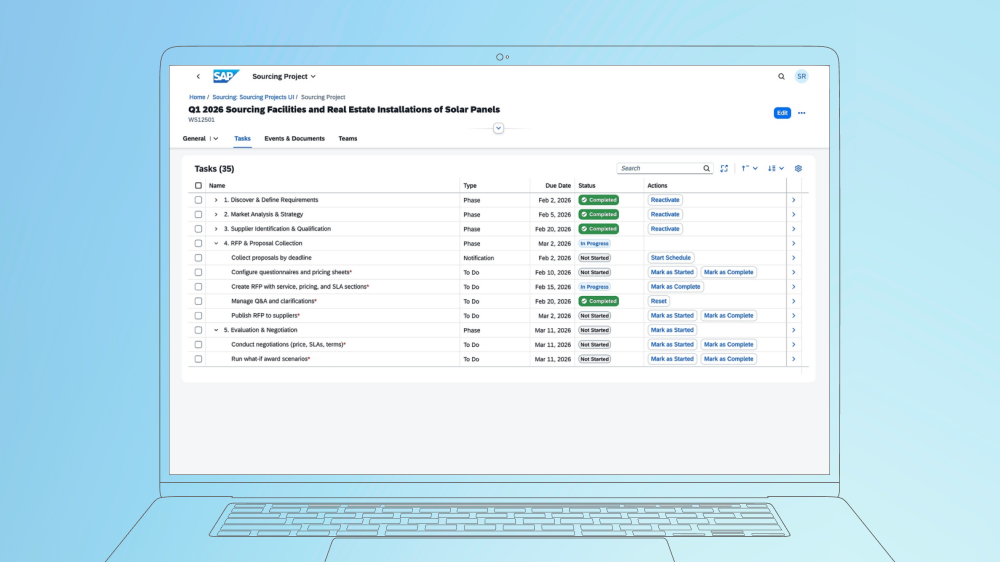
SAP Ariba Sourcing helps buyers run RFIs, RFPs, RFQs, and online auctions. Procurement teams invite suppliers, compare bids, and select the best offer. Depending on your SAP Ariba integration, award details can be sent to the ERP system to create purchase orders or contracts.

SAP Ariba Sourcing project tasks and progress tracking.

SAP Ariba Contracts

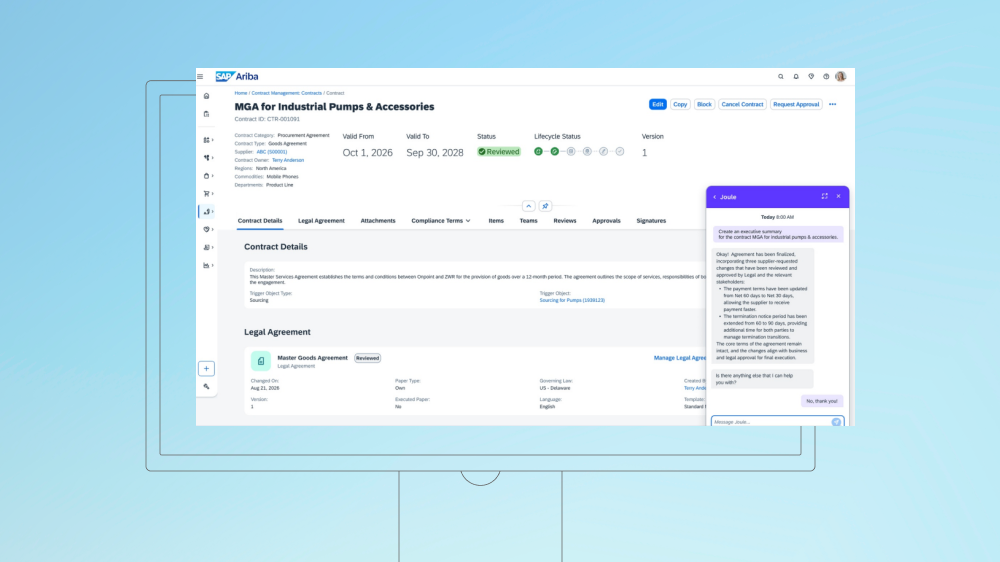
SAP Ariba Contracts gives procurement teams a central place to draft agreements, manage approvals, and store signed contracts. It tracks renewal dates and obligations, while agreed prices and terms can feed into purchasing when the systems are connected.

SAP Ariba contract management.

SAP Ariba Buying and Invoicing

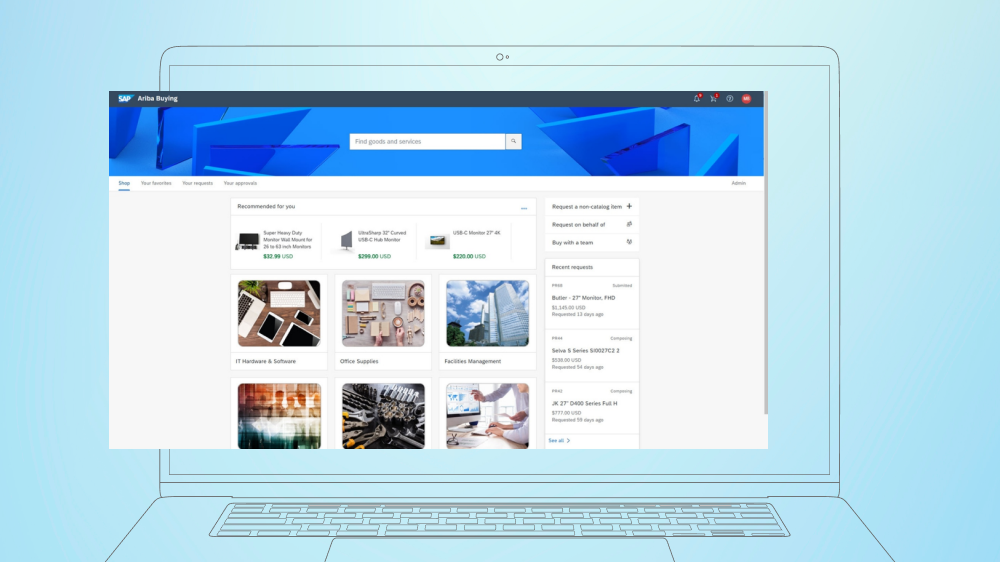
Guided Buying makes everyday purchasing easier for employees. They choose what they need from approved catalogs or submit a request for items not listed. SAP Ariba Buying and Invoicing handles the steps behind these purchases, including approvals, purchase orders, and checking supplier invoices against orders and delivery records.

SAP Ariba Buying catalog and purchase requests.

SAP Ariba Supplier Lifecycle and Performance

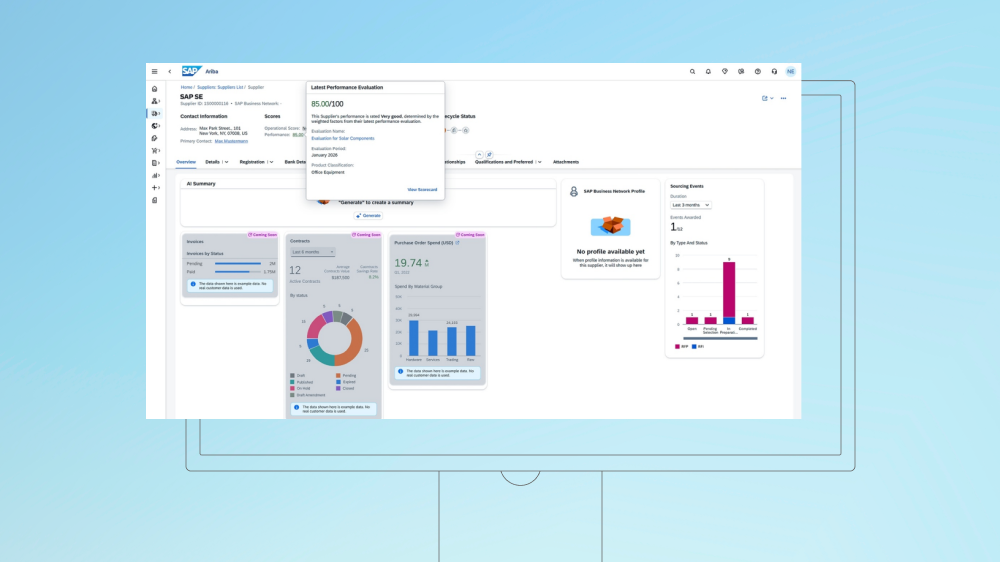
When a company brings on a new supplier, procurement teams use this module to collect company details, check qualifications, and manage approvals. Once the supplier is onboarded, teams can evaluate its performance and track issues over time. SAP Ariba Supplier Risk is a separate solution for identifying and monitoring potential supplier risks.

SAP Ariba supplier profile and performance evaluation.

SAP Ariba Spend Analysis and Insights

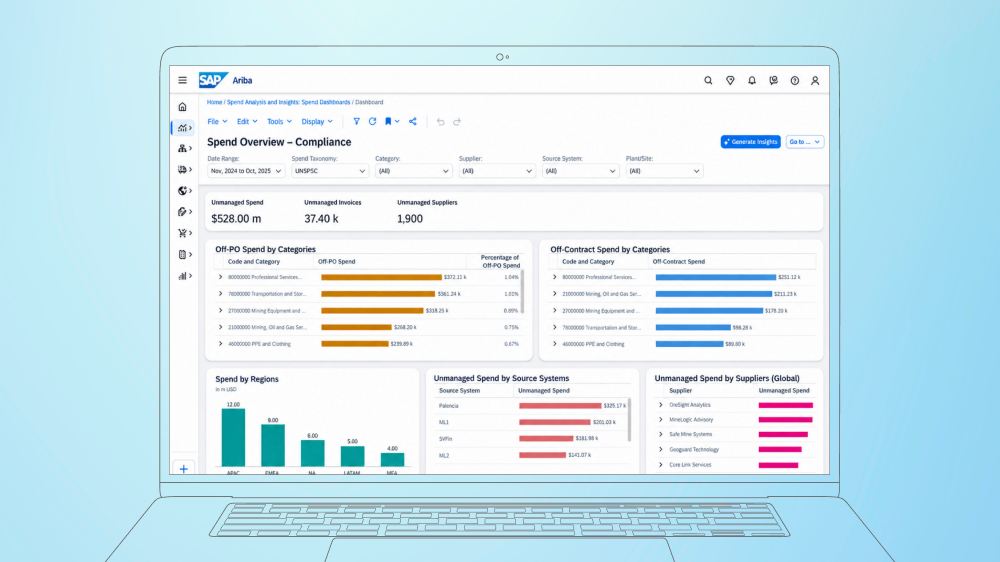
SAP Ariba Spend Analysis and Insights shows what your company buys, from which suppliers, and at what price. It brings purchasing data from SAP and other systems into one place, helping procurement teams spot when departments pay different prices for the same goods or buy outside agreed contracts. This gives them a better basis for negotiating with suppliers and reducing costs.

SAP Ariba spend analysis and compliance dashboard.

SAP Business Network

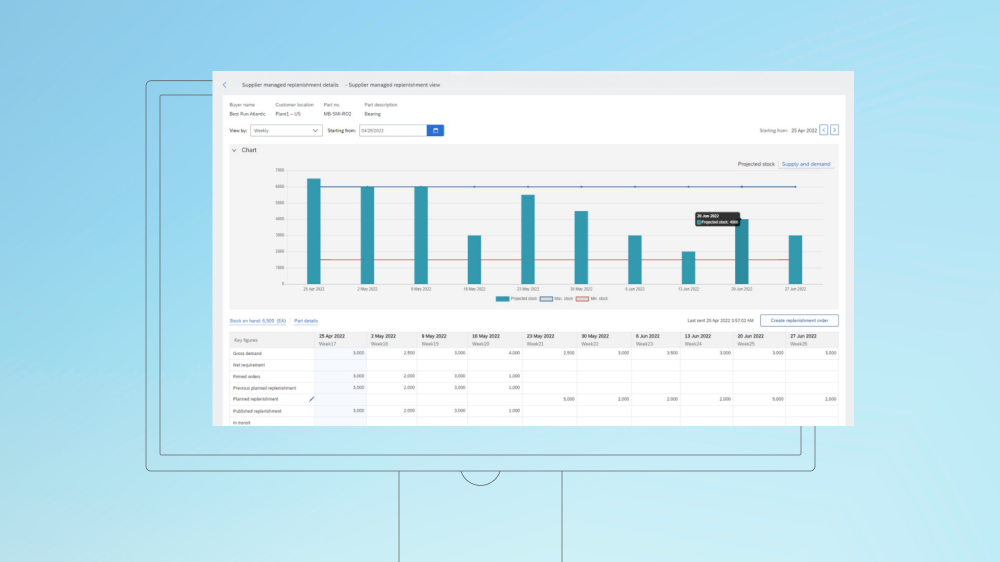
SAP Business Network helps buyers and suppliers exchange purchase orders, confirmations, and invoices. It also simplifies supply chain collaboration. Using its Supply Chain Collaboration tool, manufacturers can share material forecasts and receive updates from suppliers on inventory and deliveries. Standard supplier accounts are free, but enterprise accounts may have fees.

Supplier-managed replenishment with projected stock and demand.

How SAP Ariba works: architecture and S/4HANA integration

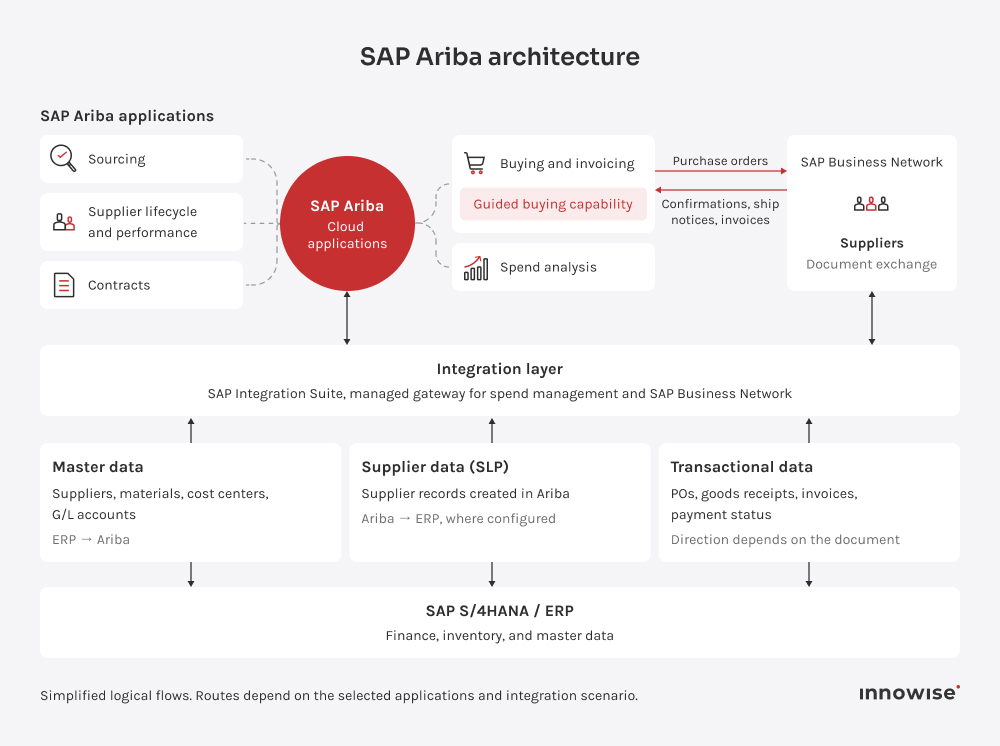
SAP Ariba handles procurement, but it works with other systems. Purchasing activities can take place in Ariba, while SAP S/4HANA manages financial and inventory records. These two systems exchange data, so procurement and finance teams can work with consistent purchasing information.

SAP Ariba and S/4HANA integration architecture.

At a high level, the setup has four main components:

  • ERP. SAP S/4HANA, on-premises or in the cloud, stores master data, budgets, inventory records, and financial postings.
  • Integration layer. SAP Integration Suite, managed gateway for spend management and SAP Business Network, connects SAP ERP and SAP S/4HANA with SAP Ariba applications and SAP Business Network. It exchanges data between systems and helps monitor document flows.
  • SAP Ariba applications. SAP Ariba solutions such as Sourcing, Contracts, Buying and Invoicing, and Supplier Lifecycle and Performance run in the cloud.
  • SAP Business Network. Suppliers receive purchase orders through the network and send back confirmations, ship notices, and invoices.

Now that we’ve covered the main components, let’s look at the two types of data that pass between SAP Ariba and SAP S/4HANA.

Master data icon.

Master data

SAP Ariba uses ERP data such as supplier records, cost centers, materials, general ledger accounts, and organizational structures in purchasing workflows. In some scenarios, SAP Ariba Supplier Lifecycle and Performance also sends supplier records and updates back to the ERP.

Transactional data icon.

Transactional data

Depending on the SAP Ariba integration scenario, the systems exchange purchase requisitions, purchase orders, goods receipts, and invoices. Payment status may also flow back from SAP S/4HANA to SAP Ariba if the setup supports it.

Choose the right SAP Ariba modules for your business

SAP Ariba procurement process: a procure-to-pay example

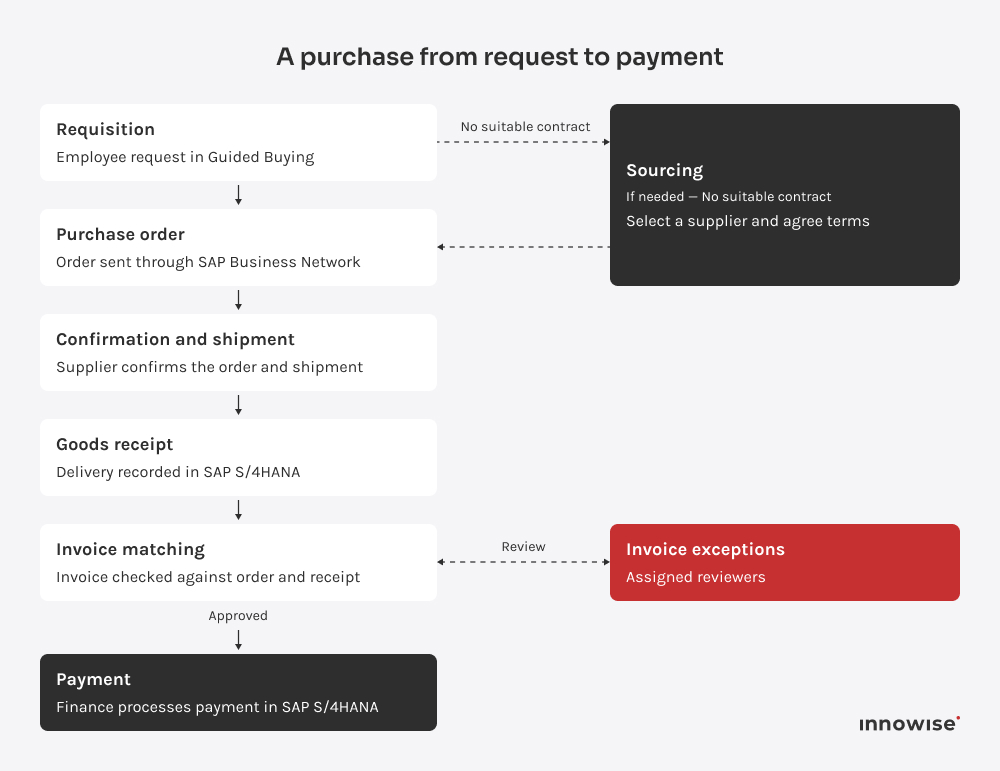
SAP Ariba and S/4HANA procure-to-pay workflow.

Now that we’ve covered how SAP Ariba and S/4HANA connect, let’s see how they work together in practice. I’ve chosen a packaging plant that needs to order more stretch film to walk you through the process.

  1. Requisition. An employee requests stretch film through Guided Buying. If it’s available in an approved catalog, they select the item and submit the request. If not, procurement may need to find a suitable supplier first.
  2. Sourcing, if needed. If the plant doesn’t have a suitable contract, procurement may use SAP Ariba Sourcing to request quotes from suppliers. The team compares prices and delivery terms, chooses a supplier, and uses the agreed terms to prepare a purchase order or new contract.
  3. Purchase order. Once the request is approved, S/4HANA creates a purchase order with the agreed quantity, price, and delivery terms. The supplier receives it through SAP Business Network.
  4. Confirmation and shipment.  The supplier confirms the order and expected delivery date. Once the stretch film ships, they may send an advance ship notice through SAP Business Network with shipment details and an updated arrival date. Warehouse staff use that information to prepare for delivery.
  5. Goods receipt. Warehouse staff record the delivery in S/4HANA. If invoice reconciliation takes place in Ariba, the receipt information is also transferred there.
  6. Invoice. The supplier submits an electronic invoice through SAP Business Network. Depending on the setup, Ariba or S/4HANA checks it against the purchase order and, where required, the goods receipt. If Ariba handles reconciliation, discrepancies are flagged for review.
  7. Payment. Once the invoice passes the required checks and approvals, finance processes payment in S/4HANA. If configured, payment information is shared with the supplier through SAP Business Network.

Why businesses choose SAP Ariba

If you’re considering SAP Ariba for your business, the question is whether the benefits justify the investment. At Innowise, these are the advantages we’d focus on when helping clients make that decision.

  • Lower purchasing costs

    SAP Ariba Sourcing lets procurement teams compare bids against the same requirements and evaluate prices alongside contract terms. Competing offers give buyers a stronger position in negotiations and help them secure more favorable agreements.

  • Easier purchasing

    Guided Buying directs employees to approved products and suppliers, with requests routed through configured approval rules. Staff know where to order what they need, and procurement teams spend less time answering routine purchasing questions.

  • Better spend visibility

    Spend analysis shows how much the company spends with each supplier and across purchasing categories. Procurement leaders spot fragmented purchases and identify opportunities to consolidate demand before negotiating new terms.

  • Stronger purchasing control

    SAP Ariba supports purchasing policies through approval rules and a record of buying decisions. Procurement teams see who approved each purchase and whether it followed the agreed process.

  • Closer supplier coordination

    SAP Business Network gives suppliers a place to confirm orders and share shipment updates. Buyers follow order progress without chasing updates by email, while suppliers have access to the purchasing documents they need.

  • Less invoice administration

    SAP Ariba checks invoices against purchase orders and, where required, goods receipts. Accounts payable teams review discrepancies instead of checking every invoice manually. Depending on the setup, approved invoice information passes to the ERP for payment processing.

  • Fit with S/4HANA

    SAP Ariba connects to SAP S/4HANA through SAP’s integration tools, so requisitions, orders, receipts, and invoices can move between procurement and finance without manual re-entry. Companies using SAP ERP can rely on SAP's prebuilt integration content rather than developing every connection from scratch.

I’d include supplier onboarding in the SAP Ariba business case from the start. The savings you expect from automating orders and invoices depend on how many of those transactions suppliers can actually process through the network.
Michael Labutin, Head of Delivery.
Michael Labutin
Head of Delivery Office

SAP Ariba vs Coupa and other alternatives

Which is better: SAP Ariba vs. Coupa? The answer depends on your procurement needs and how each platform works with your ERP. I’ve compared them alongside three other options in the table below.

PlatformKey capabilitiesERP and suppliersWhat to check
SAP Ariba
  • Sourcing, contracts, guided buying, invoicing
  • SAP-delivered S/4HANA integration scenarios
  • Sourcing awards can feed into ERP purchasing processes
  • SAP Business Network
  • Standard supplier account: free
  • Enterprise accounts may incur fees based on transaction volume and value
  • S/4HANA deployment option and supported document flows
  • Required modules, supplier onboarding, and network charges when building the business case
Coupa
  • Procurement, invoicing, expenses, payments
  • Community data for spend insights
  • Direct-material sourcing from bills of materials
  • APIs and file interfaces
  • SAP and other ERPs
  • Purchasing and invoice approval can take place in Coupa
  • How processes are split between Coupa and the ERP
  • Handoff from approved invoice to accounting and payment
  • Scope of advanced sourcing and payment services
Oracle Fusion Cloud Procurement
  • Integration with the wider Fusion suite
  • Progress payments and retainage for complex services (a portion of payment withheld under agreed terms)
  • Supplier Portal for onboarding and transaction collaboration
  • Integrations with external systems and Fusion applications
  • Interfaces and dependencies when using a non-Oracle ERP
  • Benefits that rely on other Fusion applications
JAGGAER One
  • Award scenario optimization using constraints, volume discounts, and bundled bids
  • Direct-material sourcing with BOM scenarios and risk-weighted awards based on capacity, quality, and ESG criteria
  • ERP integrations with back-end systems
  • No supplier participation fees (according to JAGGAER)
  • Testing a representative sourcing event with allocation rules
  • How sourcing awards transfer into purchasing
  • Required sourcing, quality, collaboration modules
Ivalua
  • Shared source-to-pay data model
  • Configurable workflows
  • Direct-materials support
  • Integration Hub for ERP systems
  • Integration with multiple ERP systems and external services
  • Free supplier portal
  • Who configures workflows, tests changes, and maintains integrations
  • How process changes affect approvals, supplier records, and accounting

SAP Ariba pricing: what drives the cost

SAP Ariba doesn’t have a single fixed price. What you pay depends on the SAP Ariba solutions you choose and how you use them. When estimating a project, I also consider SAP Ariba implementation, integration with your existing systems, supplier onboarding, and rollout costs. The table below shows what goes into the total budget.

Cost driverWhat affects the price
Solutions and packagesThe Ariba products you choose, whether you buy them separately or as a package, and any additional paid features
Spend volumeSAP Ariba Buying and Invoicing pricing depends on the annual purchasing spend processed through the platform
UsersSAP Ariba Sourcing, Contracts, and Supplier Lifecycle and Performance use per-user pricing. The number of licensed users affects the subscription cost
Integration scopeConnecting more systems or supporting custom document flows adds configuration and testing work
Supplier enablementSuppliers may need help setting up accounts and testing how they receive orders or submit invoices. Onboarding a larger supplier base takes more time
Implementation and change managementCosts include configuration, data preparation, testing, and employee training. Rollouts across multiple countries or business units require additional work
Support and operationsOngoing costs include platform administration, user support, integration maintenance, and testing after updates

Projects we’ve delivered for our clients

All case studies
Odoo ERP implementation
Innowise implemented Odoo 17 Enterprise as a single connected system for sales, purchasing, production, finance, service, HR, and reporting.
100% unified operations under one ERP
100% operations traceability
View case study
Client review
View case study
Client review logo. Client review
Odoo ERP implementation.
Automated testing for top ERP solutions
Innowise executed automated ERP testing to ensure that integrating new functionality did not compromise the integrity of the existing system.
2x faster feature release compared to manual QA
Upgrade of data management software for extractive, oil, and gas industry
Innowise has upgraded a set of customized oil and gas platforms to optimize resource exploration and extraction processes.
1-3 seconds to generate reports
Royalty streams calculator development
Innowise developed a convenient system for storing, calculating, and editing royalty streams from biopharmaceutical products on a quarterly basis.
Enterprise resources management system development
We built cloud-based mobile and web applications for tracking and managing equipment and machines’ states, location, and work schedule in real-time.
Time and task tracking application upgrade
Innowise enhanced a custom web and mobile solution allowing users to easily track document management tasks, working time, and safety.
01 / 01
Close popup icon

SAP Ariba implementation

At Innowise, we manage SAP Ariba implementation from initial planning to support after launch. Here’s how we structure the work with your team.

01 arrow-icon.

Scope and rollout planning

We start by agreeing which procurement processes belong in the first release and what results you expect. Procurement and finance set the priorities, while the project team plans which Ariba applications to introduce and when each business unit will go live.

02 arrow-icon.

Process design

Next, we run fit-to-standard workshops to compare your current purchasing processes with SAP Ariba's standard workflows. These sessions help us decide which approval rules to configure and how to manage exceptions. We also agree which tasks should stay in your ERP.

03 arrow-icon.

Data preparation

Our team reviews supplier records and ERP master data, including cost centers and general ledger accounts, for duplicates or missing information. Then we agree on which system maintains each record and validate test data loads to catch problems before go-live.

04 arrow-icon.

Configuration and integration

With the processes agreed, Innowise configures the selected Ariba applications and connects them to your ERP. The work may include configuring s approval rules, sourcing templates, and invoice checks. We also test data transfers and establish how the team will identify and resolve integration errors.

05 arrow-icon.

Supplier onboarding and training

We help suppliers set up their SAP Business Network accounts and test whether they can receive purchase orders and submit invoices. At the same time, we train employees to create purchase requests, approve orders, and use Ariba in their daily work.

06 arrow-icon.

Testing and acceptance

Before launch, business users test real purchasing scenarios, such as order changes and invoices that don't match purchase orders. Our specialists resolve any issues with approval workflows or data transfers to the ERP. Once testing is complete, process owners review the results and sign off on the system.

07

Go-live and support

The team goes live with the new SAP Ariba setup according to the rollout plan, while managing purchase orders already in progress. During the first few weeks, our specialists monitor data exchange, help users resolve issues, and check whether the system meets the agreed goals.

arrow-icon.arrow-icon.
01

Scope and rollout planning

We start by agreeing which procurement processes belong in the first release and what results you expect. Procurement and finance set the priorities, while the project team plans which Ariba applications to introduce and when each business unit will go live.

arrow-icon.arrow-icon.
02

Process design

Next, we run fit-to-standard workshops to compare your current purchasing processes with SAP Ariba's standard workflows. These sessions help us decide which approval rules to configure and how to manage exceptions. We also agree which tasks should stay in your ERP.

arrow-icon.arrow-icon.
03

Data preparation

Our team reviews supplier records and ERP master data, including cost centers and general ledger accounts, for duplicates or missing information. Then we agree on which system maintains each record and validate test data loads to catch problems before go-live.

arrow-icon.arrow-icon.
04

Configuration and integration

With the processes agreed, Innowise configures the selected Ariba applications and connects them to your ERP. The work may include configuring s approval rules, sourcing templates, and invoice checks. We also test data transfers and establish how the team will identify and resolve integration errors.

arrow-icon.arrow-icon.
05

Supplier onboarding and training

We help suppliers set up their SAP Business Network accounts and test whether they can receive purchase orders and submit invoices. At the same time, we train employees to create purchase requests, approve orders, and use Ariba in their daily work.

arrow-icon.arrow-icon.
06

Testing and acceptance

Before launch, business users test real purchasing scenarios, such as order changes and invoices that don't match purchase orders. Our specialists resolve any issues with approval workflows or data transfers to the ERP. Once testing is complete, process owners review the results and sign off on the system.

arrow-icon.arrow-icon.
07

Go-live and support

The team goes live with the new SAP Ariba setup according to the rollout plan, while managing purchase orders already in progress. During the first few weeks, our specialists monitor data exchange, help users resolve issues, and check whether the system meets the agreed goals.

Conclusion

When deciding whether to implement SAP Ariba, start by identifying the areas in your procurement process that need the most improvement. For example, a company that has trouble choosing suppliers will need a different approach than one facing slow approvals or invoice issues.

Choose the right modules, but also consider how Ariba will integrate with your ERP and how your suppliers will handle the changes. Before committing, test the proposed setup with real purchasing scenarios and Factor in the SAP Ariba implementation cost.

If you need a second opinion before committing, Innowise offers SAP Ariba consulting to help you review your options, plan integration with SAP S/4HANA, and create a practical rollout plan.

FAQ

SAP Ariba helps companies manage sourcing, purchasing, and supplier relationships. Procurement teams use it to find and evaluate suppliers, manage contracts, buy through approved catalogs, process invoices, and track spending.

No, SAP Ariba is a cloud-based procurement and spend management platform, not an ERP system. It focuses on sourcing and purchasing, while ERP software covers broader business operations, including finance and inventory. SAP Ariba can integrate with ERP systems such as SAP S/4HANA.


SAP Ariba is still called SAP Ariba, but several related products have been renamed. Ariba Network is now SAP Business Network, and SAP Ariba Discovery became SAP Business Network Discovery. SAP Ariba Cloud Integration Gateway was also renamed SAP Integration Suite, managed gateway for spend management and SAP Business Network.

SAP Ariba integrates with SAP S/4HANA by exchanging supplier data and procurement documents, such as purchase orders and invoices. One supported integration option is SAP Integration Suite, managed gateway for spend management and SAP Business Network. Depending on the setup, SAP Integration Suite and native APIs can also be used.

SAP Ariba implementation typically takes around 35 weeks for a mid-sized project. Larger deployments involving multiple modules or countries may take 12–18 months. The timeline depends on the project scope, integration requirements, and rollout complexity.

SAP Ariba has no single fixed price. SAP provides a quote based on the modules you choose, usage volume, and contract terms. Your total budget also needs to cover implementation, ERP integration, and supplier onboarding. Share your requirements with Innowise, and we'll review them and provide an estimate of your SAP Ariba implementation cost.

No, suppliers can use a standard SAP Business Network account for free. Enterprise accounts offer additional features and may incur subscription and transaction fees depending on the volume and value of transactions.

Neither is universally better. SAP Ariba is worth a closer look if your company already uses SAP S/4HANA or SAP Business Network. But the final choice depends on your procurement needs. Compare both platforms using the same purchasing scenarios, supplier requirements, integration effort, and total cost.

Show all

Table of contents

Get Ariba and S/4HANA in sync.

    Contact us

    Book a call or fill out the form below and we’ll get back to you once we’ve processed your request.

    Send us a voice message
    Attach documents
    Upload file

    You can attach 1 file up to 2MB. Valid file formats: pdf, jpg, jpeg, png.

    By clicking Send, you consent to Innowise processing your personal data per our Privacy Policy to provide you with relevant information. By submitting your phone number, you agree that we may contact you via voice calls, SMS, and messaging apps. Calling, message, and data rates may apply.

    You can also send us your request
    to contact@innowise.com
    What happens next?
    1

    Once we’ve received and processed your request, we’ll get back to you to detail your project needs and sign an NDA to ensure confidentiality.

    2

    After examining your wants, needs, and expectations, our team will devise a project proposal with the scope of work, team size, time, and cost estimates.

    3

    We’ll arrange a meeting with you to discuss the offer and nail down the details.

    4

    Finally, we’ll sign a contract and start working on your project right away.

    More services we cover

    arrow