SAP for manufacturing: software, benefits & future trends

Oct 19, 2026 14 min read
Lead of ERP Consultants
Verified expert
Every article at Innowise is created by authors with real-world experience. They understand the topic beyond theory and bring insight from real projects.
19+ years of experience
Verified expert
19+ years of experience
Kiryl is a specialist in SAP ecosystem optimization. He cuts through the complexity of enterprise resource planning, tailoring SAP modules to specific workflows to ensure clients extract maximum efficiency from their digital core.
Expertise
ERP Project management Process optimization
Let's talk

Key takeaways

  • SAP for manufacturing connects product engineering, procurement, production, quality, maintenance, and finance on one data model.
  • SAP S/4HANA Cloud, SAP Business One, and SAP Business ByDesign are ERP systems; SAP Digital Manufacturing, SAP Integrated Business Planning, and SAP Extended Warehouse Management extend the core.
  • Mainstream maintenance for SAP Business Suite 7 (including SAP ECC) ends in 2027.
  • The business case rests less on features and more on outcomes: throughput, visibility, leaner inventory, traceability, less downtime, and comparable performance across plants
  • Implementation follows the SAP Activate methodology across six phases, and master data quality is the most common cause of go-live disruption.
Summarize article with AI

From my practice, the most common issue manufacturers face is that they own plenty of software,  but data is stored in multiple systems with no automatic updates between them. So, planning, procurement, shop floor execution, quality, maintenance, and finance each hold a version of the truth, and nobody can reconcile them fast enough to act.

For instance, a production supervisor pulls the day’s schedule from one system, checks component availability in a second, and reconciles both against a spreadsheet that someone updates separately. A supplier slips two days. Nobody finds out until the line stops. Finance learns about the cost variance at month-end close.

One of the solutions we offer is SAP implementation. More than 425,000 organizations across over 180 countries use SAP. 

What is SAP in manufacturing? What are the benefits? Which SAP solution is right for your manufacturing business? Let’s talk more about it today. Additionally, I’ll tell you about possible difficulties in implementation, and what to expect in the near future.

What is SAP in manufacturing?

SAP for manufacturing industry is the system of record that connects what a company designs, buys, makes, ships, maintains, and services on one data model, so a change in one place is visible everywhere else.

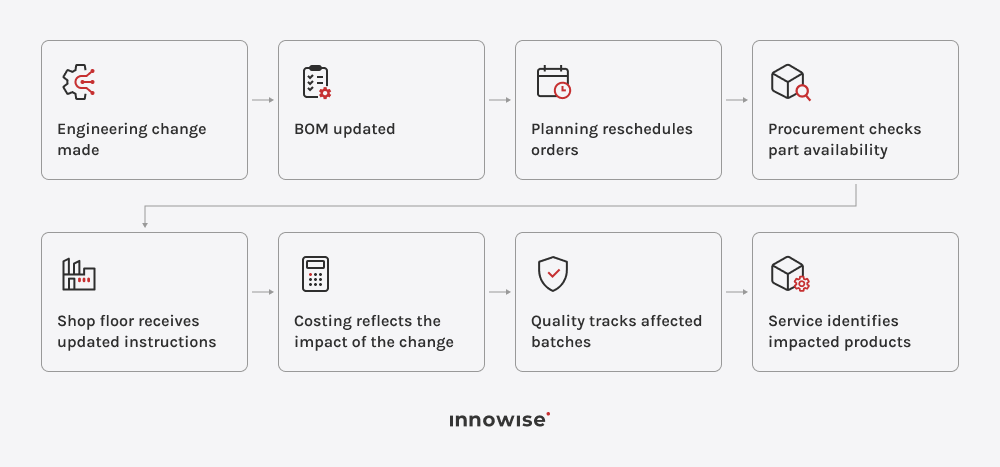
The practical meaning of that is easier to see through a single order:

In a fragmented environment, each of those steps is an email, a file export, or a meeting. In SAP solutions for manufacturing, they’re the same one set of numbers viewed by different roles and across plants, entities, and currencies. A process models supply chains, products, and manufacturing processes together, including through digital twins.

So, if…

  • Your engineering changes and product variants are frequent enough to break spreadsheet-based control
  • Your audit and traceability requirements are strict
  • Your planning has to run against actual capacity rather than assumed capacity

SAP is likely to help.

Core SAP models for the manufacturing industry

The earliest choice we have to make is to determine your production model. The rest of SAP manufacturing rollout will follow it. It’s important because production type is configured per material and per process and reversing it later means reworking master data, costing, and shop floor routines.

Discrete manufacturing

Distinct, countable, assembled products. Runs on production orders, which serve as both the execution document and the cost object, with each order tracked individually by status and cost.

566

Process manufacturing

Products mixed, reacted, or transformed. Runs on process orders against a master recipe, with support for complex equipment networks, batch genealogy, and the signature controls regulated producers need.

Repetitive manufacturing

Period-based, quantity-based production of standardized products on dedicated lines. Runs on planned orders, backflushing, and period-based costing through the product cost collector, often paired with Kanban for pull-based flows.

573

Engineer-to-order manufacturing

Capital equipment, turbines, and special machinery where no two units are identical, and design continues after the order is placed. Combines Project System, Variant Configuration, and Production Engineering and Operations to manage order-specific BOMs and control engineering changes through production.

Still running discrete orders on a line?

Learn how SAP can match your production model.

Best SAP software for manufacturing

In the solutions catalog, I included full-featured ERP systems listed alongside specialized applications that complement the ERP core. 

The products below are not direct alternatives. SAP S/4HANA Cloud, SAP Business One, and SAP Business ByDesign are ERP platforms. Digital Manufacturing, IBP, and EWM are not. They extend the capabilities of the core system by providing in-depth functionality across manufacturing, planning, and warehouse.

It’s easy to get confused, so I’ll walk you through each manufacturing SAP system:

SAP S/4HANA Cloud

SAP S/4HANA Cloud is SAP’s flagship ERP and the destination for most manufacturers currently running SAP ECC. It covers finance, procurement, production planning, quality, maintenance, sales, and service on one data model, and supports discrete, process, repetitive, subcontracted, and lean production without separate planning tools per production type.

There’re two editions of SAP S/4HANA for the manufacturing industry. Public Edition runs a standardized scope with quarterly major updates and limited room for modification. This makes it the fastest route for manufacturers willing to adopt SAP’s process templates. Private Edition, delivered through RISE with SAP, keeps custom code and configuration depth. For SAP S/4HANA Cloud Private Edition, SAP delivers major base releases on a two-year cycle.

Key features

  • Production planning and control across all major production models, plus Production Engineering and Operations for engineering-driven builds
  • MRP Live and predictive MRP for capacity simulation before commitments
  • Embedded finance with costing and margin visibility at the document level
  • Extension model on SAP BTP for custom logic outside the core

Pros

  • The widest functionality of any SAP product for multi-plant, multi-entity groups
  • Longest committed roadmap: SAP has committed to keeping at least one S/4HANA release in maintenance until the end of 2040
  • Deepest partner and consultant pool

Cons

  • The highest cost and the longest implementation timelines in the portfolio
  • Public Edition constrains non-standard processes; Private Edition carries custom-code remediation work

Best suited for

Multi-plant manufacturers that run several production models across entities, currencies, and regulatory regimes.

SAP Business One

SAP Business One is SAP’s ERP for small companies. They’re usually single-site or few-site manufacturers with under 100 users to use the system. It covers financials, purchasing, inventory, sales, and light production: bills of materials, production orders, and an MRP wizard that generates purchase and production recommendations. Deployment runs on-premises or through partner-hosted cloud, on SAP HANA or SQL Server.

Its manufacturing depth stops well short of SAP S/4HANA. Manufacturers extend it through the partner add-on ecosystem.

Key features

  • Multi-level BOMs with production orders and backflush options
  • MRP wizard with forecast, sales order, and stock-level inputs
  • Batch and serial number tracking with basic traceability reporting
  • Bin-level inventory with pick-and-pack processing

Pros

  • Deployment can take from several weeks to a few months
  • Low total cost relative to the rest of the SAP portfolio
  • Large add-on ecosystem that fills industry-specific gaps

Cons

  • Minimal shop floor execution and no advanced planning capability
  • Multi-entity consolidation and complex process manufacturing need third-party add-ons

Best suited for

Smaller manufacturers with straightforward assembly or light batch production and a single set of books.

SAP Business ByDesign

SAP Business ByDesign is a multi-tenant cloud ERP suite. It includes finance, supply chain, projects, CRM, and HR. It has been sold almost entirely through SAP’s partner network since 2007. I included it in this list because manufacturers still encounter it in vendor comparisons and in acquired subsidiaries.

SAP delisted it for new customers effective 20 April 2026, and SAP’s current ByDesign page directs companies new to SAP toward GROW with SAP, presenting migration to SAP Cloud ERP as the modernization path. Existing customers keep unchanged support, compliance, and maintenance with no announced end date.

Key features

  • Multi-entity, multi-currency financials with built-in consolidation
  • Supply chain and light production planning in the same tenant
  • Project management and professional services costing

Pros

  • Broad suite functionality with no infrastructure to maintain
  • Existing installations remain supported and continue receiving legal and security updates

Cons

  • Cannot be licensed by new customers, so it isn’t a selection candidate
  • SAP’s development investment has moved to SAP S/4HANA Cloud and SAP Business One

Best suited for

Manufacturers already running ByDesign but are planning a migration timeline.

SAP Digital Manufacturing

SAP Digital Manufacturing (formerly SAP Digital Manufacturing Cloud) is a cloud MES and manufacturing operations management platform built on SAP Business Technology Platform. It succeeds the on-premises SAP ME and SAP MII products and connects plant equipment, operators, and quality processes to the ERP layer above.

Digital Manufacturing governs operation-by-operation execution, work instructions at the station, machine data capture, in-line quality checks, and cross-plant performance analysis. It exchanges production orders, BOMs, routings, quantities, quality results, and resource consumption with SAP S/4HANA or SAP ECC through SAP Cloud Integration.

Key features

  • Order dispatch and operator execution with version-controlled work instructions
  • Equipment and OT connectivity through standards-based interfaces
  • Production and quality KPIs across plants with machine-learning-assisted root cause analysis
  • Plant templating for rollout to additional sites

Pros

  • Native integration with the SAP ERP core
  • One execution template deployable across a plant network

Cons

  • OT and equipment connectivity work is a project in its own right, separate from the software
  • Functional overlap with PP-PI and QM forces early decisions about which system owns which process

Best suited for

Multi-plant manufacturers standardizing shop floor execution and plant performance reporting above a shared ERP core.

SAP Integrated Business Planning

SAP Integrated Business Planning (SAP IBP) is SAP’s supply chain planning suite and the successor to SAP APO. It runs on SAP BTP and covers sales and operations planning, demand forecasting, inventory planning, supply and response planning, and a supply chain control tower for exception monitoring.

Manufacturers reach for SAP IBP when ERP-level MRP stops being enough. Planners work through a Microsoft Excel add-in as well as a web interface, which shortens adoption in teams that have planned in Excel for years.

Key features

  • Statistical and machine-learning demand forecasting with forecast error monitoring
  • Multi-echelon inventory target calculation across the network
  • Constrained supply planning with scenario simulation and version comparison
  • Control tower alerting on deviations against plan

Pros

  • Handles planning complexity well beyond what ERP MRP covers
  • Scenario modeling gives commercial and operations teams a shared basis for S&OP decisions

Cons

  • Output quality depends entirely on master data discipline — lead times, yields, and BOM accuracy
  • Requires planning expertise that many mid-market manufacturers don’t have in-house

Best suited for

Manufacturers with complex supply networks, long procurement lead times, or volatile demand across multiple plants and distribution tiers.

SAP Extended Warehouse Management

SAP Extended Warehouse Management (SAP EWM) is SAP’s advanced warehouse application, available embedded in SAP S/4HANA or deployed as a decentralized system serving one or several plants. It goes well past the stock-and-bin logic of standard inventory management, governing how work moves through a warehouse.

Manufacturers adopt SAP EWM when warehouse throughput, mechanization, or labor cost becomes an operational constraint, such as high pick volumes, conveyor and ASRS equipment, dense yard traffic, or value-added services performed on the way out of the building.

Key features

  • Task and resource management with RF-directed picking and putaway
  • Material Flow System for direct control of conveyors, sorters, and automated storage
  • Labor management with engineered standards and performance measurement
  • Yard management, wave planning, kitting, and value-added service processing

Pros

  • Depth that no other SAP warehouse option matches, especially for mechanized sites
  • Decentralized deployment keeps the warehouse running during ERP downtime

Cons

  • Configuration effort and ongoing administration are substantial
  • Overspecified for warehouses running modest volumes with manual processes

Best suited for

High-volume, mechanized, or multi-shift warehouses where throughput and labor productivity carry real cost.

SAP manufacturing products at a glance

SAP productPrimary roleBest suited for
SAP S/4HANA CloudEnterprise ERPComplex, multi-plant manufacturers
SAP Business OneCore ERP for SMBsSmaller manufacturers with straightforward processes
SAP Business ByDesignCloud ERP suite (closed to new customers)Existing ByDesign users planning a migration path
SAP Digital ManufacturingShop-floor execution and monitoringConnected factories standardizing plant operations
SAP Integrated Business PlanningSupply chain planningComplex supply networks
SAP Extended Warehouse ManagementAdvanced warehouse managementHigh-volume or mechanized warehouses

How to choose the right SAP product

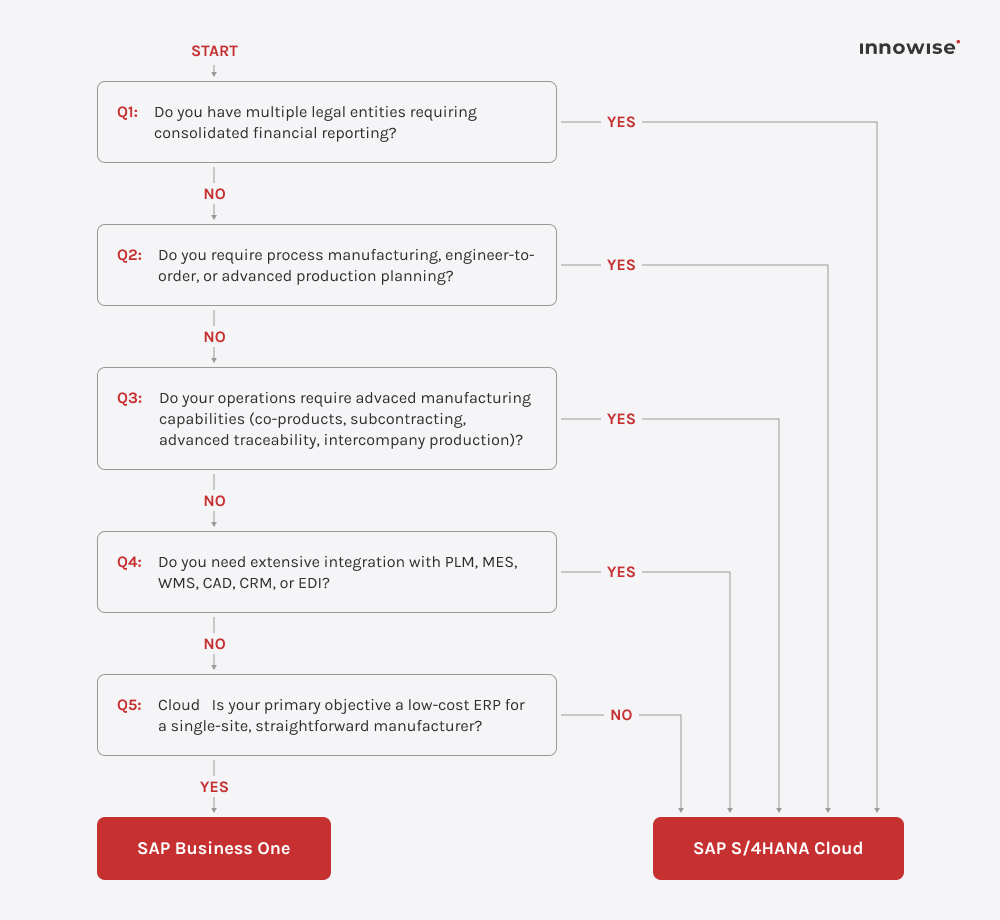
The key to the right SAP software for manufacturing is a match between what the business does and what the system was designed for. Six questions narrow the field.

  • How many legal entities does your business operate?

A single legal entity with one set of books typically aligns with SAP Business One, while manufacturers requiring financial consolidation across multiple entities are generally better served by SAP S/4HANA Cloud.

  • What is your type of manufacturing?

Your production model determines how much manufacturing functionality your ERP needs to support. Advanced production scenarios often require the capabilities available in SAP S/4HANA Cloud.

  • How complex are your manufacturing processes?

The number of process exceptions, such as subcontracted operations, co-product costing, advanced traceability, or intercompany production, can quickly narrow the options of SAP ERP for the manufacturing industry.

  • Which systems will ERP integrate with?

ERP rarely operates in isolation. Understanding how it will connect to systems such as PLM, MES, CAD, WMS, CRM, or EDI helps determine whether the solution can support your integration needs without excessive customization or maintenance.

  • Which deployment model fits your organization?

Public cloud offers standardized processes and faster deployment, while private cloud provides greater configuration depth and supports existing custom developments.

  • What is your long-term budget and technology strategy?

Implementation, integration, migration, training, and ongoing support account for the majority of ERP costs, so these should be considered alongside the product’s long-term roadmap and support commitment.

Not sure which SAP solution is the best for you?

Let Innowise experts assess your processes and recommend the best SAP product.

Core SAP manufacturing modules

Your choice of specific products determines the platform’s configuration. The set of modules determines the platform’s practical functionality at launch. These five SAP modules for the manufacturing industry handle the bulk of the operational workload when the system is implemented in manufacturing:

  • PP holds the master data everything downstream depends on: BOMs, routings, work centers, production versions
  • Turns demand into planned orders, production orders, and capacity requirements through MRP
  • MRP Live runs the calculation in memory; predictive MRP simulates demand against available capacity before commitments are made
  • PP-PI (process industries) replaces routings with master recipes and production orders with process orders
  • Adds control recipe and process instruction mechanisms that pass parameters to plant automation and receive process messages back
  • Handles batch management, potency handling, and co-product/by-product allocation

  • Stores purchasing documents, source lists, contracts and scheduling agreements, goods receipt, and invoice verification
  • Manages stock movements and the material master that PP, QM, and EWM all read from
  • Material valuation decisions here flow directly into costing — a reason finance belongs in these workshops
  • Runs inspection across the supply chain: incoming at goods receipt, in-process during production, final before delivery, and recurring for stock with expiry
  • Inspection plans define characteristics and sampling procedures; results recording produces usage decisions that release or block stock
  • Covers notifications for customer complaints and supplier defects, quality certificates for outbound deliveries, and stability studies
  • Feeds supplier quality scoring back into source selection
  • Supplies the electronic signature and audit trail layer FDA, EMA, and IATF requirements depend on
  • Built on a technical object structure — functional locations and equipment records — that maintenance plans, work orders, notifications, and cost history attach to
  • Covers preventive maintenance on time or counter-based schedules, corrective work from breakdown notifications, and condition-based maintenance driven by sensor readings
  • Feeds spare parts requirements into MM, maintenance labor into work order costing, and downtime records into equipment availability reporting
  • Makes unplanned downtime cost and cause visible against equipment history
  • Provides the audit-artifact maintenance record required in regulated and safety-critical environments
  • Governs physical movement of goods: inbound unloading, deconsolidation, and putaway by storage control rules; outbound wave planning, pick task creation, packing, staging, and loading
  • Executes through warehouse tasks and orders assigned to resources, with RF devices directing and confirming each movement
  • Keeps fast-moving items near the pick face through slotting and rearrangement
  • Runs physical inventory as cycle counting without stopping operations
  • Manages production supply — staging components to the line and receiving finished goods back into stock
  • Covers kitting, value-added services, QM-integrated inspection at goods receipt, yard management, and labor management against engineered standards
I strongly advise against evaluating SAP by its module list because implementation success depends on how well business processes fit together. When engineering changes automatically trigger planning, procurement, production, and quality updates, manufacturers eliminate many of the delays that disconnected systems create.
Michael Labutin, Head of Delivery.
Michael Labutin
Head of Delivery Office

SAP use cases in manufacturing

The module list answers what SAP contains. What operations leaders ask is narrower: what changes on Monday morning. Six areas cover most of the answer.

Production planning

  • MRP matches demand to orders against BOMs, lead times, and lot sizes
  • Predictive MRP simulates demand against work center capacity
  • Detailed scheduling sequences operations while accounting for changeovers
  • Production versions assign materials to alternate lines based on availability

Materials planning and procurement

  • Planned orders automatically generate requisitions with target delivery dates
  • Vendor confirmations and ATP checks flag slipping dates before shortages
  • Subcontracting tracks external component stock, posting consumption upon return

Shop-floor execution and monitoring

  • Production orders send operations, components, and instructions to the shop floor
  • Operators log progress, triggering goods receipt and settlement upon confirmation
  • SAP Digital Manufacturing automates execution, machine data, and quality checks
  • Live transactional data powers real-time order, OEE, scrap, and load metrics

Quality and traceability

  • Auto-generates inspection lots at goods receipt, production, and pre-delivery.
  • Records results to release, restrict, or reject stock.
  • Traces batch history from components to customers to limit recall scope.
  • Supports quality notifications, 8D workflows, supplier scorecards, and regulatory compliance.

Asset maintenance

  • Preventive plans trigger on time or counter readings; breakdowns become corrective orders with labor, spares, and downtime logged
  • Reporting shows MTBF, maintenance cost per asset, downtime by cause, spare parts consumption
  • Maintenance orders reserve work center capacity, blocking production scheduling during planned downtime

Warehouse and fulfillment

  • Inbound: receiving, inspection, and putaway
  • Production supply: staging components and receiving finished goods
  • Outbound: wave planning, pick/pack/stage/load, and proof of delivery
  • Accuracy: RF-directed tracking maintains stock precision without manual counts
  • Specialized shipments: custom labeling, ASN transmission, and scheduled delivery windows

Business benefits for manufacturers

If I’d been asked to name the main benefit of SAP for manufacturing, I’d say it’s removing the friction that is accumulated when planning, procurement, production, quality, and finance each hold their own version of events. If we talk about it in more detail, here’s what changes:

Higher production throughput Production icon.
Live operational visibility Live operational visibility icon.
Leaner inventory Leaner inventory icon.
Better quality & compliance Security icon.
Less unplanned downtime Unplanned downtime icon.
Standardized multi-plant model Blockchain icon.

SAP implementation roadmap for manufacturers

SAP recommends following six SAP Activate phases. As an SAP partner, Innowise follows them. So, here’s how we’d roll out SAP for a manufacturing company:

01
Discover
  • Define business objectives
  • Prioritize manufacturing processes
  • Scope, KPIs, and the business case
02
Prepare
  • Establish governance
  • Assemble the project team
  • Assess master data and the existing MES, SCADA, PLM, IoT, and ERP landscape
03
Explore
  • Conduct fit-to-standard workshops
  • Define target processes, modules, integrations, and required extensions
04
Realize
  • Configure and integrate the solution
  • Migrate data
  • Test end-to-end production, quality, maintenance, and warehouse workflow
05
Deploy
  • Train users by role and plant
  • Complete cutover
  • Launch the system
  • Provide hypercare
06
Run
  • Monitor performance
  • Support users
  • Optimize processes
  • Extend SAP capabilities to additional plants or operations
arrow-icon. arrow-icon.
01 Discover
  • Define business objectives
  • Prioritize manufacturing processes
  • Scope, KPIs, and the business case
arrow-icon. arrow-icon.
02 Prepare
  • Establish governance
  • Assemble the project team
  • Assess master data and the existing MES, SCADA, PLM, IoT, and ERP landscape
arrow-icon. arrow-icon.
03 Explore
  • Conduct fit-to-standard workshops
  • Define target processes, modules, integrations, and required extensions
arrow-icon. arrow-icon.
04 Realize
  • Configure and integrate the solution
  • Migrate data
  • Test end-to-end production, quality, maintenance, and warehouse workflow
arrow-icon. arrow-icon.
05 Deploy
  • Train users by role and plant
  • Complete cutover
  • Launch the system
  • Provide hypercare
arrow-icon. arrow-icon.
06 Run
  • Monitor performance
  • Support users
  • Optimize processes
  • Extend SAP capabilities to additional plants or operations

Identify process, data, and integration required for SAP rollout

Trends and emerging technologies

SAP’s manufacturing roadmap right now is less about new modules and more about what runs on top of the ones already there: AI accessing the same production data planners and quality teams use, tighter links between the shop floor and the ERP core, and the first systems that adjust operations instead of only reporting on them. Here’s what trends and emerging technologies we have today:

AI-assisted planning, quality, and decision-making

AI in manufacturing SAP environments helps with:

  • Forecasting
  • Replanning
  • Anomaly detection
  • Visual inspection

SAP’s current framing is the Manufacturing Assistant, which coordinates AI agents, including SAP’s own Joule Agents or custom ones, across manufacturing processes:

  • Creates and refines routings and inspection plans from production data and compliance requirements
  • Analyzes critical orders to catch cross-order issues and propose fixes
  • Checks material, capacity, and scheduling availability, recommending workarounds for conflicts
  • Monitors production conditions to catch trends
  • Delivers work instructions informed by live data, batch records, and historical cases

Connected factories and manufacturing orchestration

ERP knows what should happen; equipment knows what did happen. How do we connect the two? SAP Digital Manufacturing, running on SAP BTP, helps to:

  • Connect plant equipment, operators, and quality processes to the ERP layer
  • Exchange production orders, BOMs, routings, quantities, quality results, and resource consumption with SAP S/4HANA or SAP ECC via SAP Cloud Integration
  • Pulls data through standards-based interfaces

Digital twins extend this to simulation. SAP’s design-to-operate concept models supply chains, products, and manufacturing processes together. The twin carries that model across the lifecycle. In practice, three applications are mature enough to matter:

  • Equipment twins for maintenance prediction
  • Process twins for changeover simulation
  • Product twins linking as-designed to as-built configuration

Production performance informs planning within the shift, and engineering sees how a design decision behaves in production.

Autonomous adaptive production and asset management

Systems are starting to adjust:

  • SAP’s Shop Floor Supervisor Agent analyzes floor disruptions and recommends actions, resequencing orders, reallocating resources
  • SAP Service and Asset Manager lets field technicians document jobs by voice, converting natural language into structured data
  • Predictive maintenance turns sensor data and failure history into a failure-probability window, generating a maintenance order with parts and capacity booked

As of now, the system proposes; a person approves, with narrow exceptions running unattended.

The expertise behind Innowise’s SAP recommendations

Innowise is an SAP Consulting Service Partner, listed in SAP’s official partner directory. Our SAP work is backed by credentials you can check. Our team consists of over 60 certified SAP consultants, who have delivered more than 40 projects. Our certifications include SAP S/4HANA, various modules, ABAB development, SAP Fiori and more.

Below are our certifications and partnerships:

SAP Partner.
SAP Activate Project Manager badge.
SAP S/4HANA Sales 1909 badge.
4HANA Sourcing and Procurement.
SAP Fiori Application Developer badge.
SAP S/4HANA Central Finance badge.
SAP S/4HANA Financial Accounting badge.
SAP HANA Data Engineer badge.
SAP ABAP Cloud Back-End Developer badge.
SAP Analytics Cloud Data Analyst badge.
SAP Partner.

Our SAP services for manufacturers

Whichever stage you’re at — choosing a product, converting off ECC, or extending SAP to a new
plant — the work sits with one team that carries it from scoping through hypercare and beyond.

  • Consulting
  • Implementation
  • Customization
  • Integration
  • Migration
  • Support and AMS

SAP consulting

  • Product and edition selection
  • Fit-to-standard analysis against your production model
  • Brownfield versus greenfield assessment
  • Cost roadmap
View SAP consulting services Right arrow icon.

SAP implementation

  • Full Activate delivery
  • Configuration across PP, PP-PI, MM, QM, PM, and EWM
  • Master data migration
  • Cutover planning around production windows
View SAP implementation services Right arrow icon.

SAP customization

  • Custom Fiori apps for shop floor roles
  • ABAP Cloud and BTP development
  • Side-by-side extensions that keep the core clean for upgrades
View SAP customization services Right arrow icon.

SAP integration

  • Connecting SAP to MES, SCADA, PLM, IoT platforms, WMS, CRM, and customer EDI through SAP Cloud Integration and APIs
View SAP integration services Right arrow icon.

SAP migration

  • SAP ECC to SAP S/4HANA conversion
  • Cloud migration
View SAP migration services Right arrow icon.

SAP support and AMS

  • Incident handling
  • Release and upgrade support
  • Performance monitoring
  • Coverage models matched to your shift patterns
View SAP support services Right arrow icon.
SAP consulting
  • Product and edition selection
  • Fit-to-standard analysis against your production model
  • Brownfield versus greenfield assessment
  • Cost roadmap
View SAP consulting services Right arrow icon.
SAP implementation
  • Full Activate delivery
  • Configuration across PP, PP-PI, MM, QM, PM, and EWM
  • Master data migration
  • Cutover planning around production windows
View SAP implementation services Right arrow icon.
SAP customization
  • Custom Fiori apps for shop floor roles
  • ABAP Cloud and BTP development
  • Side-by-side extensions that keep the core clean for upgrades
View SAP customization services Right arrow icon.
SAP integration
  • Connecting SAP to MES, SCADA, PLM, IoT platforms, WMS, CRM, and customer EDI through SAP Cloud Integration and APIs
View SAP integration services Right arrow icon.
SAP migration
  • SAP ECC to SAP S/4HANA conversion
  • Cloud migration
View SAP migration services Right arrow icon.
SAP support and AMS
  • Incident handling
  • Release and upgrade support
  • Performance monitoring
  • Coverage models matched to your shift patterns
View SAP support services Right arrow icon.

Discuss requirements and receive an initial view of the solution scope

Our SAP and ERP projects

Odoo ERP implementation
Innowise implemented Odoo 17 Enterprise as a single connected system for sales, purchasing, production, finance, service, HR, and reporting.
100% unified operations under one ERP
100% operations traceability
View case study
Client review
View case study
Client review logo. Client review
Odoo ERP implementation.
Automated testing for top ERP solutions
Innowise executed automated ERP testing to ensure that integrating new functionality did not compromise the integrity of the existing system.
2x faster feature release compared to manual QA
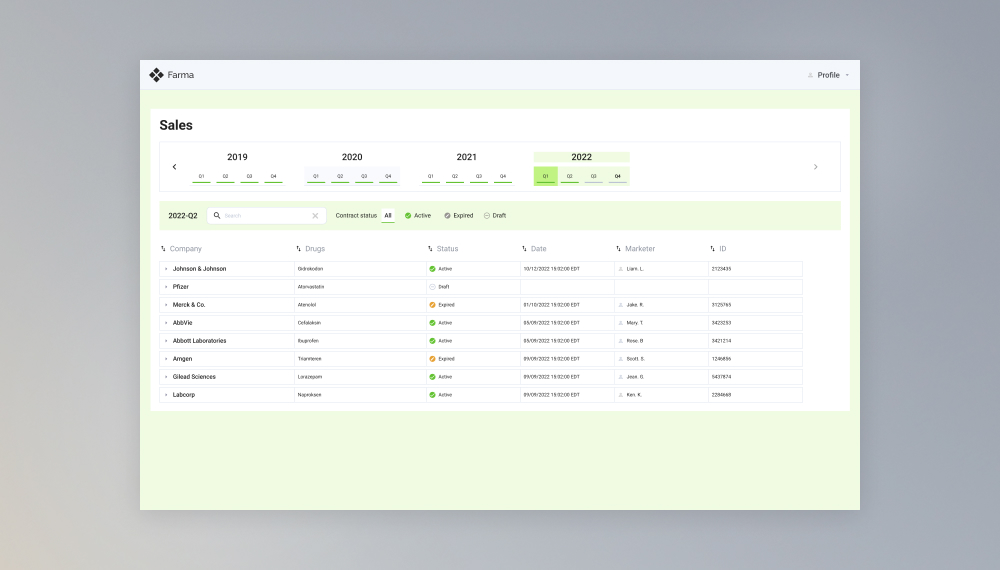
Upgrade of data management software for extractive, oil, and gas industry
Innowise has upgraded a set of customized oil and gas platforms to optimize resource exploration and extraction processes.
1-3 seconds to generate reports
Royalty streams calculator development
Innowise developed a convenient system for storing, calculating, and editing royalty streams from biopharmaceutical products on a quarterly basis.
Enterprise resources management system development
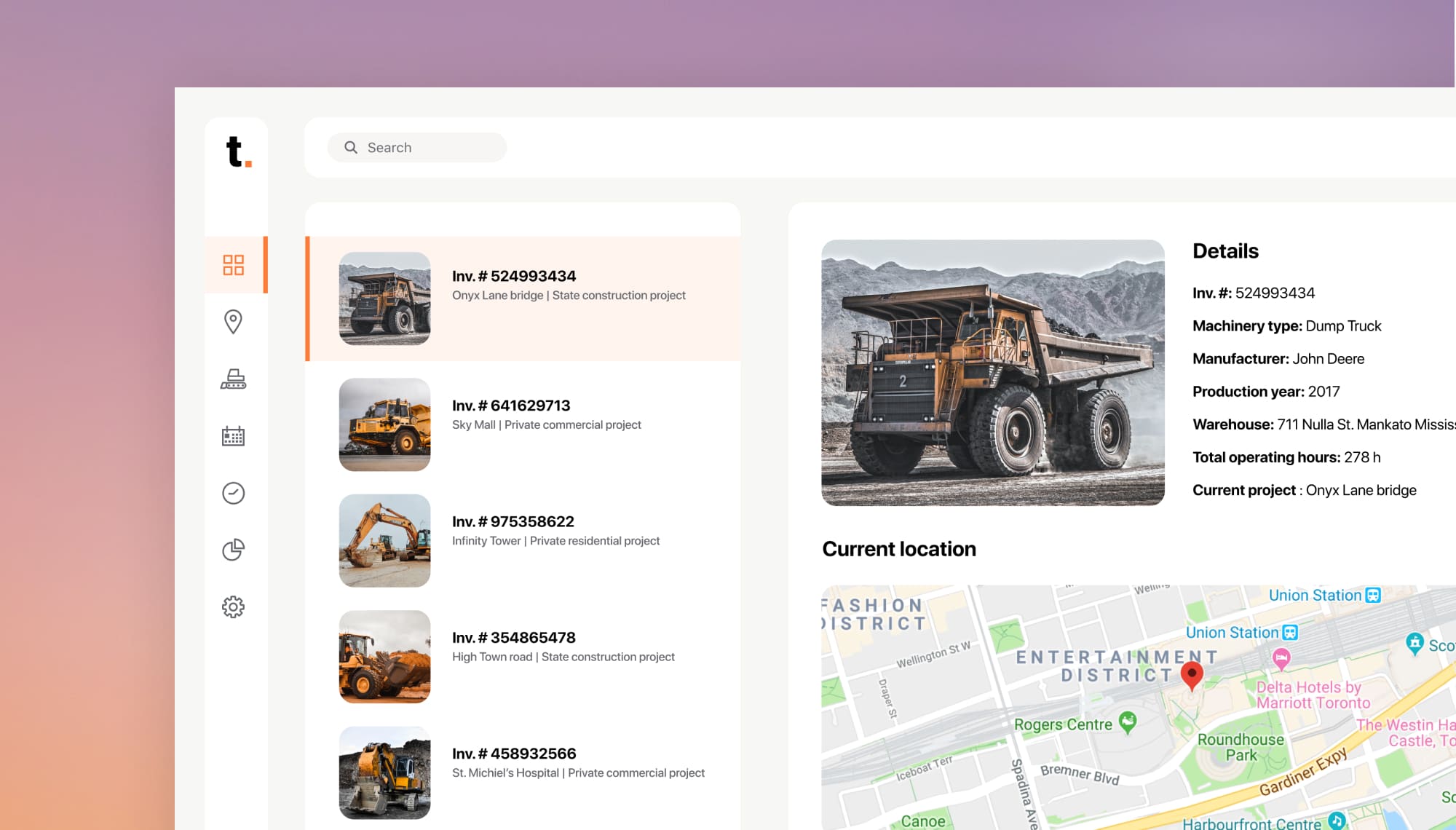
We built cloud-based mobile and web applications for tracking and managing equipment and machines’ states, location, and work schedule in real-time.
Time and task tracking application upgrade
Innowise enhanced a custom web and mobile solution allowing users to easily track document management tasks, working time, and safety.
MedSpa Network website redesign and rebuild
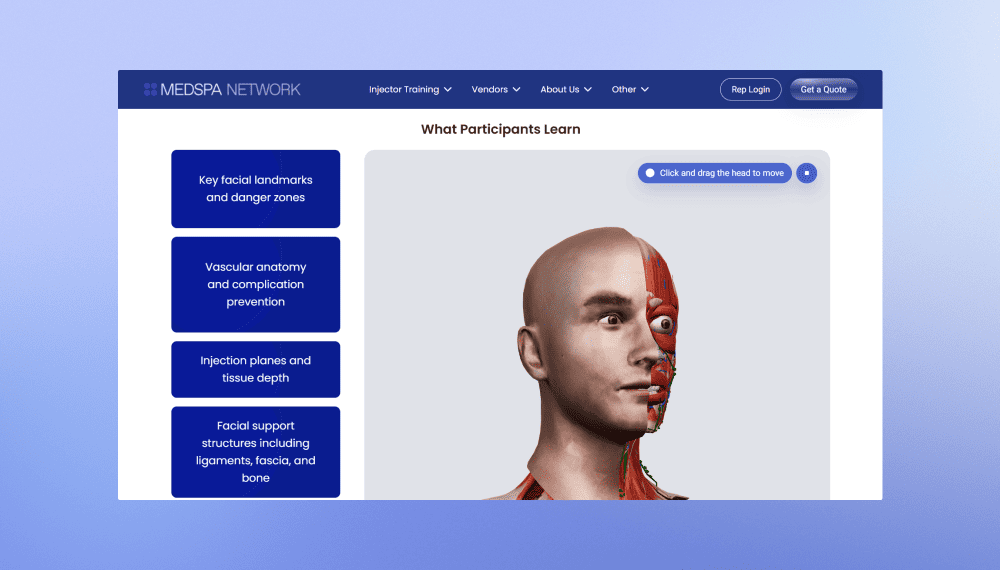
Innowise rebuilt MedSpa Network’s website on WordPress, giving its team control over day-to-day content updates.
2 months from kickoff to launch
3-5 leads per week up from 1 per month
View case study
Client review
View case study
Client review logo. Client review
MedSpa Network website redesign and rebuild.
AI bot for TBC Bank marketing campaign
Innowise built a bilingual Telegram bot that generates AI selfies with TBC Bank's football-star brand ambassador.
3,000 users engaged
2 languages supported
View case study
Client review
View case study
Client review logo. Client review
AI Telegram bot..
01 / 01
Close popup icon

Conclusion

SAP is worth consideration for manufacturers with multiple plants, multiple production models, or serious regulatory requirements. They get one data model across engineering, production, quality, maintenance, and finance. Their production models are supported without separate planning tools per site. For those still on SAP ECC, the mainstream maintenance deadline at the end of 2027 has made the timing question urgent even where the strategy question was settled long ago.

The variable that decides outcomes is rarely the software. It’s whether the implementation was scoped against how your plants run, whether master data was cleaned before migration, and whether the people who work the floor participated in defining target processes. Those are partner decisions as much as product decisions.

If you’re evaluating SAP, planning a migration off SAP ECC, or extending an existing system to new plants, talk to our SAP team. We’ll give you a straight assessment, including the cases where the answer is that SAP isn’t it.

FAQ

SAP is enterprise software that connects the manufacturing processes, such as product engineering, procurement, production planning and execution, quality, maintenance, warehousing, logistics, sales, and finance. All of them run on a shared data model.

Total cost is driven by scope, plant count, integration complexity, and how much custom development is required. These costs are added on top of the license price. We recommend budgeting for data migration, interface development, testing, training, and at least two years of post-go-live support as separate line items.

Business One deployments generally take 2 to 4 months. A single-plant SAP S/4HANA Cloud Public Edition implementation typically runs 6 to 12 months. Multi-plant programmes, SAP ECC conversions with substantial custom code, or rollouts spanning several production models commonly take 18 to 36 months, usually phased plant by plant. Master data condition is the most frequent cause of overrun, which is why assessment is important in the Prepare phase.

Yes. However, the effort varies considerably by interface. SAP exchanges production and business data with these systems through APIs, prebuilt connectors, middleware such as SAP Cloud Integration, and event-based patterns. Some connections are well supported out of the box. Others require development.

Yes, and on one data model. Discrete production runs on production orders, process production on process orders driven by master recipes, and repetitive production on period-based planning with backflush and product cost collectors.

To minimize disruption, sequence the migration around production rather than around the project plan. Clean master data before migration because errors discovered after cutover are resolved while plants are waiting. Remediate custom code early. Test end-to-end on production volumes. Schedule cutover into a planned shutdown or an extended weekend, with a documented rollback point and manual fallback procedures for the first days. Roll out plant by plant where the organization allows it. Staff hypercare with people on the floor.

SAP Business One is SAP's product for small manufacturers. Usually, it’s selected when a manufacturer has single-site operations under 100 users with one legal entity and straightforward assembly or light batch production. It covers financials, purchasing, inventory, sales, BOMs, production orders, and MRP. It takes weeks to a few months to deploy.

Show all

Table of contents

    Contact us

    Book a call or fill out the form below and we’ll get back to you once we’ve processed your request.

    Send us a voice message
    Attach documents
    Upload file

    You can attach 1 file up to 2MB. Valid file formats: pdf, jpg, jpeg, png.

    By clicking Send, you consent to Innowise processing your personal data per our Privacy Policy to provide you with relevant information. By submitting your phone number, you agree that we may contact you via voice calls, SMS, and messaging apps. Calling, message, and data rates may apply.

    You can also send us your request
    to contact@innowise.com
    What happens next?
    1

    Once we’ve received and processed your request, we’ll get back to you to detail your project needs and sign an NDA to ensure confidentiality.

    2

    After examining your wants, needs, and expectations, our team will devise a project proposal with the scope of work, team size, time, and cost estimates.

    3

    We’ll arrange a meeting with you to discuss the offer and nail down the details.

    4

    Finally, we’ll sign a contract and start working on your project right away.

    More services we cover

    Industries
    3D product modeling 3D product rendering Adtech Agriculture software ATS software Automotive software Banking software BI BigCommerce Biotech Clinical data management Clinical intelligence Clinical trials software Cloud Migration Consulting Services CMS Construction software CRM Desk booking apps Drupal E-commerce E-commerce apps E-commerce apps QA E-commerce consulting E-commerce migration E-commerce web design EHR & EMR EHR integration EHS solutions Elearning Embedded finance Energy & utilities Enterprise AI Enterprise blockchain Enterprise software ESG consulting Finance apps QA Finance software Fintech consulting Fitness apps GenAI consulting Government apps GRC Headless ecommerce development Healthcare Healthcare AI Healthcare analytics Healthcare data migration Healthcare IT consulting Healthcare mobile apps Healthcare software Hire healthcare app developers HR software Imprint Insurance Investment apps Life-cycle assessment LIMS integration LMS Logistics Magento Magento PWA Manufacturing Marketing Marketplace development Media & entertainment Medtech Microsoft 365 Microsoft Dynamics 365 MS Dynamics 365 migration NopCommerce Odoo consulting Odoo development Odoo implementation Oil & gas software OpenCart Patient engagement Payment gateway API Payment hub Pharma Pharma AI Pharmacy management PIM implementation Pimcore Population health management PoS software Practice management PWA development Quality management RCM software Real estate Retail Retail data analytics Robotics Salesforce CRM SaMD & SiMD SharePoint SharePoint Intranet Shopify Shopify developers Shopify integration Shopify migration Shopware Sitecore Supply chain management Sustainability consulting Telecom Telemedicine Transportation Travel apps Travel portals Value-based care apps Video-on-demand VR/AR in healthcare Wellness apps White-label HRM White-label LMS WooCommerce Wordpress
    See more

    arrow