SAP in construction industry: modules, PM & field-to-office tools

Oct 15, 2026 12 min read
Lead of ERP Consultants
Verified expert
Every article at Innowise is created by authors with real-world experience. They understand the topic beyond theory and bring insight from real projects.
19+ years of experience
Verified expert
19+ years of experience
Kiryl is a specialist in SAP ecosystem optimization. He cuts through the complexity of enterprise resource planning, tailoring SAP modules to specific workflows to ensure clients extract maximum efficiency from their digital core.
Expertise
ERP Project management Process optimization
Let's talk

Key takeaways

  • SAP construction ERP connects project control with office and field workflows, giving teams one place to work with project data.
  • Different SAP modules cover different construction needs. SAP PS focuses on WBS, EVM, cost control, and change orders.
  • SAP mobile tools extend selected ERP workflows to the job site, including inventory updates and work-order reporting.
  • Implementation cost depends heavily on scope and resourcing, with later changes adding further effort.
  • Current construction ERP trends include SAP-BIM integration and the use of connected field data for risk analysis.
Summarize article with AI

If you’re considering SAP construction software, you’ve probably already faced some common challenges. Site teams often report progress in one system, while finance uses another, and project managers spend extra time matching hours, materials, change orders, and costs before they can trust the numbers. The longer this disconnect lasts, the later you notice budget overruns or billing issues.

Here, I’ll explain which SAP modules construction companies use most and how SAP Project System helps with WBS, progress tracking, cost control, and managing change orders. I’ll also talk about field-to-office mobility, what affects implementation costs, and how BIM, IoT data, and AI-based risk analysis fit into a modern SAP setup.

Make SAP work for your construction teams

Why SAP ERP for construction industry is important

One cost view across every job

A purchase order commits part of a budget before an invoice arrives, and that gap is what trips up a lot of job costing. SAP Project System shows those commitments alongside actual spending at WBS level, so project managers can check how much of the approved budget is still available.

SAP MM links material requirements and purchase orders to the relevant project. Subcontracted work can be assigned to WBS elements too. On a job running six subcontractors and a dozen material vendors at once, those assignments help you trace procurement spending back to the proper project.

Before sending equipment to another site, operations teams can check what maintenance is due. SAP Plant Maintenance keeps service history and work orders linked to the equipment record, so that check takes a few minutes instead of a phone call to whoever serviced it last.

SAP EHS lets you report incidents and safety observations directly in the system, with follow-up actions linked to each record. So nothing gets stuck in someone’s inbox waiting to be finished. Work permits are managed through SAP Work Clearance Management, which is important if an auditor or insurer ever asks who approved a permit months ago.

When employees work at different construction sites, their labor costs need to be tracked accurately. SAP time recording lets them log hours to the specific WBS element where the work happened. HR also keeps certifications, like a crane operator’s license, linked to the right person and project. This way, expired certifications don’t show up unexpectedly during an audit.

SAP PS runs earned value analysis: the budgeted value of completed work compared to actual cost gives a cost variance, and earned value compared to planned value gives a schedule variance. These two numbers alone show whether a job is over budget due to cost or schedule, a distinction many monthly status reports blur.

Construction financing relies on percent-complete and cost-to-complete reporting. Cost and schedule variance pulled directly from the WBS provides a steadier answer to a lender’s draw request than a spreadsheet assembled the night before it is due.

Make SAP fit your construction workflows.

The best SAP ERP modules for construction companies

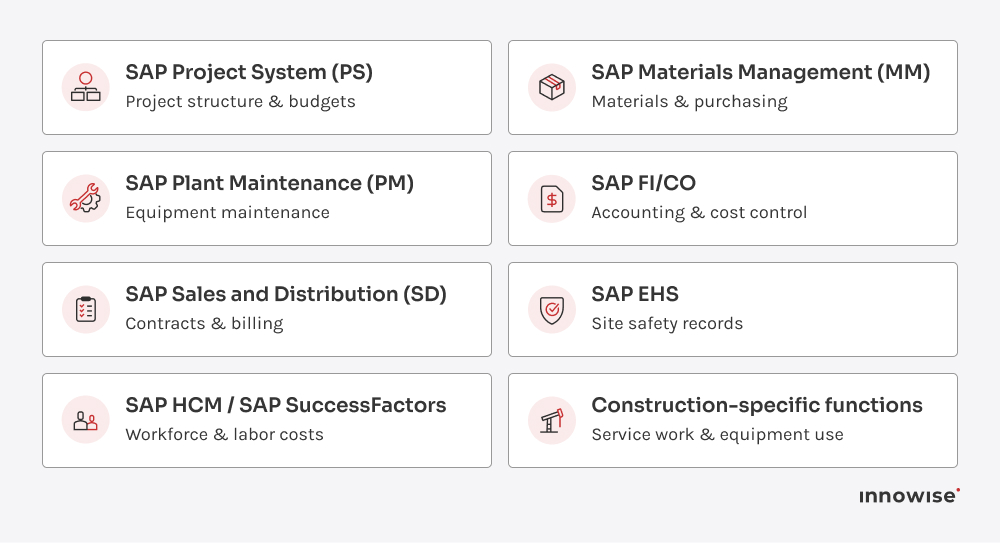
Picture a buyer placing a materials order while a project manager checks how it affects the budget. Both are working on the same project but using different parts of SAP. Construction setups often use several components, depending on how your company manages projects. Here’s what each part does and why it matters.

SAP Project System (PS)

PS lets you divide a project into parts you can plan and track, like foundation work or roofing. These parts make up a WBS, and you can assign budgets to each level. Networks help teams plan activities, and milestones show when to check progress. Project managers can review spending and commitments for each part of the job.

SAP Materials Management (MM)

This module covers buying materials and planning what each project needs. For example, several sites are ordering concrete. Teams can assign each purchase order and material requirement to the relevant WBS element, so purchasing can see which job needs the materials and where the cost belongs.

SAP Plant Maintenance (PM)

You can use SAP PM for routine servicing and repairs, including urgent ones halfway through a shift. Each asset keeps its own maintenance history, while notifications capture issues as they come up and work orders organize the repair work. For equipment that moves between sites, SAP Equipment and Tools Management helps you plan where it’s needed and when it’s available.

SAP Financial Accounting and Controlling (FI/CO)

FI/CO keeps project costs tied to the financial records. When you buy materials or post labor, the related costs appear in SAP and can be traced to the right project structure in PS. Finance can see where the money went, and project teams can compare current spend with the budget. If your company has several legal entities, you usually need to set up consolidation separately.

SAP Sales and Distribution (SD)

SD covers customer contracts and sales orders. Billing plans set out when the customer should be billed for the work. Link those sales documents to a project, and you can record planned revenue and payment values against the relevant WBS element. For more complex project changes, SAP Commercial Project Management provides dedicated issue and change management functions.

SAP HCM and SAP SuccessFactors

Construction companies use SAP HCM and SuccessFactors for workforce and HR processes, but the setup varies. Some rely mainly on one platform; others split HR functions between the two. Time posted against project objects can flow into project reporting as labor cost. Payroll remains in one component, with qualifications or training records managed elsewhere.

SAP Environment, Health and Safety (EHS)

EHS logs incidents, inspections, and safety certifications against regulatory requirements like OSHA. For a construction firm, it’s often what an insurer or a government inspector asks to see first.

Construction-specific SAP functions

SAP also offers construction-specific functions through its Engineering, Construction & Operations component, including Bill of Services and Equipment and Tools Management. These functions work with core modules such as PS and MM rather than replace them. Depending on the project, teams may also use SD or Commercial Project Management. The right mix depends on the construction processes you want SAP to support.

SAP construction project management: end-to-end control

Before approving a new materials order, a project manager should check the remaining budget and see how much has already been committed to open orders. SAP Project System connects these numbers to the specific tasks they relate to. SAP construction project management helps teams organize the project, plan tasks, track progress and costs, and make sure any changes stay within the budget. Below, I’ll explain how these parts work in real situations.

Work Breakdown Structure (WBS)

A project can start with major areas such as foundations or MEP work, then break them into smaller work packages. Those elements form the WBS. Teams assign costs and budgets to the relevant parts of the structure, which makes it easier to see where spending starts to move away from plan.

Networks, activities, and milestones

SAP PS helps teams map out the order of project work. For example, framing may only start after the foundation inspection is complete. Activities show what needs to happen and how long each task should take, while dependencies show which tasks must come first. Milestones mark important points in the schedule, such as an approved inspection or completed project phase, and can also support processes like milestone billing.

Earned Value Management (EVM)

EVM helps project managers see if the work done matches both the money spent and the original plan. For instance, if 60% of the work is finished but 75% of the budget is already used, the project might cost more than planned. SAP PS helps teams compare progress with planned work and recorded costs, so they can spot cost or schedule problems early.

In EVM, that comparison is based on three measures:

MeasureWhat it tells you
Planned value, PVThe budgeted value of work scheduled by the reporting date.
Earned value, EVThe budgeted value of work performed by that date.
Actual cost, ACThe cost incurred for the work.

Comparing EV with PV shows whether the project is ahead of or behind schedule in value terms. Comparing EV with AC shows whether the completed work is costing more or less than planned.

Cost control

You can set a budget for a specific part of the build, such as the foundations, at the WBS level. When you raise a new purchase order, SAP checks whether enough budget is still available, counting both posted costs and amounts already committed through open orders. If you’ve ordered concrete but the invoice hasn’t arrived yet, SAP still treats that amount as committed. Depending on the limits you set, the system can warn you or block the purchase. You can then review the order or adjust the budget.

Change orders

A change order records a change to the work you originally agreed with your client. Say they ask you to add another room. You calculate the extra cost and get their approval before updating the project records. Your team can then update the sales order in SAP SD and adjust the budget for that work in SAP PS. Keep a record of who approved the change and when. If your client questions the extra charge at the end of the project, you can refer back to the work and price they agreed to.

Need to connect SAP with BIM or project planning tools?

SAP construction for field-to-office mobility

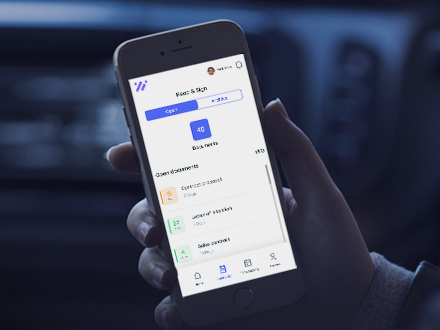
When materials arrive, your site team knows about it, but procurement needs that information too. With SAP Service and Asset Manager, site staff can use mobile devices to record material movements, maintenance work, and inspection data, even without an internet connection. After the data syncs with SAP ERP or S/4HANA, office teams can access the same updates in the system they already use.

Materials and stock

SAP gives the office a current view of stock without waiting for someone on site to check it manually. When materials arrive, leave storage, move to another location, or go back to the supplier, site staff records the change in the mobile app. Those updates flow into SAP inventory records, so procurement can see what is available before placing the next order.

Physical stock counts add a second check. Site teams enter what they actually find, and SAP can compare that with the recorded quantity to show where the numbers do not match.

Maintenance notifications and work orders

Maintenance planners need to stay informed about issues and repair progress. With SAP Service and Asset Manager, technicians can report faults and record repairs directly from the site. For example, a technician might describe a generator fault in a maintenance notification and create a work order for the repair. They can look up equipment details, reserve spare parts in the app, and log their time and completed work. When updates sync with SAP, planners can review both the reported fault and the repair records together.

Inspections and offline work

SAP Dynamic Forms lets your teams create and complete inspection forms in SAP Service and Asset Manager. The results are synced with SAP ERP for the construction industry or SAP S/4HANA so office staff can review them. Even with a weak connection, fieldwork continues. Technicians can access work orders and equipment details already on their device, record their work, and complete forms offline. When the connection is back, they sync their updates with SAP.

SAP implementation roadmap

For construction projects, our team usually structure the rollout in a few clear phases, then adjust the work in each one to the current setup and selected SAP modules.

01

Discover

Innowise starts with your current setup and the construction processes you want SAP to support. Together, we define the project direction and decide which areas should come first.

02

Prepare

Next, we define the project plan in more detail. Innowise sets responsibilities with your team, agrees on the delivery approach, and prepares the documentation.

03

Explore

Our team runs fit-to-standard workshops to compare your processes with SAP functionality. We document the gaps that need additional work and confirm the scope for the next phase.

04

Realize

Innowise configures each SAP module for the construction industry and builds the agreed additions. We also load the required data and test the workflows.

05

Deploy

Innowise prepares the production environment and moves the approved data into SAP. We check user access, run final tests, and prepare office and site teams for go-live.

06

Run

After launch, we support users and resolve issues that appear in production. We also review how SAP performs in day-to-day work and make agreed changes as the business evolves.

arrow-icon.arrow-icon.
01

Discover

Innowise starts with your current setup and the construction processes you want SAP to support. Together, we define the project direction and decide which areas should come first.

arrow-icon.arrow-icon.
02

Prepare

Next, we define the project plan in more detail. Innowise sets responsibilities with your team, agrees on the delivery approach, and prepares the documentation.

arrow-icon.arrow-icon.
03

Explore

Our team runs fit-to-standard workshops to compare your processes with SAP functionality. We document the gaps that need additional work and confirm the scope for the next phase.

arrow-icon.arrow-icon.
04

Realize

Innowise configures each SAP module for the construction industry and builds the agreed additions. We also load the required data and test the workflows.

arrow-icon.arrow-icon.
05

Deploy

Innowise prepares the production environment and moves the approved data into SAP. We check user access, run final tests, and prepare office and site teams for go-live.

arrow-icon.arrow-icon.
06

Run

After launch, we support users and resolve issues that appear in production. We also review how SAP performs in day-to-day work and make agreed changes as the business evolves.

Pricing & cost considerations for SAP construction industry

There is no single price for an SAP solution for the construction industry. Even the same set of modules can cost very differently. The table below shows what has the biggest impact on the budget.

Cost factorHow it affects the budget
Deployment modelSAP S/4HANA Cloud, private cloud, and on-premises deployments use different licensing and infrastructure models. The choice affects subscription or license costs, hosting, and infrastructure management.
Users and functional scopeCost grows with the number of users and SAP components in scope. A single-entity rollout with PS, MM, and FI/CO differs significantly from a multi-entity program that also includes PM, SD, or HCM.
Data migrationHistorical project, financial, and master data may need cleansing, mapping, and validation before migration. Effort increases when source data comes from several legacy systems or follows inconsistent structures.
Configuration and custom developmentStandard configuration keeps the project closer to SAP-delivered processes. Custom ABAP development adds design, testing, and maintenance effort.
IntegrationsConnections to BIM platforms, Primavera P6, payroll, or reporting systems add interface design and testing work. Cost depends on the systems involved and the data exchanged between them.
Training and change managementSite teams, project managers, and finance users work with different SAP processes. The budget should include role-based training before go-live.
Scope changesNew requirements introduced after scope approval add analysis, development, and testing effort. A formal change process keeps them separate from the original budget.
Post-launch supportAfter go-live, companies usually need support for incidents, configuration changes, and later releases. AMS or internal support capacity becomes an ongoing operating cost.
Show more

Trends and emerging technologies in construction ERP

Construction teams are already using newer SAP capabilities to forecast project risks and connect SAP ERP for construction companies with design and field systems. Below, I’ll look at these trends and how they work in practice.

AI-based predictive analytics & risk mitigation

SAP Analytics Cloud helps finance teams estimate upcoming expenses and check whether their budgets need revising. Its Smart Predict feature uses machine learning to analyse past spending, identify recurring patterns, and forecast costs for future periods. You can use those forecasts as a starting point for their plans, then adjust them to reflect what they know about upcoming work. SAP supports bringing these predictions directly into its planning and budgeting processes.

For equipment, SAP Asset Performance Management helps you assess the risk of a breakdown. It analyses maintenance records and sensor readings, using AI to estimate equipment failure risk and remaining lifespan.

BIM-to-ERP integration

BIM-to-ERP integration connects building design data with project planning and cost processes in SAP. The exact data flow depends on the BIM connector or construction solution used alongside the ERP. For example, quantities from an updated model can be passed into downstream planning and costing processes instead of being entered again manually. If a design revision changes the amount of concrete or other material required, project teams can use the revised quantities to review the affected cost and procurement requirements before approving the change.

Field-to-office connectivity via IoT & mobile

Connected equipment provides maintenance teams with real-time operational data. SAP Asset Performance Management uses monitoring rules and alerts to process sensor readings, so planners get notified when equipment conditions change.

Mobile apps help track the work done by on-site staff. Technicians use SAP Service and Asset Manager to log inspections and maintenance, and offline entries sync to SAP when they reconnect. By combining equipment data with field records, office teams get a more up-to-date picture of asset conditions.

In SAP construction projects, scope should follow the actual project flow rather than the module list. I usually start with the handoffs between site teams, cost control, and procurement, because that is where delays and duplicate work tend to surface first.
Vitaly Lavshuk, Head of ERP Practice.
Vitaly Lavshuk
Head of ERP Practice

Why choose Innowise for SAP construction industry solution

Construction SAP projects often involve more than one module, so your team needs a partner with broad expertise. Innowise is an SAP Consulting Service Partner with certified skills in SAP Activate, S/4HANA, SAP HANA, SAP Analytics Cloud, SAP Fiori, and ABAP Cloud. If your project includes ERP, analytics, mobile apps, or custom SAP development, you can trust one team to handle it all. 

We also hold ISO 9001:2015, ISO 27001:2022, and ISO 27017 certifications, which guarantee a clear framework for quality and information security. Since we work with construction software beyond SAP, our team understands project planning, field work, equipment, and BIM.

ISO 9001.
ISO 27001.
ISO-27017-2015.
SAP Partner.

Our SAP services for construction companies

  • SAP consulting
  • SAP implementation
  • SAP customization
  • SAP integration
  • SAP migration
  • SAP support and AMS

SAP consulting

SAP consulting starts with understanding how your construction processes work today and where SAP should take over. Our consultants define the scope, review the current setup, and map the requirements that will shape the implementation.

SAP implementation

Innowise manages the SAP implementation from initial planning through go-live. For construction companies, we configure the selected processes, test them against project workflows, and prepare the system for production use.

SAP customization

Standard SAP functionality doesn’t always match construction company workflows. We adapt the configuration and develop Fiori or ABAP extensions when the project needs functionality beyond the standard setup.

SAP integration

Construction data often sits across ERP, planning tools, and other business systems. Innowise connects SAP with the applications your teams already use, keeping project information available across the systems involved.

SAP migration

Shifting from a legacy SAP environment requires careful planning around data and system dependencies. Our team prepares the move to S/4HANA or a new cloud environment, transfers the required data, and verifies it before cutover.

SAP support and AMS

After go-live, Innowise helps keep the SAP environment working as business requirements change. Our AMS team works with incidents, planned updates, and basis tasks across the SAP environment.

SAP consulting

SAP consulting starts with understanding how your construction processes work today and where SAP should take over. Our consultants define the scope, review the current setup, and map the requirements that will shape the implementation.

View SAP consulting services Cross-functional team having a friendly conversation in a casual office lounge with laptops on a coffee table.

SAP implementation

Innowise manages the SAP implementation from initial planning through go-live. For construction companies, we configure the selected processes, test them against project workflows, and prepare the system for production use.

View SAP implementation services IT specialist troubleshooting software on a laptop, surrounded by digital interface graphics.

SAP customization

Standard SAP functionality doesn’t always match construction company workflows. We adapt the configuration and develop Fiori or ABAP extensions when the project needs functionality beyond the standard setup.

View SAP customization services Developers collaborating and reviewing code together in a software project meeting.

SAP integration

Construction data often sits across ERP, planning tools, and other business systems. Innowise connects SAP with the applications your teams already use, keeping project information available across the systems involved.

View SAP integration services Programmer working on backend system integration, viewing annotated code lines on a screen.

SAP migration

Shifting from a legacy SAP environment requires careful planning around data and system dependencies. Our team prepares the move to S/4HANA or a new cloud environment, transfers the required data, and verifies it before cutover.

View SAP migration services Data scientist building and testing algorithms with code overlays on screen.

SAP support and AMS

After go-live, Innowise helps keep the SAP environment working as business requirements change. Our AMS team works with incidents, planned updates, and basis tasks across the SAP environment.

View SAP AMS services IT expert on a sprint planning video call with clients, wearing earphones and focused on a computer screen in a bright office space.

Featured SAP and ERP projects

Odoo ERP implementation
Innowise implemented Odoo 17 Enterprise as a single connected system for sales, purchasing, production, finance, service, HR, and reporting.
100% unified operations under one ERP
100% operations traceability
View case study
Client review
View case study
Client review logo. Client review
Odoo ERP implementation.
Automated testing for top ERP solutions
Innowise executed automated ERP testing to ensure that integrating new functionality did not compromise the integrity of the existing system.
2x faster feature release compared to manual QA
Upgrade of data management software for extractive, oil, and gas industry
Innowise has upgraded a set of customized oil and gas platforms to optimize resource exploration and extraction processes.
1-3 seconds to generate reports
Royalty streams calculator development
Innowise developed a convenient system for storing, calculating, and editing royalty streams from biopharmaceutical products on a quarterly basis.
Enterprise resources management system development
We built cloud-based mobile and web applications for tracking and managing equipment and machines’ states, location, and work schedule in real-time.
Time and task tracking application upgrade
Innowise enhanced a custom web and mobile solution allowing users to easily track document management tasks, working time, and safety.
MedSpa Network website redesign and rebuild
2 months from kickoff to launch
3-5 leads per week up from 1 per month
View case study
Client review
View case study
Client review logo. Client review
MedSpa Network website redesign and rebuild.
AI bot for TBC Bank marketing campaign
Innowise built a bilingual Telegram bot that generates AI selfies with TBC Bank's football-star brand ambassador.
3,000 users engaged
2 languages supported
View case study
Client review
View case study
Client review logo. Client review
AI Telegram bot..
01 / 01
Close popup icon

Conclusion

For construction companies, it’s important that updates from the site reach the teams handling costs, procurement, or maintenance as soon as possible. SAP in the construction industry can help speed up this process, but the outcome depends on which processes you include and how you plan the rollout. 

If you’re using SAP for the first time or upgrading from an older SAP ERP system to S/4HANA, Innowise’s SAP consultants can review your current setup and help plan the scope and implementation steps.

FAQ

SAP in the construction industry is an ERP platform that helps construction companies manage project finances, procurement, workforce data, assets, and other key business tasks in one place. It also links project planning and site data with finance, so teams can better track costs, progress, and resource use across their projects.

SAP implementation costs vary widely with project scope, company size, integrations, and deployment model. A mid-sized SAP S/4HANA Cloud implementation can run into several hundred thousand dollars, while complex enterprise programs cost considerably more. Innowise reviews your requirements first and provides a free initial estimate based on the scope of work.

Most SAP implementations in construction take around 3 to 12+ months, depending on company size, project scope, and system complexity. At Innowise, we define the required modules, integrations, data migration, and rollout approach early, providing you with a timeline that reflects the scope of work.

SAP usually connects to BIM platforms and Primavera P6 through APIs, middleware, or dedicated connectors. Innowise can map P6 schedules and progress data to SAP WBS elements and link BIM data with project, cost, or asset workflows, so teams can keep their existing planning tools while bringing key project data into SAP.

For companies using SAP construction project management software, SAP PS organizes a project into WBS elements, so teams can plan and track work at each level. For EVM, it compares planned value with earned value and actual cost. The comparison shows schedule and cost variances against the project baseline.

Yes. SAP construction industry solution supports field work through mobile apps with offline capabilities, so superintendents can enter site data, update tasks, and record progress without a constant connection. Once connectivity returns, the app syncs the stored data with the SAP system.

For construction companies, the biggest difference is the data architecture. SAP ECC can run on several third-party databases and depends more on aggregate and index tables. SAP S/4HANA runs only on the SAP HANA in-memory database and uses a simpler data model, so project and financial information is available with less duplication and fewer processing steps.

Show all

Table of contents

Make SAP work for your construction teams

    Contact us

    Book a call or fill out the form below and we’ll get back to you once we’ve processed your request.

    Send us a voice message
    Attach documents
    Upload file

    You can attach 1 file up to 2MB. Valid file formats: pdf, jpg, jpeg, png.

    By clicking Send, you consent to Innowise processing your personal data per our Privacy Policy to provide you with relevant information. By submitting your phone number, you agree that we may contact you via voice calls, SMS, and messaging apps. Calling, message, and data rates may apply.

    You can also send us your request
    to contact@innowise.com
    What happens next?
    1

    Once we’ve received and processed your request, we’ll get back to you to detail your project needs and sign an NDA to ensure confidentiality.

    2

    After examining your wants, needs, and expectations, our team will devise a project proposal with the scope of work, team size, time, and cost estimates.

    3

    We’ll arrange a meeting with you to discuss the offer and nail down the details.

    4

    Finally, we’ll sign a contract and start working on your project right away.

    More services we cover

    arrow