ERP software for small business: how to choose, compare, and implement it

Small-cover_ERP-software-for-small-business.
Lead of ERP Consultants
Verified expert
Every article at Innowise is created by authors with real-world experience. They understand the topic beyond theory and bring insight from real projects.
19+ years of experience
Verified expert
19+ years of experience
Kiryl is a specialist in SAP ecosystem optimization. He cuts through the complexity of enterprise resource planning, tailoring SAP modules to specific workflows to ensure clients extract maximum efficiency from their digital core.
Expertise
ERP Project management Process optimization
Let's talk

Key takeaways

  • A small business ERP keeps finance, inventory, orders, purchasing, and reporting in one system, so you don’t have to use separate tools for each task.
  • Accounting software tracks your financial history, while an ERP system for small businesses also helps manage the day-to-day operations that generate those numbers.
  • Focus on your business model before choosing software. For example, a 20-person service company and a 40-person manufacturer will need very different ERP systems.
  • When planning your budget, consider more than just license fees. Setup, system integration, and your team’s time can account for a significant part of the total cost.
  • Most small-business ERP projects last from a few months up to about a year. The timeline depends on the complexity of your needs and how well organized your data is.
  • Start with a simple rollout that your team can handle easily. After everyone is comfortable using the system, you can add more features later.
Summarize article with AI

Small businesses often start considering ERP when everyday questions take too long to answer. For instance, someone may have to check an order in one system and look up stock in another before getting back to a customer. The finance team might keep everything in a separate spreadsheet. This setup can work for a while, but as orders grow, the team spends more time fixing issues and matching records across different tools.

When choosing ERP software for a small business, start with the processes that create extra work for your team. A services company may need to track project costs and billing, while a manufacturer may also need tools for materials planning and production management.

In this guide, I’ll help you evaluate ERP options based on your business processes, consider costs beyond the subscription fee, and plan an implementation your team can manage.

What is ERP software for a small business?

ERP software for a small business is an integrated platform that brings accounting, inventory, sales, purchasing, and HR into one system with a shared database. Teams work from the same records, so a customer order stays linked to the stock it uses and the invoice that follows. Purchasing teams use that same information to plan supplier orders.

ERP vs accounting software

ERP and accounting software have some similarities, but they serve different purposes. Accounting software focuses on the financial side of your business, including invoices, bills, payments, taxes, and ledger entries. It helps you keep the books in order and see where your finances stand.

ERP links your financial records to the activities that create them. For example, orders change your stock levels, shortages trigger new purchases, shipments lead to invoices, and production uses up materials and updates inventory.

Let’s see how that works with a sale. With accounting software, you might create the invoice in one tool while tracking stock and shipping in separate apps or spreadsheets. The invoice shows what the customer owes, but checking whether their order has shipped may mean asking someone else.

With ERP, a confirmed sales order can reserve stock for that customer. The shipment and invoice stay linked to it, so finance can check delivery status without chasing the warehouse for an update. Purchasing can also use stock levels and order demand to see what needs replenishing. Each team works from the same information as the order progresses.

Do you need ERP yet?

If you run a small service business with straightforward billing and little or no inventory, accounting software may be all you need. ERP becomes worth considering when teams need the same information but keep it in separate systems. Some common signs are:

  • The same order, customer, or product data gets entered in more than one system.
  • Month-end reporting involves pulling numbers from different sources and reconciling them in spreadsheets.
  • Sales has to check with the warehouse before confirming a delivery date.
  • Purchasing only finds out about shortages once stock is already running low.

Core features of small business ERP

Most ERP platforms tick the same boxes on a feature list. What matters is how each process works in practice and what the version you are considering includes. Below, I’ve outlined the functions you’ll commonly find in ERP for a small business and what they actually do.

  • Financial management
  • Inventory management
  • Order management
  • Purchasing and procurement
  • CRM
  • Reporting and dashboards
  • Workflow and approvals
  • Manufacturing

Financial management

Financial management combines the general ledger, accounts payable and receivable, and bank reconciliation in the ERP. It also lets finance teams trace a sale, purchase, or inventory movement back to its source.

Financial management.

Inventory management

Inventory management shows what you have in stock, where it is stored, and what is already allocated to orders. It can also track lots or serial numbers and handle inventory valuation. Since sales and purchasing use the same stock data, availability updates as orders are fulfilled or new goods arrive.

Inventory management.

Order management

Order management covers the sales process from the initial quote to fulfillment and invoicing. Once an order is accepted, it updates inventory needs and sends the right transaction details to accounting, so you don’t have to enter the same information in multiple places.

Order management.

Purchasing and procurement

Purchasing covers everything from identifying a need to placing a supplier order and receiving goods. The ERP links each purchase to the right stock or expense and sends the financial details to accounting. Supplier records also show what was bought and who it came from.

Purchasing and procurement.

CRM

CRM stores customer records and sales activity alongside your ERP operations. Quotes and opportunities can flow into sales orders without re-entering customer or order details. Some ERPs have built-in CRM, while others connect to a separate CRM system, so how well they share data matters as much as the features themselves.

CRM.

Reporting and dashboards

Reporting uses the data already collected in finance and operations. Managers can track metrics such as revenue, inventory levels, purchasing, and order status directly in the ERP, rather than pulling exports from different apps. Dashboards provide a quick view of the most important indicators.

Reporting and dashboards.

Workflow and approvals

Workflow features manage what happens when a transaction needs review or something unusual comes up. For example, a purchase over a certain amount might require approval before it is processed, and an overdue shipment can trigger an alert. These rules are especially helpful as a small business grows and informal approvals are no longer enough.

Workflow and approvals.

Manufacturing

For businesses that make physical products, manufacturing features link demand with production and materials. They can handle bills of materials, production orders, work-in-progress, and material requirements. The ERP compares what production needs with available and incoming stock, helping purchasing respond to shortages before they disrupt planned work.

Manufacturing.
Financial management

Financial management combines the general ledger, accounts payable and receivable, and bank reconciliation in the ERP. It also lets finance teams trace a sale, purchase, or inventory movement back to its source.

Financial management.
Inventory management

Inventory management shows what you have in stock, where it is stored, and what is already allocated to orders. It can also track lots or serial numbers and handle inventory valuation. Since sales and purchasing use the same stock data, availability updates as orders are fulfilled or new goods arrive.

Inventory management.
Order management

Order management covers the sales process from the initial quote to fulfillment and invoicing. Once an order is accepted, it updates inventory needs and sends the right transaction details to accounting, so you don’t have to enter the same information in multiple places.

Order management.
Purchasing and procurement

Purchasing covers everything from identifying a need to placing a supplier order and receiving goods. The ERP links each purchase to the right stock or expense and sends the financial details to accounting. Supplier records also show what was bought and who it came from.

Purchasing and procurement.
CRM

CRM stores customer records and sales activity alongside your ERP operations. Quotes and opportunities can flow into sales orders without re-entering customer or order details. Some ERPs have built-in CRM, while others connect to a separate CRM system, so how well they share data matters as much as the features themselves.

CRM.
Reporting and dashboards

Reporting uses the data already collected in finance and operations. Managers can track metrics such as revenue, inventory levels, purchasing, and order status directly in the ERP, rather than pulling exports from different apps. Dashboards provide a quick view of the most important indicators.

Reporting and dashboards.
Workflow and approvals

Workflow features manage what happens when a transaction needs review or something unusual comes up. For example, a purchase over a certain amount might require approval before it is processed, and an overdue shipment can trigger an alert. These rules are especially helpful as a small business grows and informal approvals are no longer enough.

Workflow and approvals.
Manufacturing

For businesses that make physical products, manufacturing features link demand with production and materials. They can handle bills of materials, production orders, work-in-progress, and material requirements. The ERP compares what production needs with available and incoming stock, helping purchasing respond to shortages before they disrupt planned work.

Manufacturing.

Is ERP the right next step for your small business?

Best ERP software for small business in 2027: comparison

No ERP will fit every small business equally well. Your choice depends on how closely a system matches your day-to-day work and what your team can realistically implement and manage. Below, I’ve outlined some of the top ERP software for small business, with a look at where each fits best and the limitations worth considering before you decide.

  • Microsoft Dynamics 365 Business Central
  • Odoo
  • SAP Business One
  • Zoho
  • Acumatica
  • Oracle NetSuite

Business Central makes the most sense for companies already working heavily in the Microsoft ecosystem. It connects ERP processes with tools such as Excel, Outlook, and Power BI, while keeping finance and operations in the same system. Essentials covers core business management; Premium adds both manufacturing and service management.

Microsoft Dynamics 365 Business Central logo.
Strengths
  • Works closely with Excel, Outlook, and other Microsoft tools
  • Large partner network and extension marketplace
Possible limitations
  • Costs can rise as more users need full licenses
  • Custom extensions require AL skills

Odoo works well if you want to add ERP features gradually instead of setting up a big system right away. Its apps cover accounting, CRM, inventory, manufacturing, e-commerce, and more. The Community edition is free and open source, while Enterprise adds more features and support. Both Standard and Custom plans include all apps, but choose Custom if you need custom modules or extra flexibility.

Odoo logo.
Strengths
  • Easy to roll out app by app as needs grow
  • Free Community edition offers a low-cost starting point
Possible limitations
  • Community and Enterprise differ significantly in functionality
  • Custom modules add upgrade and maintenance work

SAP Business One can suit smaller manufacturers and distributors that need finance, inventory, purchasing, and production in one ERP. Its MRP functionality helps plan what materials to buy or produce based on current stock and demand. You can deploy the system in the cloud or on your own servers.

SAP Business One logo.
Strengths
  • Strong core ERP functionality for inventory and production
  • Available in cloud and on-premises deployments
Possible limitations
  • Pricing is quote-based, with extra costs possible for add-ons
  • Moving to another SAP ERP product may require a separate migration project

Zoho can work well for smaller businesses that want to connect CRM, accounting, and inventory without moving to a full ERP platform. Books, Inventory, and CRM stay as separate apps, but they can share data and support the same workflows. This makes Zoho a lighter option for service, trading, or e-commerce companies with relatively simple operational needs.

Zoho logo.
Strengths
  • CRM, finance, and inventory apps work well together
  • Apps can be introduced gradually
Possible limitations
  • Features and limits vary by app and plan
  • Cross-app workflows need additional configuration

Acumatica is a good choice if you need many people to access your ERP system for small business. Most of its current licensing tiers don’t charge per additional user, so warehouse staff, project teams, and managers can all use the system without paying for each new seat. Instead, costs are based on how much you use the system and which features you need.

Acumatica logo.
Strengths
  • Consumption-based licensing can suit businesses with many users
  • Industry editions cover different operating models
Possible limitations
  • Costs can rise with usage and resource needs
  • Some capabilities are sold as add-ons

NetSuite makes more sense for small businesses that operate through several legal entities or across multiple countries. OneWorld keeps those entities in the same ERP, so finance can consolidate results and manage intercompany activity without stitching reports together from separate systems.

Oracle NetSuite logo.
Strengths
  • Strong multi-entity and consolidated reporting capabilities
  • Modules and users can be added as needs grow
Possible limitations
  • Pricing includes platform, module, user, and implementation costs
  • Multi-entity setups require more implementation work

Which ERP fits your business model?

The products or services you offer and how you deliver them determine what you need from an ERP. Here, I’ve matched four business models with the features to look for and suggested platforms from the list above.

Business model Priority capabilities Platforms to consider
Service firm (5–50 people) Project costs and profitability; time and expense tracking; billing; staff allocation; revenue recognition where needed Business Central; Odoo; Zoho Books with Projects; NetSuite with project capabilities
Wholesale distributor Inventory across locations; purchasing and replenishment; customer-specific pricing; warehouse operations; EDI where trading partners require it Acumatica Distribution Edition; Business Central; SAP Business One; NetSuite
Retailer or e-commerce seller Sales-channel connections and order import; stock synchronization; returns; payment reconciliation; point of sale for physical stores Odoo; Zoho Books with Inventory for online sales; Business Central; NetSuite
Small manufacturer Bills of materials; production steps and orders; material requirements planning (MRP); shop-floor reporting; production costing Business Central Premium; SAP Business One; Acumatica Manufacturing Edition; Odoo Manufacturing

Find an ERP that fits your business and your budget

Integrations a small business ERP must handle

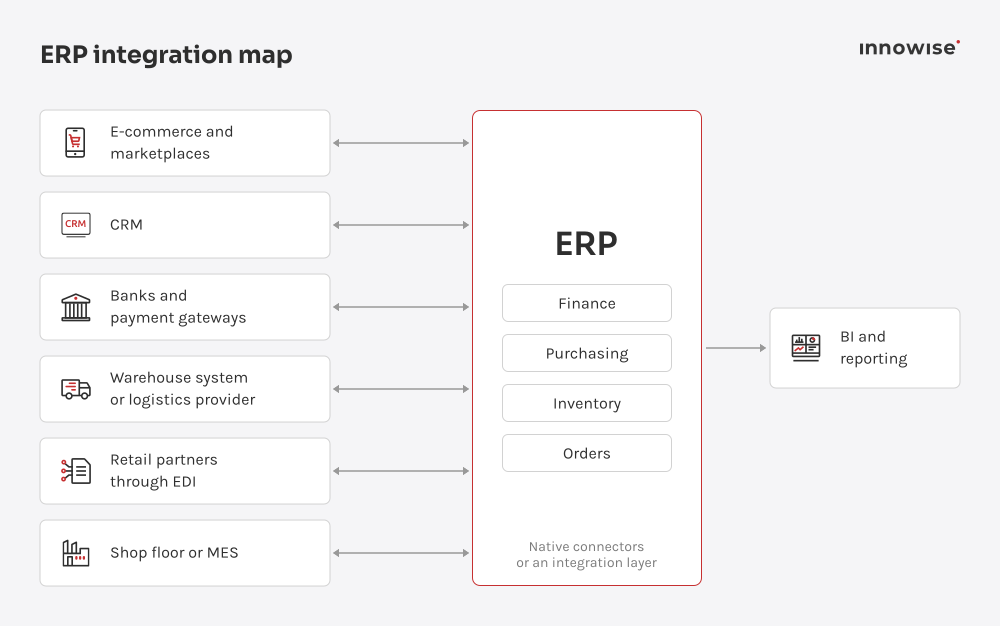
Your ERP should work with the tools your business already uses. If it doesn’t, your team might have to retype online orders or manually check warehouse updates. Mapping those connections before choosing a platform helps you see what the rollout actually needs to include.

Start by checking if ready-made connectors cover the data and actions you need. Some come with your ERP, while others may cost extra. Middleware can help by translating data between systems. If you need something more specific, custom API integrations can fill the gaps, but remember to budget for development and support.

ERP connections across core business systems.

Your priorities depend on your business. For example, an online seller might focus on syncing orders and stock first, while a service company may benefit more from linking approved project hours to billing. Ask yourself where missing or repeated data causes the most extra work for your team.

You need to decide which system is the source for each type of data, such as prices or stock. If you manage product prices in the ERP, for instance, the integration can send them to your online store. How often that exchange runs determines how quickly a price change appears on the website. Also, decide who monitors the connections. If stock updates stop on Friday night, your store might keep selling items that are already sold out. Make sure failure alerts go to someone who can fix the problem and recover any missed updates, and include this responsibility in your rollout plan.

The table below outlines common integrations and typical data flows. The exact fields and available actions depend on the connector and setup.

Integration Data into ERP Data out of ERP Process supported
E-commerce / marketplaces Orders, customer details, payment details Stock levels, prices, shipment status Order import and fulfillment updates
CRM Customer details, quotes, sales orders Invoices, order status, customer balances Quote-to-order processing
Banks and payment gateways Transactions, settlements, fees Payment instructions, where supported Reconciliation and payment processing
Warehouse systems / logistics providers Goods receipts, picking and shipment confirmations Orders, product records Warehouse and fulfillment coordination
Trading partners through EDI Customer purchase orders Advance shipping notices, invoices Order and document exchange
Manufacturing execution systems (MES) Production quantities, labor time, scrap Production orders, bills of materials Production reporting
Business intelligence (BI) Usually none for reporting Financial and operational data Reports and dashboards
I’d be careful about moving every current process into a new ERP. Before changing the system, I’d check whether all those steps are still needed. For a small business, customization costs don’t stop at launch. You’ll also need to keep things updated as the ERP changes.
Michael Labutin, Head of Delivery.
Michael Labutin
Head of Delivery Office

How much does ERP cost for a small business?

In the first year, ERP costs for a small business usually range from $10,000 to $150,000. This includes licenses and setup. The exact amount depends on how many people will use the system, which tools it needs to connect with, and how much custom work your business needs.

Licenses

ERP vendors structure their license fees differently. Business Central and Odoo charge per user, with the edition or plan determining which features are included. The cost depends on how many people need access and what they need to do in the system.

Acumatica bases its pricing on the applications you choose and the resources needed to support your operations. SAP Business One and NetSuite use tailored pricing. NetSuite’s subscription combines the core platform with user licenses and any additional modules.

For budgeting, a quote for your proposed setup is more useful than a headline price. Regional pricing and contract terms can affect the amount you pay. The quote should also explain renewal costs, including what happens when an introductory discount ends.

Implementation

Implementation is the work needed to get your ERP ready for everyday use. The ERP implementation company configures processes such as invoicing and purchasing, transfers your existing records, tests the system, and trains your employees. For a small business, published implementation estimates range from roughly $25,000 to $150,000 or more, depending on the scope of work.

Preparing your data can add to that work. Suppose the same customer appears in several spreadsheets, each showing a different billing address. Someone needs to check which address is correct before importing the record into the ERP. Your quote should specify whether the provider handles that preparation or expects your employees to do it.

ERP implementation roadmap for small businesses

Each ERP project has its own details. The modules, integrations, and data involved can change the plan. Even so, most small-business projects the Innowise team works on follow a similar process.

01
Set scope and goals

Our team starts with the issues the ERP should fix, like slow month-end closing or unreliable stock data. Next, we decide what to include in the first release and save less urgent changes for later.

02
Map current processes

Our ERP experts map the main workflows and work with you to decide how they should run in the new system. We keep what still works and review workarounds or approvals that add little value.

03
Shortlist platforms and run a PoC

We compare the ERP options against your requirements and test the areas that matter most before implementation. A proof of concept can help when the fit is unclear or a critical workflow needs closer validation.

04
Configure the system and prepare the data

Our team sets up the ERP based on the agreed processes and prepares the data for migration. Trial migrations help us find duplicates, missing links, and other issues before go-live.

05
Build and test integrations

Our engineers connect the ERP to adjacent systems and test end-to-end workflows under realistic loads. We validate performance using target data volumes and simulate synchronization failures to check how the system recovers.

06
Run UAT and train users

Before go-live, teams first test daily operational tasks like entering material requisitions and approving purchase orders. We resolve any functional errors or permission issues found during testing, then conduct role-specific training on the validated system.

07
Go live and stabilize

After the ERP goes live, our engineers monitor early system operations, fix production issues, and assist field teams. Minor feature requests and non-critical adjustments enter a backlog for planned post-launch releases.

arrow-icon. arrow-icon.
01 Set scope and goals

Our team starts with the issues the ERP should fix, like slow month-end closing or unreliable stock data. Next, we decide what to include in the first release and save less urgent changes for later.

arrow-icon. arrow-icon.
02 Map current processes

Our ERP experts map the main workflows and work with you to decide how they should run in the new system. We keep what still works and review workarounds or approvals that add little value.

arrow-icon. arrow-icon.
03 Shortlist platforms and run a PoC

We compare the ERP options against your requirements and test the areas that matter most before implementation. A proof of concept can help when the fit is unclear or a critical workflow needs closer validation.

arrow-icon. arrow-icon.
04 Configure the system and prepare the data

Our team sets up the ERP based on the agreed processes and prepares the data for migration. Trial migrations help us find duplicates, missing links, and other issues before go-live.

arrow-icon. arrow-icon.
05 Build and test integrations

Our engineers connect the ERP to adjacent systems and test end-to-end workflows under realistic loads. We validate performance using target data volumes and simulate synchronization failures to check how the system recovers.

arrow-icon. arrow-icon.
06 Run UAT and train users

Before go-live, teams first test daily operational tasks like entering material requisitions and approving purchase orders. We resolve any functional errors or permission issues found during testing, then conduct role-specific training on the validated system.

arrow-icon. arrow-icon.
07 Go live and stabilize

After the ERP goes live, our engineers monitor early system operations, fix production issues, and assist field teams. Minor feature requests and non-critical adjustments enter a backlog for planned post-launch releases.

How Innowise builds and improves small business ERP systems

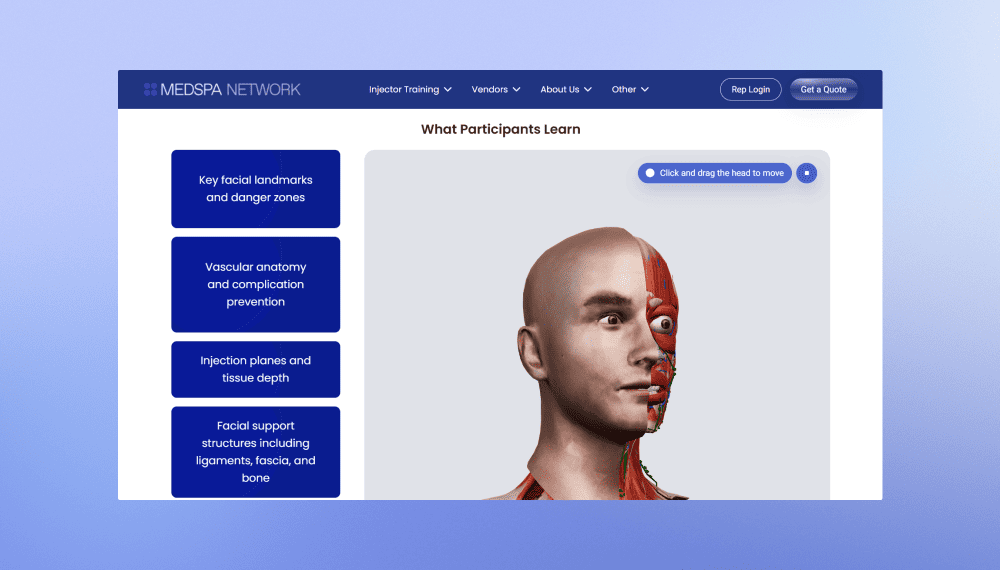
MedSpa Network website redesign and rebuild
Innowise rebuilt MedSpa Network’s website on WordPress, giving its team control over day-to-day content updates.
2 months from kickoff to launch
3-5 leads per week up from 1 per month
View case study
Client review
View case study
Client review logo. Client review
MedSpa Network website redesign and rebuild.
AI bot for TBC Bank marketing campaign
Innowise built a bilingual Telegram bot that generates AI selfies with TBC Bank's football-star brand ambassador.
3,000 users engaged
2 languages supported
View case study
Client review

View case study
Client review logo. Client review


AI Telegram bot..
Defining the product strategy for Bitlendex’s bitcoin lending platform
Innowise conducted a discovery phase for Bitlendex, helping the client transform an early-stage product concept into a validated business model and clearly defined MVP.
1 month for a full discovery phase
Financial advisory system for Bonnfinanz
Innowise helped Bonnfinanz to build a web-based advisory and administration system that supports mobile working and direct interaction with the client.
EV charging platform with flexible billing
Innowise helped modernize SMART/LAB’s e-mobility platform by enhancing its billing, payment, transaction management, and reporting capabilities.
>50% faster billing and payment processing
FinXP’s cloud-native DevOps transformation
Innowise helped FinXP modernize its financial services infrastructure by migrating legacy PHP-based APIs and applications to a cloud-native architecture.
11 apps moved to Azure App Service
100% Infrastructure as Code
Technical SEO for e-commerce platform
Innowise addressed critical technical SEO and performance issues across Officine 08’s e-commerce platform.
<500 ms server response time
5 months to complete the project
View case study
Client review

View case study
Client review logo. Client review

Technical SEO for e-commerce platform.
Continuous development of a fragrance subscription platform
Innowise helped Scentbird expand its subscription platform to support new shopping experiences and international growth.
4 years of continuous support
View case study
Client review

View case study
Client review logo. Client review

Continuous development of a fragrance subscription platform.
01 / 01
Close popup icon

How to choose ERP software for a small business: selection checklist

A demo usually highlights a system’s strengths, so don’t base your decision only on that. Use the checklist below with each vendor and implementation partner you’re considering, and ask them to test your most important workflows and data instead of just showing prepared examples.

  • Everyday processes.

Pick key tasks your business depends on, like processing a return or billing a project. Ask the vendor to show which ones work with the standard setup and which need add-ons or custom development.

  • Connections to existing tools.

Find out how the ERP will share data with the systems you plan to keep. Make sure you know what each connection transfers and who is responsible if something stops working.

  •  Moving data in and out

Decide which records to move, such as unpaid invoices and unfinished orders. Ask to see how records and transaction history can be exported in a format you could use in other systems.

  •  Room to grow

Share your expected user numbers and transaction volumes for the next three to five years. Ask what adding another location or legal entity would mean for licensing and implementation costs.

  • Permissions and security

Check if you can control who changes supplier bank details and track those changes later. Review security reports for the hosting service and look for certifications or other evidence that it meets your industry’s requirements.

  • Usability for occasional users

Have someone on your team try a routine task after training, using only the provided instructions. See if they can complete it without needing help at every step.

  • The full cost

Ask for a three- to five-year estimate that covers both setup and ongoing costs. Include your employees’ time, and check what work or services are not included in the quote.

  • Implementation experience

Ask the company setting up your ERP for references from businesses like yours. Talk to those customers about any rollout problems and the support they got afterward.

  • A focused proof of concept

Find the requirement you are least sure about. Before you sign, agree on a small test using your own scenario and define what the result should demonstrate.

  • Contract terms

Look for limits on renewal price increases, data ownership, and the conditions and fees for leaving. The contract should also specify support hours and response times.

Where AI helps in small business ERP

AI in ERP can help a small team spend less time on repetitive work. Invoice processing is a good example. AI can extract invoice details and suggest matches to purchase orders or receipts. The accountant then checks the results, with less data to enter manually.

AI can also flag unusual transactions before month-end or estimate demand from sales history. The accountant reviews whether a flagged entry needs correcting. With forecasts, the team also needs to assess whether the underlying sales data is reliable enough to support a decision.

Which AI features are available depends on your ERP edition and configuration, and when the standard setup falls short, Innowise’s AI consulting and development teams add the missing ones through AI-driven ERP customization. The use cases below show where AI can assist with everyday work:

Demand forecasting Demand forecasting icon.
AP invoice capture and matching AP invoice capture and matching icon.
Anomaly detection in transactions Anomaly detection in transactions icon.
Natural-language reporting assistants Natural-language reporting assistants icon.

Why choose Innowise for ERP

With over 19+ years of software development experience, Innowise has more than 3,500+ specialists, including over 300+ ERP experts. We have delivered more than 200+ ERP projects, with 93% of clients returning for additional implementation phases.

As an official partner of SAP, Microsoft, and Odoo, we work with both standard ERP platforms and custom architectures. Our quality and information security management systems are certified to ISO 9001 and ISO/IEC 27001 standards.

When out-of-the-box platforms fall short, our teams build custom modules and integrations. Our experience with AI projects also helps us support ERP tasks like invoice processing and demand forecasting.

odoo_ready_partner icon.
SAP Partner icon.
ISO 9001 icon.
ISO 27001 icon.
Microsoft Data & AI Azure icon.
Microsoft Infrastrusture Azure icon.

Conclusion

A long feature list can make almost any small business ERP look like a good fit. The real test is what happens when you run your own awkward cases through it, whether that is a partial shipment, a stock mismatch, or a month-end close that still needs Excel.

Then look at what it will take to get the system live. Data migration and your team’s available time can change the scope, and the three- to five-year cost often turns out well above the license price.

If you want a second opinion on your shortlist, Innowise can review it against your processes and flag gaps before you sign.

FAQs

The best ERP software for a small business depends on how the company operates and which processes the system needs to handle. Shortlist platforms that fit your business model, then test your key workflows in the exact edition you are considering. Innowise can help compare those options against your requirements.

Not always. If your business has simple billing and only a few people involved, accounting software and a few connected tools might be enough. A small business ERP makes sense when you spend too much time on repeated data entry, reconciliation, or managing disconnected processes.

Among the options in this guide, Odoo Community has no software license fee. However, you should also consider hosting, setup, and support costs, since the lowest license price doesn't always mean the lowest total cost. Our consultants can help you compare these costs before you choose.

First-year ERP costs for a small business can range from about $10,000 to $150,000, including licenses and implementation. The final amount depends on the scope and how much work is needed to prepare the system for launch. At Innowise, we review your processes and current systems to estimate the implementation effort and likely cost.

An ERP for a small business can take a few months to implement, while more complex projects may run close to a year. The timeline can stretch when the project involves substantial data preparation, integrations, or manufacturing requirements.

Business Central Premium, SAP Business One, Acumatica Manufacturing, and Odoo Manufacturing are strong ERP options for small manufacturers. When comparing ERP software for small manufacturing business needs, look at how each system handles production planning, materials, and costing, as well as which manufacturing features are included in the edition you are pricing.

MRP helps plan what materials to buy or make, how much is needed, and when they are required for production. ERP handles a wider range of business tasks, such as finance, purchasing, sales, and inventory. Usually, ERP software for small manufacturing businesses includes MRP as a feature.

Cloud ERP usually leaves less infrastructure for a small business to manage because the vendor or hosting provider runs the system. On-premises ERP gives the company more control over where the system runs but also brings more responsibility for maintaining it. The better fit depends on your IT setup and requirements.

Neither is automatically better. Off-the-shelf ERP systems work well if their standard features match your business needs. If your core processes require major changes to fit an existing product, a custom ERP might be a better choice.

The integrations you need depend on where your business data comes from and where it needs to go. Many businesses connect their ERP to e-commerce platforms, CRM systems, banks, or warehouse software. Innowise can review your current setup and help you figure out which integrations your ERP needs before implementation starts.

Yes, it can, especially by reducing repetitive tasks or flagging items that need an employee’s attention. Common uses include invoice capture, demand forecasting, transaction checking, and natural-language reporting. The features you get will depend on the ERP system for small business you choose and its edition.

First, we set a baseline before implementation, using business measures the ERP should improve, such as month-end close time or order processing effort. After go-live, we track the same numbers, convert the gains into money, and compare them with the total cost of the system, including implementation and your team's time.

Show more Show less

Table of contents

    Contact us

    Book a call or fill out the form below and we’ll get back to you once we’ve processed your request.

    Send us a voice message
    Attach documents
    Upload file

    You can attach 1 file up to 2MB. Valid file formats: pdf, jpg, jpeg, png.

    By clicking Send, you consent to Innowise processing your personal data per our Privacy Policy to provide you with relevant information. By submitting your phone number, you agree that we may contact you via voice calls, SMS, and messaging apps. Calling, message, and data rates may apply.

    You can also send us your request
    to contact@innowise.com
    What happens next?
    1

    Once we’ve received and processed your request, we’ll get back to you to detail your project needs and sign an NDA to ensure confidentiality.

    2

    After examining your wants, needs, and expectations, our team will devise a project proposal with the scope of work, team size, time, and cost estimates.

    3

    We’ll arrange a meeting with you to discuss the offer and nail down the details.

    4

    Finally, we’ll sign a contract and start working on your project right away.

    More services we cover

    arrow