







SAP Materials Management (SAP MM): module overview, features & implementation

Nov 19, 2026 11 min read
Head of ERP Consultants
Verified expert
Every article at Innowise is created by authors with real-world experience. They understand the topic beyond theory and bring insight from real projects.
19+ years of experience
Verified expert
19+ years of experience
Kiryl is a specialist in SAP ecosystem optimization. He cuts through the complexity of enterprise resource planning, tailoring SAP modules to specific workflows to ensure clients extract maximum efficiency from their digital core.
Expertise
ERP Project management Process optimization
Let's talk

Key takeaways

  • SAP MM covers material master data, purchasing, inventory management, material planning, service procurement, and invoice verification. Supplier payments are processed in Finance.
  • A typical purchasing cycle runs from a purchase requisition through a purchase order, goods receipt, and invoice verification. Goods movements affecting inventory value also generate accounting postings.
  • SAP MM integrates with FI/CO, PP, QM, WM/EWM, TM, PM, SD, and PS, so you can use purchasing and inventory data across finance, production, and logistics.
  • SAP S/4HANA keeps core MM functions but adds a modern SAP Fiori interface, centralized supplier records, and a simplified inventory data model. Material Ledger is required, while Actual Costing is optional.
Summarize article with AI

When your system says a material is in stock, but the warehouse shelves are empty, production ends up waiting for stock that exists only on paper. Purchasing can’t tell what needs ordering, and someone has to figure out why the numbers don’t match.

SAP Materials Management connects purchasing, inventory, and material planning so teams can work with the same stock information.

In this guide, I’ll explain what the SAP MM module is, how it works, its key features and integrations, and what to consider before implementation.

Purchasing delays hitting margins?

What is SAP MM?

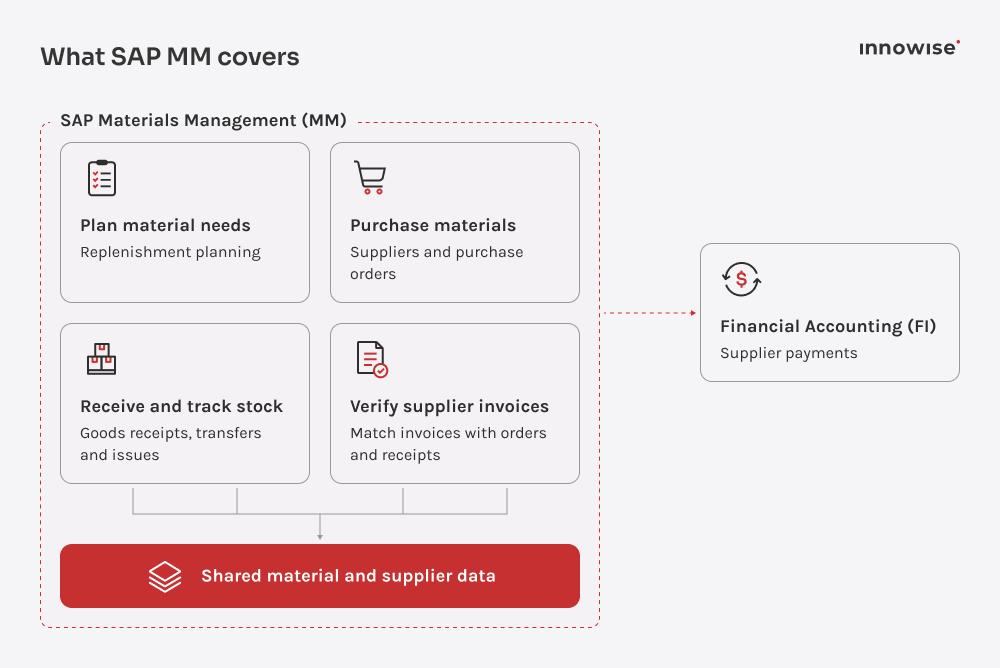
SAP MM, short for SAP Materials Management, is the module that helps businesses plan what materials they need, purchase them from suppliers, and keep track of inventory. It covers purchase orders, goods receipts, stock movements, and supplier invoice verification. Supplier payments are processed in SAP Financial Accounting (FI).

In SAP S/4HANA, purchasing and invoice verification are part of Sourcing and Procurement, while inventory management is part of Materials Management and the broader logistics processes. Buyers manage suppliers, orders, and invoices;e warehouse teams record goods receipts, transfers, and issues. Both use shared material records, so they’re working with the same data.

SAP MM material planning, purchasing, inventory, and invoice verification.

Key SAP MM components

The SAP Materials Management module covers the records and processes behind purchasing, inventory tracking, and invoice verification. Here’s how its main components work.

  • Master data icon.

    Master data

    Master data provides the information used across SAP MM processes. The material master stores purchasing, planning, storage, and accounting details for each material. In SAP S/4HANA, Business Partner records hold supplier data. Purchasing info records contain supplier prices and delivery terms, while source lists identify valid sources of supply.

  • Purchasing icon.

    Purchasing

    Purchasing covers purchase requisitions, requests for quotation, purchase orders, contracts, and scheduling agreements. SAP can suggest suppliers based on existing purchasing records and send documents for approval according to rules such as order value or material group.

  • Inventory management icon.

    Inventory management

    Inventory management records goods received, issued, or transferred between locations. It shows stock quantities by plant, storage location, and stock type, including unrestricted-use, quality-inspection, and blocked stock. Each posted movement creates a material document, so teams can check what changed and when.

  • Invoice verification icon.

    Invoice verification

    SAP checks supplier invoices against purchase orders and, where applicable, goods receipts. Comparing all three is called a three-way match. If a supplier bills for 100 units but only 80 arrive, payment may be blocked. With Evaluated Receipt Settlement (ERS), SAP creates invoices automatically based on purchase orders and goods receipts.

  • MRP and CBP icon.

    MRP and CBP

    Material Requirements Planning (MRP) calculates which materials are needed for planned production or customer orders, taking existing stock and incoming deliveries into account. Consumption-Based Planning (CBP) uses past consumption to forecast material needs or triggers replenishment when stock falls below a set level.

  • Physical inventory icon.

    Physical inventory

    Physical inventory checks whether the stock recorded in SAP matches what's actually in the warehouse. If SAP shows 100 units but staff count only 80, they investigate the difference and correct the records. With cycle counting, companies check different materials throughout the year instead of counting everything at once.

  • Valuation and Material Ledger icon.

    Valuation and Material Ledger

    Valuation determines the accounting value of stock using a standard price or moving average price. Material Ledger records inventory values in multiple currencies and supports different valuation views. It is mandatory in SAP S/4HANA, while Actual Costing remains optional.

  • Service procurement icon.

    Service procurement

    The SAP MM module also supports buying services, such as equipment repairs. Once the work is done, the team records and approves it using a service entry sheet. They can then check the supplier's invoice against the approved work.

  • Stock in transit and subcontracting icon.

    Stock in transit and subcontracting

    Stock transfers track materials moving between storage locations or plants, including goods still in transit. In subcontracting, a company sends components to an external manufacturer to make a finished product. SAP tracks those components at the supplier's site and records their consumption when the finished goods are received.

Key features

We’ve covered what the SAP MM module does. Now let’s look at the features I find particularly useful for keeping purchasing and inventory work on track.

  • Traceability
  • Autofill
  • Auto-posting
  • Batches & serials
  • Reports

Document traceability

A supplier delivers only part of an order. Buyers can check purchase order (PO) history to see what was received and invoiced. Since the documents are linked, it's easier to investigate missing deliveries or invoice discrepancies without searching through separate records.

SAP MM document traceability and material records.

Data inheritance

Nobody wants to enter the same information over and over. SAP MM prefills purchase order fields using existing material and supplier records, while purchasing info records can supply prices and delivery times. When an invoice references a PO, SAP also suggests quantities and amounts. You can review and adjust them before posting.

SAP MM master data inheritance across purchasing documents.

Automatic postings

When purchased materials arrive, SAP automatically records their value in accounting as soon as the goods receipt is posted. If the materials are later moved between storage locations within the same plant, their total value stays the same, so no new accounting entry is normally needed. SAP makes these postings automatically, without manual data entry.

SAP MM automatic inventory and accounting postings.

Batch and serial numbers

If there's a quality issue, teams need to know which stock is affected. Batch numbers identify groups of materials, while serial numbers identify individual items. When tracking is configured, SAP records these identifiers during goods movements, so teams can check where a particular batch or item was received or issued.

Barcode scanning for SAP MM batch tracking.

Dashboards and reporting

SAP Materials Management reports show which purchase orders are overdue, how much stock is available, and which materials have been sitting unused. In SAP S/4HANA, SAP Fiori apps also provide dashboards and detailed reports, with filters for plants and storage locations.

SAP MM inventory analytics and reporting dashboard.

Integration with other SAP modules

SAP Materials Management shares purchasing and inventory data with other SAP modules. For example, a goods receipt can create an accounting entry in Finance or trigger a quality inspection in QM, depending on the process and configuration. The table below shows what information MM exchanges with each module.

SAP moduleData exchanged with SAP MM
FI/CO: Finance and ControllingGoods movements that affect inventory value and supplier invoices create financial postings. Purchase orders can also carry account assignments, so costs can be recorded against cost centers or orders.
PP: Production PlanningProduction orders provide material requirements and quantities for planning. Goods issues record components used in production, while goods receipts update stock when finished products are received.
QM: Quality ManagementGoods receipts provide material and quantity information for inspections. Inspection results help determine whether stock is released for use or moved to blocked stock.
WM/EWM: Warehouse ManagementGoods receipt and delivery information is used for warehouse activities such as putaway and picking. Warehouse goods movements that affect inventory quantities or stock types are reflected in MM inventory records.
TM: Transportation ManagementTransportation-relevant purchase orders provide quantities, delivery dates, and locations for freight planning.
PM: Plant MaintenanceMaintenance orders provide spare-part requirements, creating reservations or purchase requisitions. Goods issues record which parts were used and charge their costs to the maintenance order.
SD: Sales and DistributionSales orders provide demand information for material planning and availability checks. Goods issues for customer deliveries reduce inventory quantities.
PS: Project SystemPurchase requisitions, purchase orders, and goods movements can reference project elements, such as a work breakdown structure (WBS) element. This connects material purchases and related costs to a specific project.

SAP MM in SAP ERP vs. S/4HANA

The main purchasing and inventory processes stay largely the same in SAP S/4HANA. The differences lie in how SAP manages supplier records, stores inventory data, records material values, and how users access these functions.

These changes are particularly relevant for companies planning to move from SAP ERP to SAP S/4HANA, especially with the maintenance deadline approaching. Mainstream maintenance for eligible SAP Business Suite 7 products ends on December 31, 2027, with paid extended maintenance available until December 31, 2030.

Here’s how the SAP MM module differs between the two systems:

AreaSAP ERP (ECC)SAP S/4HANA
Supplier recordsPurchasing teams maintain supplier information in vendor master recordsSupplier data is managed through Business Partner records with supplier roles.
Material LedgerOptionalMaterial Ledger is mandatory for material valuation, while Actual Costing remains optional.
Inventory dataGoods movement records are stored in separate tables, including MKPF and MSEGMaterial document data is stored in MATDOC. Compatibility views support access through older data structures.
Purchasing and inventory interfaceBuyers and warehouse staff mainly use SAP GUI transactionsSAP Fiori apps provide additional ways to work with purchase orders and stock, alongside supported SAP GUI transactions. Availability depends on the edition and release.

For companies planning a move to S/4HANA, custom reports and integrations that rely on older inventory tables may need updating. Innowise’s SAP migration team can review these dependencies and identify the changes required before migration.

Considering SAP MM for your operations?

Why businesses need SAP MM

Now that we’ve answered the question “what is SAP MM” and covered how the module works, let’s look at what changes when businesses put it to use and whether those improvements justify the investment.

Shared material data icon.

Shared material data

Purchasing and warehouse teams rely on the same material records. Item details stay consistent across orders and receipts, helping reduce delivery mismatches and follow-up checks.

Better stock visibility icon.

Better stock visibility

Stock at each plant or location is easier to track. Receipts, issues, and transfers update quantities, while consumption-based planning signals when replenishment is due.

Lower inventory costs icon.

Lower inventory costs

Before ordering, buyers can review supplier prices, quantities, and slow-moving stock to spot purchases they don't need. Less excess inventory means less cash sitting on shelves.

Faster month-end close icon.

Faster month-end close

Invoice verification compares bills with purchase orders and goods receipts, so price and quantity differences can be resolved throughout the month rather than at close.

Less manual work icon.

Less manual work

Goods receipts can generate accounting entries automatically for valuated stock. Invoice checks reuse purchasing data, leaving less information to re-enter.

Scaling across locations icon.

Scaling across locations

As businesses add plants, SAP MM can support purchasing across locations and currencies within one system, while allowing purchasing organizations to follow local requirements.

FinERP Insights estimates SAP MM adoption at 87%, behind FI/CO at 94% and ahead of SD at 82%. I'm not surprised MM ranks so highly. In manufacturing, a single overstated stock balance can delay purchasing until production is already waiting for the material.
Michael Labutin, Head of Delivery.
Michael Labutin
Head of Delivery Office

SAP case studies

All case studies
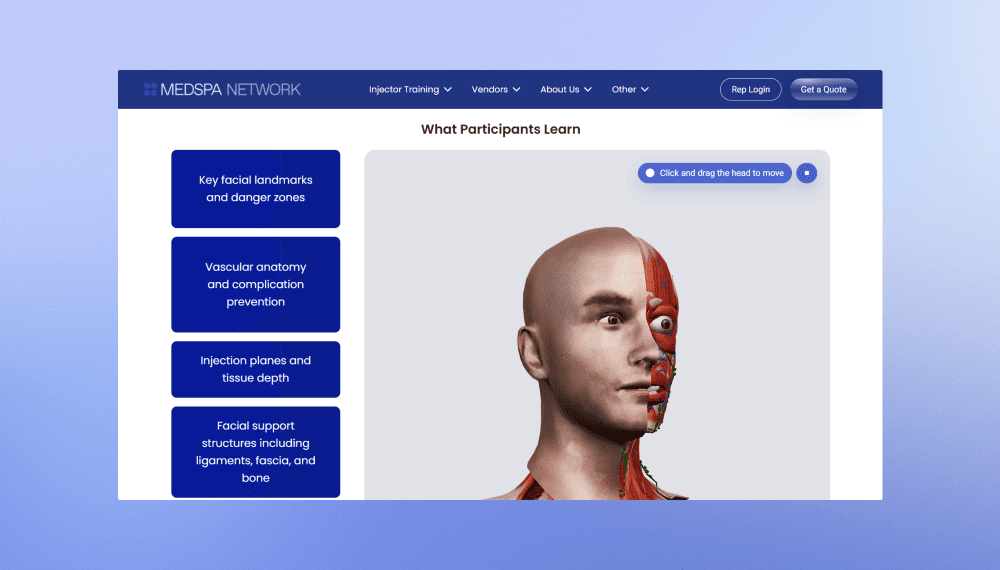
MedSpa Network website redesign and rebuild
Innowise rebuilt MedSpa Network’s website on WordPress, giving its team control over day-to-day content updates.
2 months from kickoff to launch
3-5 leads per week up from 1 per month
View case study
Client review
View case study
Client review logo. Client review


MedSpa Network website redesign and rebuild.
AI bot for TBC Bank marketing campaign
Innowise built a bilingual Telegram bot that generates AI selfies with TBC Bank's football-star brand ambassador.
3,000 users engaged
2 languages supported
View case study
Client review

View case study
Client review logo. Client review


AI Telegram bot..
Defining the product strategy for Bitlendex’s bitcoin lending platform
Innowise conducted a discovery phase for Bitlendex, helping the client transform an early-stage product concept into a validated business model and clearly defined MVP.
1 month for a full discovery phase
Financial advisory system for Bonnfinanz
Innowise helped Bonnfinanz to build a web-based advisory and administration system that supports mobile working and direct interaction with the client.
EV charging platform with flexible billing
Innowise helped modernize SMART/LAB’s e-mobility platform by enhancing its billing, payment, transaction management, and reporting capabilities.
>50% faster billing and payment processing
01 / 01
Close popup icon

SAP MM implementation roadmap

Now, onto the practical side. Below, I’ve outlined how we approach SAP MM implementations at Innowise, following the six phases of SAP Activate.

01

Discover

We start by reviewing purchasing delays, stock discrepancies, and invoice errors. Together with business owners, we define the project goals and outline the functional and technical requirements for SAP MM.

02

Prepare

With the goals agreed, the team puts together a project plan covering timelines, budget, and KPIs. We assign responsibilities, identify data owners, and start preparing technical specifications.

03

Explore

Our experts compare your current workflows with standard SAP processes. We identify gaps, agree on necessary changes, and check which material and supplier records need cleaning before migration.

04

Realize

Our specialists configure SAP MM, build integrations, and develop customizations where standard features fall short. The team tests data migration and runs functional, integration, regression, and load tests as needed. Business users check real-world scenarios and exceptions.

05

Deploy

Before launch, employees complete training while the project team prepares for cutover. Final data loads and readiness checks follow. Once everything is approved, SAP MM goes live, with support ready to address early issues.

06

Run

After go-live, support teams monitor SAP MM operations and resolve issues as they arise. Business owners review inventory accuracy, purchasing delays, and invoice discrepancies to identify improvements and plan further rollouts.

arrow-icon.arrow-icon.
01

Discover

We start by reviewing purchasing delays, stock discrepancies, and invoice errors. Together with business owners, we define the project goals and outline the functional and technical requirements for SAP MM.

arrow-icon.arrow-icon.
02

Prepare

With the goals agreed, the team puts together a project plan covering timelines, budget, and KPIs. We assign responsibilities, identify data owners, and start preparing technical specifications.

arrow-icon.arrow-icon.
03

Explore

Our experts compare your current workflows with standard SAP processes. We identify gaps, agree on necessary changes, and check which material and supplier records need cleaning before migration.

arrow-icon.arrow-icon.
04

Realize

Our specialists configure SAP MM, build integrations, and develop customizations where standard features fall short. The team tests data migration and runs functional, integration, regression, and load tests as needed. Business users check real-world scenarios and exceptions.

arrow-icon.arrow-icon.
05

Deploy

Before launch, employees complete training while the project team prepares for cutover. Final data loads and readiness checks follow. Once everything is approved, SAP MM goes live, with support ready to address early issues.

arrow-icon.arrow-icon.
06

Run

After go-live, support teams monitor SAP MM operations and resolve issues as they arise. Business owners review inventory accuracy, purchasing delays, and invoice discrepancies to identify improvements and plan further rollouts.

Planning an SAP MM move to S/4HANA?

How Innowise can help

As an SAP partner, we approach SAP MM with your wider SAP environment in mind. Changes to purchasing or inventory processes can affect other departments, so we account for those dependencies throughout the project.

SAP Partner.
  • Consulting​
  • Implementation​
  • Integration​
  • Migration​
  • Support​

SAP consulting

We look at where your purchase approvals stall and why stock figures don't match actual inventory. Our consultants also check how purchasing and inventory processes depend on finance and warehouse systems, then help you agree on the project scope, budget, and priorities.

SAP implementation

Your purchasing rules and inventory processes guide how we configure SAP MM. Approval workflows, stock movements, and invoice verification all need testing against actual business scenarios. Our specialists work through them with your team before go-live.

SAP integration

Your warehouse and supplier systems need to exchange accurate data with SAP MM. Our integration engineers map purchase orders and stock updates between applications, then test how the interfaces respond when data exchanges fail.

SAP migration

If you're moving to S/4HANA, our migration team checks whether your custom reports rely on legacy inventory tables. They also review material and supplier records and reconcile test migration results with data from your existing system before cutover.

SAP support and maintenance

A blocked invoice or failed goods receipt can disrupt your team's work. Our support specialists investigate transaction errors and correct configuration issues. As your requirements change, they also adjust purchasing and inventory settings.

Consulting

We look at where your purchase approvals stall and why stock figures don't match actual inventory. Our consultants also check how purchasing and inventory processes depend on finance and warehouse systems, then help you agree on the project scope, budget, and priorities.

See our SAP consulting services Cross-functional team having a friendly conversation in a casual office lounge with laptops on a coffee table.

Implementation

Your purchasing rules and inventory processes guide how we configure SAP MM. Approval workflows, stock movements, and invoice verification all need testing against actual business scenarios. Our specialists work through them with your team before go-live.

See our SAP implementation services Developer working on complex system architecture with frontend and backend code displayed on screen.

Integration

Your warehouse and supplier systems need to exchange accurate data with SAP MM. Our integration engineers map purchase orders and stock updates between applications, then test how the interfaces respond when data exchanges fail.

See our SAP integration services Automated workflow connects users to documents and analytics, speeding up approval and reporting.

Migration

If you're moving to S/4HANA, our migration team checks whether your custom reports rely on legacy inventory tables. They also review material and supplier records and reconcile test migration results with data from your existing system before cutover.

See our SAP migration services Data engineer interacts with a visual dashboard to orchestrate real-time data synchronization across systems.

Support

A blocked invoice or failed goods receipt can disrupt your team's work. Our support specialists investigate transaction errors and correct configuration issues. As your requirements change, they also adjust purchasing and inventory settings.

See our SAP support & maintenance services IT expert on a sprint planning video call with clients, wearing earphones and focused on a computer screen in a bright office space.

Conclusion

The SAP Material Management module helps businesses keep materials available, control inventory costs, and resolve purchasing discrepancies faster. But getting these results depends on the basics: accurate stock records and purchasing rules that reflect how the business actually works.

If you’re planning an SAP MM implementation or a move to SAP S/4HANA, our certified SAP experts can assess your current setup, identify what needs improving, and build an implementation plan around your business priorities.

FAQ

MM stands for Materials Management, the SAP module for procurement, inventory management, invoice verification, and material valuation.

The SAP Materials Management module includes Purchasing (MM-PUR), Inventory Management (MM-IM), Invoice Verification (MM-IV), Master Data (MM-MD), Consumption-Based Planning (MM-CBP), and External Services Management (MM-SRV). Vendor evaluation is part of purchasing.


Both versions cover the same core tasks, but SAP S/4HANA changes how some of them are handled. While SAP ERP (ECC) primarily uses SAP GUI and traditional inventory tables, S/4HANA introduces MATDOC, SAP Fiori apps, and the Business Partner approach to managing supplier data. It also supports MRP Live and embedded analytics. Material Ledger is mandatory, while Actual Costing remains optional.

SAP Materials Management processes connect with FI/CO through financial postings. Goods movements affecting inventory value and supplier invoices update financial accounts. Account assignments link costs to cost centers or orders, while supplier payments remain in Finance.

The material master in SAP MM is the central repository of data for every material an organization procures, produces, stores, or sells. It reduces data duplication by serving as a shared source of material information across multiple SAP modules, including MM, SD, PP, and FI/CO.

DDMRP stands for Demand-Driven Material Requirements Planning. It's a method for deciding when to replenish materials and how much to order. Instead of relying solely on forecasts, it uses actual demand and inventory buffers at key points in the supply chain. It's especially useful when customer orders fluctuate or supplier lead times are unpredictable. SAP S/4HANA supports DDMRP through dedicated Fiori apps for buffer positioning and replenishment planning.

An SAP MM implementation may take 3 to 12 months, depending on the project scope. A standalone rollout can be quicker, while a multi-site S/4HANA implementation with complex integrations and data migration may take longer. The Innowise team can provide a more accurate timeline and cost estimate based on your specific requirements.

SAP MM implementation costs depend on the project scope. A single-site rollout with minimal customization will generally cost less than a multi-site implementation involving complex integrations and data migration. SAP licensing and ongoing maintenance also affect the budget. Innowise can assess your requirements and provide a project-specific estimate.

Show all

Table of contents

Purchasing delays hitting margins?

    Contact us

    Book a call or fill out the form below and we’ll get back to you once we’ve processed your request.

    Send us a voice message
    Attach documents
    Upload file

    You can attach 1 file up to 2MB. Valid file formats: pdf, jpg, jpeg, png.

    By clicking Send, you consent to Innowise processing your personal data per our Privacy Policy to provide you with relevant information. By submitting your phone number, you agree that we may contact you via voice calls, SMS, and messaging apps. Calling, message, and data rates may apply.

    You can also send us your request
    to contact@innowise.com
    What happens next?
    1

    Once we’ve received and processed your request, we’ll get back to you to detail your project needs and sign an NDA to ensure confidentiality.

    2

    After examining your wants, needs, and expectations, our team will devise a project proposal with the scope of work, team size, time, and cost estimates.

    3

    We’ll arrange a meeting with you to discuss the offer and nail down the details.

    4

    Finally, we’ll sign a contract and start working on your project right away.

    More services we cover

    arrow