CRM for manufacturing: key features, benefits, and best software

Sep 18, 2026 14 min read
Head of CRM Practice
Verified expert
Every article at Innowise is created by authors with real-world experience. They understand the topic beyond theory and bring insight from real projects.
5+ years of experience
Verified expert
5+ years of experience
Raman leads CRM and Microsoft Dynamics 365 projects across insurance, automotive, and manufacturing. He specializes in CRM consulting, data architecture, delivery management, and the development of ERP and CRM expertise.
Expertise
CRM Microsoft Dynamics Delivery management
Let's talk

Key takeaways

  • A CRM system centralizes manufacturing-specific sales processes, including complex multi-stage RFQs, technical reviews, and distributor networks rather than just standard customer interactions.
  • Choosing the best CRM software for manufacturing is more about finding a system that fits your specific operational needs, existing software stack, and budget. 
  • Main benefits include speeding up sales cycles, improving demand forecasting, supporting more efficient production planning, and providing better visibility into outstanding quotes and production status.
Summarize article with AI

Does your manufacturing company face situations where quotes are sent to distributors before anyone verifies plant capacity, and production teams learn about won deals only through forwarded emails rather than an integrated tracking system? 

Landbase lists 23,682 companies using QuickBooks, with manufacturing being the most common industry among them. But accounting software alone doesn’t necessarily give manufacturers a single place to manage sales proposals, technical specifications, and order history. And this isn’t just a manufacturing issue. According to SearchLab,  22% of businesses still use Excel or spreadsheets as their primary customer management system.  At the same time, SLT Creative reports that CRM adoption in the manufacturing industry is already around 86%. So, the issue isn’t necessarily whether manufacturers have a CRM system, but how well they use it and whether the system actually meets the needs of their sales teams. 

In modern manufacturing, sales cycles can last for months. Deals pass through engineers, procurement managers, plant managers, and the finance teams before they’re closed. And a standard CRM system designed for a startup or an online store doesn’t cut it here. 

This guide covers what a manufacturing CRM does, why generic sales tools tend to fall short past the factory gate, which features are worth paying for, and how the leading platforms compare.

What is manufacturing CRM?

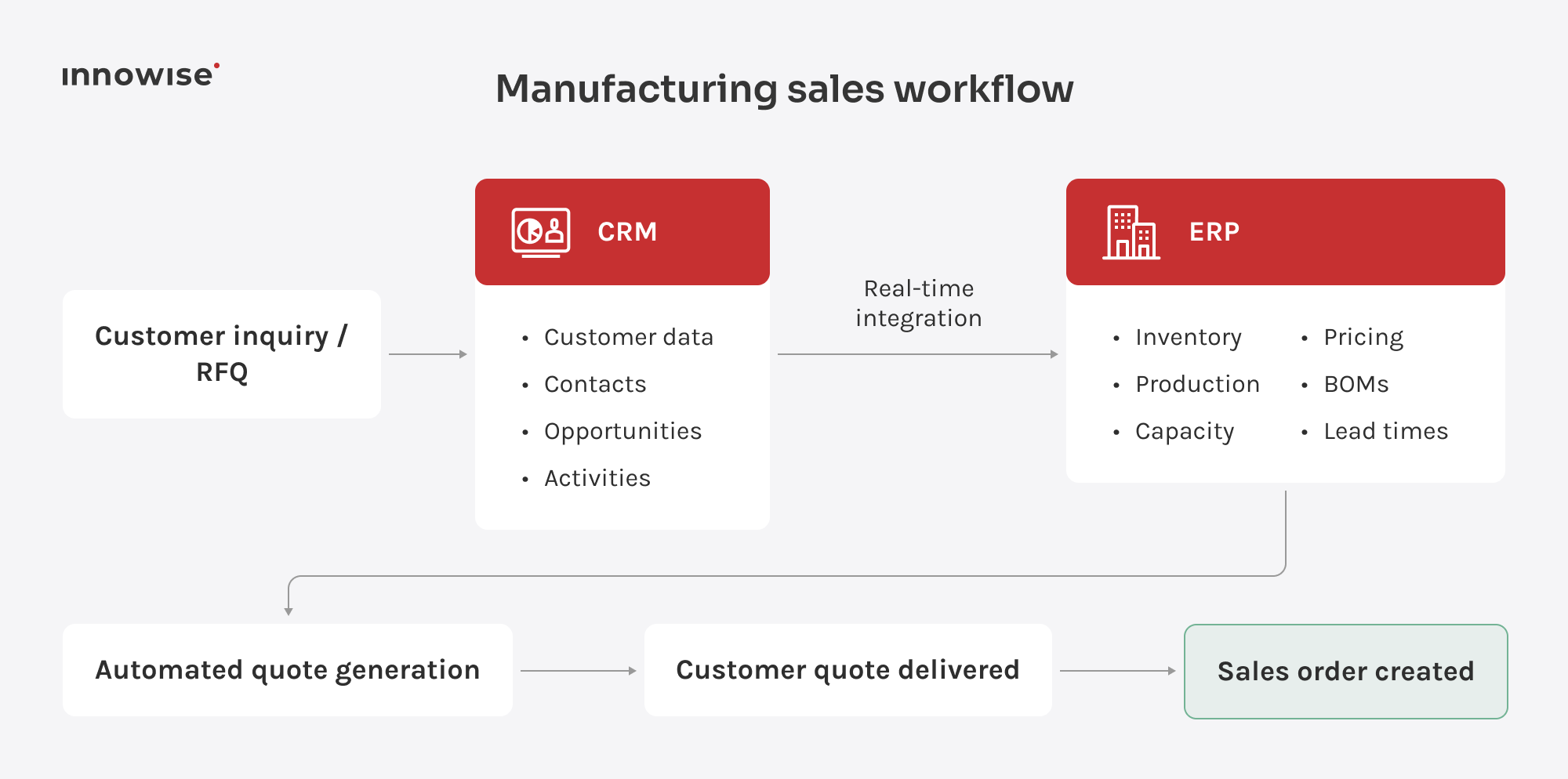
A manufacturing CRM manages the relationships and documentation essential to a manufacturing enterprise’s sales, such as leads, quotes, purchase orders, distributor accounts, and after-sales service, within a single system. It collects operational data and provides the sales department with a unified view of what’s happening on the production floor.

The difference from a standard sales CRM is what the system is designed to track. A standard CRM logs calls, emails, and actions by a single decision-maker at every stage of the process. A manufacturer’s CRM also needs to account for requests for quotes (RFQs), technical reviews by engineering teams, multi-tiered price lists, distributor hierarchies, and production slots.  When a CRM is set up for manufacturing, it serves as a record of what was sold, to whom, under what terms, and what the company has committed to deliver.

Why manufacturers need CRM

Though plenty of manufacturers already run a CRM, that doesn’t necessarily mean they have translated the investment into results. One reason is that generic platforms aren’t always built around manufacturing-specific workflows such as complex RFQs and technical approvals. As a result, reps still build quotes in spreadsheets and enter the numbers into the CRM by hand.

The sales cycle is part of the reason. On average, a manufacturing sale takes around 130 days to close, and larger deals with more stakeholders can take considerably longer.  A spreadsheet or a rep’s memory can’t hold that much detail over much time, especially once a second or third stakeholder joins the deal.

Data quality compounds the problem. When customer and operational data sit in disconnected systems, sales teams struggle to get the full picture before speaking to a prospect. They may know what the customer wants, but not what the plant can build, when it can deliver, or at what cost. Much of that information sits in ERP and other production systems rather than the CRM, so the systems need to exchange data.

Key features of manufacturing CRM

A CRM for the manufacturing industry needs to reflect how manufacturers sell and operate. Standard system functionality isn’t always enough, so manufacturers should look for these features:

FeatureDescription
Lead and sales pipeline managementTracks deals through industry-specific stages such as RFQs, technical reviews, formal quotes, negotiations, and purchase orders
Monitors stakeholders involved and flags stalled deals
Offers pipeline views broken down by product line, region, or account tier
Account and partner managementTracks individual records, pricing tiers, and deal histories for distributors, dealers, resellers, and OEMs.
Links partners to opportunities to align direct and indirect pipelines
Marketing automationNurtures contacts early in long manufacturing sales cycles with targeted content
Scores leads based on industrial buyer behavior and hands them to sales when qualified
Quoting and order managementReferences live pricing, configuration rules, and available production capacity to improve quote accuracy 
Routes technical reviews to engineering and converts won quotes into orders 
Customer and field serviceIntegrates service contracts, warranty claims, spare parts, and technician visits with the account
Schedules field technicians by location and skill set, keeping warranty terms visible
Forecasting and analyticsBases forecasts on pipeline stages, historical close rates, and account-level demand
Helps sales and production teams plan around the same demand forecast 
ERP/MES/inventory integrationsConnects the CRM with ERP, MES, and inventory management systems to check stock levels and open production slots
Aligns sales promises with actual plant capability
Mobile accessProvides field reps and technicians with mobile access to account histories, quotes, and schedules
Enables technicians to close jobs and reps to view orders on site
Workflow automationAutomates handoffs between sales, engineering, and production 
Notifies production once an order is confirmed
Show more

Explore how a CRM can improve your sales processes

AI agents and AI-assisted workflows for manufacturing

Now, manufacturing CRM systems are increasingly adding AI agents that analyze data, provide recommendations, and, in some cases, take action on their own. This reduces the need for a person to open a record and decide what to do next. AI can’t replace a sales rep’s judgment on a deal or an engineer’s approval of technical specifications, but it can take care of routine operations that don’t require human intervention.

Platforms are introducing AI agents for manufacturing-specific use cases such as:

TaskDescription
RFQ intake
  • Reads an inbound quote request and extracts ls part numbers, quantities, and requested delivery dates
  • Opens the deal record and routes it to the estimator covering that product line so the pipeline reflects the inquiry immediately
Lead qualification and scoring
  • Scores contacts against past buying patterns
  • Flags high-priority leads worth calling first
Quote and proposal drafting
  • Assembles a first-pass quote from price books and order history for configured or repeat items
Supply and production monitoring
  • Monitors connected inventory and production data to flag material shortages or schedule slips
  • Can trigger stock replenishment or schedule adjustments in connected systems within predefined rules and approval limits
Customer service triage
  • Answers routine inquiries regarding order status, shipping dates, or spec sheets
  • Escalates non-routine requests to human representatives
Follow-up on stalled quotes
  • Drafts personalized check-in notes referencing specific quotes when no reply is received after several days

Best CRM software for manufacturing

I usually recommend that manufacturers consider one of the six platforms: Salesforce, Microsoft Dynamics 365, Odoo, HubSpot, Zoho, or Creatio. The right choice depends on the company’s needs, goals, size, and budget. Let’s see how each stacks up.

1. Salesforce

Salesforce offers sector-specific features, such as sales agreements, account-based forecasting, and order and program management. It’s a strong choice for mid-size and enterprise manufacturers managing long-term contracts, complex sales processes, and unpredictable demand.

Strengths:

  • Purpose-built objects for sales agreements and account-based forecasting
  • Large partner and systems-integrator ecosystem for manufacturing rollouts
  • Strong reporting once integrated with ERP and production data

Possible limitations:

  • Some teams report difficulty connecting complex back-office systems during setup
  • Can become expensive once Manufacturing Cloud, additional modules, and implementation costs are factored in 
  • Forecasting and sales agreement data may be less complete without integration with ERP and other operational systems

2. Microsoft Dynamics 365

Microsoft Dynamics 365 brings together a range of CRM and ERP applications, including Sales, Field Service, Finance, and Supply Chain Management. Its customer-facing apps share Microsoft Dataverse, while CRM and ERP data can be connected across the wider Dynamics 365 environment, reducing the amount of integration work compared with stitching together unrelated platforms. The platform also bends to fit unusual processes: admins can reshape core business objects, build custom workflows, and extend the system through the Power Platform. 

I would recommend it as the best CRM for manufacturing businesses already running Microsoft’s stack, or those that want CRM and ERP closely connected within the same ecosystem.

Strengths:

  • Tight integration between Dataverse and Microsoft’s ERP products can reduce integration effort for existing Microsoft environments
  • Can support large, multinational organizations with complex processes and multiple business units
  • Power BI and Power Platform extend reporting and workflow-building

Possible limitations:

  • Costs can add up across licenses, customization, and implementation
  • Makes the strongest case for organizations already invested in the Microsoft ecosystem
  • Implementation and upkeep may require Dynamics 365, Dataverse, and Power Platform expertise, either in-house or through a partner

3. Odoo

Odoo suits manufacturers that want CRM as one module inside a wider operations platform. Its CRM is designed to work alongside inventory, manufacturing, accounting, and other business applications on the same platform. Its value grows when those modules share data across connected sales and operational workflows. If you think of CRM as one function inside a bigger operations system rather than a standalone tool for the sales team, Odoo is worth considering.

Strengths:

  • Low starting cost, with a free Community edition and modular paid pricing
  • It’s flexible and lets teams shape workflows around existing processes
  • Native integration with  inventory and manufacturing modules, without having to connect separate platforms

Possible limitations:

  • Sales teams focused mainly on outbound selling may find it more complex than a sales-first CRM
  • Highly complex manufacturing environments may require additional modules, customization, or specialist systems
  • Advanced customization beyond Odoo Studio may require developer involvement

4. HubSpot

HubSpot earns loyalty through relatively straightforward onboarding and a sales-first interface. Reps can quickly get comfortable tracking deals, sending quotes, and following email activity, while Marketing Hub nurtures trade-show leads until they’re ready for sales. With the right integrations, HubSpot can bring sales data, order and production updates, and post-sale service information into the same customer view. So, you may prefer it if connecting marketing and sales across a long, multi-touch buying cycle is the priority.

Strengths:

  • Relatively fast onboarding and a low barrier to adoption 
  • Strong marketing automation and lead-nurturing tools for long B2B cycles
  • Free tier for up to two users, with paid tiers scaling from there

Possible limitations:

  • Manufacturing-specific functions such as production planning and shop-floor management typically require integrations with ERP, MES, or other operational systems
  • More complex manufacturing integrations may still require custom middleware or implementation work
  • Costs rise substantially at Professional and Enterprise tiers, with required onboarding fees on top

5. Zoho

Zoho CRM is worth considering for cost-conscious manufacturers. It covers sales and marketing automation on its own and can extend into a wider business suite through Zoho’s connected applications. Its Blueprint automation, together with AI-powered suggestions from Zia, covers a fair share of what a smaller sales team with straightforward sales processes needs without a lengthy setup.

Strengths:

  • Relatively low entry cost with several pricing tiers 
  • Integrates with popular tools such as Gmail, Outlook, Mailchimp, and Zapier
  • Offers flexible configuration through tools such as Blueprint and workflow automation 
  • Keeps pace with a growing team without an enterprise price tag

Possible limitations:

  • Zoho CRM itself doesn’t provide manufacturing or supply-chain management
  • Cross-department reporting that combines CRM, financial, and operational data may require additional configuration or tools such as Zoho Analytics
  • Complex, multi-entity manufacturers may need significant customization or a more specialized ERP/MRP system alongside the CRM

6. Creatio

Creatio is an AI-native platform that brings AI agents into sales, marketing, service, and operational workflows. Its AI capabilities work alongside visual no-code tools, allowing teams to build and adjust many workflows without developer involvement. For manufacturers, Creatio supports workflows such as order processing, product lifecycle management, and supply chain planning and tracking. It’s worth considering for manufacturers with highly specific processes that require more flexibility than an off-the-shelf setup can provide.

Strengths:

  • Visual no-code tools let teams adjust many workflows without waiting on a development backlog
  • Composable pricing lets manufacturers add the products and capabilities they need as their setup grows
  • Built-in AI agents support lead scoring, sales forecasting, and service case handling

Possible limitations:

  • Extensive configuration options can mean a steeper learning curve during initial setup
  • Getting the most from the platform usually takes some upfront configuration rather than simply running it out of the box
When CRM implementations fail in manufacturing, the problem isn’t always missing functionality. One common reason is a mismatch between the CRM setup and the way teams actually handle sales, quoting, approvals, and order handoffs to production. That’s why process mapping, clear data ownership, and user adoption are just as important as the technology itself.
Nikita Konkin, Head of Odoo Department.
Nikita Konkin
Head of Odoo Department

Benefits of CRM for manufacturers

CRM implementation centralizes communication, orders, and technical requirements by connecting sales teams with manufacturing processes. As a result, your company gains the following benefits:

Better sales visibility

Managers can see all open quotes, the current stage of each deal, and, when the CRM is connected to ERP or accounting systems, any overdue invoices or production commitments tied to the account. They don’t have to chase colleagues for updates. In many cases, this is one of the first benefits manufacturers notice after implementing a CRM.

Faster quoting

When the CRM has access to current pricing and configuration data, sales teams can generate quotes faster. Customers spend less time waiting between requesting a quote and receiving a response, which can help shorten the overall sales cycle.

Stronger customer and partner relationships

The system keeps a record of interactions with distributors, dealers, and repeat buyers, and keeps a record of order history. When a new rep joins, they have all the information in one window without digging through old emails.

More accurate demand forecasts

Forecasts built on pipeline stage, close rates by product line, and account-level signals can improve production planning and narrow the gap between what sales expects to close and what the plant needs to prepare for.

Better production planning

Once confirmed orders, forecasts, and delivery timelines reach production teams, schedulers can plan against expected volume and timing instead of reacting when an order suddenly lands. That can mean fewer rush jobs and less idle time while teams wait for confirmation.

Improved service

Field and support teams with access to equipment and order history can resolve warranty claims and service requests faster. Relevant account information is already on file, so customers don’t have to repeat the same details.

Less manual work

When quotes pull from current pricing, accepted quotes flow into orders, and approvals are routed automatically, teams spend less time re-entering the same information across multiple systems.

Better cross-team coordination

When sales, engineering, and manufacturing teams work from the same connected data, sales can give customers more accurate terms and delivery dates, reducing the risk of having to revise them later.

Easier reporting and analytics

A CRM collects data from logged quotes, calls, orders, and service tickets. It uses this data to update dashboards and reports showing pipeline value, win rates, and service response times by product line, region, or rep.

How to choose a manufacturing CRM: selection guidelines checklist

Choosing a manufacturing CRM is a long-term decision that can affect both sales performance and day-to-day production operations. To avoid costly integration issues or disruption later on, start with what your business actually needs from the system. The steps below can help you narrow down the options and choose a CRM that fits both your technical setup and business processes.

  1. Start with what needs to change and define the goal before comparing vendors. It might be faster quoting, better forecast accuracy, or fewer stalled deals.
  2. Map the workflows so you can match them to a platform that already fits and requires less custom work later.
  3. Check how the CRM integrates with the ERP, MES, and inventory systems you use, including whether data syncs in real time or in scheduled batches.
  4. Check access controls, encryption standards, and audit logging before signing, especially if the CRM will store pricing data, technical drawings, and distributor contracts.
  5. Depending on the sector, whether automotive, aerospace, defense, food, or pharma, a CRM may need to support specific data-handling or traceability rules. Confirm the vendor’s certifications support the regulations that apply to the business.
  6. Ask vendors what changes in cost, admin work, and performance as the team and catalog grow.
  7. Find out whether the platform adapts through configuration or requires custom code once you move beyond its standard data model. 
  8. Compare cloud, on-premises, and hybrid deployment options against your requirements. Each comes with different infrastructure costs, IT responsibilities, upgrade cycles, and levels of control over availability.
  9. In addition to per-seat pricing, factor in onboarding fees, data migration, custom development, and the ongoing cost of admin time.
  10. Ask vendors what support they provide after launch and whether it matches the level of help your team is likely to need.
  11. During the demo, ask the vendor to walk through an actual RFQ-to-order sequence using a scenario from your own catalog and pricing structure.
  12. Talk to a sales rep or plant manager at a company already using the shortlisted platform and ask what frustrates people who work with it every day.

Make a choice that will pay off

Let our experts help with choosing a CRM based on your business analyses.

Our CRM services

Innowise offers CRM services for manufacturing companies at all stages of the lifecycle, including implementation, custom development, integration, and migration. After go-live, we also provide ongoing support. As part of our CRM consulting services, our experts assess your current sales process, existing ERP or MES system, and long-term goals to recommend the platform and configuration that are right for you.

Innowise is a Salesforce Partner, and our specialists hold Salesforce Platform Developer I and II certifications. We build and configure Salesforce solutions for manufacturers that need Manufacturing Cloud connected to ERP, MES, and other systems used on the plant floor.  

With Microsoft certifications including Dynamics 365 Customer Service Functional Consultant Associate and Dynamics 365 Fundamentals (CRM), we provide expert Dynamics 365 implementation services.

As an Odoo Ready Partner, Innowise configures Odoo apps, builds custom modules, and integrates third-party tools to create a unified platform for managing all orders, inventory, and customer data. 

As a HubSpot Solutions Partner, we consult on HubSpot, set up the CRM, and integrate it with websites, ERP systems, e-commerce tools, and portals.

Zoho complements our CRM portfolio. Innowise configures Zoho for manufacturers looking for a lower-cost entry point while keeping CRM connected to inventory and production data.

As an official Creatio partner, Innowise helps companies implement and adapt the AI-native platform to their business processes. We configure AI agents and workflows, integrate Creatio with enterprise systems, migrate data, and provide ongoing support.

Our technology partnerships and manufacturing expertise help us build CRM solutions tailored to the way your sales and production teams work. We work with companies across manufacturing, industrial, automotive, logistics, and wholesale sectors. Clients often highlight our speed in delivering new features, responsiveness to changing requirements, and clear communication throughout the project.

Final thoughts

For manufacturing, a CRM needs to support complex sales and operational processes, including requests for quotation (RFQs), multi-tiered pricing, and distributor networks. It should also integrate with core ERP and MES systems so sales teams can access relevant production and operational data.

To get more value from a CRM, choose a system based on your business requirements and goals. Start by defining those requirements and mapping your workflows. Then check that the system integrates with your existing ERP, MES, and inventory software and provides the security and compliance capabilities your business needs. Finally, evaluate long-term scalability, vendor support, and total cost of ownership.

Ultimately, long-term ROI depends on much more than the software you choose. A strong implementation also requires careful workflow mapping, well-planned system integration, effective team training, and ongoing support.

That’s the part of the work Innowise takes on for manufacturers. If your current CRM feels like overhead, or you need expert advice on which CRM to choose, get in touch with Innowise’s CRM team to talk through what would work better for your sales process and production environment.

FAQ

CRM manages the customer-facing side of the business, including leads, quotes, accounts, and service history. ERP manages the internal operations behind it, such as inventory, production scheduling, financials, and procurement. A manufacturing CRM adds industry-specific workflows such as RFQs, distributor pricing, and multi-stakeholder deals on top of standard sales tracking.

Often, yes, but it depends on what the ERP already covers. Core ERP functionality focuses on areas such as inventory, production, procurement, and finance, while CRM adds deeper support for leads, opportunities, distributor relationships, and sales activity. Some ERP suites already include CRM capabilities that may be enough for simpler sales processes. Manufacturers with long sales cycles, complex partner networks, or more advanced marketing and sales workflows may still benefit from a dedicated CRM connected to the ERP.

At a minimum, a manufacturing CRM should include lead and pipeline management built around a multi-stage RFQ process, account and partner management for distributors and dealers, quoting and order management connected to current pricing data, forecasting and analytics, and integrations with ERP, MES, and inventory systems.

It varies widely by platform and project scope. It’s important to distinguish between licensing costs and total cost of ownership. The latter is usually higher because it also includes implementation, data migration, custom development, and ongoing administration. Both depend on the platform you choose, company size, deployment model, and business requirements.

A relatively standard CRM implementation with minimal configuration can take around 4–8 weeks, while a manufacturing-specific rollout with custom workflows and integrations may take 3–6 months or longer. Timelines increase with factors such as bidirectional ERP or MES integration, larger user bases, complex data migration, and extensive process redesign.

The most important integrations are typically ERP and, where applicable, MES. Depending on the business, a manufacturing CRM may also connect with accounting or invoicing software, e-commerce or distributor portals, marketing tools, field service platforms, and telephony systems.

Show all

Table of contents

    Contact us

    Book a call or fill out the form below and we’ll get back to you once we’ve processed your request.

    Send us a voice message
    Attach documents
    Upload file

    You can attach 1 file up to 2MB. Valid file formats: pdf, jpg, jpeg, png.

    By clicking Send, you consent to Innowise processing your personal data per our Privacy Policy to provide you with relevant information. By submitting your phone number, you agree that we may contact you via voice calls, SMS, and messaging apps. Calling, message, and data rates may apply.

    You can also send us your request
    to contact@innowise.com
    What happens next?
    1

    Once we’ve received and processed your request, we’ll get back to you to detail your project needs and sign an NDA to ensure confidentiality.

    2

    After examining your wants, needs, and expectations, our team will devise a project proposal with the scope of work, team size, time, and cost estimates.

    3

    We’ll arrange a meeting with you to discuss the offer and nail down the details.

    4

    Finally, we’ll sign a contract and start working on your project right away.

    More services we cover

    arrow