Best headless CMS platforms reviewed by experts

Sep 2, 2026 18 min read
Summarize article with AI

Key takeaways

  • The choice of the best CMS platform for your business should be based on your infrastructure, staff, and maturity level.
  • SaaS and open source solutions deal with different pain points. SaaS favors speed of deployment, while open source makes more sense when full control is a priority.
  • Apart from matching features with the business needs, choosing the best CMS also means considering the platform’s depth and its ability to scale content operations.
  • The total cost of ownership goes beyond the license or subscription fees. It also includes hosting and developer work.

10 years ago, headless CMS used to be a developers’ decision. Now it’s a business one. Teams that need content to move faster than a monolithic platform allows now favor headless CMS.

The numbers prove the change. The headless CMS market alone is expected to grow to $9,159 million by 2036. If we look at it from the commerce side, composability has moved past being the early adopters’ choice: 44% of surveyed businesses are already using headless CMS, while more than 74% of digital decision-makers say they plan to migrate from traditional CMS platforms within the next 24 months. 

If you’re wondering which platform to choose, I have two pieces of news. The bad news is that there’s no universally best headless CMS that fits every company, so recommending one without knowing your business wouldn’t make much sense. The right choice depends on your business goals, technical requirements, existing tech stack, growth plans, and how your editorial team works. The good news is that this guide can help you shortlist the top headless CMS platforms and understand what can work best for you. I’ll compare the leading headless content management platforms using a consistent set of criteria.

Start storing content separately, or what is a headless CMS?

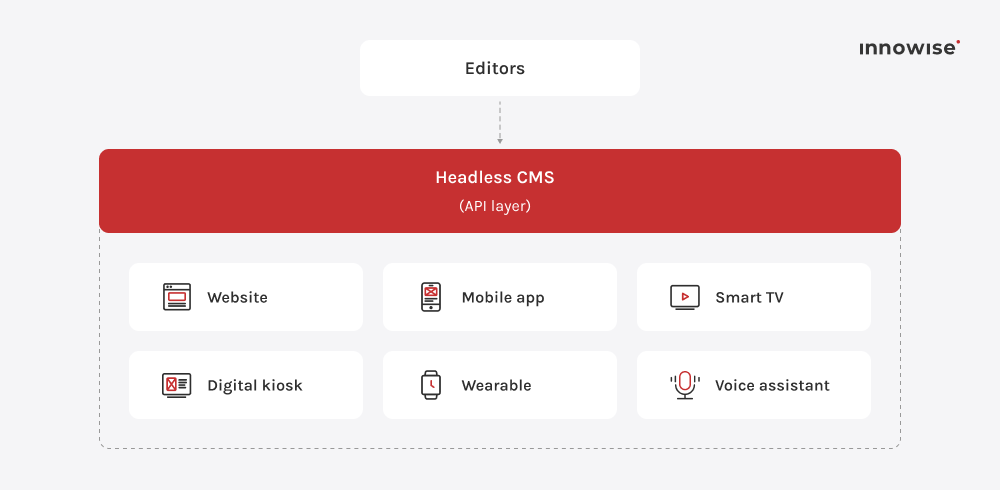
A headless CMS stores and manages content separately from the layer that displays it. It doesn’t bundle a database, an editing interface, and a front-end templating system into one application. Instead, it exposes content through APIs and lets developers build any frontend layer for any channel, whether that’s a website, a mobile app, a kiosk, a wearable, or a voice assistant.

This is the core difference from a traditional CMS, which ties content directly to a specific frontend template. Change the frontend, and you’re often rebuilding the content layer along with it. With a headless setup, content gets pulled into as many frontends as a business needs. For example, a product description written once can appear on a website, inside a native app, and on a digital shelf label. You don’t need three separate copies for each channel. 

Common use cases span industries. For e-commerce, a headless CMS can manage catalogs that need to be published across web and app simultaneously. Media companies syndicate articles to partner sites. Enterprises consolidate content for multiple regional brands under one editorial workflow. Whenever multiple front-end channels need to be updated simultaneously, it’s a use case for a headless CMS.

Our evaluation methodology used to select a CMS

I assessed the top headless CMS platforms against a set of criteria that reflect how content teams and developers work daily:

CriteriaWhat I pay attention to
Ease of useHow quickly a non-technical editor can create and publish content on their own
Content modelingFlexibility in defining custom content types, relationships, and structured fields
Developer experienceAPI design, SDKs, documentation quality, and how much setup a new project requires
Integration capabilitiesNative and third-party connections to commerce platforms, DAMs, analytics tools, and marketing systems
Scalability potentialHow the platform performs as content volume, traffic, and the number of channels grow
Deployment modelSaaS, self-hosted, or hybrid, and what that means for infrastructure ownership
Best use casesThe type and size of organization each platform is built for
AI capabilitiesBuilt-in support for content generation, tagging, translation, or personalization
Overall flexibilityHow well the platform adapts to workflows beyond its original design

Best headless CMS comparison at a glance

The CMS market offers dozens of platforms today. My goal isn’t to point you to a single top-rated headless CMS, but to give you a balanced shortlist. Let’s start with a quick overview of the best options for headless CMS in 2026:

PlatformDeploymentKey strengthsMain consideration
ContentfulFully managed SaaS
  • Mature role and permission system
  • Wide integration ecosystem
  • AI Actions for drafting and localization
  • Pricing depends on a tier
  • No self-hosted option
SanitySaaS backend with a self-hostable Sanity Studio
  • Powerful GROQ query language and APIs
  • Strong live-preview support
  • Lower backend maintenance
  • GROQ has a learning curve
  • Editorial UI is only as polished as what your team builds
StoryblokFully managed SaaS, EU-hosted option
  • Live visual editor
  • AI-assisted translation and content workflows
  • SaaS-only
  • Visual editor can constrain very complex layouts
StrapiSelf-hosted or Strapi Cloud
  • Open-source with no per-seat fees or vendor lock-in
  • Customizable admin panel, REST API by default, and GraphQL support via a plugin
  • Your team is responsible for hosting, upgrades, and performance tuning
HygraphSaaS
  • Content Federation lets teams combine CMS content with data from external APIs and other sources through a single GraphQL API.
  • Projects that don't need federation get fewer benefits
ContentstackSaaS
  • Visual workflow engine
  • Automation hub
  • Broad integration ecosystem, including SEO tools
  • Higher price point than open-source alternatives
  • Can require more onboarding as implementations become more complex
Kontent.aiSaaS
  • AI governance
  • ISO/IEC 42001 certification
  • Agent actions that mirror user permissions and require human approval
  • Higher entry cost
  • Steeper onboarding for smaller teams
Payload CMSOpen source and self-hostable
  • TypeScript types generated directly from the schema
  • No per-seat pricing
  • Your team has more responsibility for infrastructure and deployment

Now, let’s review each platform in our list of headless CMS in detail.

Contentful

Contentful has a mature space-and-environment model, granular roles and permissions, and an integration marketplace that’s had years to grow. While earlier headless CMS platforms were largely developer-focused, Contentful has evolved to become more like a digital experience platform. 

Contentful has built additional layers of AI-enabled drafting and content orchestration on top of e its API-first foundation. This makes it particularly suitable for companies that already have some level of content governance in place. Smaller teams may find themselves paying for structure they don’t yet need.

Strengths: 

  • A mature permissions and audit-log system
  • A large partner and integration ecosystem
  • AI Actions built into the editor for translation, SEO metadata, and content summarization

Possible limitations: 

  • There’s no self-hosted option
  • There’s a wide pricing gap between the entry-level plan and plans built for enterprise scale

Sanity

Unlike most of the field, Sanity treats content not as a page, but as structured data that may eventually render as one. Schemas, validation rules, and editorial workflows live in code, while the Content Lake stores the content as queryable JSON. 

However, the editorial experience is assembled by your own team, which rewards technical investment and can leave less technical teams needing more support to get comfortable. That’s why it’s better suited to engineering-led teams building with React or Next.js that need a content model that bends to complex, changing requirements.

Strengths: 

  • Flexible querying through GROQ
  • Instant live previews
  • Measurably lighter backend maintenance than older CMS architectures
  • The admin Studio is a React app that developers can customize

Possible limitations: 

  • Schema and workflows are defined in code, so the quality of the editorial experience depends on what your developers build

Storyblok

Founded in Austria in 2017, Storyblok set out to solve a specific complaint: f editors losing the ability to see what they’re publishing. Its visual editor renders the live page alongside a structured component panel, so a marketer can click directly on a section and edit it in context. Under that visual layer, though, the architecture is still fully API-first and component-based, which makes developers more comfortable handing editorial control to non-technical teams. 

The platform is closer to a page builder in feel, while its structure is more in line with Sanity or Contentful. That’s why it’s preferred by marketing teams that need day-to-day autonomy over pages, paired with developers who still want structured, API-first content.

Strengths: 

  • A visual editor that shows editors the actual page instead of a form
  • Strong multilingual support
  • A growing AI automation layer

Possible limitations: 

  • SaaS-only, with no on-premises deployment
  • Pricing scales with both seats and traffic as teams grow

Strapi

I can’t skip one of the most popular headless CMS platforms — Strapi. The system is defined less by editorial experience and more by ownership. It can be self-hosted on infrastructure a company already controls, which gives teams more control over hosting and removes their dependency on a SaaS vendor’s uptime. 

That freedom isn’t free because someone on the team now owns patching, scaling, and backups. For organizations with the DevOps maturity to take that on, the payoff is infrastructure control and the ability to modify nearly any layer.

Strengths: 

  • No per-seat fees in the self-hosted Community edition
  • A visual content-type builder
  • REST support out of the box, with GraphQL available via a plugin 
  • Lifecycle hooks and plugins for custom requirements

Possible limitations: 

  • If you don’t want to handle hosting, database management, upgrades, and performance in-house, you’ll need a paid Strapi Cloud plan

Hygraph

Hygraph (formerly GraphCMS) was built around GraphQL, and that origin still shapes what it does best. If your content is spread across legacy platforms by brand or region, you don’t need to migrate everything into the CMS first. 

Thanks to Hygraph’s content federation, your team can query and merge data from several external systems into a single response at request time. So, if you’re an enterprise running multi-brand or multi-region content operations where source data lives across several legacy systems, Hygraph can be an efficient choice.

Strengths: 

  • Content federation, which assembles a unified response from external sources at query time
  • Clean, predictable GraphQL performance

Possible limitations: 

  • If you don’t need to federate multiple data sources, the advantage over Sanity or Contentful narrows considerably

Innowise works with Hygraph directly as an implementation partner, using it to help clients unify content delivery across multiple channels. We’ve applied its federation model and GraphQL-first approach in real projects, so if you go for it, you’ll be working with a team that already knows the platform well and how to fit it into a broader tech stack. The partnership also gives us direct access to Hygraph expertise, resources, and implementation support, which helps us resolve technical questions faster and keep implementations aligned with the platform’s recommended practices.

Contentstack

Contentstack’s feature list makes the difference: approval chains, compliance triggers, and audit trails. The Automation Hub extends that governance focus into workflow triggers, letting teams enforce review steps automatically. That level of control and oversight tends to appeal most to regulated industries and large companies, and less to smaller teams looking for the fastest path to a first published page.

Strengths: 

  • Multi-step approval chains and audit trails without heavy custom build-out
  • A visual workflow engine
  • Automation Hub for trigger-based workflows and compliance checks
  • Strong SEO support and integrations

Possible limitations: 

  • Entry pricing sits above open-source alternatives
  • Some teams report a steeper onboarding curve than with lighter SaaS options

Kontent.ai

Kontent.ai is positioning itself as an “Agentic CMS”. An AI agent can be set up to handle specific content tasks, such as refactoring content models or making SEO updates across an entire library. But there’s also a governance component to this feature. 

What separates it from many other AI offerings is that each agent operates within the permissions of the user who initiated the process, with human oversight built into the workflow. Kontent.ai is particularly well suited to large organizations that want to scale content operations with AI while keeping governance in place. 

Strengths: 

  • AI governance certified to ISO/IEC 42001
  • Agent actions inherit the initiating user’s permissions and operate within human approval workflows 
  • Strong multilingual and workflow tooling

Possible limitations: 

  • Entry cost is on the higher end
  • A steeper learning curve for smaller teams unfamiliar with enterprise-style workflows

Payload CMS

Payload takes the opposite approach from Storyblok’s visual-first model: it’s TypeScript-native and code-first, with the CMS living directly inside a Next.js application. Schemas, access rules, and the admin panel are all defined in the same repository as the frontend, so a content-type change and its corresponding type update can be handled together. 

Figma’s 2025 acquisition of Payload raised its profile, though new sign-ups for Payload Cloud are currently paused during the transition. New users can still deploy Payload through other hosting providers or self-host it. If you’re building on Next.js and want full ownership of your content infrastructure without per-seat licensing, I’d recommend considering Payload. 

Strengths: 

  • Schema and frontend can share the same generated TypeScript types
  • Types can be generated directly from the Payload config
  • Three built-in APIs: REST, GraphQL, and Local
  • A fully extensible React-based admin panel

Possible limitations: 

  • Payload Cloud has paused new sign-ups
  • Teams need to plan their own deployment while new Payload Cloud sign-ups are paused
  • The platform is best suited to teams comfortable with TypeScript and React

Which headless CMS is best for different use cases?

The CMS choice should depend on who will use it, what your content needs to connect to, and how many channels it has to reach. The table below is a starting shortlist for six common scenarios and the matching CMS.

Use casePlatforms to evaluate
Enterprise content operationsContentful, Contentstack, Kontent.ai
Marketing-led websitesStoryblok
Developer-focused projectsSanity, Payload CMS
Open-source, self-hosted infrastructureStrapi, Payload CMS
GraphQL-first architectureHygraph, Sanity
Composable commerceContentful, Storyblok, Hygraph
AI-governed content operationsKontent.ai, Hygraph

Find out which platform suits your use case

Is a headless CMS right for your business?

A headless CMS solves problems, but it also may pose limitations. That’s why I advocate choosing one based on your business needs.

Key benefits and limitations

Separating content from presentation buys you flexibility and reach, but it also shifts work that a traditional CMS handles automatically onto the development team. Before you decide to implement a headless CMS, weigh the pros and cons:

YesBut
Frontend flexibility and technology independenceRequires custom frontend development
Omnichannel content delivery across channelsPreview and in-context editing may require additional setup
Easy integration with APIs and third-party systemsMore complex implementation
Independent scaling of frontend and backendDependence on developer resources and skill availability
Content reuse across brands, markets, and platformsHigher implementation and maintenance costs
Composable architecture that can evolve over timeMay be unnecessary for simple, single-site needs

When a headless CMS makes sense

  • You need to publish the same content across multiple digital channels
  • Your business runs several regional sites, sub-brands, or localized storefronts that need to share content while allowing for local variations
  • Decoupling the frontend from the CMS is a priority, so frontend changes don’t require rebuilding the content layer
  • Integrations with external systems are essential
  • Your team can invest in tooling that gives content editors more independence from developers
  • Your growth plan includes adding channels, markets, or traffic well beyond what your current site handles

When a traditional CMS may be a better choice

  • You have only one website
  • Content requirements are relatively simple, such as a brochure site, small-business marketing pages, or a blog with a handful of content types
  • Integrations are minimal and don’t require the API-first approach of a headless setup 
  • You don’t have enough development resources to build and maintain the frontend, set up preview tooling, or deploy a separate presentation layer 
  • Fast deployment and ease of maintenance are the main priorities

Some teams have backtracked from headless architecture after realizing how much engineering effort it would take to achieve the returns they expected. Migration risk can also prevent otherwise solid business cases from moving forward. That’s why we don’t dismantle an old monolith immediately. Instead, we run a phased rollout, service-by-service, correcting course along the way.

Herman Samolazov, Head of Engineering

Head of Engineering

SaaS vs open-source headless CMS

Once you’ve confirmed a headless architecture fits, the next decision splits most of the field in two: pay a vendor to run the platform, or run it yourself. The choice affects budget, team structure, and how much control you have over the infrastructure.

ModelAdvantagesConsiderationsBest for
SaaSThe vendor handles hosting, uptime, security patching, and scaling You depend on the vendor and have less control over pricing, roadmap, and data residency Teams prioritizing speed
Open sourceYou have greater control over the codebase, data, and hosting environment Your team maintains the platform, including upgrades and backups Engineering-led teams

How much does a headless CMS cost?

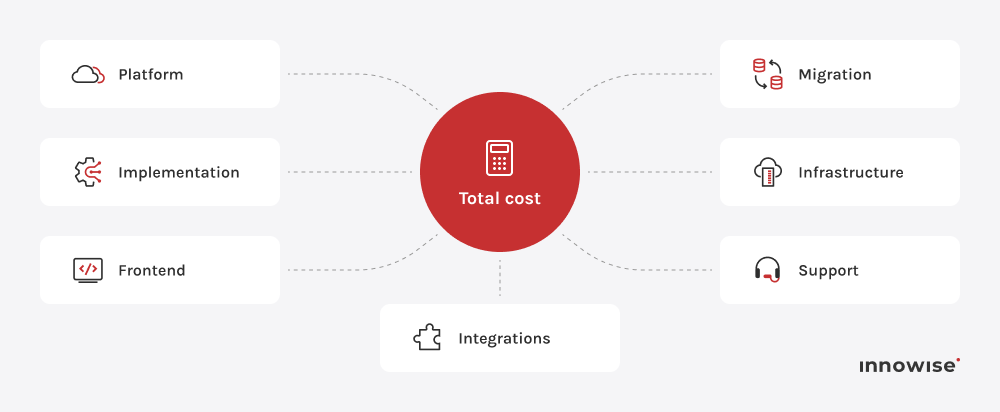
Vendor pricing pages answer only one part of the cost question. One thing to know upfront is that the license or subscription fee is rarely the largest line item in a real project budget. A useful way to frame it is:

None of the specific dollar figures published across the industry are consistent enough to use as a reliable benchmark. A better approach is to contact CMS consultants who can analyse your needs, recommend a platform, assess the implementation scope, and estimate the costs.

Estimate the budget required for CMS implementation

How Innowise can help

Selecting a headless CMS has implications for your overall content strategy, development capabilities, and architecture, so an independent third-party perspective can be valuable. The Innowise team can help with: 

  • CMS consulting
  • Platform evaluation
  • Architecture planning
  • Content modeling
  • Migration
  • Integration
  • Implementation
  • Ongoing support 
  • Proof of concept and platform validation

If you want to assess whether a headless CMS fits your content operations, choose a platform that matches your architecture and budget, or discuss any other aspect related to CMS implementation, you can reach out to Innowise. Our experts are available to talk through the specifics of your setup.

Final thoughts

Before you close the tab, I want to remind you of the thread that has run throughout this comparison: there’s no universally best headless CMS. Contentful and Sanity tackle problems that Strapi and Payload don’t, while Storyblok’s visual editor serves a very different purpose from Hygraph’s federation model. The platform that suits a media firm with four regional sites won’t necessarily be the same one that suits a startup building a product on Next.js.

If you’re at the point of narrowing a shortlist, planning a migration, or scoping an implementation, you can talk to Innowise’s team about your specific content operations, technical constraints, and timeline. Our experts can offer an independent perspective on your CMS implementation.

FAQ

A headless CMS separates content storage from the presentation layer. Developers can build the presentation layer they need and connect it to the content through APIs. This means one content backend can support multiple presentation layers simultaneously.


A headless architecture makes sense when you need to publish content across multiple channels, when several brands or markets share the same content base, when the frontend needs to evolve independently from the content layer, or when the company relies on integrations for commerce, personalization, or analytics. For a single, relatively simple website with few integration needs, it may be unnecessary.

High implementation complexity, skill shortages, integrations, and more. Beyond the technical side, a headless setup usually requires a custom frontend that the old CMS provided out of the box, which adds another layer of complexity to the migration.

There isn’t a single answer. The right choice depends on your business needs and requirements, so define them first and shortlist platforms accordingly. Contentful, Contentstack, and Kontent.ai are all positioned for enterprise use, but none of them may be the right fit for your particular setup.

Contentful, Storyblok, and Hygraph are all strong options for composable commerce stacks. Each offers integrations with commerce platforms and other tools commonly used in e-commerce ecosystems.

Strapi is one of the most widely adopted open-source CMS platforms. It has a flexible admin panel, and its Community edition has no per-seat licensing. Payload CMS is a strong alternative for teams building specifically on Next.js, since its schema and frontend share generated TypeScript types. There are other platforms on the market. Which one is best depends on your business priorities.

No-code website builders let non-technical users build and publish a site through a visual interface. They require little to no coding, but they typically restrict how content can be modeled, delivered across channels, or governed at scale. Low-code platforms sit somewhere in between, offering visual tooling with the option to extend functionality through custom code. A headless CMS is generally the most developer-dependent of the three, giving the development team full control over the frontend.

Some headless CMS platforms are moving toward "agentic CMS", where AI agents execute defined content tasks such as SEO updates, translation, and content audits within existing permission boundaries.

Show all
Denis Bogush, Head of Frontend Development

Head of Frontend Development

Denis is a master of resilient frontend architectures and micro-frontends. He eliminates delivery bottlenecks and ensures codebases remain maintainable, creating web interfaces that are as robust under the hood as they are responsive.

Table of contents

    Contact us

    Book a call or fill out the form below and we’ll get back to you once we’ve processed your request.

    Send us a voice message
    Attach documents
    Upload file

    You can attach 1 file up to 2MB. Valid file formats: pdf, jpg, jpeg, png.

    By clicking Send, you consent to Innowise processing your personal data per our Privacy Policy to provide you with relevant information. By submitting your phone number, you agree that we may contact you via voice calls, SMS, and messaging apps. Calling, message, and data rates may apply.

    You can also send us your request
    to contact@innowise.com
    What happens next?
    1

    Once we’ve received and processed your request, we’ll get back to you to detail your project needs and sign an NDA to ensure confidentiality.

    2

    After examining your wants, needs, and expectations, our team will devise a project proposal with the scope of work, team size, time, and cost estimates.

    3

    We’ll arrange a meeting with you to discuss the offer and nail down the details.

    4

    Finally, we’ll sign a contract and start working on your project right away.

    More services we cover

    arrow