CRM for professional services: features, benefits and best platforms

Sep 23, 2026 14 min read
Head of CRM Practice
Verified expert
Every article at Innowise is created by authors with real-world experience. They understand the topic beyond theory and bring insight from real projects.
5+ years of experience
Verified expert
5+ years of experience
Raman leads CRM and Microsoft Dynamics 365 projects across insurance, automotive, and manufacturing. He specializes in CRM consulting, data architecture, delivery management, and the development of ERP and CRM expertise.
Expertise
CRM Microsoft Dynamics Delivery management
Let's talk

Key takeaways

  • A professional services CRM goes beyond a standard sales tool.
  • Key features include project delivery, time tracking tied to billing, resource capacity planning, and more.
  • Salesforce, Dynamics 365, HubSpot, and Zoho are popular CRM options for professional services firms. 
  • To make a CRM a single source of truth, it has to integrate with ERP, accounting, HR, and document management tools.
  • There’re three implementation options: off-the-shelf setups, customized platform-based CRM, or fully custom development.
Summarize article with AI

Professional services firms are losing more billable time than they used to. Billable utilization across the industry dropped to 66.4% in 2025, down from 68.9% the year before and well below the 75% threshold SPI considers optimal. EBITDA remained almost stagnant at 9.9%, still far below the five-year average of 13.8%. I don’t think weak client demand is the main problem. Deal pipelines are up. What’s failing is the operational layer between winning the work and billing for it: proposals stuck in email threads, staffing decisions made from memory, time entries logged days late, project margins nobody sees until the invoice is already wrong. 

A CRM built for professional services can help address these operational gaps. And when CRM is connected with professional services automation, the impact goes beyond managing client relationships. Firms that use professional services automation (PSA) software report 8% higher billable utilization than those that don’t. But simply implementing a generic CRM won’t solve the problem. The platform has to fit the way your firm sells, staffs, delivers, and bills for its work. That’s what I want to unpack in this article. 

Let’s talk about the best CRM for professional services. I’ll also walk you through what a professional services CRM does, who benefits from it, which features matter most, and what integrations you may need.

What is CRM for professional services?

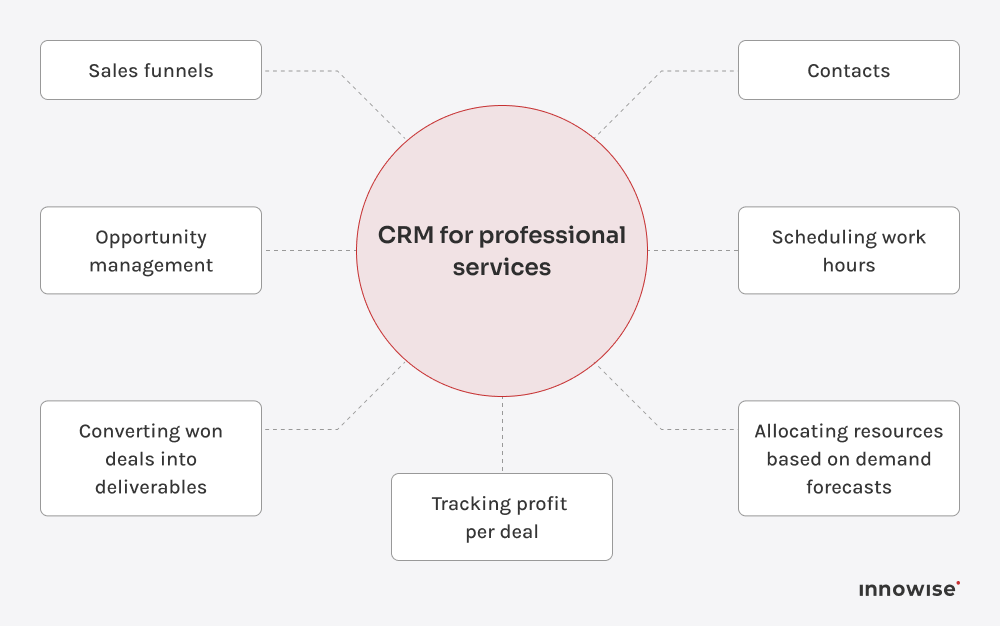
A CRM for professional services is software built for firms that sell expertise and bill for their time. Essentially, it extends standard sales CRM beyond contacts, sales funnels, opportunity management, and all those useful features. It can also help professional services firms allocate resources based on demand forecasts, schedule work, convert won deals into deliverables, and track profit per deal.

A CRM system for professional services supports client relationships throughout the entire lifecycle. From managing contracts and preparing proposals to staffing, service delivery, invoicing, and renewals, these processes can draw on a single database accessible to finance, operations, and business development teams.

Who needs a professional services CRM?

Your CRM needs may differ from those of another professional services firm because the way you sell and deliver your services can vary by niche. I usually see the following requirements across various segments:

IndustryCRM requirements
IT consulting firmsLinking the sales process with real-time resource availability for mixed fixed-price and time-and-materials contracts, frequent use of subcontractors, and skills-based hiring
Legal service providersMatter-level tracking, conflict-of-interest checks before taking on new work, and reliable recording of client correspondence and billing history
Marketing and digital agenciesVisibility into account profitability across parallel contracts and projects, as well as support for flexible approval cycles for creative work
Chartered accountants and financial advisorsSecure document processing, integration with a compliance calendar, reliable tracking of renewals, and clear audit trail
Engineering and architectural firmsMulti-stage resource planning for internal teams and external partners, with the right certified and licensed specialists assigned throughout long sales and delivery cycles
HR and recruitment firmsParallel workflows for managing client and candidate processes at the same time without losing visibility across either side

Key CRM features for professional services

CRM software for professional services carries the client relationship through delivery, billing, and renewal. For that, it needs more features than a generic sales CRM. Take a look at the feature set below, which brings together pipeline and project management, time tracking, profitability reporting, and other capabilities professional services firms rely on:

FeatureWhat it does
Lead and opportunity management
  • Tracks prospects from first contact through signed statement of work (SOW)
  • Uses pipeline stages built for services sales cycles, such as RFP response, scoping call, and proposal, negotiation
  • Flags stalled or aging opportunities
Client and relationship management
  • Maintains one record per client with contact history, past engagements, and contract terms
  • Shows account ownership
  • Surfaces accounts that have gone quiet before they churn
Proposal and contract management
  • Generates proposals from templates tied to the pipeline record
  • Routes contracts through approval chains automatically
  • Supports e-signatures and version control for contract terms
Project and delivery management
  • Turns a signed deal into a project with assigned tasks and milestones
  • Gives the account team visibility into delivery status
  • Connects delivery progress back to the original scope and budget
Time tracking and billing
  • Logs time directly against the project and client record
  • Feeds time entries into invoicing with less manual reconciliation
  • Reduces late or inaccurate time entries that cause margin leakage
Resource and capacity planning
  • Shows who's staffed, who's rolling off a project, and who has open capacity
  • Lets business development check a proposal against real availability
  • Flags upcoming staffing gaps before they become urgent
Workflow automation
  • Routes leads, approvals, and renewal reminders through rules-based automation
  • Triggers follow-up tasks without manual tracking
  • Frees account managers to spend time on client work instead of administrative tasks
Analytics, profitability, and forecasting
  • Reports project-level margins in addition to pipeline value
  • Tracks utilization by team or individual
  • Forecasts revenue from staffing and delivery data
Client portals and communication
  • Gives clients a shared space to see project status and review deliverables
  • Cuts back-and-forth email threads for approvals and updates
  • Keeps a record of client-facing communication in one place
Integrations
  • Connects to accounting software, calendar, email, and document storage
  • Links to an ERP system where one is in use
  • Reduces the need to copy data manually
Show more

See what the right CRM can change for your firm

Best CRM platforms for professional services

The right platform depends on firm size, delivery complexity, and what’s already running in your technology stack. For Innowise clients in professional services, I usually recommend one of the four CRM platforms below.

Salesforce

Salesforce is the largest CRM provider by market share. Professional services firms usually pair it with a PSA layer. On the CRM side, it covers lead capture, opportunity tracking, and service cases. With Certinia or a comparable solution, firms can also add project delivery, resource management, billing, and revenue recognition while keeping CRM and services data on the same platform. I usually see Salesforce as a good fit for mid-size to enterprise firms with complex, multi-stage client relationships, multiple service lines, and large delivery teams.

Strengths:

  • Can be customized to match almost any billing model, approval chain, or reporting requirement 
  • A large ecosystem of partners and implementation solutions
  • Reporting and forecasting capabilities that remain effective as the system scales and spans multiple practices or business units

Possible limitations:

  • Licensing and total cost of ownership can rise quickly with higher-tier plans, add-ons, and additional modules
  • More complex configurations may require a dedicated administrator or implementation partner 
  • Companies that don’t need such extensive configuration flexibility risk overpaying for features they will never use

Microsoft Dynamics 365 Sales

For firms already running Microsoft’s stack, Dynamics 365 Sales is a natural CRM choice. It runs on Microsoft Dataverse and integrates closely with the wider Dynamics 365 ecosystem. When paired with Dynamics 365 Project Operations, sales, project, and resourcing data can stay connected across the same platform. On the sales side, Dynamics 365 Sales manages leads, accounts, opportunities, and pipeline forecasting. Higher tiers offer AI-assisted features like conversation intelligence and predictive scoring.

Strengths:

  • Native integration with Outlook, Teams, and Power BI
  • Built-in reporting, dashboards, forecasting, and deal-stage visibility across the sales team
  • Tiered licensing lets a firm start with core sales automation and upgrade further as it grows

Possible limitations:

  • Firms that need delivery-focused resource management, project scheduling, or time tracking have to add Project Operations or a comparable solution, which increases cost and configuration effort
  • Per-user licensing costs can become significant for large teams, while additional products and licenses can make budget planning more complex

HubSpot

HubSpot is built around Smart CRM, with Sales, Marketing, and Service Hubs layered on top. It doesn’t have a dedicated professional services edition, but its flexible pipeline and relationship management tools work well for consulting, legal, and agency sales processes. I see it as a good choice for small to mid-size firms that want to get up and running quickly without the heavier configuration that can come with Salesforce or Dynamics 365.

Strengths:

  • Can be quicker to deploy and easier to administer than more heavily customized CRM setups
  • Strong marketing and lead-nurturing tools for firms that combine structured business development with referral pipelines
  • Professional tier includes advanced workflow automation, forecasting, custom reporting, and flexible deal pipelines

Possible limitations:

  • Costs rise noticeably when a team moves beyond Starter and needs more advanced automation, forecasting, and reporting
  • Limited native functionality for project delivery, resource planning, and time-tracking 
  • Custom objects are limited to Enterprise, while deep process customization is less flexible than in Salesforce or Dynamics 365

Creatio

Creatio combines AI agents with no-code configuration tools, so companies can automate sales and service processes and adjust workflows as their needs change. Professional services firms don’t have to force their processes into a generic sales-stage template. Instead, they can structure pipeline stages around the way their business actually works. Creatio also offers ready-made connectors through its Marketplace and tools for building custom integrations with ERP and financial systems. With the right integrations in place, proposals, project delivery data, and invoices can be tied back to the same customer record.

Strengths:

  • No-code configuration tools let teams set up and adjust workflows without relying on developers
  • You can add Sales, Marketing, or Service capabilities as your needs grow, instead of buying a fixed bundle sized for a bigger operation 
  • Built-in AI agents support account research, quote generation, and service case handling

Possible limitations:

  • Extensive configuration options can mean a steeper learning curve during the initial setup than with a more fixed, out-of-the-box CRM
  • You may need to invest time upfront in configuring Creatio around your processes to get the most value from its flexibility

Zoho CRM

Zoho CRM is a cloud-based CRM with five editions. It starts with a free plan for teams of up to three users and goes up to Ultimate. The system is part of the broader Zoho ecosystem, which includes Zoho Books and Zoho Analytics, and it is also available as part of Zoho One. For professional services firms, one of its main draws is value for money: even the lower-priced tiers include workflow automation, custom modules, and reporting. Zoho CRM is a logical choice for firms already using, or open to adopting, other Zoho products. It can also suit small and mid-size firms that want solid automation and reporting without moving into higher-priced enterprise CRM plans.

Strengths:

  • Lower cost per seat
  • Native integration with Zoho Books for invoicing and with Zoho Analytics for cross-departmental reporting
  • Workflow automation and renewal or follow-up reminders that work well for recurring client engagements

Possible limitations:

  • Feature availability and usage limits vary by edition, so firms can outgrow lower tiers
  • Configuration is flexible but not always straightforward; firms often need dedicated setup time or a partner to get the automation layer working the way they expect
I don’t recommend getting the CRM for the business you hope to become rather than the one you run today. A five-employee advisory firm doesn’t need a highly configurable Salesforce setup. A 200-person consultancy can't rely on a CRM with no resource management functionality. Your current level of complexity should drive the choice.
Michael Labutin, Head of Delivery.
Michael Labutin
Head of Delivery Office

How to choose CRM for professional services

When we’re talking about the best CRM for professional services, I mean the one that matches how a specific firm sells and delivers its work. During a discovery call, we usually start with these questions:

  1. Do you sell time, project outcomes, or both? 
  2. What systems do you already use? Do you rely on Microsoft or Zoho products, for instance?
  3. How complex is your delivery model? Are you dealing with a single consultant on short engagements or multi-phase projects involving subcontractors, multiple practice groups, or regulatory documentation?
  4. Does your compliance profile require audit trails, data residency controls, or access permissions aligned with regulatory requirements? 
  5. What budget have you allocated, and does it cover licensing as well as implementation, data migration, administration, and training? 
  6. Who supports it after go-live?

I recommend answering these questions before you start looking at CRM platforms. Keep your answers handy and use them to evaluate each option.

Not sure which CRM fits your firm?

Business benefits of a professional services CRM

Higher billable utilization

When the CRM shows staff shortages and available capacity in real time, managers can make faster, better-informed staffing decisions.

When negotiations, project outcomes, and commitments are tracked in a single system, the company doesn’t lose touch with the client. That makes relationships more resilient to staff changes or problems during delivery. Clients notice when nothing falls through the cracks.

Tying data on time, budget, and project status to a single record allows you to identify when a project is exceeding its planned scope while there is still an opportunity to adjust the team composition or revise the terms. That gives you a better chance of catching margin issues before the final invoice goes out.

When you use proposal templates, automate contract approvals, and generate invoices from recorded billable hours, there are fewer manual handoffs between sales, project management, and finance. A signed deal can move into delivery faster, while invoicing requires less manual reconciliation and number-crunching.

Time tracking, status updates, and follow-up task assignments can be automated. This frees up time for consultants and partners that was previously spent on administrative tasks at the expense of their work.

When revenue and staffing forecasts are drawn from real data in the sales pipeline and active projects, management has a stronger foundation for making decisions about hiring and resource allocation.

Clients also appreciate it when a firm keeps a complete record of conversations, decisions, and project outcomes. They don’t have to repeat themselves, requests are less likely to get lost, and it is clearer who is responsible for their project. A smoother collaboration experience can also support long-term relationships, contract renewals, and referrals.

CRM integrations

A professional services CRM earns its value from what it connects to as much as from what it does on its own. These are the integrations the Innowise team most commonly sets up in client projects:

IntegrationWhat it enables
Project management
  • Syncs client and deal records with project management tools, or keeps project tracking inside the CRM where supported
  • Keeps delivery status visible to the account team
ERP
  • Keeps client, project, and financial data aligned across systems
  • Reduces inconsistencies that build up when CRM and ERP data are maintained separately
Accounting
  • Connects the CRM with accounting software or an ERP finance module
  • Lets logged time and expenses feed into invoicing
  • Reduces manual data entry and billing delays
HR and resource management
  • Provides access to data on skills, certifications, and availability
  • Replaces a resource manager’s memory of who’s free with actual capacity data
Communication tools
  • Logs email and messaging activity against the relevant client record
  • Reduces the need to copy conversation details into the CRM manually
Calendar
  • Keeps meetings, deadlines, and follow-ups tied to client and project records through two-way sync
  • Makes missed or overdue follow-ups easier to spot
Document tools
  • Connects with document storage and e-signature platforms
  • Keeps contracts, deliverables, and proposals linked to the client record
Show more

CRM implementation options

Off-the-shelf CRM

The CRM is deployed close to its default configuration, with simple setup and little customization. It is usually the quickest and least expensive option to get up and running. It is a reasonable choice for small firms with simple, standard processes. The trade-off becomes more apparent as the firm grows and starts to outgrow default workflows, fields, and reports that may no longer fit its billing model or delivery process.

Customized platform-based CRM

The chosen platform, such as Salesforce, Dynamics 365, HubSpot, or Zoho, is tailored to the firm’s sales pipeline stages, billing model, approval workflows, and reporting needs. This often includes custom fields, workflows, and integrations built on top of the core product. The result is a CRM that fits the way the firm operates without the cost and time involved in building a system from scratch.

Custom CRM development

A custom CRM is built from the ground up around a company’s specific processes. It gives you more control over the product roadmap, feature set, and future changes than a platform-based solution. This option can make sense for firms whose delivery models, compliance requirements, or client workflows do not fit existing platforms well. It is typically more expensive and time-consuming than customizing an existing CRM and also puts long-term maintenance and support in your hands, so those costs need to be planned for from the start.

Our CRM services

From implementation and custom development to integration, migration, and ongoing support after go-live, Innowise covers the full CRM lifecycle. Our technology partnerships and experience with professional services delivery models help us build CRM systems around the way each firm actually works.

salesforce
zoho logo

As a Salesforce Partner, we build and configure Salesforce solutions for consulting, legal, and advisory firms that need Sales Cloud or Certinia integrated with delivery, billing, and finance systems.

With Microsoft-certified Dynamics 365 specialists, including experts certified as Dynamics 365 Customer Service Functional Consultant Associate and in Dynamics 365 Fundamentals (CRM), Innowise delivers Dynamics 365 implementation services. This includes Project Operations setups for firms that need resourcing, delivery, and finance connected on a single Dataverse-based platform.

As a HubSpot Solutions Partner, we consult on HubSpot, configure the CRM around a firm’s actual pipeline stages, and connect it with websites, ERP systems, e-commerce tools, and client portals.

Zoho rounds out our CRM portfolio. Innowise configures Zoho for firms that want strong automation and reporting at a lower entry cost. We also connect Zoho CRM with Zoho Books and Zoho Analytics for firms that want billing and reporting on one stack.

Innowise recently became an official Creatio partner, supporting implementation of the platform across sales, marketing, service, and core business operations. For professional services firms, we configure Creatio around the way each firm sells and delivers its work.

Client reviews frequently highlight our timely delivery, responsiveness to changing requirements, and clear communication throughout the project.

A few final thoughts

A CRM system for professional services provides a single client record from initial contact through service delivery and contract renewal, helps firms make staffing decisions based on actual capacity, and gives them better visibility into profitability while a project is still in progress.

Choosing the right platform matters, but even the right CRM will deliver little value if it is implemented poorly. To get real value from it, a firm needs to match the platform to the way it sells and delivers work, connect it with the systems already in use, and work with a partner who understands professional services well enough to configure it around those processes from the start.

FAQ

The best CRM for professional services depends on your firm’s size, delivery complexity, and existing technology stack. The right choice is the platform that best matches how your firm sells, staffs projects, delivers work, and bills clients.

A professional services CRM should go beyond basic sales functionality. Look for lead and opportunity management, client and relationship management, proposal and contract handling, workflow automation, reporting and forecasting, client portals, and integrations with accounting, ERP, communication, and project delivery tools. Depending on the setup, it may also include or integrate with PSA capabilities such as project tracking, time and billing, resource planning, and profitability reporting.


A CRM manages the client relationship: leads, opportunities, contacts, and communication history. A professional services automation (PSA) system manages delivery: project execution, resource staffing, time and expense tracking, and service financial management. Some professional services platforms combine both in one system, so client and delivery data can share the same platform and data model.

License costs depend on the platform and pricing tier you choose. Beyond licensing, you should also budget for implementation, data migration, integrations, customization, and ongoing support. The total cost varies based on business size, process complexity, and the amount of configuration and development required.

If we’re talking about a relatively simple deployment for one department, with clean data and few integrations, it may take around 4 to 10 weeks to go live. A typical mid-market implementation with several integrations and moderate customization may take 2 to 4 months. More complex enterprise rollouts with multiple integrations and extensive customization can take 4 to 6 months or longer.

Salesforce, Dynamics 365, HubSpot, and Zoho are among the strongest options for professional services firms. HubSpot and Zoho can be a better fit for smaller teams that want a lighter setup and lower entry costs. Salesforce and Dynamics 365 tend to make more sense when delivery complexity, headcount, customization, or integration requirements call for a more extensible platform.

Show all

Table of contents

    Contact us

    Book a call or fill out the form below and we’ll get back to you once we’ve processed your request.

    Send us a voice message
    Attach documents
    Upload file

    You can attach 1 file up to 2MB. Valid file formats: pdf, jpg, jpeg, png.

    By clicking Send, you consent to Innowise processing your personal data per our Privacy Policy to provide you with relevant information. By submitting your phone number, you agree that we may contact you via voice calls, SMS, and messaging apps. Calling, message, and data rates may apply.

    You can also send us your request
    to contact@innowise.com
    What happens next?
    1

    Once we’ve received and processed your request, we’ll get back to you to detail your project needs and sign an NDA to ensure confidentiality.

    2

    After examining your wants, needs, and expectations, our team will devise a project proposal with the scope of work, team size, time, and cost estimates.

    3

    We’ll arrange a meeting with you to discuss the offer and nail down the details.

    4

    Finally, we’ll sign a contract and start working on your project right away.

    More services we cover

    arrow