ERP software for oil and gas industry: features, benefits, and top solutions

Aug 26, 2026 14 min read
Summarize article with AI

Key takeaways

  • Oil and gas ERP systems must cater to industry-specific needs, such as joint venture accounting, well-level cost calculations, and complicated regulations.
  • ERP synchronization can help manage complex operations, compliance requirements, asset-intensive maintenance, and supply chain issues more effectively.
  • Integrated ERP systems reduce operational costs, improve asset use, and support betterdecision-making through real-time data.
  • Companies are better off choosing ERP software according to the scale of their operations and growth plans.

Unplanned downtime can be costly. According to ABB, 76% of industrial decision-makers surveyed estimated its cost at up to $500,000 per hour. At that rate, even a few hours of disruption can cost you millions of dollars of revenue losses.

Field operations, asset records, compliance data, and finance run in systems that were never built to exchange data. I keep running into legacy systems that are more than 15 years old and still support operations at many oil and gas companies. Let’s not forget that a barrel price can move faster than someone can update the cost sheet. 

The gap between what happens in the field and what the finance department sees can be expensive. This may be a reason why only 25% of oil and gas organizations are satisfied with the return on their investments from operational technology, cloud, and AI.

The problem is solvable, and one possible solution is an industry-specific ERP. Let’s look at it in more detail. I will walk you through what it is, how it works, the challenges it addresses, the features worth checking, and how the right platform can change what a bad day looks like.

What is ERP software for the oil and gas industry?

Oil and gas ERP is a business management system built around how this industry operates: joint-venture accounting, well-level cost tracking, asset-heavy maintenance, and compliance reporting that spans environmental, safety, and financial regulators. It pulls finance, procurement, maintenance, HR, and production data into one database, so a plant manager, a CFO, and a compliance officer work off the same numbers.

Implementing a generic ERP system won’t be as effective because it can’t split revenue among multiple joint-venture partners on a single well, calculate royalty payments by lease terms, or flag an overdue valve inspection before it becomes a safety incident. While oil and gas ERP starts from the same core of finance, procurement, HR, and reporting, it adds industry-specific modules like hydrocarbon accounting, asset lifecycle management, HSE tracking, and production forecasting.

The oil and gas value chain describes how hydrocarbons move from extraction to the end customer, through production, transportation, storage, processing, and distribution. Companies play different roles in that chain. Some run a single stage, while others run several. An ERP’s scope usually reflects that.

UpstreamMidstreamDownstream
Exploration and productionTransportation and storageRefining and distribution
  • Well-level cost tracking
  • P&L tracking
  • Contractor payments
  • Drilling budgets
  • Production volumes linked to financial performance
  • Pipeline volume tracking
  • Truck volume tracking
  • Terminal volume tracking
  • Contract reconciliation
  • Automated billing between parties
  • Refining output tracking
  • Quality control
  • Inventory management
  • Pricing
  • Sales and market shifts

Key challenges facing oil and gas companies

The oil and gas industry has its fair share of challenges, from volatile prices to stringent regulations. While the use of technology may complicate issues further, the right ERP software helps bring data and processes into one place. Let’s look at the main gaps in the industry and how ERP addresses them.

Operational complexity

A company can conduct exploration, drilling, transportation, and refining simultaneously, often across time zones and regulatory regions. If you have separate software for each function, a delay in the field isn’t reflected in finance until someone manually re-enters the data. ERP synchronizes production, procurement, and finance data on the same timeline, so a scheduling change on a rig shows up in the budget the same day.

Regulatory compliance

To prepare environmental, safety, and financial reports on different schedules, manually pulling data from multiple systems is slow and error-prone. An ERP with built-in compliance tracking consolidates the data and generates the reports each regulator needs.

Asset-heavy operations

Rigs, pipelines, compressors, and refineries can break down, causing costly downtime and lost production. Relying only on maintenance schedules can mean problems are detected too late. ERP-driven asset management tracks each unit’s full history and can flag maintenance needs before a breakdown, which turns unexpected outages into planned maintenance.

Supply chain disruptions

To reduce supply chain disruptions, an ERP system provides procurement and logistics with up-to-date information on inventory and orders across all facilities. With it, you can avoid delays or idle time for the crew and equipment.

Cost volatility

Without real-time information on project costs, budgeting decisions can quickly become outdated. With the help of an ERP system, costs can be tracked in real time for each asset or project.

ESG and sustainability reporting

In addition to financial data, companies have to report on emissions and sustainability information to investors, regulatory authorities, and business partners. Environmental reporting systems integrated within an ERP capture environmental information as part of the regular processes. As a result, reporting can be completed in just a few clicks.

Cybersecurity risks

Oil and gas infrastructure sits high on the list of targets for attackers, and a breach can stop production as easily as it can expose data. ERP vendors include encryption, role-based access controls, and audit trails to support both security requirements and regulatory compliance.

Workforce shortages

Sometimes, experienced employees leave faster than they can be replaced, and new hires need to start working with complex systems immediately. An ERP that offers an easy-to-use interface as well as mobile access for field employees reduces learning curves.

Learn how ERP can fix workflow gaps

Essential ERP features for oil and gas

A basic ERP covers finance, inventory, and sales and stops there. Oil and gas operations need more: joint venture accounting, well-level cost tracking, HSE incident logs, and asset records that follow a piece of equipment for thirty years. When selecting an ERP, I’d recommend checking for these features.

FeatureBusiness value
Financial managementManagers see which wells or projects are profitable in time to act.
Asset and equipment managementProvides a record of the condition, location, and depreciation of rigs, pipelines, compressors, and storage tanks.
Maintenance managementTied closely to asset tracking, including scheduling inspections, recording repairs, and flagging maintenance needs before equipment fails. This can help reduce unplanned outages and repair costs over an asset's lifetime.
Inventory and warehouse managementProvides visibility into which spare parts and materials are on hand and where, cutting both overstocking and shortages.
Procurement and supply chain managementManages supplier relationships, purchase orders, and transport.
Production planningCovers scheduling exploration and production activity, tracking output by site, and forecasting volumes against targets.
Project managementTies project costs to the general ledger in real time, so you can catch overruns early.
Compliance and HSE managementTracks incidents, inspections, and permits, and produces the reports for regulators.
Reporting and analyticsTurns that data into dashboards and forecasts that support budget and operational decisions.
Document managementProvides centralized control with version history and access permissions, reducing the risk of losing records or drawings.
CRMKeeps sales and customer data connected to the same operational numbers driving pricing and delivery timelines.
Show more

Benefits of ERP software for oil and gas companies

Implementing an integrated ERP system brings core functions into a single source of truth, which results in the following benefits:

Lower operating costs

Tying procurement, inventory, and maintenance into one system cuts the waste in all three at once. A company that used to keep safety stock at every site “just in case” can instead see real inventory levels across locations and stock according to actual needs.

Better asset use

ERP-linked maintenance schedules catch wear of rigs, pipelines, and refinery equipment before failure. Keeping equipment running closer to its planned capacity allows for scheduling maintenance windows around a slow production period instead of an emergency shutdown during a busy one.

Faster reporting and decision-making

When finance, production, and procurement data live in separate systems, a manager waits days for a report that pulls all three together. With shared data, reports are generated almost instantly. Employees pull the numbers from the system and don’t wait on spreadsheets from site managers.

Stronger compliance control

Regulators want audit-ready records. An ERP with built-in HSE and emissions tracking keeps that data current as part of daily work so you can quickly provide the required information.

Lower operational risk

Incident tracking, corrective action logs, and safety checks are tied to the same system that runs operations. So, a near-miss on a rig gets logged and followed up on. Fewer things slip through the gaps between departments.

Higher team productivity

Mobile access lets field staff log data on-site. New hires also ramp up faster on one connected system. This matters when companies are short on experienced staff.

Easier growth across sites and business units

Multi-entity consolidation and multi-currency support mean adding a new field, region, or joint venture doesn’t mean bolting on another disconnected system. If your company expands into a new country, you can set it up as another entity in the same ERP, with local tax and reporting rules built in.

Best ERP software for the oil and gas industry

You will find a variety of ERPs on the market. However, not all of them are a good fit for oil and gas operations. I picked the best ones based on their strengths, limitations, deployment options, and the company sizes they typically serve.

1. Odoo ERP

The first on our list is Odoo. It’s a modular ERP platform that includes finance, inventory, manufacturing, and CRM. It’s suitable for small and mid-sized businesses, as well as larger companies using it within a single business unit, that require basic ERP capabilities but cannot afford a Tier 1 solution.

Strengths

  • Broad module range at a lower entry cost 
  • Per-app pricing that lets a company start small and add modules later
  • A large partner ecosystem for customization

Limitations

  • Joint venture accounting, hydrocarbon-specific reporting, and HSE modules need custom development
  • Harder long-term maintenance as more modules and customizations stack up

Deployment

  • SaaS
  • PaaS
  • On-premises

2. SAP S/4HANA

SAP S/4HANA is a large-scale ERP that runs on an in-memory database and is built to process high transaction volumes in real time across finance, supply chain, production, and asset management. You’ll get the most from it if you’re a large, multinational operator with complex financials, joint ventures, and high-value assets across the full value chain.

Strengths

  • Purpose-built hydrocarbon and joint venture accounting
  • Partner revenue distribution
  • Deep IoT integration for asset monitoring
  • Cloud options with the Fiori interface and Joule AI assistant

Limitations

  • High licensing and setup costs
  • Requires specialized consultants for configuration
  • Rollout typically runs 12 to 18 months

Deployment

  • Cloud 
  • On-premises

3. Microsoft Dynamics 365

Microsoft Dynamics 365 is a cloud-basedERP platform that connects finance, supply chain, operations, and field services. The system integrates closely with Power BI and other Microsoft tools. It’s a good choice for field-heavy operators and midstream or downstream companies, particularly those already running on Microsoft infrastructure.

Strengths

  • Field service scheduling and dispatch built for maintenance-heavy operations
  • Preventive and predictive maintenance tools
  • IoT monitoring
  • Cloud-first setup with lower IT overhead
  • Live performance dashboards

Limitations

  • Needs customization for deeper upstream requirements like hydrocarbon accounting
  • Some industry-specific functions rely on third-party add-ons

Deployment

  • Cloud 
  • On-premises
  • Hybrid options for Finance & Operations

4. ServiceNow

Unlike the other ERPs in the list, ServiceNow isn’t a finance-and-production ERP. It’s a workflow and operations platform that includes IT asset management, IT/OT operations, and service management. Oil and gas companies run it alongside an ERP. If you need stronger control over IT/OT assets, incident response, and compliance workflows, particularly around SCADA-connected infrastructure, adding ServiceNow may make sense.

Strengths

  • Real-time visibility into IT and OT assets thanks to a configuration management database (CMDB)
  • Tools built for operational technology security and governance
  • Established use in the oil and gas sector

Limitations

  • Adds a second platform and requires integration with the existing ERP rather than replacing it

Deployment

  • Cloud (SaaS)

Here’s a quick ERP-to-ERP comparison, so you can juxtapose them and select the most suitable one.

VendorBest forStrengthsLimitations
OdooSmall/mid-sized companies, lower costBroad module range, flexible pricing, big partner networkNeeds custom JV/HSE work; harder to maintain at scale
SAP S/4HANALarge, multinational operatorsHydrocarbon/JV accounting, deep IoT integration, real-time scaleHigh cost, 12–18 month rollout, needs specialists
Dynamics 365Field-heavy midstream/downstreamField dispatch, predictive maintenance, Microsoft tiesNeeds add-ons for complex upstream accounting
ServiceNowAdding OT and asset control on top of ERPReal-time asset and infrastructure visibility, OT security, track recordNot a finance or production ERP; runs alongside one

It may still be difficult to decide which ERP will work best for you. Innowise’s ERP experts have both deep industry expertise and platform-specific technical skills, so we can help you choose an ERP and ensure the implementation delivers value.

As an Odoo partner, Innowise has access to and implements the latest features and best practices. So, regardless of how multi-faceted your needs are, you get more effective and tailored Odoo implementations. If your priority is SAP, Innowise is also a certified SAP partner and advances its expertise through SAP Learning Hub as soon as a new release is out. We implement SAP with the latest capabilities for our clients, easier compliance, and clear analytics.

We also hold professional certifications in Microsoft Dynamics 365 and ServiceNow, helping you leverage these platforms for optimized field management, IT operations, and workflow automation.

Odoo

odoo partner

SAP

SAP Activate Project Manager
4HANA 1809
4HANA 1709
4HANA Sales 1909
4HANA Sourcing and Procurement
SAP Certified Development Associate - SAP Fiori Application Developer
4HANA Cloud Private Edition, Central Finance
4HANA Cloud Private Edition, Financial Accounting
SAP Certified Associate - Backend Developer - SAP Cloud Application Programming Model
SAP Certified Associate - Data Engineer - SAP HANA
SAP Certified Associate - Back-End Developer - ABAP Cloud
SAP Certified Associate - Data Analyst - SAP Analytics Cloud

MS Dynamics 365

MB-500-Microsoft-Dynamics-365-Finance-and-Operations-Apps-Developer 1
Dynamics-365_-Finance-and-Operations-Apps-Developer-Associate 1
MB-300-Microsoft-Dynamics-365-Core-Finance-and-Operations 1

ServiceNow

Certified-Implementation-Specialist-IT-Service-Management 1
Certified-System-Administrator 1
Certified-Application-Developer 1

Cloud vs on-premise ERP

The ERP deployment model depends less on preference than on where a company operates, what it’s regulated to protect, and how fast it needs results. Some would find cloud more suitable because of the costs and maintenance demands, while others would prefer on-premise systems because of security and regulatory requirements. Let’s compare both options:

FactorCloudOn-premise
CostLower upfront cost, subscription pricing tied to users and modulesHigher upfront investment in hardware and infrastructure; ongoing costs depend on licensing, maintenance, and internal IT
SecurityVendors invest in encryption, audits, and certifications, but data is still kept on third-party infrastructureData and systems remain within infrastructure controlled by your organization
Implementation timeOften faster to deploy, depending on scope and customizationOften takes longer, particularly for large, highly customized oil and gas environments
MaintenanceThe vendor handles updates and patches on its own schedule, reducing the workload for internal ITYour team is responsible for upgrades, patching, and capacity planning
Flexibility & growthYou can add users, modules, or sites without provisioning new hardwareCan suit specialized field equipment and legacy systems, but scaling may require additional hardware planning
Show more

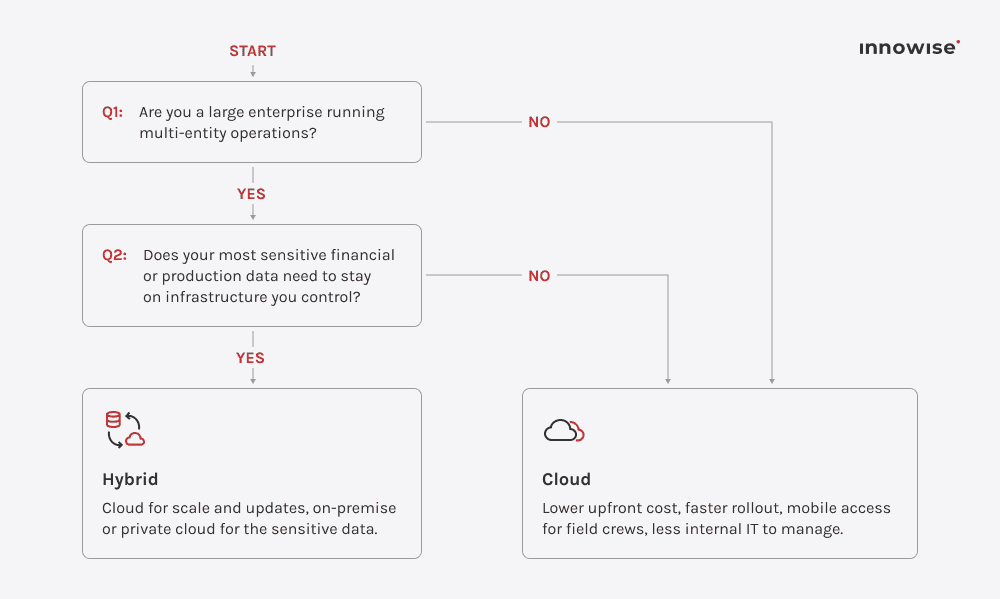
Below, I added a short decision matrix. Answer the questions and proceed to the next one. Based on your answers, you will arrive at the option that suits you. However, it’s just advisory. The more accurate ERP recommendation you can get based on a thorough expert assessment.

Decision tree helping businesses choose between cloud and hybrid ERP deployment based on size and data requirements.

Sometimes the cloud-vs-on-premise conversation starts as a cost question. I wouldn’t recommend making the decision based on cost alone. The deciding factors should also be where sensitive data has to be stored, how much your current infrastructure will change, and your growth plans.

Head of Delivery Office

How to choose the right ERP

Before scheduling a vendor demo, it’s worth getting internal clarity on what your company needs. Use the following criteria to evaluate and shortlist platforms:

  • Define your transaction volume, user count, and number of sites to determine whether you need a Tier 1 platform or a mid-market option.
  • Get clear on which segments the system needs to cover: upstream, midstream, downstream, or a combination of these.
  • List your must-have features, such as joint venture accounting, HSE tracking, and asset management. Separate them from nice-to-haves.
  • Map what the ERP has to be integrated with: SCADA, project management tools, and accounting software. 
  • Decide upfront how much you want to customize: adjust the platform to fit your existing processes, or change your processes to fit the platform. Both are valid, but they call for different vendors and different budgets.
  • Check whether a platform’s compliance features cover the specific regulators and jurisdictions you answer to.
  • Calculate the total cost of ownership, including implementation, customization, training, and ongoing support. 
  • Confirm the vendor has already implemented joint venture accounting or HSE modules for other oil and gas clients. 
  • Plan for growth and think a few years beyond your current footprint. 
  • Walk through the system with the people who’ll use it, like field staff and office teams.

Essential integrations

In addition to an ERP platform, you’re likely to need a wider set of systems to track field data, assets, customer relationships, and financial records. I recommend considering integrations with the following systems:

SystemWhat it doesWhy it needs to connect to ERP
SCADACaptures live production data from the field — flow rates, pressures, equipment statusProduction figures update as they happen instead of getting keyed in from a daily report, so finance and operations work from the same numbers as the field
IoT platformsSensors on rigs, pipelines, and tanks feed condition dataWithout the connection, that data sits in its own dashboard, disconnected from the maintenance schedules and budgets it should inform
GISMaps well locations, pipeline routes, and field assetsMaintenance teams see not just that an asset needs attention but where it sits relative to crews and equipment already nearby, reducing unnecessary travel
CRMManages distributor relationships, contract renewals, trading desksSales teams quote delivery times and pricing off current production and inventory numbers, not estimates
CMMS and EAMHolds detailed equipment and maintenance historyLeft disconnected, work orders and purchase orders can be duplicated. When connected, a field maintenance request can trigger the appropriate procurement or finance workflow
HR systemsHandles workforce planning, payroll, and schedulingLabor costs on a project or well get counted alongside material and equipment costs, giving an accurate picture of what the project actually costs
BI platformsTurns ERP data into dashboards and forecastsExecutives work from one dashboard pulling live ERP data, rather than a static report built from outdated exports
Accounting softwareSpecialized accounting tools kept alongside ERP, common during a phased migrationA weak connection between the two can lead to duplicate entry and reconciliation issues
Show more

Check ERP compatibility with your current stack

ERP implementation best practices

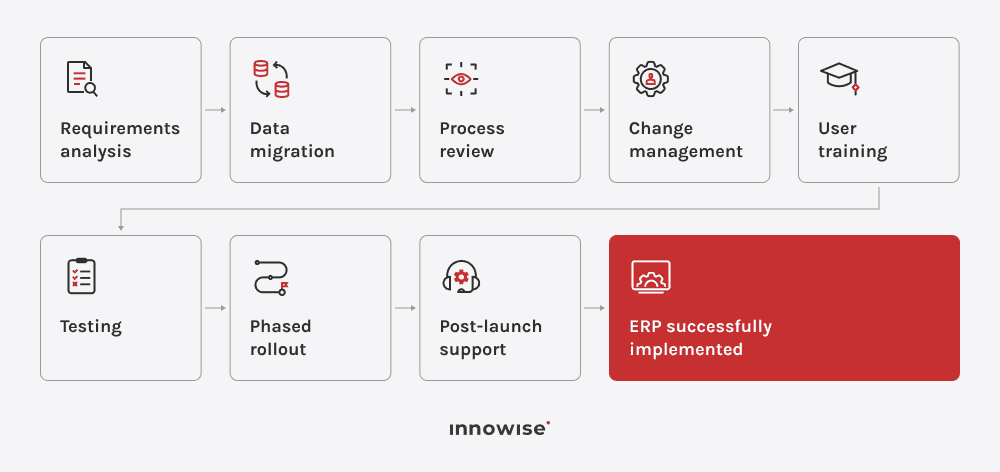
At Innowise, we divide the implementation into phases. Each phase focuses on a measurable outcome. We adopted such an approach because it minimizes disruption and helps keep the implementation efficient. Here are the core practices we follow:

1. Requirements analysis

Before selecting a platform, we map and analyze your business processes. The findings help us define the capabilities the solution needs to support your operations.

2. Data migration

To avoid transferring duplicate or outdated data into the new system, we clean historical records and migrate only the cleansed data.

3. Process review

Our experts audit workflows during implementation to remove workarounds. This helps make sure the new system supports more efficient processes.

4. Change management

We collaborate with your project sponsors and communicate upcoming changes to help your team adopt the new system more easily.

5. User training

Innowise provides ongoing, role-specific training. After go-live, we reinforce it with follow-up sessions.

6. Testing

The new system is tested against real-world scenarios, such as a joint venture revenue split, an emergency maintenance request, and a multi-currency invoice. If any errors are found, they’re fixed before the system goes live and can affect production data.

7. Phased rollout

The system is launched incrementally by site or function, allowing business operations to continue with minimal disruptions.

8. Post-launch support

A support team adjusts configurations based on usage after go-live. This ensures the platform continues to provide value long after the launch.

ERP implementation flowchart outlining eight stages from requirements analysis to post-launch support

Future of ERP in oil and gas

Most future ERP trends are already showing up in current platform roadmaps. Major platforms are adding AI, connected asset data, mobile tools, and stronger reporting features. These are the developments to watch:

Final thoughts

The right ERP should suit your business segment, company size, and geographic footprint, and integrate with the rest of your systems. 

Before deciding, conduct an objective internal audit to identify your pain points, the areas where you can’t afford to get compliance or reporting wrong, and your likely growth needs. Companies that take this approach are more likely to choose a solution that fits. If you’re weighing an off-the-shelf ERP against a custom one, it can also help to talk the options through with an experienced ERP consulting team.

FAQ

ERP is an enterprise management system that connects financial, procurement, maintenance, HR, and manufacturing data in a shared environment. When tailored to the requirements of the oil and gas industry, it can also support joint venture accounting, well costing, HSE compliance, and asset maintenance.

It all comes down to company size and where it operates across the value chain. SAP S/4HANA is better suited to larger international companies with complex financial operations. Microsoft Dynamics 365 is more appropriate for companies with field-heavy operations. Odoo works well for smaller companies that need core ERP coverage at a lower cost. ServiceNow isn't a core ERP but complements one with asset and OT workflow management.

At a minimum, it should include financial management, asset management, maintenance management, procurement and logistics, production planning, project management, compliance and HSE management, reporting, and analytics. Document management and CRM may also be relevant, depending on the company’s organizational structure and how much it relies on distributors and contractors.

Total cost varies widely based on deployment model, company size, and the level of customization needed. A reliable estimate requires proper business analysis and scoping.

Mid-market cloud systems can be deployed in 3 to 6 months. Large cloud systems with extensive customization to support upstream operations may take 12 to 18 months to become fully operational.

For many companies, yes. Cloud-based ERP systems can offer lower infrastructure requirements, easier scalability, and less internal maintenance. However, some companies have specific security, data residency, or regulatory requirements that may make an on-premises or hybrid setup more appropriate.

Yes. Integrating SCADA and IoT platforms with ERP allows production and equipment condition data to flow into the same environment. This means finance and maintenance teams can work with the same operational data instead of relying on separate dashboards disconnected from budgets and maintenance schedules.

Start with functional requirements and determine what the company needs to track now and where the process is breaking down. Cloud platforms with lower upfront costs and modular pricing, such as Odoo, tend to suit smaller operators better than enterprise-grade systems. Don’t forget to factor in your growth plans and choose a system that can add modules or sites without requiring a full replacement a few years down the line.

Show all

Lead of ERP Consultants

Kiryl is a specialist in SAP ecosystem optimization. He cuts through the complexity of enterprise resource planning, tailoring SAP modules to specific workflows to ensure clients extract maximum efficiency from their digital core.

Table of contents

    Contact us

    Book a call or fill out the form below and we’ll get back to you once we’ve processed your request.

    Send us a voice message
    Attach documents
    Upload file

    You can attach 1 file up to 2MB. Valid file formats: pdf, jpg, jpeg, png.

    By clicking Send, you consent to Innowise processing your personal data per our Privacy Policy to provide you with relevant information. By submitting your phone number, you agree that we may contact you via voice calls, SMS, and messaging apps. Calling, message, and data rates may apply.

    You can also send us your request
    to contact@innowise.com
    What happens next?
    1

    Once we’ve received and processed your request, we’ll get back to you to detail your project needs and sign an NDA to ensure confidentiality.

    2

    After examining your wants, needs, and expectations, our team will devise a project proposal with the scope of work, team size, time, and cost estimates.

    3

    We’ll arrange a meeting with you to discuss the offer and nail down the details.

    4

    Finally, we’ll sign a contract and start working on your project right away.

    More services we cover

    arrow