Recognized for tech excellence by CRN
Innowise was named to CRN’s 2026 Tech Elite 250, recognizing solution providers with strong technical expertise and advanced vendor certifications.
Explore
The form has been successfully submitted.
Please find further information in your mailbox.

 About usPortfolioUse cases

In any business, efficiency and data visibility shape how fast you move and how well you serve your customers. Two systems make this possible: enterprise resource planning (ERP) and customer relationship management (CRM).
If you’re wondering about a CRM and ERP meaning in simple terms, think of it this way. CRM keeps your sales, marketing, and support teams connected so they can track leads, close deals, and build strong customer relationships. ERP handles what happens behind the scenes, from finance and inventory to supply chains and HR.
Each system is valuable on its own merit. But when they work together, everything starts running better. ERP and CRM integration connects front- and back-office operations, providing everyone access to the same, up-to-date information. Sales teams can check product availability before committing to a deal. Finance teams can forecast revenue based on live data. Managers can see exactly how the company is performing without piecing together separate reports.
In this guide, I’ll explain how ERP and CRM work together, why integration matters, and how to make it work in practice.
ERP and CRM integration creates a connected environment where customer and operational data move together in real time. Instead of juggling two separate systems with overlapping records, integration unites a continuous data flow that supports every step of the customer and product journey.
On the technical side, the connection usually happens through APIs, middleware, or built-in connectors that sync key information such as customers, quotes, orders, invoices, and inventory. The CRM sends customer and deal data to the ERP system, while the ERP returns updates on stock levels, order fulfillment, and payments. Depending on how the business works, the sync can run in one direction or both.
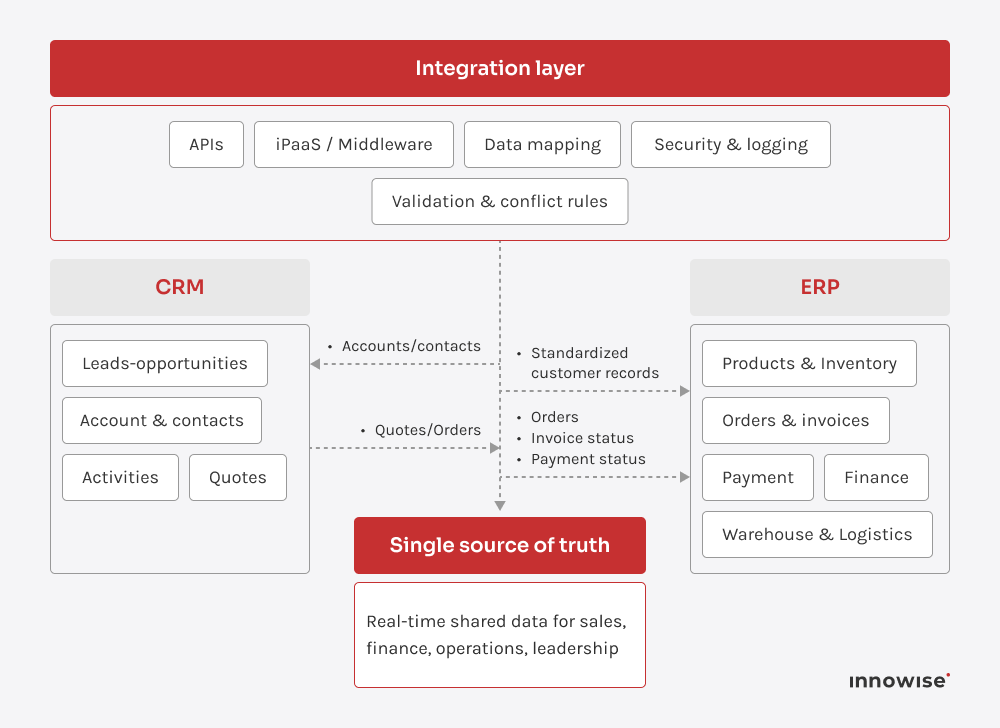
Here’s what that looks like in practice. A sales rep closes a deal in the CRM, and the system automatically sends the order details to the ERP so production, shipping, and billing can get started right away. As things move forward, the ERP sends updates back, for example, when the product ships or when a payment comes through. Everyone sees the same, up-to-date information without needing to re-enter data or double-check spreadsheets.
A good setup also defines who owns which data. The CRM typically acts as the main source for customer and lead records, while the ERP manages financial and operational details. A well-designed integration maps these data areas, defines how often they sync, and sets rules for handling duplicates or conflicts.
When built thoughtfully, the result is a single, reliable source of truth. It removes silos, speeds up workflows like quote-to-cash, and gives leadership a clear view of both revenue and operations in real time.
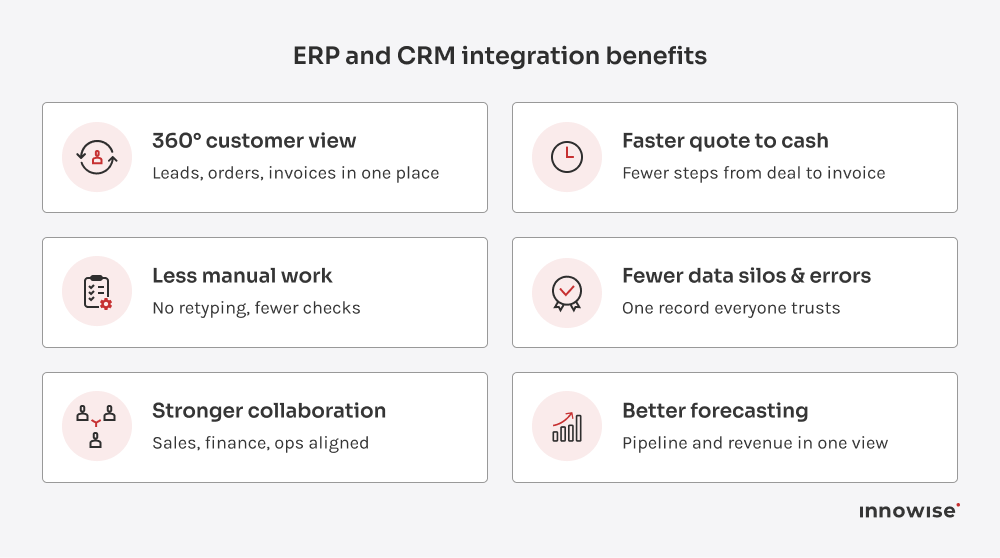
When both systems share data, you get the full picture: every lead, quote, contract, delivery, invoice, and renewal connected in one view. No gaps or hopping between tools.
Sales teams can check open invoices or credit limits before offering new terms. Finance can review contracts and forecast renewals with up-to-date numbers. Support can instantly see what was delivered and which agreement covers it.
This level of visibility makes everyday work smoother and decisions more confident. It helps teams:
You can just open the system, look up a customer, and know exactly what’s happening without waiting for updates or chasing numbers; it’s that simple.
You can tell when systems aren’t connected. People spend half their day copying the same data between tools. Quotes go into the CRM, orders go into the ERP, and someone double-checks everything in a spreadsheet. It’s slow, repetitive, and full of room for error.
Once CRM and ERP are integrated, customer data, order details, pricing, and invoices move automatically between systems. This way, your team isn’t retyping and reconciling the same information over and over.
When CRM and ERP operate on their own, small mismatches start creeping in. Maybe a customer’s billing info gets updated in the CRM but not in the ERP. Or sales adjusts a quote, yet finance never sees the change. Over time, these mismatches create confusion, wasted effort, and bad decisions.
ERP and CRM integration keep records aligned across systems. Updates in one system automatically appear in the other, so every team works from the same accurate record. You avoid double-checking spreadsheets or arguing over which version is right.
This consistency improves data quality and builds trust in your reports. People stop chasing information and start using it with confidence. Connected CRM-ERP data directly improves accuracy and reduces costly mistakes that come from working with the wrong details.
Once both systems are aligned, teams stop working (and feeling) blind. Everyone can see what others are doing in real time:
Picture a sales rep on a call with a key client: on the same screen, they see that a large order shipped yesterday, one invoice is overdue, and a new feature request from support is already in progress. The conversation is informed, specific, and confident, not the classic “let me check on that.”
When ERP and CRM are connected, sales and service stop waiting on finance, logistics, or warehouse updates. The information they need is right in front of them, exactly when they need it. The whole quote-to-cash process moves faster and with fewer steps.
Picture a customer asking for a custom order. During the conversation, the sales rep checks available stock, production capacity for the next two weeks, and the customer’s credit limit in one view. The system calculates a realistic delivery date, confirms pricing and margin, and records any required approvals. The rep closes the deal on that same call.
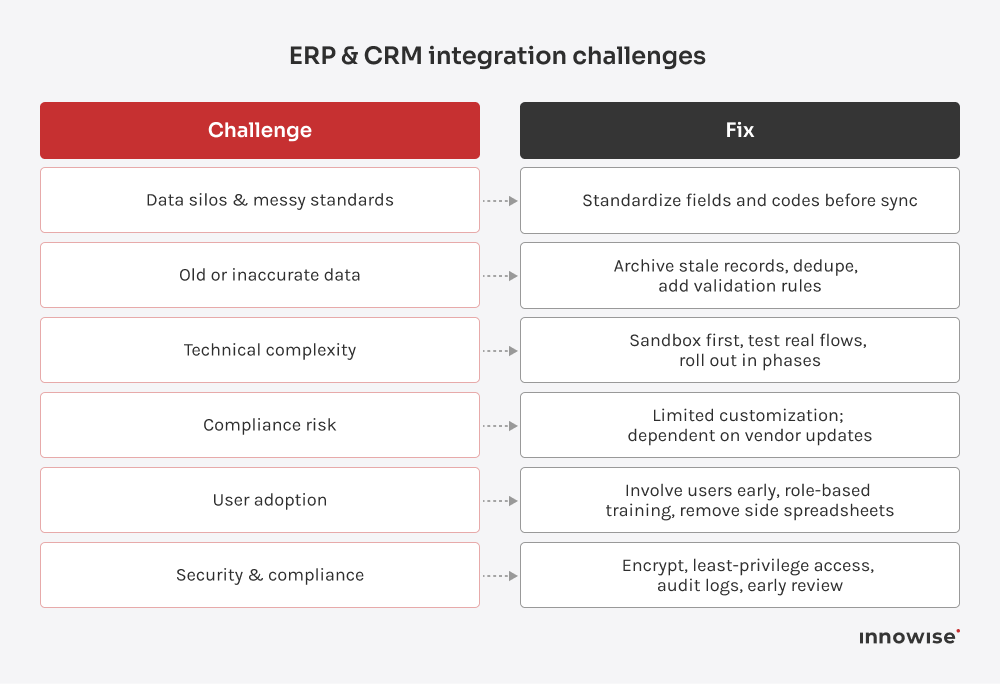
The first big challenge usually sits in the data. Both systems store the same information (customers, product IDs, addresses, etc.), but not always in the same way. For example, one might record a state as CA, another spells out California. Multiply that by thousands of records, and things get chaotic fast.
Before connecting anything, clean your data and agree on one standard for each field. These actions keep the integration clean and predictable later. Most teams find that nearly all their CRM data needs at least some tidying before sync.
If your databases are cluttered with outdated or incorrect info, integration just spreads that problem around. Consider inactive customers, duplicate entries, and outdated products.
Before syncing, archive what’s no longer relevant and update what you keep. Take the chance to set simple data rules so new records are consistent across both systems. Once the base is clean, the integration runs smoother and stays that way.
Connecting two large systems rarely happens in one click. Custom setups, old software, and quirky APIs can slow things down. And if you skip proper testing, you might end up with duplicate orders or mismatched inventory before anyone catches it.
Treat integration like a real project. Test it in a sandbox first and run through real scenarios. When you go live, start with one process or data set, then expand step by step. Having a reliable partner who’s done this before helps more than any documentation.
Sometimes the hardest part is getting people to use it. Teams used to their own tools might hesitate to trust the new setup. Some keep personal spreadsheets just in case, which defeats the whole purpose.
Involve users early. Show how it makes their day easier: no more copying data between systems or chasing updates. Train them, listen to feedback, and make sure they see small wins quickly. Once they realize it saves time, adoption follows naturally.
When systems start sharing data, security questions always come up. Companies worry about exposure or compliance, especially when customer data moves between platforms.
Modern integration tools handle this well with encryption, access controls, and clear audit trails. Use secure channels, limit what data is shared, and keep your systems patched. Check compliance boxes early with your development team to avoid surprises later.
Start with one simple question: what exactly should this integration fix or improve? And make it specific. For example:
Write those goals down. Use them later to challenge every integration idea: Does this help us hit those outcomes or not?
Next, bring in people who work with these systems every day. I mean sales, finance, operations, customer service, and IT. Ask them how they work today, what slows them down, and what information they wish they could see in one place.
Before connecting anything, take a good look at how data actually moves between your CRM and ERP (or doesn’t). Map out the steps as they happen in real life and write those gaps down. Maybe sales enters an order in the CRM, and then accounting retypes the same thing into the ERP. Or perhaps support can’t see billing details and has to email finance for updates.
While you’re at it, check the data itself. Are there different formats for the same fields? Are there duplicate customers, outdated contacts, or inconsistent product codes? Make a list of what needs cleaning.
This audit gives you 2 things: a clear view of what needs connecting and a list of cleanup tasks before integration starts. The smoother your data, the cleaner your integration will run.

There’s more than one way to connect your systems. Most ERP CRM software pairs connect through built-in connectors, iPaaS, or APIs. The right choice depends on what systems you use, how complex your setup is, and how much flexibility you need.
When deciding how to connect your systems, consider factors like budget, timeline, data volume, and whether your team has the right tech skills. In my experience, an integration platform or middleware usually strikes the best balance for mid-sized companies. But whatever you pick, make sure it can grow with your business and that you have reliable vendor support when things get tricky.
This is the stage where precision really matters, as the way you match data decides how clean and trustworthy your system will feel.
Start by defining which records from your CRM should match which ones in your ERP. For instance, a “customer” in CRM aligns with a “client account” in ERP. Clarify which system holds authority when there’s a conflict.
Next, agree on ownership. When both systems hold the same kind of data, which one wins in a conflict? Usually, the ERP owns financials like invoices, payments, and tax details, while the CRM stays responsible for contacts, deals, and communication history.
Once that’s clear, sit down with your implementation team and match key fields: deal amounts, product codes, customer names, payment terms, currencies, and dates. Note any format differences and define how to handle them.
It may sound like a back-office detail, but this is the step that keeps your entire operation consistent. Accurate mapping means clean reports, dependable forecasts, and fewer late-night data fixes.
At this stage, start small. Pick one or two flows and run a pilot. For example, sync customer records first, or push new orders from CRM into ERP. A tight scope helps you catch issues early, validate logic, and build confidence before you scale.
Next, decide how often the sync should run. Some data needs to move instantly, like orders or customer updates. Other processes, such as reporting, can run on a schedule once or twice a day.
Set a few smart rules to keep the flow clean and useful:
Work closely with your technical team on how to handle errors and failed syncs. Define what happens when something goes wrong: how it’s logged, who gets notified, and how to roll it back safely. Once the pilot is stable, expand gradually. Add orders, invoices, inventory, and other flows that support your goals.
Testing proves whether your integration holds up in real work. If you skip it, you trade time now for support tickets, manual cleanup, and shaky trust in the data later.
Build test cases that reflect actual business scenarios. For instance:
Also, try what-if-something-breaks scenarios. What happens if a required field is missing, a product is unavailable, or the network drops mid-sync? The system should flag the issue clearly and either retry or place the record somewhere visible for review. Nothing should quietly disappear.
If possible, involve end users in testing. They use these processes daily and will think of practical scenarios that technical teams sometimes overlook. Fix as much as you can while everything is still in a test environment. Move on only when you and your team are confident that the integration behaves as expected.
Once the integration works well in testing, focus on your people. The system only works if they know how to use it properly and actually trust it.
Run short, focused training sessions to show real changes. For example:
Highlight what they no longer need to do: copy data, chase updates, and maintain side spreadsheets. And make the benefits very concrete.
Also, I recommend picking a sensible time for go-live. Avoid peak hours or critical closing periods whenever possible. And have your in-house team or your integration development partner on standby for the first days.
Check a few key flows in production: new customers, new orders, address changes, and payment updates. If something looks off, fix it quickly and explain the change to the people affected. That keeps confidence in the system and in the data.
After going live, keep an eye on how the integration behaves across your ERP and CRM solutions. Treat it like an ongoing part of your operations and regularly check:
Use this input to make small improvements. Adjust mappings, improve validation rules, and refine error handling. Small fixes applied regularly keep the setup stable. Once core flows run smoothly, start connecting more areas, for example, link support tickets to shipments or align marketing campaigns with sales data.
I also recommend setting a simple review routine. A quarterly check is usually enough. Look at data quality, performance trends, and how teams use the integration compared to the original design. These check-ins will help you keep the setup aligned as processes change and new needs appear.
Choosing an integration partner is one of the most important decisions in an ERP and CRM project. The team you pick will shape how the setup works in everyday life, from sales calls to month-end close. Look for people who understand the technology and can talk easily with your business teams about how work actually gets done.
Here are the key things I would do when choosing an integration partner:
CRM and ERP play different parts in a business. One helps you find customers and keep them engaged. The other keeps your operations running in a predictable, steady way. When these systems talk to each other, you see processes in real time, quotes move to invoices faster, and every team works with the same numbers.
But there is always a bit of prep involved. You need to map how work currently moves, talk to the people who rely on these systems, and clean up data where needed. The effort pays off. Once both systems sync, tasks stop getting stuck, information shows up where it should, and no one wastes time entering the same thing twice.
If you want support from people who have done this many times, Innowise can help you shape a practical plan, avoid common mistakes, and build an integration that feels natural for your team to use day after day.
Costs depend on scope, tools, and complexity. Prebuilt connectors or iPaaS usually mean lower upfront effort and a subscription fee. A fully custom-built costs more to start and to maintain over time. A good way to control the budget is to begin with a few high-value flows, prove they work, and then expand from there.
Simple connector-based projects can be finished in a few weeks. Multi-system, high-volume, or customized setups often take longer due to data cleanup, testing, and change management.
Yes, this is very common. You can connect them with secure network links, APIs, or an integration platform that supports both cloud and on-premises systems. Plan for authentication, firewalls, and data residency, and make sure monitoring and error handling cover both sides.
Choose the timing based on how the data is used. Quotes, orders, and order status usually benefit from real-time or near-real-time sync. Reference data, such as price lists or product catalogs, can be updated on a schedule.
Use encrypted connections and narrow access so the integration only touches what it truly needs. Rely on trusted tools, log important actions, and let your security team double-check compliance and risk before you turn it on.
If you’re wondering about the CRM and ERP meaning in simple terms, here it is. ERP runs your internal operations like finance, inventory, production, and HR. CRM helps your sales, marketing, and support teams manage leads, close deals, and build customer relationships. Together, they cover the full flow from first contact to delivery and payment.
Start with accounts and contacts, products and price lists, quotes to orders, and invoices plus payment status. Add inventory and returns after core flows are stable.







Your message has been sent.
We’ll process your request and contact you back as soon as possible.


Every startup has a story worth hearing. Some are chasing their first customers, others are figuring out how to handle their next million. And somewhere along the way, nearly every founder faces a question that can't be solved by ambition alone. On November 4, TechCrunch Founder Summit 2026 will fill Boston with people who know these challenges firsthand. Founders, investors, and tech leaders will get together to talk funding, product decisions, growth, and all the lessons that rarely make it into a pitch deck.
Egor Grischenko, Co-founder & VP of Business Development at Innowise, will be joining the crowd, and he's especially keen to hear what's keeping founders busy these days. A product that's outgrown its original architecture? An AI feature that's proving trickier to launch than expected? An engineering team struggling to keep pace with demand? We've helped companies work through challenges like these, and we'd love to compare notes, share a few lessons from our own projects, and see where our engineering expertise could come in handy.
Will you be in Boston? Tell Egor what you're building, what's working, and what you'd happily never troubleshoot again. We look forward to meeting you!