





logo icon

Innowise’s Salesforce rollout and business process overhaul

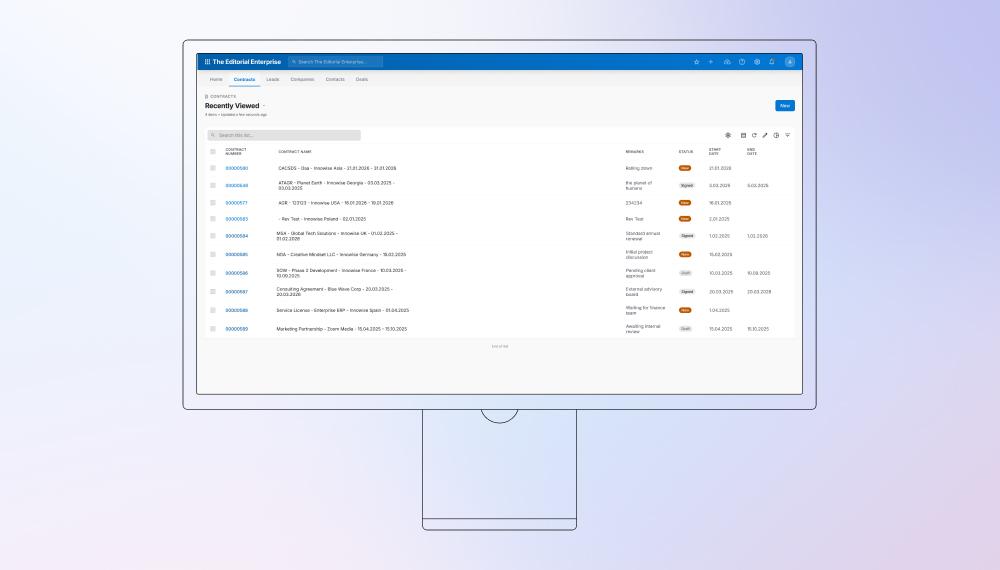
We implemented Salesforce to optimize our own internal business processes, not only migrating data but completely reshaping workflows to align with Salesforce’s best practices.

4+

scattered systems replaced by 1 Salesforce ecosystem

300+

Specialists onboarded to a standardized business process

salesforce-for-innowise image
Branche Technik & IT
Angestellte 3,500+ Mitarbeiter
Region Europa
Leistungen Salesforce implementation Data migration & integration
Kunde seit 2007

Kundenübersicht

Artikel mit KI zusammenfassen

Innowise is a global IT outsourcing company that specializes in software development, IT outstaffing, and consulting. It offers expertise in cloud solutions, big data, AI, and automation, providing innovative solutions to clients across industries.

Herausforderung

Innowise was using a mix of HubSpot CRM, Jira, spreadsheets, and documents to manage data. As the company grew quickly, this approach led to chaotic processes, with information scattered across systems and often duplicated. We needed a unified solution to centralize data, standardize processes, and provide secure access across teams.

  • Disorganized internal systems with data stored in HubSpot, Jira, spreadsheets, and documents.
  • Lack of standardization in business processes, leading to inefficiencies and duplication of information.
  • Need to unify data and processes in one centralized system for easier management and secure access.
  • Difficulty in managing and automating workflows across multiple departments.
  • Resistance to change from teams accustomed to legacy systems.
  • Balancing the cost of a custom-built solution versus an off-the-shelf system like Salesforce.
  • Datenmigration from multiple systems (HubSpot, Jira, spreadsheets) while maintaining data integrity.
  • Sicherstellung smooth integration of Salesforce with other internal tools like HRM, Jira, und time-tracking systems.
  • Customizing Salesforce to fit Innowise's unique business processes without building an entirely custom system.
  • Managing the complexity of workflow automation within Salesforce to address unique business needs.
  • Designing a system that could scale as the company grew, while being flexible enough to accommodate future changes.

Lösung

To solve these challenges, Innowise delivered the solution in stages.

Initial analysis and planning

At the outset, the company was using a mix of HubSpot CRM, Jira, spreadsheets, sowie documents to store data. Processes were chaotic, and information was often duplicated across these systems, leading to inefficiencies. The company’s rapid growth required a unified system that could centralize information, ensure secure access, and streamline processes. During this phase, we not only identified business objectives and key requirements but also focused on system transformation und eine data migration strategy. The goal was to transition from legacy tools to Salesforce without losing valuable data or disrupting business continuity. This included:

  • Assessing legacy systems to determine what data needed to be migrated, cleaned, or archived.
  • Creating a data migration plan using Salesforce’s Data Loader and custom scripts to ensure data integrity.
  • Setting transformation goals to align our workflows with Salesforce’s best practices for automation and efficiency.
  • Balancing customization and cost by choosing between custom solutions and Salesforce’s out-of-the-box features to maximize value.

Salesforce platform setup

Once we had a clear understanding of our needs, we began developing the system and implementing Salesforce with our internal team. After identifying business objectives and requirements, we started configuring the platform using Salesforce’s standard components to meet Innowise’s specific needs. This included setting up Sales Cloud und Experience Cloud modules to support various business functions. We also configured user roles, permissions, sowie data access levels to ensure security and compliance across the organization. Key activities included:

  • Configuring key Salesforce modules like Sales Cloud.
  • Defining user roles and permissions to ensure data security and compliance.

Datenmigration und -integration

The migration of data from multiple systems posed a significant challenge, as data was scattered across HubSpot, Jira, and various documents. Our priority was to migrate the most relevant data into Salesforce while ensuring no data was lost or corrupted. We tackled this challenge by:

  • Cleaning up legacy data, removing duplicates, and ensuring consistency across platforms before migration.
  • Automating the data migration process using Salesforce Data Loader und custom apex scripts to streamline the transfer.
  • Integrating Salesforce with other internal tools like HRM, Jira, und Zeiterfassung to ensure seamless data flow.

Automatisierung von Geschäftsprozessen

One of the primary goals of the implementation was to automate key business processes. By doing so, we could reduce manual effort, improve accuracy, and ensure that tasks were completed in a timely manner. Our team worked closely with department heads to identify repetitive, time-consuming tasks that could be automated. We then developed Salesforce workflows, Apex triggers, and Salesforce Flow automation to handle most common tasks.  Key actions included:

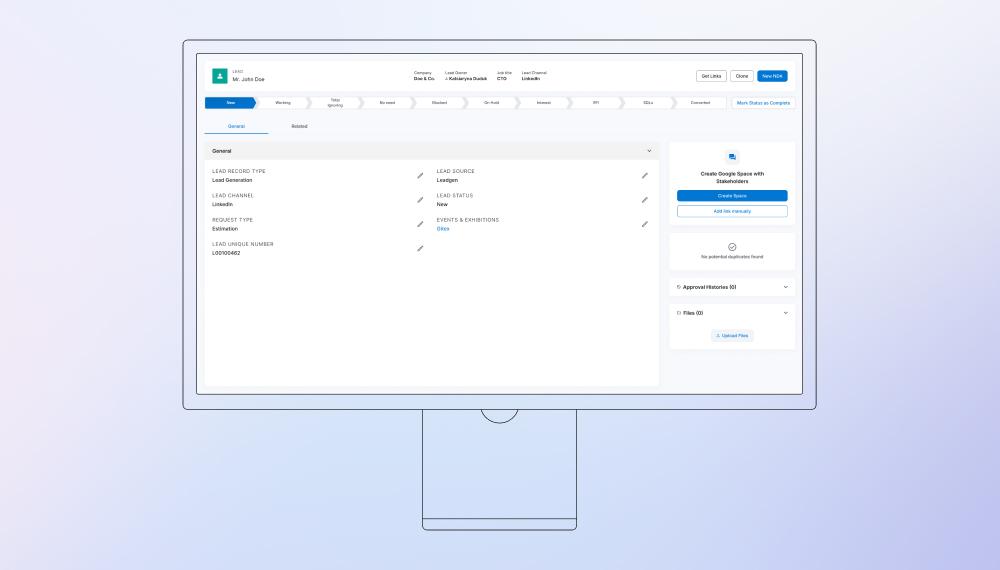
  • Automating lead capture from multiple sources (manual input and website integration), along with lead assignment across Sales Managers, and automated follow-ups, scoring, qualification, and validation to ensure complete and high-quality data collection.
  • Implementing a custom lead conversion process into Companies, Contacts, and Deals.
  • Automating notifications and collaboration flows, including integrations with messaging tools for real-time updates.
  • Streamlining deal management through automated triggers at key stage transitions, ensuring all stakeholders are consistently informed.
  • Automating project creation and delivery tracking triggered upon deal closure.
  • Implementing approval workflows for request processing, document validation, worked hours verification, and other internal processes.
  • Automating time tracking validation and approval flowsto improve accuracy and control.
  • Enabling automated data flowbetween delivery (projects, hours) and financial processes (invoicing).
  • Customizing the invoicing process to meet government system requirements and integrating it with external services.
  • Setting up automated alerts, reminders, and status notifications across the system.

Customization of Salesforce modules

Salesforce’s out-of-the-box modules didn’t fully fit Innowise’s specific needs, so we customized the platform to make it work for us. Our Salesforce developers really dug into the system, tailoring it to match our unique business processes. We focused on making sure we got the best value for our investment, finding cost-effective solutions wherever we could. In cases where our processes didn’t quite match what Salesforce offered, we added custom components and workflows to fill the gap. Here’s how we approached it:

  • Cost-effective customization: We made sure to balance the cost of custom features with the business value they’d bring, avoiding overcomplicated solutions when simpler ones worked.
  • Custom deal closure workflow: We built a special process for closing deals in Closed Won/Closed Lost stages. This helped us understand why we were losing deals and made sure we collected the right information when starting new projects.
  • Validation rules: To make sure everyone entered the right data, we set up custom validations that ensured key info was collected, especially at the start of a project.
  • Custom objects and fields: We created objects and fields that suited our unique needs, like resource planning, sales tracking, sowie client engagement.
  • Custom page layouts and reports: We designed layouts and reports that made it easy to track progress and stay on top of things.
  • Custom dashboards: We built dashboards to give our leadership real-time insights into business performance, so they could make informed decisions quickly.

User training and adoption

Training was a critical component to ensure smooth user adoption. We made sure employees were well-prepared to use Salesforce effectively, which was key to realizing the full benefits of the system. Complementing the training efforts, we focused on:

  • Hands-on workshops for different teams, from sales to project management, to ensure understanding of their respective Salesforce features.
  • Creating comprehensive user guides and resources, including a Salesforce knowledge base to support ongoing learning.
  • Certifications: One of the testers completed the Salesforce Administrator certification, later becoming the Support Manager, ensuring continuous support for over 300 users.

Post-implementation support and optimization

After Salesforce was successfully implemented, our work didn’t stop. We continued to monitor the platform’s performance and gather feedback from users to make continuous improvements. Our support team provided ongoing system maintenance, resolving any technical issues and ensuring that the platform remained optimized. This phase included:

  • Regularly gathering feedback from users to identify pain points and make system improvements.
  • Expanding integrations with new tools such as marketing platforms, payroll systems, sowie government reporting tools (KSeF).
  • Fine-tuning custom reports and dashboards to improve data accuracy and decision-making processes.
Quote icon

This project was not just about moving data into Salesforce. We used it to bring scattered processes together, improve data quality, and build one system that supports the business from the first client request to project delivery.

Igor Medyuha
Igor Medyuha Head of Automatizationa

Technologien

Salesforce platform

Sales Cloud, Experience Cloud, Salesforce Flow, Apex, Lightning Aura, Lightning Web Components (LWC), Einstein Activity Capture, Platform Events

Integrationen

HRM, Jira, Google Workspace, Marketing Tools (Instantly), HubSpot, KSeF, Time Tracking Systems, Internal Bots/Staffing Tools, Payroll Systems, Lead Generation Research Systems

Automation & workflow

Apex Triggers, Salesforce Flow

Custom development & reporting

Apex, Lightning Web Components (LWC), Lightning Aura, Reports & Dashboards, Custom Report Types

Datenintegration und -migration

REST API, Bulk API, Custom Scripts (Apex)

Version control & deployment

Bitbucket, Bitbucket pipelines

Team

The project started with a compact internal team: a project manager / business analyst and a developer. As the system expanded across more business functions and user groups, we scaled the team to support ongoing development, testing, analytics, and user support.

Icon 1
Technischer Leiter
Icon 5
Entwickler
Icon 3
Business-Analysten
Icon 1
Projektmanager
Icon 2
QA-Spezialisten
Icon 1
Salesforce Certified Administrator
das Innowise-Team

Ergebnisse

Projektdauer
August 2022 - ongoing

After implementing Salesforce, things ran much smoother at Innowise. With everything in one place and key processes automated, we saw some real improvements in efficiency, accuracy, and team collaboration.

  • Reduced manual task time: Automation eliminated repetitive tasks, enabling teams to focus on more strategic work.
  • Improved data accuracy: Migrating data into Salesforce minimized inconsistencies and errors, making the data more reliable.
  • Enhanced reporting: Clean data allowed us to build real-time reports and dashboards, saving time on report generation and providing better insights.
  • End-to-end project tracking: The entire process (from client request to project completion) now resides in one place, improving overall visibility and reducing data input errors.
  • Actionable analytics: We now have the ability to collect and analyze key metrics, such as: number of client requests from all channels and number of deals in progress, conversion und contracts signed.

All of this data is used by relevant departments (sales, legal, finance, resource management) for informed decision-making.

Inhaltsübersicht

Unify your systems with Salesforce

    Kontaktformular

    Termin vereinbaren oder füllen Sie das Formular aus. Wir kontaktieren Sie, sobald wir Ihre Anfrage bearbeitet haben.

    Sprachnachricht senden
    Datei beifügen
    Datei hochladen

    Sie können 1 Datei mit bis zu 2 MB anhängen. Gültige Dateiformate: pdf, jpg, jpeg, png.

    Mit dem Klicken auf Senden erklären Sie sich damit einverstanden, dass Innowise Ihre personenbezogenen Daten gemäß unserer Datenschutzerklärung verarbeitet, um Ihnen relevante Informationen bereitzustellen. Mit Angabe Ihrer Telefonnummer stimmen Sie zu, dass wir Sie per Sprachanruf, SMS oder Messaging-Apps kontaktieren. Es können Gebühren für Anrufe, Nachrichten und Datenübertragung anfallen.

    Sie können uns auch kontaktieren
    bis hin zu contact@innowise.com
    Wie geht es weiter?
    1

    Sobald wir Ihre Anfrage erhalten und geprüft haben, melden wir uns bei Ihnen, klären erste Fragen und unterzeichnen bei Bedarf ein NDA, um die Vertraulichkeit zu gewährleisten.

    2

    Nach genauer Prüfung Ihrer Anforderungen, Bedürfnisse und Erwartungen wird unser Team einen Projektvorschlag mit Angaben zu Arbeitsumfang, Teamgröße, Zeitaufwand und Kosten erstellen.

    3

    Wir vereinbaren einen Termin, um das Angebot gemeinsam zu besprechen und alle Details festzulegen.

    4

    Abschließend unterzeichnen wir den Vertrag und starten umgehend mit der Umsetzung Ihres Projekts.

    arrow