AI in CRM: use cases, benefits, and implementation

Updated: Oct 15, 2026 23 min read
Head of CRM Practice
Verified expert
Every article at Innowise is created by authors with real-world experience. They understand the topic beyond theory and bring insight from real projects.
5+ years of experience
Verified expert
5+ years of experience
Raman leads CRM and Microsoft Dynamics 365 projects across insurance, automotive, and manufacturing. He specializes in CRM consulting, data architecture, delivery management, and the development of ERP and CRM expertise.
Expertise
CRM Microsoft Dynamics Delivery management
Let's talk

Key takeaways

  • AI in CRM helps teams score leads, draft content, answer questions, spot account risks, and keep records current. Different tasks need different types of AI.
  • Start with one recurring problem and a measurable outcome. A useful first project might reduce case wrap-up time or improve the order in which reps contact leads.
  • Better output depends on clear records, current knowledge, and controlled access. Connecting more data does not automatically produce better answers.
  • Published results need context. A vendor’s customer story, a sales survey, and an academic study provide different kinds of evidence.
  • Judge the investment by business results after review time, software charges, and support costs. More AI activity is not a business result.
Summarize article with AI

Your CRM can do a LOT. Pick out leads worth calling first, catch signs that a customer might leave, turn a messy call transcript into a follow-up you can review and send. All thanks to AI. 

So, yes, this article is an ode to leveraging AI in CRM systems. You’ll learn what it can take off your team’s plate, where it earns its keep, and how to get it working in your business.

I promise it’ll be an interesting read.

A few market stats

81% of sales teams were testing or using AI
70% of reps’ time went to non-selling work
88% of organizations use AI in at least one business function

AI adoption is moving fast

Make sure your CRM can keep up

AI use cases in CRM

Before we get into the use cases, it’s worth separating three things that often get lumped together.

Machine learning looks for patterns in past data to predict what might happen next, such as whether a lead will convert or a customer might churn.

Generative AI is the part that creates things: drafts emails, summarizes calls, answers questions, and turns messy information into something easier to use.

AI agents go a step further. They can connect to other tools and actually carry out tasks, as long as they have permission to do so.

There’s some overlap between the three, but they’re not the same thing.

A model that can write a great sales email isn’t automatically good at forecasting next quarter’s revenue. And if all you need is to assign leads by postcode, a simple rule will probably do the job just fine. No AI required. Now, what problems does AI solve in CRM systems?

  • 1. Lead scoring and qualification

Not every lead deserves the same urgency. AI in CRM can rank prospects using company size, source, past interactions, and deal history, then surface the ones worth calling first. Just define “good lead” carefully: the one most likely to book a meeting may not be the one most likely to become a valuable customer.

  • 2. Sales forecasting and next-best actions

A slipping close date, a missing decision-maker, a deal gone quiet: small signals can say a lot. Artificial intelligence in CRM can use them to estimate what is likely to close and suggest the next move. Prediction and advice are different jobs, though, and neither guarantees the deal will move.

  • 3. Customer-specific marketing and recommendations

The same offer can land very differently depending on timing and context. Purchase history, service interactions, and product usage can help AI choose what to recommend and when. A click is nice, but extra revenue or margin is the stronger proof.

  • 4. Content and email generation

Blank pages waste time. Generative AI can turn CRM context into follow-ups, meeting recaps, campaign copy, and quick first drafts. Prices, dates, claims, and commitments should still come from approved records, not the model’s imagination.

  • 5. Customer service chatbots and AI agents

Answering a question is one thing; changing a customer record is another. Chatbots can handle routine questions, while agents may check orders, open cases, or request changes. The more they can touch, the tighter the permissions should be.

  • 6. Sentiment and conversation analysis

Calls and chats hide patterns that are easy to miss one conversation at a time. AI can surface recurring complaints, objections, and shifts in tone across hundreds of interactions. Treat tone scores with caution, though, because sarcasm, accents, translation, and poor audio can distort them.

  • 7. Customer churn prediction

By the time a customer says they are leaving, the useful window may already be gone. Churn models look for earlier signals such as falling usage, billing trouble, support issues, or disappearing contacts. One warning still does not tell you whether that customer can be persuaded to stay.

  • 8. CRM data entry, cleansing, and enrichment

A lot of CRM work is repetitive rather than complicated. AI can pull action items from notes, suggest fields, flag duplicates, and enrich records, with a person checking the result. Facts and model guesses should stay clearly separated, while exact rules belong in regular software.

  • 9. Workflow automation

One customer email can contain a complaint, an order number, and three separate requests. AI can unpack the mess, while standard automation handles routing, ownership, and deadlines. That division keeps language flexible and business rules predictable.

  • 10. Employee copilots and knowledge assistance

“What changed on this account?” should not require opening ten records. A copilot can pull the answer from approved CRM data and company knowledge in seconds. Access rules still apply, and numbers should come from defined queries rather than a confident summary.

Your use case doesn’t need to fit a template

Innowise can shape the AI around the way your CRM, data, and teams already work.

Benefits of AI in CRM systems

AI in CRM should change something you can point to: less admin, faster service, sharper prioritization, cleaner records, stronger follow-up.

If the team ignores the output, spends too long fixing it, or cannot show what improved, the benefit is mostly theoretical. The table below ties each promise to a visible change in daily work.

Benefits of AI in CRMWhat changes in daily workEvidence to collect
Higher sales productivityReps spend less time preparing briefs and recording follow-upsSelling time, follow-up completion, and wins per rep
Better customer insightsTeams can review recurring needs across more conversationsValidated themes and actions taken from them
More relevant customer interactionsMessages reflect the account’s products, needs, and current issuesConversion lift, complaints, and unsubscribes
Faster customer serviceStaff find answers sooner; supported requests need fewer stepsResolution time, repeat contacts, and customer satisfaction
Better forecasting and decisionsTeams see deal risks and outcome estimates earlierForecast error and useful changes to plans
Less manual CRM workDraft notes and field suggestions reduce typingNet minutes saved after checking and correction
Higher data qualityRecords become more complete, current, and traceableSampled accuracy, duplicate rate, and record freshness

There’s some real evidence behind the productivity claims. A 2025 study of 5,172 customer-support agents found that access to a generative AI assistant helped them resolve 15% more issues per hour on average. The biggest gains went to less experienced workers; the most experienced saw little improvement and, in some cases, a slight drop in quality. One company, though, so don’t treat 15% as a universal CRM benchmark.

Sales data is murkier. Salesforce reported revenue growth among 83% of sales teams using AI, compared with 66% of teams without it. Interesting signal, yes. Proof that AI caused the difference, no.

Saving time is the easy part to demonstrate. What the business does with that time is where the stronger case begins.

Popular CRM platforms with AI capabilities

The major CRM platforms are taking different routes into AI. Here’s the short version:

  • Creatio
  • Salesforce
  • Microsoft Dynamics 365
  • Odoo
  • SAP
  • HubSpot
  • Zoho

I put Creatio first because it positions itself as an AI-native CRM, with AI agents built into the platform and the option to create custom agents with no-code tools.

Key AI features

  • Role-based AI agents
  • Predictive insights and recommendations
  • Content generation
  • AI-driven sales and service workflows

Pricing

The core platform starts at $40/user/month, with Sales Creatio from $15/user/month on top.

Salesforce combines predictive AI, generative tools, and Agentforce agents across its CRM ecosystem.

Key AI features

Pricing

Sales Cloud starts at $25/user/month; Agentforce can be added from $125/user/month or priced by usage, including $500 per 100,000 Flex Credits.

Dynamics 365 brings Copilot and sales agents directly into CRM workflows and the wider Microsoft 365 environment.

Key AI features

  • Opportunity and account summaries
  • Email and meeting assistance
  • Natural-language insights and recommended actions
  • Prebuilt sales agents

Pricing

Sales Enterprise costs $105/user/month and includes Copilot capabilities; Sales Premium is $150/user/month with 1,000 Copilot Credits included.

Odoo takes a lighter, integrated approach, adding AI alongside its CRM and broader suite of business apps.

Key AI features

Pricing

Standard starts at $24.90/user/month billed annually; Custom starts at $49/user/month. Some in-app services require extra credits.

SAP Sales Cloud pairs Joule with AI-assisted selling, customer insights, and automation across the SAP ecosystem.

Key AI features

Pricing

SAP Sales Cloud pricing is contract- and market-dependent; SAP lists its broader CRM packages as price on request. Joule Base is included in eligible packages.

HubSpot spreads AI across prospecting, service, content, account research, and CRM data work.

Key AI features

  • Prospecting and customer agents
  • Account research and conversational intelligence
  • AI-assisted content and outreach
  • Data Agent and smart CRM enrichment

Pricing

Sales Hub list pricing starts at $20/user/month; paid plans include HubSpot Credits, with extra credits from $9 per 1,000 on annual billing.

Zoho’s Zia covers predictive sales intelligence, generative assistance, and AI agents across the CRM.

Key AI features

  • Lead, deal, and churn predictions
  • Email summaries and sentiment analysis
  • Zia recommendations and insights
  • AI agents for sales tasks

Pricing

Zoho CRM starts at $14/user/month annually; Professional is $23, Enterprise $40, and Ultimate $52. More advanced Zia capabilities appear in the higher tiers.

By the way, we’re not watching these platforms from the sidelines. Innowise works with CRM systems across this list and beyond, from implementation and customization to integrations and AI.

One useful buying rule: give every shortlisted platform the same tasks, data, and difficult cases. Compare the quality of the result, correction time, permissions, and cost per completed task, not the length of the feature list.

Here are a few real-world examples of artificial intelligence in CRM and of how differently these tools can be used:

  • ISSA + HubSpot: an early support-agent rollout underperformed, so the team rebuilt its help content before relaunching. The reported result was a drop in first-response time from 7.5 hours to 4 hours and around 4,000 conversations resolved per month. The lesson is simple: weak knowledge in, weak answers out.
  • Heathrow + Salesforce: Agentforce supports passenger FAQs and wayfinding using service content, maps, APIs, and live flight data. It’s a good example of why static guidance and live operational information should come from different sources.
  • Business software support: in the 2025 Generative AI at Work study, support agents received real-time AI suggestions but stayed in control of the conversation. That’s a useful reminder that AI does not have to face the customer directly to create value.

These cases are useful signals, not clean AI-only benchmarks. The surrounding data, workflows, and human processes matter just as much as the model.

Whether you stay with your current CRM or switch platforms

Innowise can help you choose, customize, integrate, and extend the right setup

Challenges of AI adoption in CRM and how to address them

The easiest way to break this down is by problem and response: 

ChallengeWhat can go wrongWhat to do
Poor or fragmented dataDuplicate records, stale contacts, missing outcomes, and inconsistent stages distort scores and summaries.Clean the data needed for the specific use case, define a source of truth, and assign ownership. Skip the endless “clean everything” project.
Data privacy and securityCRM data may include contracts, private messages, and sensitive customer information. Agents can also be manipulated by malicious instructions embedded in emails or documents.Restrict what the model can access and change, review retention and processing rules, test misuse scenarios, and keep an incident process.
Bias and inaccurate outputModels can repeat historical bias, miss important context, or produce confident but wrong answers.Test across customer groups, languages, and difficult cases. Keep source material visible and give the system permission to say “I don’t know.”
Integration complexityThe AI may produce the right answer while the workflow fails because of stale data, bad mappings, or rejected updates.Test the full path from source to action, including errors, retries, recovery, and a manual fallback.
Implementation costsLicenses are only part of the bill. Data work, integrations, testing, training, monitoring, and correction time all add up.Model costs at normal and peak usage, track cost per accepted result, and check whether a native feature or simple rule can solve the problem first.
Excessive automationRemoving every human step makes unusual or high-stakes cases harder to recover.Set approval levels by consequence. Drafting a reply and changing contract terms should never have the same freedom.
Low employee adoptionPeople will ignore AI that creates more checking, feels unreliable, or raises concerns about how their work is monitored.Involve users early, let them reject output, show where time is saved, and measure repeated use rather than training attendance.
Weak governanceNobody knows who owns the system, what it may access, or when it should be stopped.Name business and technical owners, record approved data and actions, keep review manageable, and re-test after meaningful changes.

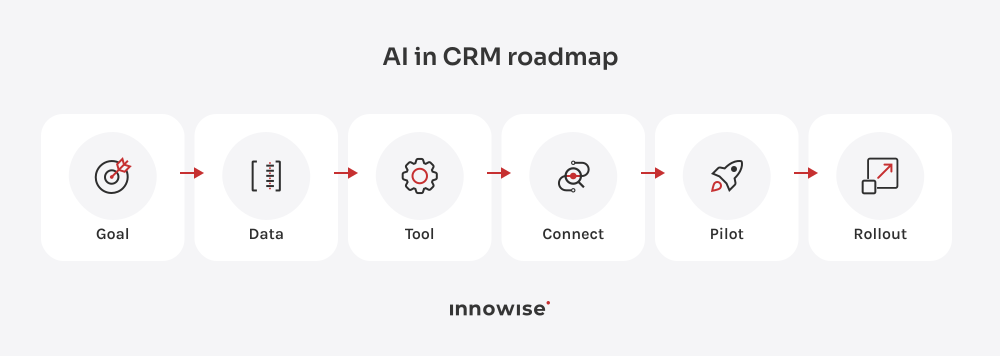
How to use AI in CRM: implementation roadmap

This is the sequence we at Innowise recommend for a first deployment. The point is to make each stage produce something the next stage can use.

1. Define business goals and priority use cases

Choose one workflow with sufficient volume, a clear owner, and an observable result. Write the problem in business terms: “Reps spend too long preparing account reviews” is specific enough to investigate.

Record the baseline and agree on success criteria. For example, require lower preparation time without an increase in material omissions. Set the target from your own workload and risk tolerance.

2. Assess CRM and data readiness

Inspect fields, history, access, and source systems. For AI and ML in CRM, readiness depends on the job: a scoring model needs usable outcome history; a knowledge assistant needs current documents and sound permissions.

Produce a short gap list with owners. If the data cannot support the desired decision, narrow the scope before buying or building.

3. Choose native CRM AI, third-party tools, or custom AI

RouteWhen to consider itWhat to check
Native CRM AIThe task fits an existing feature and most required data is already accessibleEdition limits, usage charges, permissions, and test results
Third-party toolA specialist function is needed across one or more systemsData duplication, identity controls, connector quality, and exit options
Custom AIThe workflow, data, or decision logic is not adequately served by existing productsBuild cost, ongoing ownership, evaluation, and support capacity

These routes can coexist. A native summary tool and a custom churn model may be the right combination. Decide task by task.

4. Prepare and connect data sources

Clean the required fields, resolve account identities, remove obsolete guidance, and connect approved sources. Retain timestamps so users can see whether an answer depends on stale information.

For models trained on historical outcomes, separate training data from later evaluation data. For retrieval systems, test whether the right passages appear before judging the model’s final answer.

5. Integrate AI into CRM workflows

Decide where the result appears, who acts on it, and how corrections are saved. Put a score in the lead queue or a suggested summary in the case screen where the user already works.

Define which actions require approval and what happens after a timeout or failed write. Include a way to reverse supported changes and disable the feature without disabling the CRM.

6. Run a PoC or pilot

A proof of concept checks whether the approach can work. A pilot checks whether it helps people under working conditions. Do not treat a successful demo as evidence for both.

Begin with historical evaluation or a read-only run. Then involve a limited user group with representative tasks. Include difficult records and busy periods, not only clean examples selected for a presentation.

7. Test outputs, security, and governance

Check factual accuracy, source support, access restrictions, attempted instruction attacks, failed tools, and handoffs. For scoring, evaluate errors and calibration: do groups given similar probabilities produce roughly those outcomes?

Use written release criteria. A critical permission failure should block rollout even if the average answer quality looks good. Compare against the existing process as well as against an ideal answer.

8. Train users and roll out the solution

Teach the actual workflow: how to inspect sources, correct output, reject a suggestion, and report a problem. Explain what the feature can access and what it is permitted to change.

Expand in stages. Give managers enough information to distinguish lack of training from a tool that is simply not useful for a particular role.

9. Monitor performance and expand successful use cases

Track quality, business outcomes, adoption, and cost together. Review a sample of accepted results as well as rejected ones; users can approve a wrong answer.

Expand after the initial use case meets its targets under normal workload. Reuse proven connectors and review processes, but assess each new use case on its own consequences.

How to measure AI CRM ROI

Start measuring before implementation. Compare like-for-like customer groups, case types, and sales periods. Where practical, use a control group or stagger rollout across comparable teams.

Otherwise, a seasonal increase in demand or a change in lead sources can look like an AI benefit. Record those changes alongside the results.

KPIWhat to measure before and afterWhat can mislead you
Conversion rateWins divided by eligible leads or opportunities over a fixed periodChanging the denominator or lead mix
Lead qualification accuracyPrecision among selected leads and the share of good leads capturedReporting accuracy when positive outcomes are rare
Sales cycle lengthMedian days from a defined entry stage to closeExcluding stalled opportunities from the review
Forecast accuracyAbsolute error and bias at the same forecast horizonTesting with information recorded after the forecast date
Churn and retentionCustomer and revenue retention for comparable cohortsDifferent renewal schedules or discounting
Response and resolution timeFirst useful response, full resolution, and repeat contactsCounting an acknowledgment as a useful reply
Employee hours savedNet time saved after checking, edits, and exceptionsCounting draft generation time alone
Cost per customer interactionSoftware, AI usage, and labor cost over consistent interaction typesIgnoring transfers and repeat contacts
User adoptionEligible users completing eligible tasks with the featureCounting logins or one-time trials
Upsell and cross-sell revenueAdditional revenue and contribution margin versus a comparison groupCrediting AI for purchases that would happen anyway

Also track a small set of quality limits: material error rate, customer satisfaction, complaints, and unauthorized actions. A faster process that breaches those limits needs review.

For the financial side:

ROI = (realized financial benefit − total AI CRM cost) ÷ total AI CRM cost × 100%

 Count the full cost: software, AI usage, integration, data work, training, testing, and support.

And be strict with the word “saved.” Three hours freed up is not automatically three hours of cash savings. If that time is simply available for other work, call it capacity gained. That’s still valuable, just a different claim.

CRM solutions we’ve built for clients

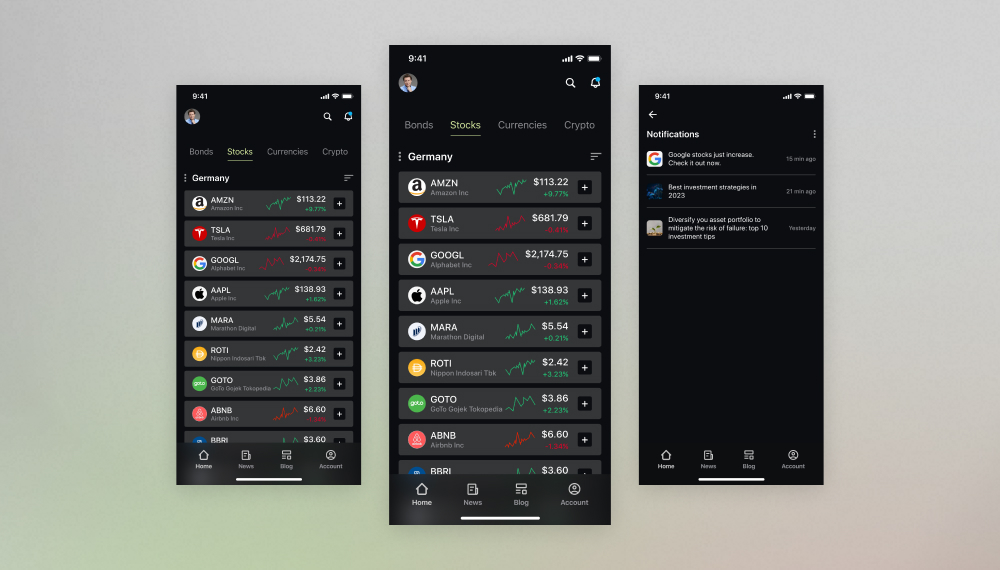
Omnichannel investment platform development
We built a feature-rich financial application to govern bank deposits, stock investments, asset portfolios, pension savings, and more under one roof.
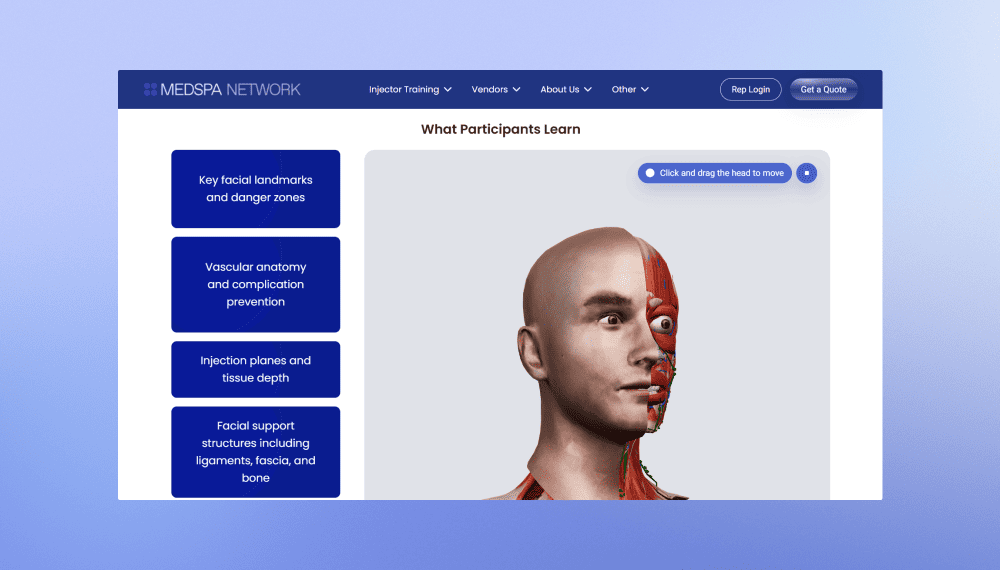
MedSpa Network website redesign and rebuild
2 months from kickoff to launch
3-5 leads per week up from 1 per month
View case study
Client review
View case study
Client review logo. Client review
MedSpa Network website redesign and rebuild.
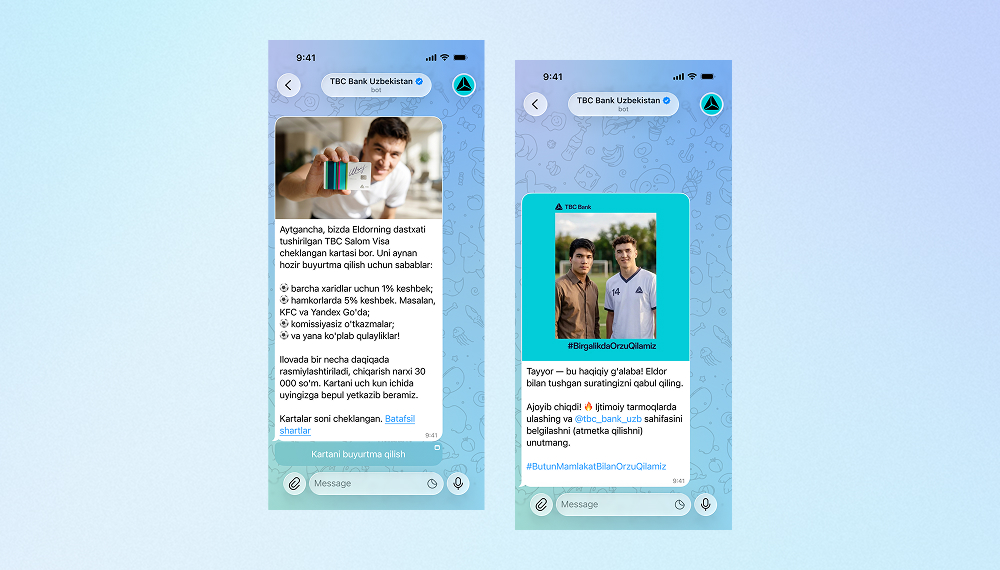
AI bot for TBC Bank marketing campaign
Innowise built a bilingual Telegram bot that generates AI selfies with TBC Bank's football-star brand ambassador.
3,000 users engaged
2 languages supported
View case study
Client review
View case study
Client review logo. Client review
AI Telegram bot..
Defining the product strategy for Bitlendex’s bitcoin lending platform
Innowise conducted a discovery phase for Bitlendex, helping the client transform an early-stage product concept into a validated business model and clearly defined MVP.
1 month for a full discovery phase
Financial advisory system for Bonnfinanz
Innowise helped Bonnfinanz to build a web-based advisory and administration system that supports mobile working and direct interaction with the client.
EV charging platform with flexible billing
Innowise helped modernize SMART/LAB’s e-mobility platform by enhancing its billing, payment, transaction management, and reporting capabilities.
>50% faster billing and payment processing
FinXP’s cloud-native DevOps transformation
Innowise helped FinXP modernize its financial services infrastructure by migrating legacy PHP-based APIs and applications to a cloud-native architecture.
11 apps moved to Azure App Service
100% Infrastructure as Code
Technical SEO for e-commerce platform
Innowise addressed critical technical SEO and performance issues across Officine 08’s e-commerce platform.
<500 ms server response time
5 months to complete the project
View case study
Client review
View case study
Client review logo. Client review
Technical SEO for e-commerce platform.
01 / 01
Close popup icon

The future of AI in CRM

The future of AI in CRM is likely to involve more action-taking software, but the pace will vary by workflow. McKinsey’s 2025 survey reported that 23% of respondents’ organizations were expanding an agentic AI system somewhere in the business, with another 39% experimenting. That is a useful signal of direction, not proof that autonomous CRM operations are already routine. 

I expect five developments to matter for buyers:

  • Agents will take on bounded sequences of work. An agent might collect missing case details, check eligibility, and prepare a resolution. The sensible boundary will depend on the cost of getting an action wrong and the ability to undo it.
  • More workflows will run with limited intervention. Routine cases with clear policy are better candidates than negotiations or disputes. Teams will need to measure completed tasks across the whole sequence, since several individually good steps can still produce a failed outcome.
  • Customer context will update closer to the moment of contact. A new support complaint or product event could change which message is appropriate. This depends on data freshness and permission to use that data, not just model quality.
  • Conversation will become another way to use CRM. Asking for an account brief is convenient. Reviewing fifty opportunities may still be easier in a table. We expect both interfaces to remain useful.
  • Governance will become part of day-to-day operations. Version records, action logs, spending controls, evaluation, and review queues will matter as much as prompt design.

My bet is that buyers will become less impressed by an agent that can do twenty things in a demo. They will ask whether it can finish one important task correctly, repeatedly, and at an acceptable cost.

How Innowise can help with AI in CRM

You do not need to arrive with a finished AI strategy. Bring us the workflow that is slow, messy, expensive, or frustrating, and we can work backward from there.Depending on the problem, that may mean AI consulting, CRM consulting, custom AI development, data engineering, integration work, or modernizing an older CRM that was never built for this kind of setup. The point is not to bolt AI onto everything. It is to figure out where it earns its place, connect it to the right data and systems, and make sure the result survives real use.Start with one workflow, the systems around it, and the outcome you want to improve. That is usually enough to define a sensible first pilot.

FAQ

AI helps users interpret customer information, estimate outcomes, produce drafts, and carry out permitted tasks. The CRM remains the system for managing customer records and processes. The useful role of AI in CRM is to make those records easier to act on while retaining clear ownership of decisions.

It can turn a call into a draft summary and follow-up task, sort an incoming service request, or prepare an account brief before a meeting. Improvements should show up in accepted output, less rework, and better outcomes. Measure the complete task, including checks and handoffs.

Common applications include lead scoring, forecasting, next-best actions, customer-specific recommendations, email drafting, service agents, conversation analysis, churn prediction, record maintenance, and employee knowledge assistance. Start with the application that addresses a frequent problem and has usable source data.

Benefits can include less administrative work, quicker service, more relevant communication, clearer account context, and better sales planning. They depend on data quality, workflow design, and adoption. Treat published performance figures as evidence to investigate, then test the result in your own operation.

The main drawbacks are incorrect output, biased scores, data exposure, usage costs, integration work, and extra review effort. Too much dependence can also make unusual cases harder to handle. Narrow permissions, quality checks, human escalation, and a manual fallback reduce these risks.

SAP, Odoo, Microsoft Dynamics 365, Salesforce, Creatio, HubSpot, and Zoho all offer AI capabilities, as described in the platform section above. Features differ by product, edition, version, region, and usage allowance. Confirm the exact functions in a written proposal and test them with your records.

AI can perform parts of their work, including summaries, routine questions, and record updates. That does not establish that it can handle an entire role. Negotiation, difficult customer situations, accountability, and relationship judgment still require people. Assess tasks individually before making staffing assumptions.

There is no useful universal price. A native feature pilot and a custom system connected to several applications have different cost structures. Request separate figures for setup, data preparation, integration, subscriptions, usage, testing, training, and support. Model expected and peak volume; the ROI example above is arithmetic, not a quote.

Security depends on the deployment. Check record permissions, provider terms, data handling, tool access, logs, and responses to attempted misuse. Limit what an agent can change and test access boundaries before launch. A vendor security claim does not establish that your particular configuration is safe.

A narrow native-feature pilot can be planned in weeks when data, access, and owners are ready. A custom deployment across several systems may require months, especially if cleanup or migration comes first. These are broad planning ranges, not delivery promises. Estimate the schedule after assessing scope, and distinguish feature launch from proving revenue or retention impact over a full business cycle.

Show all

Table of contents

Give your CRM some AI

    Contact us

    Book a call or fill out the form below and we’ll get back to you once we’ve processed your request.

    Send us a voice message
    Attach documents
    Upload file

    You can attach 1 file up to 2MB. Valid file formats: pdf, jpg, jpeg, png.

    By clicking Send, you consent to Innowise processing your personal data per our Privacy Policy to provide you with relevant information. By submitting your phone number, you agree that we may contact you via voice calls, SMS, and messaging apps. Calling, message, and data rates may apply.

    You can also send us your request
    to contact@innowise.com
    What happens next?
    1

    Once we’ve received and processed your request, we’ll get back to you to detail your project needs and sign an NDA to ensure confidentiality.

    2

    After examining your wants, needs, and expectations, our team will devise a project proposal with the scope of work, team size, time, and cost estimates.

    3

    We’ll arrange a meeting with you to discuss the offer and nail down the details.

    4

    Finally, we’ll sign a contract and start working on your project right away.

    More services we cover

    arrow