Enterprise mobile app development: strategy, architecture, and process

11 Sep , 2026 16 min read
Head of Mobile Development
Verified expert
Every article at Innowise is created by authors with real-world experience. They understand the topic beyond theory and bring insight from real projects.
9+ years
Verified expert
9+ years
Pavel drives the delivery of high-performance mobile apps across iOS and Android. With a background in native engineering, he ensures that cross-platform and native products scale smoothly and provide a flawless user experience.
Expertise
Cross-platform apps iOS & Android Product delivery
Let's talk

Key takeaways

  • Enterprise mobile app development is designing, building, and supporting mobile apps. They’re integrated with core systems, such as ERP, CRM, and IAM, to support internal business operations.
  • Organizations must decide whether to build their own solution, purchase an off-the-shelf product, extend an existing platform, or modernize legacy software, based on their unique process and integration needs.
  • The long-term implementation and value of an application depend on full alignment between business objectives and the underlying infrastructure (ERP, CRM, IAM).
  • The vendor must treat OWASP MASVS as the benchmark standard for mobile application security controls: data storage, cryptography, authentication, network, platform, code, fault tolerance, and confidentiality.
Summarize article with AI

According to a Clutch survey, 86% of employees use mobile apps to get work done. 67% reported increased efficiency. We see the demand. Needing a mobile app doesn’t mean being okay with any mobile app. Your employees are likely to want an app that works with all the systems, roles, and approval processes in place. Satisfying this need starts with mapping, and then comes coding.

An enterprise mobile app supports the business systems already running. It can read and write data through CRM or ERP systems, authenticate through the company’s existing identity provider, respect the roles and permissions assigned to each user, and operate inside whatever device management policy and operational environment it’s deployed into.

Enterprise mobile app development is a sequence of decisions, and the order matters. I’ll walk you through evaluating the need, choosing between building and buying, designing the architecture and integrations, securing the app, rolling it out, and running it afterwards.

What is enterprise mobile app development?

Enterprise mobile app development is designing, building, and maintaining mobile applications integrated with the company’s ERP, CRM, identity, and data platforms. Internal security and compliance policies regulate the apps. 

If consumer apps are built for the widest possible audience, enterprise apps are built for defined user groups with defined roles and defined data access. Let’s compare in more detail how these two categories differ:

Enterprise apps vs consumer apps

FactorEnterpriseConsumer
Primary usersEmployees, partners, or a company's own customers with defined rolesGeneral public, self-registered
DistributionPrivate app stores, MDM/EMM push, internal catalogsPublic app stores, such as App Store and Google Play
AuthenticationSSO, MFA, biometrics tied to corporate identityEmail/social login, optional MFA
Data sourceERP, CRM, internal APIs, legacy systemsPublic or app-specific backend
Security baselineOWASP MASVS controls, MDM policy, audit logging, GDPR/HIPAA/PCI DSS as applicableApp store review, a privacy policy
Offline behaviorOften required for field sites, warehouses, low-connectivity zonesOptional
Update rolloutStaged by device group, region, or business unitFast, usually automatic
Success metricTask completion time, error rate, adoption by roleDownloads, DAU/MAU, session length
OwnerIT, the business unit, and security jointlyProduct/ business team

When a business needs an enterprise mobile app

Do your enterprise workflows call for an app, or do you think about one because a competitor has it? Before we go comparing frameworks or vendors, I’d recommend answering a question: what specific operational gap does this app close? 

Let’s run a brief self-diagnostic test. I prepared a checklist. If two or more of these are true, an enterprise mobile app is worth scoping.

  • A process runs on paper, spreadsheets, or phone calls, and the data isn't re-entered into a core system immediately.
  • Field staff, drivers, or technicians need current data on inventory, work orders, and client records. To get it, they need a laptop, a VPN session, or a call to the office.
  • Approvals are done via email. You can measure the cost of the delay: a stalled sale, idle equipment, or a missed SLA.
  • Customers ask for self-service that the company's mobile website doesn't handle well.
  • IT is maintaining several point solutions like a forms tool, a messaging app, a legacy web app squeezed onto a phone screen. The combined maintenance cost exceeds what one app would take.
  • Paper and spreadsheets can't produce the data trail required by an audit or compliance review.

Common enterprise mobile app types and use cases

Our next step is matching your initiative to the work it has to support. By audience, enterprise apps split into employee-facing, customer-facing, partner-facing, and shared-device. By function, they fall into the six below. I will determine what features are necessary and where you should concentrate your development efforts so you can find yours.

  • Employee self-service
  • Field service
  • Sales and customer
  • Logistics and warehouse
  • Executive analytics
  • Customer and partner

Workforce and employee self-service

These apps replace and complement HR-system web portals. The workflows are simple, but the identity requirements aren't: every action has to trace back to the employee record in the HRIS.

Features

  • Schedules
  • Time reporting
  • Leave requests
  • Internal communications
  • Approvals
  • Expense management

Field service and asset operations

This category has the highest technical bar of the six. Since it is designed for field workers, who may not have a signal, it needs offline-first synchronization. So, changes are queued locally and reconciled when connectivity returns.

Features

  • Inspections
  • Work orders
  • Asset history
  • Barcode or QR scanning
  • Photo evidence
  • Digital signatures
  • Offline data capture

Sales and customer operations

This type of app is useful when a rep is pricing a deal or checking stock while standing in front of a customer, instead of promising a follow-up email.

Features

  • Mobile CRM
  • Product catalogs
  • Quoting
  • Account information
  • Order status
  • Customer onboarding

Logistics, warehouse, and delivery

Often runs on rugged handheld devices or shared tablets rather than personal phones. That’s why, for this category, device management and session handling matter as much as the app's own features.

Features

  • Inventory management
  • Picking
  • Route operations
  • Proof of delivery
  • Shipment tracking

Executive analytics and approvals

Low in transaction volume, high in visibility — a broken approval chain here gets noticed by leadership within a day, so reliability and clear escalation paths matter more than feature breadth.

Features

  • KPI dashboards
  • Alerts
  • Approval workflows
  • Exception handling

Customer and partner applications

This category is usually a choice for banking, insurance, healthcare, B2B ordering, distributor portals, and account management. The apps overlap with the customer-facing and partner-facing types described earlier. However, the end user isn't inside the company, so authentication, data exposure, and support load all carry different risks than an internal tool.

Features

  • Secure authentication & identity management
  • Personalized dashboards
  • Self-service management
  • Real-time order & status tracking
  • Integrated communication channels
  • Secure payment & transaction processing
  • Document & resource library
Workforce and employee self-service

These apps replace and complement HR-system web portals. The workflows are simple, but the identity requirements aren't: every action has to trace back to the employee record in the HRIS.

Features

  • Schedules
  • Time reporting
  • Leave requests
  • Internal communications
  • Approvals
  • Expense management
Field service and asset operations

This category has the highest technical bar of the six. Since it is designed for field workers, who may not have a signal, it needs offline-first synchronization. So, changes are queued locally and reconciled when connectivity returns.

Features

  • Inspections
  • Work orders
  • Asset history
  • Barcode or QR scanning
  • Photo evidence
  • Digital signatures
  • Offline data capture
Sales and customer operations

This type of app is useful when a rep is pricing a deal or checking stock while standing in front of a customer, instead of promising a follow-up email.

Features

  • Mobile CRM
  • Product catalogs
  • Quoting
  • Account information
  • Order status
  • Customer onboarding
Logistics, warehouse, and delivery

Often runs on rugged handheld devices or shared tablets rather than personal phones. That’s why, for this category, device management and session handling matter as much as the app's own features.

Features

  • Inventory management
  • Picking
  • Route operations
  • Proof of delivery
  • Shipment tracking
Executive analytics and approvals

Low in transaction volume, high in visibility — a broken approval chain here gets noticed by leadership within a day, so reliability and clear escalation paths matter more than feature breadth.

Features

  • KPI dashboards
  • Alerts
  • Approval workflows
  • Exception handling
Customer and partner applications

This category is usually a choice for banking, insurance, healthcare, B2B ordering, distributor portals, and account management. The apps overlap with the customer-facing and partner-facing types described earlier. However, the end user isn't inside the company, so authentication, data exposure, and support load all carry different risks than an internal tool.

Features

  • Secure authentication & identity management
  • Personalized dashboards
  • Self-service management
  • Real-time order & status tracking
  • Integrated communication channels
  • Secure payment & transaction processing
  • Document & resource library

Assess your business case and select an app type

Enterprise mobile app architecture and integrations

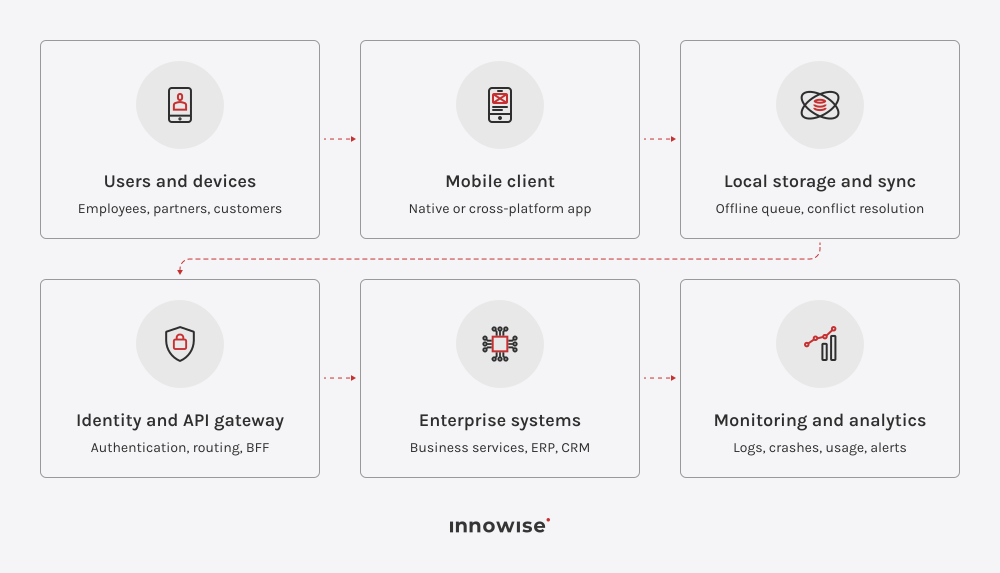
Enterprise mobile architecture includes the full chain of systems through which the app has to move data safely. A working enterprise mobile stack normally includes ten parts:

  • The mobile client
  • Local storage
  • Synchronization layer
  • Identity provider
  • API gateway or backend-for-frontend (BFF)
  • Business services
  • Systems of record, such as ERP, CRM, HRIS, and other databases that hold the source-of-truth data
  • Monitoring
  • Analytics
  • Device-management controls

The diagram below shows how data moves through the architecture: from the device, through sync and gateway layers, into the systems that own the data, and back out as monitoring and usage signals.

Let’s have a deeper look at some of the nuances with enterprise mobile apps that make them more complicated.

Identity and access

Enterprise app authentication must be performed via the existing identity provider, so that the role and permissions assigned to the user on the mobile match the permissions in other systems. If you build a standalone username-and-password authentication process, then you create a second identity system to patch, audit, and eventually retire. I recommend implementing role-based access control (RBAC) at the API level so that any changes take place immediately. Shared devices need one more decision: on a warehouse tablet or a kiosk, the session has to end with the shift, so plan for fast user switching and automatic logout.

Integration layer

When a mobile client calls a legacy ERP API directly, any backend change requires rebuilding the client app. BFFs or API gateways mediate between the two. They change backend APIs into what the mobile screens can use, add rate-limiting and caching, and give mobile engineers a solid interface to work against despite all the volatility in backend systems.

Offline-first operation

If an app is for field service, warehouses, or logistics, it has to work offline. That means local writes that queue on the device and sync when the connection returns. Apart from the queue, you have to make these four decisions underneath it.

  • Conflict resolution. Decide it per field. If your business is related to money or stock, last write wins isn’t a working policy. In this case, two technicians updating different fields of the same work order shouldn't overwrite each other's work.
  • Idempotency. Sync a log of operations, and let the client generate record IDs. Without this, a request that times out and gets retried creates a duplicate that causes phantom orders or double-counted inventory.
  • Local data protection. Encrypt the local store (SQLCipher, Keystore, or Secure Enclave) and define what remote wipe does to records that haven't synced yet. This way, you’ll protect the data in case the device gets lost or stolen.
  • Schema migrations. A device in a warehouse can go a month without an update, so several app versions will be writing to the same local database at once. Plan migrations from the first release.

Observability and support

Crash and performance monitoring, such as session traces, API latency, and crash-free session rate, needs to correlate with backend behavior. The goal is to make it possible to tell within minutes whether a spike in failed logins is a mobile bug or an identity-provider outage. Usage analytics belong in the same conversation: adoption by role and by device type tells a team which workflows are worth another sprint and which ones are not being used.

Build, buy, extend, or modernize?

You got two or more checks above, so we can now assume you need an app. You can choose one of four ways to go: build a custom app from scratch, buy a ready-made app, extend a platform in place, or modernize a custom app you already have. Let’s see which one suits you better:

ApproachBest suited whenMain advantageMain limitation
Build a custom mobile appYou have unique workflows, integrations, UX, or offline needsFull controlMore complex and costly, higher delivery and maintenance responsibility
Buy an existing applicationYour processes are standardFaster initial adoptionLimited differentiation and customization
Extend ERP, CRM, or low-code platformProcesses are already centered on a major platform, and you need to make them mobileData and governance are already in placePlatform dependency and licensing constraints
Modernize an existing appYou have a valuable product with outdated technologyPreserves business logic and investmentLegacy dependencies may remain
Extend is the way to go when the process is well standardized, and the company has already committed to using the platform. We have no objection when it’s efficient. The pitfall is choosing it simply because it’s the quickest option, overlooking the three-year license term and the cost of all the workarounds the platform will ultimately require.
Herman Samolazov, Head of Engineering
Herman Samolazov
Head of Engineering

Security, compliance, and mobile governance

The reference standard is OWASP’s Mobile Application Security Verification Standard (MASVS), currently at version 2.1.0. It provides a framework for eight different areas under 24 different controls across storage, cryptography, authentication, network communication, platform interaction, code quality, resilience, and privacy. A mobile penetration test is typically scored against MASVS, which serves as a common benchmark between your security team, the mobile app vendor, and even any auditor. At a request for proposal stage, you can feel free to ask a vendor which testing profile of the Mobile Application Security Testing Guide (MASTG) they build to, and to see the test results. While MASVS defines what security controls must be implemented, MASTG provides the specific testing procedures and technical guidelines on how to verify those controls.

Some organizations use Zero Trust to guide the development of their Mobile device management (MDM) policies. This involves implementing device health checks and contextual access decisions. That matters more now because “Bring Your Own Device” (BYOD) has become the norm. It’s estimated that two-thirds of devices accessing business data are personally owned. That’s why the management point varies depending on the device owner. Corporate devices are managed via MDM. In this case, the IT department controls the entire device. Personal devices are managed through Mobile Application Management (MAM) and application security policies. Corporate data and applications are stored in a container that the IT department can delete on its own, while the rest of the phone remains outside the system’s scope.

When developing applications for regulated industries, the security architecture must comply with applicable legal requirements. For example, the GDPR regulates the processing of personal data of EU residents; HIPAA safeguards Protected Health Information (PHI) held by organizations subject to the law and their business partners in the United States; and PCI DSS establishes control requirements for organizations that process cardholder data. In addition, organizations may need to comply with industry standards or regulations, such as SOC 2 reporting, FFIEC guidelines, or local banking requirements, depending on their specific operational context and industry.

Governance is often addressed last, but it is essential from the very beginning. Before launch, you must determine who owns the application after release, who approves its version for use in a production environment, what the SLA terms for support are, and how the business unit can request changes. You need to cover two operational aspects in a single document: certificate and key rotation, and what happens to corporate data on a device when an employee leaves the company.

Delegate mobile security and compliance to the industry experts

Enterprise mobile app development process

When all the necessary decisions are made, you can start the technical part of the enterprise mobile app development. I’ll walk you through Innowise’s process with brief descriptions of the stages:

01
Discovery & assessment
  • Documenting the process the app will change, including the current steps, who performs them, and where time or accuracy gets lost
  • Assessing systems, data, APIs, identity provider, and device management policies
02
Requirements & MVP definition
  • Turning the discovery findings into requirements
  • Preparing a scoped first release
03
UX research & prototyping
  • Testing the workflow with the people who'll use it
  • Designing screens based on the test results in mind
04
Architecture & technology selection
  • Deciding on building, buying, extending, or modernizing an app
  • Choosing the framework: native, cross-platform, hybrid, or low-code
05
Development & integrations
  • Building the client
  • Integrating it with the identity, the API gateway, and the systems of record in parallel
06
Testing & security verification
  • Running functional QA
  • Testing device and OS compatibility
  • Conducting a MASVS-aligned security assessment
07
Pilot deployment
  • Rolling out to one team, one region, or one device group before a company-wide push
08
Enterprise rollout
  • Defining a rollback plan
  • Deploying in stages by device group, region, or business unit
  • Coordinating with IT support
  • Training users
09
Maintenance & support
  • Preparing OS updates
  • Patching dependencies and SDK
  • Changing backend API as needed
  • Gathering user feedback
arrow-icon arrow-icon
01 Discovery & assessment
  • Documenting the process the app will change, including the current steps, who performs them, and where time or accuracy gets lost
  • Assessing systems, data, APIs, identity provider, and device management policies
arrow-icon arrow-icon
02 Requirements & MVP definition
  • Turning the discovery findings into requirements
  • Preparing a scoped first release
arrow-icon arrow-icon
03 UX research & prototyping
  • Testing the workflow with the people who'll use it
  • Designing screens based on the test results in mind
arrow-icon arrow-icon
04 Architecture & technology selection
  • Deciding on building, buying, extending, or modernizing an app
  • Choosing the framework: native, cross-platform, hybrid, or low-code
arrow-icon arrow-icon
05 Development & integrations
  • Building the client
  • Integrating it with the identity, the API gateway, and the systems of record in parallel
arrow-icon arrow-icon
06 Testing & security verification
  • Running functional QA
  • Testing device and OS compatibility
  • Conducting a MASVS-aligned security assessment
arrow-icon arrow-icon
07 Pilot deployment
  • Rolling out to one team, one region, or one device group before a company-wide push
arrow-icon arrow-icon
08 Enterprise rollout
  • Defining a rollback plan
  • Deploying in stages by device group, region, or business unit
  • Coordinating with IT support
  • Training users
arrow-icon arrow-icon
09 Maintenance & support
  • Preparing OS updates
  • Patching dependencies and SDK
  • Changing backend API as needed
  • Gathering user feedback

Enterprise mobile app development cost

I could tell that enterprise mobile app development typically costs between $100,000 and $600,000+. However, I wouldn’t recommend relying on the numbers without requirements and a needs assessment. The cost depends on the number of system integrations, compliance scope, and offline requirements. The cost falls in a wide range because the budget is driven by legacy integration, compliance scope, offline and sync complexity, device scale and management, and platform choice.

Also, we include ongoing maintenance. Ongoing maintenance typically costs 10–20% of the original build cost annually. This is a reasonable planning figure once you factor in patching, OS updates, and backend changes are factored in. The first year often runs higher because real usage surfaces gaps missed in pilot deployment.

Measuring ROI and application success

Finally, the app is deployed. Next, we measure its success across three areas: user adoption, operational performance, and financial return.

Focus areaHow to measureWhy it matters
User adoption
  • DAU/MAU and adoption rate by role
  • Session frequency and retention rate
  • CSAT/NPS
Ensures employees and stakeholders actively utilize the app, preventing wasted development efforts and driving organizational change.
Operational performance
  • Task completion time and workflow efficiency gains
  • Error and re-entry rate reductions
  • Crash-free sessions, API latency
Validates that the application streamlines business processes, reduces operational friction, and provides reliable day-to-day execution.
Financial return
  • Payback period
  • Cost savings from reduced manual labor and legacy tool retirement
  • Multi-year net financial return
Demonstrates tangible financial value and cost justification to leadership, ensuring long-term investment sustainability.

Apps that replace one well-defined, high-frequency task, such as an approval, a scan, a check-in, tend to show ROI fast. Apps layered on top of a multi-year ERP rollout take longer to pay back because the slower system underneath them sets the timeline.

AI and modern engineering in enterprise mobile apps

With AI being actively integrated into enterprise systems, I cannot skip its importance in enterprise mobile apps. The reality of the AI capabilities available on mobile enterprise applications is quite limited and linked to a certain task. Each has clearly defined criteria for success, such as extracting this field, detecting this transaction, predicting a problem, or verifying a user.

In-app chat and support

You can add LLM-based chat inside the app itself to handle customer queries, triage support tickets, and guide users through a flow. The feature is an add-on to your existing support content and workflows.

Document and receipt scanning

Computer vision applied to the phone camera extracts structured data. Your employees don’t have to manually enter information from an expense receipt, a signed form, or a shipping label. Usually, field service and back-office apps adopt this feature first, since it removes a specific, repetitive task.

On-device biometric authentication

Face and fingerprint recognition (Face ID, Android’s biometric APIs) has become the default for enterprise apps too. The difference from consumer apps is that it runs on-device rather than sending biometric data to a server.

Voice input and hands-free workflows

Enterprise mobile apps now also integrate voice assistants like Siri, Google Assistant, and similar. From the development point of view, it doesn’t require a separate voice layer from scratch because they operate at the operating-system level. The feature is useful for hands-busy environments, where typing isn’t practical.

Fraud and anomaly detection

Widespread in banking, insurance, and payments apps: models that watch transaction patterns, device signals, and behavior in real time and flag what falls outside the normal range for a given account. The design pattern that matters here: the model flags; a human or a defined workflow decides. I don’t recommend full automatic blocking without a review path because it creates the most customer complaints.

Equipment-failure forecasting

The feature is common in manufacturing and field-service apps: models trained on sensor and maintenance history flag which equipment is likely to need service before failure. Then the information is surfaced to a technician’s app as a work order.

Computer vision for field inspection

Object detection and image classification run against a phone or tablet camera for safety inspection, quality control, and asset condition checks in construction, logistics, and manufacturing. A photo of a pallet, a job site, or a piece of equipment gets scored against defined criteria.

Task-specific AI agents

An agent completes a bounded task on its own. It can reroute a delivery and notify a warehouse of the delay, or pull data from a scanned receipt into an expense report. The pattern across working examples stays narrow — one defined step inside a workflow the app already owns, with a human confirming anything consequential.

How Innowise helps

Innowise offers enterprise mobile app development services across the full stack: native iOS and Android, cross-platform development, hybrid apps, and low-code implementations on platforms like Mendix. Our experts analyze your requirements and consult on the best option for your business. 

As a recognized enterprise mobile app development company, we hold ISO 9001, 13485, and 27001/27017/27018 certifications and are a partner of AWS, Microsoft, SAP, Databricks, Odoo, InterSystems, and UiPath. As for compliance, we respect SOC 2, HIPAA, PCI DSS, and GDPR.

If you are looking to hire enterprise mobile app developers, we work with businesses in various industries including fintech and banking, healthcare and telemedicine, insurance, logistics, and enterprise operations. Our clients often compliment our delivery speed on ongoing feature work, responsiveness to scope changes, and communication quality during multi-week engagements.

Map your integration, identity, and compliance requirements

Final thoughts

Let me wrap up by emphasizing that the success of corporate mobile app development depends on complete alignment between business strategy and the underlying infrastructure. This means direct integration with existing ERP, CRM, and security systems. Strong identity management, scalable architecture, and robust compliance with regulatory requirements from the outset will help you avoid costly rework later on. When developed against target operational gaps and strict standards such as OWASP MASVS, a mobile app goes beyond being a simple operational tool to become a strategically important asset that delivers long-term efficiency and business value.

FAQ

Enterprise mobile app development is the process of designing, building, and maintaining mobile applications that connect to a company's existing systems, such as ERP, CRM, identity, and data platforms. They are built under the company's security and compliance policies.

Enterprise apps authenticate through corporate identity systems, connect to internal data sources, and follow the internal device management and compliance policies. Consumer apps are built for open, self-registered audiences with lighter security requirements and faster, more frequent release cycles.

Employee-facing apps, customer-facing apps, partner-facing apps, and shared-device or kiosk apps are the four categories that can fulfill most of the use cases. Field service, approvals, and internal tools are use cases of employee-facing apps. Customer-facing apps cover banking, insurance, and retail and are built for a company's own customers. Partner-facing apps are dealer or distributor portals. Finally, shared-device or kiosk apps are on locked-down hardware.

Custom enterprise mobile app development makes sense when the workflow, integration needs, or offline requirements are specific enough that no packaged product covers them well. It can be unique field operations, non-standard system connections, or a UX requirement tied to a particular job.

Off-the-shelf or low-code works well for standard workflows. If your goal isn’t to be different from your competitors in any way but just to have the workflow to optimize internal processes, then the approaches are worth considering.

Native development is a better choice when apps need deep hardware access, top-tier performance, or heavy platform-specific features such as background processing, complex camera or sensor use. Usually, it's field service and logistics apps. Cross-platform framework apps should be chosen when a shared code base for iOS and Android is more important than gaining the very last performance benefit from each platform. For enterprise buyers, the decision usually turns on something else: an internal app lives five to seven years, so ask who will maintain this stack in year three and how easily you can hire for it. Low-code platforms shorten the first release but tie the app's lifespan to a license and a vendor roadmap, which is a trade worth making deliberately rather than by default.

Usually, enterprise apps integrate with ERP or CRM systems through an API gateway or backend-for-frontend layer that transforms the backend's data for mobile use and absorbs changes on the backend side. This keeps the mobile app from breaking every time there is a change in the ERP.

Offline-capable apps store data locally on the device and queue any changes made without a connection. When the connection returns, they sync changes and data. However, to avoid data clashes, you need to decide what happens when the same record is changed both on the device and on the server before sync.

Security follows the OWASP Mobile Application Security Verification Standard (MASVS) that covers storage, cryptography, authentication, network communication, platform behavior, code quality, resilience, and privacy across 24 specific controls. On top of that baseline, regulated apps add framework-specific requirements, such as HIPAA, PCI DSS, and GDPR.

Mobile Device Management (MDM) allows IT to impose security policies, push apps or block apps, and erase company data from the device. This is important since MDM is the layer that determines how the application is going to be deployed and what will happen to the company data when the device is stolen or the employee quits.

The cost of enterprise mobile apps depends on your business requirements. The main cost drivers are legacy system integration, compliance requirements, offline capability, and the scale of device rollout.

Full development takes 6 to 18 months, depending on integration and compliance issues involved. Simple apps that only integrate into one system of record and have no compliance requirements could be done within the minimum side of the timeframe range. More complex apps that integrate with multiple systems of record or require regulatory sign-off will take more time due to the review process.

ROI is usually measured across several metrics, including adoption rate, task completion time compared to the old process, error and re-entry rate, and payback period. The ROI becomes visible in field service and workflow-replacement apps faster, while apps tied to a larger ERP rollout take longer because the timeline follows the slower system underneath.

Select a vendor or skilled enterprise mobile app developers that consider identity, integration, and compliance needs prior to suggesting a framework. They should also be able to demonstrate proof of MASVS-aligned security processes. Previous experience working in an equivalent regulatory environment or system of record (specific ERP solution, specific industry compliance process) is also worth paying attention to.

Show more Show less

Table of contents

Start building your app with Innowise

    Contact us

    Book a call or fill out the form below and we’ll get back to you once we’ve processed your request.

    Send us a voice message
    Attach documents
    Upload file

    You can attach 1 file up to 2MB. Valid file formats: pdf, jpg, jpeg, png.

    By clicking Send, you consent to Innowise processing your personal data per our Privacy Policy to provide you with relevant information. By submitting your phone number, you agree that we may contact you via voice calls, SMS, and messaging apps. Calling, message, and data rates may apply.

    You can also send us your request
    to contact@innowise.com
    What happens next?
    1

    Once we’ve received and processed your request, we’ll get back to you to detail your project needs and sign an NDA to ensure confidentiality.

    2

    After examining your wants, needs, and expectations, our team will devise a project proposal with the scope of work, team size, time, and cost estimates.

    3

    We’ll arrange a meeting with you to discuss the offer and nail down the details.

    4

    Finally, we’ll sign a contract and start working on your project right away.

    More services we cover

    arrow