SAP ECC to S/4HANA migration: benefits, challenges, and step-by-step guide

Apr 20, 2026 17 minutes de lecture
Résumé par l'IA

Principaux enseignements

  • SAP ECC mainstream support ends on December 31, 2027. Companies should migrate to SAP S/4HANA to avoid higher costs for extended maintenance.
  • SAP S/4HANA is a more modern enterprise solution than SAP ECC because it runs on the high-speed in-memory HANA database, features the user-friendly SAP Fiori interface, and comes with real-time predictive analytics and AI capabilities.
  • The SAP ECC-to-S/4HANA migration decision should be made soon to avoid a rushed implementation or a “traffic jam” of requests that could delay hitting the deadline.

SAP ERP Central Component (SAP ECC) has been a core pillar of SAP’s ERP suite for about 20 years. Over this time, it has been powering enterprise resource planning for more than 35,000 businesses. 

But SAP announced the end of mainstream support for SAP ECC by December 31, 2027. After that date, no more security patches, compliance updates, or fixes will be delivered.

This pushes companies using SAP ECC to decide what to do next: go for a temporary relief through extended maintenance (which is 2–3 times more expensive) or migrate to SAP S/4HANA, which guarantees a longer run.

Some may view the 2027 horizon as still comfortably distant. This sentiment mirrors previous timeline shifts; the original end of SAP ECC support was set for 2025, but was ultimately extended. SAP was compelled to delay its plans by two years as migration to SAP S/4HANA had not yet reached the critical mass required to retire the legacy suite.

It’s important to take into account that migration also takes time. Companies should make a decision early enough to get a new ERP system running before SAP ECC is discontinued. So, in this article, I’ll ponder on SAP ECC to SAP S/4HANA migration and answer the questions you may have.

What is SAP ECC and SAP S/4HANA?

SAP ECC is an enterprise resource planning software developed by SAP. It consolidates data from various business areas such as finance, human resources, sales, supply chain, and logistics so that you can manage and integrate core business processes across departments in one system. Thanks to this, all data is centralized in a repository and can be processed and analyzed in real time.

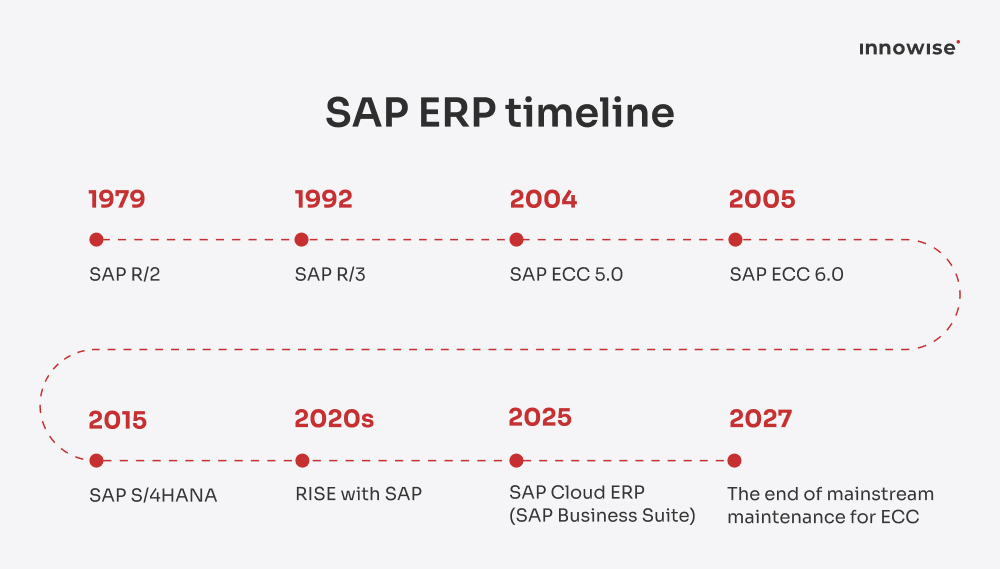
The solution was introduced to the world in 2004 as part of SAP ERP 6.0, positioned as the core of SAP’s ERP suite. 

After the first version of SAP ECC, the vendor released several more ERP updates. The latest is SAP S/4HANA, released in 2015.

SAP software roadmap from R/2 to S/4HANA, showing shift to lcloud ERP

SAP S/4HANA is the successor to both SAP R/3 and SAP ECC. It’s optimized for SAP’s in-memory database SAP HANA, which launched in 2011. The solution addresses key problems associated with traditional ERP systems, like batch latency and data sprawl. Its business applications are designed to run only on the HANA database, with simplified applications and an improved user experience delivered through SAP Fiori.

The suite covers the full range of day-to-day enterprise operations and integrates mission-critical workflows such as order-to-cash, procure-to-pay, plan-to-product, and request-to-service alongside fundamental core capabilities.

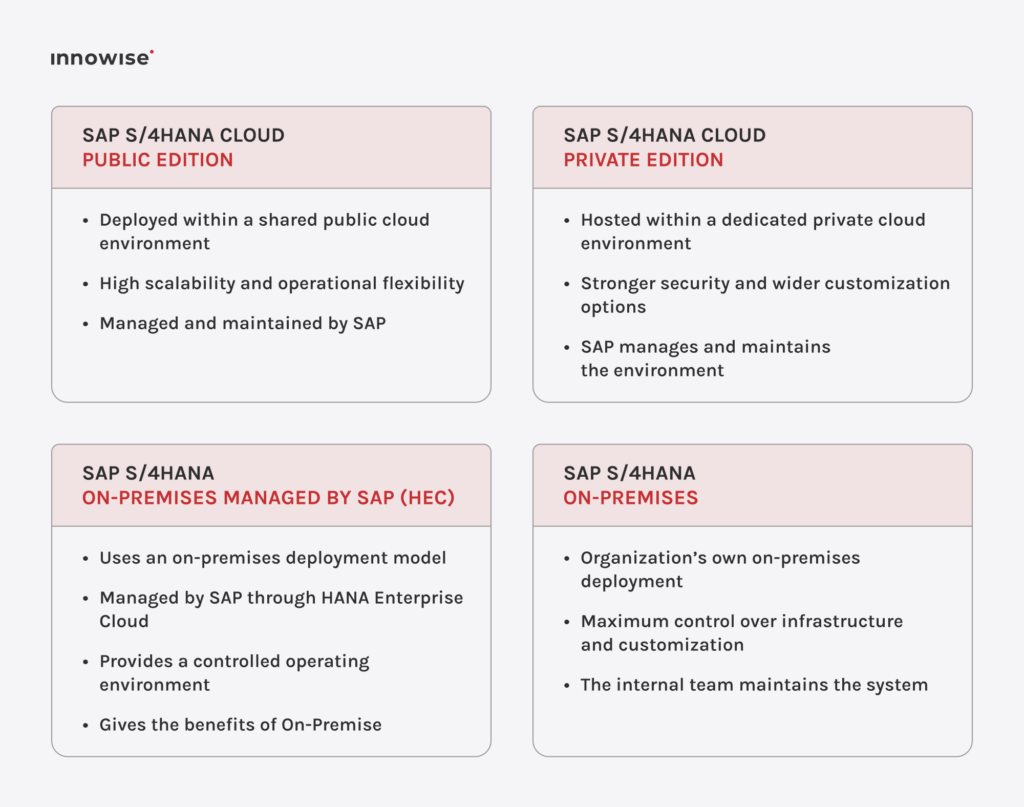
Businesses that go for SAP S/4HANA can choose a deployment option:

SAP S/4HANA deployment models comparing cloud and on-premise control and management

What SAP S/4HANA has that SAP ECC doesn’t

While both systems handle core operations, they have key differences that I’ve outlined below.

Catégorie
SAP ECC
SAP S/4HANA
Data & decision architecture
Relies on traditional relational databases that separate transactional and analytical layers. Data replication is needed to separate systems for reporting.
Uses the HANA database to process transactions and analytics simultaneously on live data. This eliminates the time-to-insight gap, so leaders can act on current reality rather than batch-processed historical reports.
Financial integrity
Finance and Controlling are separate modules. Data is stored in different places and must be manually checked and matched at the end of each month.
All financial data is stored in a single table. Businesses can view their real-time financial health 24/7 without waiting for manual monthly updates.
Supply chain planning
Material Requirements Planning (MRP) consumes a lot of system resources, so it usually runs as a slow overnight update.
Planning logic happens at the database level for real-time execution. The supply chain responds dynamically to demand instead of following a rigid, pre-set schedule.
Workforce effectiveness
Uses SAP GUI, a transaction-code-based interface built around technical modules.
Uses SAP Fiori for a user-friendly design that works on any device and is customized for each person's role.
Inventory transparency
Inventory data is spread across 26+ tables. Such scattered data can complicate things and lead to errors or mismatches.
Data is stored in a single inventory record. The stock levels remain transparent and updated in real time.
Entity governance
If a company is both a customer and a vendor, the system treats them as two separate entities.
A single master record manages each business partner, even if they have multiple roles. All data remains consistent across your enterprise.
Process intelligence
Users rely on static lists and external spreadsheets to manually identify errors, shortages, or delays.
Native machine learning identifies anomalies, automates routine data extraction, and recommends the next best action.
Future adaptability
Innovation is limited to bolt-on solutions.
Encourages a standardized core ERP and uses SAP Business Technology Platform (BTP) for specialized extensions. You don’t have to destabilize critical operations when adopting new technologies.

Explore how SAP S/4HANA will change your ERP management

The silver lining: Why migrate from SAP ECC to S/4HANA?

Among the benefits of SAP S/4HANA are a unified data model and native machine learning to provide real-time insights and automated process intelligence. These capabilities help your enterprise remain adaptable and efficient in a digital-first world. 

However, we can see that SAP ECC customers are not rushing to migrate. CIO, citing Gartner, says that only 39% of SAP ECC customers did so at the end of 2024. At the current migration rate, 17,000 holdouts are still projected to remain on ECC by 2027, which is nearly half of the ECC customer base. More than a third of ECC customers, 13,000, will remain on the legacy ERP in 2030. 

I suggest that one reason companies are reluctant is a lack of awareness of what the end of support entails. So, let’s discuss why it is worth reconsidering the continued use of legacy SAP ECC, and how SAP ECC-to-S/4HANA migration solves these issues.

Risk: The security and compliance hard stop

When mainstream maintenance ends, SAP will no longer issue new security patches. CVEs (common vulnerabilities and exposures) discovered after December 31, 2027, will not receive SAP’s fixes.

What migration offers: SAP S/4HANA gets continuous system monitoring and patches 

SAP S/4HANA comes with continuous security updates and automated regulatory patches. Moreover, advanced features like AI-driven anomaly detection can identify fraudulent transactions before they escalate.

Risk: The extended maintenance costs premium

Organizations that miss the 2027 deadline must pay higher fees for extended support through 2030. This often involves a 9% surcharge on annual licensing fees or may cost 2–3 times more than standard maintenance.

What migration offers: Lower long-term expenses due to a more efficient architecture 

SAP S/4HANA gets rid of the extra tables found in SAP ECC. This change can cut the database size by up to half, lowering infrastructure and maintenance costs while improving system performance.

Risk: Without the support, your system gets an innovation freeze

SAP is not investing in new features like AI or enhanced data tools for the ECC system. Companies that stay on it will end up paying more for a system that is no longer improving. In addition, as s the pool of specialists with ECC expertise shrinks, getting help will become much more expensive.

What migration offers: A new system comes with intelligent enterprise capabilities 

With the SAP Joule generative AI assistant, users can interact with SAP S/4HANA using natural language to find insights 95% faster. Built-in predictive analytics allow finance and supply chain teams to forecast demand and cash flow fluctuations in real time.

Risk: Temporary workarounds will stop functioning after the deadline

Many businesses initially migrated to S/4HANA while relying on Compatibility Packs. They represent temporary bridges that allow legacy SAP ECC functions to run inside the new system without immediate re-engineering. 

However, for on-premises software, these usage rights expire on May 31, 2026. Businesses that haven’t remediated these processes by then risk functional breaks in critical business logic.

What migration offers: A complete package of services through RISE with SAP and SAP BTP 

Migrating to SAP S/4HANA Cloud (RISE with SAP) gives you a safety net by extending support for older ECC functions until December 31, 2030. While you have this extra time, you can move your custom business rules to the SAP Business Technology Platform (SAP BTP). This “Clean Core” strategy keeps your system easy to update and can lower your total costs by 37% over five years when compared to staying on-premises.

Risk: A potential talent shortage can complicate staffing your migration team

When SAP ECC reaches the end of support, the pool of senior consultants capable of maintaining highly customized legacy code will shrink. If you are familiar with COBOL, you’ve probably heard that the remaining experts command astronomical rates now. We can expect the same story with SAP ECC consultants as demand will surge toward 2027. 

What migration offers: An easy-to-use system with SAP Fiori UX

SAP S/4HANA comes with a role-based SAP Fiori UX that replaces the clunky SAP GUI. This consumer-grade interface has been shown to improve usability, efficiency, and overall user experience while reducing training time from weeks to days.

Risk: The deadline rush may create a traffic jam of implementation requests

A comprehensive SAP ECC-to-S/4HANA migration takes an average of 18–36 months. Even starting today means looking at implementation windows stretching into 2027 and beyond. When you add in common issues like project goals changing, limited staff, and technical problems, hitting the 2027 deadline becomes quite a lt challenge.

What migration offers: A secured ROI from the migration costs

Early movers benefited from a calmer delivery environment and were able to achieve a faster return on investment. Research of early adopters indicates a 155% ROI over three years, with a payback period as short as 13 months. Given the continued reluctance of many SAP ECC clients, if you start the migration soon enough, you still have an opportunity to benefit from SAP ECC-to-S/4HANA migration.

Get your SAP ECC assessed to know if you can make it to 2027

SAP ECC to S/4HANA migration approaches

There are three approaches to SAP ECC-to-S/4HANA migration: Greenfield, Brownfield, and Bluefield. Each offers a different way to keep things running, modernize systems, and manage risks. Your choice determines the cost, technical complexity, and the overall business impact.

Greenfield migration: Starting fresh with a completely new system

  • Implementation of a new S/4HANA system
  • An optimal choice for enterprises looking to shed legacy technical debt and outdated workflows
  • Often chosen for migrations from non-SAP systems or fragmented SAP ECC environments
  • Focuses on process standardization and using SAP standard recommendations instead of migrating old settings
  • Takes significant effort to extract, transform, and load data into the new system
  • Requires high investment, intensive team training, and a longer implementation timeline

Brownfield migration: Modernizing existing processes instead of building from scratch

  • Upgrading the existing SAP ECC environment to S/4HANA while retaining business processes, data history, and customizations
  • Requires careful pre-migration checks to fix unnecessary code and technical debt, preventing carryover and delays in realizing S/4HANA's benefits
  • Suited for a stable, well-maintained SAP ECC environment that only needs to transition to the new database and architecture
  • The fastest and least disruptive route for businesses with well-established processes aligned with enterprise requirements

Bluefield migration: Selective and flexible move

  • A hybrid of Greenfield and Brownfield approaches
  • A new system is built, but only the required data or departments are migrated
  • Helps fix messy processes while keeping important records for audit or compliance
  • Harder to set up because you have to manage two different systems at once during the move
  • The process is highly technical and usually requires support from SAP experts
Greenfield Brownfield Bluefield
Coût totalHautMoyenMoyenne à élevée
How long it takes18-36 months12-24 months18-30 months
Risk to businessHautFaible à moyenMoyen
Complexité techniqueMoyenHautHaut
Historical dataNot movedFully keptSelective
Process changesTotalMinimePartial
Legacy codeClean startFull fixSelective
Meilleur pourFast-growing companies that want to get rid of legacy systemsStable businesses that need to keep all their old audit recordsLarge groups that want to change one part of the business at a time

Get help choosing between greenfield, brownfield, or bluefield.

How it actually happens: SAP ECC to S/4HANA migration steps

SAP recommends its modular, agile framework for SAP ECC-to-S/4HANA migration — SAP Activate. The methodology consists of six steps: discover, prepare, explore, realize, deploy, and run. Here’s what happens at each of them:

1. Discover

  • Compare ECC issues with S/4HANA benefits
  • Test the Fiori UX and HANA speed
  • Choose between the Greenfield, Brownfield, or Bluefield approaches

2. Prepare

  • Check SAP ECC code and data for migration blocks
  • Define project roles and cloud deployment model
  • Plan to finish before or soon after the 2027 deadline

3. Explore

  • Adopt SAP best practices over custom code
  • Pick essential features for the cloud platform
  • Align processes with the new data model

4. Realize

  • Build and sprint in agile cycles
  • Fix or delete old ECC "Z" programs
  • Check data and workflow accuracy

5. Deploy

  • Migrate live data and shut down SAP ECC
  • Train users to work with SAP Fiori
  • Launch the new S/4HANA

6. Run

  • Deploy SAP Joule for AI-automated tasks
  • Update regularly via the cloud
  • Optimize based on real-time data

"The best outcomes come from thoughtful preparation. When businesses start migrations late, they often run into higher costs and have to make compromises on things like data quality and user training. Take time to understand your current system, identify what needs to be customized, and treat this as a chance to improve how you work, not just a system swap."

Directeur adjoint de l'exécution au niveau mondial

SAP ECC to S/4HANA migration challenges

During migrations, constraints can arise in both systems. Usually, they relate to six categories: technical, data, people, processes, integration, and costs. 

Out of my experience, I can single out these possible SAP ECC-to-S/4HANA migration challenges ​in each of the categories:

Technical
Custom ABAP code remediation

SAP ECC systems carry years of bespoke ABAP. Much of it uses deprecated function modules, direct table access, or obsolete APIs that S/4HANA no longer supports. This may require full code analysis and refactoring before go-live.

  • Brownfield, Bluefield
Infrastructure & HANA sizing

SAP S/4HANA runs exclusively on SAP HANA in-memory DB. Many SAP ECC customers are on Oracle, DB2, or MSSQL. You may need a full database migration on top of the S/4 conversion, with careful memory sizing to maintain performance.

  • All approaches
Données
Data quality & cleansing

Over time, your SAP ECC data has been accumulating duplicates, orphaned records, and inconsistencies. If you migrate dirty data into S/4HANA's unified ACDOCA journal, it can cause reconciliation failures and incorrect reporting from day one.

  • All approaches
Universal Journal data model change

SAP S/4HANA collapses FI and CO into a single ACDOCA table, while SAP ECC has separate tables (BKPF, BSEG, COEP). Custom reports and extractors built on SAP ECC table structures break entirely and must be rebuilt when migrating.

  • Brownfield, Bluefield
Personnes
Talent & skills shortage

Demand for SAP S/4HANA consultants far outstrips supply, particularly for skills in ACDOCA, embedded BW, and ABAP on HANA. Internal teams fluent in SAP ECC need retraining, and external resource costs have risen sharply.

  • All approaches
Knowledge transfer risk

Long-serving SAP ECC staff carry undocumented configuration knowledge. When not involved in the migration, critical business logic in config and code can be lost or misunderstood.

  • Brownfield, Bluefield
Processus
Testing scope & regression

Testing the extensive range of SAP ECC functions means you will have to create thousands of test cases in a new system. Often, automated testing tools are either missing or out of date, which puts extra pressure on the schedule.

  • All approaches
Cutover & go-live risk

Cutover windows are typically 48–72 hours. During this time, the team must complete all data transfers, system checks, and safety tests. If any steps are missed, the new system might not launch on time or could face serious technical issues once it’s live.

  • All approaches
Intégration
BW / BI reporting disruption

SAP ECC-based BW extractors rely on specific table structures that change in SAP S/4HANA. All BW DataSources must be reviewed, with many replaced, which affects the reporting continuity during the migration.

  • All approaches
Middleware & EDI complexity

Using SAP PI/PO or other systems may require changes to data mapping and routing if the new system's APIs change. You may also need to re-test all EDI trading partner setups end-to-end.

  • All approaches
Cost & time
Budget overruns & hidden costs

SAP migrations regularly go over their planned budgets by 20% to 40%. This happens mainly due to underestimating the work required for custom code, data migration, and testing.

  • All approaches
Licensing & contract complexity

SAP S/4HANA uses different licensing. Migration may require renegotiating your contracts, especially if you are moving from traditional on-premise models to RISE with SAP. Commercial risks related to indirect and digital access licenses also need to be considered.

  • All approaches
Voir plus

Already mid-migration but hitting problems?

Best practices for successful SAP migration

Un SAP ECC to SAP S/4HANA migration affects processes, data, people, and architecture simultaneously. Research by management consultancy Horváth shows that projects are taking an average 30% longer than originally planned. Only 8% of companies complete their transition on schedule, and budgets are exceeded in more than six out of ten cases. 

Based on SAP’s official methodology, real-world project outcomes, and Innowise’s hands-on delivery experience across industries, here are the best practices for planning a successful enterprise system transition:

1. Start with a structured readiness assessment

Before scoping the migration, companies must understand what they actually have. A thorough initial assessment should include a technical analysis of the infrastructure, a review of existing customizations, and an evaluation of business processes and their alignment with S/4HANA.

  • Run SAP Readiness Check and Simplification Item Check before approving the project budget
  • Catalog all custom ABAP objects, Z-programs, interfaces, and third-party add-ons
  • Classify every integration point as compatible, remediable, or requiring replacement
  • Engage all relevant departments in identifying and prioritizing business objectives (not just IT

2. Adopt the SAP Activate methodology as the project backbone

SAP recommends using the SAP Activate methodology as the standard approach. It includes six phases: Discover, Prepare, Explore, Realize, Deploy, and Run.

The Activate framework forces explicit governance decisions at each phase gate and helps prevent the scope creep and mid-project redesigns that are the primary reasons for budget overruns.

3. Make data quality a pre-project workstream

The effectiveness of an SAP S/4HANA migration is directly tied to how well data is consolidated, cleansed, harmonized, enriched, and ultimately transformed into the S/4HANA format. 

A particular challenge is Business Partner consolidation. In the old ECC structure, a customer and a vendor could be the same entity represented as two different records. In SAP S/4HANA, they are unified under a single Business Partner record with multiple role definitions. Companies that don’t fully understand this hierarchy when making data transformation decisions can find it significantly more difficult to reconcile records at go-live.

  • Begin data profiling and cleansing 12–18 months before the planned go-live
  • Use SAP Information Steward or SAP Data Services to check data quality by domain
  • Assign data owners for finance, materials, and partners
  • Run several mock migration cycles to identify issues that only show up when you actually try to migrate
  • Do not move any data that you do not trust for your business reports

4. Invest heavily in testing

Looking back on completed migrations, 58% of respondents said they would have planned for a longer timeline or a larger budget from the start. The most common reason for these changes was not leaving enough time for testing. So here’s how to avoid it:

  • Buy automatic testing tools, such as SAP Cloud ALM or Tricentis Tosca, when building the system, not after it is finished
  • Run at least three full integrated test cycles before user acceptance testing
  • Do at least two full practice runs of the final switch with precise step timing
  • Freeze changes 4–6 weeks before the launch to avoid last-minute risks
  • Set clear go/no-go rules that leaders agree on before the final cutover starts

5. Run change management from day one

When you include key employees, like finance managers and warehouse supervisors, in the first planning meetings, they gain two things that a late training program cannot provide: a real understanding of why the system is changing, and a sense of ownership over the outcome.

To get executives on board, you need to show them clear results they can count on, such as faster financial reporting, reduced manual work, and lower technology costs. This same approach works for everyone in the company. For example, a warehouse worker doesn’t need to know the technical details of the database; they just need to know that their daily tasks will be easier and require fewer steps.

  • Get support from top leaders before the project starts
  • Assign process owners who will have the authority to make final decisions on how the system works
  • Provide Fiori training for each specific role and start it before the final testing phase
  • Meet with experienced staff to record how the old system was set up and why it was done that way
  • Track user adoption rates once the new system launches, alongside system uptime

Planning your SAP ECC migration?

Let’s talk about what it actually takes for your system.

Dernières réflexions

Since SAP will stop maintenance of ECC by the end of 2027, companies face the choice of migrating on their terms or being forced to act under time pressure. Waiting too long may entail consequences like security risks, a “traffic jam” of implementation requests, and higher costs for extended maintenance. If you are not yet confident about moving to SAP S/4HANA, our Experts SAP can help you understand what it will change and how it will benefit your business.

FAQ

SAP ECC runs on a traditional disk-based database with batch processing, and S/4HANA is built on SAP's in-memory HANA database, where transactions and analytics run simultaneously in real time. Instead of SAP ECC’s dozens of separate tables, S/4HANA consolidates everything into a single Universal Journal. S/4HANA also replaces the SAP GUI with role-based Fiori and integrates AI and predictive analytics into core processes.

Your current SAP ECC system must be running at least version 6.0. The system must be able to handle "Unicode," which means it can correctly process and display all types of characters and languages. The underlying database must be converted to SAP HANA as part of the move. Also, you must run SAP's "Simplification Item Check," and it must complete without any critical errors.

To choose the right partner for your SAP migration, focus on these two main things:

  1. Look for case studies that show how the partner handled custom code, data migration, and cutover for systems of comparable size and complexity.
  2. Check if the partner can handle the entire migration project themselves, or if you will have to hire and coordinate different vendors for different parts of the job.

Take Innowise, for example. We handle everything for you: the first talk, system check, setup, keeping it running for the long haul, and everything in between. This way, you have one point of contact for the whole work cycle.

All master data and active records, such as open orders, uncleared invoices, and ongoing production work, must be migrated so your business can function immediately. Historical records (closed transactions) can be kept in a separate, read-only archive for legal or audit compliance. Such an approach to data migration from SAP ECC to S/4HANA helps reduce costs in the new S/4HANA system.

Chef de file des consultants ERP

Kiryl connaît SAP sur le bout des doigts. Il est la personne à contacter lorsqu'un client a besoin non seulement d'une mise en œuvre, mais aussi d'une configuration intelligente qui s'adapte à ses processus uniques - avec un chemin clair de la complexité à la clarté.

Table des matières

    Contactez-nous

    Réserver un appel ou remplissez le formulaire ci-dessous et nous vous contacterons dès que nous aurons traité votre demande.

    Envoyez-nous un message vocal
    Joindre des documents
    Charger fichier

    Vous pouvez joindre un fichier d'une taille maximale de 2 Mo. Formats de fichiers valables : pdf, jpg, jpeg, png.

    En cliquant sur Envoyer, vous consentez à ce qu'Innowise traite vos données personnelles conformément à notre politique de confidentialité. Politique de confidentialité pour vous fournir des informations pertinentes. En communiquant votre numéro de téléphone, vous acceptez que nous puissions vous contacter par le biais d'appels vocaux, de SMS et d'applications de messagerie. Les tarifs des appels, des messages et des données peuvent s'appliquer.

    Vous pouvez également nous envoyer votre demande
    à contact@innowise.com
    Que se passe-t-il ensuite ?
    1

    Une fois que nous aurons reçu et traité votre demande, nous vous contacterons pour détailler les besoins de votre projet et signer un accord de confidentialité.

    2

    Après avoir examiné vos souhaits, vos besoins et vos attentes, notre équipe élaborera une proposition de projet avec l'étendue des travaux, la taille de l'équipe, les délais et les coûts estimés projet avec l'étendue des travaux, la taille de l'équipe, les délais et les coûts estimés.

    3

    Nous prendrons rendez-vous avec vous pour discuter de l'offre et régler les détails.

    4

    Enfin, nous signons un contrat et commençons immédiatement à travailler sur votre projet.

    Autres services couverts

    arrow