Claudeforce: where Claude fits into your Salesforce workflows

Calendar icon.

Sep 30, 2026

Time icon.

6 min read

Claudeforce partnership between Salesforce and Anthropic.
Summarize with AI

I lead Innowise’s CRM practice, so I’ve seen AI features appear across Dynamics 365, HubSpot, Creatio, Zoho, and pretty much every other major CRM we use. Claudeforce caught my attention because Salesforce has moved part of the sales workflow from the CRM interface directly into Claude.

Salesforce in Claude started its beta on September 15, 2026, with 37 built-in sales skills, including account research, call prep, pipeline review, and CRM updates. According to Anthropic, 7,000 Salesforce sellers are already using it, and companies like GitLab, Siemens, and Legora have rolled it out. What stands out is how much a seller can do from Claude while Salesforce still manages the data, permissions, and actions behind the scenes.

In this post, I’ll explore how Salesforce in Claude fits into daily sales tasks, how Salesforce manages access and actions, and when sellers still need to review customer details before making changes.

Head of CRM Practice
Verified expert
Every article at Innowise is created by authors with real-world experience. They understand the topic beyond theory and bring insight from real projects.
5+ years of experience
Verified expert
5+ years of experience
Raman leads CRM and Microsoft Dynamics 365 projects across insurance, automotive, and manufacturing. He specializes in CRM consulting, data architecture, delivery management, and the development of ERP and CRM expertise.
Expertise
CRM Microsoft Dynamics Delivery management
Let's talk

What is Claudeforce?

Claudeforce is the broader Salesforce and Anthropic partnership. Its first product, Salesforce in Claude, is now in beta and offers prebuilt sales skills for tasks like prospecting, deal review, and pipeline management.

Salesforce in Claude lets users access Salesforce data, context, and actions directly in Claude using a prebuilt Model Context Protocol (MCP) server. You can work with live Salesforce information and take supported actions without switching back to the regular Salesforce interface each time. Existing Salesforce permissions and business rules still apply whether you work through Lightning, Slack, or Claude.

Access to the beta requires Salesforce’s approval and a paid Claude plan. Anthropic’s setup guide also lists the latest Sales Cloud enterprise edition as a requirement.

Several Salesforce components support this experience. The table below explains their roles.

ComponentRole
ClaudeforceSalesforce and Anthropic partnership
Salesforce in ClaudeClaude plugin with Salesforce context, actions, and 37 prebuilt sales skills
AIforceSalesforce interface layer that brings Salesforce data, workflows, and business logic into AI interfaces
Headless ToolkitArchitecture that exposes Salesforce capabilities through MCPs, APIs, plug-ins, and developer tools
AgentforceSalesforce platform for building and running AI agents

Salesforce in Claude vs Agentforce

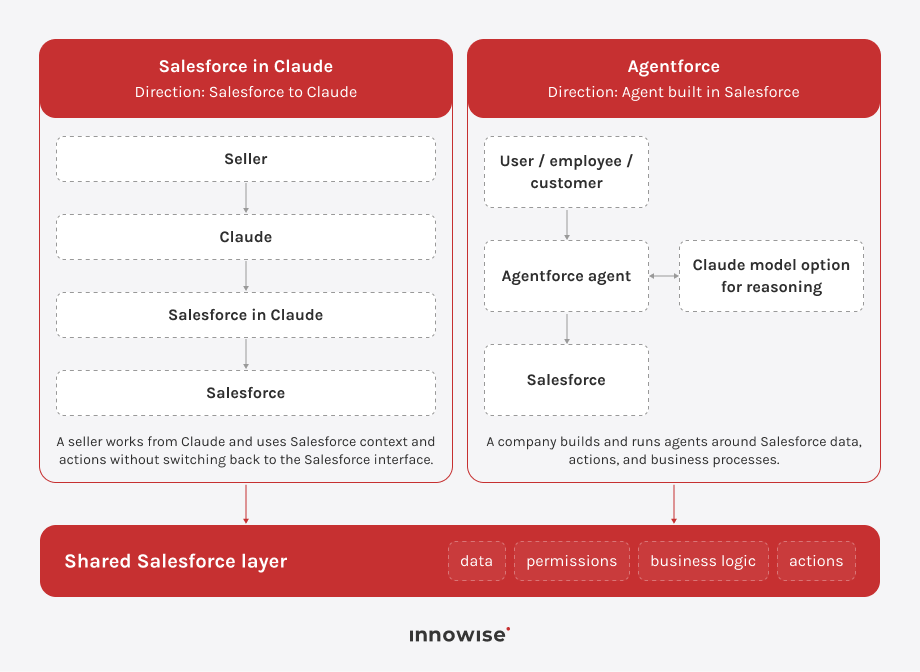
Salesforce in Claude and Agentforce are both part of Salesforce’s AI stack, but each one addresses a different need.

Salesforce in Claude lets users access Salesforce features directly from Claude. Sellers can stay in Claude to research accounts, review opportunities, prepare for calls, or suggest CRM updates. Salesforce provides the data, workflows, permissions, and actions that the plugin uses.

Agentforce takes the opposite approach. It is Salesforce’s platform for creating and deploying AI agents that use Salesforce data, actions, and business processes. Agentforce can also use Anthropic Claude as a reasoning model, so the two can overlap technically. That still doesn’t make them the same thing. Salesforce in Claude is a ready-made way to work with Salesforce from Claude. Agentforce is the platform companies use to build and configure agents around their own data, actions, and business processes.

Where Salesforce in Claude fits into everyday sales work

Salesforce in Claude helps at every stage of the sales cycle, from researching new accounts to preparing renewals. In each case, Claude either pulls CRM data, gathers info from other sources, interprets it, or suggests actions in Salesforce.

Sales stageSalesforce in Claude use casesTypical outputWhat the seller needs to review
Prospecting & lead triageResearch Prospect, Account Tiering, Lead Triage, Draft OutreachProspect brief, ICP fit, lead priority, outreach draftFit recommendations and any outreach before it goes to the prospect
Account research & meeting prepAccount Context, Call Prep, Daily BriefingAccount history, open opportunities, recent conversations, unanswered questions, upcoming meetingsWhether the context is current and anything important is missing from connected sources
Deal qualification & close planningDeal Review, Deal Advance Gap, Stakeholder Map, Close PlanQualification gaps, stakeholder map, deal risks, business case, mutual close planWhether a missing field reflects a real deal gap, and whether recommendations match the latest customer position
Meeting follow-up & CRM updatesCall Follow-Up, Update Opportunity, Query Activity HistoryFollow-up email, Slack summary, next steps, proposed stage or close-date changesCustomer-facing content and any CRM field changes before approval
Pipeline review & forecastingTeam Pipeline, Deal Signals, Deal Slip Scenario, Forecast NarrativePipeline dashboard, at-risk deals, coverage impact, forecast narrativeThe reasoning behind risk flags and assumptions used in the forecast
Renewals & account growthRenewal Radar, Customer Health, Expansion WhitespaceRenewal brief, health assessment, potential expansion opportunitiesRecent customer context, open issues, and evidence behind renewal or expansion recommendations
Cross-cutting sales workInbox Sweep, Rep Context, Salesforce Hygiene Check, Find Internal Answer, Win-Loss ReviewEmail triage, manager brief, CRM cleanup findings, internal answers, closed-deal patternsSource accuracy, stale CRM data, and whether suggested actions fit the current account context

Planning to bring Claude into your Salesforce workflows?

Prospecting and lead triage

Salesforce in Claude can research prospects and prioritize inbound leads. Account-tiering workflows help sellers sort accounts against the team’s ideal customer profile (ICP), while outreach skills prepare draft messages. Those recommendations depend on the available account data and how the sales team defines a good fit.

Account research and meeting preparation

Before a meeting, Salesforce in Claude gathers details like the current opportunity, recent account activity, open questions, and past conversations. Connected email or Slack threads can add context about who is involved and what needs follow-up before the call.

It can also create a daily briefing with upcoming meetings, deals approaching their expected close date, unread messages, and opportunities needing attention. Sellers can then open the relevant account or deal from that view.

Deal qualification and close planning

When working on active opportunities, Salesforce in Claude helps you review deals using your team’s sales approach. It points out missing stakeholders, highlights risks to closing on time, and can create a stakeholder map. It can also draft business cases or close plans and suggest updates to qualification fields or contact roles.

If the economic buyer field is empty, it might mean there’s a gap in the deal or that the team hasn’t recorded the relationship in Salesforce yet. It also applies to other qualification fields. Before following any recommendations, the seller should check which reason applies.

Meeting follow-up and CRM updates

After a call, Salesforce in Claude can use notes or a transcript to draft a follow-up email and a summary for the deal’s Slack channel. It can also propose Salesforce updates, including next steps or changes to the opportunity stage and close date, and create follow-up tasks.

Pipeline review and forecasting

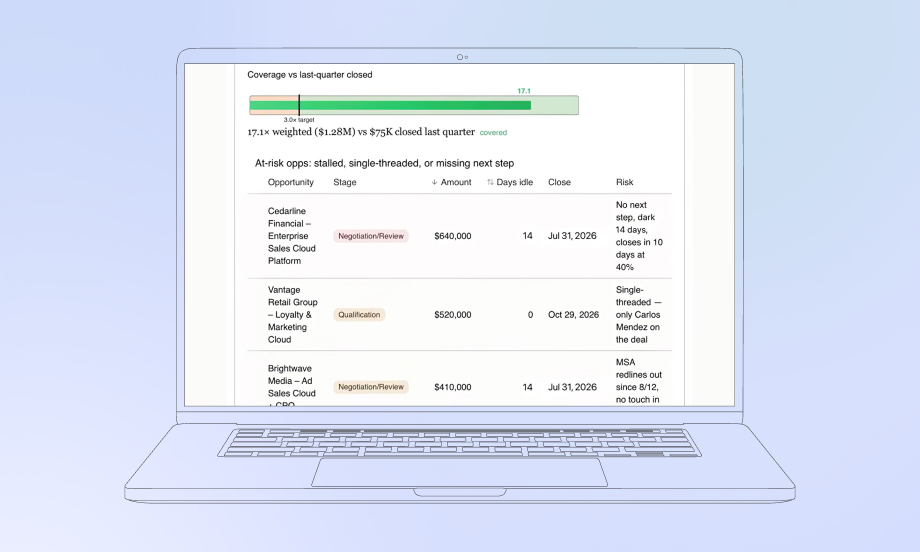
Salesforce in Claude can create a pipeline view by stage, let sellers examine individual accounts, flag deals that might slip, and draft a forecast summary for sales reviews. It can also show how a slipping deal could affect pipeline or quota coverage.

Salesforce supplies the opportunity’s stage, amount, and close date. Connected email or Slack conversations can add context to the activity history. If a deal has no recent CRM activity, the account owner still needs to check whether contact has slowed or the team has yet to record it. That check should inform any change to the forecast.

Renewals and account growth

This tool helps with renewal preparation and customer health reviews. It pulls information for upcoming renewals from Salesforce and approved calendar or email sources. Sellers can use account data to create a quarterly business review (QBR).

For current accounts, the tool shows when renewals are due, highlights risks, and points out ways to grow the relationship. Before adding these suggestions to an account plan, I recommend checking them against any open customer issues and recent business talks.

How Salesforce in Claude works

Salesforce in Claude supports these workflows through the Headless 360 for Sales plugin and Salesforce’s Headless 360 MCP Server. The server exposes four tools for finding and running Salesforce operations.

ToolAPI nameWhat it does
DiscoverdiscoverSearches available Salesforce operations and returns the closest matches
DescribedescribeReturns the APIs, parameters, dependencies, and steps for the selected operation
DispatchdispatchRuns the selected operation
Dispatch Read-Onlydispatch_readonlyRetrieves information without changing Salesforce data or configuration

For a typical request, Claude uses Discover to find a Salesforce operation and Describe to check its requirements. It then uses Dispatch or Dispatch Read-Only to run the operation. Salesforce can add supported operations behind these four tools as the service develops.

Each MCP request runs as the logged-in Salesforce user. Object permissions, field-level security, sharing rules, profiles, and permission sets still control what Claude can access or change. Salesforce attributes those actions to the user in its audit trail.

Where to keep human approval

The Salesforce permissions described above determine which actions Claude can take. By default, Claude also asks the seller to approve a proposed Salesforce change before making it. The user can choose Allow once, Always allow, or Deny.

I recommend keeping that approval step for fields that affect the sales forecast, especially the opportunity stage and close date. For example, a buyer saying procurement could finish next month leaves the seller with a judgment to make. The seller still needs to consider the remaining buying steps and how firmly the customer has committed to that timeline before approving a new close date.

For meeting notes, activity logs, or follow-up tasks, I’d focus the review on whether Claude captured the information accurately and linked it to the correct account or opportunity.

Conclusion

What stands out to me about using Salesforce in Claude is how it connects understanding an account with keeping records up to date. A seller can take details from a customer conversation and add them to a CRM update, while Salesforce manages the company’s permissions and business rules.

I’d measure adoption by how much time the team saves after reviewing the results and correcting any mistakes. If a change impacts the forecast, I’d keep the account owner involved, because knowing exactly what a customer has agreed to is still an important part of managing the deal.

More on this topic

    Contact us

    Book a call or fill out the form below and we’ll get back to you once we’ve processed your request.

    Send us a voice message
    Attach documents
    Upload file

    You can attach 1 file up to 2MB. Valid file formats: pdf, jpg, jpeg, png.

    By clicking Send, you consent to Innowise processing your personal data per our Privacy Policy to provide you with relevant information. By submitting your phone number, you agree that we may contact you via voice calls, SMS, and messaging apps. Calling, message, and data rates may apply.

    You can also send us your request
    to contact@innowise.com
    What happens next?
    1

    Once we’ve received and processed your request, we’ll get back to you to detail your project needs and sign an NDA to ensure confidentiality.

    2

    After examining your wants, needs, and expectations, our team will devise a project proposal with the scope of work, team size, time, and cost estimates.

    3

    We’ll arrange a meeting with you to discuss the offer and nail down the details.

    4

    Finally, we’ll sign a contract and start working on your project right away.

    arrow