Strategic tips on custom warehouse management system (WMS) development

Updated: Apr 13, 2026 14 min read

In 2025, the global WMS (warehouse management system) market was worth $3.88 bn. But this is just the beginning of the story. By 2032, it’s projected to hit $9.11 billion, growing at a steady pace of 12.9% annually. This growth tells a tale of rapid adaptation, driven in large part by the rise of cloud-based solutions.

With e-commerce booming and supply chains getting more complex, businesses have had to rethink how they run their warehouses. Take SAP SE and Oracle, for example. They’re building advanced WMS solutions that help with everything from inventory tracking to order fulfillment and automation. And then there’s Microsoft not making WMS directly, but powering a lot of the innovation behind the scenes with AI, cloud, and IoT.

$3.88 bn

Market size in 2025

$9.11 bn

Projected market size in 2032

12.9%

CAGR is expected for 2024-2032

I’ve been thinking about how much online giants like Amazon, Alibaba, and eBay have changed the game. Typical processes such as managing inventory, predicting demand, and automating tasks used to be nice extras, but now they’re absolute must-haves. The way online orders fluctuate, you just can’t afford to wing it.

This brings us to warehouse management systems. Throughout this article, I’ll give a comprehensive overview that covers every aspect of warehouse management, from inventory tracking and demand forecasting to automation and cost reduction. If you’re looking to get a complete picture of how warehouse tracking software is transforming warehouse operations, this article dives into all the key details.

What is a warehouse management system?

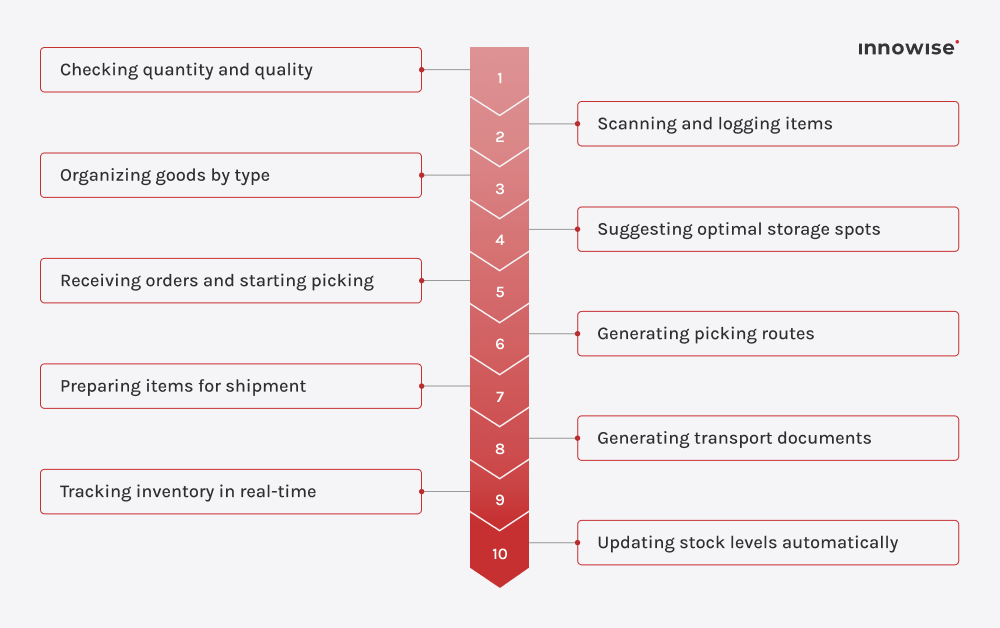
To put it simply, WMS (warehouse management system) is a system designed to automate warehouse operations, including receiving, storing, processing, and shipping goods. It helps track inventory, optimize space usage, and improve overall warehouse efficiency. With WMS, businesses can manage stock accurately and quickly, monitor product movement, and reduce errors. Let’s take the example of an e-commerce business and see how a warehouse management system works in this context.

Receiving goods

When new stock arrives at the warehouse, WMS is used to verify the quantity and quality of each product against the supplier’s invoice or order documentation. Warehouse staff scan each product using barcodes or RFID, which updates the inventory levels in real time. 

For example, if a shipment of 100 t-shirts arrives, a warehouse employee simply scans each box, and the warehouse management software updates the inventory to reflect the exact quantity available for sale on the e-commerce platform.

Storage

Warehouse management software helps position products based on their size, weight, and demand frequency. High-demand items, such as popular clothing sizes or frequently purchased electronics, are stored in easily accessible areas, while bulkier or less popular items are placed in less accessible locations. The system considers factors like product type (fragile, perishable) and recommends optimal storage.

Order picking

Once a customer places an order, WMS guides warehouse staff to pick the correct items from various locations. The system then generates an optimal picking route. If an order contains multiple products, the warehouse management system directs the worker to the exact shelf or bin, ensuring the right quantity and item are picked. So, if a customer orders three different sizes of the same hoodie, the WMS sends the picker to the exact shelves where those sizes are stored, reducing the chance of errors.

Shipping

After the items are picked, the warehouse distribution management software validates the order before shipment. The warehouse employee scans each item, confirming that it matches the customer’s order. It then generates shipping labels and can suggest the best carrier and shipping method based on the customer’s preferences, order value, and urgency (e.g., standard vs. expedited shipping). This helps e-commerce companies provide fast, reliable shipping, with minimized errors and delays.

Inventory management

The inventory is automatically updated in WMS after each item is received, picked, and shipped. If an item is sold out in the online store, the warehouse management system updates the system immediately to reflect the change in stock.

As a result, customers can only order items that are actually in stock, preventing overselling and ensuring customer satisfaction. In order to avoid stockouts WMS also can help the e-commerce business to reorder products in time through low-stock pointers.

Warehouse management system workflow

Role of WMS in supply chain order processing

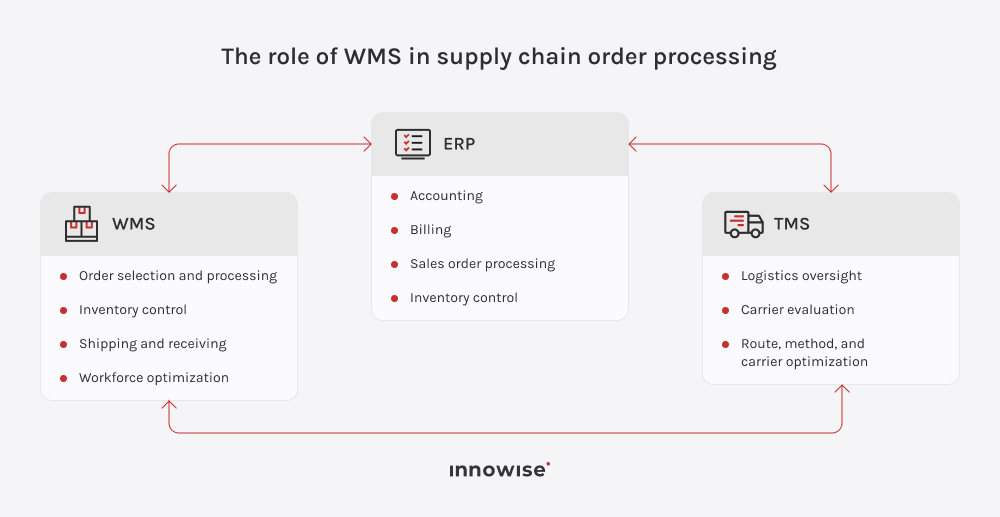
When a customer places an order, the ERP system acts as the central hub, processing the order and then passing it on to the WMS for fulfillment. The WMS handles all warehouse operations, including inventory management, picking, packing, and preparing shipments for delivery.

As inventory is picked and updated in the warehouse management system, this information is relayed back to the ERP, which maintains accurate stock levels across the organization. The ERP also links with the accounting and invoicing systems to accomplish the financial side of the order. After completing the order preparation in the WMS, shipping instructions are passed on to the TMS (transportation management system). The TMS helps reduce transportation costs by choosing the cheapest carrier, the best route, and the best method of transportation.

Throughout this process, the three systems exchange real-time data, providing end-to-end visibility and enabling proactive decision-making. As an example, in the event of an inventory shortage, an ERP system can decrease demand forecasts, while simultaneously, the WMS can ensure that the workforce is optimally allocated. Meanwhile, the TMS monitors freight progress and updates delivery timelines, maintaining transparency for both the business and the customer.

When the WMS, ERP, and TMS collaborate, silos are broken down, mistakes are minimized, and the entire supply chain runs more smoothly, which boosts performance, lowers costs, and improves service levels.

Diagram showing the role of WMS in supply chain order processing

Track stock, automate processes, and obtain smooth fulfillment with WMS

Types of warehouse management systems

Types of WMS solutionsBest forKey advantagesLimitations
WMS modules integrated with ERPCompanies using ERP systems
  • Fully adapts to real warehouse processes
  • Easy to change workflows as operations grow
  • Performs well with high-order volumes
  • Requires integration with other business systems
  • Needs technical support for ongoing changes
Standalone WMSFast-growing warehouses
  • High flexibility in warehouse workflows
  • Easier customization
  • Strong performance under heavy operational loads
  • Requires integration effort with other systems
  • Data synchronization must be carefully managed
On-premise WMSEnterprises with strict data security, compliance, or offline operation requirements.
  • Full control over data and system behavior
  • Deep customization options
  • No dependency on cloud availability
  • High upfront infrastructure and maintenance costs
  • Slower scalability Requires a strong in-house IT team
Cloud-based warehouse management systemGrowing businesses needing fast deployment
  • Quick implementation
  • Easy scaling
  • Lower upfront investment
  • Dependence on vendor security and uptime
  • Performance may vary under heavy loads
Cloud-native warehouse management systemHigh-growth companies, omnichannel retailers, and logistics providers
  • High scalability and performance
  • Built-in redundancy and resilience
  • Faster innovation and feature delivery
  • Vendor ecosystem lock-in
  • Requires cloud maturity to fully leverage benefits

Smart technologies in warehouse management

Frame 564777474

Warehouse automation

Automating tasks like sorting, picking, packing, and shipping reduces human error, speeds up operations, and cuts costs. Systems such as automated storage and retrieval systems (AS/RS), robotic picking solutions, and high-speed sortation systems simplify warehouse workflows. These technologies guarantee the accurate storage and retrieval of goods, which reduces the need for manual labor.

Siri

Voice-picking technology

Voice-picking technology allows workers in a warehouse to use headsets to receive picking instructions, allowing them to pick using voice aids. This hands-free method improves picking operation speed and accuracy while enhancing warehouse safety since workers are not focused on paper printouts or mobile devices.

In-app purchase

Mobile devices

Modern warehouse management would simply not exist if we excluded mobile devices such as smartphones, tablets, and even handheld scanners. These devices allow employees to scan items, check inventory, and track shipments from anywhere without being tied to a workstation. In addition, workers receive instant notifications about low inventory, misplaced items, or order changes, allowing for quicker decision-making.

Icons 57

AI and IoT in warehouse management

IoT-enabled gadgets like RFID tags and sensors continuously collect and transmit data to central systems. This real-time information allows businesses to monitor key factors such as stock levels, shelf life, and reorder needs with greater accuracy. AI takes these processes a step further. With advanced data analysis, businesses can anticipate demand, minimize waste, and control costs — all while providing timely deliveries.

Automotive

Warehouse robots

Warehouse robots have become central players in the push toward automation. These robots can perform a variety of tasks such as picking, sorting, and packaging, and they work in tandem with human workers to increase overall productivity. Automated guided vehicles (AGVs) and conveyor belts, for example, transport products across large warehouses without the need for manual labor, providing that goods are delivered to the right places more efficiently and accurately.

Icon 281

Augmented and virtual reality apps

AR tech overlays digital information, such as picking instructions or inventory data, onto the physical environment. For example, AR glasses can guide employees to the correct items on the shelves, reducing errors and speeding up the picking process. VR, on the other hand, is used for training warehouse staff in a simulated environment. These immersive techs can also be used to simulate entire warehouse layouts to identify inefficiencies or improve workflow designs.

Embrace smarter inventory management.

Recommended WMS integrations

A WMS works best when it’s part of a connected ecosystem rather than a standalone tool. The integrations below help align warehouse operations with the wider business, improve data reliability, and drive operational efficiency.

Enterprise resource planning (ERP) systems

Integrating WMS with ERP creates a single, consistent source of truth across the business.

  • Provides end-to-end visibility into warehouse activities for finance, procurement, manufacturing, and management teams
  • Automatically syncs purchase orders, receipts, and stock movements, reducing manual data entry
  • Keeps warehouse teams informed about incoming purchase orders created in the ERP
  • Enables faster and more accurate invoice generation based on real fulfillment data
  • Improves planning accuracy and cross-department alignment

Order management systems (OMS) or sales channels

A tight connection between WMS and order management ensures customer promises align with real inventory.

  • Gives customers and sales teams real-time visibility into available stock
  • Reduces overselling and backorders by reflecting actual warehouse inventory
  • Speeds up order processing by automatically sending confirmed orders to the WMS
  • Can integrate directly with eCommerce platforms, marketplaces, and B2B portals for faster fulfillment
  • Enhances customer experience through more accurate delivery timelines

Product information management (PIM) systems

PIM integration equips warehouse staff with reliable, detailed product data.

  • Provides easy access to item attributes such as dimensions, weight, handling instructions, and batch details
  • Simplifies item identification during receiving, picking, and packing
  • Supports quality control checks at goods receipt and during storage
  • Reduces errors caused by incomplete or outdated product information
  • Improves consistency across warehouse and sales systems

Yard management systems (YMS)

Connecting yard and warehouse operations helps optimize the flow of goods beyond the warehouse walls.

  • Improves coordination between dock schedules, trailers, and warehouse teams
  • Reduces truck waiting times and dock congestion
  • Accelerates loading and unloading processes
  • Supports efficient cross-docking between warehouses or distribution centers
  • Provides better visibility into yard capacity and asset utilization

Shipping carrier systems

Carrier integrations streamline outbound logistics and cost control.

  • Enables real-time shipment tracking and status updates
  • Automates label generation and carrier selection
  • Improves delivery accuracy and transparency for customers
  • Helps compare carrier rates and optimize shipping costs
  • Simplifies handling of exceptions, returns, and delivery issues

Warehouse hardware and automation solutions

Integrating WMS with physical devices and automation tools boosts productivity and accuracy.

  • Supports barcode scanners and RFID readers for faster, error-free data capture
  • Integrates with automated storage systems, robotic pickers, and smart forklifts
  • Increases labor efficiency and reduces dependency on manual processes
  • Minimizes picking, packing, and inventory errors
  • Lowers operational costs while improving throughput and safety

Benefits of warehouse management system

Workflow optimization

What if, instead of manually searching for items throughout the warehouse, you use a warehouse management system that leverages barcode scanning and automates picking routes, guiding workers straight to the item locations? Such automation results in faster order fulfillment and higher customer satisfaction, as a pleasant bonus.


Smart inventory control

Real-time tracking of inventory allows businesses to maintain accurate stock levels, monitor product movement, and prevent issues like overstocking or stockouts. This increased visibility improves forecasting and demand planning.

Strategic workforce management

WMS assigns workers the specific zones and then generates optimized picking routes for each order. No unnecessary movement! No wasted time! Just higher numbers of orders handled daily. It can also analyze performance data to identify areas for improvement.

Maximized cost efficiency

A WMS drives cost savings by improving inventory accuracy, enabling growth, and providing smarter workforce management. The system enables real-time visibility into inventory, prevents errors, and allows businesses to scale without increasing overhead.

Limitless scalability

Some WMS solutions are specifically built to grow with your business. No matter what you want to do — scaling up your operations, introducing new product categories, or expanding to additional warehouses — the system adapts to handle escalating demands without disrupting workflows.

When do businesses need a custom WMS?

In my experience, businesses usually start thinking about a custom WMS when they realize they’re spending more time adapting their processes to the software than the software is saving them. At first, off-the-shelf systems do the job. But as warehouses get busier, orders increase, and operations become more nuanced, those “standard” features begin to feel limiting.

I’ve seen teams rely on spreadsheets, manual checks, and awkward workarounds just to keep fulfillment on track. That’s usually the turning point. A custom WMS becomes necessary when a business needs its warehouse to work the way it operates — with specific inventory rules, tailored picking logic, and seamless integrations with existing systems. Done right, a custom WMS gives the business a scalable, flexible backbone that supports growth instead of slowing it down.

Why choose Innowise for warehouse management software

With top-tier engineers, custom service models, and quick team ramp-up, we deliver fast time-to-market, predictable budgets, and smooth integration to optimize your warehouse operations and guarantee flawless, efficient processes.

Warehouse management systems across industries

Michael Labutin

Deputy Global Delivery Director

Michael knows ERP inside and out — from choosing the right system to figuring out how it’ll work with the rest of your tech stack. He’s the one people turn to when they need ERP to solve real operational problems, not create new ones.

Table of contents

    Contact us

    Book a call or fill out the form below and we’ll get back to you once we’ve processed your request.

    Send us a voice message
    Attach documents
    Upload file

    You can attach 1 file up to 2MB. Valid file formats: pdf, jpg, jpeg, png.

    By clicking Send, you consent to Innowise processing your personal data per our Privacy Policy to provide you with relevant information. By submitting your phone number, you agree that we may contact you via voice calls, SMS, and messaging apps. Calling, message, and data rates may apply.

    You can also send us your request
    to contact@innowise.com
    What happens next?
    1

    Once we’ve received and processed your request, we’ll get back to you to detail your project needs and sign an NDA to ensure confidentiality.

    2

    After examining your wants, needs, and expectations, our team will devise a project proposal with the scope of work, team size, time, and cost estimates.

    3

    We’ll arrange a meeting with you to discuss the offer and nail down the details.

    4

    Finally, we’ll sign a contract and start working on your project right away.

    arrow