The power of data mapping in healthcare: benefits, use cases & future trends. As the healthcare industry and its supporting technologies rapidly expand, an immense amount of data and information is generated. Statistics show that about 30% of the world's data volume is attributed to the healthcare industry, with a projected growth rate of nearly 36% by 2025. This indicates that the growth rate is far beyond that of other industries such as manufacturing, financial services, and media and entertainment.

What is ERP and CRM? How they work together (integration guide)

Feb 1, 202610 min read

Key takeaways

  • ERP and CRM integration clears daily bottlenecks. Less retyping, fewer spreadsheets, and cohesive data systems.
  • Real-time data improves decisions. Approvals, stock checks, and billing rely on live numbers for greater accuracy.
  • Plan the effort and track results. Allocate budget for data cleanup, testing, and training, then measure cycle time, errors, and manual steps.
  • Manufacturing, services, and e-commerce are growing rapidly. Stock-aware quotes, instant orders, and same-day invoicing enhance the customer journey.
  • Data and processes create most risks. Outdated records, unclear ownership, and lack of monitoring cause more issues than the connector itself, so set clear rules and monitor workflows from day one.

In any business, efficiency and data visibility shape how fast you move and how well you serve your customers. Two systems make this possible: enterprise resource planning (ERP) and customer relationship management (CRM).

If you’re wondering about a CRM and ERP meaning in simple terms, think of it this way. CRM keeps your sales, marketing, and support teams connected so they can track leads, close deals, and build strong customer relationships. ERP handles what happens behind the scenes, from finance and inventory to supply chains and HR.

Each system is valuable on its own merit. But when they work together, everything starts running better. ERP and CRM integration connects front- and back-office operations, providing everyone access to the same, up-to-date information. Sales teams can check product availability before committing to a deal. Finance teams can forecast revenue based on live data. Managers can see exactly how the company is performing without piecing together separate reports.

In this guide, I’ll explain how ERP and CRM work together, why integration matters, and how to make it work in practice.

What is CRM and ERP integration?

ERP and CRM integration creates a connected environment where customer and operational data move together in real time. Instead of juggling two separate systems with overlapping records, integration unites a continuous data flow that supports every step of the customer and product journey.

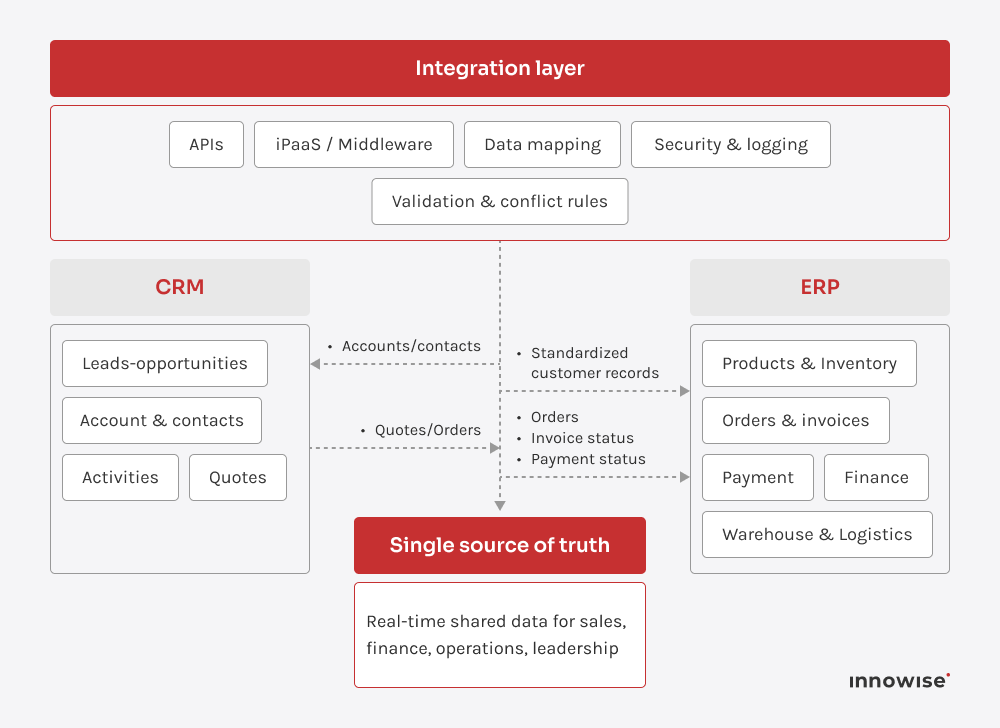
On the technical side, the connection usually happens through APIs, middleware, or built-in connectors that sync key information such as customers, quotes, orders, invoices, and inventory. The CRM sends customer and deal data to the ERP system, while the ERP returns updates on stock levels, order fulfillment, and payments. Depending on how the business works, the sync can run in one direction or both.

End-to-end data flow between CRM and ERP systems using an integration layer to automate customer records, orders, invoices, and payment status

Here’s what that looks like in practice. A sales rep closes a deal in the CRM, and the system automatically sends the order details to the ERP so production, shipping, and billing can get started right away. As things move forward, the ERP sends updates back, for example, when the product ships or when a payment comes through. Everyone sees the same, up-to-date information without needing to re-enter data or double-check spreadsheets.

A good setup also defines who owns which data. The CRM typically acts as the main source for customer and lead records, while the ERP manages financial and operational details. A well-designed integration maps these data areas, defines how often they sync, and sets rules for handling duplicates or conflicts.

When built thoughtfully, the result is a single, reliable source of truth. It removes silos, speeds up workflows like quote-to-cash, and gives leadership a clear view of both revenue and operations in real time.

Benefits of ERP and CRM integration

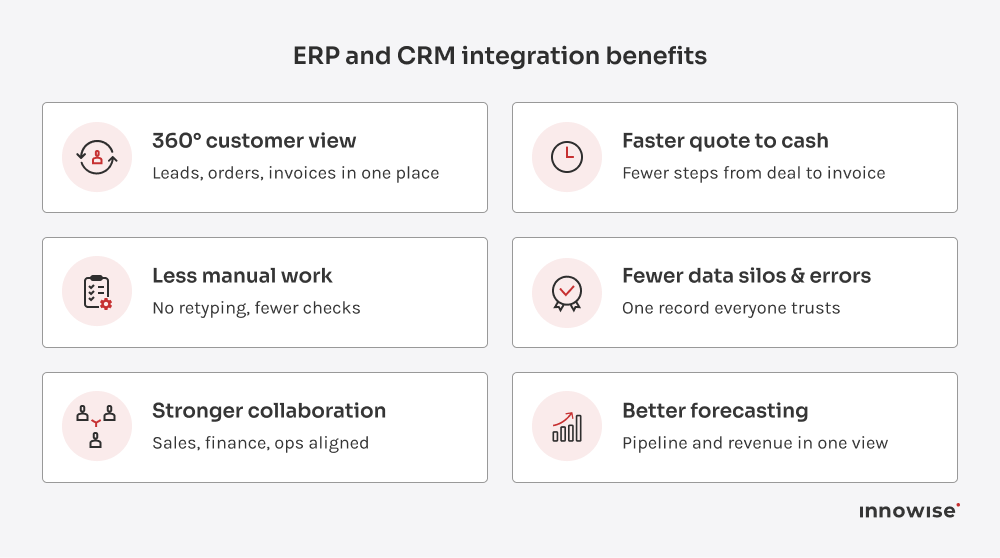
In my experience, things start to click once a company connects its ERP and CRM properly. The day-to-day gets lighter, the data finally makes sense, and everyone can see what’s going on with customers and operations without digging through endless files. Here are high-impact benefits you can expect by syncing these systems.
Business value results gained from integrating ERP and CRM

A complete view of every customer

When both systems share data, you get the full picture: every lead, quote, contract, delivery, invoice, and renewal connected in one view. No gaps or hopping between tools.

Sales teams can check open invoices or credit limits before offering new terms. Finance can review contracts and forecast renewals with up-to-date numbers. Support can instantly see what was delivered and which agreement covers it.

This level of visibility makes everyday work smoother and decisions more confident. It helps teams:

  • Approve special pricing
  • Prioritize support requests
  • Plan account growth based on profitability

You can just open the system, look up a customer, and know exactly what’s happening without waiting for updates or chasing numbers; it’s that simple.

Increased efficiency & less manual work

You can tell when systems aren’t connected. People spend half their day copying the same data between tools. Quotes go into the CRM, orders go into the ERP, and someone double-checks everything in a spreadsheet. It’s slow, repetitive, and full of room for error.

Once CRM and ERP are integrated, customer data, order details, pricing, and invoices move automatically between systems. This way, your team isn’t retyping and reconciling the same information over and over.

  • Fewer manual touchpoints per deal
  • Fewer corrections and ‘just checking’ emails
  • Faster path from quote to order to invoice

Elimination of data silos & errors

When CRM and ERP operate on their own, small mismatches start creeping in. Maybe a customer’s billing info gets updated in the CRM but not in the ERP. Or sales adjusts a quote, yet finance never sees the change. Over time, these mismatches create confusion, wasted effort, and bad decisions.

ERP and CRM integration keep records aligned across systems. Updates in one system automatically appear in the other, so every team works from the same accurate record. You avoid double-checking spreadsheets or arguing over which version is right.

This consistency improves data quality and builds trust in your reports. People stop chasing information and start using it with confidence. Connected CRM-ERP data directly improves accuracy and reduces costly mistakes that come from working with the wrong details.

Elimination of data silos & errors

When CRM and ERP operate on their own, small mismatches start creeping in. Maybe a customer’s billing info gets updated in the CRM but not in the ERP. Or sales adjusts a quote, yet finance never sees the change. Over time, these mismatches create confusion, wasted effort, and bad decisions.

ERP and CRM integration keep records aligned across systems. Updates in one system automatically appear in the other, so every team works from the same accurate record. You avoid double-checking spreadsheets or arguing over which version is right.

This consistency improves data quality and builds trust in your reports. People stop chasing information and start using it with confidence. Connected CRM-ERP data directly improves accuracy and reduces costly mistakes that come from working with the wrong details.

Stronger cross-team collaboration

Once both systems are aligned, teams stop working (and feeling) blind. Everyone can see what others are doing in real time:

  • Sales checks available stock and production slots before promising delivery dates
  • Operations sees confirmed deals early and plans capacity instead of reacting
  • Finance tracks exposure per customer while deals are still in motion
  • Support views contracts, shipments, and invoices without chasing three departments

Picture a sales rep on a call with a key client: on the same screen, they see that a large order shipped yesterday, one invoice is overdue, and a new feature request from support is already in progress. The conversation is informed, specific, and confident, not the classic “let me check on that.”

Faster sales cycles & better customer experience

When ERP and CRM are connected, sales and service stop waiting on finance, logistics, or warehouse updates. The information they need is right in front of them, exactly when they need it. The whole quote-to-cash process moves faster and with fewer steps.

Picture a customer asking for a custom order. During the conversation, the sales rep checks available stock, production capacity for the next two weeks, and the customer’s credit limit in one view. The system calculates a realistic delivery date, confirms pricing and margin, and records any required approvals. The rep closes the deal on that same call.

Make quote-to-cash faster without adding headcount.

Common challenges of ERP-CRM integration

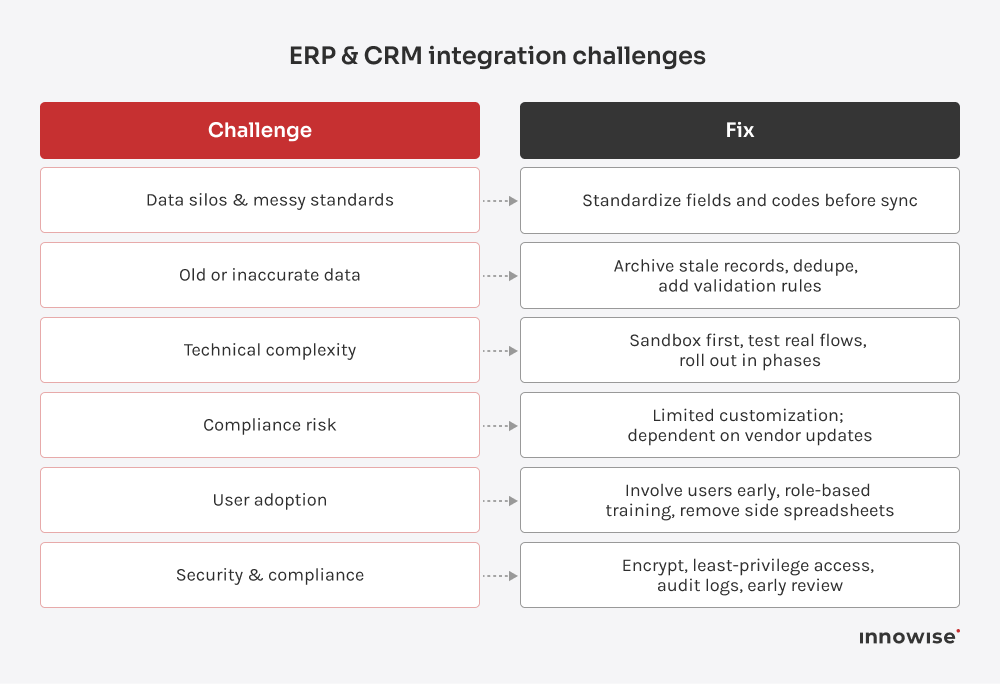
Sure, ERP-CRM integration brings incredible value, but it also comes with its fair share of bumps. From experience, I can tell you, success comes down to spotting the usual trouble spots early and handling them before they snowball.
List of common barriers to connecting ERP and CRM systems, along with digital transformation-focused actions for smoother data, workflow, and adoption alignment

Data silos & messy standards

The first big challenge usually sits in the data. Both systems store the same information (customers, product IDs, addresses, etc.), but not always in the same way. For example, one might record a state as CA, another spells out California. Multiply that by thousands of records, and things get chaotic fast.

Before connecting anything, clean your data and agree on one standard for each field. These actions keep the integration clean and predictable later. Most teams find that nearly all their CRM data needs at least some tidying before sync.

Old or inaccurate data

If your databases are cluttered with outdated or incorrect info, integration just spreads that problem around. Consider inactive customers, duplicate entries, and outdated products.

Before syncing, archive what’s no longer relevant and update what you keep. Take the chance to set simple data rules so new records are consistent across both systems. Once the base is clean, the integration runs smoother and stays that way.

Technical complexity

Connecting two large systems rarely happens in one click. Custom setups, old software, and quirky APIs can slow things down. And if you skip proper testing, you might end up with duplicate orders or mismatched inventory before anyone catches it.

Treat integration like a real project. Test it in a sandbox first and run through real scenarios. When you go live, start with one process or data set, then expand step by step. Having a reliable partner who’s done this before helps more than any documentation.

User adoption

Sometimes the hardest part is getting people to use it. Teams used to their own tools might hesitate to trust the new setup. Some keep personal spreadsheets just in case, which defeats the whole purpose.

Involve users early. Show how it makes their day easier: no more copying data between systems or chasing updates. Train them, listen to feedback, and make sure they see small wins quickly. Once they realize it saves time, adoption follows naturally.

Security concerns

When systems start sharing data, security questions always come up. Companies worry about exposure or compliance, especially when customer data moves between platforms.

Modern integration tools handle this well with encryption, access controls, and clear audit trails. Use secure channels, limit what data is shared, and keep your systems patched. Check compliance boxes early with your development team to avoid surprises later.

How to successfully integrate ERP and CRM

Think of integration as a proper upgrade to how your company runs, not a quick connector someone sets up before the weekend. If we were working on it together, here’s how I’d lay it out step by step.

Set clear goals & get stakeholder buy-in

Start with one simple question: what exactly should this integration fix or improve? And make it specific. For example:

  • Cut order processing time from 3 days to 1 day
  • Stop double-entry between sales and finance
  • Give leadership a reliable revenue and margin view
  • Let support teams see orders and invoices without asking finance

Write those goals down. Use them later to challenge every integration idea: Does this help us hit those outcomes or not?

Next, bring in people who work with these systems every day. I mean sales, finance, operations, customer service, and IT. Ask them how they work today, what slows them down, and what information they wish they could see in one place.

Audit your processes & data

Before connecting anything, take a good look at how data actually moves between your CRM and ERP (or doesn’t). Map out the steps as they happen in real life and write those gaps down. Maybe sales enters an order in the CRM, and then accounting retypes the same thing into the ERP. Or perhaps support can’t see billing details and has to email finance for updates.

While you’re at it, check the data itself. Are there different formats for the same fields? Are there duplicate customers, outdated contacts, or inconsistent product codes? Make a list of what needs cleaning.

This audit gives you 2 things: a clear view of what needs connecting and a list of cleanup tasks before integration starts. The smoother your data, the cleaner your integration will run.

Integrating an enterprise resource planning system with your CRM cuts copy-paste work, status chasing, and the month-end scramble. It gives you one set of numbers, a faster quote to cash path, and clean handoffs between sales, finance, and operations.
Michael Labutin
Director, Head of Java, ERP solutions

Choose the right integration approach

There’s more than one way to connect your systems. Most ERP CRM software pairs connect through built-in connectors, iPaaS, or APIs. The right choice depends on what systems you use, how complex your setup is, and how much flexibility you need.

  • Built-in connectors. Some platforms offer prebuilt connectors for popular enterprise resource planning CRM combinations. If your CRM and ERP come from the same ecosystem, like Microsoft Dynamics, you might already have a solution. You just configure it and go. It’s usually the simplest and quickest path.
  • Integration platforms (iPaaS). If your systems come from different vendors, or you want more control, an integration platform can help. Tools like MuleSoft, Boomi, or Cleo act as the middle layer that moves data between systems. They come with pre-built connectors, handle errors automatically, and let you monitor data flows.
  • Custom API development. Sometimes, pre-built tools don’t quite fit, especially with older or heavily customized systems. In that case, developers can use APIs from both platforms to build a custom bridge. It gives you full control, but you’ll need to maintain it as your systems grow.

When deciding how to connect your systems, consider factors like budget, timeline, data volume, and whether your team has the right tech skills. In my experience, an integration platform or middleware usually strikes the best balance for mid-sized companies. But whatever you pick, make sure it can grow with your business and that you have reliable vendor support when things get tricky.

Plan your data mapping & field alignment

This is the stage where precision really matters, as the way you match data decides how clean and trustworthy your system will feel.

Start by defining which records from your CRM should match which ones in your ERP. For instance, a “customer” in CRM aligns with a “client account” in ERP. Clarify which system holds authority when there’s a conflict.

Next, agree on ownership. When both systems hold the same kind of data, which one wins in a conflict? Usually, the ERP owns financials like invoices, payments, and tax details, while the CRM stays responsible for contacts, deals, and communication history.

Once that’s clear, sit down with your implementation team and match key fields: deal amounts, product codes, customer names, payment terms, currencies, and dates. Note any format differences and define how to handle them.

It may sound like a back-office detail, but this is the step that keeps your entire operation consistent. Accurate mapping means clean reports, dependable forecasts, and fewer late-night data fixes.

Develop & configure the integration

At this stage, start small. Pick one or two flows and run a pilot. For example, sync customer records first, or push new orders from CRM into ERP. A tight scope helps you catch issues early, validate logic, and build confidence before you scale.

Next, decide how often the sync should run. Some data needs to move instantly, like orders or customer updates. Other processes, such as reporting, can run on a schedule once or twice a day.

Set a few smart rules to keep the flow clean and useful:

  • Sync only customers with approved credit
  • Skip deals below a certain value
  • Share only active products for quoting

Work closely with your technical team on how to handle errors and failed syncs. Define what happens when something goes wrong: how it’s logged, who gets notified, and how to roll it back safely. Once the pilot is stable, expand gradually. Add orders, invoices, inventory, and other flows that support your goals.

Test thoroughly with real-world scenarios

Testing proves whether your integration holds up in real work. If you skip it, you trade time now for support tickets, manual cleanup, and shaky trust in the data later.

Build test cases that reflect actual business scenarios. For instance:

  • Add a new customer in CRM and check if it appears in ERP with the right fields, IDs, and ownership
  • Update an address in ERP and confirm it is updated in CRM within the expected timeframe
  • Create a quote and convert it to an order in CRM, then verify it appears in ERP with all line items, taxes, discounts, and pricing intact

Also, try what-if-something-breaks scenarios. What happens if a required field is missing, a product is unavailable, or the network drops mid-sync? The system should flag the issue clearly and either retry or place the record somewhere visible for review. Nothing should quietly disappear.

If possible, involve end users in testing. They use these processes daily and will think of practical scenarios that technical teams sometimes overlook. Fix as much as you can while everything is still in a test environment. Move on only when you and your team are confident that the integration behaves as expected.

Train your team & go live

Once the integration works well in testing, focus on your people. The system only works if they know how to use it properly and actually trust it.

Run short, focused training sessions to show real changes. For example:

  • Sales reps can now see invoice status, credit limits, and stock directly in the CRM
  • Finance sees web or CRM orders land in ERP without retyping
  • Support can check delivery status and payments without sending emails to other teams

Highlight what they no longer need to do: copy data, chase updates, and maintain side spreadsheets. And make the benefits very concrete.

Also, I recommend picking a sensible time for go-live. Avoid peak hours or critical closing periods whenever possible. And have your in-house team or your integration development partner on standby for the first days.

Check a few key flows in production: new customers, new orders, address changes, and payment updates. If something looks off, fix it quickly and explain the change to the people affected. That keeps confidence in the system and in the data.

Monitor, improve, & expand

After going live, keep an eye on how the integration behaves across your ERP and CRM solutions. Treat it like an ongoing part of your operations and regularly check:

  • Error logs or dashboards for failed or delayed syncs
  • How fast important updates move between systems
  • Feedback from users on what still feels clunky or manual

Use this input to make small improvements. Adjust mappings, improve validation rules, and refine error handling. Small fixes applied regularly keep the setup stable. Once core flows run smoothly, start connecting more areas, for example, link support tickets to shipments or align marketing campaigns with sales data.

I also recommend setting a simple review routine. A quarterly check is usually enough. Look at data quality, performance trends, and how teams use the integration compared to the original design. These check-ins will help you keep the setup aligned as processes change and new needs appear.

Not sure where to start with integration?

How to choose the right partner for ERP and CRM integration

Choosing an integration partner is one of the most important decisions in an ERP and CRM project. The team you pick will shape how the setup works in everyday life, from sales calls to month-end close. Look for people who understand the technology and can talk easily with your business teams about how work actually gets done.

Here are the key things I would do when choosing an integration partner:

  • Look for real experience with your stack. Ask for concrete examples with your CRM and your ERP. For instance, projects involving CRM integration with Oracle ERP options, Dynamics connected to Odoo, or Zoho paired with a specific ERP. A partner who has done this before already knows the tricky parts, the limits, and the usual shortcuts, which can save you from months of trial and error.
  • Pay attention in the first conversations. Do they explain options and tradeoffs in simple language? Can they answer a question from a sales lead and an IT architect in the same call without losing anyone? If every reply sounds like a tech manual, the collaboration will be hard.
  • Ask about data design and ownership. Strong integration teams think about data from the start. So, ask how they decide which system owns customer data, how IDs are matched, how duplicates are handled, and how often data syncs. If the answers feel vague, expect problems later with mismatched reports or confusing records.
  • Check their plan for testing, monitoring, and failure. Reliable integrations assume that things will go wrong sometimes. Ask how they handle retries, logging and error details, error queues, alerts, volume, and peak loads.
  • Look for cross-functional understanding. ERP and CRM touch sales, finance, operations, support, and IT. A strong partner can run a workshop with all of them, ask focused questions, and turn what they hear into a practical design. They involve users early instead of designing in a vacuum.
  • Expect a phased and transparent delivery plan. Ask how they roll out integrations. Mature teams usually start with a small but important flow, prove that it works, then extend it. That approach keeps risk and cost under control and makes adoption easier for users. If someone pushes for a big-bang rollout with no clear reasoning, dig deeper.
  • Clarify what happens after launch. Good partners stay present after launch and offer monitoring and alerting, clear support paths, documentation that your team can actually use, and a plan for small, ongoing improvements.

Conclusion

CRM and ERP play different parts in a business. One helps you find customers and keep them engaged. The other keeps your operations running in a predictable, steady way. When these systems talk to each other, you see processes in real time, quotes move to invoices faster, and every team works with the same numbers.

But there is always a bit of prep involved. You need to map how work currently moves, talk to the people who rely on these systems, and clean up data where needed. The effort pays off. Once both systems sync, tasks stop getting stuck, information shows up where it should, and no one wastes time entering the same thing twice.

If you want support from people who have done this many times, Innowise can help you shape a practical plan, avoid common mistakes, and build an integration that feels natural for your team to use day after day.

FAQ

Costs depend on scope, tools, and complexity. Prebuilt connectors or iPaaS usually mean lower upfront effort and a subscription fee. A fully custom-built costs more to start and to maintain over time. A good way to control the budget is to begin with a few high-value flows, prove they work, and then expand from there.

Simple connector-based projects can be finished in a few weeks. Multi-system, high-volume, or customized setups often take longer due to data cleanup, testing, and change management.

Yes, this is very common. You can connect them with secure network links, APIs, or an integration platform that supports both cloud and on-premises systems. Plan for authentication, firewalls, and data residency, and make sure monitoring and error handling cover both sides.

Choose the timing based on how the data is used. Quotes, orders, and order status usually benefit from real-time or near-real-time sync. Reference data, such as price lists or product catalogs, can be updated on a schedule.

Use encrypted connections and narrow access so the integration only touches what it truly needs. Rely on trusted tools, log important actions, and let your security team double-check compliance and risk before you turn it on.

If you’re wondering about the CRM and ERP meaning in simple terms, here it is. ERP runs your internal operations like finance, inventory, production, and HR. CRM helps your sales, marketing, and support teams manage leads, close deals, and build customer relationships. Together, they cover the full flow from first contact to delivery and payment.

Start with accounts and contacts, products and price lists, quotes to orders, and invoices plus payment status. Add inventory and returns after core flows are stable.

Lead of ERP Consultants

Kiryl knows SAP inside and out. He’s the go-to when a client needs not just implementation, but smart configuration that fits their unique processes — with a clear path from complexity to clarity.

Table of contents

    Contact us

    Book a call or fill out the form below and we’ll get back to you once we’ve processed your request.

    Send us a voice message
    Attach documents
    Upload file

    You can attach 1 file up to 2MB. Valid file formats: pdf, jpg, jpeg, png.

    By clicking Send, you consent to Innowise processing your personal data per our Privacy Policy to provide you with relevant information. By submitting your phone number, you agree that we may contact you via voice calls, SMS, and messaging apps. Calling, message, and data rates may apply.

    You can also send us your request
    to contact@innowise.com
    What happens next?
    1

    Once we’ve received and processed your request, we’ll get back to you to detail your project needs and sign an NDA to ensure confidentiality.

    2

    After examining your wants, needs, and expectations, our team will devise a project proposal with the scope of work, team size, time, and cost estimates.

    3

    We’ll arrange a meeting with you to discuss the offer and nail down the details.

    4

    Finally, we’ll sign a contract and start working on your project right away.

    arrow