Wiadomość została wysłana.
Przetworzymy Twoją prośbę i skontaktujemy się z Tobą tak szybko, jak to możliwe.
Formularz został pomyślnie przesłany.
Więcej informacji można znaleźć w skrzynce pocztowej.

ERP systems have seemingly limitless potential, but many companies still struggle to squeeze maximum value out of them. Even after ERP implementation, employees can still waste countless hours searching for data, managers wait on delayed reports, and IT teams handle tickets that should be automated. This creates a melting pot of friction and frustration, which ultimately slows the business down.
You may have anticipated it, but this is where we covertly (wink) suggest a primed and packaged solution… AI ERP bots (ta-dah!) completely transform the way users interact with their systems. Rather than navigating through dashboards, users can instead ask questions in simple, everyday language and leave the grunt work to the bots. Whether it’s quickly obtaining reports, triggering workflows, or accessing the data they need. This speed leads to more informed decisions, better processes, and frees up time for more important tasks.
Look, we can’t take credit for putting the industry onto this phenomenon; businesses have been steadily adopting AI-driven ERP assistants in a big way. According to Gartner, by 2026, 40% of enterprise apps will include task-specific AI agents, up from less than 5% in 2025. For leaders, it’s clear: conversational AI is becoming essential. Companies that don’t set a strategy in the next 6–12 months risk falling behind those who have already adopted AI for ERP decision-making. Stagnaters simply can’t match the efficiency and speed offered by it.
In this article, I’ll break down how ERP AI chatbots work, the measurable value they bring, where they’re gaining traction across industries, and practical strategies for rolling them out effectively.
Let’s start by defining the term, we’re about to get dry for a second (clears throat). An ERP AI chatbot is a conversational assistant built into your enterprise resource planning system. It uses natural language processing to understand user intent, fetch or update ERP data in real-time, and automate routine tasks across finance, supply chain, sales, and HR.
In practice, it acts as an extension of already familiar tools; employees interact with it through the ERP interface, web or mobile apps, Slack, or Microsoft Teams. Behind the scenes, it connects via secure APIs, enforces role-based permissions, and logs every action for audit and compliance. To sum up, it puts ERP data and actions at your fingertips while keeping enterprise-grade controls in place.
Here’s an everyday example: A sales manager is logged into Teams and wants to know the quarterly pipeline, filtered by region. With a few taps, they send the request, and seconds later, the report is populated on-screen. Better yet, the AI ERP bot offers to make this a regular thing and schedule an automatic refresh of the info every Monday morning. Bliss.
Now that we’ve defined what an ERP chatbot is, let’s look at the features that make them effective in day-to-day business. These functions help employees find information faster, automate routine tasks, and keep business operations running smoothly.
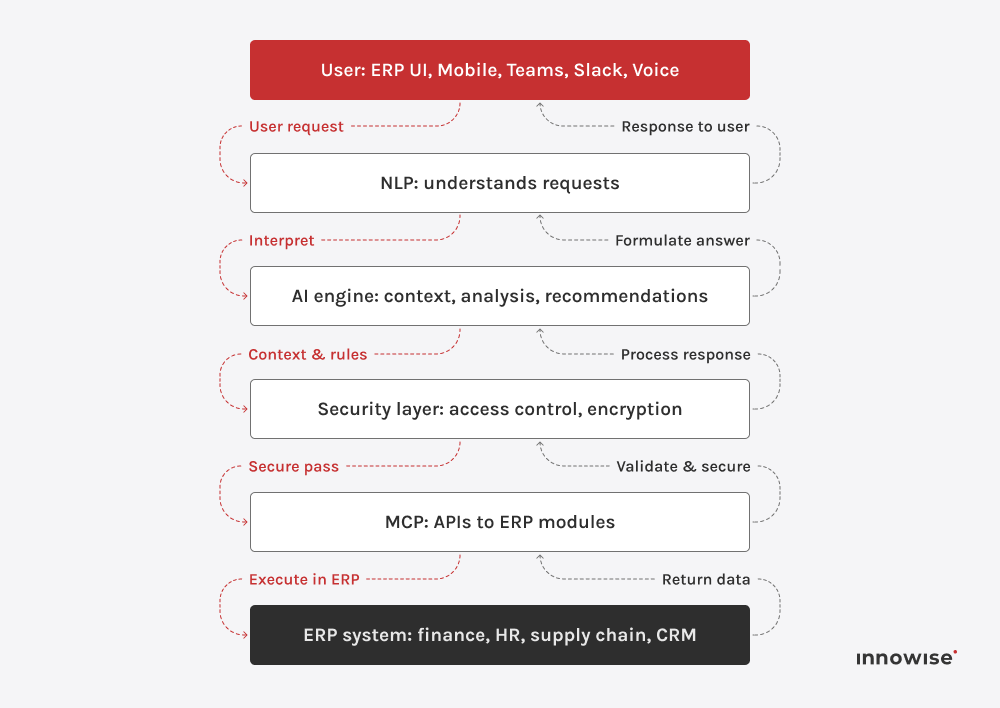
Now let’s take a look at what sits under the hood. An ERP AI chatbot may feel simple to use on the surface, but it’s powered by a highly complex, multi-layered architecture that keeps everything running the way you’d expect.
Here are the key components that create the magic
This is like the AI agent’s ear and eyes, if you will. It understands what people type or say, extracts intent and key fields such as dates, amounts, SKUs, or PO numbers, and maintains context across turns so that follow-ups make sense. The output becomes a structured request that the ERP can execute.
This component defines how the chatbots connect with the ERP system. APIs act as secure messengers, allowing them to fetch data, update records, or trigger processes in modules like finance, HR, or supply chain. When you ask for outstanding invoices, the agent assistant goes directly into the ERP, pulls the live data, and delivers it instantly.
The AI engine is the chatbot’s brain. It analyzes context, detects patterns, and generates recommendations. For example, if sales dip in a specific region, it can highlight the trend and suggest checking inventory or pricing data.
The user interface is where employees interact with the agent assistant, whether inside the ERP, through a mobile app, or in tools like Microsoft Teams or Slack. Wherever they type or speak, the chatbot is ready to respond.
Because ERP data is highly sensitive, the security layer is essential. It manages user authentication and authorization, so employees only access the data and actions allowed by their roles. All communication is protected with end-to-end encryption.


“AI chatbots make ERP systems smarter and more approachable. They turn data into something people can use instantly, without needing to know the system inside out. The result is fewer delays, fewer meetings, and faster results across the board.”

Dyrektor ds. technologii
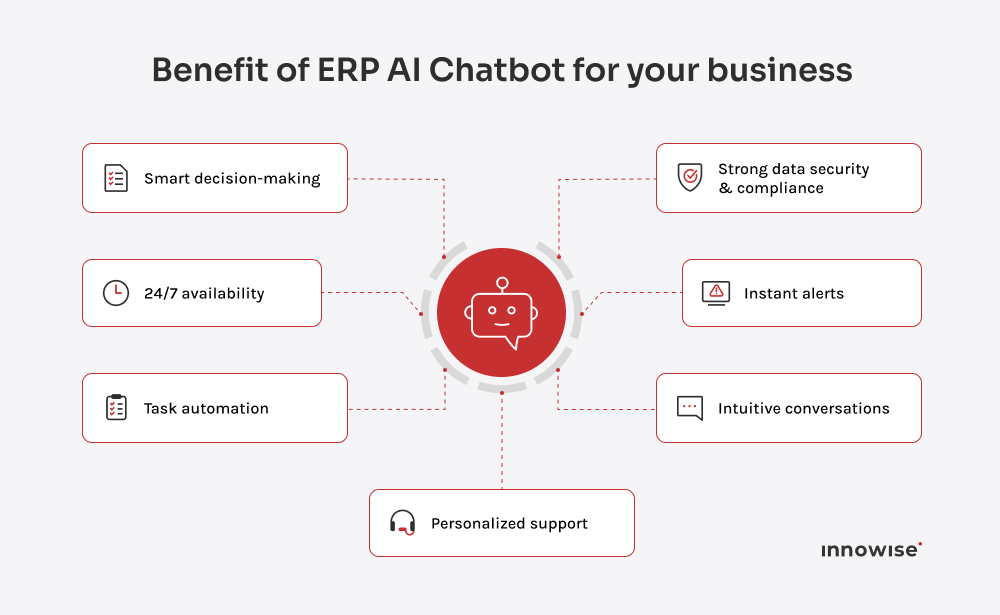
So, why are so many companies adding chatbots to their ERP? Because they make everyday work easier. Chatbots handle repetitive tasks, simplify data access, and deliver instant insights that help managers make faster, more informed decisions. The result is greater efficiency, lower admin effort, and a business that adapts quickly to change.
Employees get answers in seconds instead of clicking through screens. Routine workflows, like checking a shipment, submitting leave, or approving a purchase order, run inside a simple chat. Time saved flows straight into strategic work.
Global teams never stop moving. The chatbot is always on, so people in any time zone can pull data or complete tasks without waiting for colleagues.
The bot handles common ERP questions first. “How do I generate a Q3 expense report?” or “Why is my login failing?” gets an instant answer. Helpdesks see fewer tickets and can focus on complex issues.
Automation, fewer support requests, and simpler onboarding reduce operational overhead. Savings show up in support, training, and process time.
Non-technical users get analytics on demand. You can just ask “What was our customer acquisition cost last month?” and receive a clear, sourced answer. Curiosity turns into informed action.
Responses and shortcuts match each role. Sales sees daily pipeline updates. HR jumps to leave balances and onboarding checklists. The ERP feels like a personal assistant, not a maze.
Every request goes through a controlled, authenticated interface. Role-based access limits what each user can see or change, with full logging for audit and compliance.
Leaders can ask follow-ups, drill into details, and explore trends in real time. Strategy discussions move faster because the data is already in the room.
Everyone pulls from the same source of truth. The chatbot returns standardized, up-to-date answers, so teams align on facts instead of debating versions.

Every industry faces its own bottlenecks, such as production delays in manufacturing or data overload in finance. ERP AI chatbots aim to address these challenges with specific context, adapting to the workflows and priorities of each sector. In the next section,
In the following section, we’ll look at how sectors such as manufacturing, retail, healthcare, finance, travel, and hospitality are already putting chatbots to work and reaping the rewards.
In manufacturing and logistics, where timing and visibility are crucial, ERP chatbots provide managers with instant access to inventory levels, order status, and supplier timelines. They can also flag risks like delays or low stock before they become critical.
Take Rheem Manufacturing, North America’s largest maker of water heating products. They unified siloed systems using Microsoft Dynamics 365 with the Copilot AI assistant and Power BI. As a result, they cut call-handling time by 14%, boosted customer satisfaction, reduced escalations, and finally got clear, centralized reporting.
Wprowadzenie AI chatbot ERP means working with the core of your business systems. It touches the key to how your systems run and how your people use them day to day. To make it work, you need a chatbot that fits your ERP setup, a clear plan for integration, and guardrails for things like security, legacy systems, and user adoption
Up next, we’ll walk through what to look for when choosing a chatbot, how to roll it out without headaches, and the common hurdles you’ll want to plan for before they turn into problems.
The first step is deciding what kind of chatbot makes sense for your business. In practice, there are three main routes:
Once you know which path fits, the next step is evaluating the options on the market. The key things to look at are:
Pick a vendor that can show working proof with your ERP setup. If they can demonstrate live integration, audit trails, and real benchmarks, you’re looking at an agent assistant that can grow with you instead of one that stalls after a pilot.
Implementing an AI chatbot ERP isn’t something you flip on overnight. The best results come from taking it step by step, testing as you go, and keeping people at the center of it all. Here’s what the process typically looks like.
Begin with the real bottlenecks: the delays that frustrate employees, the processes that regularly fail, or the IT queues that never seem to shrink. Talk directly with the department leads to surface high-frequency tasks and measure how much time is being lost. From there, set concrete goals, like reducing IT helpdesk tickets by 40% or cutting the time to retrieve reports from ten minutes to ten seconds. At Innowise, we use these benchmarks to guide both design and evaluation, making sure the chatbot delivers measurable results instead of vague improvements.
Choose a department or workflow with a clear scope and manageable risk, such as HR leave requests or inventory checks. At Innowise, we often start pilots in shadow mode, where the agent assistant runs quietly in the background and logs potential responses without interacting with users. This approach lets us fine-tune accuracy and spot integration gaps before going live. The insights from this phase feed directly into refining conversational flows, security controls, and overall user experience.
Even the best chatbot will fail without adoption. The rollout should include simple, practical training that shows employees how the agent assistant makes their work easier. Short video demos, in-app tips, and quick reference guides work better than thick manuals.
I also recommend appointing team champions who use the bot early, share success stories, and help colleagues build confidence. Clear communication about what the chatbot can do and how it adds value is just as important as the technology itself.
The launch is not the finish line. Track usage, resolution rates, and employee satisfaction to see how the agent assistant performs under real conditions. Watch where it delivers value and where it struggles. Our team sets up regular review cycles with analytics dashboards to adjust prompts, expand coverage, and improve accuracy. Rolling out gradually into new ERP modules guarantees the chatbot remains reliable while growing with the business.
Even with a solid plan, bringing an AI chatbot into an ERP landscape is not without hurdles. The biggest challenges tend to cluster around data security, legacy systems, and employee adoption. But each one can be managed with the right approach.
You now have the plan, the steps, and the common pitfalls. Although turning that into real, day-to-day results takes a partner who can properly integrate the agent assistant into the ERP, tune the AI to your business language, and guide adoption so that people continue to use it. Innowise blends deep ERP expertise with hands-on AI delivery. We have helped companies surface analytics through conversational chatbots i rolled out ERP platforms at scale. Our teams design the architecture, connect secure APIs, apply role-based controls and audits, and coach users so the agent assistant becomes a natural part of daily work.

Lider konsultantów ERP
Philip brings sharp focus to all things data and AI. He’s the one who asks the right questions early, sets a strong technical vision, and makes sure we’re not just building smart systems – we’re building the right ones, for real business value.


Wiadomość została wysłana.
Przetworzymy Twoją prośbę i skontaktujemy się z Tobą tak szybko, jak to możliwe.
Rejestrując się, wyrażasz zgodę na naszą Polityką Prywatności, w tym korzystanie z plików cookie i przekazywanie Twoich danych osobowych.