Laat uw contactgegevens achter, dan sturen we u ons overzicht per e-mail.
Ik geef toestemming voor het verwerken van mijn persoonlijke gegevens om gepersonaliseerd marketingmateriaal te sturen in overeenstemming met de Privacybeleid. Door de inzending te bevestigen, gaat u akkoord met het ontvangen van marketingmateriaal
Bedankt.
Het formulier is succesvol verzonden. Meer informatie vindt u in uw mailbox.
AI verbetert de traditionele automatisering en bewijst een 30% snellere QA-cyclustijd met het juiste kader.
Met ML- en NLP-modellen in de kern zijn de AI tools geschikt voor grootschalige analyse, testgeneratie en foutvoorspelling - taken die doorgaans een groot deel van de QA-tijd in beslag nemen en een hoog risico met zich meebrengen als ze handmatig worden uitgevoerd.
Testen op basis van AI kan de volgende natuurlijke stap worden bij het ontwikkelen van complexe producten in grote volumes die vaak veranderen.
Als je product klein is, onderhevig is aan compliance of gevoelig is voor ethiek, kunnen AI-gestuurde tests meer kwaad dan goed doen, omdat ze te riskant of zinloos worden.
Als we naar het totale ontwikkelproces kijken, zien we dat testen de laatste bottleneck in DevOps is geworden. Automatisering is een uitkomst geweest, maar met grotere hoeveelheden tests en toenemende complexiteit toont automatisering zijn beperkingen. Waar dichte producten meer dan duizend tests vereisen, die handmatig gegenereerd en onderhouden moeten worden, zullen teams ongeveer 3-6 maanden besteden aan het maken ervan en tientallen uren per week alleen al aan ondersteuning.
AI wil deze uitdaging aangaan en kostbare tijd terugwinnen. Maar hoe? Bij de overgang naar intelligente testworkflows (zonder codering) melden bedrijven tot wel 70% reductie in testinspanning. Dit zijn onweerlegbare cijfers, die voornamelijk zijn bereikt door minder onderhoud en minder afhankelijkheid van codeerwerk. Maar zoals bij elke doorbraak zijn er nuances.
Ik ben al 15 jaar actief in het testen van software en ik sta te popelen om te laten zien hoe een goed geplande, strategisch geïmplementeerde introductie van AI een positieve verandering teweeg kan brengen. Ik experimenteer, analyseer en lever het resultaat in AI-ondersteunde testen, die ik met vertrouwen aan klanten aanbied. Om te begrijpen hoe AI kan worden gebruikt bij het testen van software en hoe je het kunt benaderen voor maximaal voordeel, lees verder.
Waarom traditioneel testen stokt: 3 valkuilen werden tastbaar
Beide handmatig en geautomatiseerd testen last hebben van knelpunten. Handmatig testen is gemaakt voor langzamere releasecycli waarbij software meerdere keren per jaar wordt uitgebracht. Hoewel automatisering het testen heeft versneld, heeft het ook stabiliteitsproblemen met zich meegebracht.
Waar QA-teams mee worstelen:
De “snelheid versus stabiliteit” paradox in CI/CD. Hoe sneller je releases uitbrengt, hoe kwetsbaarder je testen worden. Als je te veel tests uitvoert, lopen de pijplijnen vast; als je er te weinig uitvoert, kunnen kritieke bugs er doorheen glippen.
Onderhoudsschuld: schilferige locators, broze scripts, lage dekking. Elke kleine UI- of API-verandering kan tientallen geautomatiseerde tests breken, waardoor hele sprints worden opgeslokt om te repareren wat voorheen werkte in plaats van nieuwe scripts te schrijven.
Menselijke grenzen in testselectie en regressieanalyse. Het kiezen van de juiste subset van tests voor elke build is giswerk als er duizenden bestaan en er deadlines aankomen. Regressieanalyse wordt een tijdrovend proces met eindeloze logbestanden, valse fouten en een trage zoektocht naar de hoofdoorzaak, waardoor releases worden vertraagd.
Om deze uitdagingen te doorbreken, hebben we een drastisch andere aanpak nodig met intelligente selectie, prioritering en analyses op schaal - waarvan AI er veel kan ondersteunen.
Wat is AI in software testen
Eerst en vooral is het gebruik van AI bij het testen van software geen vervanging voor QA engineers. Het betekent het injecteren van intelligentie in elk deel van de testlevenscyclus om engineers te helpen. Daarnaast is het geen vervanging voor automatisering. Terwijl de laatste gericht is op het herhalen van vooraf gedefinieerde stappen, helpt AI tests te leren van eerdere resultaten, tests automatisch bij te werken en potentiële faalzones te voorspellen, waardoor het hele proces wordt geoptimaliseerd.
Technologieën die AI-gestuurde testautomatisering achter zich laten, gedragen zich als volgt:
Machinaal leren (ML) modellen leren van gegevens om patronen te identificeren en beslissingen te nemen met minimale tussenkomst. Bij het testen kunnen ML-modellen eerdere testruns, codewijzigingen en buggeschiedenis analyseren en terugkerende patronen herkennen om te leren wat er meestal kapot gaat en waarom.
Neurale taalverwerking (NLP) Modellen interpreteren, begrijpen en genereren menselijke taal. Bij het testen kan het requirements, user stories of bugrapporten begrijpen en automatisch die “de gebruiker moet zijn wachtwoord kunnen resetten” vertalen naar een gestructureerde testcase met invoer-, uitvoer- en validatiestappen. Het kan fungeren als een assistent die op zoek gaat naar ontbrekende scenario's, zelfs binnen een chatbot.
Voorspellende analyses betekent historische gegevens, statistische algoritmen en ML gebruiken voor voorspellingen. Bij het testen voorspellen modellen op basis van historische defecttrends, code churn en testresultaten welke onderdelen van het product waarschijnlijk de volgende keer stuk zullen gaan.
Zie hoe AI-testen uw processen versnelt
Neem contact op met Innowise om de haalbaarheid te valideren en intelligent testen op een geoptimaliseerde manier te implementeren.
Hoe je AI kunt gebruiken bij het testen van software: de belangrijkste use cases die je vandaag al kunt gebruiken
AI testcase genereren
Hier is goed nieuws: AI stroomlijnt de meest arbeidsintensieve taken. Door het scannen van requirements, acceptatiecriteria, user stories en historische testgegevens, stelt het automatisch nieuwe testscenario's voor of maakt deze aan, inclusief edge cases die mensen misschien over het hoofd zien. Tools gebouwd op GPT-4 of Code Llama, of verfijnde interne modellen, kunnen alle mogelijke scenario's analyseren om teststappen en condities te genereren. NLP-modellen helpen bij het structureren van deze input en genereren uitgebreide testgevallen op basis van uw aangepaste regels.
Resultaat
Sneller testontwerp, bredere dekking, minder hiaten in QA en teams die zich richten op kerntaken.
AI genereren van testgegevens
Het goede nieuws gaat door: AI verlicht een van de grootste testproblemen - gemiste data. Generatieve AI modellen kunnen data genereren die productiegedrag en datacombinaties nabootsen voor complexe workflows en edge cases. Machine-learning modellen leren van schema patronen en historische data om geldige en zelfs opzettelijk “slechte” inputs te produceren die de dekking versterken. Met tools voor data-afscherming en differentiële privacy zorg je voor anonimisering met behoud van data-integriteit. Dit is vooral waardevol voor complexe user journeys binnen domeinen zoals fintech of gezondheidszorg.
Resultaat
Consistente en relevante gegevens voor elke testrun, verbeterde betrouwbaarheid en naleving, en minder handmatige instellingen.
Zelfherstellende testautomatisering
Geautomatiseerde tests hebben de neiging om te breken bij zelfs de kleinste wijzigingen in de UI of workflow, wat een constante stroom van valse mislukkingen oplevert. AI detecteert efficiënt gewijzigde locators, identifiers of API-paden wanneer een test mislukt en werkt deze automatisch bij of repareert ze. Het intelligente systeem leert de patronen achter stabiele en langdurige identifiers en versterkt geleidelijk de hele suite.
Resultaat
Veel minder onderhoud, stabiele testsuites en ononderbroken CI/CD-pijplijnen.
Visuele afwijkingsdetectie
Het gebruik van AI bij het testen van software helpt bij het valideren van UI door het vergelijken van schermafbeeldingen, DOM-structuren en renderpatronen tussen versies om visuele verschillen te detecteren, zoals misplaatste elementen of verschuivingen in de lay-out. Bovendien vergelijkt AI met succes hoe de interface wordt weergegeven op verschillende apparaten en browsers. In tegenstelling tot naïeve pixelverschillen, weet AI wat dynamisch is (advertenties, tijdstempels) en wat een echte regressie is, waardoor vals alarm wordt verminderd.
Resultaat
Snellere, nauwkeurigere UI-validatie die zorgt voor een consistente gebruikerservaring op verschillende browsers en apparaten.
Testrapport intelligentie
Slimme rapporten comprimeren overweldigende data, zoals logs, screenshots, stack traces, timings, etc., in een inzichtelijke vorm. AI analyseert patronen in builds, clustert vergelijkbare fouten, correleert ze met recente codewijzigingen en laat zien waarom tests zijn mislukt. In plaats van door honderden rode tests te waden, krijgen teams een levendige samenvatting met prioritering zoals: “De meeste fouten hebben betrekking op de bijgewerkte checkout API; waarschijnlijk veroorzaakt door commit #4821.” Voor leiderschap wordt het een sleutel voor het bijhouden van kwaliteitstrends.
Resultaat
Snellere triage, beter overzicht voor QA- en productteams en releasebeslissingen op basis van gegevens.
Analyse van de oorzaak en voorspelling van defecten
In plaats van handmatig logs door te spitten, stack traces te vergelijken en storingen in verband te brengen met recente wijzigingen, clustert AI gerelateerde storingen, detecteert gedeelde patronen en correleert deze met specifieke commits, configuraties of componenten. Dit versnelt de identificatie van de hoofdoorzaak enorm.
Door historische defecten, codewijzigingen en testresultaten te analyseren, voorspelt AI welke componenten het meest waarschijnlijk zullen falen. Het benadrukt “hot zones”, de gebieden met een hoge faalkans. Op deze manier hoeven teams niet meer te gissen en kunnen ze hun test- en engineeringinspanningen richten op de gebieden met het werkelijke risico.
Resultaat
Teams prioriteren gebieden met een hoog risico voor de release en diagnosticeren huidige problemen sneller, waardoor QA verschuift van reactief naar preventief.
Testoptimalisatie en prioritering in CI/CD
AI-gedreven testorkestratie helpt de snelheid versus stabiliteit afweging te omzeilen door te beslissen welke tests belangrijk zijn voor elke codewijziging en wanneer ze moeten worden uitgevoerd. Het intelligente systeem analyseert recente commits, testhistorie en stabiliteitspatronen om prioriteit te geven aan de meest relevante scenario's met een hoge impact, terwijl overbodige tests of tests met een laag risico worden overgeslagen. Het optimaliseert ook de uitvoeringsvolgorde en parallellisatie en zorgt voor efficiënt gebruik van de omgeving om pijplijnen snel te houden.
Resultaat
Kortere testcycli, snellere feedbackloops en geoptimaliseerd gebruik van bronnen.
onveilige gegevensstromen, zwakke autorisatiepaden en riskante API-blootstellingen gekoppeld aan bedrijfslogica detecteren
Verkennende tests
Agentic AI ontdekt stromen die mensen nooit proberen;
testen van onregelmatige reeksen;
imitaties voor onvoorspelbaar gebruikersgedrag;
het ontdekken van “onbekende onbekenden” in de UI
Bedrijfsimpact achter AI-gestuurde QA
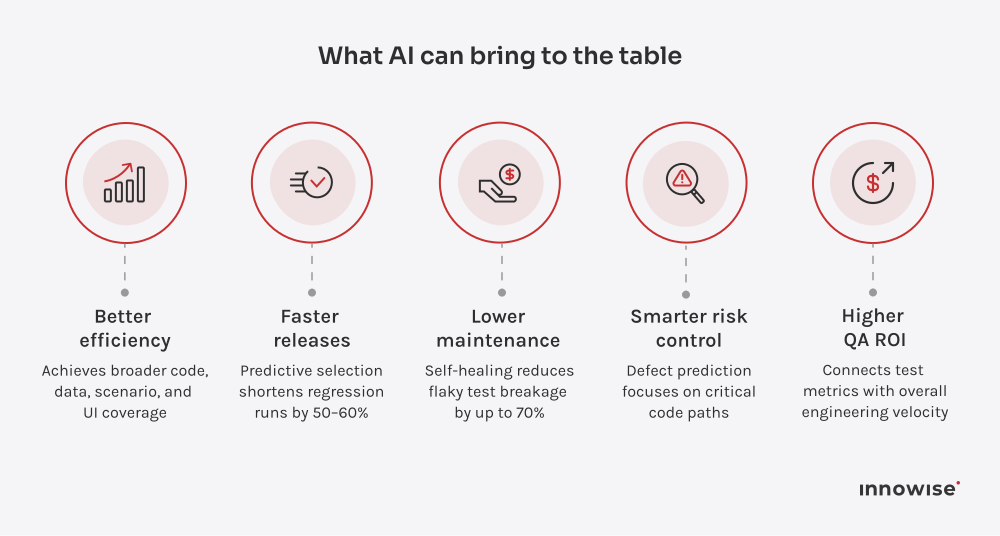
Hoewel AI tools CI/CD pipelines zelf niet automatiseren, stroomlijnen en optimaliseren ze veel omliggende testactiviteiten, wat de algehele testworkflow aanzienlijk verbetert. Wat AI kan bieden:
Wat heb je nodig om AI te introduceren voor het testen van software?
Voordat u AI aansluit op uw workflows, moet u de omgeving eromheen aanpassen. Omdat het zijn specifieke eigenschappen meebrengt, zoals grootschalige gegevensinvoer en een behoefte aan continu leren, moet uw DevOps-levenscyclus voorbereid zijn op het naadloos voeden, integreren en hertrainen van AI-modellen.
Kwaliteitsgegevens zijn een must. Toegang tot alle historische testresultaten, codewijzigingen, stack traces, gedetailleerde defectlogs en volledige testgegevens op een systeem. Schoon uw gegevens op, structureer ze en centraliseer ze zodat AI zinvolle patronen kan leren.
Integratie met bestaande tooling. Integratie mag lopende ontwikkelingscycli niet verstoren. Zorg voor een enkele gegevenslaag, API-verbinding tussen verschillende tools en voortdurend toezicht; ervoor zorgen dat CI/CD flexibel kan worden geconfigureerd met AI als overlay van het bestaande framework.
Modeltraining. Zorg voor voortdurende training van je model om je aan te passen aan nieuwe codewijzigingen en veranderend gebruikersgedrag. Het model blijft accuraat en relevant door regelmatig te leren van nieuwe testruns en nieuwe defectpatronen.
Schaalbaarheid. Je model heeft ruimte nodig om te groeien. Om uitbreiding van honderden naar tienduizenden tests te ondersteunen, met behoud van dezelfde prestaties, zorgt u voor krachtige rekenbronnen, gecentraliseerde gegevensopslag en een flexibele cloudinfrastructuur. Optimaliseer pijplijnen voor AI ondersteuning en zorg voor horizontale schaling met gelijktijdige resultaatverwerking.
Vertrouwen en transparantie. Een kritiek punt om controle te houden over AI. Bouw het systeem met zichtbare redeneringen en duidelijke logs van AI-gestuurde acties. Op deze manier zullen teams begrijpen waarom AI prioriteit geeft aan bepaalde tests of specifieke fouten markeert, en zullen ze in staat zijn om direct in te grijpen als dat nodig is.
Hoe implementeer je AI softwaretesten met een reden
Stap 1: pijnpunten identificeren
Begin met uw uitdagingen: AI helpt waar knelpunten het meest voelbaar zijn. Hoge onderhoudsoverhead en flake rate, lange regressie, beperkte dekking van kritieke scenario's en trage analyse van hoofdoorzaken zijn veelvoorkomende pijnpunten die AI goed kan oplossen.
Stap 2: Metrics & KPI's definiëren
Om overschatting van AI softwaretesten te voorkomen, kun je “voor” op belangrijke meetpunten vastleggen, zoals testdekking, MTTR (mean time to resolution), regressie cyclustijd, flake rate, of onderhoudsuren per sprint. Dit zal laten zien waar AI echt helpt, en waar het nog verfijning behoeft.
Stap 3: Pilot met beperkte reikwijdte en benchmarkverbetering
Pak het probleemgebied op voor de pilotimplementatie met veel UI-veranderingen, afgebroken tests en herhalende scenario's. Na een pilot van 2-6 weken zul je al snel winst zien, of het nu gaat om minder flakes, snellere regressie of nauwkeurigere RCA.
Stap 4: integreren in CI/CD en modellen regelmatig hertrainen
Zodra de pilot zijn waarde bewijst, integreer het AI systeem dan in uw CI/CD pijplijn zodat testselectie, prioritering en uitvoering dynamisch worden aangepast aan codeveranderingen. Regelmatige bijscholing over nieuwe UI-patronen, defecten of projectstructuren helpt om duurzame resultaten te bereiken.
Stap 5: Behoud mens-in-de-lus voor rand- en UX-testen
Blijf menselijk toezicht houden op complexe en zeldzame scenario's, aanzienlijke UI- en API-veranderingen en strategische dekkingsbeslissingen. Op deze manier kun je 30% sneller testen zonder afbreuk te doen aan de technische volwassenheid.
Op zoek naar speciaal gebouwde QA verbeteringen?
We integreren en passen gerichte, geavanceerde tools aan om je releases sneller te laten verlopen.
Het gebruik van AI voor het testen van software kan in bepaalde contexten onpraktisch of te riskant worden. Ik adviseer om het gebruik van AI te heroverwegen wanneer:
Uw product is heel eenvoudig - statisch en voorspelbaar, producten met minimale veranderingen slagen door traditionele automatisering.
Je hebt niet voldoende gegevens - zonder historische testresultaten kunnen modellen eenvoudigweg niet leren en effectief voorspellen.
Je opereert in een sector waar compliance zwaar weegt - strenge auditvereisten, zoals voor software voor de gezondheidszorg testen, gedetailleerde validatie en documentatie vereisen, waardoor vertrouwen op AI riskant wordt.
Diepe menselijke intuïtie is nodig - subjectieve feedback, inlevingsvermogen van de gebruiker of domeinkennis kunnen niet worden geautomatiseerd.
Het ontbreekt u aan middelen - AI is niet plug-and-play en vereist een deskundig team om het te introduceren en te onderhouden.
De toekomst van softwaretesten en AI
Volgens het onderzoek van DevOps Digest, over 55% van de bedrijven heeft AI ten minste geprobeerd tools voor ontwikkeling en testen. Zoals bedrijven rapporteren, ongeveer 25% kostenreductie in testkosten door AI, zal deze trend naar verwachting nog meer aan kracht winnen.
Moeten we een brede toepassing verwachten? In de komende 3 tot 5 jaar zullen de tools volwassen worden, de best practices zullen beter worden en het gebruik van AI bij het testen van software zal op natuurlijke wijze toenemen. Over het algemeen wordt voorspeld dat het de volgende logische stap zal worden in QA levenscycli, vergelijkbaar met hoe CI/CD enige tijd geleden een zeldzaamheid was en nu gemeengoed is geworden. Als je vandaag AI integreert, moet je een rigoureus haalbaarheidsonderzoek uitvoeren op basis van je product en bestaande processen, en zul je waarschijnlijk een pionier worden in een aantal opkomende praktijken.
Conclusie: hoe AI gebruiken bij het testen van software
AI betekent niet dat QA helemaal wordt vervangen. Het vervangt de onhoudbare onderdelen van traditionele automatisering, zoals broze scripts, groot onderhoud, trage regressies en handmatige triage. Vandaag de dag bewijst AI zijn efficiëntie en betrouwbaarheid in resource-intensieve taken, zoals het genereren van testcases en hoofdoorzaakanalyses.
Door de best practices van softwaretesten met AI te volgen, kunnen bedrijven besparen op testinspanningen en hun producten sneller uitbrengen zonder aan efficiëntie in te boeten. Het blijft echter belangrijk om een mens in de lus te houden voor succes op de lange termijn.
Als uw knelpunten bij het testen de vooruitgang tegenhouden en u werkt aan een complex, high-volume product, kan AI adoptie de volgende logische stap zijn. Neem contact op met Innowise voor een volledige beoordeling en definieer AI aangedreven en aanvullende oplossingen die passen bij uw doelen en lange termijn strategie.
Andrew is de laatste verdedigingslinie tegen technische schuld. Met een “zero tolerance” benadering van bugs en een speurdersoog voor detail zorgt hij ervoor dat elke release aan de hoogste kwaliteitsnormen voldoet.
Vergelijk de 9 beste ERP-adviesbureaus van 2026. Bekijk hun expertise en branchegerichtheid, en ontdek tips voor het kiezen van de juiste partner voor u.



 Inhuren
 Over ons