Benefits, use cases & strategies for implementing ERP AI chatbots

Responsabile Big Data e AI9 min
Vantaggi, casi d'uso e strategie per l'implementazione di chatbot ERP A

Punti di forza

  • ERP AI chatbots make complex ERP tasks a cinch, with instant answers and automated workflows.
  • Core features include secure integration, natural language queries, proactive alerts, and role-based support.
  • All the big players from manufacturing to finance use chatbots to speed up everyday tasks, improve accuracy, and make decisions.
  • There are keys to successful rollouts: identify bottlenecks, launch pilots, train users, and refine through monitoring.
  • Common challenges like data security, legacy systems, and adoption are manageable with strong guardrails and change management.

ERP systems have seemingly limitless potential, but many companies still struggle to squeeze maximum value out of them. Even after ERP implementation, employees can still waste countless hours searching for data, managers wait on delayed reports, and IT teams handle tickets that should be automated. This creates a melting pot of friction and frustration, which ultimately slows the business down.

You may have anticipated it, but this is where we covertly (wink) suggest a primed and packaged solution… AI ERP bots (ta-dah!) completely transform the way users interact with their systems. Rather than navigating through dashboards, users can instead ask questions in simple, everyday language and leave the grunt work to the bots. Whether it’s quickly obtaining reports, triggering workflows, or accessing the data they need. This speed leads to more informed decisions, better processes, and frees up time for more important tasks.

Look, we can’t take credit for putting the industry onto this phenomenon; businesses have been steadily adopting AI-driven ERP assistants in a big way. According to Gartner, by 2026, 40% of enterprise apps will include task-specific AI agents, up from less than 5% in 2025. For leaders, it’s clear: conversational AI is becoming essential. Companies that don’t set a strategy in the next 6–12 months risk falling behind those who have already adopted AI for ERP decision-making. Stagnaters simply can’t match the efficiency and speed offered by it.

In this article, I’ll break down how ERP AI chatbots work, the measurable value they bring, where they’re gaining traction across industries, and practical strategies for rolling them out effectively.

What is an ERP AI chatbot?

Let’s start by defining the term, we’re about to get dry for a second (clears throat). An ERP AI chatbot is a conversational assistant built into your enterprise resource planning system. It uses natural language processing to understand user intent, fetch or update ERP data in real-time, and automate routine tasks across finance, supply chain, sales, and HR.

In practice, it acts as an extension of already familiar tools; employees interact with it through the ERP interface, web or mobile apps, Slack, or Microsoft Teams. Behind the scenes, it connects via secure APIs, enforces role-based permissions, and logs every action for audit and compliance. To sum up, it puts ERP data and actions at your fingertips while keeping enterprise-grade controls in place.

Here’s an everyday example: A sales manager is logged into Teams and wants to know the quarterly pipeline, filtered by region. With a few taps, they send the request, and seconds later, the report is populated on-screen. Better yet, the AI ERP bot offers to make this a regular thing and schedule an automatic refresh of the info every Monday morning. Bliss.

Core features of AI-powered ERP chatbot

Now that we’ve defined what an ERP chatbot is, let’s look at the features that make them effective in day-to-day business. These functions help employees find information faster, automate routine tasks, and keep business operations running smoothly.

  • Automated data access. The agent assistant gives your team instant answers from the ERP system. Instead of clicking through multiple screens, they can ask for inventory levels, payment statuses, or customer history in plain language. It saves time and cuts out manual steps from daily work.
  • User interactions. Using NLP and NLU, the chatbot understands intent, context, and even casual wording. Employees can ask questions in their own words and get clear answers, which makes complex queries feel as easy as chatting with a teammate.
  • Decision support. The agent assistants go beyond pulling data. They highlight trends, flag anomalies, and generate clear summaries, so managers and executives can make faster, better decisions.
  • ERP integration. API-driven integrations connect chatbots with essential ERP modules such as finance, HR, supply chain, and CRM. As a result, they have accurate and secure access to data across the entire system.
  • Proactive alerting. Il ERP AI bot tracks key metrics and sends real-time alerts when thresholds are crossed. They can notify a supply chain lead about low stock or flag an overdue high-value invoice for finance.
  • Personalized assistance. The ERP bot adapts to each user’s role and daily routine. A sales manager might receive automatic sales reports, while HR can quickly pull leave balances or onboarding checklists. Every interaction feels tailored and efficient.

ERP AI chatbot architecture

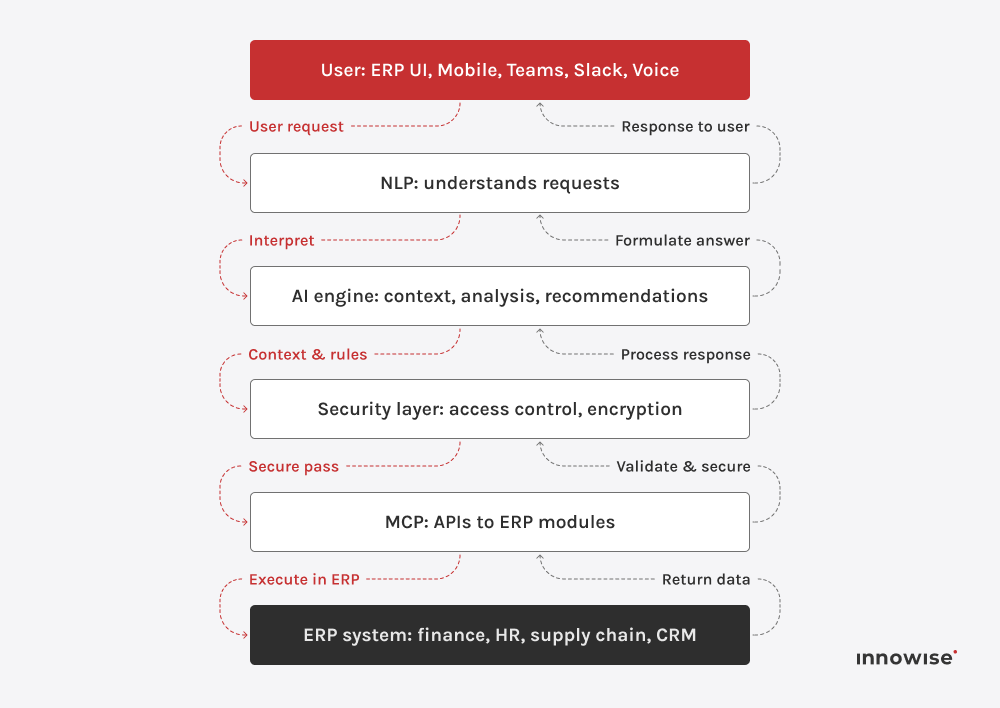
Now let’s take a look at what sits under the hood. An ERP AI chatbot may feel simple to use on the surface, but it’s powered by a highly complex, multi-layered architecture that keeps everything running the way you’d expect.

Here are the key components that create the magic

Elaborazione del linguaggio naturale (NLP)

This is like the AI agent’s ear and eyes, if you will. It understands what people type or say, extracts intent and key fields such as dates, amounts, SKUs, or PO numbers, and maintains context across turns so that follow-ups make sense. The output becomes a structured request that the ERP can execute.

Model context protocol (MCP)

This component defines how the chatbots connect with the ERP system. APIs act as secure messengers, allowing them to fetch data, update records, or trigger processes in modules like finance, HR, or supply chain. When you ask for outstanding invoices, the agent assistant goes directly into the ERP, pulls the live data, and delivers it instantly.

AI engine

The AI engine is the chatbot’s brain. It analyzes context, detects patterns, and generates recommendations. For example, if sales dip in a specific region, it can highlight the trend and suggest checking inventory or pricing data.

Interfaccia utente

The user interface is where employees interact with the agent assistant, whether inside the ERP, through a mobile app, or in tools like Microsoft Teams or Slack. Wherever they type or speak, the chatbot is ready to respond.

Security layer

Because ERP data is highly sensitive, the security layer is essential. It manages user authentication and authorization, so employees only access the data and actions allowed by their roles. All communication is protected with end-to-end encryption.

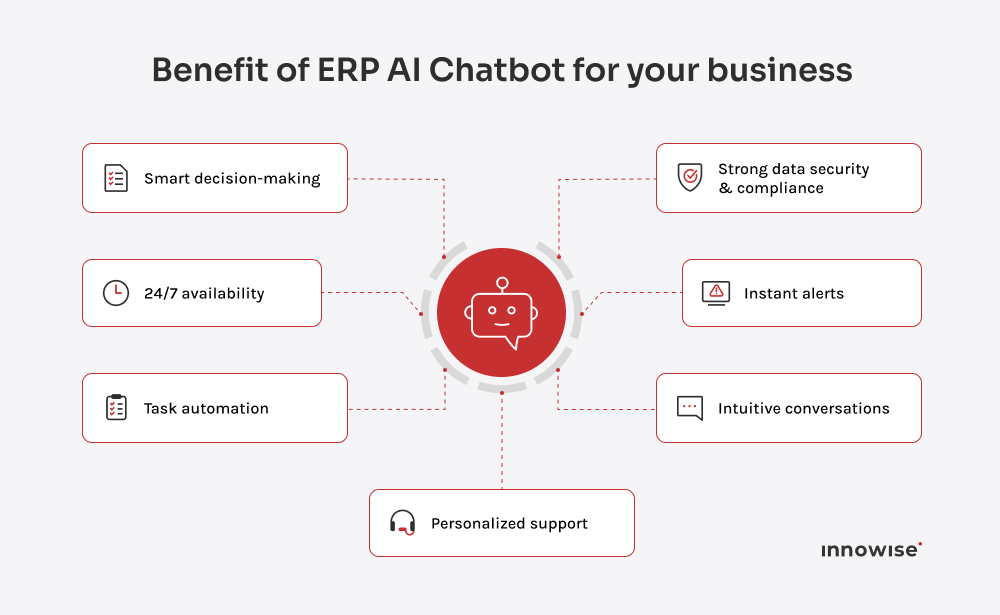
Business gains from ERP chatbot: smarter decisions, fewer manual tasks, always-on help, compliant data handling
erp ai chatbot architecture flow

“AI chatbots make ERP systems smarter and more approachable. They turn data into something people can use instantly, without needing to know the system inside out. The result is fewer delays, fewer meetings, and faster results across the board.”

Dmitry Nazarevich

CTO

Why enterprises need ERP AI chatbots

So, why are so many companies adding chatbots to their ERP? Because they make everyday work easier. Chatbots handle repetitive tasks, simplify data access, and deliver instant insights that help managers make faster, more informed decisions. The result is greater efficiency, lower admin effort, and a business that adapts quickly to change.

Enhanced efficiency & automation

Employees get answers in seconds instead of clicking through screens. Routine workflows, like checking a shipment, submitting leave, or approving a purchase order, run inside a simple chat. Time saved flows straight into strategic work.

Disponibilità 24/7

Global teams never stop moving. The chatbot is always on, so people in any time zone can pull data or complete tasks without waiting for colleagues.

Issue response & resolution

The bot handles common ERP questions first. “How do I generate a Q3 expense report?” or “Why is my login failing?” gets an instant answer. Helpdesks see fewer tickets and can focus on complex issues.

Riduzione dei costi

Automation, fewer support requests, and simpler onboarding reduce operational overhead. Savings show up in support, training, and process time.

Enhanced data insights

Non-technical users get analytics on demand. You can just ask “What was our customer acquisition cost last month?” and receive a clear, sourced answer. Curiosity turns into informed action.

Esperienza utente personalizzata

Responses and shortcuts match each role. Sales sees daily pipeline updates. HR jumps to leave balances and onboarding checklists. The ERP feels like a personal assistant, not a maze.

Maggiore sicurezza

Every request goes through a controlled, authenticated interface. Role-based access limits what each user can see or change, with full logging for audit and compliance.

Processo decisionale basato sui dati

Leaders can ask follow-ups, drill into details, and explore trends in real time. Strategy discussions move faster because the data is already in the room.

Consistent communication

Everyone pulls from the same source of truth. The chatbot returns standardized, up-to-date answers, so teams align on facts instead of debating versions.

Business gains from ERP chatbot: smarter decisions, fewer manual tasks, always-on help, compliant data handling

Use cases of ERP AI chatbots for various industries

Every industry faces its own bottlenecks, such as production delays in manufacturing or data overload in finance. ERP AI chatbots aim to address these challenges with specific context, adapting to the workflows and priorities of each sector. In the next section,

In the following section, we’ll look at how sectors such as manufacturing, retail, healthcare, finance, travel, and hospitality are already putting chatbots to work and reaping the rewards.

Produzione & catena di fornitura

In manufacturing and logistics, where timing and visibility are crucial, ERP chatbots provide managers with instant access to inventory levels, order status, and supplier timelines. They can also flag risks like delays or low stock before they become critical.

  • Check stock levels across plants and warehouses
  • Track supplier deliveries and update expected dates
  • Monitor MRP exceptions and approve suggested orders
  • Get alerts for delays, shortages, or quality issues

Prendere Rheem Manufacturing, North America’s largest maker of water heating products. They unified siloed systems using Microsoft Dynamics 365 with the Copilot AI assistant and Power BI. As a result, they cut call-handling time by 14%, boosted customer satisfaction, reduced escalations, and finally got clear, centralized reporting.

In utilities and energy, chatbots are layered on top of ERP, billing, and field service systems to enhance customer service and operational responsiveness. Customers can check balances, pay bills, or report outages instantly. Meanwhile, field teams access work orders, asset data, and safety checklists hands-free.
  • Pull up work orders, asset histories, and safety checklists
  • Check inventory in depots and reserve parts for jobs
  • Review exceptions in billing or meter-to-cash processes
  • Push outage updates and vendor SLA alerts
SA Power Networks, South Australia’s electricity distributor, runs S/4HANA Cloud with AI-powered Joule embedded into ERP workflows, improving both customer-facing service and internal processes.
Retail and e-commerce teams rely on speed for everything from inventory turns to promotions. ERP chatbots give staff a single entry point to merchandising, fulfillment, and service data. A store manager can simply ask, “What’s our inventory for SKU 562 in Warsaw and Berlin?” and get live ERP data.
  • Query inventory by SKU, store, or warehouse
  • Track customer orders and manage returns
  • Review pricing and promotional performance
  • Balance stock across locations with inter-store transfer
Vera Bradley is a strong example. The brand added Microsoft Copilot in Dynamics 365 Store Commerce. Associates now ask natural-language questions and get real-time actions grounded in ERP data, improving both efficiency and customer experience.Vera Bradley | Who’s Using Copilot? | Dynamics 365 Customer Story
Hospitals and health systems run heavy back-office workloads across HR, finance, procurement, and inventory. ERP-connected agent assistants simplify these processes so staff can spend more time on patient care.
  • Check payroll, benefits, or scheduling details
  • Submit and approve requisitions for supplies
  • Track inventory for critical medications
  • Review budgets and departmental spend
A clear example is Northwell Health. The organization deployed Oracle Digital Assistant with Fusion Cloud HCM to modernize HR for 85,000 employees. They cut HR tickets by 40%, hit 94% training participation in seven months, and logged 2.5 million in-app guide downloads.
Universities and training providers manage admissions, scheduling, course management, and student services across ERP and academic systems. Agent assistants reduce complexity for both students and staff.
  • Guide applicants through enrollment and scheduling
  • Provide students with tuition balances or grades
  • Support staff with expense submissions and approvals
  • Simplify HR and recruiting tasks for faculty
The University of Nevada introduced Workday Assistant within its Workday platform. Staff now use it on desktop and mobile for time-off requests, expense submissions, recruiting tasks, and more.

Viaggi e ospitalità

ERP AI chatbots in travel and hospitality streamline both guest services and daily operations. Guests can handle bookings, check in or out, track flight status, and get instant answers through simple conversation. On the backend, teams gain relief from repetitive tasks, and managers benefit from smoother workflows.
  • Support bookings, check-ins, and concierge requests
  • Provide real-time updates on reservations or flights
  • Track F&B or housekeeping inventory across properties
  • Automate vendor invoice approvals and reporting
Leaders in the sector are already making the shift. KLM links its customer service chatbot with SAP ERP to deliver consistent support. Marriott is also rolling out Oracle OPERA Cloud across properties and testing virtual concierges like RENAI to raise the guest experience to a new level.

Banking & finance

Banks and financial institutions run on compliance, speed, and trust. ERP AI chatbots give both customers and internal teams conversational access to critical data and tasks.
  • Check balances, transactions, and payment statuses
  • Generate exception reports for reconciliations
  • Approve invoices and payments within role limits
  • Surface fraud alerts and regulatory compliance checks
Prendere Bank of America’s Erica as an example. The bot may not sit in ERP, but it tracks spending, flags duplicate charges, monitors recurring payments, and delivers bill reminders. It also replaces cards and retrieves past transactions.
Telecom companies run on large ERP environments that cover billing, provisioning, and field operations. Chatbots add a conversational layer on top of these systems, making both customer interactions and internal processes faster and more intuitive.
  • Handle billing inquiries and payment tasks
  • Troubleshoot common technical issues via chat
  • Provide field teams with work orders and inventory data
  • Suggest optimized plans and bundles based on usage
Vodafone illustrates this shift with SuperTOBi, a generative AI assistant powered by Microsoft Azure OpenAI. Already live in several European markets, it handles complex inquiries more naturally, raising first-time resolution rates and boosting customer satisfaction.

Get instant ERP answers without waiting for support.

Considerations for implementing ERP AI chatbots

Lancio di un AI chatbot ERP means working with the core of your business systems. It touches the key to how your systems run and how your people use them day to day. To make it work, you need a chatbot that fits your ERP setup, a clear plan for integration, and guardrails for things like security, legacy systems, and user adoption

Up next, we’ll walk through what to look for when choosing a chatbot, how to roll it out without headaches, and the common hurdles you’ll want to plan for before they turn into problems.

Choosing the right ERP AI chatbot

The first step is deciding what kind of chatbot makes sense for your business. In practice, there are three main routes:

  • Native assistant from your ERP vendor. This comes built into systems like SAP, Oracle, or Dynamics. It’s strong on security and follows your workflows closely, but it’s usually limited if you need to connect data outside the ERP.
  • Third-party chatbot platform. These tools connect with your ERP as well as other systems like CRM or warehouse management. They give you more flexibility, but you need to set them up carefully so security and data consistency stay solid.
  • Custom build. This option is designed fully around your processes. It delivers the closest fit but takes more resources to build and maintain.

Once you know which path fits, the next step is evaluating the options on the market. The key things to look at are:

  • Capacità di integrazione. The chatbot should play nice with your ERP modules and apps. Stable APIs or connectors are a must, whether you use SAP, Dynamics, NetSuite, or Odoo.
  • AI and language skills. It should understand the way your people actually talk about data, not just polished queries. A good vendor will show you the bot working with your own data, not a staged script.
  • Scalability and security. Look for the ability to handle thousands of queries without lag while keeping data safe through proper encryption, access controls, and certifications like SOC 2 or ISO 27001.
  • Domain expertise. A provider who already knows your industry will get you to value much faster. A finance chatbot looks very different from a manufacturing one.

Pick a vendor that can show working proof with your ERP setup. If they can demonstrate live integration, audit trails, and real benchmarks, you’re looking at an agent assistant that can grow with you instead of one that stalls after a pilot.

Integration steps

Implementing an AI chatbot ERP isn’t something you flip on overnight. The best results come from taking it step by step, testing as you go, and keeping people at the center of it all. Here’s what the process typically looks like.

Identifying pain points and defining objectives

Begin with the real bottlenecks: the delays that frustrate employees, the processes that regularly fail, or the IT queues that never seem to shrink. Talk directly with the department leads to surface high-frequency tasks and measure how much time is being lost. From there, set concrete goals, like reducing IT helpdesk tickets by 40% or cutting the time to retrieve reports from ten minutes to ten seconds. At Innowise, we use these benchmarks to guide both design and evaluation, making sure the chatbot delivers measurable results instead of vague improvements.

Pilot programs and proof of concept

Choose a department or workflow with a clear scope and manageable risk, such as HR leave requests or inventory checks. At Innowise, we often start pilots in shadow mode, where the agent assistant runs quietly in the background and logs potential responses without interacting with users. This approach lets us fine-tune accuracy and spot integration gaps before going live. The insights from this phase feed directly into refining conversational flows, security controls, and overall user experience.

Formazione e gestione del cambiamento

Even the best chatbot will fail without adoption. The rollout should include simple, practical training that shows employees how the agent assistant makes their work easier. Short video demos, in-app tips, and quick reference guides work better than thick manuals. 

I also recommend appointing team champions who use the bot early, share success stories, and help colleagues build confidence. Clear communication about what the chatbot can do and how it adds value is just as important as the technology itself.

Monitoraggio e miglioramento continui

The launch is not the finish line. Track usage, resolution rates, and employee satisfaction to see how the agent assistant performs under real conditions. Watch where it delivers value and where it struggles. Our team sets up regular review cycles with analytics dashboards to adjust prompts, expand coverage, and improve accuracy. Rolling out gradually into new ERP modules guarantees the chatbot remains reliable while growing with the business.

Overcoming challenges in ERP AI chatbot implementation

Even with a solid plan, bringing an AI chatbot into an ERP landscape is not without hurdles. The biggest challenges tend to cluster around data security, legacy systems, and employee adoption. But each one can be managed with the right approach.

  • Data privacy and security concerns. ERP data is sensitive, so the agent assistant needs the same guardrails as the system itself. That means strict role-based permissions, single sign-on, and complete logs of who did what. Encryption should be standard, and certifications such as SOC 2 or ISO 27001 give extra assurance. Our experts often add an extra layer, like redacting personal details before the AI sees them. This way, users get useful answers without exposing private data.
  • Integration with legacy systems. Many ERPs run on custom setups that don’t play nicely with modern APIs. Replacing them overnight is rarely an option. Middleware or RPA can act as a bridge, letting the chatbot pull and update data without breaking existing workflows. Our teams often mirror business rules inside these connectors so the agent assistant respects validations and posting logic, keeping operations safe while gradually modernizing the stack.
  • User adoption. Even the smartest agent assistant fails if people don’t trust it. A clumsy first impression can kill momentum fast. The way around this is to start with small, everyday wins: checking stock, resetting passwords, or pulling a status report in seconds. Build trust step by step. Lightweight training helps, but the best results are when early adopters inside a company share their wins and encourage others.

Forget spreadsheets. Ask your ERP chatbot for live data.

Partnering with an ERP AI chatbot company

You now have the plan, the steps, and the common pitfalls. Although turning that into real, day-to-day results takes a partner who can properly integrate the agent assistant into the ERP, tune the AI to your business language, and guide adoption so that people continue to use it. Innowise blends deep ERP expertise with hands-on AI delivery. We have helped companies surface analytics through conversational chatbots e rolled out ERP platforms at scale. Our teams design the architecture, connect secure APIs, apply role-based controls and audits, and coach users so the agent assistant becomes a natural part of daily work.

Guida dei consulenti ERP

Philip brings sharp focus to all things data and AI. He’s the one who asks the right questions early, sets a strong technical vision, and makes sure we’re not just building smart systems – we’re building the right ones, for real business value.

Indice dei contenuti

    Contattateci

    Prenota una chiamata oppure compilate il modulo sottostante e sarete ricontattati una volta elaborata la vostra richiesta.

    Inviaci un messaggio vocale
    Allegare i documenti
    Caricare il file

    È possibile allegare 1 file di dimensioni massime di 2 MB. Formati di file validi: pdf, jpg, jpeg, png.

    Facendo clic su Invia, l'utente acconsente al trattamento dei propri dati personali da parte di Innowise in base alla nostra Informativa sulla privacy per fornirvi informazioni pertinenti. Inviando il vostro numero di telefono, accettate che possiamo contattarvi tramite chiamate vocali, SMS e applicazioni di messaggistica. Potrebbero essere applicate tariffe per chiamate, messaggi e dati.

    Potete anche inviarci la vostra richiesta
    a contact@innowise.com
    Cosa succede dopo?
    1

    Una volta ricevuta ed elaborata la vostra richiesta, vi contatteremo per illustrarvi le esigenze del vostro progetto. Progetto e firmare un NDA per garantire la riservatezza.

    2

    Dopo aver esaminato i vostri desideri, le vostre esigenze e le vostre aspettative, il nostro team elaborerà una proposta di progetto con l'ambito di lavoro, le dimensioni del team, i tempi e i costi stimati.

    3

    Organizzeremo un incontro con voi per discutere l'offerta e definire i dettagli.

    4

    Infine, firmeremo un contratto e inizieremo subito a lavorare sul vostro progetto.

    freccia