ZUGFeRD compliance in Germany: profiles, requirements, and ERP integration

Calendar icon

Aug 24, 2026

Time icon

10 min read

PDF-to-XML invoice conversion for ZUGFeRD e-invoicing in Germany.
Summarize with AI

German e-invoicing requirements can make a familiar invoicing process suddenly feel like a much bigger IT project. If your ERP already works well, the last thing you want is to rebuild it just to support another invoice format.

That’s why I’d start with what you already have. Some ERP systems can generate structured e-invoices through built-in modules, APIs, or country-specific components. Others still produce standard PDFs and need an additional conversion step. Once you know where your system stands, it becomes much easier to choose a ZUGFeRD setup that meets the requirements without adding unnecessary changes to the core billing process.

Dmitry Nazarevich

Chief Technology Officer

A visionary architect, Dmitry bridges the gap between raw innovation and commercial viability. He oversees the company’s tech roadmap, ensuring every solution is built on a stack that solves immediate business pain.

What is ZUGFeRD?

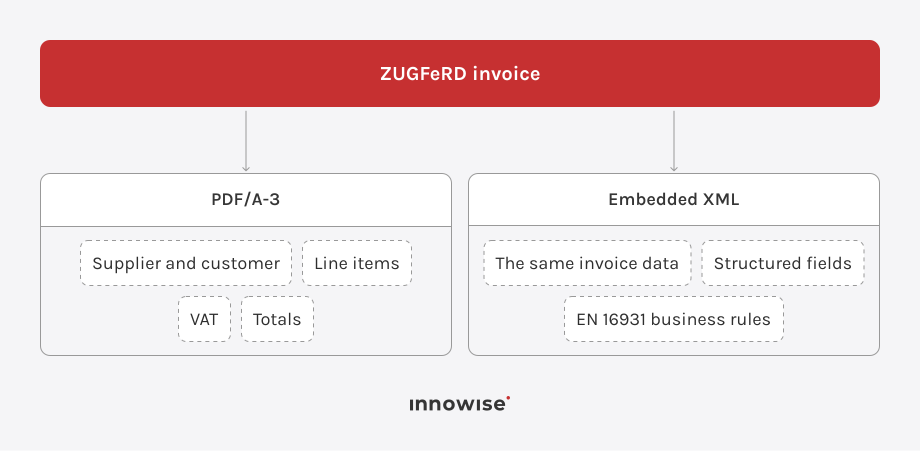
ZUGFeRD is a hybrid electronic invoice format. A ZUGFeRD invoice combines a human-readable PDF/A-3 document with embedded structured XML that accounting software can process directly.

The XML carries defined invoice data such as seller and buyer information, invoice lines, taxes, totals, payment details, and references. For German e-invoicing, the selected ZUGFeRD version and profile matter just as much as the file itself.

Which ZUGFeRD profile should you use?

ZUGFeRD has five main profiles plus the XRECHNUNG reference profile, and they differ in both data scope and regulatory use. For a typical EN 16931-based German B2B implementation, I would usually start with the EN 16931 profile and move to EXTENDED when the business process requires additional structured data.

ProfileWhat it coversStatus in Germany
MINIMUMBasic buyer, seller, totals, and tax informationNot recognized as a complete UStG invoice
BASIC WLHeader-level accounting information without invoice linesNot recognized as a complete UStG invoice
BASICSubset of EN 16931 for simpler invoicesRecognized as a complete UStG invoice
EN 16931, formerly COMFORTFull EN 16931 core invoice modelRecognized as a complete UStG invoice and the main choice for standard EU-conformant e-invoicing
EXTENDEDEN 16931 plus additional data for more complex business processesRecognized as a complete UStG invoice
XRECHNUNGReference profile based on KoSIT XRechnung requirementsMainly relevant where XRechnung requirements apply, particularly B2G

FeRD explicitly recommends EN 16931 for EU-conformant electronic invoices. The German Federal Ministry of Finance also states that ZUGFeRD from version 2.0.1 can meet the German e-invoice requirements, with MINIMUM and BASIC-WL excluded.

So profile selection should happen early. Picking MINIMUM because it contains the basic amounts, for example, does not make the document a compliant German e-invoice.

Who needs to comply in Germany?

Germany is introducing B2B e-invoicing in stages.
  • Since January 1, 2025, German businesses in scope must be technically able to receive e-invoices for transactions covered by the B2B rules.
  • Until December 31, 2026, transitional rules still allow paper invoices and, with recipient consent, other electronic formats such as ordinary PDFs.
  • During 2027, that transition is extended for issuers whose previous-year turnover does not exceed €800,000. Certain EDI arrangements also have a transition through 2027.
  • From January 1, 2028, the general transition period ends for in-scope domestic B2B invoicing.

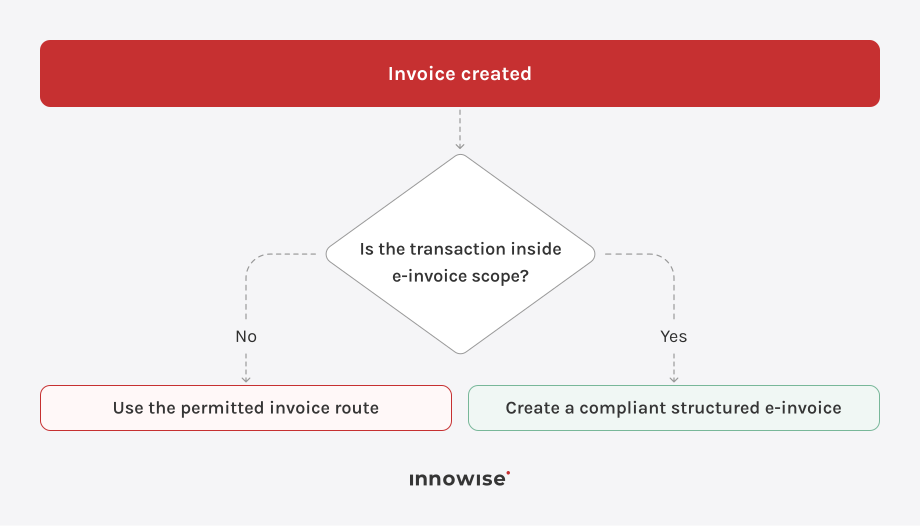
I would not treat this as a rule that every German invoice must use ZUGFeRD. Scope still depends on the transaction. B2C invoices, some exempt transactions, low-value invoices, and other special cases can follow different rules.

Why ordinary PDF invoices are no longer enough

A standard PDF contains information mainly for human reading. A structured e-invoice also gives accounting software defined machine-readable fields.

A person might see:

A structured invoice separates the underlying values so software knows which amount represents the taxable base, VAT, gross total, and payable amount.

That distinction allows ERP and accounting systems to process invoices without reconstructing their meaning from PDF text or page layout.

Check what your ERP already supports first

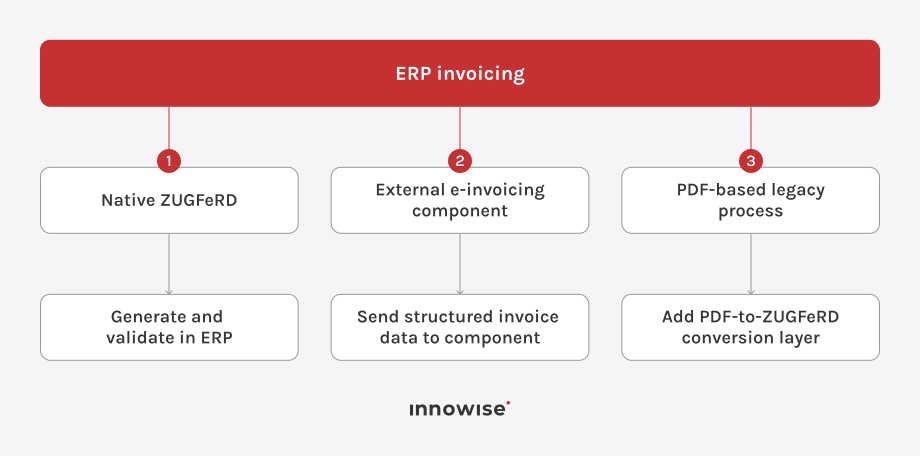
Before introducing a converter, check whether the ERP already provides country-specific e-invoicing functions, APIs, or document modules.

There are usually three routes:

SAP environments, for example, can use country-specific functionality through SAP Document and Reporting Compliance. Other ERP or custom systems may require middleware or a separate conversion service.

A standalone converter therefore makes the most sense when suitable native support is missing or changing the core billing application would introduce unnecessary project risk.

How a standalone PDF-to-ZUGFeRD converter helps

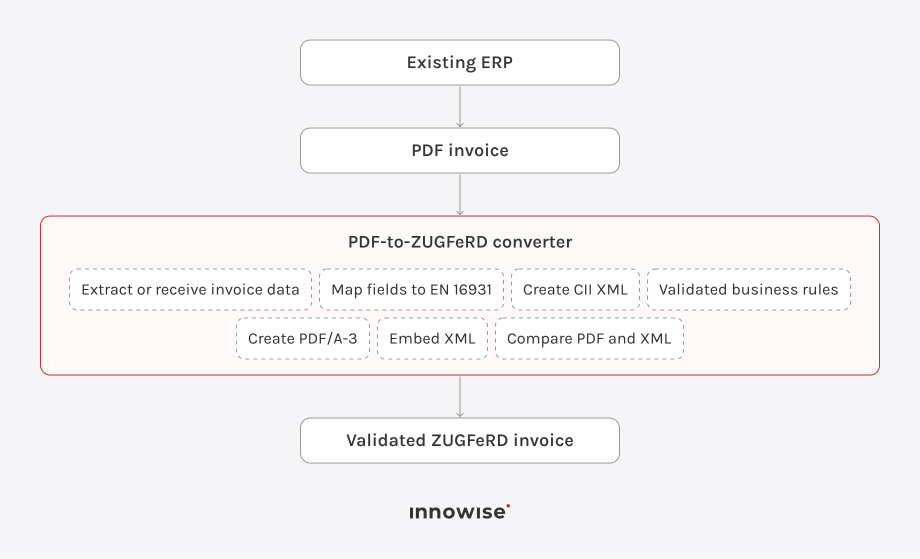
For a PDF-based process, the conversion flow can look like this:

Where possible, structured ERP data is a better source than values reconstructed from the PDF. JSON, XML, CSV, database records, or API data preserve the meaning of invoice fields and reduce interpretation errors. 

Map invoice data to the EN 16931 model

Creating the XML requires correct semantic mapping. The converter has to identify what each invoice value represents and place it in the corresponding structured field.

A price is straightforward. Other fields need more context: seller and buyer identifiers, invoice type, tax categories, unit codes, allowances, charges, references, payment terms, delivery information, and VAT breakdowns can all affect the XML.

Invoice valueEN 16931 term
Invoice numberBT-1
Issue dateBT-2
CurrencyBT-5
Seller nameBT-27
Buyer nameBT-44
Line net amountBT-131
Total without VATBT-109
VAT totalBT-110
Total with VATBT-112
Amount dueBT-115

Most implementation work sits in this data model and the validation around it. The system has to map source data correctly, create valid XML, package it into PDF/A-3, and keep both representations consistent.

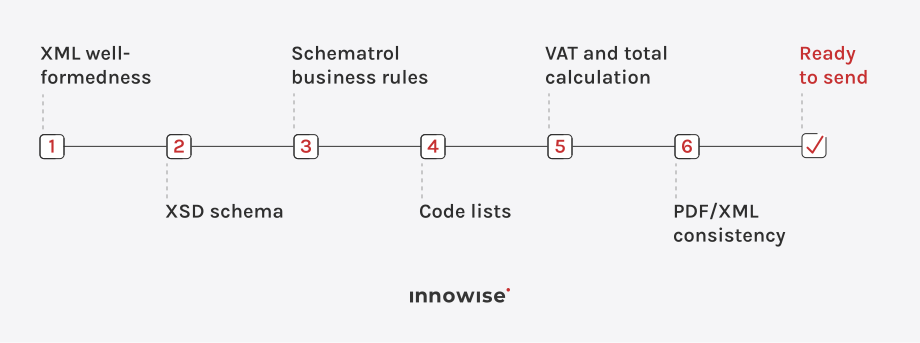
Validate in layers

I would check the invoice in several stages:

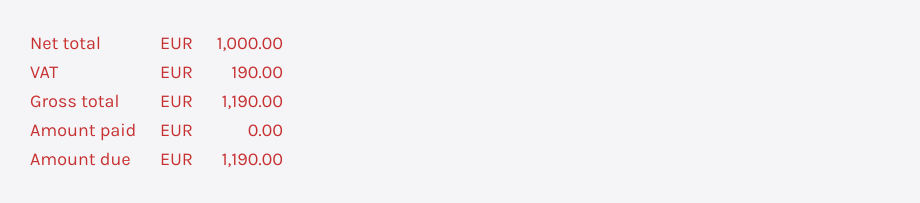
For example:

The converter should calculate and compare these values rather than copy formatted strings from the PDF.

I would also validate the finished PDF/A-3 file after the XML has been embedded. The packaging step changes the document, so checking only the source PDF does not cover the final output.

Before sending, I would compare invoice number, dates, parties, currency, line values, tax information, totals, payment data, and references across the PDF and XML.

Need to add e-invoicing to your ERP?

We can help assess your current ERP setup, define the right invoice data flow, and implement e-invoicing around the systems you already use.

ZUGFeRD compliance checklist

  • Use a supported ZUGFeRD version and the right profile.
  • Follow EN 16931 requirements for the selected invoice type.
  • Include all required invoice data in the structured XML.
  • Generate a valid PDF/A-3 document.
  • Embed the XML correctly inside the PDF.
  • Keep PDF and XML invoice values consistent.
  • Validate XSD schemas and Schematron business rules.
  • Check code-list values for currency, units, VAT categories, and payment methods.
  • Recalculate VAT, totals, dates, and payment amounts.
  • Reject invoices that fail required validation checks.
  • Retain the electronic invoice according to German retention requirements.
  • Test files with customers’ accounting systems before production use.

More on this topic

    Contact us

    Book a call or fill out the form below and we’ll get back to you once we’ve processed your request.

    Send us a voice message
    Attach documents
    Upload file

    You can attach 1 file up to 2MB. Valid file formats: pdf, jpg, jpeg, png.

    By clicking Send, you consent to Innowise processing your personal data per our Privacy Policy to provide you with relevant information. By submitting your phone number, you agree that we may contact you via voice calls, SMS, and messaging apps. Calling, message, and data rates may apply.

    You can also send us your request
    to contact@innowise.com
    What happens next?
    1

    Once we’ve received and processed your request, we’ll get back to you to detail your project needs and sign an NDA to ensure confidentiality.

    2

    After examining your wants, needs, and expectations, our team will devise a project proposal with the scope of work, team size, time, and cost estimates.

    3

    We’ll arrange a meeting with you to discuss the offer and nail down the details.

    4

    Finally, we’ll sign a contract and start working on your project right away.

    arrow