Odoo ERP for Manufacturing: Mastering Production with Key Features and Benefits

Updated: Mar 5, 2026 10 min read
Odoo ERP for manufacturing_ mastering production with key features and benefits

Key takeaways

  • Odoo manufacturing ties planning and shop-floor execution together, so production status and stock moves stay in one place instead of multiple spreadsheets.
  • Early wins come from clean BOMs, believable routings, and easy-to-follow inventory rules. Advanced Odoo manufacturing features can wait.
  • Start with one flow and one line, then expand after data and reporting stay stable for a few weeks.
  • Treat integrations as phase two unless they directly drive demand, purchasing, inventory movements, or valuation.
  • Assign clear owners for BOMs and routings and train by role. General onboarding does not hold up on the shop floor.

Manufacturing looks smooth in a slide deck. On the shop floor, it’s a different story. Materials arrive late, someone runs the wrong Bill of Materials (BOM) version, managers wait on updates, and operators do paperwork when they should be building products. The plan stops being a plan and starts being a fragile suggestion.

Odoo manufacturing helps regain some order by keeping planning, execution, and records in one place. Below, I’ll walk through Odoo manufacturing features and benefits, and a practical way to implement them without turning the rollout into another source of friction.

What is Odoo manufacturing?

Let’s ground this first. Odoo manufacturing software is a module inside the wider Odoo ERP. It’s built to run day-to-day production without bouncing between spreadsheets, disconnected tools, and “ fix it later” workarounds. Planning, execution, and tracking all live in one place. At a practical level, it covers the full production flow. You plan with bills of materials and work centers, launch manufacturing orders, and run operations directly on the shop floor, including tablet-based work orders if that’s your setup. Inventory updates as materials are consumed. Sales and production stay in sync. Quality checks and maintenance can be triggered right where the work happens. All of which means less paperwork, fewer blind spots, and more control over production Next, I’ll break down what you can do inside the module, how the main Odoo manufacturing module features work in real life, and where it brings the biggest wins on the shop floor.
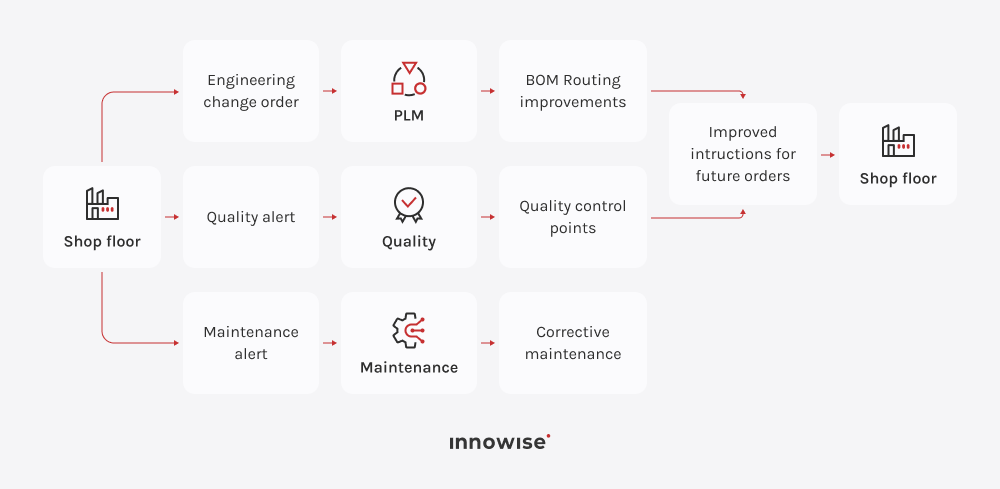
Odoo manufacturing workflow that turns shop floor issues into better BOMs, routing, quality checks, and maintenance actions

Core Odoo manufacturing module features

Frankly, manufacturing in Odoo packs a lot of capability, but it still feels built for real production work. You can use it for simple assemblies, or you can run multi-step processes with work orders, work centers, quality checks, and maintenance, all in the same system. Here are the key features worth knowing.

Intelligent bills of materials (BoM)

Odoo for manufacturers supports multi-level BoMs, variants, and by-products, so inputs and outputs stay explicit and consistent across planning, production, and inventory. It also supports kits, which let you manage an assembly as a set of components instead of stocking a pre-built item.

Material requirements planning (MRP)

Plan production based on real demand and real stock. Odoo helps you decide what to make and what to buy, checks component availability, and keeps manufacturing tied to inventory movements so planning doesn’t drift from reality.

Dynamic shop floor control

Replace paper packets with a live shop floor view on tablets. Operators process work orders, follow instructions, and log time as they work. Production data is captured immediately rather than being filled in after the fact.

Master production scheduling (MPS)

Forecast demand and align it with your actual machine capacity and lead times. The MPS visualizes your production roadmap months in advance, helping you adjust procurement and schedules to hit customer deadlines without tying up cash in excess stock.

Integrated quality assurance

You can set quality control points on the steps that matter and use checks like instructions, measurements, or photos. When something fails, it gets logged exactly where it happened and can trigger a quality alert right away, so issues won’t sneak down the line.

Product lifecycle management (PLM)

Manage engineering changes with full clarity. With ECOs and version history, you can manage changes centrally and keep related documents close to the product and process, so updates are easier to roll out consistently.

Smart maintenance integration

Odoo links manufacturing with maintenance so operators can log a repair request directly from the production line. Production data can also drive preventive maintenance planning, helping critical machines stay reliable and reducing the risk of downtime turning into bottlenecks.

IoT integrations

Odoo for a manufacturing company can connect shop-floor devices such as barcode printers and scanners. With IoT support, you can automate certain data capture and actions directly from the shop floor app.

Friction-free subcontracting

Increase capacity without expanding your shop floor. Odoo tracks materials you send to subcontractors and finished goods you receive back, keeping inventory accurate at every step. It also links deliveries and accounting entries, so outsourced production stays visible and easy to manage.

Full-loop traceability

Know the who-what-where for each item. With lot and serial tracking, you can trace a component back to a supplier or forward to a specific customer in a few clicks. That feature supports compliance, makes audits easier, and keeps potential recalls more controlled.

Work center capacity & OEE

Odoo manufacturing gives you a clear view of real capacity and bottlenecks. You can monitor work center load and OEE in near real time, then break losses down by downtime, speed, or quality. When a machine underperforms, you act on the cause, rather than your gut feeling.

Unbuild orders

Mistakes happen, but Odoo manufacturing ERP helps you recover. Unbuilt orders let you disassemble finished products for repair, recycling, or parts recovery and automatically return usable components to the right inventory locations.

Advanced scrap management

You can track waste where it actually happens, from incoming materials to final assembly. When an item is scrapped, inventory updates instantly, and the financial loss is recorded. Warehouse data stays clean, valuation remains accurate, and you always see the real cost of doing business.

Real-time cost analysis

Get a detailed view of your profitability. Odoo tracks component costs and operation time at work centers, then rolls them up per manufacturing order. You can compare actual costs against your targets to see where the margin is slipping and where processes need adjustment.

“Manufacturing module in Odoo ties planning, shop-floor reporting, and inventory moves into one clear flow. Clean data and simple reporting keep production steady and the numbers reliable. Teams see fewer surprises on the floor and make better calls on scheduling, stock, and costs.”

Chief Technology Officer

Key benefits of Odoo for manufacturing

Now, let’s talk about the Odoo manufacturing module and what it actually improves for manufacturing firms. At a high level, it helps you run production with less friction, see what’s happening in real time, and keep tighter control over planning and execution, while staying cost-effective and scalable. Below are the key benefits you can expect:

  • Improved efficiency & automation. Odoo reduces admin work around production by linking demand, inventory, and manufacturing triggers. Teams spend less time coordinating and re-entering data, and more time executing.
  • Real-time visibility & traceability. You see what’s in progress, what’s blocked, and what’s ready, with inventory updating as work is recorded. Lot and serial tracking speeds up investigations and supports compliance workflows where needed.
  • More connected operations across departments. Manufacturing connects with Inventory, Purchase, Sales, and Accounting, so planning and execution rely on shared data. That cuts down on reconciliation work and reduces the number of versions of the truth.
  • Built-in support for quality control. Quality checks can be placed inside the production flow, so issues are captured where they happen. Catching problems earlier reduces rework, scrap surprises, and late-stage defects.
  • Scales with your process. Start with core manufacturing, then add Maintenance, Quality, PLM, or other modules as complexity grows. You can keep the system simple until extra structure brings clear value.
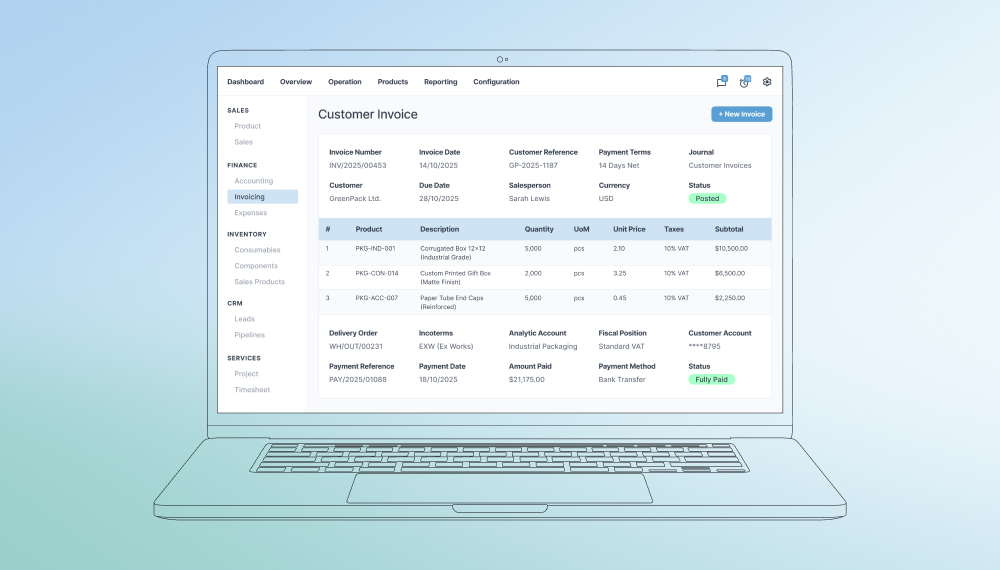
  • Better cost visibility. Odoo tracks materials, time, and production movements, so costing becomes more transparent. That helps pricing and margin analysis rely less on guesswork.
  • Easier shop-floor adoption. Operators can use tablets and scanners to record work quickly. Better adoption usually means cleaner data, and cleaner data is what makes planning and reporting useful.

Odoo manufacturing implementation roadmap

Odoo manufacturing can go live fast. But a fast go-live also breaks even quicker if you skip the unglamorous parts: BOM accuracy, routing logic, inventory rules, and clear ownership of master data. I have seen the same pattern across projects. Teams focus on screens and features, then get stuck in firefighting when production starts using the system for real.

Here is the roadmap we use at Innowise. It stays practical, and it keeps the risk visible.

Define the outcome & the scope

Start with what you want to improve, then shape the rollout around that. Pick KPIs that actually matter in your plant, like on-time delivery, inventory accuracy, WIP visibility, scrap rate, or production lead time. After that, choose one production flow to tackle first, such as make-to-order or make-to-stock, and keep everything else out of phase one.

Then define what “done” means for phase one. For example, phase one is done when planners schedule in Odoo, operators report production steps in Odoo, finished goods reliably land in stock, and the costing numbers line up with finance within an agreed margin.

Map your manufacturing process

Before configuring anything, map how production actually works. Not how it looks in a procedure doc. How does it run on a busy Tuesday? We usually do this in short workshops and document the flow in a way people can challenge and correct:

  • How orders enter production
  • How materials are reserved, issued, and substituted
  • How partial completions and scrap are handled
  • How rework and quality holds really work
  • How subcontracting is managed day to day

This step matters because small exceptions are rarely that small. For instance, a manufacturer describes their process as “standard assembly.” In practice, components get substituted almost every week because suppliers miss deadlines. If substitution rules and approvals are not modeled, Odoo becomes a blocker. 

That’s why I recommend getting the real process on the table first. Then configure Odoo to match it.

Clean your master data

This part decides whether Odoo runs smoothly or becomes another system people work around. If your BoMs, routings, and stock rules are messy, planning will be off, work orders will stall, and costs will drift. Then the team spends days fixing data instead of running the floor.

Focus on the essentials:

  • Bills of materials: correct components, units of measure, versions, and effective dates.
  • Routings and work centers: real cycle times, setup times, and capacity rules.
  • Products and stock rules: lead times, reorder rules, storage locations.
  • Traceability: lot or serial policies, if you actually need them.

Cleaning this after go-live turns into constant patching. Trust falls off a cliff, and people stop using the system properly, then the dreaded spreadsheets sneak back in.

Build a pilot

Start small on purpose. Pick one product family or one production line that reflects real work, but does not drag the whole factory into the first test.

Test the process end-to-end on that one line. Create a manufacturing order using a real BoM and routing. Reserve the materials, then consume them as production happens. Have operators report the steps on the shop floor. If you run QC, record the checks. Finish by receiving the finished goods into stock and doing a quick sanity check on the cost.

Configure Odoo for manufacturing

This step is deciding how work should move through your factory inside Odoo. Not every checkbox matters. A few do, and they decide whether operators can work smoothly.

Here are the decisions that usually matter most:

  • Work centers setup and capacity rules
  • Routing structure: one simple operation vs step-by-step work orders
  • When work orders are released, and how progress gets reported
  • WIP locations and stock move rules
  • Subcontracting setup and how materials are supplied
  • Quality control points and what happens when a check fails

Now, a simple example. You decide operators must start and stop a timer for every operation because it sounds useful. In practice, nobody uses that time data. Costing still relies on standard times, planners do not review actual durations, and supervisors do not act on the numbers.

So operators end up doing extra clicks with no payoff. They forget to start the timer, leave it running, or fix it later. This way, the data becomes unreliable, and you can’t trust it.

Integrate only what you need

Integrations sound harmless, but they rarely are. Each one adds rules, edge cases, and another place for things to break. So we do them in two waves. 

Start with the connections that make production work at all. Manufacturing needs to see real demand from sales, real material availability from purchasing, and real stock movements in inventory. Accounting needs clean valuation and cost data so finance can trust the numbers. If these links are not solid, production planning and reporting fall apart quickly.

Everything else can wait. MES systems, advanced barcode flows, shipping tools, forecasting engines, or external PLM systems add value, but only after the core flow is stable. We still design with them in mind, so nothing has to be rebuilt later. We just don’t introduce them while the team is still learning how to run production in Odoo.

Test end-to-end with exceptions

Testing should match how your factory behaves on a normal day. Production rarely runs in a straight line, so your test should not either. Do not only test the perfect scenario where everything is in stock, but also machines run, and nobody makes changes. Test the full process with the problems you deal with in real life:

  • Material shortage and partial availability
  • Substitutions and alternates
  • Rework and scrap
  • Machine downtime and rescheduling
  • Backflushing vs manual consumption
  • Subcontracting delays
  • Inventory discrepancies and corrections

If you skip these cases, the first real week on the shop floor becomes your testing phase. And that is when things break, people improvise, and the data stops being reliable.

Train by role and lock ownership

Training only works when people practice the exact tasks they will do every day. A generic session teaches menus, but it does not teach production.

So each role needs its own training flow:

  • Planners: how to build the schedule, change priorities, and handle exceptions when materials or capacity change.
  • Warehouse: how to reserve materials, pick them, and issue or consume them correctly.
  • Shop floor: how to report progress with the fewest steps possible, without breaking traceability or stock.
  • Finance: how valuation and manufacturing costs are calculated, and how to read the costing reports.

Then you lock the ownership of master data. Name a person who owns BoM and routing changes, including approvals and version control. But note, when master data is everyone’s job, it becomes nobody’s job.

Go live & stabilize

We keep rollout controlled. Start with the pilot scope in real production. Then spend a short stabilization period fixing what keeps tripping people up: recurring data errors, unclear steps, missing rules, and small configuration issues. Once that slice runs smoothly, expand to the next product families. Add extra complexity, like subcontracting or deeper quality flows, only after the core flow is steady.

In the first weeks, we do a short daily check-in. We look at each issue and tag the cause: data problem, process problem, training gap, configuration issue, or integration bug. That makes it obvious what to fix and who should fix it.

Monitor & improve

After go-live, keep a simple routine so Odoo stays accurate and useful. Once a week, look at the same mistakes and exceptions people keep running into, then fix the root cause. Once a month, do a quick reality check on inventory accuracy, lead times, and whether production is following the plan. Once a quarter, revisit the expected times for each step, review bottlenecks, update the rules, and roll out a couple of improvements.

Ready to transform your production line?

Real-world case studies

IS Engineering builds custom brush rollers, but its processes had fallen behind the complexity of made-to-order production. Quoting, crate calculations, scheduling, and finance all lived in separate tools, which caused delays, errors, and poor visibility. We implemented Odoo ERP for manufacturing as one connected system for sales, manufacturing, inventory, quality, and accounting, adding crate and pricing calculators plus DATEV and EBICS integrations. The result was a single workflow from quote to shipment, full traceability, and far less operational friction.

Growing order volumes left a US packaging manufacturer stuck with a siloed CRM, separate accounting, and spreadsheet-driven production. Inventory counts conflicted, reporting took too long, and bottlenecks slowed orders from intake to shipment. 

We implemented Odoo ERP Manufacturing as one connected system across Sales, MRP, Stock, Purchase, and Accounting, including data migration, embedded quality checks, and real-time dashboards. 

After launch, order-to-delivery time dropped 23% (7.9 to 6.1 days) and operating costs fell 15%.

Conclusion

Manufacturing always has surprises. A supplier misses a date, a machine goes down, or components get swapped. The difference is whether your system keeps up or whether the team ends up managing everything through calls, chats, and last-minute fixes. Odoo manufacturing helps when it reflects how your plant really works. BoMs match what you actually build. Routings match how work is done. Stock moves match how materials move on the floor. Reporting stays simple enough that people actually use it. Then planning gets more reliable, tracking gets cleaner, and you spend less time arguing with numbers. At Innowise, we help you get that setup right. We review your current process, find the gaps that usually break a go-live, and build an Odoo roadmap that fits your production. We also keep an eye on Odoo trends in manufacturing, so the setup still makes sense as Odoo 19 and later releases arrive. Whether you are trying Odoo manufacturing for the first time or migrating to a newer version, we make sure the rollout is predictable and the data is solid.

FAQ

Odoo manufacturing smooths out production by integrating e-commerce, sales, inventory, and the shop floor into a unified workflow. Sales orders trigger production, materials, and schedules automatically. Multi-level BoMs, shop floor control, and IoT tracking provide real-time visibility, cut manual work, reduce bottlenecks, and improve traceability.

Most manufacturing Odoo 18 implementations take 2–3 months for a pilot and 6–12 months for a multi-plant rollout. The exact timeline depends on process complexity, integrations, and how much data cleanup is needed. Our team uses a phased deployment, switching on one workshop or line at a time to keep production running.

Odoo is designed to slot into your operations without long shutdowns. For instance, you can start with a single product line or work center, while others stay on legacy systems. The new stack queues and syncs transactions, so most changes happen during short, planned windows such as overnight cutovers.

Yes, manufacturing Odoo 19 integrates cleanly with other systems through its APIs and IoT tools. You can connect it to ERP, MES, CAD, or plant control, and use the IoT Box for machines and scanners. REST APIs let Odoo push and pull data from external planning systems and databases in real time.

Yes. Odoo for engine manufacturing works well when you have multi-level BoMs, enforce serial or lot tracking, and model quality and rework steps directly in routings and work orders.

Head of ERP Solutions

Kiryl knows SAP inside and out. He’s the go-to when a client needs not just implementation, but smart configuration that fits their unique processes — with a clear path from complexity to clarity.

Table of contents

    Contact us

    Book a call or fill out the form below and we’ll get back to you once we’ve processed your request.

    Send us a voice message
    Attach documents
    Upload file

    You can attach 1 file up to 2MB. Valid file formats: pdf, jpg, jpeg, png.

    By clicking Send, you consent to Innowise processing your personal data per our Privacy Policy to provide you with relevant information. By submitting your phone number, you agree that we may contact you via voice calls, SMS, and messaging apps. Calling, message, and data rates may apply.

    You can also send us your request
    to contact@innowise.com
    What happens next?
    1

    Once we’ve received and processed your request, we’ll get back to you to detail your project needs and sign an NDA to ensure confidentiality.

    2

    After examining your wants, needs, and expectations, our team will devise a project proposal with the scope of work, team size, time, and cost estimates.

    3

    We’ll arrange a meeting with you to discuss the offer and nail down the details.

    4

    Finally, we’ll sign a contract and start working on your project right away.

    More services we cover

    arrow