The power of data mapping in healthcare: benefits, use cases & future trends. As the healthcare industry and its supporting technologies rapidly expand, an immense amount of data and information is generated. Statistics show that about 30% of the world's data volume is attributed to the healthcare industry, with a projected growth rate of nearly 36% by 2025. This indicates that the growth rate is far beyond that of other industries such as manufacturing, financial services, and media and entertainment.

AI trends 2026: latest advancements, innovations, and future directions

Apr 1, 2026 25 mins read

Key takeaways

  • Artificial intelligence trends in 2026 come down to this: AI has to earn its place by saving time, cutting mistakes, or bringing in revenue, otherwise it gets cut from the roadmap.
  • Agentic AI is growing fast because it can plan steps, use tools, and cut routine errors.
  • Generative AI keeps improving with multimodal models, so one system can handle text, images, audio, and video, transforming support, sales, training, and content workflows.
  • Edge AI is back in the spotlight because on-device inference cuts latency, keeps more data local, and lowers cloud costs, but it introduces strict hardware constraints.
  • Governance, security, and energy use now decide what ships: EU AI Act timelines, AI safety controls, and efficiency efforts are part of the build.

AI in 2026 feels less like “wow” and more like “okay, who owns this in production?” A year or two ago, people wanted a chatbot because everyone else had one. Now they want something that saves time, cuts mistakes, or helps staff stop answering the same question 200 times a day.

Here’s the blunt truth. AI keeps getting cheaper to try and more expensive to run well. Anyone can spin up a model and get a decent prototype. Then reality hits: bad data, weird edge cases, legal questions, security reviews, latency, and the awkward moment when the model confidently makes something up in front of a customer.

So what are the latest developments in artificial intelligence that actually matter for business? The ones that survive contact with the real world:

  • Systems that can take actions, not just talk.
  • Generative models that handle more than text.
  • AI that runs closer to where data lives (including devices).
  • More rules, more audits, more “prove it works” paperwork.

Scroll on to learn more!

If you’re planning something serious this year, start with a scoped AI consulting effort. Of course, it is NOT magical. But it’s cheaper than building the wrong thing, then pretending it was “a learning project”.

How artificial intelligence and machine learning evolved

AI started as a simple question: “Can a machine think?” and then it turned into a pile of math, data, GPUs, and deadlines. Alan Turing framed that question in his 1950 paper and proposed what we now call the imitation game (the Turing test).

Not long after, the field got its name. The Dartmouth proposal (written in 1955 for a summer 1956 workshop) basically said: let’s treat “intelligence” like an engineering problem and see how far we get. Bold plan. It worked, just slower than the hype cycles wanted.

From there, AI kept bouncing between big promises and genuine progress. A few milestones explain why 2026 looks the way it does:

  1. Neural networks learned to learn once backprop became the standard training method (1986). Backprop is the “you made an error, adjust the weights, try again” loop that still sits inside most deep learning pipelines.
  2. Computer vision stopped being a research toy once deep convolutional nets started winning on ImageNet in 2012 (AlexNet). That’s when “the model saw the cat” became a product feature, not a lab demo.
  3. Reinforcement learning proved it could handle messy decision-making when AlphaGo combined deep nets with search and self-play to beat top Go players (2016). That wasn’t “chat”. That was “pick the next move under pressure”.
  4. Language models got their modern backbone with the Transformer architecture in 2017. If you use an LLM today, you’re living in the Transformer era.
  5. NLP took another step with models like BERT (2018), which pushed the idea of pretraining on large text and then fine-tuning for real tasks.

Now, the big buckets of AI you keep hearing about make more sense:

Natural language processing (NLP) is AI that works with human language: search, summarization, classification, translation, chat. It’s why your support inbox can get triaged without someone reading every line.
Computer vision is AI that works with images and video: detection, segmentation, quality inspection, medical imaging support, safety monitoring.
Reinforcement learning is AI that learns by trying actions and getting feedback. It fits routing, scheduling, robotics, pricing, and any setup where the system needs to choose the next move, not just label data.
Generative AI is the newest “daily driver” for many teams. It generates text, images, audio, code, and sometimes video. Under the hood, it rides on the same building blocks above, plus a lot of training data and computing.

Get a clear AI plan for what to build and what to skip

Key AI trends to watch in 2026

If you only remember one thing from the latest AI developments, make it this: nobody cares that it’s ‘AI’ if it can’t save time, save money, or reduce risk. The trends below keep showing up because they tie to money, time, and risk.
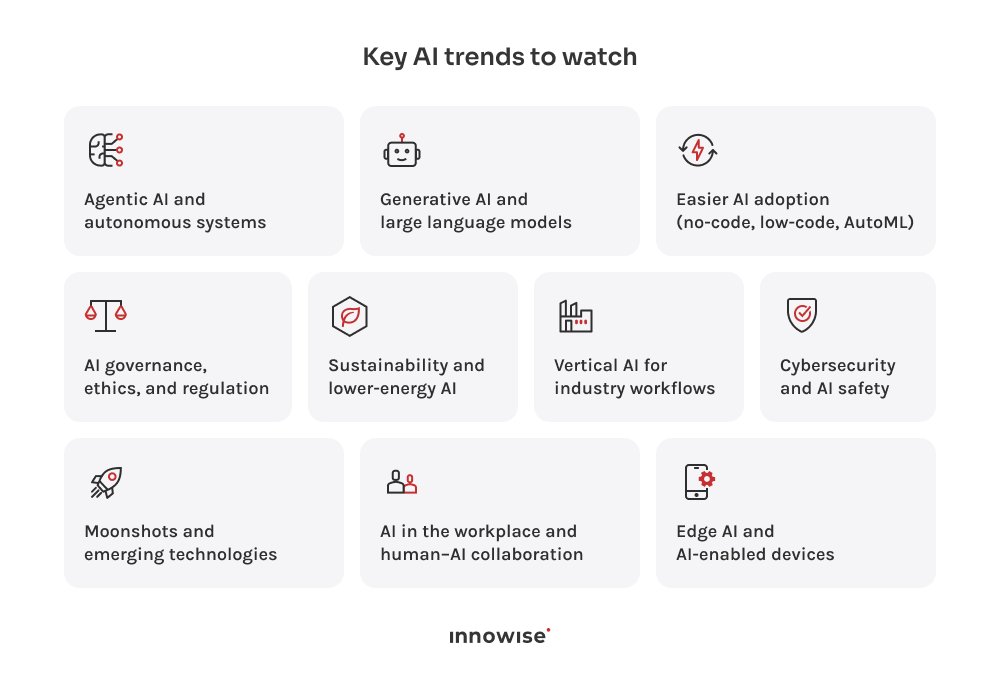
List of 10 key AI trends to watch in 2026, including agentic AI, generative AI, edge AI, governance, security, and workplace collaboration.

1. Agentic AI and autonomous systems

Agentic AI means you give a system a goal, and it handles the steps. Such software can plan, invoke tools, check results, and try again when something fails.

Why it matters in 2026: Companies feel buried in workflows. Tickets bounce between teams. People copy-paste between apps. Someone always forgets a step. Agent-style systems attack that mess.

Here’s what I see working in real life (and what breaks if you don’t design it right):

  • One workflow per agent, with tight permissions. Drafting replies, filling forms, pulling policy, and routing tasks work fine. Approvals still belong to humans.
  • Built-in checks for small mistakes. Customer tiers, missing attachments, stale inventory, and invoice mismatches are boring, but they cause real damage.
  • Monotonous, repeatable starting points. Ticket creation, callback scheduling, CRM updates, and simple routing in logistics beat “let’s make it do everything”. Vertical agents do better with one narrow lane, like claims intake, HR onboarding, or procurement intake.

But be warned: agentic systems can also become very confident chaos generators if you let them run loose. The fix is dull, but that’s good. Give the agent limited permissions, log everything, and force checkpoints. If it can spend money, change data, or contact customers, it needs a gate.

If you want to build this the same way, this is exactly what we do in our AI agents development work: define the allowed actions, wire the agent to your tools, and set guardrails so it helps your team instead of creating a new class of incidents.

2. Generative AI and large language models

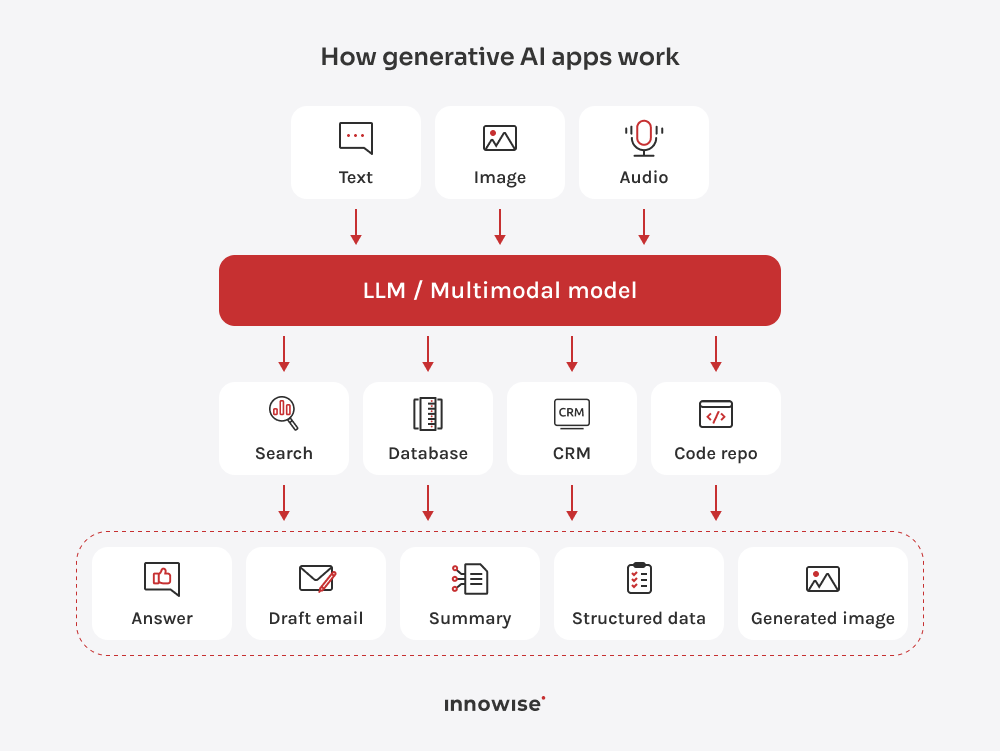
Generative AI in 2026 means you can pick a strong model off the shelf, hook it into your apps, and get useful output fast. As long as you treat it like software (not a magic box).Here are the recent AI developments (and what teams keep paying for):
  • Model choice is now a real product decision. Teams mix OpenAI’s GPT-5.2 with open(-weight) options like Llama 4 and vendor models like Mistral Large 3.
  • Multimodal is standard now. GPT-5 family can take text, audio, images, and video, then respond with text, audio, and images, which fits support, sales, training, and internal tools.
  • Chat is turning into tool use. Models like Mistral Large 2 can call functions, pull data, run checks, and write results back.
  • Media generation is getting usable. Tools like Sora 2 and Google Veo push video (and sometimes audio), which helps marketing and training.
Diagram showing text, image, and audio inputs going into an LLM or multimodal model that can use search, databases, CRM, and code repositories to produce outputs like answers, draft emails, summaries, structured data, and generated images.

The unglamorous reality is that the biggest gains come from narrow, high-volume tasks: support replies, sales follow-ups, document drafting, internal Q&A, and “turn this mess of notes into something a human can read”. If you want this built into a product or an internal workflow, this sits right in our generative AI development and AI chatbot development work.

Turn AI into a working feature inside your product

3. AI becomes easier to use (no-code, low-code, AutoML)

This trend is simple: more people can build AI features without hiring a full ML team. That’s good for speed. It’s also how you end up with ten AI pilots and zero working product if nobody owns the outcome.What this AI advancement looks like in 2026:
  • No-code and low-code tools let teams build simple AI helpers inside the apps they already use, like doc search, ticket sorting, form fill, email drafts, call summaries, and basic forecasts.
  • AutoML makes training guided and fast. You bring data, pick a goal, and the platform tries models and settings to give you a baseline without a long build.
  • More AI comes as ready-made blocks: embeddings, speech-to-text, image tagging, document parsing, and model APIs. Teams assemble, test, and ship instead of building from scratch.
  • Trying ideas is cheaper, but quality still costs. Messy data, weak definitions, and no testing will sink “easy AI” fast.
Here’s my somewhat mean but honest take: this trend creates a lot of “shadow AI”. People will plug things in and call it done. Then security, legal, or the first angry customer shows up. If you want the upside without the mess, set simple rules early: who can use what data, where outputs can go, and what needs human review.If you want help turning a no-code prototype into something you can actually run in production, that’s the point where AI development pays for itself.

4. Edge AI and AI-enabled devices

Edge AI means the model runs on the device itself, or close to it, instead of sending everything to the cloud. People like it for one reason: it feels instant, and it doesn’t ship your data all over the internet just to get an answer.What this looks like in 2026:
  • TinyML puts small models on sensors and low-power devices, so they can detect anomalies and failures without relying on the cloud.
  • Phones and wearables run more AI locally, like speech recognition, wake-word detection, image understanding, and offline translation.
  • Robotics and machines react faster with on-device inference, which matters for safety checks, drones, warehouse bots, and medical devices.
  • Keeping data on the device makes privacy and security reviews easier, even though you still need strong encryption and access control.
  • Edge AI forces efficiency work: battery, heat, and memory limits push smaller models, quantization, and smarter scheduling.
Edge AI is great, but it does force you to care about hardware. If you plan to just run the model on the device, you’re about to meet memory limits, CPU throttling, and firmware updates. It’s doable, but it needs careful engineering, not wishful thinking.If edge AI ties into a larger system (mobile app, IoT platform, robotics pipeline), this sits nicely inside our AI development work because you almost always need both sides: the device logic and the backend that monitors it.

Add AI engineers who can ship without babysitting

5. AI governance, ethics, and regulation (yeah, this is a “trend” now)

This one feels like paperwork because it is paperwork. But it’s also the reason AI projects survive security review, legal review, procurement, and the first upset customer.

What changes in 2026:

  • The EU AI Act stops being the talk of the future and starts becoming a calendar problem. The law entered into force on August 1, 2024, and the general date of application is August 2, 2026, with phased deadlines before and after that depending on the topic.
  • Companies start treating governance like a system, not a slide deck. Frameworks like NIST’s AI Risk Management Framework give teams a shared way to talk about risks, testing, monitoring, and responsibilities. ISO/IEC 42001 takes it one step further and turns it into a management system standard for how you run AI across an organization.
  • Leaders want a score, not a debate. You’ll see more attempts to “grade” AI with composite measures (MIQ-style ideas) because executives hate fuzzy answers. Just be careful: MIQ can mean different things depending on who you ask, so treat it as a conversation starter, not a universal yardstick.

Governance feels annoying until the day it saves you. And that day always comes.

6. Sustainability and lower-energy AI

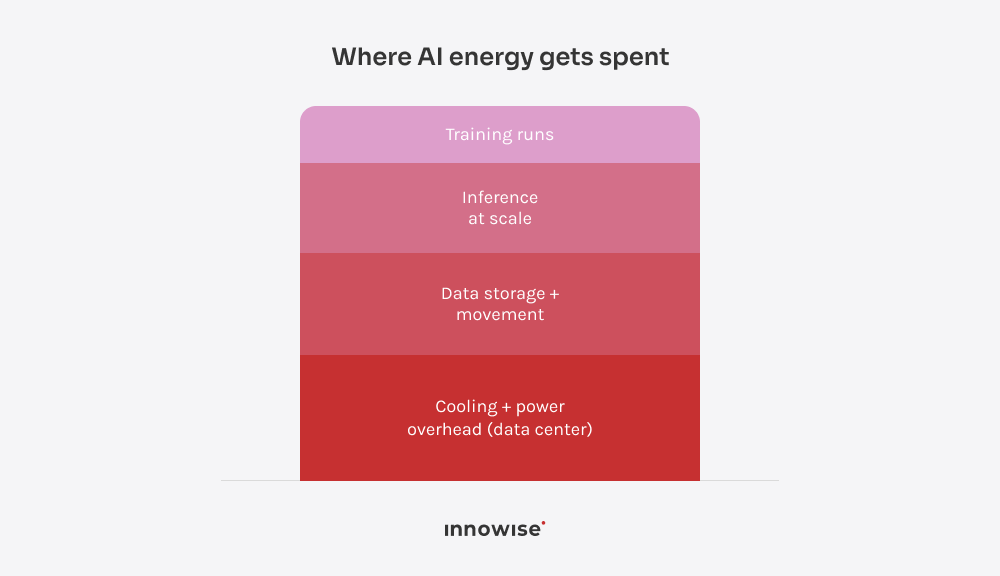
This trend exists because AI eats power, and power is not free. In some regions, it’s also a political headache now, not just a line item. The IEA has been pretty direct about AI driving electricity demand growth from data centers.

What this looks like in 2026:

  • Power and cooling now limit what teams can deploy, so better cooling (often liquid) and tighter capacity planning matter.
  • Energy becomes a design constraint, so teams use pruning, quantization, and distillation to cut inference cost.
  • More work per watt drives hardware choices, with new chips and systems built for cheaper inference at scale.
  • Sustainability isn’t only carbon anymore. Water use from cooling also matters, so reporting and better cooling designs reduce pushback.
Stacked diagram showing typical AI energy drivers, including training, inference at scale, data movement and storage, and data center cooling and power overhead.
My rough take is that the green AI part sounds noble, but most teams do it for a simpler reason. If it costs less to run, it ships faster and stays live longer. That’s still a win.

7. Vertical AI and industry workflows

This is one of the biggest AI industry trends for 2026: companies stop buying generic AI and start building narrow systems that live inside real workflows. Not a demo tab. Not a chatbot that answers and then shrugs. A tool that does part of the job.

Here’s what this looks like when it’s done right:

  • Manufacturing teams use AI to catch defects on the line and spot troublesome signals early. The win is fewer bad units and fewer surprise stoppages that wreck the schedule.
  • Finance teams use AI to spot odd transactions, sort documents, and cut down the manual review pile. The win is faster handling without hiring a small army of analysts to read the same forms all day.
  • Healthcare teams use AI to reduce paperwork pain. Think note drafting, document sorting, and pulling key facts from patient history. Clinicians still make the calls. The win is more time with patients and less time wrestling with admin tasks.
  • Logistics teams use AI to plan routes, flag delays early, and keep dispatch from turning into chaos. The win is fewer late deliveries and fewer “where is it?” calls.

My honest take: the “best” use case is usually the one that happens a lot and hurts a little every time. If it happens twice a month, AI won’t save you. It’ll just become another thing to maintain.

If you want to turn these latest advancements in AI into a working feature inside your ERP/CRM/WMS/EHR stack, that’s where AI development pays off — because integration is the whole job, not the last step.

Build a custom AI system around your data and workflows

8. Cybersecurity and AI safety

AI is now part of the security problem and part of the security stack. Attackers use it to scale scams. Defenders use it to spot weird behavior faster. And if you build AI apps, you also need to defend the model itself from people trying to mess with it. NIST has even published a full taxonomy on adversarial ML attacks and mitigations, which tells you this problem is no longer niche.

What this looks like in 2026:

  • Faster anomaly spotting with ML-based anomaly detection across users, devices, transactions, and network activity.
  • Real attack surface around AI itself, including data poisoning, model manipulation, and prompt attacks.
  • Protected “data in use” through confidential computing and trusted execution environments (TEEs).
  • Tight permission control for agents, with audit logs and human approval on high-impact actions.

I think, if your AI app can take actions, it’s a security system now. Treat it like one.

9. AI in the workplace and human–AI collaboration

Most teams don’t want AI to replace staff. They want it to take the annoying parts of the job and leave the parts that need judgment. If you’ve ever watched a senior specialist spend 40 minutes reformatting someone else’s notes, you already know why this trend sticks.

Here’s where it actually helps:

  • Routine work support: drafts, summaries, extraction from long docs, and turning chat noise into task lists.
  • Higher adoption when AI sits inside existing tools, not a separate prompt tab.
  • Consistent results driven by role playbooks, not loose rollout.
  • Human sign-off for high-stakes decisions, backed by audit trails.

My honest take: “human–AI collaboration” sounds like a poster on a wall. In practice, it’s two rules — let AI do the first pass, and don’t let it make final calls where mistakes hurt.

Talk through AI risks, costs, and rollout in 30 minutes

10. Moonshots and emerging technologies

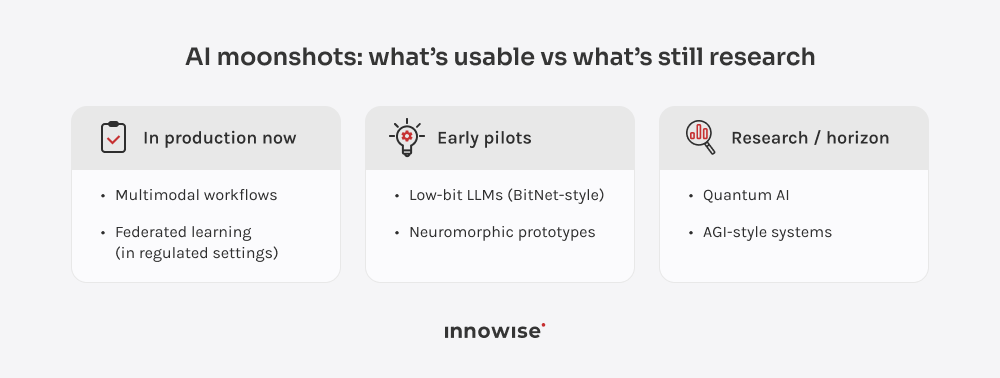
This is the bucket where people love to make bold predictions and then quietly forget them in 18 months. Still, a few weird areas are turning into real engineering work, so they’re worth tracking.What’s worth watching in 2026:
  • Low-bit LLMs (BitNet-style 1-bit / 1.58-bit) aimed at cheaper inference by shrinking memory and compute.
  • Federated learning for privacy-bound orgs, with training across devices or silos while raw data stays local.
  • Neuromorphic computing (Loihi-style) focused on low-power, event-based workloads for edge systems.
  • Quantum AI is still exploratory, but security planning matters because quantum threatens parts of today’s cryptography.
  • Multimodal models moving toward one system that handles text, images, audio, and video for practical workflows, not demos.
Three-column maturity map that groups emerging AI technologies into in production now, early pilots, and research or horizon categories, including multimodal workflows, federated learning, low-bit LLMs, neuromorphic computing, quantum AI, and AGI.
And about AGI: people will keep arguing about it because it’s fun and it gets clicks. For most businesses in 2026, the practical version of AGI progress is simpler. Models act more like coworkers inside tools (with guardrails), and less like chat windows that say nice things.

Skills and competencies for the AI era

If you want a career-proof skill set in 2026, don’t aim to “learn AI”. Aim to build systems that use AI and don’t embarrass you in production.

What I’d bet on:

  • One language you can ship with. Python covers most ML work; R still shows up in analytics teams. The main thing is writing code that runs, logs, and fails in predictable ways.
  • Solid data instincts. Most “AI failures” are data failures. Know how to clean data, avoid leakage, handle imbalance, and split datasets the way reality works. And yes, know SQL.
  • Evaluation that goes beyond accuracy. Pick metrics that match the task, do error analysis, and test edge cases. If you ship LLM apps, test for made-up answers and unsafe output.
  • Enough cloud and deployment knowledge to not get blindsided. Latency, cost, reliability, and GPU constraints will hit you whether you like it or not.
  • Practical safety habits. Track data sources, log behavior, test for bias, and keep human review where mistakes can hurt people or money.

One last thing: continuous learning isn’t optional here. Not because tech moves fast (it does), but because today’s latest AI technology becomes tomorrow’s baseline. The people who stay valuable are the ones who keep building, testing, and shipping (not the ones who collect course certificates like Pokémon).

The future of AI: what’s next

You think the near future of AI is one big new model drop? Nope! It’s AI showing up everywhere, quietly, inside products and workflows.

Where this is heading (to my mind):

  • More “set it and forget it” automation in daily life. Think energy routines, basic device diagnostics, and assistants that handle reminders without you repeating yourself.
  • Virtual assistants that do tasks, not small talk. Calendar-aware, tool-connected, and able to act with approvals: book it, file it, update it, send it.
  • Business AI that behaves like a junior operator. It pulls data, drafts the first pass, runs checks, and hands you options. Most companies won’t have one AI partner. They’ll have a few agents, each stuck on one workflow.
  • Faster industry rollout because the building blocks are easy to buy. The hard part is integration and control, not inventing the core tech.

Conclusion

AI trends in 2026 point to one thing: AI is becoming a normal part of software and operations. The flashy phase is fading. The “ship it, run it, govern it” phase is here.

If you’re building with AI this year, the winners won’t be the teams that chase every new AI technology name. They’ll be the teams that pick a few high-volume problems, connect AI to real data and tools, and put guardrails around anything that can hurt customers or the business.

And yeah, you should keep learning. First of all, it’s trendy now. Second, recent advances in artificial intelligence keep turning yesterday’s advantage into today’s baseline.

Philip Tihonovich
Head of Big Data
Philip leads Innowise’s Python, Big Data, ML/DS/AI departments with over 10 years of experience under his belt. While he’s responsible for setting the direction across teams, he stays hands-on with core architecture decisions, reviews critical data workflows, and actively contributes to designing solutions to complex challenges.

Table of contents

    Contact us

    Book a call or fill out the form below and we’ll get back to you once we’ve processed your request.

    Send us a voice message
    Attach documents
    Upload file

    You can attach 1 file up to 2MB. Valid file formats: pdf, jpg, jpeg, png.

    By clicking Send, you consent to Innowise processing your personal data per our Privacy Policy to provide you with relevant information. By submitting your phone number, you agree that we may contact you via voice calls, SMS, and messaging apps. Calling, message, and data rates may apply.

    You can also send us your request
    to contact@innowise.com
    What happens next?
    1

    Once we’ve received and processed your request, we’ll get back to you to detail your project needs and sign an NDA to ensure confidentiality.

    2

    After examining your wants, needs, and expectations, our team will devise a project proposal with the scope of work, team size, time, and cost estimates.

    3

    We’ll arrange a meeting with you to discuss the offer and nail down the details.

    4

    Finally, we’ll sign a contract and start working on your project right away.

    More services we cover

    arrow