What is a RAG chatbot? Benefits, use cases, and how to implement one

Feb 25, 2026 12 min read
Summarize article with AI

Key takeaways

  • RAG chatbots fit when answers already exist in your docs and systems, but people still waste time hunting them down.
  • A plain LLM can guess from memory. A RAG bot checks your approved sources first, then answers with citations people can click.
  • The payoff shows up fast in support, IT, HR, sales, legal, and finance, where one wrong answer turns into extra work or risk.
  • Good results come from the boring build work: clean content, strong retrieval, clear answer format, and a hard “no source, no answer” rule.
  • Permissions have to sit inside retrieval, so each person only sees what they are allowed to see, every time.

If you have already tried an LLM chatbot at work, you know the breaking point: it sounds confident, then someone asks for a policy detail, a product rule, or the latest internal process, and the answer is wrong or vague. Your team ends up double-checking everything, searching through PDFs and wikis anyway, and worrying about who just saw what in the chat.

A RAG chatbot connects an LLM to your approved company knowledge at question time. It pulls the right passages from your documents, uses them as the basis for the reply, and can show the source text so people can verify it. Access rules can be part of the setup, so the bot does not surface sensitive content to the wrong person.

In this guide, I’ll explain the RAG chatbot definition, how Retrieval-Augmented Generation works, where it fits best, and how to implement one step by step, including the features and security checks teams usually need in real environments.

What is a RAG chatbot?

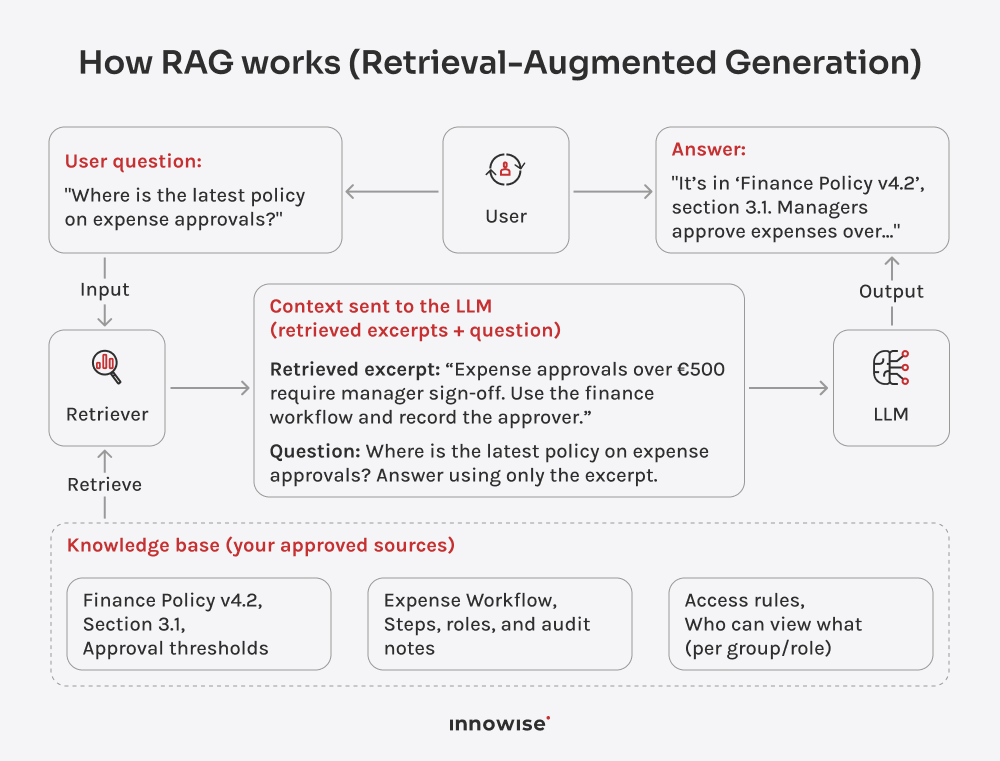
A RAG chatbot, or retrieval augmented generation chatbot, is a chat assistant that answers with your data right in front of it. Before it responds, it searches your docs, databases, or APIs for the most relevant bits, then the LLM writes the reply using that pulled context. The contrast is simple. A plain LLM answers based on what it remembers (from previously entered data). A RAG AI chatbot answers after it checks your sources, which cuts down on hallucinations and adds citations to back its claims.

To understand the RAG chatbot meaning without jargon, picture this. Monday morning. You’re booking a 9-hour flight for a client trip, and (for sure) you want to move fast, so you drop a message in chat to check whether your company covers premium economy for flights over 6 hours. The basic bot replies yes right away. You book it. Done.

Two weeks later, your expense claim gets rejected. Because, unbeknownst to you, the policy changed last quarter, where a new approval step was added. Now you’ve got a back-and-forth with Finance, your manager is pulled in, and you’re digging through the wiki trying to prove what the rule even is.

A RAG-powered chatbot handles the same question by checking the travel policy first, quoting the exact rule, and dropping the link. You book the right thing, or you get approval first. Either way, no surprise later.

RAG pipeline with retriever, knowledge base, augmented prompt, and LLM response

The differences are easier to grasp when we look at common examples:

  • Traditional chatbots. Rule-based bots do fine until you step off the happy path. Ask something slightly unexpected, and they break or loop. RAG bots can take natural-language questions and still respond sensibly.
  • Standard LLMs. A vanilla ChatGPT wrapper replies from what it already knows, and it can still guess when it’s unsure. A RAG bot can cut down on those unsupported answers by pulling from your data and tying the response to what it found, with citations.

Why companies build RAG-based chatbots

You can usually tell in week one whether a chatbot will stick. If people can’t trust the answers, they stop using them. If they can’t check the source, they stop even faster. RAG gives them something solid to lean on. Here are the wins I see most often when it’s working:

  • More accurate answers. Replies are based on the sources you provide, which reduces hallucinations.
  • Faster knowledge lookup. Employees stop digging through folders and wiki pages. The bot fetches the relevant snippet or data point for the question.
  • Updates feel immediate. Policies and docs change all the time. With RAG, you update the content, re-index it, and the RAG AI chatbot can use the new version. No model retraining just to reflect a revised paragraph.
  • Access control stays intact. Better RAG setups respect permissions, so an intern does not see data meant for the CFO. Access rules stay in place.
  • User trust goes up. Citations and links show where the answer came from, so people can verify it with confidence.
  • Fewer repeats for experts. Support, ops, IT, and legal teams spend less time answering the same basic questions. New hires also progress faster because they can self-serve with sources attached.
  • Clearer oversight. With logging and source tracking, teams can review what was asked, what content was pulled, and what the bot replied. That makes it easier to spot gaps in docs, bad indexing, or answers that need guardrails.

Need source-backed answers, not gut feel?

Popular features in a RAG chatbot

We’ve built a lot of doc-heavy systems for internal teams: policies, knowledge bases, portals, the whole mess. So we know what breaks first. If you’re planning a RAG chatbot for an enterprise setup, these are the features teams ask for most. Not because they sound cool. Because they save you when real users show up.

Source attribution

When a bot answers without showing its source, people hesitate because they can’t fully trust it. Source attribution adds a link or note to the exact doc and section the answer came from. So when someone asks, “Where did that come from?”, the bot can point to the receipt instead of forcing people to dig through the wiki.

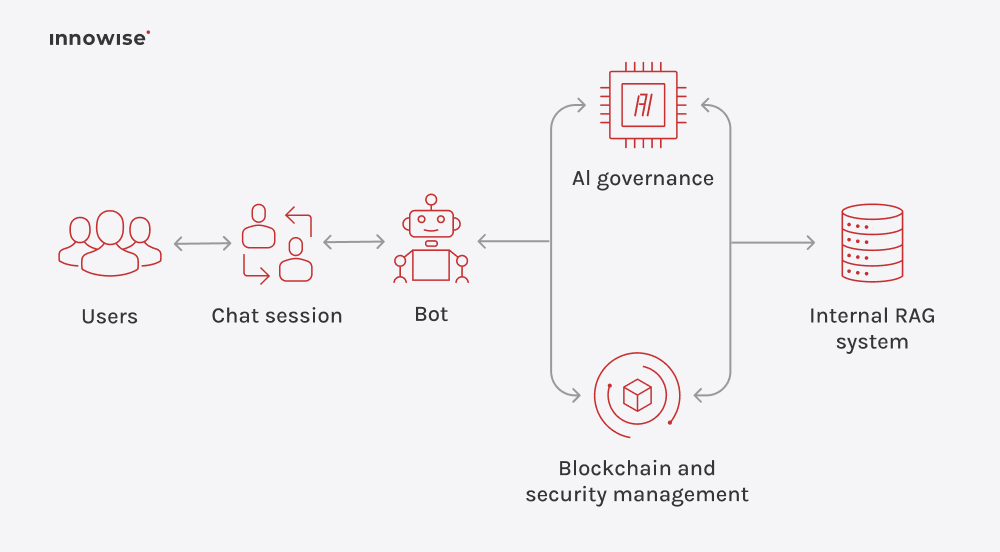
AI governance workflow connecting users, chatbot interactions, internal RAG system, and blockchain-based security

Hybrid search

Some questions are keyword hunts like error 0x801c03f3, a part number, or a policy ID. Others are just how people talk, for example, “Why is this failing after the update?” Hybrid search covers both. It runs keyword search (BM25) alongside vector search, so the bot can match the exact string and still catch the intent behind the question. Without it, you get the annoying failures. You ask about an exact code or ID, the doc has that exact code, and the bot still pulls the wrong page or says it found nothing.

Query rewriting

People don’t talk to bots like they talk to a search bar. They type fast, skip details, and drop vague follow-ups. Query rewriting fixes that before the search even starts. It cleans up typos, fills in missing context where it can, and turns a fuzzy question into something the system can actually look up. This way, you avoid the LLM RAG chatbot grabbing the wrong document from the first step.

Document re-ranking

Search rarely returns one perfect match. It hands you a stack of close enoughs. And the model tends to grab the first thing it sees and build the answer around it. Re-ranking fixes that. It takes those top results, scores them again, and puts the best ones first before the model starts writing. The difference is obvious in real use. You get fewer weird detours and fewer replies based on the wrong paragraph.

Contextual compression

Most company docs are long, and the useful part is rarely in the first paragraph. Without compression, the bot pulls in full paragraphs, and the answer starts wandering. Thanks to compression, it strips the source down to the few lines that actually matter for the question and drops the rest. So you get a cleaner answer.

Citation previews

A citation link is better than nothing, but it still sends you into a giant PDF, and you spend five minutes hunting for one sentence. Citation previews cut that pain. You hover the citation, and the LLM RAG chatbot shows the exact lines it used. You check it in two seconds and move on.

Conversational memory

Real chat is a chain, not a single question. You ask something, get an answer, and keep going. Conversational memory keeps the bot on the thread, so it understands what you’re referring to and can continue without resetting. Without it, the bot forgets, you restate everything, and the chat starts feeling like a form with extra steps.

Multi-modal support

Teams keep key info in tables, charts, screenshots, and scanned PDFs. A text-only bot cannot read that content, so it can miss the detail that decides the answer. Multi-modal support lets the bot read those formats and use them in the reply. This feature matters in manuals and finance reports, where the answer often sits in one table cell.

Permission-aware access

The chatbot using RAG has to follow your access rules, the same as any employee, including the messy cases where one doc has open sections and restricted sections. Get this wrong, and the rollout gets blocked. Get it right, and people can use the chat without worrying that it will spill something it should not.

Governance with an append-only record

Some environments need tighter controls around integrity and misuse. One approach I’ve seen in a reference implementation is adding a blockchain layer for governance. It can store records in an append-only way, while smart contracts run governance rules using voting and consensus for rule enforcement. But you don’t need this for every project. Consider it when you want stronger controls around how content and permissions change over time.

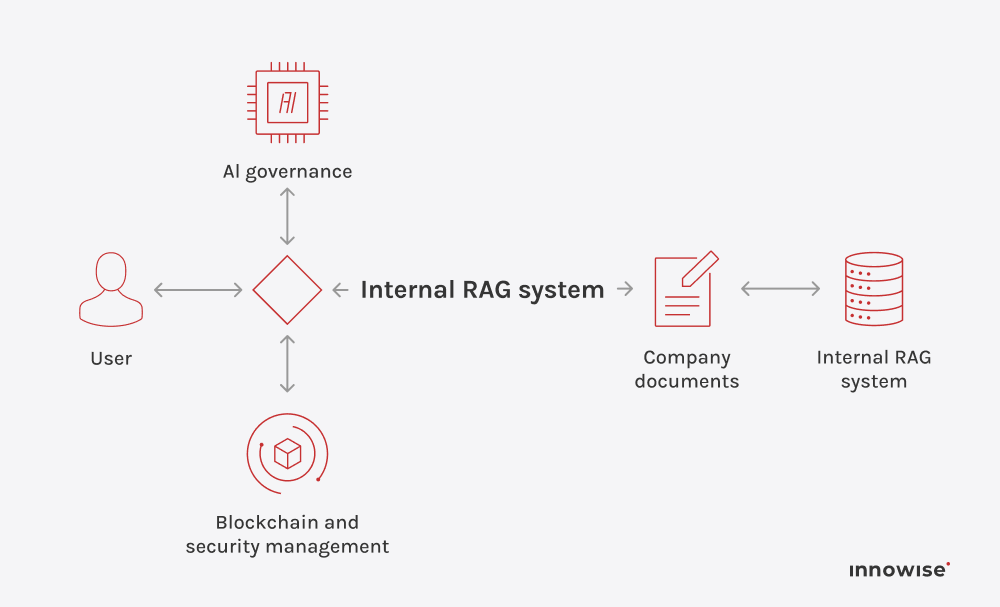
Enterprise internal RAG workflow connecting users, governance controls, company documents, and secure knowledge retrieval

Security monitoring for misuse and poisoning

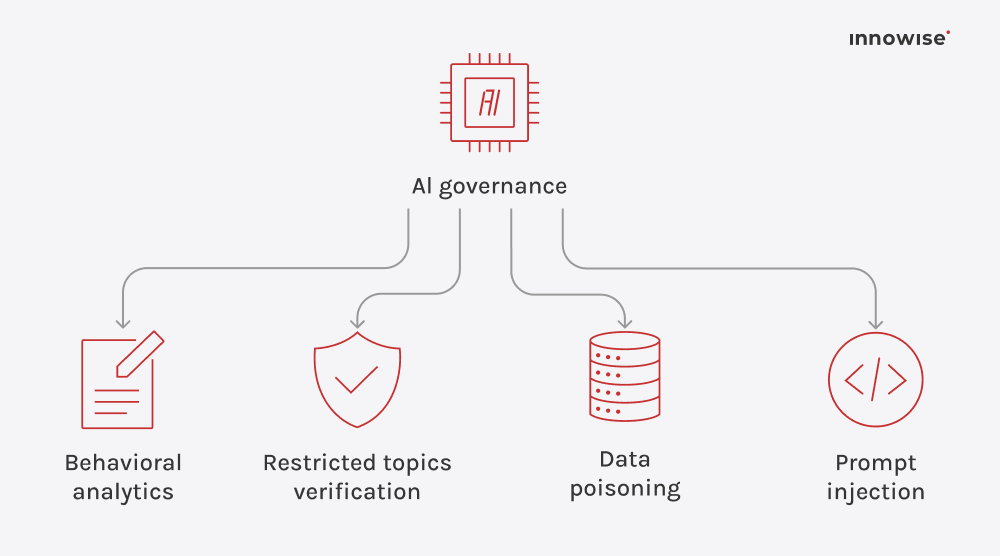
RAG systems get attacked in specific ways. Prompt injection and poisoned content are common. You can add monitoring that reviews chat logs for risky patterns, scans documents for signs of poisoning, and watches the data flow for unusual activity. If something looks off, it flags it and routes it to a response path, like blocking the source, alerting security, or forcing a review step.

AI governance system designed to reduce risks through verification, analytics, and security safeguards

RAG chatbot use cases

You don’t need a fancy reason to build this. If your team keeps asking the same stuff and the answer is already written down somewhere, you’re paying the search tax. A bot that can quote the source takes that pain down fast. I’ve pulled together the use cases where that gap shows up the most.

  • Customer support. Give instant answers from product docs, policies, and troubleshooting guides, with citations people can click.
  • IT helpdesk. Knock out repeat tickets like VPN issues, access requests, and device setup by pulling steps from runbooks and KB articles.
  • Employee HR self-serve. Answer benefits, leave, travel, and expense questions from the latest internal policies, with source links.
  • Sales enablement. Pull approved product specs, pricing rules, and competitive notes, so reps stop guessing mid-call.
  • Customer-facing product assistant. Put how-to help inside the app using manuals, FAQs, and release notes, tied back to the source.
  • Legal & compliance Q&A. Summarize clauses and procedures from controlled doc sets, then link to the exact sections used.
  • Finance operations. Guide invoice, procurement, and budgeting workflows based on internal SOPs, so everyone follows the same rules.
  • Healthcare & pharma knowledge tools. Give clinicians or ops guidance from protocols, with tight access rules around sensitive content.
  • Onboarding & training. Let new hires ask the same old questions, and get answers tied to internal docs, not tribal memory.
  • Analytics and BI assistant. Explain metric definitions and look up data catalog details, then cite sources so numbers don’t turn into debates.
Quote icon

Traditional chatbots usually stick to a fixed menu of questions. Step outside it, and they stall. A RAG-powered chatbot can look up the answer in the sources you connect, so replies match what your docs and systems actually say.

Dmitry Nazarevich
Dmitry Nazarevich Chief Technology Officer

How to build a RAG chatbot

1: Define scope

Pick one focused domain first, like support docs, internal policies, or IT runbooks. Write down the top questions you want to cover and define what counts as a correct answer. Decide what the bot does when the sources don’t support an answer. For example, point the user to the right document section, or ask a follow-up question to narrow the request.

2: Inventory your knowledge sources & fix issues

Start by listing every source you expect the LLM RAG chatbot to use, who owns it, how current it is, and what the access rules are. Then clean up the stuff that will trip retrieval later:

  • duplicate copies
  • outdated versions
  • fuzzy permission groups
  • documents with no clear owner

If policies change often, agree on a simple version rule so old drafts don’t keep winning. Also, store permissions with the documents and enforce them every time the bot retrieves content.

3: Build ingestion & indexing the way your content works

Retrieval quality depends on two things: how you split content and how you label it. For policies and procedures, chunk by sections and headings so retrieved text is readable on its own. Add a small overlap so you don’t cut a rule across two chunks. Deduplicate repeats so copied paragraphs don’t dominate retrieval. Once chunked and cleaned, pass these text blocks through an embedding model to convert them into vector numbers, which allows the database to search by meaning and context later.

Add metadata you will filter on later (title, section, date, team, region, product, version). Set re-index triggers, like a document update, a new version, or a permission change. For PDFs and scans, run text extraction and quality checks so you don’t index broken text.

4: Choose a stack that fits your business constraints

As you already know, a RAG chatbot needs a few parts working together:

  • a back end that runs retrieval and security checks
  • a vector database for meaning-based search
  • an LLM provider that writes the answer

Now you have a real choice: go with an out-of-the-box setup, or build a stack you own.

A one-click setup gets you a demo fast. However, it also makes changes painful later. A stack you control gives you room to move. For example, a React UI with Python services behind it lets you swap the LLM provider or the retrieval layer without rebuilding everything.

Here, I recommend going with the second option if you want to keep control when things change.

5: Treat permissions as a non-negotiable feature

Permission leakage is a failure that’s hard to recover from. For example, a junior employee asks a harmless-sounding question about salaries. The RAG-powered chatbot goes searching, grabs a line from the CEO’s private folder, and drops it into chat. Now it is a company problem.

That’s why permissions have to be part of retrieval. Filter during retrieval using document access lists, group membership, and metadata tags. Run the same checks again when the user opens a source link.

Plan for partial access too. Some users can see one section of a document but not another, and that affects chunking and metadata. If users ask for exact codes, IDs, or policy numbers, hybrid retrieval (semantic plus keyword) often works better than embeddings alone.

6: Define the answer format and the no-guess rule

After retrieval and permissions are set, decide what shows up in the reply. People want two things: the answer, and the proof right under it.

A solid default looks like this:

  • Short answer (1 to 2 sentences)
  • Supporting snippets (a few lines pulled from the source, quoted or lightly summarized)
  • Citations (a stable link to the doc, and ideally the exact section or page)

Then set the no-guess rule. If what the bot pulled does not back the answer, the bot should say that and either ask a targeted follow-up question or send the user to the source section.

7: Test with real questions & real documents

Before launching, test the RAG-powered chatbot with real questions from actual users. Look for weak points, such as when retrieval gets the wrong section, misses the right document, or the answer goes beyond what the source says. Use these findings to adjust chunk size, retrieval settings, metadata filters, and prompts.

Make the evaluation process simple by breaking it into two parts. First, see if retrieval found the right passage. Next, check if the answer stayed within that passage. Track retrieval hit rate, citation coverage, and how many answers are supported by the source to measure progress over time.

8: Add security controls, logging, and monitoring

Add checks for prompt injection, record who asked what, and save the sources used for every answer. If your environment is at higher risk, watch for harmful content and weird data flows that look off. Redact secrets and personal data when needed, set clear retention rules for chat logs and retrieved snippets, and keep audit logs that show the user, the retrieved sources, and the final response.

9: Deploy in sprints and assign clear ownership

Ship in small releases. Start with a pilot, read real chats, fix what breaks, then widen access. After launch, name owners for content updates, retrieval tuning, and permission changes. Without owners, docs change, folders move, and the bot slowly starts giving answers people stop trusting.

Team and timeline

From my experience, a small pilot usually lands in 4 to 8 weeks. It’s one domain, one chat flow that works end to end, sources and citations, plus basic access checks. Enough to prove the bot can answer and show its work. Not enough to turn into a whole side quest.

A wider rollout usually takes 10 to 16 weeks. That extra time goes into pulling from more source types, handling stricter permissions, adding monitoring and logs, and testing with the messy questions people actually type.

The team usually looks like this:

  • Project manager & business analyst to keep scope tight and sources clear
  • Front-end developers to build the chat UI
  • Back-end developers to handle retrieval, access checks, and logging
  • Machine learning engineer for embeddings and evaluation

You can also bring in an ML security engineer when prompt injection and poisoned content are real risks. Or add blockchain skills, but only when governance with an append-only record is part of the plan.

Conclusion: What happens when RAG is done right

When a RAG chatbot goes live, teams can reach up to a 41% productivity bump and a 20% jump in breach-attempt detection. Pretty wild.

Sure, I cannot promise you’ll see the same numbers. Those results came from specific builds, and the details matter. At least not before we review your scope. The point still stands. When the bot answers from approved sources and access rules stay tight, work speeds up, and risky activity gets spotted sooner.

If you want to check whether a RAG chatbot fits your team, we‘ll show you what a RAG-based chatbot is, share similar cases, review your use cases and data sources, and help you design a build that fits your constraints.

FAQ

It can use internal documents, knowledge base articles, wiki pages, support content, and other text sources you approve. The key is that you control the sources and the access rules.

A common example is a chatbot inside an internal collaboration tool where employees ask for summaries, extract clauses, and compare documents, while the bot returns source snippets and enforces viewing limits.

Not always. Many builds use existing models for embeddings and generation, then focus effort on data prep, retrieval quality, permissions, and monitoring.

Common issues include retrieving the wrong chunk, missing key context, and letting prompt injection steer the model. Security reviews and monitoring help, plus answer formats that point back to the source text.

Table of contents

    Contact us

    Book a call or fill out the form below and we’ll get back to you once we’ve processed your request.

    Send us a voice message
    Attach documents
    Upload file

    You can attach 1 file up to 2MB. Valid file formats: pdf, jpg, jpeg, png.

    By clicking Send, you consent to Innowise processing your personal data per our Privacy Policy to provide you with relevant information. By submitting your phone number, you agree that we may contact you via voice calls, SMS, and messaging apps. Calling, message, and data rates may apply.

    You can also send us your request
    to contact@innowise.com
    What happens next?
    1

    Once we’ve received and processed your request, we’ll get back to you to detail your project needs and sign an NDA to ensure confidentiality.

    2

    After examining your wants, needs, and expectations, our team will devise a project proposal with the scope of work, team size, time, and cost estimates.

    3

    We’ll arrange a meeting with you to discuss the offer and nail down the details.

    4

    Finally, we’ll sign a contract and start working on your project right away.

    More services we cover

    arrow