SAP DRC e-invoicing: document & reporting compliance module

Principais conclusões

  • E-invoicing changes from a local IT issue to a global operational risk affecting over 50 countries.
  • SAP DRC replaces patchwork local solutions with a single hybrid model.
  • The solution automates the conversion of SAP data to XML/JSON, real-time submission, and status monitoring.
  • DRC in SAP is essential for the VAT in the Digital Age (ViDA) initiative and supports long-term SAP S/4HANA migration strategies.
  • Positioned within the future of ERP systems, SAP DRC helps companies stay agile and compliant as digital reporting becomes the global norm.

Over 50 countries already require B2B e-invoicing, and more than 70 regulate structured e-invoices in some form. For CFOs and business leaders, this is now a global operational risk that touches every invoice, every market, and every ERP system in scope. A small rule change in one country can easily disrupt a shared finance or ERP model, creating a knock-on effect.

In the EU, the VAT in the Digital Age (ViDA) package will push e-invoicing and near real-time reporting much further over the next decade. It was formally adopted in March 2025 and will be rolled out gradually until 2035. At the same time, countries like Italy, France, and Germany are moving ahead with their own B2B models, each with different formats, platforms, onboarding processes, and timelines. Keeping up with this patchwork is a constant challenge for any central finance team.

In this case, SAP Document and Reporting Compliance (SAP DRC e-invoicing) has become a key piece of the puzzle. It helps automate e-invoice issuance, connect to local networks or tax authorities, and stay compliant with ever-changing rules across multiple jurisdictions, all from inside SAP.

In this article, I’ll walk through what SAP DRC offers for e-invoicing, how it fits into SAP S/4HANA and SAP ECC, and what business impact you can realistically expect from getting it right.

What is DRC in SAP?

SAP Document and Reporting Compliance, or SAP DRC for short, is an integrated SAP module that standardizes and automates the full flow of creating, validating, and exchanging e-documents. So you can use one setup for e-invoicing, e-reporting and statutory reporting rather than treating each requirement as a separate mini-project.

Before SAP DRC, companies would have to segregate their systems for every country and function. One connector for Italy’s SDI. Another for Mexico’s CFDI. A custom fix for a local VAT portal. As you might imagine, this is a logistical nightmare that drags everything down to a snail’s pace. DRC pulls all of that into a single eDocument cockpit, so your finance and dev teams stop juggling different systems and start working from one consistent view. 

The real magic happens under the hood. DRC takes your SAP transactional data, like billing documents in SD or FI, and turns it into the legally required XML or JSON format automatically. It then sends the file straight to the national e-invoicing system, like KSeF or a network such as the PEPPOL network, and keeps track of the status without pulling users out of SAP. It feels much cleaner in practice, as the whole flow runs inside one place instead of across multiple tools.

Stay compliant locally and globally with SAP DRC.

How SAP DRC works

To understand the DRC module in SAP from a technical point of view, it helps to start with its hybrid architecture. The solution connects your stable ERP core with fast-changing, cloud-based requirements from tax authorities and e-invoicing networks.

In a typical setup, the SAP DRC architecture has two main layers that work as one.

On-premises layer (the cockpit)

This part runs inside your SAP S/4HANA or SAP ECC system. It is where finance, tax, and support teams spend most of their time.
  • eDocument Framework. Backend component that pulls data from SAP source documents like FI or SD invoices and turns them into eDocuments ready for mapping and transmission.
  • SAP Application Interface Framework (AIF). A monitoring and mapping engine that converts your internal SAP structures into the external formats required by tax platforms, for example, ZUGFeRD or UBL.
  • eDocument Cockpit (transaction EDOC_COCKPIT). Main work screen where finance and tax teams track each eDocument, see statuses such as Created, Submitted, Accepted, or Rejected, and drill into issues when something needs fixing.

Cloud layer (communication)

The cloud layer usually runs on SAP Business Technology Platform and handles all communication with external systems.
  • Cloud connector. Cloud Connector provides a secure outbound tunnel from your on-premises SAP system to BTP. Network teams configure it so that internal systems stay protected, while BTP services still have controlled access to the data they need for e-invoicing and reporting.
  • SAP Document and Reporting Compliance. This BTP service acts as the central communication and country content hub. It manages:
    • Connectivity to government platforms, tax authority portals, or the PEPPOL network
    • Protocols, encryption, and digital signatures
    • Exchange of messages and status updates between the authority and your SAP system
This hybrid architecture keeps your core ERP processes stable while regulations change around them. Most updates are delivered in the cloud layer and country-specific content, which reduces the need for repeated custom development in your SAP core and helps you react faster when new e-invoicing rules go live.

E-invoice submission workflow example: create invoices with SAP DRC for KSeF

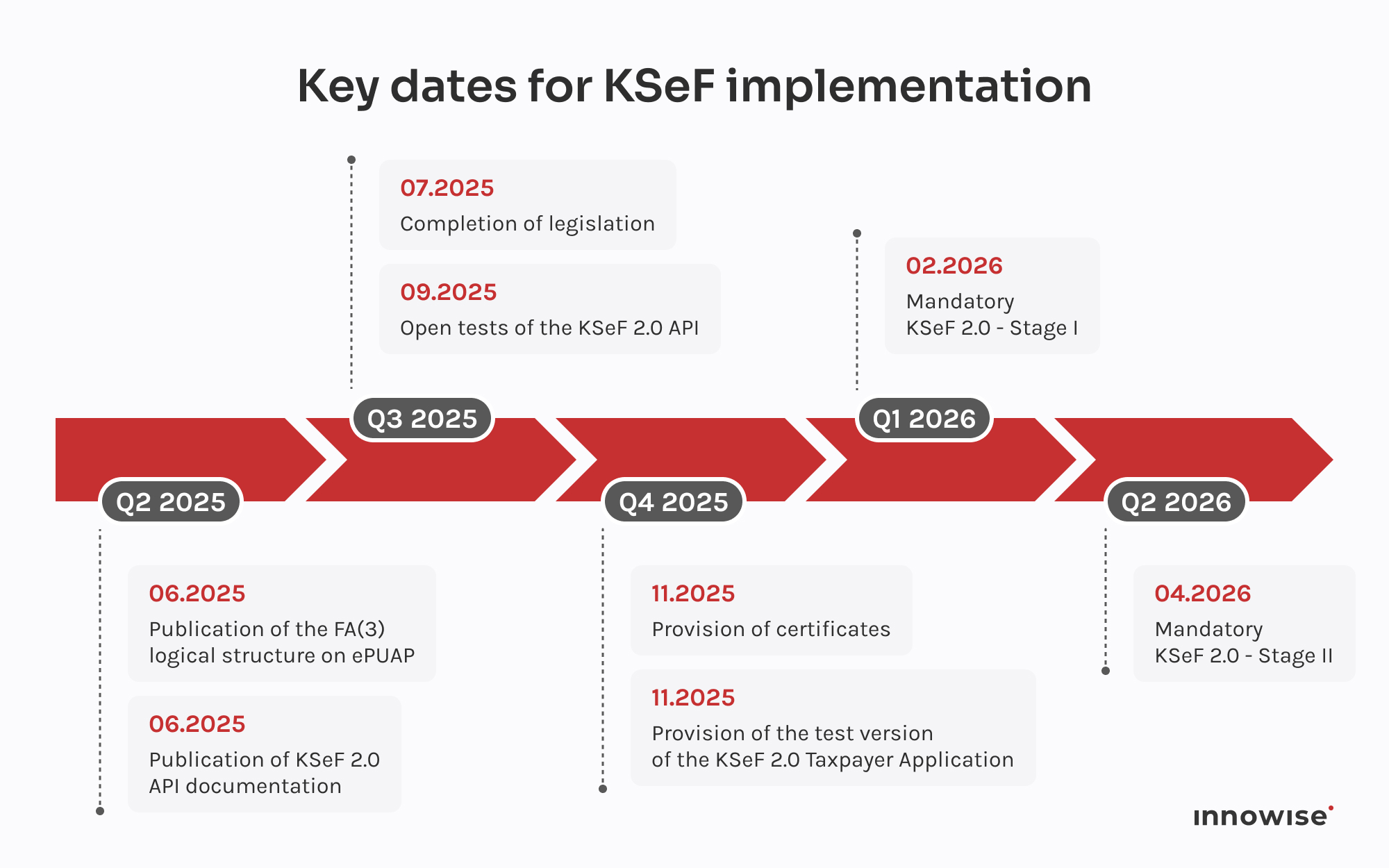
Let me show how DRC in SAP actually works in a real scenario instead of discussing it in abstract. Poland is a neat test case. The National e-Invoicing System (KSeF) will make e-invoicing mandatory: from February 2026 for large enterprises and from April 2026 for other VAT taxpayers. In day-to-day terms, most invoices will run through a central government hub instead of hopping straight between you and your customers or suppliers.

Government rollout timeline for mandatory e-invoicing, showing phased regulatory milestones and compliance deadlines.

If you run SAP in Poland, the real challenge is keeping that flow reliable without hand-coding a pile of local integrations. KSeF comes with its own XML format and API. SAP Document and Reporting Compliance gives you a ready KSeF scenario that covers the whole route.

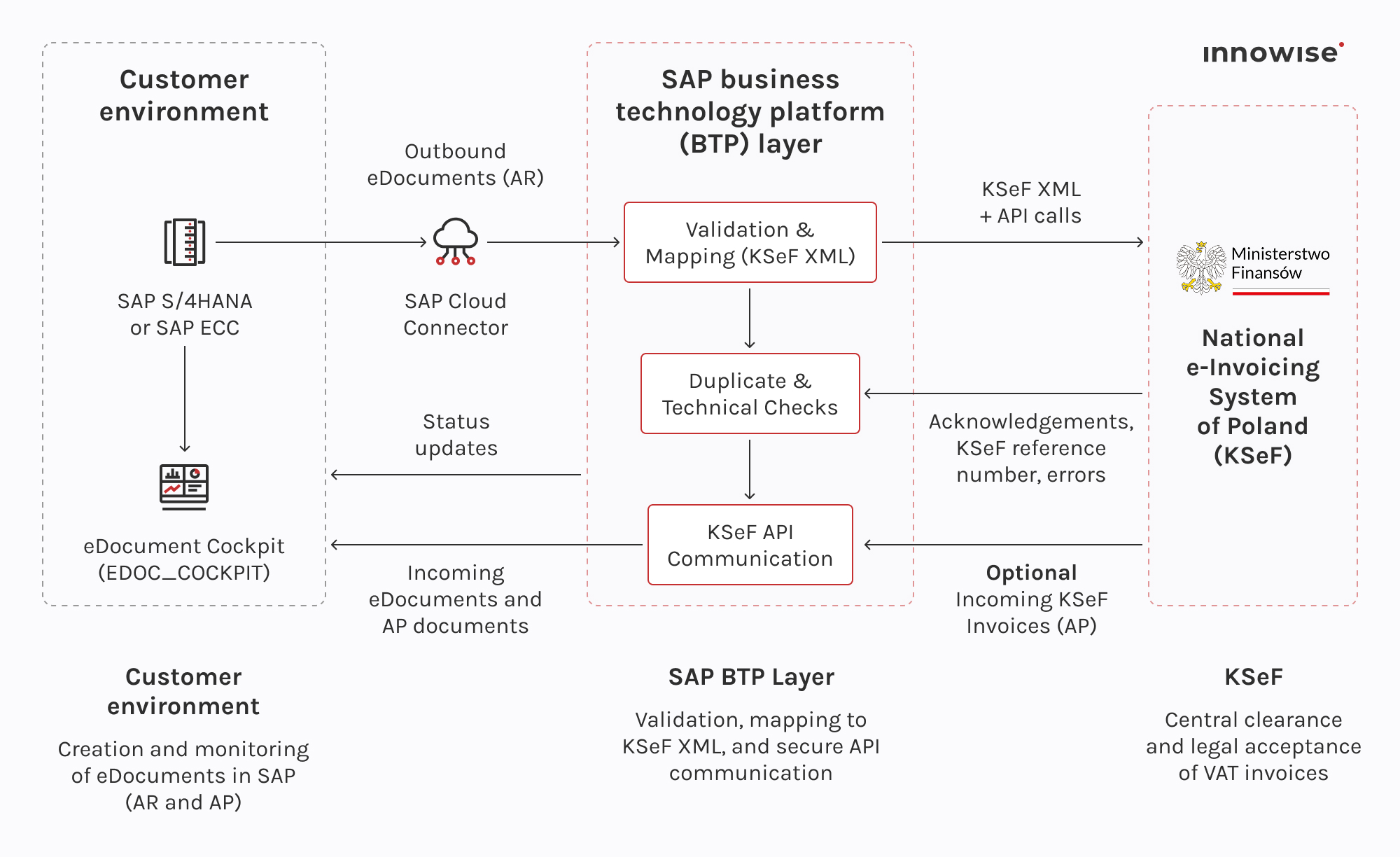
Here is how an outbound invoice travels through SAP DRC and KSeF.

End-to-end SAP e-invoicing workflow showing how business documents are validated, transformed, and legally cleared through the national KSeF system.
  • Post the invoice in SAP. Your team creates and posts FI or SD documents like they always do. Posting automatically spins up a KSeF eDocument in the SAP DRC eDocument Cockpit so the invoice is ready for clearance from the start.
  • Send to SAP BTP for validation and mapping. The eDocument goes through SAP Cloud Connector to the DRC integration service on SAP Business Technology Platform. There, the service:
    • validates the data
    • checks for duplicates
    • maps it into the official KSeF XML format
    • applies signing if your setup needs it
  • Call the KSeF API and get the result. Using your KSeF credentials, the service calls the KSeF API and submits the invoice.
  • KSeF sends back technical acknowledgements and, if all is good, a KSeF reference number. SAP DRC reads the response and updates the eDocument status in the cockpit, for example:
    • Sent to KSeF
    • Accepted by KSeF
    • Rejected by KSeF. If KSeF rejects the invoice, users see the error details right in the cockpit, fix the data in SAP, and resend the same eDocument.
  • Handle incoming invoices on the AP side. On the accounts payable side, SAP DRC can pull incoming invoices from KSeF with a unique KSeF Number, convert the KSeF XML into SAP structures, create an incoming eDocument, and support AP document creation in FI. Both AR and AP use the same clearance platform and stay inside familiar SAP transactions.
SAP ERP remains your system of record. The DRC plus BTP layer takes care of KSeF formats, rules, and future changes, so you do not have to keep rebuilding local integrations every time the regulation moves.

Why businesses need SAP DRC for e-invoicing compliance

E-invoicing rules are tightening, portals keep changing, and tax authorities are getting a lot less forgiving with mistakes. One wrong format or missing field, and suddenly you are dealing with rejected invoices, delayed shipments, and clean-up work your team did not plan for. SAP DRC steps in as the control layer that keeps those issues from spilling into day-to-day operations.

One setup instead of a patchwork

Without DRC, multi-country e-invoicing usually becomes a mix of local tools, custom scripts, and government portals. It works, but it is fragile. With DRC, your team uses a single cockpit in SAP to handle different flows, whether it is Poland’s KSeF, Italy’s FatturaPA, or Mexico’s CFDI. Same place, same look and feel, different country content behind the scenes.

Automatic e-document generation

Users keep working in SD, MM, or FI as they always have. When they post an invoice, credit note, or other relevant document, DRC can automatically create the eDocument and the XML or JSON needed for compliance. That removes duplicate data entry and cuts out the “export this later” step that often leads to errors.

Real-time monitoring and fast error handling

The DRC cockpit gives you a live list of every document and its status. You see what is waiting to be sent, what has cleared, and what needs attention. If a tax platform rejects an invoice, DRC flags it, shows the error, and lets users fix the data in SAP and resend from the same screen. No guessing what happened in an external portal.

Country-specific content maintained by SAP

Each tax authority has its own ideas about formats, fields, and workflows. DRC ships with country-specific content that SAP keeps up to date. When rules change, you adjust the configuration and test, instead of building a new integration from scratch or decoding every new schema yourself.

Built for real-time clearance models

More countries expect invoices to pass through their platforms in real time, sometimes before goods can be shipped. DRC is designed for these clearance and Continuous Transaction Controls (CTC) models. It sends the invoice data out, handles validation and signatures where required, and writes the response back into the original SAP document, so the status is always clear inside ERP.

End-to-end integration

DRC reads data directly from your SAP documents, passes it through SAP Business Technology Platform for mapping and communication, and then brings responses back into SAP. For incoming flows, it can also pull vendor e-invoices from government portals, convert them into SAP structures, and support AP posting. The whole loop stays inside your landscape instead of being scattered across manual uploads and spreadsheets.

Room to grow with new requirements

If a new local mandate appears and standard content is not there yet, DRC gives you an extensibility framework. Customers or partners can model new scenarios using the same cockpit and monitoring, so you keep everything in one place rather than adding another point solution.

“When you roll out SAP DRC, you are rewiring how invoices and cash flow move through your business. Our team’s focus is to keep that shift predictable: solid data, a cockpit your finance team trusts, and go-lives that do not put cash flow at risk.”

Michael Labutin
Michael Labutin

Diretor, Chefe de Java, soluções ERP

Global reach: supporting international e-invoicing mandates

Once you work in several countries, e-invoicing stops being a local project. You suddenly deal with different formats, portals, and rules for every market. SAP DRC gives you one framework that can cover many of these mandates, so you don’t have to reinvent the wheel each time.

Europa

With SAP DRC, you can support many of the main European models, for example:
  • Italy: FatturaPA via SDI
  • Germany: XRechnung for B2G and growing B2B use
  • Poland: KSeF clearance model
  • Spain: SII near real-time VAT reporting
  • Hungary: RTIR invoice reporting
On top of that, DRC can work with Peppol, so your team sends and receives Peppol e-invoices directly from SAP instead of logging into a separate tool.

Americas

In Latin America, SAP DRC covers the core clearance systems most global SAP teams ask about:
  • Mexico: CFDI
  • Brazil: Nota Fiscal Eletrônica (NFe)
In the US and Canada, companies use DRC more for structured tax and regulatory reporting because there is no single federal e-invoicing model to follow. The same framework still helps standardize formats and maintain global tax compliance.

APAC and the Middle East

SAP delivers DRC scenarios for several key countries in this region, including:
  • India: GST e-invoices, e-waybills, and GST reporting
  • Saudi Arabia: ZATCA structured e-invoicing
Other markets in APAC and the Middle East can be covered either with standard DRC content or with extensibility options when a mandate is newer or has precise requirements.

Beyond invoices: statutory reporting

DRC also supports periodic reporting, not only invoice flows. It can generate and send:
  • VAT returns
  • EC Sales Lists
  • SAF-T and similar audit files
  • Local periodic tax reports
These scenarios use the same DRC layer, so reporting stays close to your SAP transaction data instead of living in spreadsheets and manual uploads.

Simplify your multi-country e-invoicing

Best practices for implementing SAP DRC e-Invoicing

Implementing SAP DRC isn’t a small config tweak. You’re changing how invoices leave SAP, how quickly orders can ship, and where people go to fix problems. It needs a clear rollout plan that finance and IT both understand and can actually follow.

Here are clear steps that have proved reliable in real projects.

Map out what you actually need to comply with

Start by getting a clear picture of your obligations instead of jumping straight into configuration. Sit down with finance and tax and write out which countries you operate in, which requirements apply in each one(e-invoices, clearance models, real-time reporting, VAT returns, SAF-T, and so on).

Then check which of these are already covered by SAP DRC. SAP publishes the full country list on the Help Portal, so you can confirm what is available out of the box.

Once you see everything on one page, the priorities become obvious. Most teams start with the countries that have the highest invoice volume or the tightest deadlines, instead of trying to switch everything on at once.

Check that your technical basics are in place

Before you design any flows, make sure your system can run DRC.
  • SAP S/4HANA. Confirm that DRC is in scope for your release and that the required business functions or support packs are active. If you are not sure, this is a quick check for your SAP Basis team.
  • SAP ECC. Make sure the eDocument Framework is installed and up to date so the DRC cockpit can run properly. That usually means the right add-ons and SAP Notes are in place.
  • SAP BTP. Decide how your ERP will talk to the cloud. In most landscapes, this means:
    • Setting up Cloud Connector
    • Subscribing to the DRC or related compliance services on BTP
At this point, you’ll need your teams involved. If something is missing here, it is far cheaper to find out now than during testing or a legal go-live

Plan your SAP DRC implementation approach

Global e-invoicing is complex, but it does not have to be chaotic. Instead of a big bang launch that risks cash flow and panic, it is safer to prove SAP DRC in one place, then copy what works.
  • Start with a low-risk pilot. Begin with one country and one flow, typically domestic Accounts Receivable in a core market. AR is easier to control than AP, because you own the data that leaves the system. 
  • Check that the whole chain behaves as expected. SAP document, eDocument Cockpit, Cloud Connector, SAP BTP, and tax platform. So, you’ll limit the number of variables. If something fails, you can usually trace it to a mapping or data issue in that specific flow, not a mysterious problem somewhere in the landscape.
  • Use SAP’s standard content first. For the pilot, stick to the delivered integration content on SAP BTP. It gives you a working template maintained by SAP and cuts out a lot of early guesswork. Avoid custom interfaces at this stage. Let your team focus on testing, understanding the cockpit, and getting finance users comfortable with the flow.
  • Once the pilot is stable, reuse the pattern. Add credit notes, then move to incoming (AP) e-invoicing for the same country. Or roll out to more countries in waves. Some teams start with simpler post audit models and then tackle more complex clearance or CTC countries like Italy or Poland.
  • Choose the right connectivity model. For each country, you decide how to reach the tax authority or the Peppol network. SAP DRC supports two main options:
    • SAP DRC cloud edition, if you prefer SAP to handle the external connectivity and protocol updates.
    • SAP Integration Suite, if your team wants to own the integration flows and keep everything customer-managed
A quick check of the SAP Help Portal, or a brief discussion with your SAP DRC implementation partner, helps you match the model to each country’s rules, especially where certified channels are required.

Use expert guidance

If your team has little or no SAP compliance experience, it is worth involving someone who has already been through DRC projects. A good SAP partner can help you bring ready-made templates and project checklists, point out common traps before you hit them or translate legal and tax requirements into concrete SAP settings.This guidance is especially useful for country specifics, such as:
  • Setting up digital signatures for Italy
  • Managing certificates for clearance portals
  • Plugging DRC into non-SAP systems that are part of the flow
You still own the process and decisions. The expert support simply cuts down trial and error and gets you to a stable setup faster.

Conduct end-to-end testing

Before going live, test each scenario thoroughly. Use a QA system or sandbox to send sample invoices to the tax platform, ideally using the authority’s test endpoint.
  • Test exceptions. Do not only test happy paths. Send invoices with deliberate errors and check that DRC flags them in the cockpit, shows a clear reason, and lets users correct and resend.
  • Involve business users. Bring accountants into testing early. They should be comfortable reading statuses and error messages in the DRC cockpit and know exactly what to do next before moving to production.

Train your team & update processes

SAP DRC changes one simple thing for your finance team: where they look to see if an invoice really went through. Instead of email threads or screenshots from a portal, the source of truth becomes the DRC cockpit.

Run short, hands-on sessions with the people who create customer invoices and process vendor invoices. Show them where to find the cockpit, how to read statuses like Created, Sent, Accepted, Rejected, and how to fix a rejected invoice end-to-end and resend it. Use real examples from your test phase so it feels tangible.

From there, agree that someone checks errors in the cockpit once a day, and that at the month’s end, you quickly confirm all invoices that should be reported have a final status. Once that rhythm is in place, DRC becomes the usual tool everyone checks when something looks off.

Monitor & refine after go-live

Once DRC is live, the goal is to keep the flow clean and catch problems before they hit your customers or the tax authority.

  • Check DRC logs and basic analytics on a regular schedule. Set a light rhythm, for example, a monthly check. Open the cockpit and logs, look at the top recurring errors, and ask: is this bad master data, a missing step in the process, or a config issue? Fix the pattern, not just the single invoice, and a lot of noise disappears.
  • Watch for latency or stuck documents. If documents stay pending longer than they should, treat it as an early warning. It can point to an integration glitch, a change on the authority side, or simply more volume than your current setup can handle.
  • Stay close to SAP updates. Subscribe to SAP legal change notifications and DRC notes for your main countries. Once a quarter, scan what changed, decide what affects you, and plan when to apply it so new rules are covered before they go live.
  • Give DRC a clear owner. Name a DRC lead or a small core group in finance or tax. They watch the trends, pull development teams in when something needs a technical fix, and coordinate new country rollouts or mandate changes.

Conclusão

E-invoicing will keep changing. That part is out of your hands. What you can control is how good your SAP setup is, how clear your processes are, and how quickly your team spots and fixes issues. SAP DRC gives you the technical layer for this, but the real impact comes from how you roll it out, test it in real flows, and support the people who work in the cockpit every day.

At Innowise, we help companies review their current landscape, shape a realistic DRC roadmap, and implement it across SAP S/4HANA or ECC, then support it as part of day-to-day operations. If you are not sure where to start, a short look at your countries, systems, and deadlines is usually enough to define a concrete next step. From there, you can move away from tactical e-invoicing fixes toward a stable setup your team can rely on.

FAQ

SAP DRC is licensed as a separate product that runs alongside SAP S/4HANA or ECC. It keeps the eDocument Cockpit and rules inside your ERP, while SAP BTP handles communication with tax authorities in the cloud, typically through a subscription model tied to document volume.

Sure. While optimized for SAP S/4HANA compliance, DRC is compatible with SAP ECC for e-invoicing. The eDocument framework comes through support packages or add-ons and connects to SAP’s cloud integration, so you can meet global tax compliance mandates now and move to S/4HANA later on your own timeline.

The SAP Business Technology Platform (BTP) acts as the secure communication bridge. It hosts the integration packages that format your data and manage the technical connection to government portals or the PEPPOL network, guaranteeing your internal ERP remains secure.

Yes, you need SAP BTP because DRC uses BTP integration content to connect with government platforms. Data moves through encrypted, controlled channels with role-based access and full logging, which is often safer than manual uploads, email exchanges, or scattered third-party tools.

SAP DRC pricing depends on your document volumes, the countries you must support, and the scope of implementation and support. ROI comes from fewer penalties and rejected filings, less manual portal work, and faster invoice processing and payment cycles. For teams with rising volumes or multi-country mandates, payback is often short.

SAP DRC e-invoicing includes pre-delivered mappings for the ZUGFeRD format (hybrid PDF/XML). The SAP Application Interface Framework (AIF) automatically maps billing data to the ZUGFeRD standard, ensuring compliance with German regulations.

A single country e-invoicing rollout with standard SAP DRC content often fits into a 4 to 8 week window. Multi-country programs with several scenarios usually run over 3 to 6 months in phases, with dedicated time for data preparation, integration setup, testing, and user training.

Kiryl Drabysheuski

Líderes de consultores ERP

Kiryl conhece o SAP por dentro e por fora. É a pessoa indicada quando um cliente precisa não só de implementação, mas também de uma configuração inteligente que se adapte aos seus processos únicos - com um caminho claro da complexidade para a clareza.

Índice

    Contactar-nos

    Marcar uma chamada ou preencha o formulário abaixo e entraremos em contacto consigo assim que tivermos processado o seu pedido.

    Envie-nos uma mensagem de voz
    Anexar documentos
    Enviar ficheiro

    Pode anexar um ficheiro com um máximo de 2MB. Formatos de ficheiro válidos: pdf, jpg, jpeg, png.

    Ao clicar em Enviar, o utilizador autoriza a Innowise a processar os seus dados pessoais de acordo com a nossa Política de privacidade para lhe fornecer informações relevantes. Ao enviar o seu número de telefone, o utilizador aceita que o possamos contactar através de chamadas de voz, SMS e aplicações de mensagens. Poderão ser aplicadas tarifas de chamadas, mensagens e dados.

    Pode também enviar-nos o seu pedido
    para contact@innowise.com
    O que é que acontece a seguir?
    1

    Assim que recebermos e processarmos o seu pedido, entraremos em contacto consigo para necessidades do seu projeto e assinar um NDA para garantir a confidencialidade.

    2

    Depois de analisar os seus desejos, necessidades e expectativas, a nossa equipa elaborará uma proposta de projeto com o âmbito do trabalho, a dimensão da equipa, o tempo e as estimativas de custos.

    3

    Marcaremos uma reunião consigo para discutir a oferta e acertar os pormenores.

    4

    Por fim, assinaremos um contrato e começaremos a trabalhar no seu projeto imediatamente.

    seta