Business benefits of test automation every CEO should know about

hero image

Key takeaways

  • Test automation drives measurable ROI: saving QA costs, reducing rework, and freeing teams to focus on innovation instead of repetitive checks.
  • Speed compounds with automation: parallel execution, CI/CD integration, and reusable test scripts accelerate delivery and shorten time to market.
  • Quality becomes predictable: automated testing improves software reliability, reduces human error, and expands test coverage across platforms.
  • Maintenance and visibility define success: sustainable ROI comes from managing test maintenance costs and continuously tracking results.
  • Automation reshapes business performance: it’s not a QA upgrade; it’s a framework for scalable growth, faster releases, and lasting customer trust.

Every company wants to ship faster, spend less, and keep bugs from sneaking into production. Test automation helps make that possible. When done right, it turns testing from a chore into a growth engine. The kind that drives ROI, accelerates delivery, and keeps consistent quality no matter what’s thrown your team’s way.

When automation clicks, you feel it. Sprints stop dragging. QA stops being the bottleneck. Developers push code without holding their breath. Releases go out on time.

I’ve watched teams go from chaotic release nights to calm confidence just by building the right test automation rhythm. The results always speak the same language: fewer delays, stronger code, happier customers.

In the next sections, we’ll explore the core benefits of test automation: how it multiplies ROI, compresses timelines, and raises the quality bar across the entire product lifecycle.

Let’s start from the ground up.

What is test automation and what are the benefits of it

So, here’s the short version: test automation just means letting software do the boring stuff for you.

All those regression runs, sanity checks, cross-browser tests — the ones nobody enjoys doing — automation handles them. Scripts run the tests, compare results, and report back. No waiting, no “did someone forget to click that?” moments.

But the real benefits of automated testing don’t show up right away. They kick in once those tests become part of your team’s development DNA. You merge code, the tests run in the background, and you get instant feedback. Bugs get caught before they have a chance to ruin your sprint. Builds stay stable. People stop dreading deployments.

From a business perspective, that’s huge. It means faster feedback loops, lower testing costs, and higher confidence in every release. Automated tests don’t get tired, distracted, or pulled into other meetings. They just keep running consistently, relentlessly, and at any scale you need.

The cool part is how this compounds. Each automated test adds one more layer of confidence. You spend less time chasing regressions, less money on QA cycles, and more time actually shipping features. The ROI of test automation becomes obvious once you realize your release velocity hasn’t just improved, it’s become predictable.

And predictability is gold. Because once you can trust your pipeline, everything speeds up:

  • You cut QA costs without cutting quality.
  • You get a faster time to market.
  • You reduce human error and increase test coverage.
  • You make development cheaper and more stable.

Eventually, automated software testing stops being a “QA thing.” It becomes part of how your business runs.

Want to see how automation could work inside your stack?

The 3 core business benefits of automated testing

Nobody invests in test automation just for fun. You do it because it pays off.

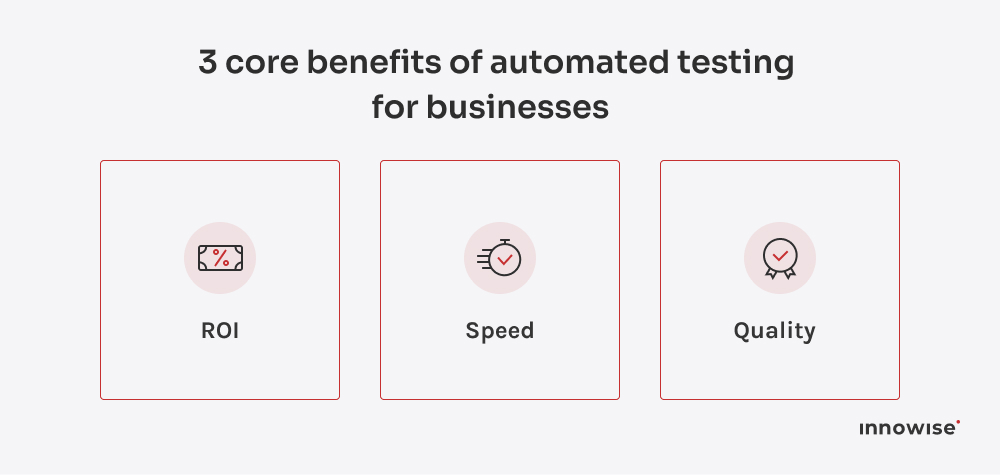
Usually in three big ways: ROI, speed, and quality.

3 benefits of automated testing

And they’re all connected. Once automation starts saving you time, everything else (consistency, release pace, even customer trust) starts improving automatically.

ROI: how automation pays back

Here’s the deal: automation isn’t free. You’ll spend some money on tools, setup, and getting your team comfortable with the framework.

But that cost pays itself back fast — like, within a few sprints fast.

Imagine your team spends around $50K a year just on manual regression testing. Once you automate even half of that, the setup (say, $25K) pays itself off in less than a year. But here’s the important nuance: that 50% isn’t automatic. Many teams hit walls with low coverage, flaky tests, test maintenance overhead, or frameworks that never mature. These issues quietly erode efficiency and keep automation from delivering the savings you expect.

This level of ROI only becomes real when automation is done with discipline: the right architecture, stable test design, and a vendor who understands how to minimize flakiness and maintenance overhead as coverage expands. When those pieces are in place, the investment pays back exactly the way it should: faster runs, fewer late-night hotfixes, and a team that isn’t stuck repeating the same tasks every release.

Plus, developers can fix regression issues in their own code right after merging changes — without handing tasks off to QA, waiting for results, or losing focus while switching between unrelated tickets. That instant feedback loop makes development faster, cleaner, and far more efficient.

Investment Return
Tools and setup 24/7 test coverage
Script development Faster regression cycles
Training Fewer production bugs
Maintenance Long-term stability

Automation basically turns QA from a cost center into an engine that compounds efficiency over time.

Every test you write once keeps paying you back in time saved, bugs avoided, and confidence gained.

Speed: accelerating delivery and feedback loops

Speed is everything in software. It’s how fast you learn, adapt, and ship value.
Automation builds that rhythm — it removes all those little pauses between “commit” and “release.”

Each time code changes, your test automation framework runs the relevant checks automatically. Often far faster than a full manual cycle and early enough to catch issues before they pile up. If something breaks, you know instantly. Developers don’t wait. PMs don’t guess. Everyone gets real-time feedback instead of a “QA handoff” that drags for days.

The benefits of test automation in agile development are clear here: continuous validation and no waiting rooms. Which means you ship more often, and with fewer surprises.

Speaking for leadership, all of that translates into concrete reliability: predictable releases, shorter timelines, and way fewer “we need another week” calls.

Quality: enhancing reliability and customer trust

Quality looks different for every product: uptime, stability, performance, user experience, etc. Automation strengthens the foundation for all of them by catching issues early and keeping the core flows predictable. Automated tests don’t get bored or distracted. They just keep running — every time, the same way, across every platform, browser, and API.

That’s how you get the test coverage increase that manual testing can’t match. Broader coverage combined with well-designed tests dramatically increases the chances of catching issues early. Long before users ever notice.

From a business view, that’s priceless. Every avoided production issue saves time, reputation, and often customer trust.

When your product just works, your brand feels solid. Simple as that.

Quick note: automated vs. manual testing

I wasn’t originally planning to compare manual and automated testing, as they serve different purposes and are most effective when used together. However, since we’re diving into the benefits of automation, it’s worth briefly highlighting the differences. 

Automated testing doesn’t replace manual testing; it complements it by improving speed, scalability, and reliability. Here’s a quick comparison table to highlight the key benefits of automated testing over manual testing:

Aspect Automated testing Manual testing
Speed Faster execution, can run tests 24/7 without breaks Slower, dependent on human availability and effort
Repetition Perfect for repetitive tests (e.g., regression) Time-consuming for repetitive tests
Coverage Can test across multiple devices, browsers, platforms simultaneously Limited to one environment or configuration at a time
Accuracy Consistent and error-free, reduces human mistakes Prone to human error, especially in complex tests
Scalability Easily scalable with increasing tests and larger teams Hard to scale without adding more testers
Cost Higher initial investment but cost-effective over time Lower upfront cost but more expensive over the long run due to labor costs

Both automated and manual testing have their place. Automated testing brings substantial benefits, particularly for regression, repetitive tasks, and large-scale projects. Manual testing, on the other hand, is still crucial for usability, exploratory, and ad-hoc testing, where human intuition plays a significant role. Ideally, automation and manual testing should complement each other to ensure optimal coverage, quality, and efficiency.

Framework for decision makers

Once you understand how automation drives ROI, speed, and quality, the next question is simple: how do you make it work inside your organization? The answer lies in structure. Without a clear framework, even the best tools and intentions dissolve into partial adoption and inconsistent results.

A strong test automation strategy begins with deliberate choices: what to automate, how to measure success, and how to scale without adding chaos. The goal is to automate intelligently, i.e., only where the payoff is measurable and repeatable.

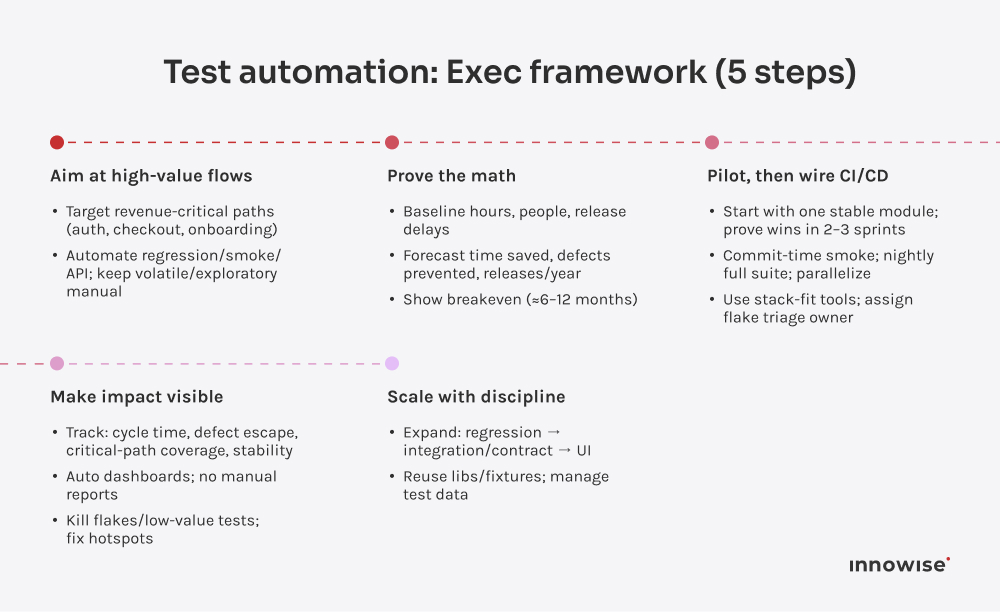
Here’s a simple, five-step framework for decision makers to build test automation that delivers business value.

5-step test automation framework for executives

Step 1: identify high-impact test candidates

Start with the tests that matter most to your business. These are usually repeatable, stable, and directly tied to revenue-critical flows. Login sequences, payment gateways, user onboarding, and data integrations are classic examples.

A quick rule of thumb: if a test is run in every sprint or release, it’s a strong candidate for automation.

Ideal for automation Better left manual
Regression tests One-off experiments
Smoke and sanity checks Rapid UI prototyping
Integration workflows Features under constant change
API tests Usability and exploratory testing

Focusing automation here gives you instant leverage: shorter test cycles, fewer regressions, and higher coverage where it counts.

Step 2: build a business case

Once you know what to automate, the next move is proving why. A business case transforms automation from a tech experiment into an executive-level priority. It defines the expected gains, the costs to get there, and the metrics that show progress. Without that clarity, even great automation efforts can lose momentum.

Define the current cost of testing

Start with where you are. How much time does your team spend on manual regression each sprint? How many engineers or QA specialists are involved? What’s the average delay caused by testing before a release?

Mapping these numbers grounds your argument. It’s easier to justify automation when you can show that every hour of manual testing equals a measurable financial cost.

Quantify the benefits

Next, estimate what automation gives back. The three easiest metrics:
  • time saved per sprint (for example, regression runs dropping from two days to two hours)
  • defects caught pre-release (showing improved stability)
  • releases per year (reflecting higher velocity)
These numbers translate directly into ROI. The more repetitive your testing workload, the faster automation pays itself off.

Align with business goals

Automation always succeeds when tied to outcomes leadership already cares about: faster time-to-market, better user experience, lower maintenance costs. Link your metrics to those outcomes, not to QA tasks. For example, “automation shortens release cycles by 30 percent, allowing us to deploy revenue-generating features sooner.” That’s what language executives understand.

Visualize the payback period

A simple timeline helps. Show the setup phase (tooling, training, initial scripts), followed by ramp-up and full operation. Most teams see breakeven within a year, sometimes sooner for high-frequency releases. A clear payback chart makes the investment concrete instead of hypothetical.

Secure stakeholder buy-in

Present automation as operational leverage, not headcount reduction. Emphasize how it elevates engineers, improves reliability, and scales testing without burnout. Leaders back initiatives that enhance both performance and morale.

Step 3: implement and integrate automation

Once the business case is approved, execution begins. This is where strategy turns into measurable results. Successful automation is basically an integration project that connects technology, people, and process.

Start small, scale fast

Begin with a pilot project that validates your assumptions. Pick one product or module (ideally something stable but high-impact) and automate its core regression tests. The goal here isn’t volume; it’s proof. You’re looking for visible improvements in test coverage, run time, and release stability that you can share with leadership.

Once you have data that shows consistent savings or faster release cycles, expand gradually. Each new wave of automation builds on the last: more coverage, more confidence, more momentum.

Every sprint you delay automation costs you hours. Let’s flip that math.

Integrate automation into CI/CD

The true value of automation appears when it becomes part of your continuous integration pipeline. Every new code commit should trigger automated tests that verify core functions immediately. This keeps defects from piling up and ensures that developers always work on a stable foundation.

Think of automation as part of the delivery bloodstream. Constant, invisible, and essential. Integrating it early prevents the old pattern of “code now, test later.”

Choose tools that match your ecosystem

Select frameworks that fit your stack, not the other way around. For web apps, that might mean Selenium, Cypress, or Playwright. For APIs, Postman or ReadyAPI. The right tool depends on your technology, skill set, and scalability needs.

One of the key benefits of test automation tools is how easily they integrate into your existing ecosystem. When tools are well-aligned with your stack, they enhance developer productivity and ensure smoother collaboration across teams.

A good principle: use tools your developers actually enjoy using (today, AI-powered testing tools are becoming favorites for many teams). Engagement drives consistency, and consistency drives quality.

Establish ownership and accountability

Automation can’t live in isolation. Define clear ownership: who maintains test scripts, who monitors results, who reports metrics. Ideally, QA and dev teams collaborate instead of operating in silos. That shared accountability ensures the automation suite evolves alongside the product, not behind it.

Track early wins

Measure from day one. How long do regression runs take now? How many tests are running automatically? How often do critical bugs reach staging? Reporting these wins builds momentum across the organization and helps justify further investment.

Step 4: measure and track outcomes

Automation only delivers value when its impact is visible. Measuring outcomes turns progress into proof. Proof that convinces stakeholders, refines strategy, and keeps teams aligned on what matters most.

Define success metrics early

Before scaling further, you need to decide what success looks like. Choose metrics that reflect both engineering performance and business impact. Examples include:
  • cycle time reduction: how much faster a release moves from commit to production
  • defect escape rate: how many issues reach production compared to before
  • test coverage: the percentage of critical paths covered by automated tests
  • stability index: how often builds fail due to regression bugs
When these numbers move in the right direction, they validate both your tooling and your process.

Combine quantitative and qualitative data

Metrics tell the “what,” but people tell the “why.” Pair numerical data with developer and QA feedback: how does automation affect their daily workflow, release confidence, or focus on innovation? These insights reveal how automation transforms culture, not just code.

Connect test metrics to business outcomes

Executives don’t track test runs; they track releases, uptime, and customer satisfaction. Translate testing performance into those outcomes. For example:
  • A 40% faster regression cycle means more frequent feature releases.
  • A drop in production bugs means fewer support escalations and happier clients.
  • A rise in coverage means lower operational risk during deployments.
The closer your reporting aligns with these outcomes, the stronger your case for continued investment.

Automate the analytics too

Just as tests run automatically, so should reporting. Many CI/CD systems can generate dashboards showing pass rates, build health, and test trends over time. Automating analytics ensures leaders always have up-to-date visibility with no manual reports.

Use metrics to guide evolution

Automation isn’t static. Once you understand what’s working, redirect effort toward weak spots: untested modules, slow-running suites, or maintenance-heavy scripts. Measurement keeps the system alive and evolving instead of stalling after initial success.

Tracking results this way shifts automation from a cost center to a performance driver, a transparent, data-backed part of your business growth story.

Step 5: optimize and scale

Once automation is running smoothly, optimization turns it from a helpful tool into a long-term advantage. Scaling doesn’t mean adding more tests; it means improving how those tests evolve, interact, and deliver insight across the organization.

Refine based on real data

Every dashboard tells a story. Look for patterns: which tests fail most often, which areas still rely on manual checks, which scripts require frequent updates. These signals show where to focus next. A healthy automation ecosystem evolves with your product, keeping coverage relevant and maintenance minimal.

Expand strategically

Scale automation in deliberate layers. Move from regression to integration, from API to UI, from one product to multiple. Each phase should justify itself through measurable outcomes (faster cycles, lower risk, better reliability). Scaling without strategy leads to brittle scripts and wasted effort. Scaling with intent compounds ROI.

Strengthen collaboration loops

As coverage grows, so does the need for clear communication. Developers, QA engineers, and DevOps teams should work as one system, reviewing failures together, improving scripts collectively, and treating automation results as shared intelligence. When everyone sees the same data, accountability becomes natural.

Maintain a living test suite

Automation is never “finished.” Applications change, frameworks evolve, and what worked last year might drag performance today. Schedule regular reviews to retire obsolete tests, refactor unstable ones, and update coverage maps. This maintenance keeps the system efficient and prevents test bloat from slowing pipelines.

Treat automation as a capability, not a project

The most successful organizations integrate automation into their culture. It becomes a default step in development, not an initiative that needs selling. Once it reaches this stage, scaling happens organically. Every new project starts automated, and every team inherits a foundation of speed, quality, and confidence.

Optimization closes the loop that began with ROI, speed, and quality. It ensures automation keeps delivering business value. Release after release, year after year.

Common challenges and how to overcome them

Every company reaches a point where automation hits friction. Scripts fail, maintenance grows, or leadership questions whether the investment still pays off. These challenges are normal. What separates high-performing teams is how quickly they respond and adapt.

Challenge 1: unclear ROI after the first phase

Many teams see early wins, then stall. The issue usually isn’t performance. It’s visibility. When ROI isn’t tracked or communicated, automation looks like an invisible expense.

Solution: Keep financial metrics alive. Tie every success back to numbers: faster test cycles, fewer hotfixes, fewer release delays. Share that data regularly with decision makers, so they see automation as a revenue enabler, not a cost.

Challenge 2: rising maintenance overhead

As test suites grow, maintenance can quietly consume more time than development. Flaky tests, outdated scripts, and UI changes become recurring pain points.
Solution: Focus on stability first. Use a modular test design and dynamic locators. Schedule regular cleanups to retire or refactor unstable tests. Invest in frameworks that self-heal or support reusable components. They pay for themselves in maintenance savings.

Challenge 3: tool overload and poor alignment

Teams sometimes collect too many tools. One for UI, another for API, a third for CI/CD. Until integration becomes its own problem.

Solution: Consolidate around a cohesive stack. Choose tools that integrate naturally with your pipelines and reporting. Prioritize consistency over novelty; fewer well-connected tools outperform a scattered mix every time.

Challenge 4: cultural resistance

Automation changes habits. Manual testers may fear replacement, developers may resist shared accountability, and leadership might hesitate to invest further without clear proof.

Solution: Position automation as empowerment, not displacement. Encourage testers to evolve into automation architects or analysts. Highlight wins that show teamwork: faster releases, fewer bugs, calmer launches. Change accelerates when people see personal value in it.

Challenge 5: automating the wrong areas

One of the most common mistakes is chasing full coverage: automating every corner of the system, including features that change weekly or have low business value.

Solution: Stay strategic. Focus on stable, high-impact flows where automation delivers consistent returns. If a feature is still evolving, keep it manual until the design stabilizes. Smart restraint produces cleaner, more durable automation.

Challenge 6: treating automation as “done”

Automation succeeds only when it evolves. The biggest risk is assuming completion — that once the scripts are written, the job is finished.

Solution: Treat automation as ongoing infrastructure. Review coverage quarterly, update frameworks annually, and measure effectiveness continuously. The best teams treat it like DevOps: always improving, always adapting.

When these challenges are managed deliberately, automation becomes self-sustaining (efficient, reliable, and deeply embedded in how your organization delivers software).

Wrapping up

Automation pays off. But only when it’s done with intention. The right flows, the right framework, the right maintenance rhythm. Do that, and testing stops draining time and starts giving it back.

Most teams underestimate how much predictability changes everything, from calmer releases, faster cycles, and fewer surprises.

So the real takeaway is simple: automation isn’t a magic switch. It’s a capability. And once you build it properly, it keeps paying you back every single sprint.

FAQ

ROI in test automation comes from the time and cost saved by replacing repetitive manual work with continuous, automated testing. The breakeven point typically arrives within six to twelve months, depending on how frequently you release. Every subsequent sprint compounds the value: fewer regressions, faster deployments, and less QA overhead. Teams that measure consistently often see ROI exceed 200% as automation scales across projects and products.

Automation has higher upfront costs (tool licensing, framework setup, training, and scripting), but the long-term expenses drop dramatically. Manual testing grows more expensive with every new release because effort scales linearly. Automated testing, however, runs in parallel, 24/7, at no additional labor cost. Over time, the cost per test cycle shrinks while consistency improves, making automation far more cost-effective for continuous delivery environments.

Prioritize stable, repeatable, and high-value workflows. Start with regression, smoke, and integration tests for core business processes such as authentication, checkout, and payment flows. These tests generate quick wins by saving hours each sprint while maintaining quality in high-risk areas. Avoid automating unstable or frequently changing features until they mature — early focus on predictable, business-critical paths sets the foundation for scalable automation success.

Most teams begin noticing measurable benefits of automated software testing after two to three sprints. Early indicators include shorter regression cycles, faster feedback on commits, and fewer production issues. The deeper payoff arrives after several releases when the automation suite matures, test coverage expands, and developers gain confidence to push updates frequently. From there, efficiency accelerates naturally, each sprint becomes smoother, releases become predictable, and quality remains consistently high.

Automation enhances both. Speed improves because automated tests execute in parallel and integrate directly into CI/CD pipelines, cutting down release time. Quality rises through repeatable validation, wider test coverage, and earlier defect detection. This combination reduces rework, minimizes hotfixes, and builds a culture of continuous improvement. Businesses benefit from faster releases that maintain (or even elevate) product stability and user satisfaction.

Yes, especially for teams releasing frequently or handling complex user flows. Start small by automating critical smoke or regression tests that run often. Lightweight, open-source, or cloud-based tools minimize setup costs. Automation lets startups maintain high velocity without compromising quality, freeing developers to innovate rather than recheck. Over time, that balance between lean staffing and reliable output compounds into a major competitive advantage.

The highest hidden costs lie in maintenance and skill development. Automated tests need periodic updates as product features evolve, and the team must learn to manage frameworks efficiently. There's also test data management that keeps datasets clean and realistic requires ongoing effort.

However, the benefits of automated regression testing outweigh these costs. Automation ensures that tests run consistently, catch issues early, and maintain high coverage, all while reducing the labor involved in manual regression testing. These maintenance costs are predictable and far smaller than the ongoing labor of manual testing, especially as automation maturity grows.

Success in automation is measured through both technical and business metrics. Track reductions in regression time, increases in test coverage, and lower defect leakage into production. Then tie those metrics to business outcomes like faster release frequency, reduced support costs, and higher customer satisfaction. When automation directly influences time-to-market and user experience, its value becomes undeniable.

Andrew Artyukhovsky

Head Of Quality Assurance

Andrew brings a critical eye and deep testing expertise, making sure that what we deliver always lives up to what we promised. He knows how to break things before users do – and how to fix them fast, without cutting corners.

Table of contents

    Contact us

    Book a call or fill out the form below and we’ll get back to you once we’ve processed your request.

    Send us a voice message
    Attach documents
    Upload file

    You can attach 1 file up to 2MB. Valid file formats: pdf, jpg, jpeg, png.

    By clicking Send, you consent to Innowise processing your personal data per our Privacy Policy to provide you with relevant information. By submitting your phone number, you agree that we may contact you via voice calls, SMS, and messaging apps. Calling, message, and data rates may apply.

    You can also send us your request
    to contact@innowise.com
    What happens next?
    1

    Once we’ve received and processed your request, we’ll get back to you to detail your project needs and sign an NDA to ensure confidentiality.

    2

    After examining your wants, needs, and expectations, our team will devise a project proposal with the scope of work, team size, time, and cost estimates.

    3

    We’ll arrange a meeting with you to discuss the offer and nail down the details.

    4

    Finally, we’ll sign a contract and start working on your project right away.

    More services we cover

    arrow